
Repair, IT & Security Service Management Software
Manage appliance repair jobs, onsite and remote IT support, locksmith call-outs, security guard shifts and patrol services from one connected scheduling, dispatch, CRM, workforce and payment platform.
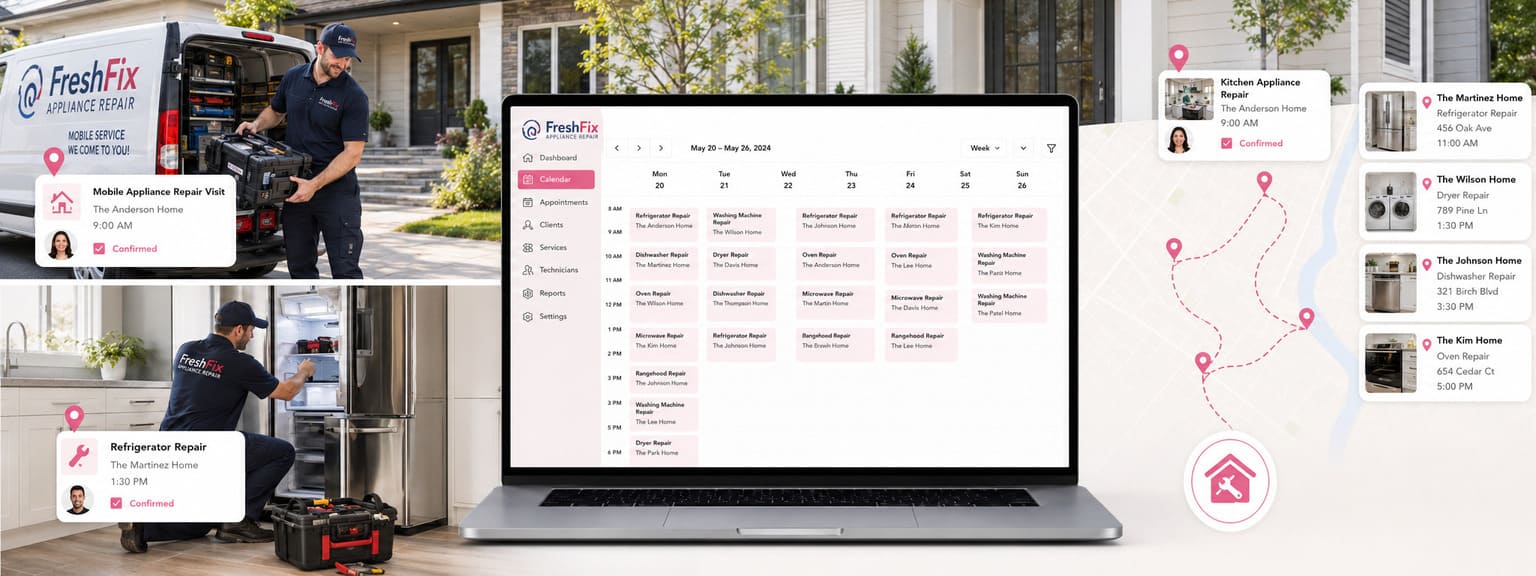
Capture emergency requests and planned work, schedule mobile technicians and guard teams, manage onsite visits and remote support sessions, store device, appliance, property and site records, collect diagnostic details, forms and proof of work, automate customer updates, track parts and products, invoice accurately and keep every service record connected.
Choose the repair, IT or security workflow closest to your business
Explore scheduling, dispatch, job management, CRM, technician and guard workforce tools, asset records, forms, parts, invoicing, payments and reporting designed around each service type.
Appliance Repair Scheduling Software
Manage appliance diagnostics, repair bookings, technician schedules, appliance and property profiles, parts, warranties, photos, quotes, invoices and repeat maintenance.
IT Support & Computer Repair Software
Coordinate onsite IT support, remote technical support, computer repair jobs, device and asset records, technician skills, recurring plans, quotes and payments.
Locksmith Scheduling & Dispatch Software
Manage emergency lockouts, scheduled locksmith work, service areas, technician availability, access notes, parts, customer updates, invoices and payments.
Security Guard Scheduling & Patrol Software
Plan guard rosters, recurring shifts, patrol sites, attendance, timesheets, incident forms, proof of service, customer reporting, payroll and billing.
Manage every repair, support or security job from request to completion
Replace disconnected calendars, messages, paper forms and spreadsheets with one organised workflow for enquiries, scheduling, dispatch, service records, customer communication, invoicing, payments and reporting.
ENQUIRIES & TRIAGE
Capture every service request
Collect fault details, urgency, service address, device or appliance information, access instructions, site requirements, screenshots, photos and preferred times before work is assigned.
WORKFORCE COORDINATION
Assign the right qualified worker
Match technicians or guards using skills, service eligibility, working hours, leave, service areas, shift rules, location context and current workload.
MOBILE & SITE OPERATIONS
Coordinate routes, sites and attendance
Manage customer-site visits, patrol locations, saved addresses, mobile service zones, precise map pins, on-the-way updates, check-in, check-out and job progress.
FORMS & PROOF
Standardise diagnostics and service evidence
Use device intake forms, repair checklists, incident reports, patrol forms, photos, attachments, customer signatures and completion records.
ASSETS, PARTS & HISTORY
Keep service records connected
Store appliances, devices, property assets, access details, parts, equipment, warranties, notes, previous work, quotes, invoices and customer communication.
BILLING & PERFORMANCE
Track revenue, labour and service quality
Manage estimates, service packages, deposits, invoices, payments, timesheets, payroll, commissions, complaints, customer feedback and live reports.
Give customers a clear way to request urgent help or scheduled service
Capture the information your team needs before dispatching a technician, starting remote support, scheduling a guard shift or preparing a quote.
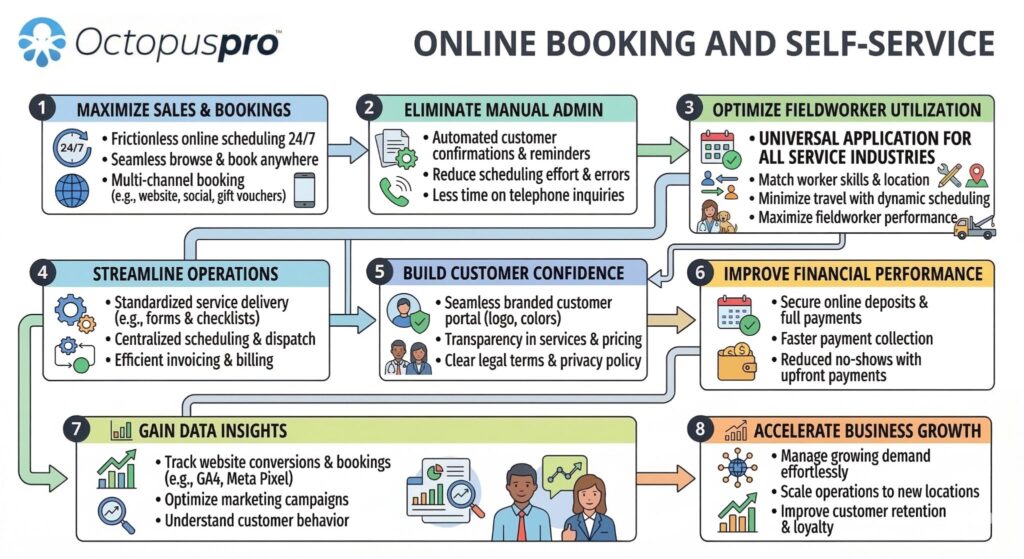
Give customers one place to request service, book appointments, approve quotes, upload files, reschedule and pay.
Website enquiries and quote requests
Collect service type, urgency, location, device or appliance details, site information, attachments and customer questions.
Online booking and time windows
Offer suitable appointment times or arrival windows while applying minimum notice, service-area and availability rules.
Remote support sessions
Schedule phone or video support, store meeting links and keep remote diagnostic notes attached to the booking.
Customer self-service
Let customers review bookings, approve quotes, reschedule where permitted, upload files, pay invoices and view service history.
Coordinate technicians, support staff, locksmiths and security guards
Plan urgent call-outs, scheduled visits, remote sessions, recurring maintenance, guard rosters and patrol services from one calendar. Match each request using availability, skills, service eligibility, location, service areas and workload.
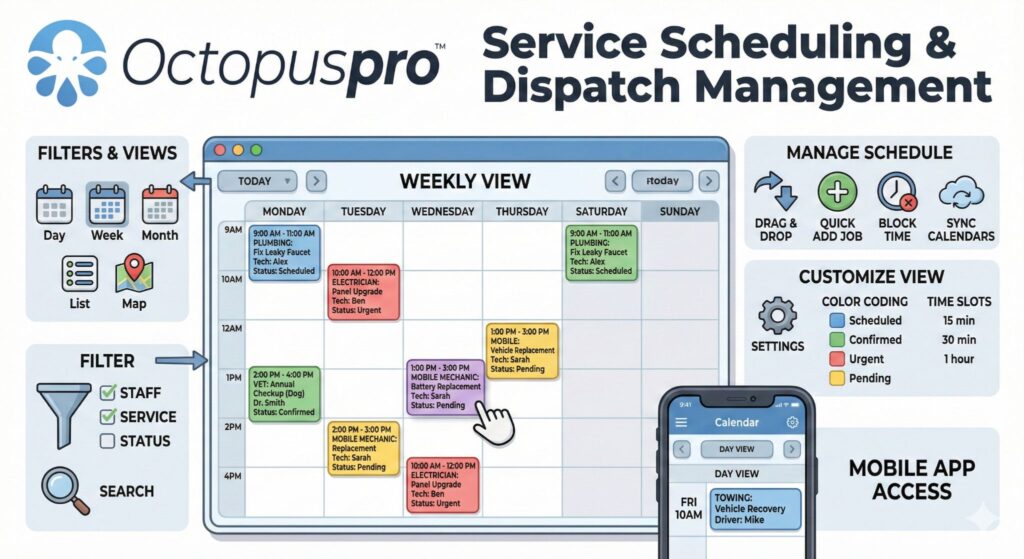
Plan urgent jobs, scheduled visits, technician workloads, guard shifts and field assignments from one live calendar.
Faster assignment
Dispatch manually or broadcast eligible work to suitable fieldworkers and reassign declined requests quickly.
Clear field updates
Track accept or decline, on-the-way, arrived, started, completed, timesheets and booking activity.
Build each service around the information, people and steps it requires
Configure repair, IT support, locksmith and security services with the right pricing, duration, location type, staff eligibility, forms, products, status stages and customer communication.
- Diagnostic visits and repair jobs
- Onsite, mobile and remote IT support
- Emergency lockouts and access work
- Guard shifts and patrol services
- Recurring maintenance and support plans
- Service packages and add-ons
- Products, parts and replacement items
- Custom job statuses and approvals
- Travel fees and geo-pricing zones
- Multiple technicians or guards per job
- Forms, checklists and signatures
- Automated reminders and follow-ups
Give every worker the context needed to complete work correctly
Bring customer details, locations, devices, appliances, properties, access records, previous jobs, photos, forms, parts, invoices and communication into one searchable service history.
Customer and business profiles
Keep contact details, sites, billing preferences, communication history, quotes, bookings, invoices and payments connected.
Devices, appliances and property assets
Store model information, serial numbers, service history, warranties, issue notes, photos and linked locations.
Sites, keys and access instructions
Record service addresses, alarm or access notes, guard posts, patrol checkpoints, map links and location-specific instructions.
Forms, incidents and proof of work
Attach diagnostic forms, repair checklists, patrol reports, incident records, screenshots, photos, files and signatures.
Protect margin while keeping service quality visible
Move from enquiry to quote, approved work, invoice and payment without re-entering information. Track labour, products, parts, shift time, payroll, complaints, reviews and follow-up activity.
- Quotes, estimates and approvals
- Call-out fees, labour and travel charges
- Parts, products and service add-ons
- Deposits, invoices and online payments
- Recurring billing and grouped invoices
- Timesheets, breaks and attendance
- Payroll, earnings and commissions
- Customer signatures and proof of work
- Complaints and issue resolution
- Customer reviews and follow-up
- Accounting integrations
- Permissions and activity history
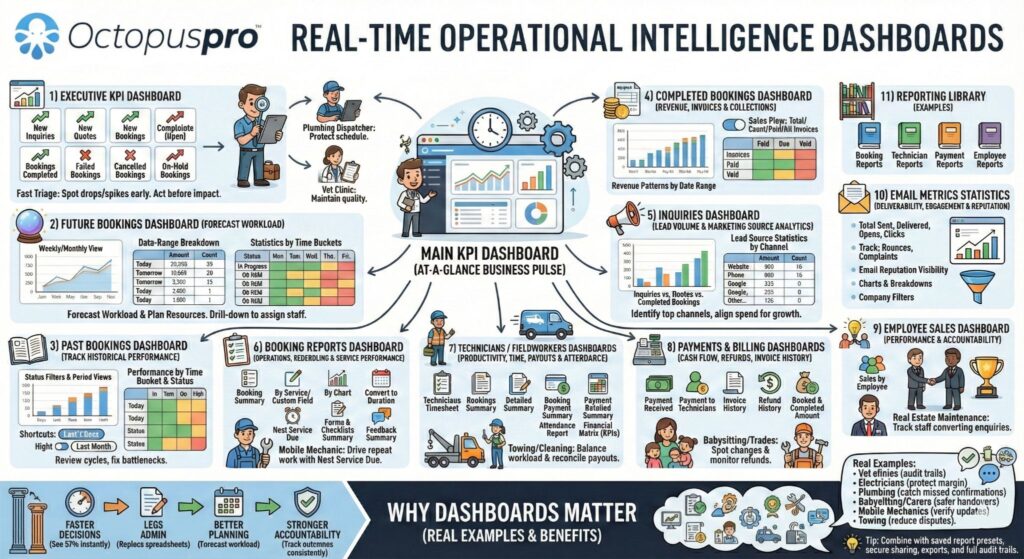
See demand, workforce activity, service outcomes and cash flow in real time
Review jobs, shifts, technicians, guards, customer activity, asset history, payments and quality records without waiting for separate spreadsheets.
Jobs, shifts and service demand
Track enquiries, quotes, bookings, recurring work, cancellations, unassigned jobs and completed services.
Technician and guard activity
Review assignment, attendance, status updates, timesheets, utilisation, service areas and performance.
Revenue, payments and quality
Monitor quote conversion, invoices, payments, payroll, complaints, reviews and audit history.
How repair, IT and security service management works in OctopusPro
Keep every operational and financial stage connected so office teams, fieldworkers, customers and managers work from the same current information.
Capture the request
Receive online enquiries, phone requests, urgent call-outs, support tickets, patrol requirements or recurring service needs.
Collect service details
Record the issue, urgency, location, device, appliance, site, access, shift, documents, photos and customer instructions.
Quote or confirm
Prepare an estimate, confirm pricing, request approval, take a deposit or book approved recurring work.
Assign and schedule
Match qualified technicians or guards using availability, skills, service areas, rosters and workload.
Complete and document
Track attendance and progress, complete forms and checklists, upload proof, record parts and collect signatures.
Invoice and follow up
Send invoices, collect payment, manage payroll, request reviews, resolve issues and schedule repeat work.
Why repair, IT and security operations need a connected service platform
A calendar can show when work is planned. It does not manage customer intake, dispatch, worker activity, asset history, forms, parts, proof, billing and follow-up.
Basic calendar, ticket list or roster
- Stores dates and short notes
- Customer, site and asset details remain elsewhere
- Manual technician or guard coordination
- Forms, proof and incident records are disconnected
- Quotes, parts, invoices and payments require separate tools
- Limited audit and performance visibility
OctopusPro service management platform
- Connects enquiries, quotes, jobs, shifts and recurring work
- Matches workers using skills, availability and service coverage
- Stores customers, sites, devices, appliances and service history
- Captures forms, checklists, incidents, photos and signatures
- Links products, labour, invoices, payments and payroll
- Provides live reports, permissions and activity history
Service management software that adapts to each repair, IT and security business
Use one connected platform whether you manage mobile repairs, customer-site technical support, remote sessions, emergency locksmith work, guard rosters or recurring patrol contracts.
Appliance repair companies & mobile repair technicians
Coordinate diagnostic visits, appliance records, parts, warranties, technician schedules, quotes, invoices and recurring maintenance.
IT support companies, computer repair teams & MSPs
Manage onsite and remote support, device and asset records, technicians, support plans, service tickets, quotes and payments.
Mobile locksmiths & access-service businesses
Handle emergency lockouts, scheduled access work, service areas, technician dispatch, key or lock details, parts and customer communication.
Security guard companies & patrol teams
Plan shifts, patrol routes and sites, track attendance, complete incident forms, manage timesheets, payroll, reporting and invoicing.
See enquiries, workers, jobs, sites, assets and payments working together
See how lead capture, online booking, scheduling, dispatch, remote support, mobile updates, forms, asset records, parts, invoices, payments and reporting stay connected from first request to completed service.


Repair, IT & Security Service Management Software FAQs
Clear answers about enquiries, urgent dispatch, scheduling, remote support, guard rosters, customer and asset records, forms, parts, invoicing, payments and reporting.
What is repair, IT and security service management software?
It is a connected platform for appliance repair, IT support, computer repair, locksmith and security businesses to manage enquiries, quotes, scheduling, dispatch, workers, customer and site records, forms, parts, invoices, payments and reporting.
Can customers request urgent service or book scheduled work online?
Yes. Configure online enquiries, quote requests and booking flows with service choices, locations, questions, attachments, urgency, available times and payment steps.
Can OctopusPro support onsite, mobile and remote IT support?
Yes. Manage customer-site and mobile support visits alongside phone or video support sessions, remote links, diagnostic notes, device records and follow-up.
Can we dispatch technicians based on skills and service areas?
Yes. Use service eligibility, skills, working hours, leave, time blocks, availability, workload and map-based service areas to identify suitable workers.
Can appliance repair companies store appliance and service history?
Yes. Store customer and property details, appliance profiles, serial or model information, issue notes, photos, warranties, previous jobs, quotes, invoices and payments.
Can locksmiths manage emergency call-outs and scheduled jobs?
Yes. Capture urgent lockouts or planned work, apply service-area rules, assign suitable locksmiths, send updates, record parts and access details, invoice and collect payment.
Can security companies manage guard rosters and patrol services?
Yes. Schedule guards, recurring shifts and patrol bookings, record sites and instructions, track attendance and timesheets, complete incident forms and generate reports and invoices.
Can workers use forms, checklists, photos and signatures?
Yes. Attach reusable forms and checklists to services or stages, require photos or structured answers, collect customer signatures and retain proof of completed work.
Can we track parts, products and service add-ons?
Yes. Link products and parts to quotes, bookings and invoices, organise service packages and add-ons, and improve pricing accuracy and preparation.
Can OctopusPro manage invoices, payments, timesheets and payroll?
Yes. Manage deposits, invoices, online and offline payments, refunds, timesheets, breaks, earnings, commissions and payroll reporting where configured.
Can customers receive automatic reminders and job updates?
Yes. Send confirmations, reminders, on-the-way or progress updates, invoices, payment messages and follow-up communication through configured channels.
Is OctopusPro suitable for multiple teams, branches or service areas?
Yes. Manage multiple worker groups, services, branches, territories, mobile service zones, customer sites, contracts, reporting and permissions from one account.
Set up OctopusPro for your repair, IT or security service business
Follow practical guides for enquiries, online booking, technician or guard availability, service areas, job assignment, forms, assets, products, invoicing, payments, payroll and reporting.
Enquiries, booking & customer portal
Scheduling, dispatch & service areas
Records, forms, parts & proof
Billing, workforce & reporting
Ready to manage repair, IT and security work from one connected platform?
Bring enquiries, quote requests, urgent dispatch, planned scheduling, remote support, technician and guard coordination, sites, assets, forms, parts, timesheets, invoices, payments, complaints and reporting together. Start your free trial or book a personalised demo to see how OctopusPro can fit your operation.