
Win more jobs, schedule faster, and run a more profitable service business
From the first booking request to final payment, OctopusPro gives your team one connected system to manage bookings, appointments, dispatch, customer communication, job progress, payments, refunds, and fieldworker payouts—without spreadsheets, disconnected apps, or manual follow-up.
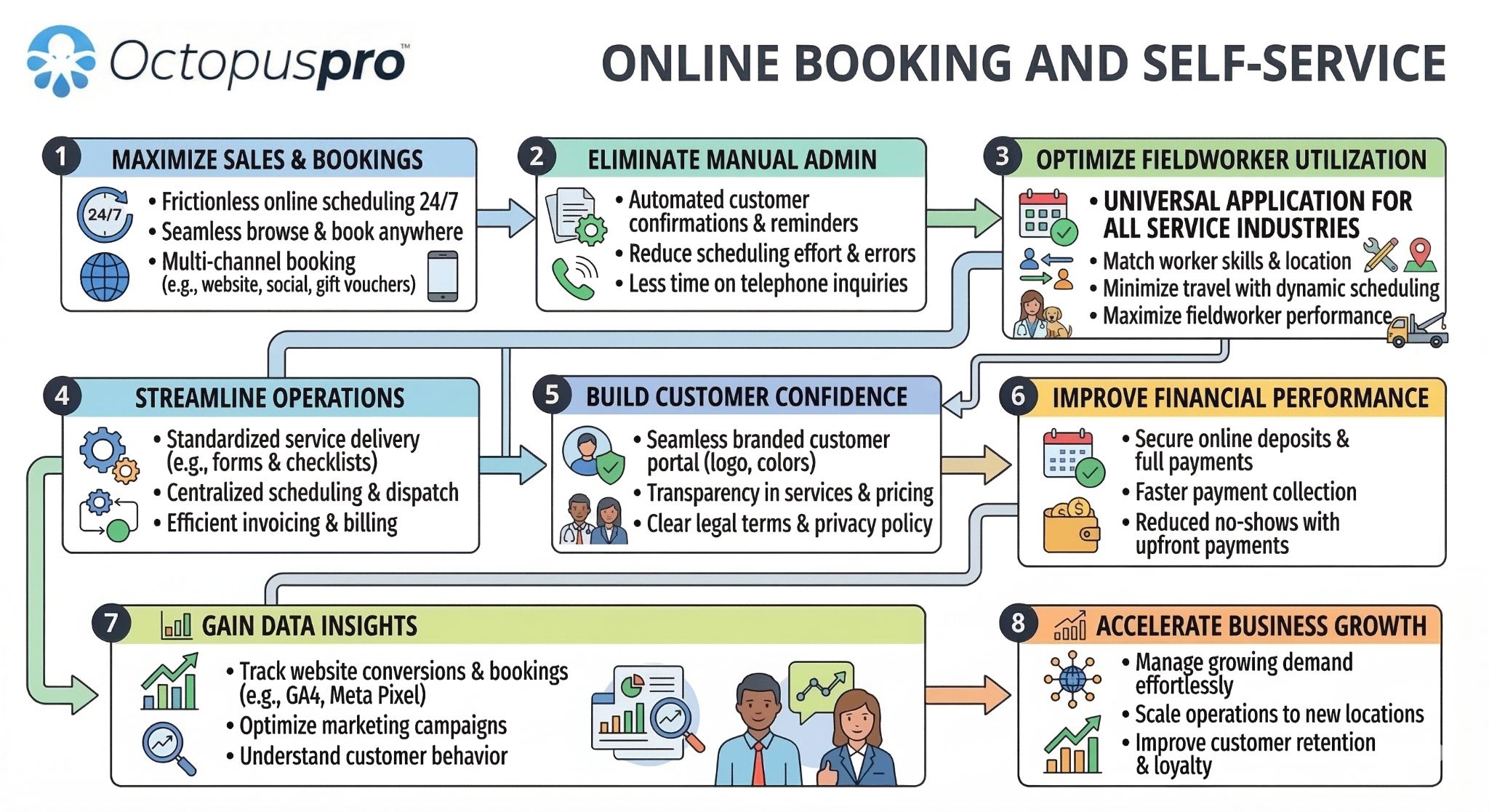
One connected workflow: online booking, dispatch, self-service, payments, and reporting in the same system.
Built for service businesses that need more than a simple appointment calendar
OctopusPro is designed for teams that need online booking, staff scheduling, dispatch, communication, payments, reporting, and customer self-service to work together.
OctopusPro is built for businesses that need more than a basic calendar
Best fit: service businesses that need online booking, staff scheduling, dispatch, fieldworker management, customer communication, payments, reporting, and operational control in one system.
When a simple calendar may be enough
If you only need a single-person appointment calendar with no dispatch, payment tracking, customer portal, fieldworker app, reporting, or workflow automation, OctopusPro may offer more capability than you need today.
Three outcomes your booking system should improve
A better booking platform should help you win more work, protect margins, and reduce the manual effort required to keep jobs moving.

Growth
Grow booking volume without growing admin chaos. OctopusPro helps you open more booking channels, respond faster, schedule more intelligently, and convert more opportunities into paid work. Instead of losing revenue to missed calls, slow replies, or clunky booking processes, you create a faster path from inquiry to confirmed appointment.
Explore: Online Bookings • Availability Finder • Nearby Bookings

Profitability
Protect margins and improve cash flow with smarter pricing, deposits, payment tracking, and refund controls. When scheduling, pricing, and financial workflows work together in one system, your business becomes easier to manage and more profitable to scale.
Explore: Payment Tracking • Refund Management • Integrated Accounting

Efficiency
Reduce repetitive admin, eliminate information silos, and keep your team aligned with one connected booking workflow. Automated communications, centralised job records, live status updates, and better visibility mean your office spends less time chasing details and more time moving the business forward.
Explore: Booking Communication • Discussion Board • Audit Log
Want a booking system that improves growth, margins, and efficiency together?
Compare plans, start testing the workflow, or speak with an expert about your current booking process.
Basic calendar vs online booking tool vs OctopusPro
Many businesses start with a calendar or a simple booking form. OctopusPro is built for service businesses that need the full workflow connected: booking capture, scheduling, dispatch, customer communication, payments, payroll, reporting, and operational control.
| Capability | Basic calendar | Online booking tool | OctopusPro |
|---|---|---|---|
| Online booking | Basic: manual appointment entry or simple calendar links. | Partial: customers can request or book slots, usually with limited workflow depth. | Complete: instant bookings, request-based bookings, booking buttons, Customer Portal, deposits, and real-time pricing options. |
| Request approval | Manual: handled by phone, email, or staff notes. | Sometimes: may support basic approval, but not full operational rules. | Controlled: admin override, booking settings, permissions, booking statuses, and approval-based workflows. |
| Availability rules | Limited: calendar availability only. | Basic: available slots, usually without service-area or fieldworker matching depth. | Advanced: fieldworker availability, working hours, service preferences, calendar sync, time rules, and availability finder. |
| Service areas and travel | Not designed for this. | Often limited: may capture an address but not optimise dispatch. | Built in: service areas, multi-address jobs, nearby bookings, proximity scheduling, and geo-pricing support. |
| Dispatch and fieldworkers | Manual: staff assignment is usually outside the calendar. | Partial: may assign staff but often lacks field-service workflows. | Complete: assignment, multi-fieldworker bookings, job requests, fieldworker app updates, check-in/out, and booking edit approval. |
| Customer self-service | Minimal: customers usually call or email. | Partial: may offer booking and some rescheduling. | Fuller workflow: Customer Portal, rescheduling, cancellations, minimum notice, cancellation fees, profiles, and booking communication. |
| Payments and refunds | Separate: payments are usually handled elsewhere. | Basic: deposits or payments may be supported, but refunds and reconciliation may be separate. | Connected: deposits, invoice payments, payment tracking, refunds, payment reconciliation, and accounting workflows. |
| Payroll and payouts | Not included. | Rarely included. | Included: fieldworker payroll, commission and pay rates, payout visibility, and job-linked financial tracking. |
| Audit logs and control | Limited: calendar history only. | Partial: basic booking records. | Stronger: booking history, audit logs, labels, issues, attachments, ownership transfer, permissions, and PDF exports. |
| Reporting and conversion tracking | Basic calendar counts. | Basic booking metrics. | Business visibility: live reports, booking statistics, GA4, Google Ads conversion tracking, lead sources, and operational analytics. |
OctopusPro is best suited to businesses that need booking management connected to real service operations, not just a calendar entry.
Turn scattered booking admin into one connected workflow
Before OctopusPro
- Bookings scattered across calls, emails, spreadsheets, calendars, and staff notes.
- Office staff manually chase confirmations, updates, cancellations, reschedules, and job details.
- Customers call repeatedly because they cannot self-book, reschedule, or track the next step.
- Payments, refunds, payroll, and invoices are handled outside the booking workflow.
- Managers struggle to see where jobs, revenue, issues, and team performance really stand.
After OctopusPro
- Every booking is captured, scheduled, dispatched, updated, invoiced, paid, and reported in one system.
- Customers receive confirmations, reminders, self-service options, and clearer communication.
- Fieldworkers access job details, update progress, upload files, and communicate from the app.
- Admins track payments, refunds, commissions, payroll, pricing, and accounting workflows more clearly.
- Managers get stronger visibility across booking volume, customer experience, operations, and profit.
See how the workflow can fit your service business
Start with the free trial, compare pricing, or book a demo to discuss your booking, scheduling, and fieldworker workflow.
A cleaner booking workflow from first request to final payment
OctopusPro makes booking management simple for service businesses of every size. Whether you run a solo operation, a growing team, or a large field service workforce, you can capture more bookings, schedule more accurately, and keep staff and customers informed at every stage.
Capture bookings from every channel
Take bookings by phone, email, SMS, office staff, or online through your website and Customer Portal. Choose Instant Bookings when customers should lock in available slots immediately, or approval-based booking requests when your team needs to review before confirming. Your team can also create bookings manually or convert inquiries and quotes into jobs when the customer is ready.
Schedule the right resource at the right time
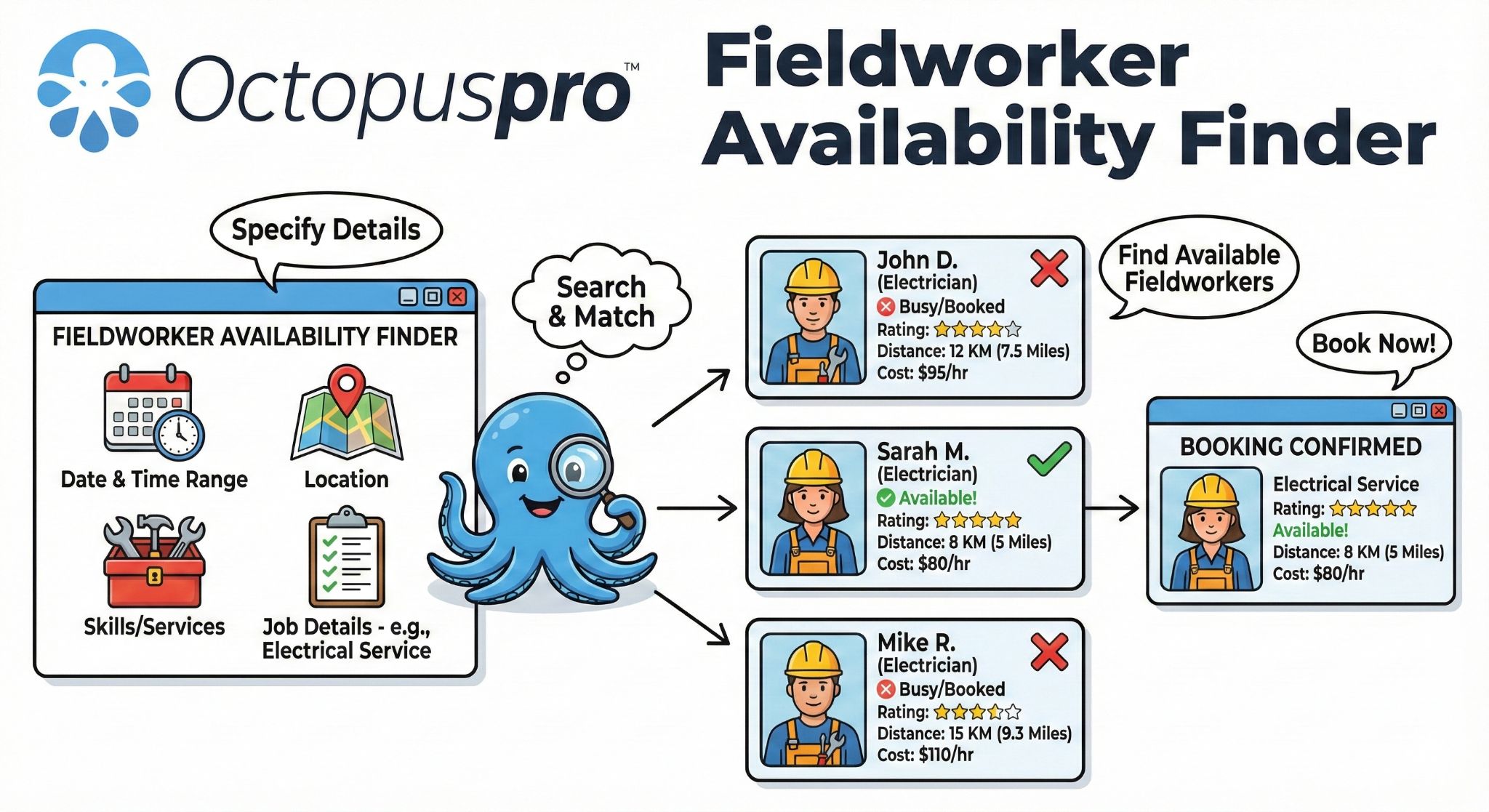
Use Fieldworker Availability Finder to locate the best available slots and the best-matched fieldworker based on availability, service area, service preferences, and business rules. OctopusPro also supports multi-address bookings, proximity-based scheduling, multiple fieldworkers on one booking, and recurring appointments.
Confirm, communicate, and keep everyone aligned
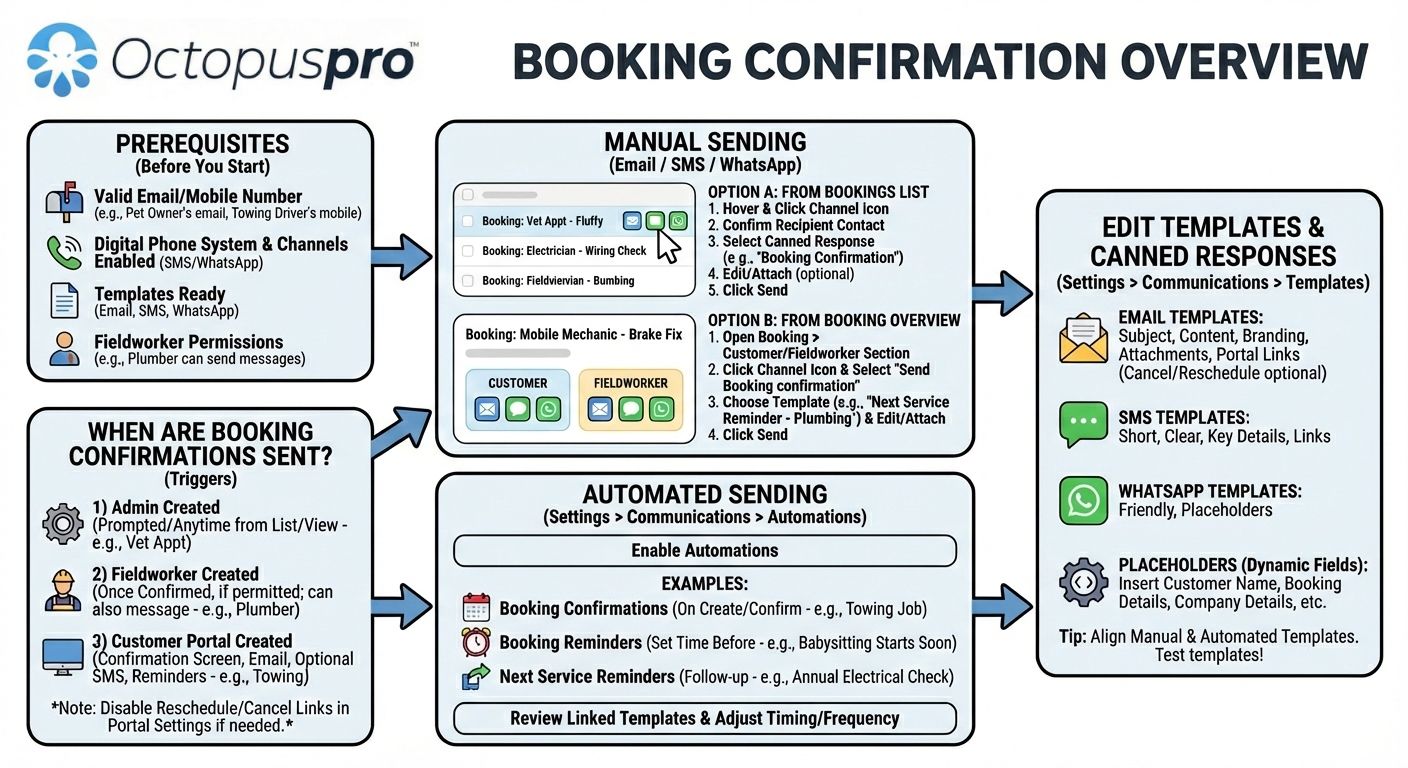
Once scheduled, OctopusPro helps you send booking confirmations, automated reminders, and job updates across email, SMS, and other configured channels. Customers can self-manage bookings with rescheduling and cancellation options when enabled, reducing calls, no-shows, and back-and-forth.
Deliver the job with full visibility
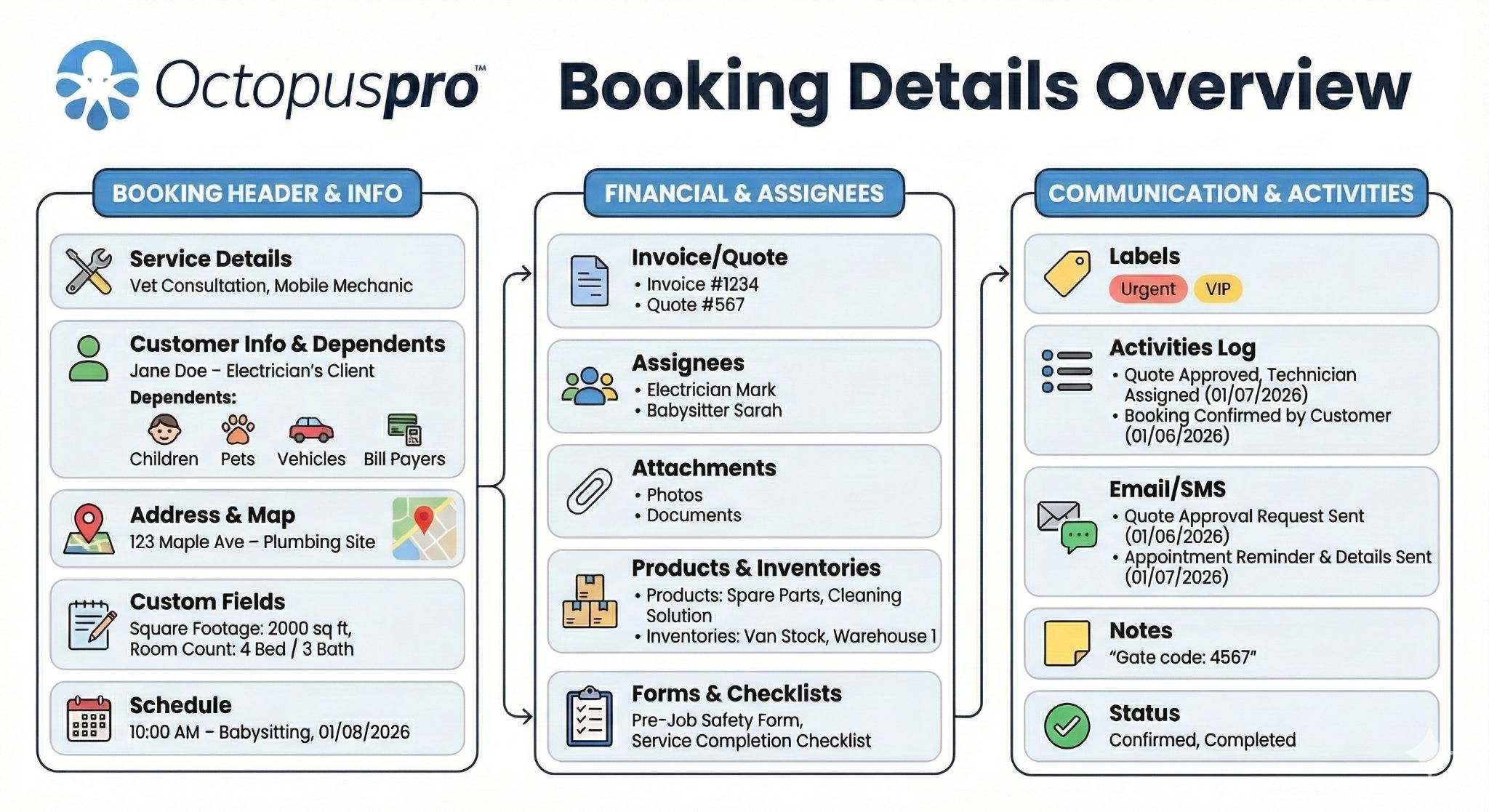
Every booking becomes a complete digital job record. Your team can view booking details, update schedules and services, communicate directly from the booking, upload photos and documents, add internal notes, track issues, and keep a full change history for accountability and compliance.
Invoice, get paid, and protect profit
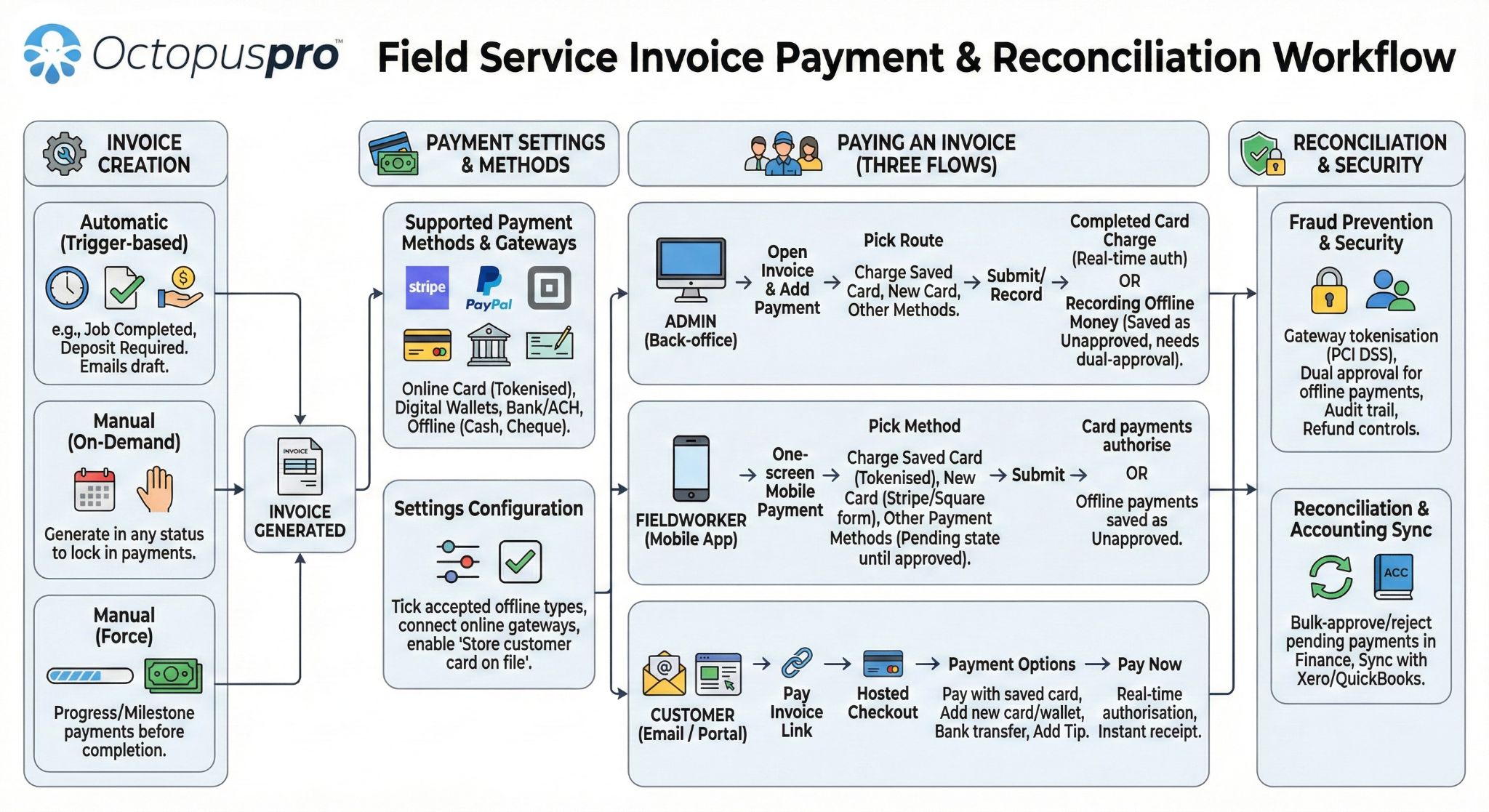
Keep financial control connected to the booking from start to finish with invoice payments, payment tracking, refund management, and fieldworker payroll tools. Reduce leakage, improve cash flow, and give office and field teams a clearer picture of business performance.
Want to see how the full booking workflow fits your business?
Start a free trial, speak to an expert, or compare pricing before you map online bookings, scheduling, reminders, payments, and reporting to your workflow.
See the complete booking workflow in 3 steps
Use the product tour below to connect the customer booking experience with scheduling, dispatch, fieldworker updates, payments, and reporting.
Capture service details, customer information, preferred times, and payment rules through a smoother online booking flow.
Match the booking to availability, service areas, fieldworker skills, proximity, and business rules.
Keep job updates, communication, invoice payments, refunds, payroll, and reporting connected to the booking record.
Click the diagram to open it full width.
See the online booking experience customers use
Watch how OctopusPro helps customers choose a service, view availability, confirm their details, and complete an online booking through a smoother self-service experience.

Access anywhere, respond faster, and keep jobs moving
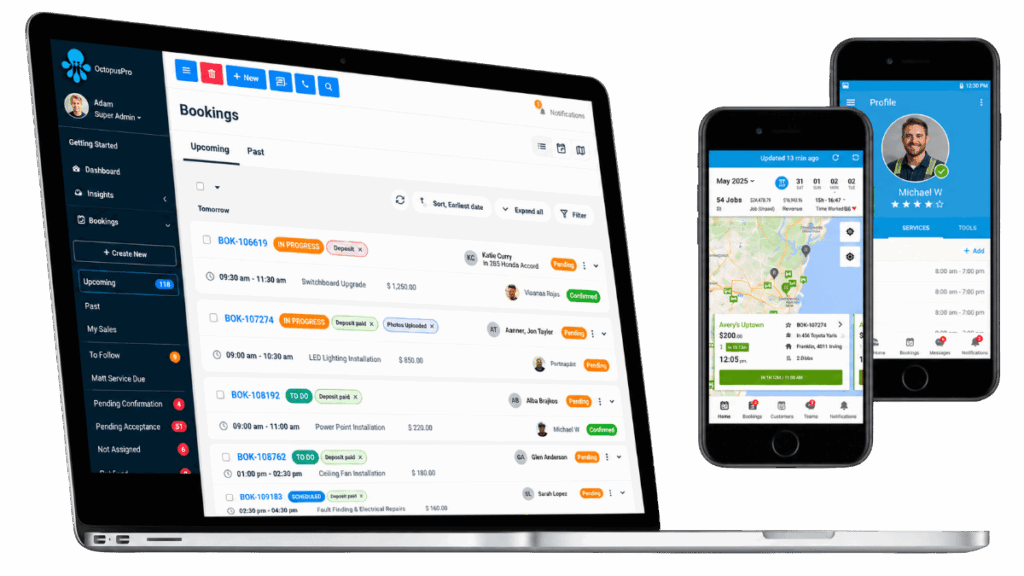
Your bookings are not tied to one office computer or one staff member. Office staff can manage bookings from any browser, while fieldworkers can access the details they need from the app while on the road or on site. Teams can view job details, communicate from the booking, update status, upload photos and documents, and keep work progressing without waiting to get back to the office. Learn more about live job updates in the fieldworker app and booking communication tools.

Time zone support
If your business works across suburbs, cities, states, or countries, accurate scheduling becomes even more important. OctopusPro helps standardise how times are handled across your business so admins, fieldworkers, and customers see clear, consistent booking times in the office, in the app, and in customer communications. This is especially valuable for teams combining mobile/on-site bookings with remote or virtual services. Learn more about date and time configuration and service delivery types.

Live availability that helps you schedule with confidence
The faster you can identify the right slot and the right fieldworker, the more bookings your team can handle without increasing admin effort. Work from live availability rather than guesswork. Use Availability Finder to locate the best options, Nearby Bookings to improve route efficiency, and Google Calendar Sync to reduce conflicts and double-bookings.
Give your team one place to manage every booking
Bring office staff, fieldworkers, customer updates, job records, and payments into one connected system. Start free, speak to an expert, or review pricing.
Ready to replace booking chaos with one connected workflow?
Start with online booking, smart scheduling, automated reminders, customer self-service, payment tracking, and reporting in one system built for real service operations.


Flexible pricing that helps you stay competitive without sacrificing profit
Winning bookings is important, but winning the right bookings at the right margin is even more important. OctopusPro gives you advanced pricing flexibility so you can respond to market conditions, service complexity, travel distance, demand, and customer expectations without needing manual price calculations for every job. This makes it easier to protect profit, increase average booking value, and present pricing more clearly to customers.
Service pricing & area rules
- Create services with flexible pricing models – fixed prices, time-based pricing, packages, add-ons, and more.
- Apply geo-pricing rules by area or postcode – charge differently based on where the work is located.
Discounts & minimum values
- Offer bulk discounts or volume pricing – reward larger jobs without manual quoting every time.
- Display minimum prices and enforce minimum booking values – reduce unprofitable low-value jobs.
Packages & job inputs
- Sell bundled services and recurring packages – increase customer value and secure repeat revenue.
- Use custom fields to collect the right pricing inputs – capture job-specific information that affects cost and scope.
Portal pricing transparency
- Show real-time pricing updates during online booking – create a more transparent customer experience while reducing pricing disputes.
- Display full service pricing in the Customer Portal – help customers understand what they are buying before they book.
The result: a booking journey that feels smoother for customers and a pricing model that works harder for your business.
Protect profit before the booking is confirmed
Configure pricing, deposits, minimum fees, packages, and location-based rules so customers see clearer pricing and your team avoids manual calculation.
More bookings, less admin, stronger control
A better booking workflow should do more than fill a calendar. It should help your team win more work, reduce repetitive admin, keep customers informed, protect revenue, and give managers clearer visibility across the entire job lifecycle.
- Win more bookings 24/7 with online booking that works even when your office is closed.
- Turn more website visitors into customers with direct booking buttons and a smoother booking path.
- Reduce no-shows and last-minute confusion with confirmations, reminders, minimum notice rules, and cancellation fees.
- Schedule faster and with more accuracy using Availability Finder and Nearby Bookings.
- Support more complex service workflows with multi-address bookings, multi-fieldworker scheduling, and recurring appointments.
- Reduce phone calls and admin load with customer self-service rescheduling and cancellation.
- Keep all booking communication, files, notes, and updates connected through booking communication tools and the discussion board.
- Improve field accountability and job transparency with check-in/out tracking and booking update reminders.
- Protect revenue with deposits and payment terms, payment tracking, and structured refund workflows.
- Improve operational discipline with audit logs, labels, and issue management.
- Create stronger margins with location-based pricing, bulk discount rules, minimum service pricing, and packages.
- Understand what is driving growth with live reports, historical booking statistics, and conversion tracking.
Ready to reduce no-shows, missed bookings, and manual admin?
Start with online booking, confirmations, reminders, self-service rescheduling, and payment tracking to create a faster path from lead to paid job.

Everything you need to manage bookings, appointments, and service delivery at scale
OctopusPro is far more than a basic calendar or appointment tool. It is a complete booking, scheduling, dispatch, communication, and payment platform designed specifically for service businesses that need to manage jobs efficiently while creating a better customer experience.
Booking capture, scheduling, and dispatch
- Booking Management Overview – understand the full booking workflow from request to completion, invoicing, and reporting.
- Create New Bookings – create bookings manually, or convert inquiries and quotes into confirmed work in seconds.
- View Booking Details – give your office and operations teams a complete view of each job, including schedule, services, communication, invoices, and activity.
- Edit Booking Details – update services, time, price, address, team assignment, and other booking details without losing control of the workflow.
- Recurring Bookings – automate repeat appointments for regular customers and long-term service contracts.
- Multi-Address Bookings – handle pickup/drop-off workflows, multi-stop jobs, and services that require more than one site location in a single booking.
- Availability Finder – locate the best time slots and the most suitable fieldworker faster, reducing scheduling friction and saving admin time.
- Nearby Bookings – improve route efficiency and reduce drive time by assigning bookings based on proximity.
- Assign Multiple Fieldworkers – schedule teams, assistants, and crews against one job when the work requires more than one person.
- Booking Settings, Flags & Permissions – configure booking rules, approval flows, permissions, and visibility so your workflow fits your business.
- Booking Status Management – manage and customise workflow stages so every team member understands where each job stands.
Online booking, customer self-service, and booking conversion
- Accept Online Bookings Through Your Website – let customers book when it suits them, not only when your office is open.
- Add Book Online Buttons – place direct booking entry points on your site, landing pages, or campaign pages to increase conversion.
- Service Payment Terms & Deposits – choose whether customers pay a deposit, prepay in full, save a card, or pay later based on your business rules.
- Admin Override for Booking Requests – keep control when you want your office to approve or manage fieldworker booking requests centrally.
- Booking Confirmations – confirm jobs professionally and reduce uncertainty with automated, consistent customer communications.
- Automated Reminders – reduce no-shows and forgotten appointments with timely reminders and follow-up sequences.
- Customer Self-Service Rescheduling – let customers change bookings without tying up your office team.
- Customer Self-Service Cancellation – give customers flexibility while still keeping your booking rules under control.
- Minimum Cancellation Notice – protect your schedule and reduce last-minute disruption with cut-off rules.
- Cancellation Fees – recover revenue when customers cancel too late and discourage avoidable lost time.
Communication, coordination, and operational control
- Booking Communication – email, SMS, calls, and chat directly from the booking so nothing gets lost across disconnected systems.
- Contact Fieldworkers from Bookings – keep communication between office staff and field teams linked to the job record.
- Discussion Board – centralise notes, updates, collaboration, and attachments across bookings, quotes, invoices, inquiries, and issues.
- Fieldworker Check-In/Out Tracking – track arrivals, start times, completion, and GPS time logs for stronger operational visibility.
- Fieldworker Reschedule Assist – recover bookings faster by suggesting alternate slots when a scheduled fieldworker cannot attend.
- Fieldworker Booking Edit Approval – maintain office-level control over booking changes when required.
- Request Booking Updates – prompt fieldworkers or team members to update the booking so everyone stays informed.
- Pause or Resume Automated Communications – stop the wrong reminders or notifications from being sent when a booking needs special handling.
Documentation, compliance, and quality assurance
- Attachments, Photos, PDFs & Documents – store job-related files where your team actually needs them, right on the booking.
- Labels & Tags – organise, prioritise, and filter bookings visually so your team can act faster.
- Issues & Complaints Management – track and resolve service issues with a proper workflow instead of messy email chains.
- Booking History & Audit Log – see who changed what and when, improving accountability and making dispute resolution easier.
- Export Booking to PDF – generate professional booking records and work orders for customers, staff, or compliance needs.
- Delete, Restore & Purge Bookings – keep your data clean without compromising control.
- Transfer Ownership – assign bookings to the right internal owner or sales rep for clearer responsibility and reporting.
Payments, refunds, payroll, and business performance
- Invoice Payments – accept and record online and offline payments with more control over cash flow.
- Booking Payment Tracking – see deposits, balances, and payment status directly against each job.
- Refund Management – manage refunds with proper records and approval workflows instead of ad hoc handling.
- Commission & Pay Rates – set how fieldworkers are paid in a way that matches your pricing and staffing model.
- Payroll & Payout Management – turn completed work into clearer, faster payout processes for contractors and teams.
- Integrated Accounting – connect your field service operations with Xero and QuickBooks for smoother financial workflows.
Reporting, analytics, conversion tracking, and visibility
- Live Reports & Analytics – measure operational performance in real time and make better decisions faster.
- Past Bookings Statistics – understand trends, revenue patterns, booking volume, and historical performance.
- Google Analytics (GA4) Integration – track customer portal usage and conversion behaviour more accurately.
- Google Ads Conversion Tracking – measure how many bookings and leads your campaigns are actually producing.
- Import Customers & Data – move faster when onboarding or migrating from older systems.
Calendars, time zones, and flexible service delivery
- Google Calendar Sync – reduce double-bookings and keep schedules aligned across systems.
- Manually Push Bookings to Google Calendar – send individual bookings when needed.
- Live Job Updates in the Fieldworker App – keep jobs moving in real time from the field.
- Date & Time Configuration – standardise how times are shown across bookings and communications.
- Service Delivery Types – support mobile/on-site, storefront, and remote/virtual booking models in one platform.
OctopusPro helps you convert more inquiries, reduce booking friction, improve schedule accuracy, strengthen team accountability, and create a smoother customer journey from the first click to final payment.

Why growing service businesses choose OctopusPro for booking and appointment management
Most service businesses do not lose profit because they lack demand. They lose profit because bookings are missed, schedules are messy, customers are left waiting, jobs are not updated properly, and payments are not tracked closely enough. OctopusPro is built to solve those problems in one connected workflow.
Run bookings, scheduling, communication, and payments from one connected workflow
Instead of juggling separate systems for booking forms, calendars, staff scheduling, customer messaging, work orders, invoices, refunds, and reporting, your team works from one connected workflow. That means less admin, fewer mistakes, faster response times, better customer experiences, and stronger operational control.
Use OctopusPro to
- Capture more bookings online without needing your office team to be available 24/7.
- Give customers a professional, self-service booking experience that feels fast and modern.
- Reduce manual scheduling time with availability-based planning and proximity-aware dispatch.
- Avoid booking chaos with configurable statuses, rules, approvals, and audit trails.
- Improve communication by keeping messages, notes, files, and job updates linked to the booking record.
- Reduce no-shows and last-minute surprises with confirmations, reminders, cancellation windows, and rebooking options.
- Create a smoother path to payment with deposits, online payments, balance tracking, refunds, and integrated accounting workflows.
- Make smarter growth decisions using live reporting, analytics, and campaign conversion tracking.
Recommended setup checklist for maximum booking performance
Build your service catalogue – define services, durations, pricing models, packages, and optional extras.
Configure working hours and availability – set when your team can actually accept work.
Set service areas and locations – define where each fieldworker or service can operate.
Use smart scheduling tools – make booking assignment faster and more accurate.
Configure booking permissions and rules – tailor the workflow to your business model.
Turn on online bookings – choose between instant bookings and request-based booking flows.
Set deposits and payment terms – decide how and when you want to get paid.
Connect calendar sync – keep availability aligned across teams and tools.
Set up booking communication templates – speed up response times and maintain a professional customer journey.
Automate confirmations, reminders, and follow-up – reduce repetitive admin and improve consistency at scale.
Make pricing work harder for your business
OctopusPro gives you pricing flexibility that many booking tools simply do not offer. Combine geo-pricing zones, volume discounts, minimum pricing rules, service packages, and real-time portal pricing updates to protect profit while still delivering a transparent customer experience.
Use custom fields to capture the exact information your team needs before the job begins.
Not sure which booking setup is best for your workflow?
Choose a plan, speak with an expert, or start testing instant bookings, request-based bookings, scheduling rules, reminders, and payment settings in your own account.
Built for modern service businesses, not just basic calendars
OctopusPro is an all-in-one booking and appointment management platform built for modern service businesses that want more than a basic calendar. It helps you capture more work, schedule more accurately, communicate more professionally, get paid faster, and run a more scalable operation with less manual effort.
Whether you manage mobile field services, fixed-site appointments, remote services, or a mix of all three, OctopusPro gives you one connected workflow for the entire customer journey: discover your service, request or book online, get scheduled intelligently, receive confirmations and reminders, complete the work, collect payment, and analyse results.
Explore the full workflow in the Booking Management Overview.
Common questions about OctopusPro booking and appointment management
Quick answers for businesses comparing online booking, scheduling, dispatch, customer portal, payments, and reporting workflows.
Can customers book online through my website?
Yes. You can add online booking entry points to your website and choose between instant booking flows or approval-based booking requests depending on how much control your team needs.
Can OctopusPro handle mobile field service bookings?
Yes. OctopusPro supports mobile/on-site service workflows, fieldworker availability, service areas, proximity scheduling, job updates, attachments, payments, and customer communication.
Can I manage recurring bookings?
Yes. Recurring bookings help you manage repeat appointments, regular customers, maintenance schedules, long-term service contracts, and ongoing service programs.
Can customers reschedule or cancel online?
Yes. Customer self-service rescheduling and cancellation options can be enabled with rules such as minimum cancellation notice and cancellation fees when required.
Can I take deposits or online payments?
Yes. OctopusPro supports service payment terms, deposits, payment tracking, invoice payments, refunds, and connected accounting workflows.
Can I assign multiple fieldworkers to one booking?
Yes. You can schedule teams, assistants, crews, or multiple fieldworkers for one booking when the job requires more than one person.
Does OctopusPro support Google Calendar sync?
Yes. Google Calendar sync and manual calendar push options help reduce double-bookings and keep schedules aligned across your team.
Can I track booking conversions from Google Ads or GA4?
Yes. OctopusPro supports Google Analytics and Google Ads conversion tracking for the Customer Portal so you can better understand which campaigns create leads and bookings.
Still comparing booking software?
Start testing the workflow, review pricing, or book a demo to see how OctopusPro can support your service business.
Questions businesses ask before changing booking systems
These are the practical questions service businesses usually need answered before moving from calendars, spreadsheets, or simple booking tools to a connected booking workflow.
Can we still take bookings by phone?
Yes. Your team can create bookings manually while also accepting online bookings, inquiries, quote conversions, and customer portal requests.
Can customers book online while admins stay in control?
Yes. You can choose instant booking flows or request-based booking workflows that your team reviews before confirmation.
Can we manage mobile, fixed-site, and remote services?
Yes. OctopusPro supports mobile/on-site jobs, storefront or branch appointments, and remote or virtual service workflows.
Can fieldworkers use the app?
Yes. Fieldworkers can access job details, receive requests, update progress, communicate, upload photos, and check in or out from the app.
Can we take deposits and track payments?
Yes. Use service payment terms, deposits, invoice payments, payment tracking, refunds, and connected accounting workflows.
Can customers reschedule or cancel online?
Yes. Customer self-service rescheduling and cancellation options can be enabled with rules such as minimum notice and cancellation fees.
Can we connect Google Calendar?
Yes. Google Calendar sync and manual calendar push options help reduce conflicts and keep schedules aligned.
Can we track ads and analytics?
Yes. Customer Portal integrations for GA4 and Google Ads conversion tracking help you understand campaign performance.