Turn fieldworker job activity into cleaner timesheets, payroll review and payout records.
OctopusPro helps service businesses reduce manual timesheet admin and automate repetitive timekeeping tasks by connecting the booking schedule, fieldworker job milestones, optional GPS context, actual attended hours, timesheet reports and fieldworker payment workflows.
Fieldworker timesheet summary report guideFieldworker check-in and check-out guideFieldworker payroll management guide
Cleaner hours for payroll review
Compare planned work with recorded attendance before payroll, so admins can catch missing starts, missed finishes, long jobs, short jobs and unapproved hours earlier.
Connected job-based records
Scheduled Hours, Actual/Attended Hours, Break Hours, Approved Hours, job milestones, booking details, appointment breakdowns, exports and payout records stay connected to the job.
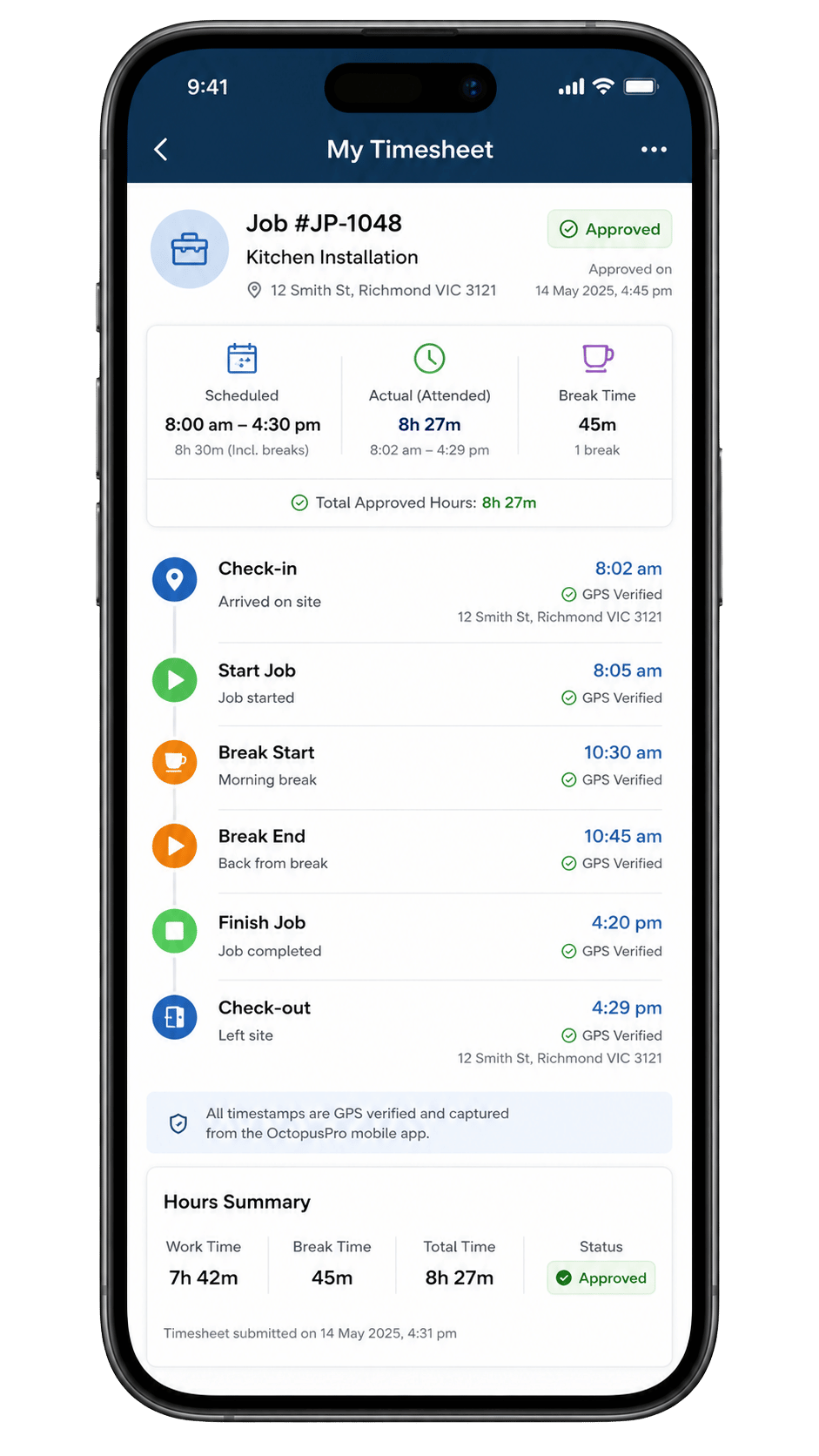
Prove one cleaner workflow from booking schedule to timesheet review.
Start with one team or service type, then expand once scheduled hours, attended hours, approvals and payouts are easier to review.
Stop building timesheets from memory, paper notes and scattered messages.
The benefit is less chasing, fewer disputes, stronger accountability and faster payroll preparation. Instead of asking workers to remember what happened, OctopusPro keeps the planned job, the fieldworker’s progress updates, the actual attended time and the admin review path connected, helping businesses eliminate time theft concerns and reduce timesheet disputes with a clearer job-based record.
Fieldworker timesheet reporting guideBooking history and audit trail guide
Manual timesheets create extra questions
Paper timesheets, spreadsheets and disconnected clock-in apps often tell you a number of hours without enough job context. Admins still need to ask what booking the hours relate to, whether the worker arrived late, why a job ran over, whether a check-out was missed, or whether the customer was updated.
- Hours can depend on memory or manual edits.
- Payroll disputes take longer to investigate.
- Booking, billing and attendance records can live in different places.
Connected timesheets make the record easier to trust
OctopusPro connects the scheduled appointment, assigned fieldworker, job status updates, Start Job / Finish Job timestamps, optional GPS/location evidence, forms, notes, photos, signatures, reports, approvals and payout workflows.
- Scheduled Hours can be compared with Actual/Attended Hours.
- Exceptions such as zero attended time, overruns, early finishes and missed check-outs are easier to spot.
- Admins can drill from totals into booking and appointment details before approving or exporting.
Fewer payroll disputes
Use job activity and review notes to explain the hours instead of relying only on worker memory, helping reduce time theft concerns and create a stronger accountability trail.
Less admin chasing
Prompt workers to update attendance, request missing updates and review exceptions before payroll day.
Faster payroll preparation
Export, print, email or approve timesheets where enabled once the record has been reviewed.
Better job insight
Use attended time, travel context, breaks and service duration to understand labour utilisation and job overruns.
Replace one manual timesheet workflow with a cleaner job-based record.
Begin with one team or service type, automate the repetitive timekeeping steps that are easiest to standardise, then compare scheduled hours, actual attended time, approvals and payout records in one connected workflow before rolling it out more broadly.

From booking schedule to payroll-ready timesheet in four connected steps.
The benefit is a clearer handoff from the field to the office. Each step adds context: what was planned, what the fieldworker did, what needs review, and what is ready to approve, export or use for payments.
Start and finish job workflow guideFieldworker check-in and check-out tracking guide
Plan the work clearly
Create bookings with the right service, location type, fieldworker, appointment time, estimated duration, customer time window and availability context.
Capture attendance from the field
Fieldworkers accept jobs or receive assignments, then use app milestones such as On the Way, Arrived, Start Job, Pause/Resume and Finish Job to record what happened.
Review exceptions before payroll
Admins compare Scheduled Hours with Actual/Attended Hours, Break Hours and Approved Hours, then investigate missing starts, missed finishes, overruns, early finishes and No Longer Attending updates.
Hand off cleaner records
Timesheets can be approved, exported, printed, emailed or used to support fieldworker payout workflows, payroll review and job-costing decisions.
Use one time-tracking approach across mobile, fixed-site, virtual and hybrid services.
The benefit is consistency. Different service types, distributed teams and fieldworkers moving across multiple job sites each day may capture time in different ways, but the office can still review scheduled hours, attended hours, exceptions and payment records through one connected timesheet process.
Booking location types guide for mobile, fixed-site and virtual workRemote service management guide
Mobile and on-site jobs
Mobile jobs, distributed teams and fieldworkers visiting multiple job sites in one day can use fieldworker milestones and optional GPS context, including On the Way, Arrived, Started, Finished, geofencing, auto check-out and billable distance records where travel charges apply.
Fixed-site and branch work
Appointments at a store, clinic, office, workshop, depot or branch can still compare planned time with attended time using Start Job, Finish Job, proof-of-work and Timesheet Summary reporting.
Virtual and online bookings
Remote services do not need GPS or a customer address, but they can still use schedules, assigned fieldworkers, status-based Start/Finish tracking, files, payments and reports.
Hybrid, multi-location and group sessions
Businesses that mix mobile, fixed-site, virtual, class or shared-session work can keep one reporting structure, including sessions tracked against an assigned instructor, fieldworker or crew.
Match time tracking to how each service is actually delivered.
Mobile teams, fixed-site staff, virtual providers and shared sessions should not be forced into the same workflow. Start with the service type where cleaner attendance records will reduce admin, disputes and payroll review time fastest.
Capture the story behind the hours, not just the start and finish time.
The benefit is a timesheet record that explains what happened in the field. Fieldworkers can update progress, add evidence, handle exceptions and keep the office informed from the Fieldworker App.
Fieldworker App getting started guideStart and finish jobs in the Fieldworker AppFieldworker forms and checklists guide

Start, pause, resume and finish work
Use Start Job / Finish Job to begin and complete visit-level time tracking, with optional Pause/Resume to separate active work from waiting time, delays or interruptions.
Start and finish job workflow guidePause and resume job guide
Handle exceptions cleanly
Unable to Start can capture reasons such as locked gate, customer no-show or unsafe site. No Longer Attending, Awaiting Update, Request Update prompts, Cancelled status updates and Reschedule Assist/propose-new-slot flows help prevent timeline gaps.
Request booking update guideFieldworker decline reason form guide

Add proof of work
Photos, before/after photos, videos, notes, file uploads, forms, checklists, mandatory photos, photo tags, required fields and digital signatures can be tied to check-in, start, finish or check-out steps where configured.
Stay updated on schedule pressure
Upcoming Job alarms, leave-now reminders, app/email/SMS reminders, push notifications, Pending Booking Accept/Decline alarms, day-before attendance confirmation and Running Late prompts help reduce missed starts and late arrivals.
Keep one connected field record
When fieldworkers update the booking as work happens, the office gets a clearer story for timesheets, attendance exceptions and payroll review.
- Job progress, timestamps and proof-of-work stay tied to the booking.
- Schedule changes, update requests and messages are easier to review later.
- Admins can move from field activity to office review without hunting through separate tools.
Work with poor reception
Fieldworkers can view loaded jobs, update progress offline or with poor reception, and sync changes when the connection returns.
Keep job communication connected
Admins and fieldworkers can keep time-related updates connected to the booking so attendance questions, schedule changes and job progress notes are easier to review.
Fieldworker App communication guideContact fieldworker from booking guide
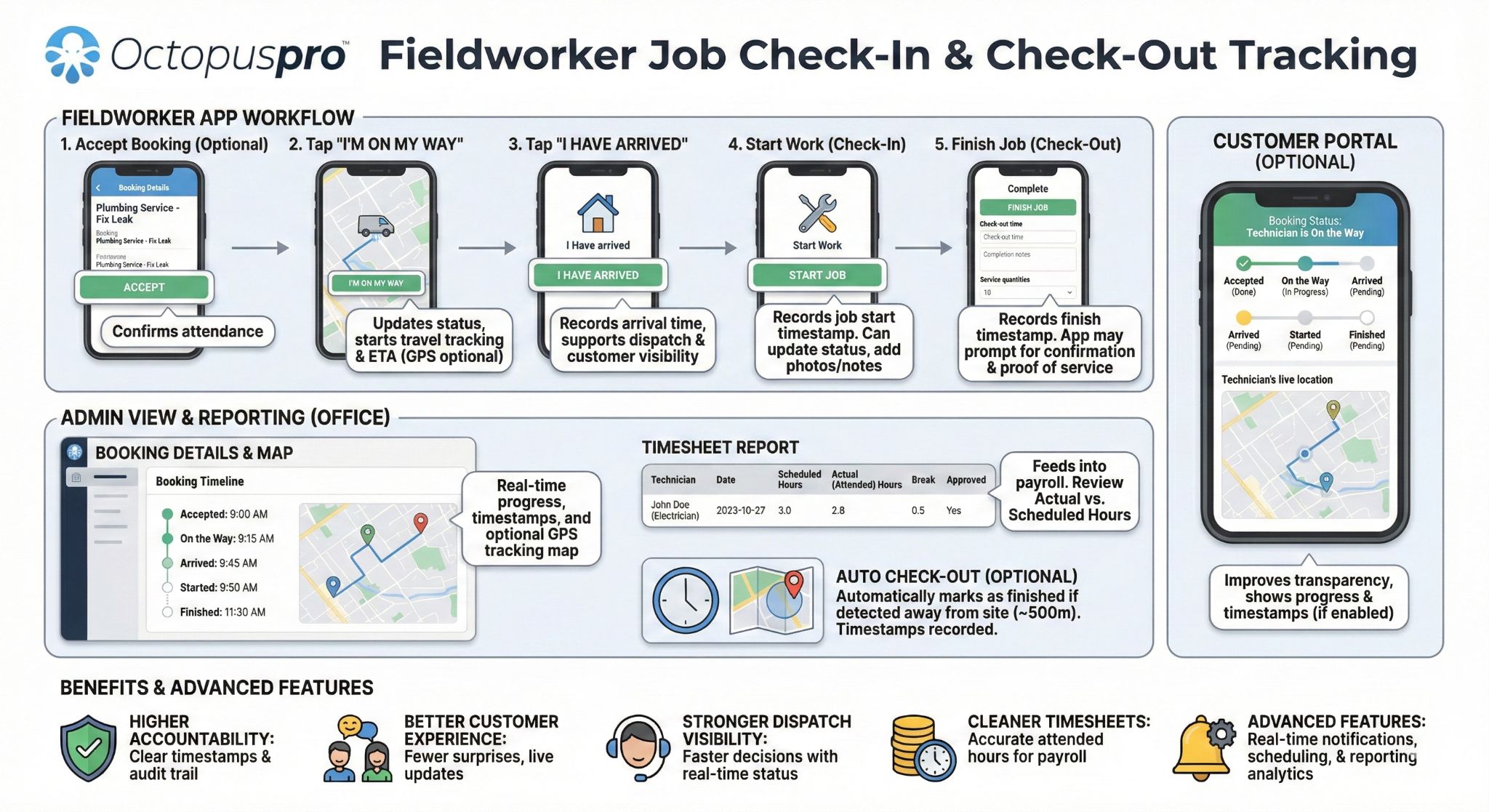
Test the Fieldworker App workflow with a real booking.
Create one booking, assign a fieldworker, capture Start/Finish activity, add proof-of-work and review the timesheet record before payroll.
GPS & mobile location
Use GPS where it improves the timesheet record, and status-based tracking where location is not needed.
The benefit is better attendance context for mobile teams without making every service type depend on location tracking. GPS supports mobile jobs, while fixed-site and virtual work can rely more on booking status and Start/Finish activity.
Fieldworker GPS tracking guideReal-time field worker location tracking guideGPS mileage billing software guide
- Booking-level GPS context: On the Way can start visit tracking, reveal the full address where address masking is enabled, and support ETA/customer update workflows. Read the On the Way SMS notifications guide Read the address masking guide
- Milestone evidence: Arrived, Started, Finished and auto check-out can be timestamped and GPS-tagged where enabled, with radius/geofence rules supporting arrival and departure records.
- Map and ETA visibility: admins can review GPS map, route/progress and ETA context for a booking, or use Real-Time Field Worker Tracking to understand logged-on, busy and logged-off worker states. Read the real-time field worker location tracking guide
Use GPS context for updates, distance and exceptions without overloading the main timesheet record.
The details below can support the same GPS-backed workflow, while keeping the main GPS section focused on attendance evidence and job status tracking.
Customer updates and late arrivals
GPS-based ETA monitoring can trigger Running Late prompts, On the Way messages and office/customer visibility where configured.
Travel and distance billing
GPS odometer/mileage tracking from En Route to Arrived can support standard distance matching, travel-to-job records, distance charges and invoice line items where configured.
Privacy and setup boundaries
GPS depends on location permissions, device settings, connectivity and admin configuration. Fixed-site and virtual bookings can still use status-based time tracking without GPS.
Need GPS, app status updates or virtual tracking?
Use the same time-tracking page to support mobile, fixed-site and virtual work without forcing every service to use the same location workflow.
Prevent timesheet problems before the job is even assigned.
The benefit is cleaner planned hours. When work is assigned to available, qualified fieldworkers with realistic service duration expectations, admins have a stronger baseline to compare against actual attended time later.
Fieldworker working hours management guideFieldworker availability finder guideCustomer portal time slot intervals guide
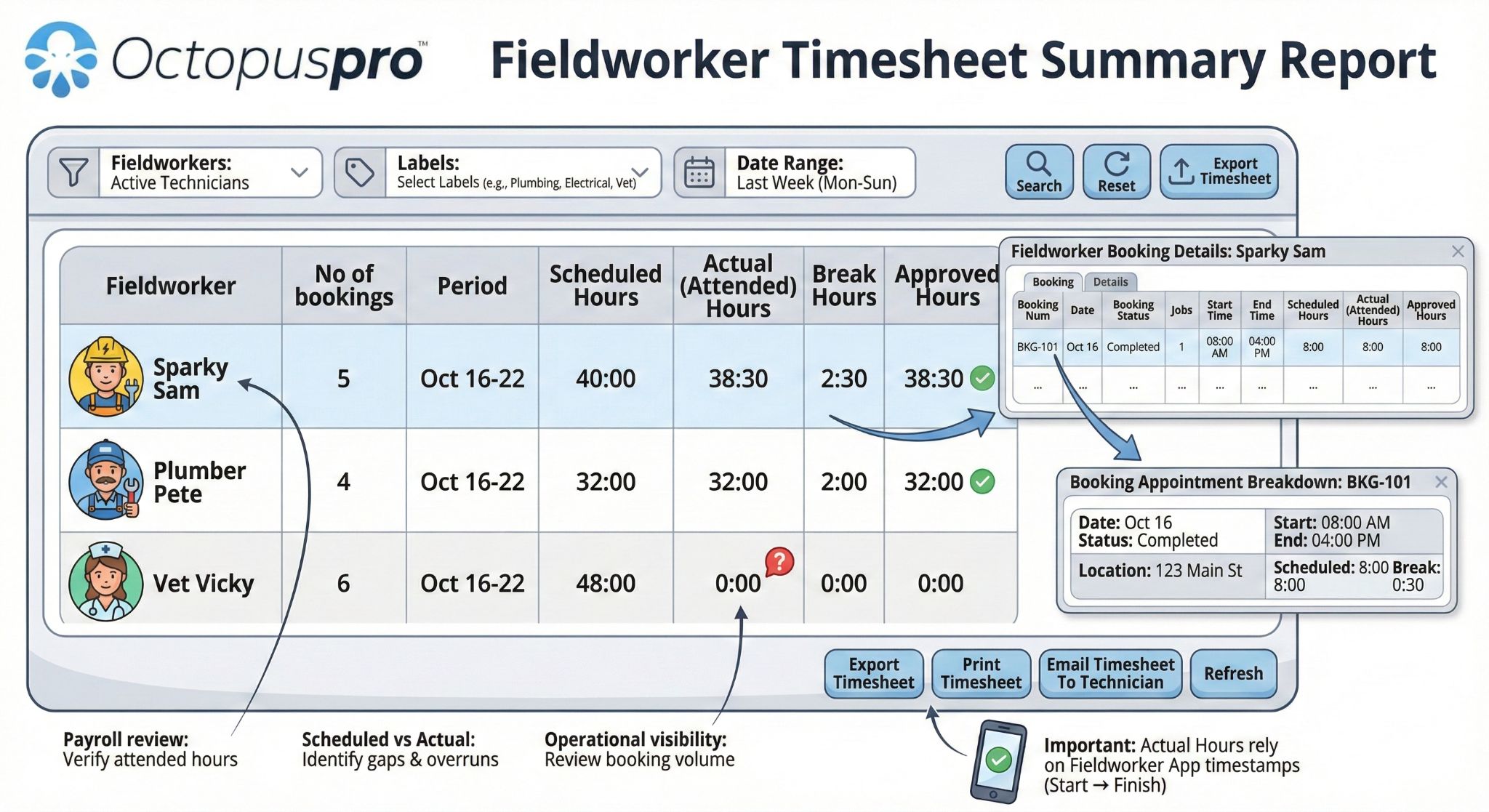
Working hours and availability
Use rosters, split shifts, time-off blocks, travel-time blocks, admin buffer blocks and fieldworker self-service availability where permitted.
Customer booking slots
Exact start times, time windows, notice rules and available slots help create cleaner Scheduled Hours before the job begins.
Customer portal time slot intervals guideCustomer portal booking start times guide
Assignment context
Assign available, qualified fieldworkers based on working hours, service areas or territories, skills, location and distance so planned hours are more realistic.
Fieldworker availability finder guideFieldworker service areas guide
Dispatch workflows
Use manual assignment, Send Job Request, accept/decline, first-accept rules, timeout rules, reassignment or rescheduling where required.
Job assignment and dispatch guideFieldworker accept/decline job request guide
Duration expectations
Estimated service time, booking duration and quantity-based inputs can improve planned labour expectations and reporting.
Display booking duration guideQuantity-based custom field guide
Fieldworker setup
Profiles, roles, services, working hours, service areas, coverage and skills help the time-tracking workflow work correctly from the start.
Setup support
Build cleaner timesheets before the job starts.
Use working hours, availability, service areas and booking duration rules to create a stronger scheduled-hours baseline before payroll review.
Review, approve and export timesheets before payroll.
The benefit is a faster, cleaner payroll review. Instead of waiting until payroll day to discover missing or conflicting hours, admins can use the Timesheet Summary, drill-downs and exception review process to verify records first.
Fieldworker timesheet summary report guideRequest booking update guide
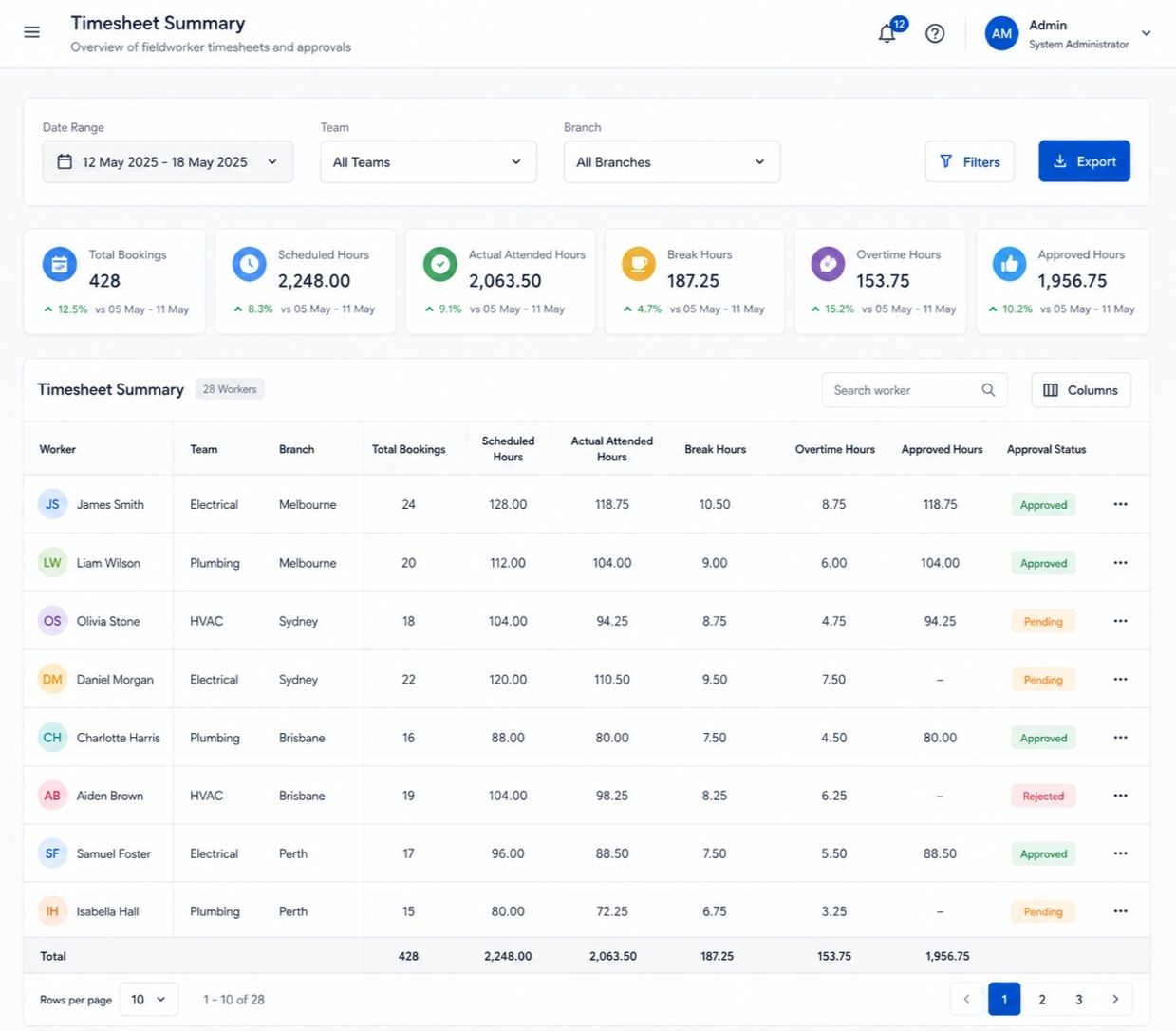
Spot missing attended time
Find records where Actual/Attended Hours show as 0 because Start Job / Finish Job steps were missed or could not be captured.
Review long or short jobs
Compare Scheduled Hours with attended time to investigate late starts, early finishes, overruns, under-runs, travel delays, waiting time and unusual appointment patterns.
Account for breaks
Break Hours can be reviewed where the workflow tracks breaks, helping separate paid work time from break or interruption time.
Finalise approved time
Approved Hours help admins confirm what should be handed off for payroll or fieldworker payout workflows where approvals are enabled.
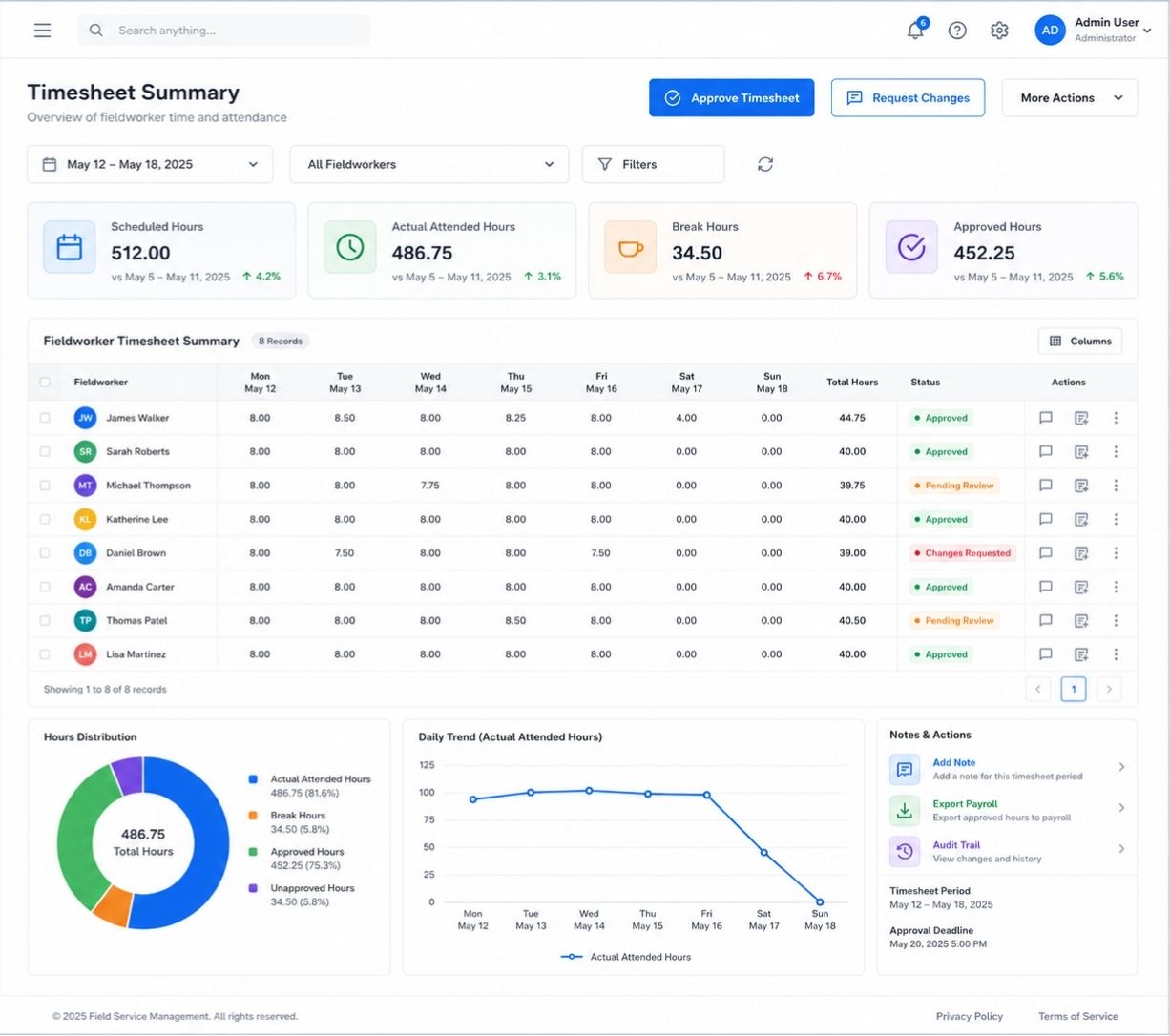
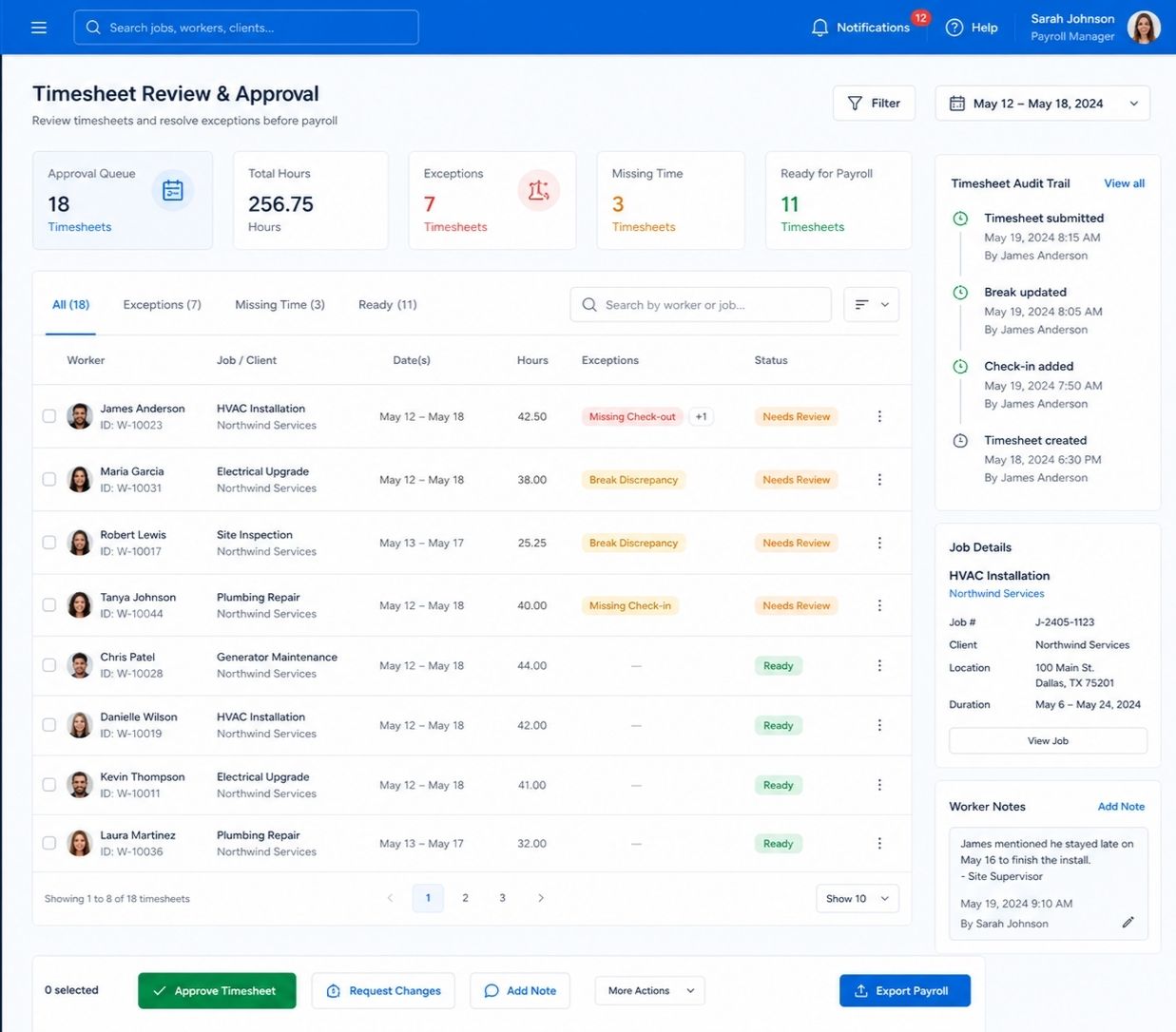
Timesheet Summary Report
Review fieldworker totals by period, date range, weekly/fortnightly/monthly/custom ranges, fieldworker, label, team, branch, region, employment type and other filters. Common totals include No. of Bookings, Scheduled Hours, Actual/Attended Hours, Break Hours and Approved Hours.
- Use search/reset options to refine review.
- Export, print or email timesheets where available.
- Restrict timesheet and payroll visibility by role or contractor access where configured.
Booking and appointment drill-downs
Click from a fieldworker total into Fieldworker Timesheet Details, booking references, statuses, appointment rows, service dates, locations, start/end times, multi-appointment breakdowns, timezone context and appointment-level timing to understand how totals were calculated.
- Booking timeline, Activity Log and activity trail help review status changes.
- Timesheet and booking data can support labour utilisation, job overrun, attendance and performance reporting.
- Booking communication history can help when a timesheet issue also involves a customer or schedule update.
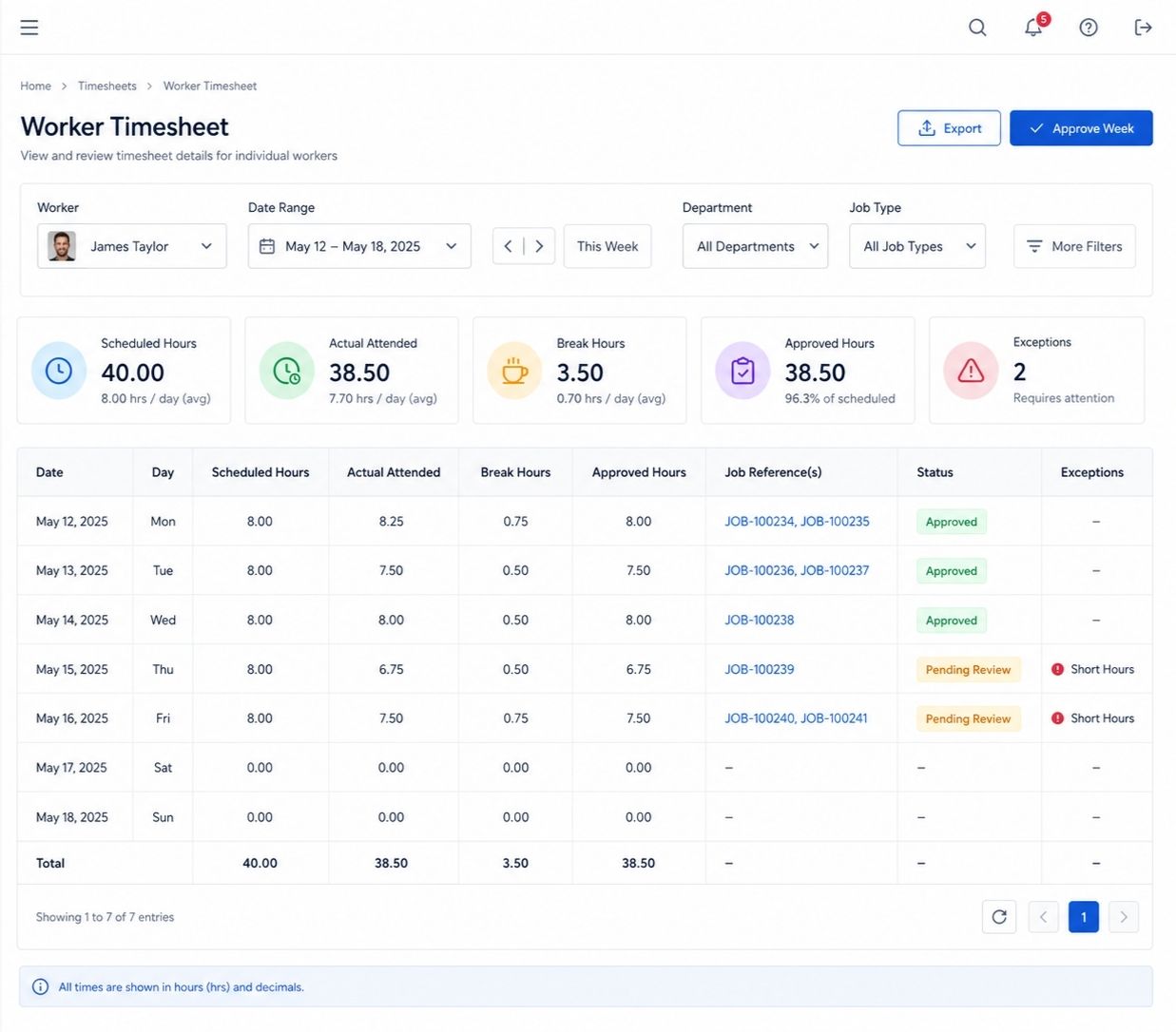
Timesheet report detail
Review totals first, then drill into the details that explain them.
The benefit is confidence before payroll. Admins can review the summary, then open the details behind each worker, booking and appointment before approving, exporting or adjusting records.
Fieldworker timesheet summary report guideView booking details guide
Common totals
Scheduled Hours, Actual/Attended Hours, Break Hours, Approved Hours, No. of Bookings and period totals help admins understand the bigger picture quickly.
Practical workflow
Start with the Timesheet Summary, open Fieldworker Timesheet Details, review Appointment Breakdown, then approve, export, print or email timesheets when ready.
Approve timesheets with cleaner evidence before payroll day.
Review attended hours, missing starts, long or short jobs, break time, booking drill-downs and export options before approving timesheets or preparing fieldworker payments.
Connect approved time and job records to clearer fieldworker payment workflows.
The benefit is a more transparent handoff from worked time to payout review. OctopusPro can support hourly, fixed, commission, hybrid and crew-based payment models while keeping rates, overrides, holds, exports and earnings visibility connected to job records.
Fieldworker payroll management guideFieldworker commission and pay rates guide
Support different pay models
Use hourly pay, overtime, first-hour/call-out premium, fixed pay, commission, fieldworker share, hybrid pay, travel stipend, allowances, adjustments and deductions where they apply to time or job-based pay.
Apply the right rate to the right job
Use service-level pay rates, service defaults, worker-specific rates, worker payment agreements, booking-level overrides and pay-rate hierarchy to calculate the correct payout for the job.
Handle teams, crews and exceptions
Support multi-fieldworker payouts, crews, subworkers and subcontractors with hourly, task-based or commission-based arrangements, plus dispute holds, payment holds, corrections and special agreements.
Review payout records
Fieldworker Bookings Summary can support job/earnings review, marking jobs as paid, grouping jobs, calculating selected invoices or earnings, and reviewing job status counts such as To Do, In Progress, Completed and Awaiting Update.
Use the Payment to Fieldworkers ledger
Track payout references, single jobs, grouped invoices, Stripe Connect transfers, bookings count, payment date, invoice total, payment method/reference, cash collected, bank transfer, amount paid, amount due, notes and review/actions.
Export or automate payouts
Export payroll/payment data using CSV, Excel, ABA, NACHA/ACH, BACS, SEPA XML or CPA-005, use fieldworker bank details for batch payments, sync relevant records with Xero/QuickBooks where available, or use Stripe Connect automated payouts where configured.
Give fieldworkers visibility
My Earnings can show weekly/monthly/yearly filters, real-time earnings, outstanding payments, pay statements, gross earnings, net pay, allowances, adjustments, deductions, paid/partially paid/closed statuses and remittance-style summaries where permissions allow.
Lock and audit reviewed pay
Pay statement locking, payroll logs and audit trails help protect reviewed pay periods and reduce later changes without approval.
Control pay visibility
Permissions can control earnings visibility, job request access, subworker dashboards and the payment information fieldworkers are allowed to see.
Fieldworker permissions guideFieldworker earnings visibility guide
Turn approved timesheets into clearer payout decisions.
Choose the plan that fits your team, then test one real workflow from scheduled hours and attended time through approvals, payout review and fieldworker visibility.
Digital record
Answer timesheet questions from one connected job record.
The benefit is easier investigation. Job history, time records, proof-of-work, booking timeline, Activity Log and invoice context can help explain what happened without digging through separate systems.
Fieldworker activity log guideBooking history and audit trail guideLive reports and analytics guide
Keep the reporting focus on labour utilisation, attendance issues, job overruns and timesheet exceptions rather than broad analytics.

Invoicing connection
Invoice faster after work is completed.
The benefit is less delay between work completed and getting paid. Timesheet, job completion and proof-of-work records can support invoicing conversations without turning this page into a full billing guide.
Field service invoice payments guideSend invoice guide
- Connect completed work with invoices and payment records where permitted.
- Use the accounting/invoicing workflow alongside timesheet review without duplicating payroll or billing records.
- Keep billing conversations focused on completed work, approved time and the job record rather than scattered messages.
After the job
Connect time records to invoicing and payment follow-up.
When completion, proof-of-work and attended time are easier to review, billing conversations can move faster with fewer missing details.
Make time tracking useful for the whole operation, not just payroll.
The benefit changes by role, but the same connected record helps everyone work with fewer gaps, spend less time chasing timesheets and focus more on running and growing the business.
Fieldworker management guideRole-based fieldworker permissions guide
For fieldworkers
Clear schedules, reminders, job status updates, proof-of-work prompts and earnings visibility where enabled.
For office admins
Cleaner timesheet records, fewer calls, quicker exception review, role-based reporting and better payroll preparation.
For owners and managers
Better labour utilisation insight, workload visibility, job overrun reporting and attendance trend review, so leaders can spend less time resolving timesheet issues and more time improving operations and growth.
For customers
More accurate arrival communication and job progress visibility where the business chooses to share it.
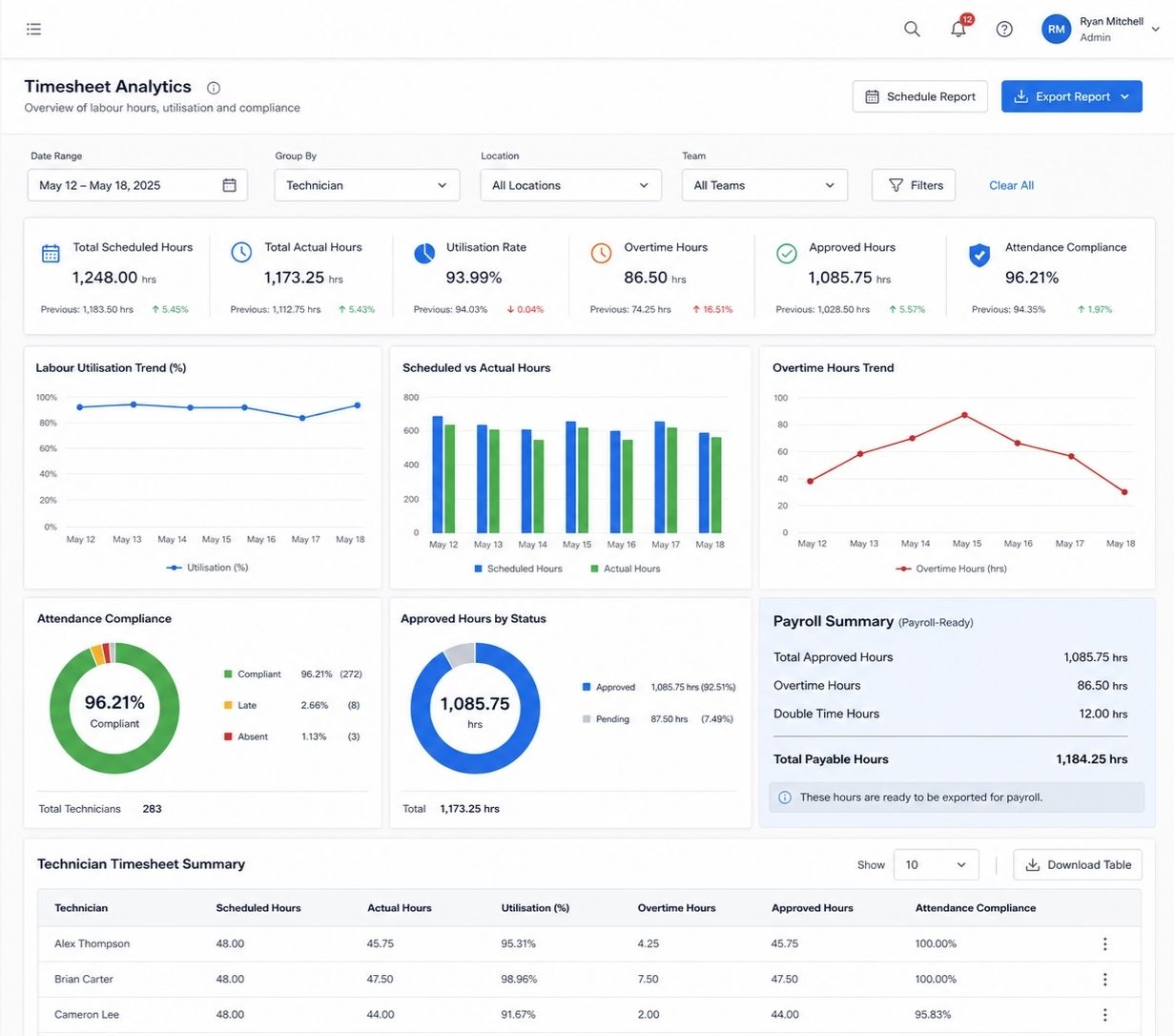
Employee timesheet tracking for fieldworkers
The key questions below are kept focused on timesheets, job tracking, GPS context, fieldworker payments and payroll review.
Timesheet summary report FAQ guideFieldworker payroll and payout guide
Is this only for employees?
No. OctopusPro can be used for employees, contractors, technicians, fieldworkers, subcontractors and crews, depending on your account setup and pay rules.
What is the main benefit compared with paper timesheets?
Paper records usually capture hours only. OctopusPro connects hours with bookings, appointments, job milestones, optional GPS context, proof-of-work, reports, approvals and payout workflows.
Do fieldworkers need GPS enabled?
Not always. GPS is most useful for mobile/on-site jobs. Fixed-site and virtual bookings can still use scheduled vs attended time, Start Job / Finish Job, status updates and admin review.
Can I export timesheets for payroll?
Yes. Timesheet records can be exported, printed or emailed where available, and Approved Hours can support payroll review where approvals are enabled.
Does OctopusPro replace payroll software?
OctopusPro supports payroll review and fieldworker payment preparation. It does not need to be positioned as a replacement for payroll software; many businesses use it to prepare cleaner records before payroll processing.
What if someone forgets to check out?
Admins can review exceptions such as zero attended hours, missing Finish Job steps, Request Update prompts, Awaiting Update records, auto check-out behaviour and attendance confirmations depending on configuration.
Why is this better than a normal clock-in app?
A normal clock-in app may show when someone started and stopped. OctopusPro connects that activity to the booking, appointment, customer, service, location type, proof-of-work, report and payment workflow.
Can managers use timesheet data beyond payroll?
Yes. Timesheet and booking data can support labour utilisation, job costing, job overrun review, attendance trends, workload visibility and operational reporting.
What should I test first during the free trial?
Test one complete workflow: create a booking, assign a fieldworker, record Start/Finish activity, review Scheduled vs Actual/Attended Hours, investigate exceptions, export/approve, then review payment handling.
Can OctopusPro support mobile, fixed-site and virtual timesheets?
Yes. Mobile jobs can use GPS and milestones, fixed-site jobs can use scheduled vs attended time, and virtual bookings can use status-based Start/Finish tracking without GPS.
Can fieldworker payments be based on tracked time?
Yes. Fieldworker payment workflows can support hourly rates, overtime, fixed payouts, commission, hybrid rules, overrides, crews/subworkers, payout ledgers and bank/export workflows where configured.
Can different fieldworkers have different pay rates?
Yes. Rates can vary by service, worker, payment agreement, booking override and pay-rate hierarchy depending on setup.
Can fieldworkers see their earnings?
Where enabled, My Earnings can show earnings, outstanding payments, pay statements, payment statuses and pay-period details based on permissions and payroll rules.
Can OctopusPro help choose the right fieldworker before the timesheet starts?
Yes. Availability, service areas, skills, location and working hours can help dispatchers choose a suitable worker and reduce timesheet exceptions.
Do customer booking time slots affect timesheets?
Yes. Booking time slots and time windows help create cleaner Scheduled Hours before the job begins.
Can forms, checklists and signatures be tied to check-in or completion?
Yes. Required forms, checklists, photos, file uploads and signatures can be tied to job steps where configured, improving the evidence behind the timesheet.
Forms and checklists guideDigital signature custom field guide
Can timesheet and payroll reports be restricted by role?
Yes. Report visibility, fieldworker permissions, earnings visibility, contractor-only access and role-based reporting can be controlled according to the account configuration.
What does accurate time tracking depend on?
Accuracy depends on workflow setup, fieldworker Start/Finish behaviour, GPS permissions/device settings where relevant, scheduling quality, approval rules, pay rules and admin review discipline.
Rollout
Start with one team, one service type and one measurable improvement.
The benefit is a practical rollout. Start by proving that one workflow can produce cleaner Scheduled Hours, Actual/Attended Hours, exception review, approvals, exports and payout records. Then expand to more teams, service types and pay models so the business can automate repetitive timekeeping and focus more on growth.
Replace one manual timesheet workflow first, then expand with proof.
Start with one team, one service type or one payroll review process. Prove cleaner records, then roll it out more widely.