
Fieldworker payroll reports, earnings and contractor payouts
Control fieldworker earnings, contractor payouts and payroll-ready reports in one place
Give your office a cleaner way to calculate earnings, review jobs and timesheets, approve payout amounts, hold disputed payments and export payment-ready reports for employees, contractors, subcontractors and crews without rebuilding every pay run in spreadsheets.
Built for payroll preparation, fieldworker earnings visibility, contractor payout review, payout reports, bank exports and finance handover. It does not replace your accountant, payroll compliance system or legal/tax advice.
Why teams switch
Turn operational records into payout-ready decisions
Keep worker rules, completed jobs, approved time, payment status and payout approvals connected so finance can review faster and explain every amount with confidence.
Key outcomes
Pay runs are easier when every payout is traceable, reviewable and explainable
Before choosing features, your team needs confidence that every payout is fair, traceable, reviewable and easy to explain. OctopusPro helps turn field activity into payroll-ready and contractor-payment-ready records that your office can check before workers are paid.
Pay workers with more confidence
Reduce payout mistakes by connecting earnings to the job, worker, service, time record, commission rule, approval status and payment evidence.
Supporting features
- Earnings calculation rules
- Timesheets and attendance
- Booking-level records
- Approval checks
Spend less time rebuilding pay runs
Replace manual spreadsheet investigations with filtered reports, payout ledgers, grouped jobs, exportable records and saved payout references.
Supporting features
- Fieldworker Bookings Summary
- Payment to Fieldworkers report
- Batch job selection
- CSV/Excel and bank exports
Reduce payout disputes
Give admins and workers clearer records around what was earned, what is outstanding, what is held and why adjustments were made.
Supporting features
- My Earnings dashboard
- Payout holds
- Admin adjustments
- Audit trail and notes
Give finance cleaner handover
Prepare payment-ready records for payroll, accounting, bank upload, contractor remittance, management reporting or marketplace split-payout workflows.
Supporting features
- Payout ledgers
- Bank details
- Payment files
- Stripe Connect
Start with the outcomes your team needs most, then use the sections below to see how OctopusPro turns job activity into reviewed payout records.

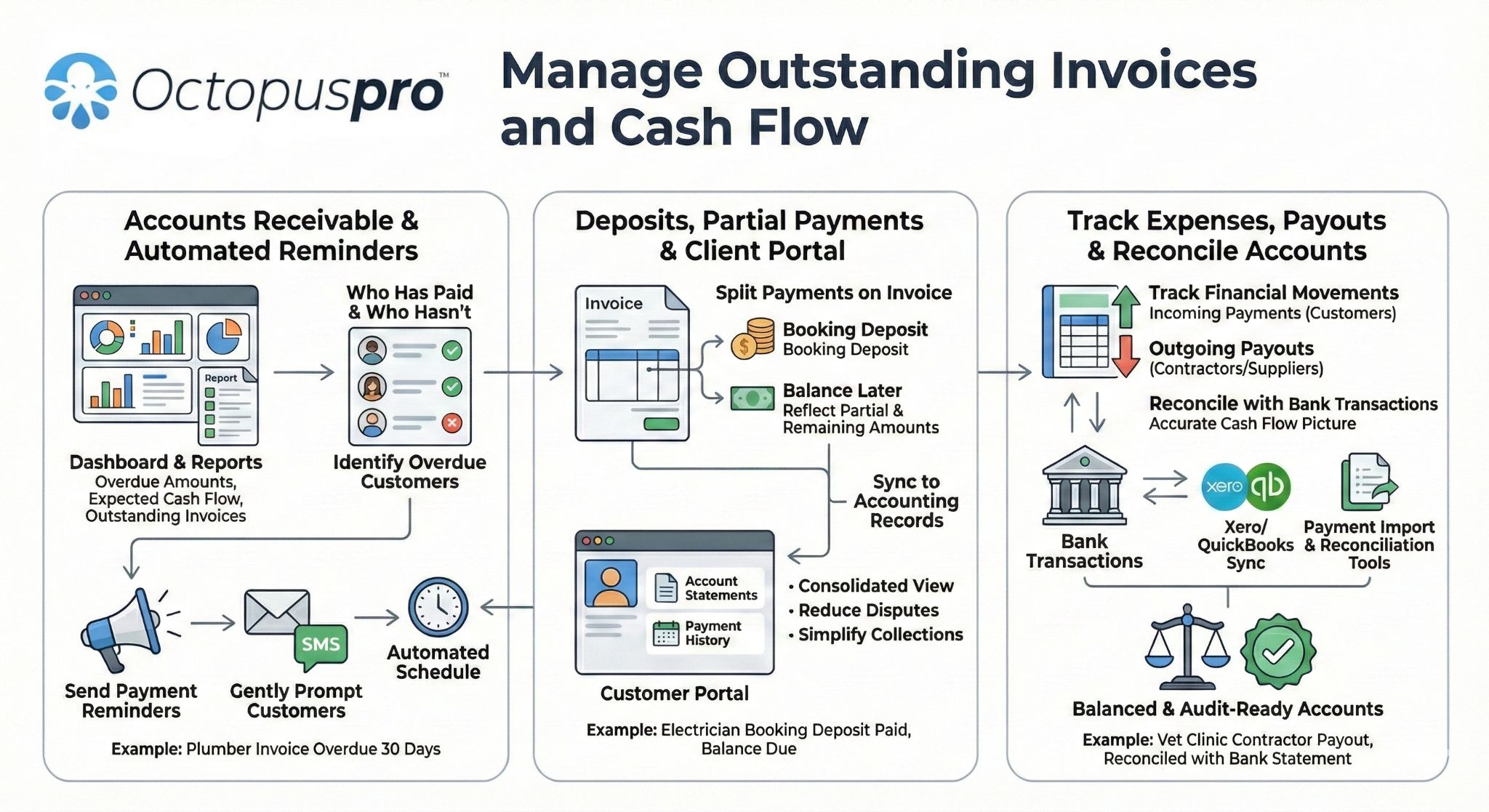
Who this helps
See whether this payout workflow fits your business
The benefit is the same across industries: your office can calculate, review and explain worker payouts using real operational records. The details change depending on whether you run employee crews, subcontractor networks, commission teams, mobile appointments or marketplace-style provider models.
Cleaning, maintenance and property services
Reduce disputes across repeat jobs, crews, subcontractors and multi-location operations.
- Hourly, fixed and service-based pay
- Timesheets and attendance review
- Subcontractor payouts
- Multi-location reporting
Trades, technical and installation teams
Make job-based payouts easier to connect to service type, completion status, overtime, callouts and technician roles.
- Service-level pay rules
- Technician payment detail
- Payment holds for issues
- Bank export workflows
Mobile beauty, wellness and appointment services
Support appointment-based teams where earnings may depend on services, tips, add-ons, commissions or provider shares.
- Commission and service-based earnings
- Tips and gratuities
- My Earnings visibility
- Stripe Connect where suitable
Delivery, transport and mobile on-demand teams
Use job progress, attendance records, provider earnings and payment ledgers to support fast-moving field teams.
- Check-in/out milestones
- GPS attendance context
- Outstanding payout records
- Batch payment exports
Floor care, cleaning franchises and subcontractor networks
Manage payouts across trading names, branches, subcontractors, lead workers and mixed service packages.
- Trading-name filters
- Contractor payout summaries
- Subcontractor invoice upload
- Role-based permissions
Marketplaces and contractor platforms
Support provider payment models where a business may need connected contractor accounts, platform fees and split payout records.
- Stripe Connect
- Connected provider accounts
- Platform fee retention
- Marketplace-style payout audit trail
Common payout problems OctopusPro helps reduce:
Spreadsheet-heavy pay runsCommission disputesUnapproved timesheetsMissing job evidenceSubcontractor invoicesManual bank filesPayouts not tied to bookingsMixed worker models
Worker payouts stay connected to the records your team already uses: Bookings Job status Services Timesheets Attendance GPS context Commissions Tips Subcontractor invoices Payment holds Adjustments Bank details Payment files Stripe Connect Exports
Traceable payout data
Make each payout easier to verify before anyone gets paid
The strongest payout process starts with reliable source data. OctopusPro helps your office use job records, time records, payment records and worker settings as the basis for payroll preparation and contractor payment review, instead of asking someone to manually reconstruct what happened after the job is completed.
Reduce missing payout details
Keep payout review connected to the work that was actually performed, so your office can trace earnings back to bookings, services, appointments and job outcomes.
Supporting features
- Booking and appointment records
- Booking status and job completion status
- Service-level payout settings
- Invoice and customer payment context
Validate time before payroll
Use scheduled time, actual attended time and fieldworker progress updates to support payroll review and help explain why payable hours changed.
Supporting features
- Timesheet Summary report
- Scheduled vs actual hours
- Check-in and check-out milestones
- GPS attendance context
Keep clearer payout evidence
Make payout approvals easier to defend with adjustment notes, payment holds, dispute records, payout references and exported reports.
Supporting features
- Admin adjustments
- Issue-based holds
- Payment references and notes
- Payout reports and ledgers
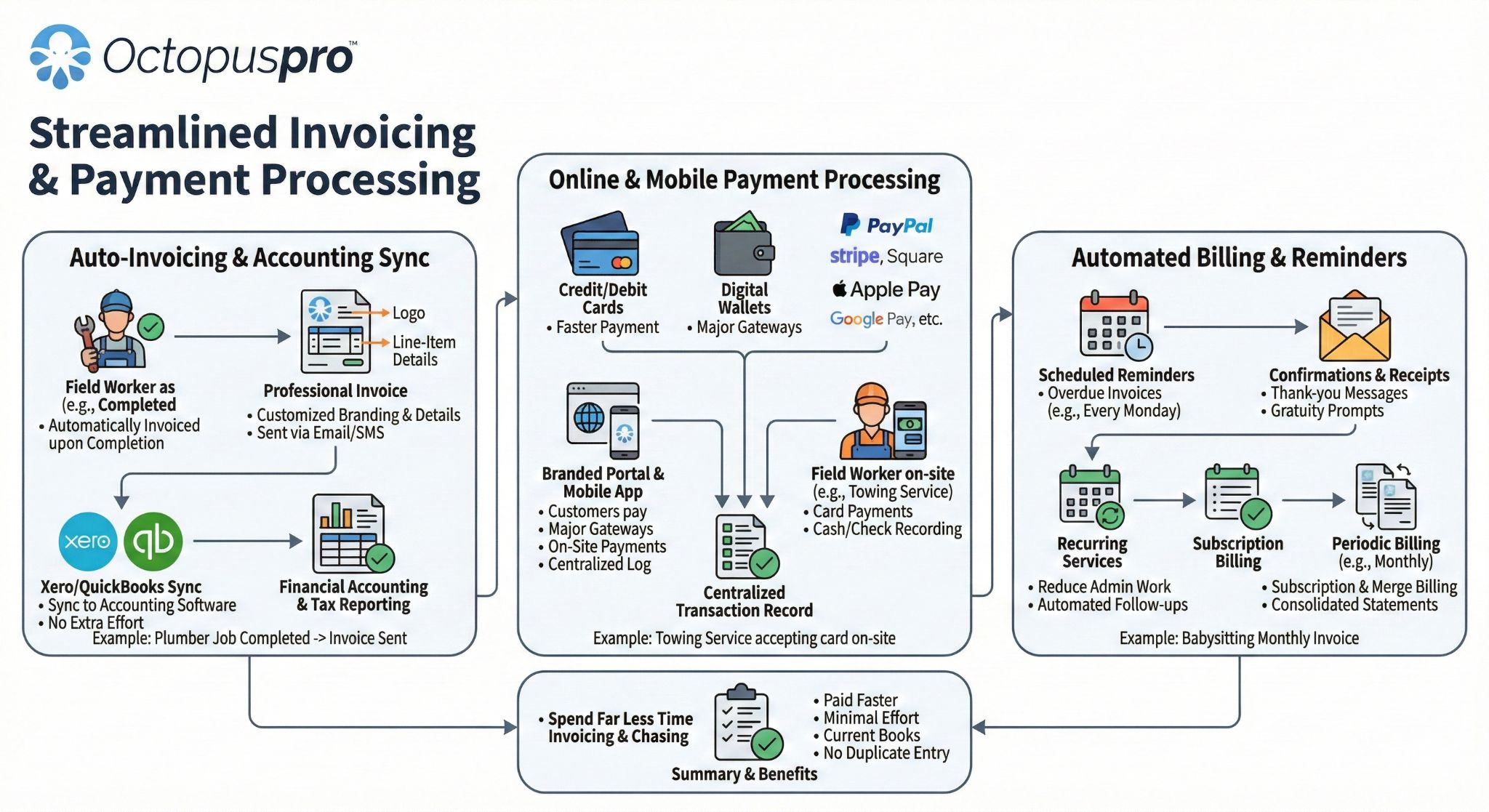
Payout workflow
Turn completed jobs into reviewed payment runs without starting from scratch
The benefit is simple: your office can move from job completion to payout approval faster, with fewer missed jobs, duplicate payments or unclear amounts. The features below support that workflow by helping admins filter, group, review, record, email and export payout information.
Review each worker’s payable jobs
The Fieldworker Bookings Summary gives your team a job-by-job view before amounts are paid.
Supporting features
- Review completed and payable jobs
- Filter by fieldworker, date range, trading name, booking status, payment status, customer payment status or invoice number
- Identify unpaid work before it reaches a pay run
- Check the job records behind each earning amount
Keep a cleaner payout ledger
The Payment to Fieldworkers report gives finance a clearer record of what was paid, when, how and against which bookings.
Supporting features
- Record payout references, dates, payment method and notes
- Track booking count, invoice total, amount paid and amount due
- Separate cash, bank transfer and other payment amounts where relevant
- Email payout reports or remittance-style summaries
1
Filter payable work
Start with the right pay period, worker, trading name, booking status and payment status so unpaid, incomplete or disputed work is not mixed into the wrong payout run.
2
Batch-select jobs
Select multiple payable bookings together instead of processing each job manually, helping weekly, fortnightly or monthly payout cycles move faster.
3
Group small jobs
Group multiple small jobs, micro-jobs or repeat visits into one payout record so payment references, remittance advice and finance reconciliation stay cleaner.
4
Review totals
Check earning totals, included bookings, timesheet records, unpaid invoices, holds, adjustments and notes before the payout is approved.
5
Record as paid
After paying by bank transfer, EFT or another approved method, save the payout as paid with the payment date, method, reference and internal notes.
6
Send and export
Email payout reports or remittance summaries, then export cleaner records for payroll preparation, contractor payment runs, accounting or finance review.
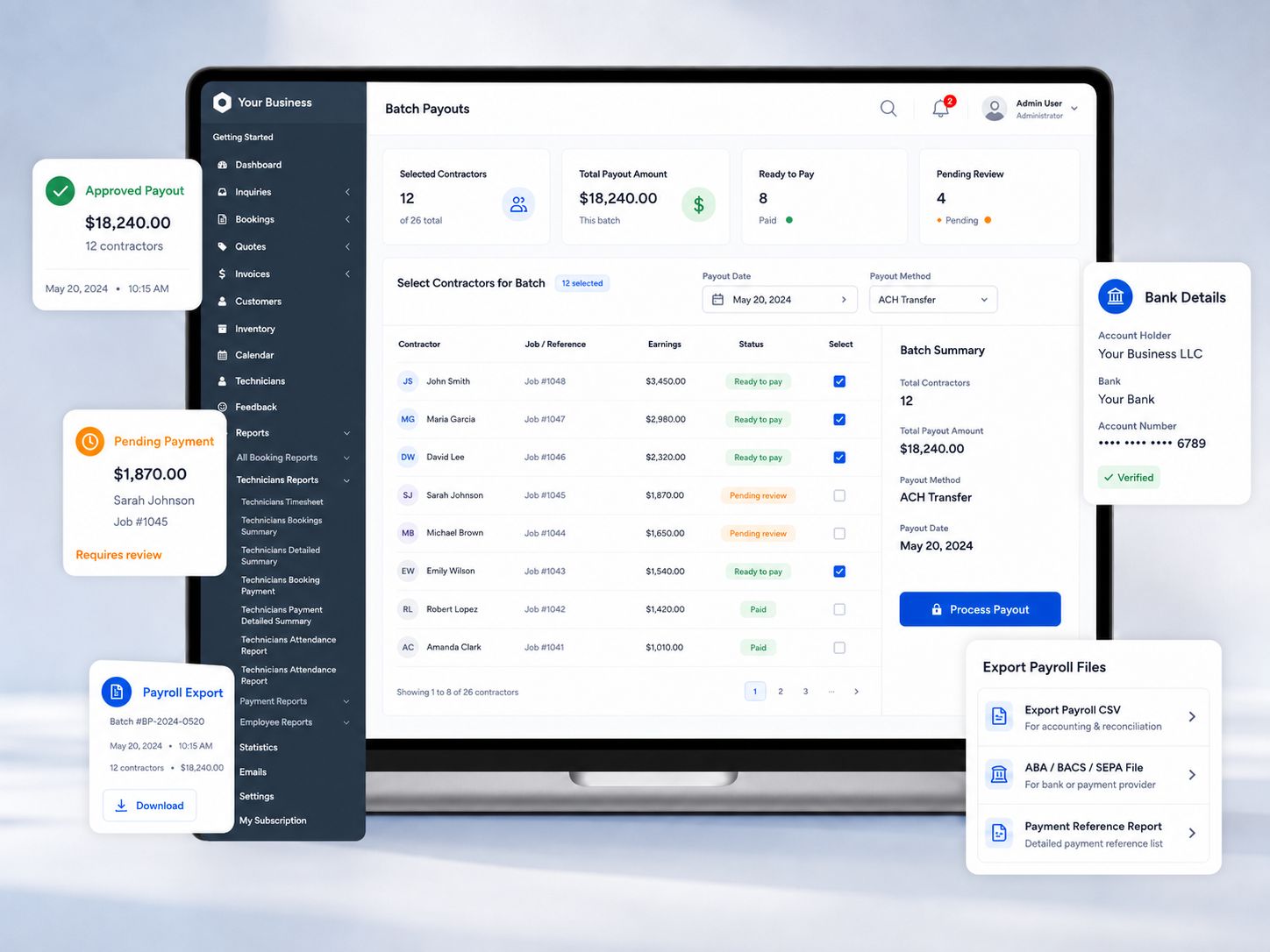
A cleaner payout record can include: Pay period Worker Included bookings Booking count Invoice total Amount paid Amount due Payment method Payment reference Notes
Earnings calculation rules
Pay each worker the right way without creating a separate spreadsheet for every agreement
Different workers are often paid in different ways. OctopusPro helps you keep those rules connected to the worker, service and booking, so your team can calculate earnings more consistently before payouts are approved.
1
Service defaults
Set default pay rates, commission rules or payout amounts for each service, work type or job category.
2
Worker agreements
Apply each fieldworker’s own pay agreement, such as hourly, fixed, percentage, commission or contractor payout rules.
3
Worker-service overrides
Pay a specialist, senior technician, subcontractor or contractor differently for a specific service without changing every worker’s default rule.
4
Booking overrides
Handle one-off bonuses, deductions, reimbursements, corrections, special agreements or custom splits on a specific booking.
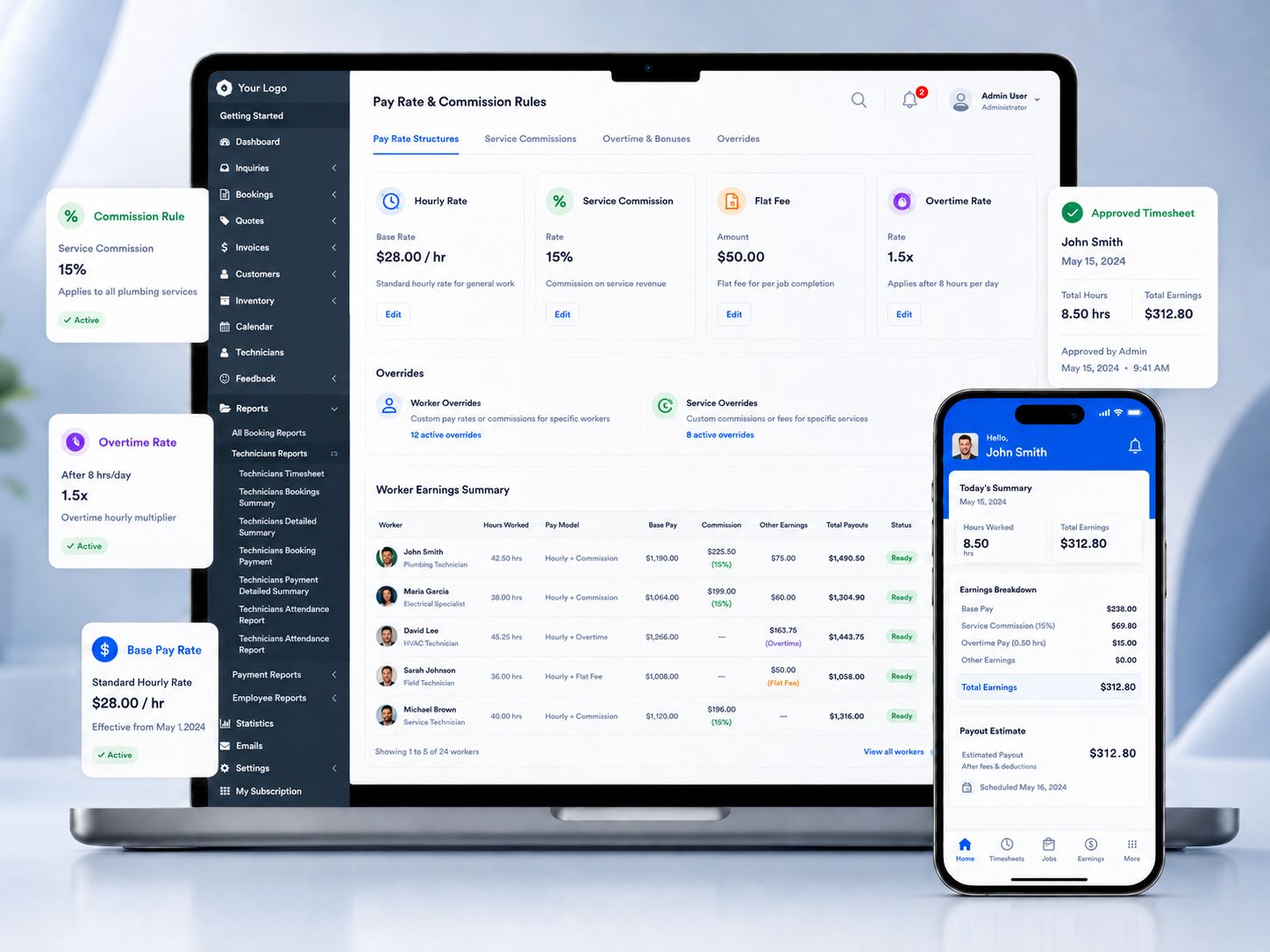
Support every common pay model
Use the structure that matches how your team is actually paid instead of forcing everyone into the same payout rule.
Supporting features
- Hourly pay
- Fixed job or flat-fee payouts
- Commission-based earnings
- Service-based pay
- Hybrid pay structures
Handle exceptions without breaking defaults
Keep your standard rules clean while still allowing authorised admins to handle real-world exceptions.
Supporting features
- Booking-level payout overrides
- Bonuses and deductions
- Reimbursements and corrections
- Product/add-on/tip-related earnings
- Admin-controlled exceptions
Manage workers with different agreements
Keep employees, contractors, subcontractors, salespeople, assistants and crews on the right payout logic without duplicating records.
Supporting features
- Contractor payouts
- Subworkers and crews
- Role-specific rules
- Worker-specific service overrides
- Multi-worker job splits
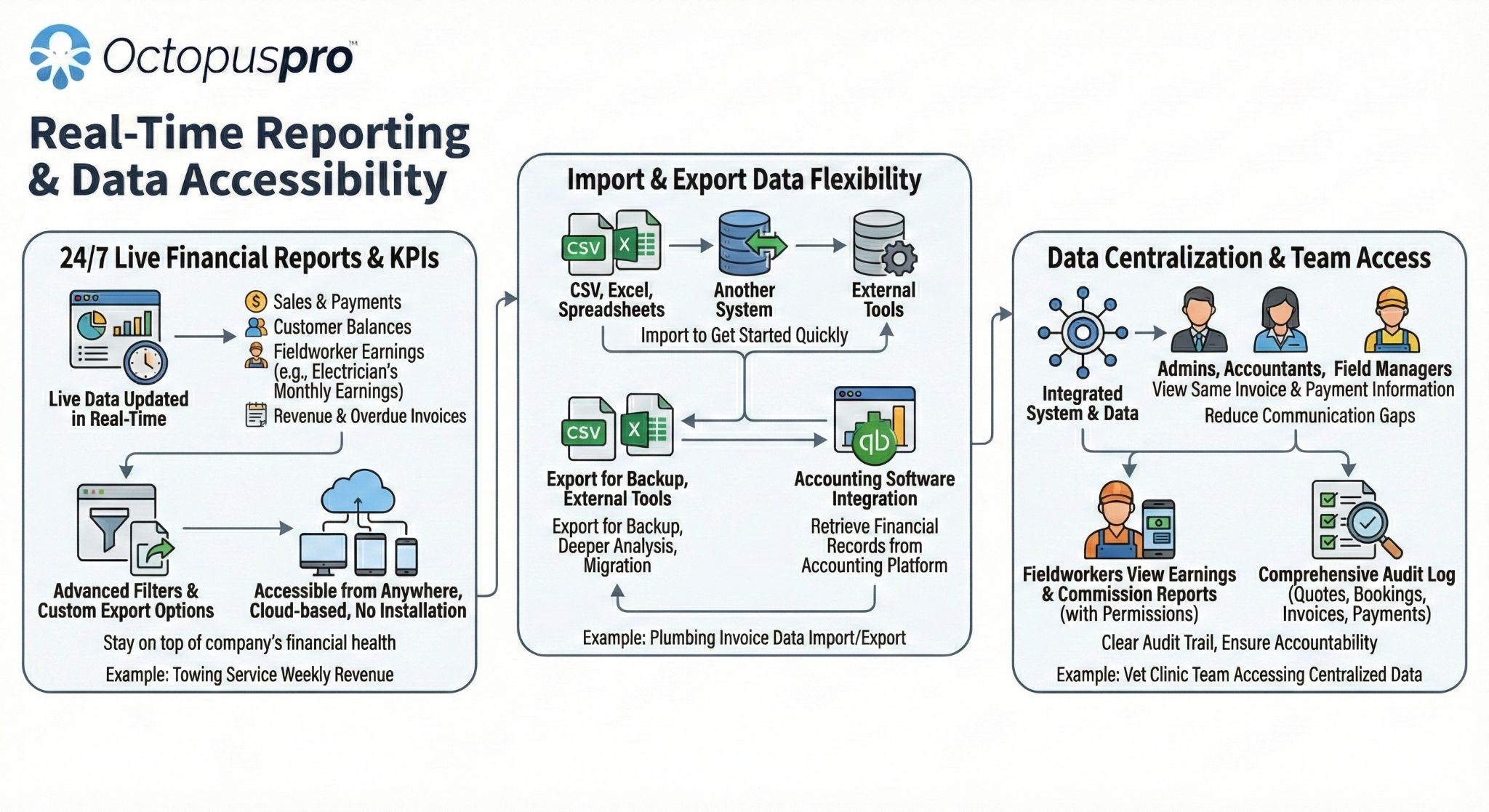
Timesheets and attendance
Reduce pay disputes by basing payroll preparation on real job activity
Your team should not need to guess whether a worker attended, how long they were on site, or which appointment caused an overrun. OctopusPro helps connect payroll preparation to scheduled hours, actual attendance, job progress and approved time records.
Compare planned time with actual work
See where jobs finished early, ran late, required breaks or need approval before payable hours are accepted.
Supporting features
- Timesheet Summary report
- Scheduled vs actual hours
- Break hours
- Approved hours
- Missing time corrections
Trace time to the exact job or appointment
Review the record behind the hours instead of accepting a number with no job-level context.
Supporting features
- Booking-level timesheet drill-down
- Appointment-level breakdowns
- Appointment start and end time
- Location and service context
- Export, print or email timesheet records
Improve attendance evidence
Give managers stronger context when reviewing lateness, missing check-outs, disputed hours or job progress updates.
Supporting features
- Check-in and check-out tracking
- On the Way, Arrived, Started and Finished milestones
- GPS attendance context
- Auto check-out support
- Forced attendance/job progress updates

Approvals, holds and audit trail
Avoid paying the wrong amount before issues, adjustments and payment evidence are checked
The benefit of stronger payout controls is not just preventing overpayment. It also gives your business a fair process for disputed jobs, complaint-based holds, cash/payment review, corrections and approval evidence before workers or contractors are paid.
Stop unresolved jobs being paid too early
Supporting features
- Payment holds
- Complaint and issue-based holds
- Release controls
- Before-payout approval checklist
Verify payments collected in the field
Supporting features
- Pending payment approval
- Cash payment review
- Cheque payment review
- EFT and offline payment review
Keep corrections controlled and explainable
Supporting features
- Admin adjustments
- Deductions and corrections
- Manual notes
- Payment method review
Defend payout decisions later
Supporting features
- Audit trail
- Payout evidence
- Payout references
- Remittance records
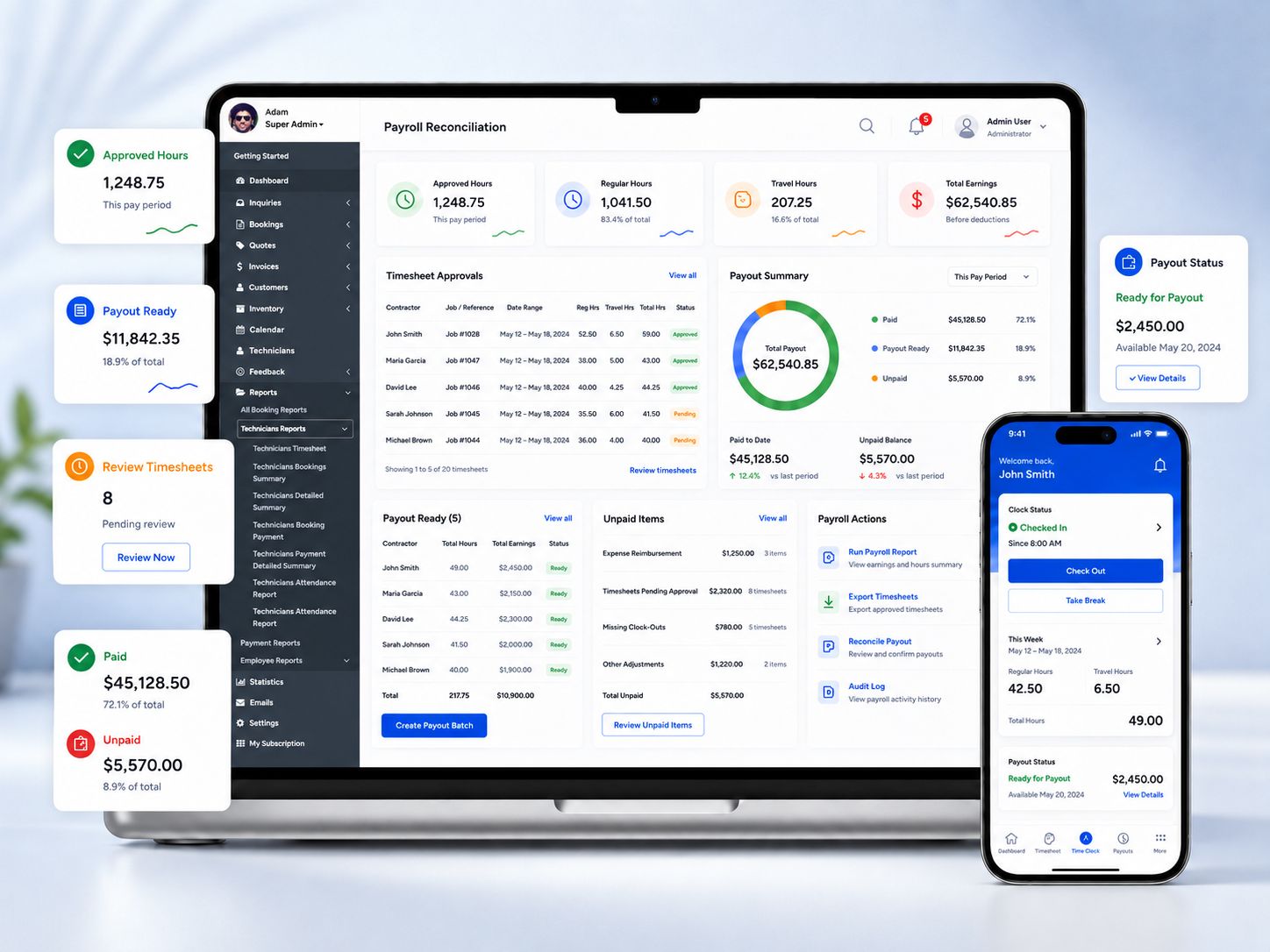
Before approving payouts, review: Completed jobs Approved hours Unresolved complaints Cash/EFT payment records Subcontractor invoices Holds Adjustments Export totals
Ready to review payouts with more confidence?
Use completed jobs, approved time, earning rules, worker visibility, payment holds, references and finance-ready exports to make each payment run easier to check before it is finalised.
Fieldworker visibility and permissions
Reduce payout questions without exposing sensitive business information
Workers want to understand what they earned and what is still outstanding. Your business still needs control over what rates, commissions, profit details and approval-sensitive information are visible. OctopusPro supports both sides through configurable visibility and app access.
Give workers clearer self-service answers
Help reduce payroll questions by showing workers the earning and payment information your business chooses to share.
Supporting features
- My Earnings dashboard
- Outstanding payments view
- Weekly, monthly and yearly earnings visibility
- Pay summaries and pay statements
Control what each worker can see
Show the information needed for transparency while protecting sensitive customer, business, finance and profitability data.
Supporting features
- Permission-controlled earnings visibility
- Show or hide rates
- Show or hide commission shares
- Show or hide payout details
- Role-based access controls
Support subcontractor payment evidence
Let contractors provide the records your office needs before payment approval where your workflow requires supplier-style invoices.
Supporting features
- Subcontractor tax invoice upload
- Fieldworker invoice-to-company workflow
- Contractor payment approval support
- Controlled document visibility
Subcontractors, crews and multi-worker jobs
Manage mixed worker models without making every job a manual payout puzzle
Service businesses rarely pay every worker the same way. OctopusPro helps organise payout preparation around employees, contractors, subcontractors, lead fieldworkers, assistants, subworkers and crews — including jobs where more than one person contributes to the same booking.
Handle multiple people on one job
Supporting features
- Multi-fieldworker jobs
- Multi-worker job earnings split
- Appointment and service context
- Different workers in one booking
Support different roles in the same team
Supporting features
- Employees
- Contractors
- Subcontractors
- Assistants and subworkers
- Lead fieldworkers
Make crews easier to review
Supporting features
- Crew payout review
- Lead fieldworker accountability
- Subworker timesheet/pay tracking
- Crew-based payout context
Keep complex pay structures organised
Supporting features
- Different pay rules in one team
- Hourly plus commission teams
- Contractor-heavy teams
- Employee-heavy teams
Bank details and payment exports
Move from approved payout records to cleaner payment preparation
Once payouts are approved, finance needs clean payment data. OctopusPro helps prepare exportable records, payout references and worker bank-detail workflows so payment runs can be handed to your bank, finance team, payroll processor or accounting workflow with fewer manual steps.
Keep payout details current and controlled
Supporting features
- Fieldworker bank details storage
- Self-service payout detail updates where enabled
- Admin-controlled access to sensitive bank/payout information
- Bank detail security and audit logs
Reduce manual bank-file preparation
Supporting features
- Payment to Fieldworkers report
- CSV and Excel payout exports
- Bank-ready batch payment files
- Payment dates, references and notes
Support different countries and bank workflows
Supporting features
- ABA exports for Australia
- NACHA/ACH exports for the US
- BACS exports for the UK
- SEPA XML, ISO 20022 and CPA-005 references
- Bank CSV and configuration-based formats
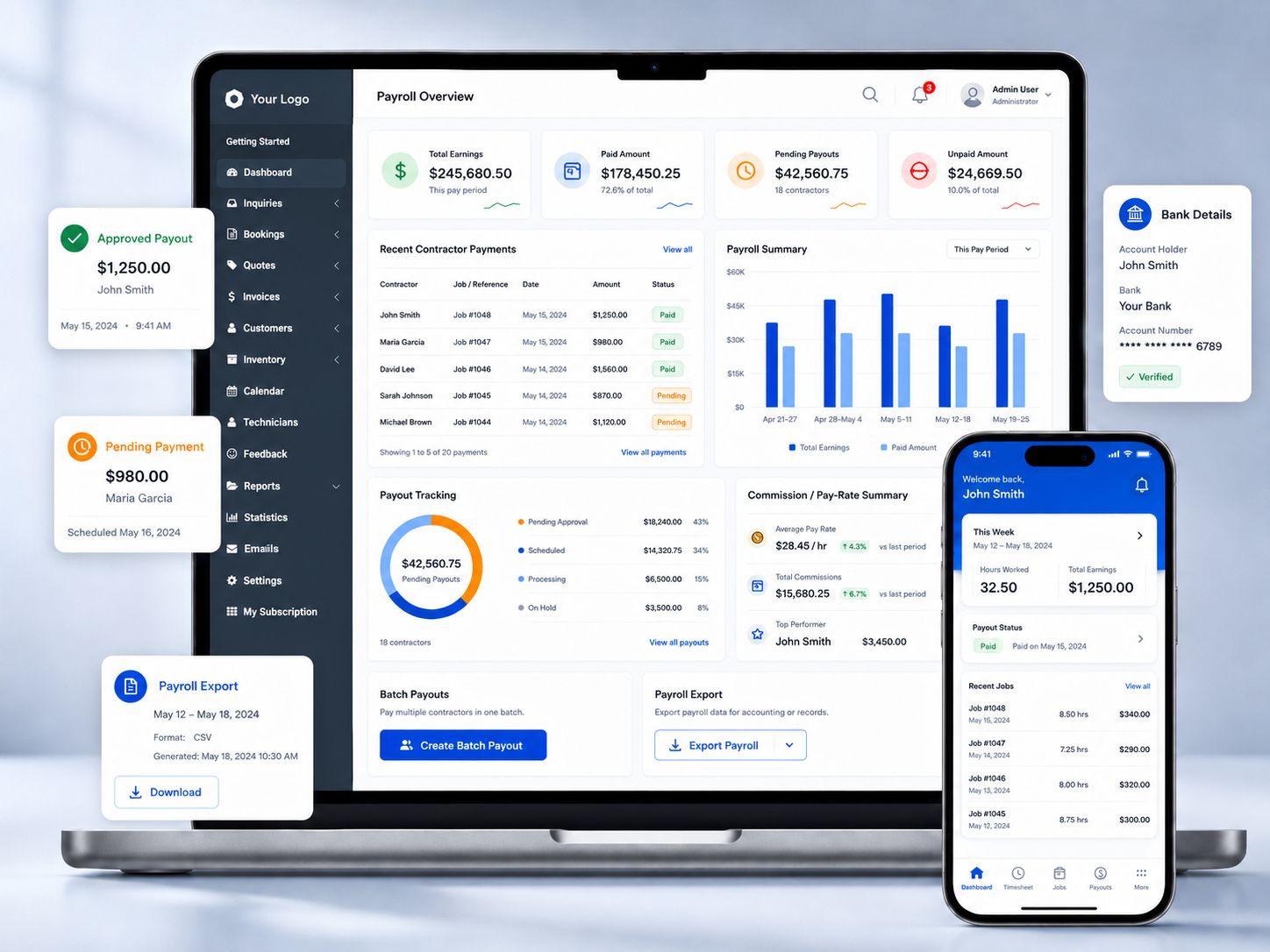
Important: Payment-file availability, export formats and bank acceptance depend on your country, bank, configuration and enabled payment workflow. OctopusPro helps prepare and record payout data, but your bank, accountant or payroll process remains responsible for final payment execution and compliance.
Advanced payout option
Support marketplace-style split payouts when your business model needs automation
Some businesses need manual payout review and bank exports. Others operate more like marketplaces, where payments may need to be split between the platform/business and connected contractors. OctopusPro supports Stripe Connect workflows for businesses that need that advanced structure.
Route payment shares through a marketplace-style workflow
Use Stripe Connect when your business model needs connected provider accounts and automated split payout logic.
Supporting features
- Connected fieldworker or contractor Stripe accounts
- Marketplace-style split payouts
- Provider/contractor share routing
- Platform fee or commission retention
- Individual provider or contractor payout context
Choose the right payout route
Stripe Connect is powerful, but not every business needs automated split payouts. Normal payroll reports and bank exports may be better for employee-heavy or review-heavy workflows.
Supporting features
- Stripe Connect audit trail
- Manual review before automation where needed
- Bank export route for standard payout workflows
- Issue/hold review before relying on automation
Reports, finance and accounting connection
Give finance clearer payout records without mixing worker payouts with customer invoicing
Worker payout records should stay connected to finance without confusing them with customer invoicing. Use this workflow for fieldworker earnings, payroll preparation, contractor payments and payout reports. Use Integrated Accounting for customer invoices, deposits, refunds, statements, reconciliation and Xero/QuickBooks.
Give management better payout visibility
Supporting features
- Payroll ledgers
- Outstanding payout reporting
- Contractor payout summaries
- Technician/fieldworker payment detail
- Reports traceable back to bookings and jobs
Account for tips and gratuities cleanly
Supporting features
- Customer tips and gratuities
- Admin, fieldworker and customer tip entry
- Tip configuration options
- Tip refund visibility
- Separate gratuity reporting context
Hand cleaner data to finance and accounting
Supporting features
- Finance team exports
- Xero/QuickBooks workflow positioning
- Supplier/vendor-style accounting handoff
- Connection to Integrated Accounting
- Payout records linked to worker/job records
Use this worker payout workflow for: Worker payouts Payroll preparation Contractor payments Payout reports Use Integrated Accounting for: Customer invoicing Payments Refunds Statements Reconciliation Xero/QuickBooks
Customer payment context
Review worker payouts with the right customer payment context
Worker payouts are easier to review when customer payment status, invoice progress, surcharges and reconciliation context are visible alongside completed job records. This helps finance teams confirm whether a job is ready for payout, needs review, or should remain on hold until the payment picture is clear.

Get paid faster
Give your team better payment visibility so completed jobs, customer payment status and worker payout readiness can be reviewed with less back-and-forth.

Add surcharges where needed
Keep payment terms, credit card surcharges and customer payment settings aligned with the wider finance workflow that supports payout review.

Track payment evidence
Use invoice and customer payment records as supporting context when reviewing contractor payouts, payment holds and finance exports.
Best setup route
Choose the setup path that matches your payout workflow
To keep setup practical, map the way your team pays people first. Then choose the supporting features: pay rules, timesheets, approvals, worker visibility, exports, Stripe Connect or accounting handover.
For owners
See that worker payouts are based on real jobs, approved records and clear payout evidence, not manual guesswork.
Best used for
- Outcome dashboard
- Payout reports
- Dispute controls
- Finance handover
For operations
Catch incomplete jobs, missing attendance, issue holds and wrong worker assignments before payout.
Best used for
- Timesheets
- Attendance
- Checklists
- Booking filters
For finance
Receive cleaner ledgers, payment references, export files and records that can be reconciled later.
Best used for
- Payment to Fieldworkers
- Bank details
- Exports
- Accounting connection
For fieldworkers
See the right earnings and outstanding-payment information without exposing sensitive business data.
Best used for
- My Earnings
- Pay summaries
- Invoice upload
- Permission controls
Related OctopusPro workflows
Connect worker payouts to the surrounding field service workflow
Timesheets and attendance
Use fieldworker timesheet, check-in/out and GPS attendance records to support payroll preparation.
Fieldworker Timesheet Summary Report guide
Fieldworker Check-In and Check-Out guide
Fieldworker GPS Tracking guide
Fieldworker app and job management
Connect payouts to job status, attendance, app updates, worker profiles and multi-worker job assignments.
Fieldworker start and finish job workflow guide
Fieldworker management guide
Assign multiple fieldworkers to a booking guide

Finance, reporting and accounting
Give your office clearer payroll reports, payout records, reconciliation data and finance handoff information.
Fieldworker payroll management guide
Live reports and analytics guide
Payment import and reconciliation guide
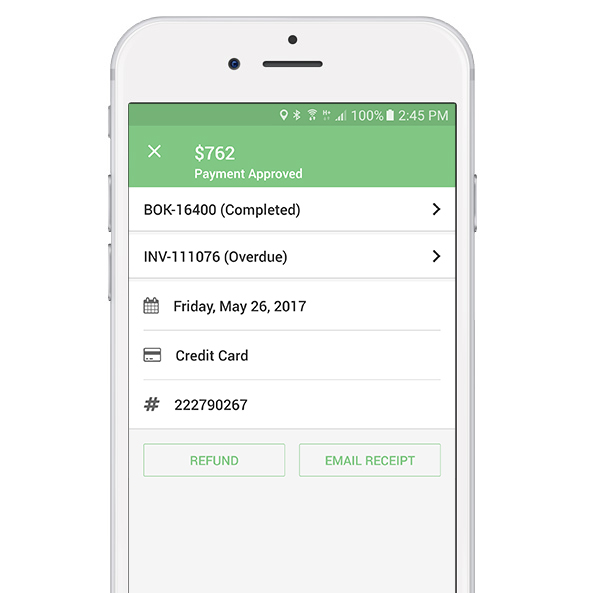
Payment approvals and holds
Review unpaid work, payment holds, issue outcomes and payout approval evidence before releasing worker payments.
Fieldworker payroll approval workflow guide
Complaint and issue management guide
Payment context and reconciliation
Use customer payment status, invoices, refunds and reconciliation context to support payout review decisions.
Payment import and reconciliation guide
Field service invoice payments guide

Sign-off and job evidence
Connect payout decisions to job evidence, customer sign-off, fieldworker updates and booking history where needed.
Digital signatures guide
Booking history and audit trail guide
FAQs
Payroll & Contractor Payment FAQs
Quick answers about fieldworker earnings, contractor payouts, payment holds, payout exports, Stripe Connect and payroll-ready reports.
Payroll scope and accounting boundaries
Questions about what OctopusPro prepares, what it supports, and where your payroll, accounting or compliance process still remains responsible.
Does OctopusPro replace full payroll software?
No. The benefit is better payroll preparation and contractor payout management from real job data. OctopusPro helps calculate earnings, review timesheets, prepare reports, manage payout approvals and export records, but tax, superannuation, payslips, payroll law and final compliance should remain with your payroll/accounting process.
Is this different from Integrated Accounting?
Yes. This workflow focuses on worker earnings, payroll reports, contractor payouts, timesheets, payment holds and payout exports. Integrated Accounting focuses on customer invoices, payments, deposits, refunds, statements, reconciliation and Xero/QuickBooks workflows.
Earnings calculation rules
Questions about hourly pay, fixed fees, commissions, service rules, overrides, bonuses, deductions and mixed worker agreements.
Can OctopusPro calculate contractor payouts?
Yes. The benefit is having worker payouts calculated from configured rules instead of manually rebuilt each pay cycle. Features include hourly pay, fixed job pay, commission pay, service-based rules, worker-specific agreements, worker-service overrides, booking-level overrides, bonuses, deductions, reimbursements and hybrid structures.
Can different workers on the same job have different pay rules?
Yes. This helps mixed teams stay organised. OctopusPro can support employees, contractors, subcontractors, lead fieldworkers, assistants, subworkers and crews with different pay structures, including jobs where multiple fieldworkers are assigned to the same booking.
Approvals, holds and audit trail
Questions about reviewing payouts before payment, withholding disputed jobs, approving field-entered payments and tracing payout decisions later.
Can admins review payouts before workers are paid?
Yes. The benefit is a safer approval process before money is released. Admins can review payable jobs, timesheets, attendance, customer payment status, unpaid work, issue holds, payment references, admin adjustments and payout totals before saving records as paid or exporting payment data.
Can payouts be held for disputed jobs?
Yes. OctopusPro can support payment holds and issue-based payout review, helping businesses pause payment for disputed, incomplete, complaint-affected or unresolved jobs until the correct review is completed.
Can office staff approve cash, cheque or EFT payments recorded by fieldworkers?
Yes. The benefit is better payment control. Offline or field-recorded payments can be reviewed and approved by authorised users before they are treated as reliable payment evidence in the payout process.
Can payout decisions be traced later?
Yes. OctopusPro helps keep clearer payout evidence through booking records, activity history, payment references, notes, adjustment records, remittance summaries, payout ledgers and exported reports.
Fieldworker payroll and payouts
Questions about payroll-ready data, contractor payouts, fieldworker earnings, batch payments, payment holds and worker-facing visibility.
Can fieldworkers see their earnings?
Yes, where enabled. The benefit is fewer payout questions from workers. The My Earnings dashboard can show earnings, outstanding payments, weekly/monthly/yearly views and pay summaries, while permissions control whether rates, commission shares and payout details are visible.
Can subcontractors upload tax invoices?
Yes, where permissions allow it. This helps subcontractor-heavy businesses collect supplier-style invoice evidence against bookings before payment approval and payout reconciliation.
Can OctopusPro track tips, bonuses and deductions?
Yes. The benefit is cleaner payout calculation and reporting. OctopusPro can support tips and gratuities, product/add-on-related earnings, bonuses, deductions, reimbursements and booking-level adjustments where configured.
Can payouts be traced back to the job?
Yes. Payout records can be connected back to bookings, services, workers, timesheets, payment status, invoice context, adjustments and payout references, making it easier to explain how each amount was prepared.
Exports, bank details and finance handover
Questions about payout exports, bank-ready files, fieldworker bank details and payment-ready records for finance teams.
Can OctopusPro export payout files?
Yes. The benefit is cleaner finance handoff. OctopusPro can support CSV/Excel exports and bank-ready batch payment workflows such as ABA, NACHA/ACH, BACS, SEPA XML, ISO 20022, CPA-005 or bank CSV depending on country, bank and configuration.
Can fieldworkers update their bank details?
Yes, where enabled. This can reduce admin chasing while keeping sensitive bank and payout information under controlled access, security and audit settings.
Stripe Connect and payment execution
Questions about marketplace-style split payouts, automatic payout execution, and when reviewed payout reports are the better fit.
Can OctopusPro support Stripe Connect split payouts?
Yes, where Stripe Connect is enabled and configured. The benefit is marketplace-style payout automation for provider models that need connected contractor accounts, platform fee retention and contractor share routing.
Should every business use Stripe Connect?
No. Stripe Connect is best for marketplace-style split payments. Many employee, contractor or subcontractor businesses are better served by reviewed payout reports, manual bank transfer/EFT workflows and bank-ready exports.
Why is this better than spreadsheets?
The benefit is that your payout process is connected to live operational records rather than manually copied data. Jobs, services, worker rules, timesheets, approvals, holds, adjustments, payment references and exports can be managed in one workflow.
Can OctopusPro pay workers automatically?
OctopusPro can prepare payout records, exports and, where configured, support Stripe Connect split payout workflows. Standard payroll or contractor payment execution is still handled through your bank, Stripe, payroll processor, accountant or finance process depending on setup.
Best next step
Choose the right path for your payout workflow
Whether you are replacing spreadsheets, reviewing a complex contractor setup, or connecting payout reviews with invoicing and reconciliation, start with the option that matches what your team needs to solve first.
Replacing payout spreadsheets?
Start by turning your existing payout process into a clearer setup inside OctopusPro, with worker rules, job filters and approval steps connected to real booking data.
- Map workers, pay rules and payout triggers
- Confirm completed-job filters and approval steps
- Prepare export requirements for finance or payroll
Need help choosing the right setup?
Book a demo if your payout process includes contractors, crews, commissions, timesheets, holds, disputes or finance review steps that need to work together.
- Review payroll preparation and contractor payout logic
- Check commission, crew and subcontractor scenarios
- Plan reports, approvals and export workflows
Need customer invoicing and accounting sync?
Use the Integrated Accounting workflow when the priority is customer invoices, payment cleanup, refunds, statements, reconciliation or Xero and QuickBooks handoff.
- Connect invoice and payment status to finance review
- Review refunds, statements and reconciliation tasks
- Separate customer accounting from worker payouts
Need a broader setup reference? Use the fieldworker payroll setup guide, the commission pay rates guide, and the payment reconciliation guide together when planning your rollout.
Ready to replace payout guesswork with clearer worker payment records?
Use OctopusPro to connect completed jobs, worker pay rules, timesheets, approvals, holds, contractor payout reports, bank exports and finance handover into one clearer payout workflow.