
Manage your mobile workforce, jobs, routes and timesheets from one connected platform.
OctopusPro helps service businesses coordinate mobile teams with connected field service management software, real-time fieldworker GPS tracking, job dispatch, mobile app updates, customer communication, payroll, invoices and reporting.
Replace phone calls, paper job sheets and disconnected mobile updates.
Mobile workforce management is not only about seeing where staff are. It is about giving every fieldworker, dispatcher, admin user and customer the right information at the right time, while every booking, route, timesheet, invoice and job record stays connected.
Assign
Send job requests and schedule changes to fieldworkers.
Navigate
Share route details, directions and ETA updates.
Track
Record GPS, check-in/out and job status milestones.
Complete
Capture forms, photos, signatures and proof of work.
Bill
Create invoices, collect payments and reconcile payroll.
Improve
Use reports, reviews and issue workflows to improve service quality.
Built for service businesses that manage people, jobs and customers in the field.
OctopusPro is designed for mobile teams that need more than a shared calendar or messaging app. It helps service businesses coordinate fieldworkers, contractors, appointments, routes, customer updates, job records, payments and reporting from one connected platform.
Trades, repairs and technical services
Coordinate technicians, urgent jobs, service areas, parts, checklists, proof-of-work records and on-the-way communication.
Home service and property teams
Manage mobile jobs, repeat visits, customer history, access notes, photos, forms, payments and customer follow-ups.
Transport, delivery and route-based teams
Plan locations, territories, ETAs, mobile updates, check-in/out records and job completion evidence.
Tutors, instructors and appointment teams
Schedule mobile, fixed-site or virtual sessions with reminders, recurring bookings, customer records and attendance history.
Employees, contractors and mixed workforces
Support internal staff, subcontractors, assistants and crews with permissions, job requests, timesheets and payroll evidence.
Growing field service operations
Replace manual processes with structured workflows that scale as booking volume, fieldworkers and customer expectations grow.
Stop relying on phone calls, spreadsheets and scattered messages to manage mobile work.
The biggest gains come when mobile workforce activity connects directly to bookings, customer records, fieldworker app updates, proof of work, invoices, payroll and reporting.
| Workflow | Manual mobile workforce management | OctopusPro mobile workforce management |
|---|---|---|
| Dispatching jobs | Office staff call or message fieldworkers one by one and manually update the schedule. | Send job requests, schedule updates and assignment changes through connected dispatch workflows. |
| Tracking fieldworkers | Managers chase updates by phone and customers ask where the technician is. | Use real-time fieldworker location tracking, check-in/out logs, job status updates and ETA communication. |
| Customer updates | Customers wait for manual calls, reminders and arrival updates. | Send booking confirmations, reminders, on-the-way SMS, ETA updates and follow-up messages automatically. |
| Job records | Photos, notes, forms and signatures are scattered across phones, paper or messages. | Capture forms, checklists, photos, signatures, comments and proof of work against the right job and customer. |
| Timesheets and payroll | Hours, commissions and job completion evidence are reconstructed later. | Connect check-in/out times, attendance records, completed work and payroll evidence to fieldworker reports. |
| Invoicing and reporting | Completed work still needs to be re-entered into invoicing, payment and reporting tools. | Connect job completion to invoices, payments, billing cycles, live reports and operational performance tracking. |
Built for real service operations, not generic task management.
OctopusPro connects the field, office and customer journey so every job update becomes useful business data instead of another disconnected message.
Manage bookings, dispatch, fieldworkers, customers, job records, invoices, payments and reporting from one service-business platform.
Use mobile/on-site, fixed-location, virtual and recurring service workflows without forcing every team into the same process.
Control permissions, job requests, subworkers, commissions, pay rates and timesheet records for different workforce structures.
Keep customer details, locations, assets, forms, photos, signatures, invoices, payments and communication tied to the right job.
OctopusPro works best for businesses that want more control without more admin.
Use OctopusPro when you want every field update, customer message and completed job to move the business forward instead of creating more follow-up work for the office.
Send job details, updates, notes and changes through connected workflows instead of repeated phone calls.
Use GPS visibility, check-in/out records, job status updates and mobile notifications to monitor work as it happens.
Capture forms, photos, signatures, comments and completion evidence from the field before invoicing or follow-up.
Keep customers informed with confirmations, reminders, on-the-way messages, ETA updates and post-service follow-ups.
Turn field activity into invoice, payment, timesheet, commission and payroll evidence with less double handling.
Use structured workflows, permissions, reports and automation as your bookings, customers and workforce grow.
See how mobile staff, office users and customers stay connected from one workflow.
A mobile workforce page should not feel like a series of dark image panels. This section breaks the page visually while showing how the customer booking experience, office workflow and fieldworker mobile updates connect across OctopusPro.
Customers book and stay informed
Customers can request services, receive confirmations, follow updates and manage booking details through connected customer communication workflows.
Office users coordinate the day
Dispatchers can review bookings, staff availability, service areas, exceptions, job records and customer communication from one central system.
Fieldworkers update jobs from the app
Mobile staff can receive work, navigate to jobs, update statuses, upload photos, complete forms and provide proof of work.
Records flow into reporting and billing
Time logs, job completion data, invoices, payments, ratings and follow-ups stay attached to the customer and booking history.
Replace disconnected mobile updates with one connected workflow.
Give your office, fieldworkers and customers one place to manage bookings, dispatch, job updates, proof of work, invoices and customer communication.
Help fieldworkers complete jobs properly from the field.
Use the mobile app to send job details, collect status updates, capture forms, record check-in/out times, upload photos and keep office staff updated without constant calls.
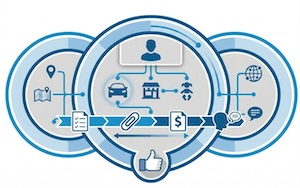
Reduce “where is my technician?” calls.
Keep customers informed with reminders, on-the-way messages, ETA updates, booking discussions and post-job follow-ups while your team stays focused on completing work.
Give fieldworkers the asset history, materials and job details they need before they arrive.
Mobile teams work faster when the app shows the right customer, property, asset, product and service history. OctopusPro can help attach related records, custom fields, parts, files and photos to the job so fieldworkers arrive prepared.
Customer Properties, Assets and Related Records
Connect vehicles, equipment, sites, pets, rooms, units or other related records to customers and jobs.
Products, Parts and Materials Management
Track products, consumables, add-ons and materials used by fieldworkers during service delivery.
Custom Fields for Field Service Jobs
Collect service-specific information, job requirements, access notes and operational details before work starts.
Arrive prepared and leave every job with a complete service history.
Connect customer records, assets, materials, custom fields, photos, forms and follow-up notes so your mobile team has the right information before, during and after every visit.
Turn mobile field activity into better decisions.
Use live reporting, timesheets, payroll evidence, customer feedback and job performance data to improve utilisation, service quality and profitability as your workforce grows.
What to look for in mobile workforce management software.
For buyers comparing mobile workforce management platforms, the strongest system should support the full field workflow — not just GPS dots on a map.
Need help choosing the right mobile workforce platform?
OctopusPro is built for service businesses that need scheduling, dispatch, fieldworker app workflows, job records, customer communication, invoicing, reporting and payroll visibility in one platform.
Show mobile workforce workflows across different service industries.
OctopusPro can support mobile teams in trades, repairs, education, home services, transport and other service industries. These examples show how the same workforce-management platform can adapt to different field workflows while keeping scheduling, dispatch, customer communication, job records and payments connected.
Mobile mechanics and repairs
Use proximity-based dispatch, vehicle records, job materials, mobile invoicing and ETA updates for workshop, roadside and mobile mechanic workflows. See mobile mechanic service management software.

Electricians and trade services
Coordinate technician schedules, service areas, compliance checklists, emergency work, on-the-way updates and customer communication. See electrician scheduling and dispatch software.

Tutoring and private lessons
Manage tutors, lesson schedules, student or parent communication, attendance records, online/in-home locations and recurring lesson bookings. See tutoring scheduling and private lesson booking software.
Roll out mobile workforce management in stages without overwhelming your team.
You do not need to activate every feature at once. Start with the mobile workflows that remove the most admin first, then expand into deeper tracking, automation, payroll, customer self-service and reporting as your team adapts.
Profiles and permissions
Add fieldworkers, roles, services, working hours, service areas and app access rules.
Dispatch and job updates
Send job requests, enable notifications, track acceptance, use status updates and reduce phone calls.
GPS and timesheets
Turn on location workflows, check-in/out, attendance reports and mobile job history.
Forms and proof
Add job sheets, checklists, photos, customer signatures, issue reasons and completion records.
Payroll and reporting
Connect time worked, job revenue, commissions, payouts, app earnings and performance dashboards.
Explore mobile workforce management features in OctopusPro.
Explore the OctopusPro features that help mobile service teams schedule work, dispatch fieldworkers, track location and attendance, capture proof of work, manage payroll, communicate with customers, automate follow-ups and report on field performance from one connected platform.
Fieldworker App Workflows
- Mobile Workforce Management Software
- Fieldworker App Notifications and Alerts
- Job Request Acceptance and Decline Workflows
- Mobile Job Navigation, ETA and Directions
- Fieldworker Start, Pause, Finish and Unable-to-Start Workflow
- On-the-Way SMS Notifications with Live Tracking
- Real-Time Booking Discussions and Collaboration
GPS, Routes and Attendance
- Real-Time Fieldworker GPS Tracking
- Fieldworker Check-In, Check-Out and GPS Time Logs
- Fieldworker Timesheet Summary Reports
- Nearby Bookings and Location-Based Dispatch
- Google Calendar Sync for Fieldworker Availability
- Booking Location Types for Mobile, Storefront and Virtual Jobs
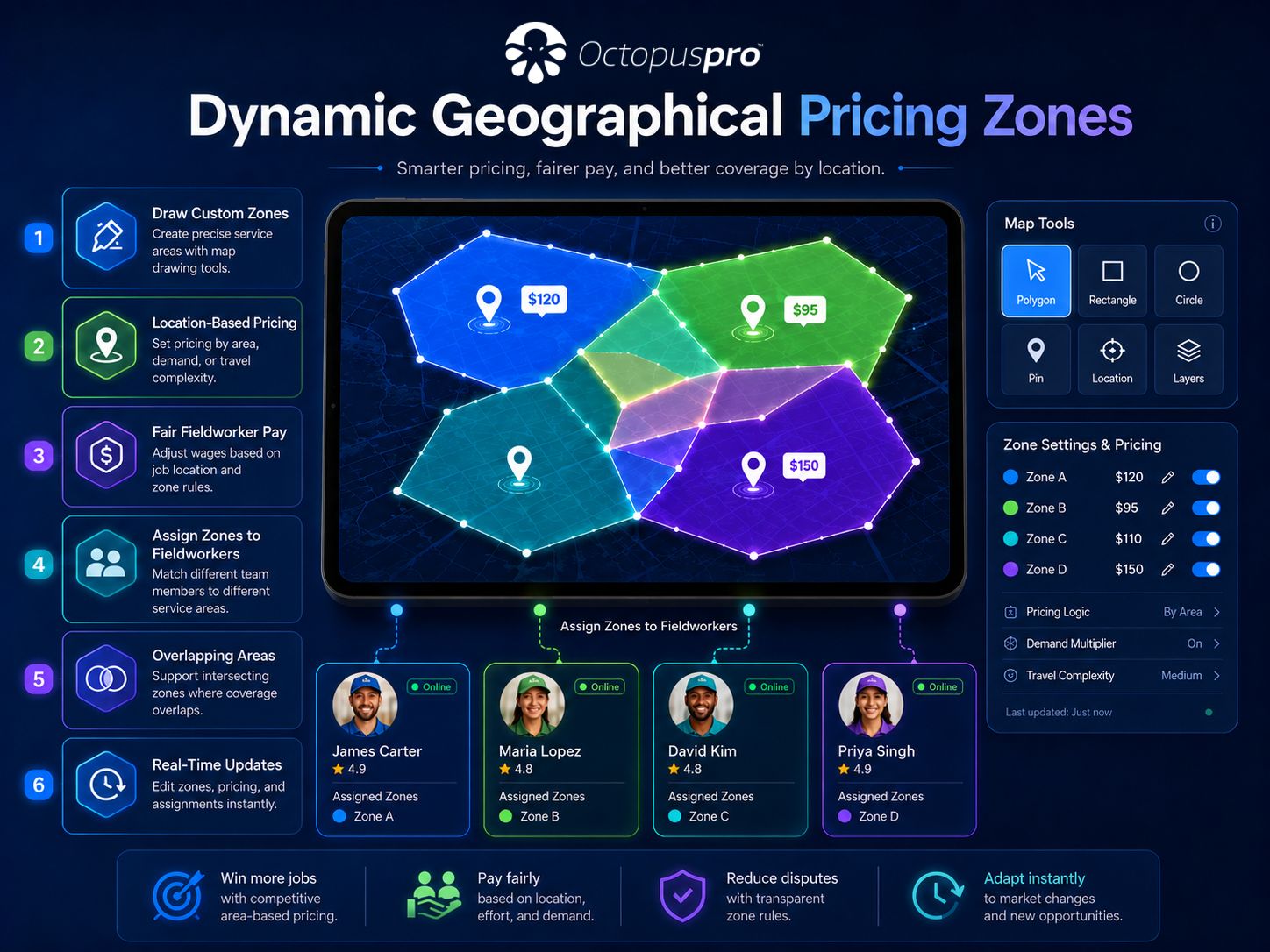
- Fieldworker Service Areas and Territory Management
Proof of Work and Job Records
Payroll, Earnings and Billing
Customer Self-Service
Admin, Security and Reporting
- Fieldworker Permissions and Access Control
- Role-Based Access Control and User Permissions
- Fieldworker Device Audit and App Access Control
- Open API, Webhooks and Third-Party Integrations
- Live Reports and Field Service Analytics
- Issue and Complaint Management Workflow
- Field Service Management Software
Service Setup and Capacity Control
See how mobile workforce operations connect across the business.
The diagrams below show detailed OctopusPro workflows for customer self-service, fieldworker app navigation, service areas, booking location types, calendar sync and live reporting. Select any diagram to view it in more detail.
Watch how OctopusPro supports mobile field operations.
Mobile workforce management overview
Fieldworker app and mobile operations
Mobile workforce management software FAQs
What is mobile workforce management software?
Mobile workforce management software helps businesses schedule, dispatch, track and support employees, contractors and fieldworkers who work away from a central office. OctopusPro connects mobile app workflows with bookings, customers, jobs, invoices, payments, communication and reporting.
What is the difference between mobile workforce management and field service management?
Mobile workforce management focuses on fieldworker activity such as availability, job updates, GPS location, check-in/out, routes, timesheets and field communication. Field service management connects those activities to the wider business workflow, including leads, customers, bookings, quotes, invoices, payments, assets and reporting.
Can OctopusPro track fieldworkers in real time?
Yes. OctopusPro supports real-time fieldworker GPS tracking and mobile job status visibility, helping dispatchers see who is working, where fieldworkers are and which jobs need attention.
Can fieldworkers check in and out from the mobile app?
Yes. Fieldworkers can use the mobile app to update job progress, check in, check out, record attendance, complete forms, upload photos and keep job records up to date from the field.
Can fieldworkers accept or decline jobs from the mobile app?
Yes. OctopusPro supports job request workflows where fieldworkers can receive job notifications and respond from the app, depending on your configuration and dispatch rules.
Can customers receive ETA and on-the-way updates?
Yes. OctopusPro can help keep customers updated with booking reminders, on-the-way SMS notifications, ETA communication and follow-up messages, reducing manual calls between customers and office staff.
Can OctopusPro manage contractor payments and commissions?
Yes. OctopusPro supports fieldworker payroll, contractor payment and commission workflows by connecting job completion, timesheets, pay rates, service delivery records and reporting.
Can mobile fieldworkers upload photos, forms and signatures?
Yes. Mobile fieldworkers can capture job forms, checklists, photos, signatures, notes and proof-of-work records so the office has cleaner job evidence for invoicing, quality control and customer history.
Can OctopusPro help with urgent jobs and schedule disruptions?
Yes. OctopusPro can support job request acceptance, decline handling, customer rescheduling, on-the-way updates, GPS visibility, booking discussions and automated follow-up procedures to help teams respond when the schedule changes.
Can mobile workforce processes be standardised across all fieldworkers?
Yes. OctopusPro supports forms, checklists, custom fields, required photos, file uploads, customer signatures, job statuses, permissions and reporting workflows that help create a more consistent mobile service process.
Does OctopusPro support mobile, fixed-location and virtual service teams?
Yes. OctopusPro can support mobile on-site services, fixed-site or branch-based services, and virtual or online service appointments, depending on how each service is configured.
Can managers and dispatchers use OctopusPro while away from the office?
Yes. OctopusPro is cloud-based, so owners, managers and authorised admin users can access booking, dispatch, customer, invoice, payment and reporting workflows from supported devices, depending on their permissions.
Is OctopusPro suitable for small mobile service businesses?
Yes. OctopusPro is suitable for small and growing mobile service businesses that want to replace manual calendars, phone calls, paper job sheets and disconnected messaging with a more organised field service workflow.
Give your field team the mobile tools to work faster, communicate clearly and finish jobs with better records.
Start with scheduling, dispatch, GPS tracking, job updates, timesheets, forms, invoicing, payments and payroll, then expand into deeper automation as your team grows.