
Put booking, tracking, payment and rebooking in your customer’s pocket
Business benefit: make your service business easier to find, easier to book, easier to pay and easier to use again, so customers can move from enquiry to repeat booking with less friction. OctopusPro features that deliver it: your branded iOS and Android app connects to your customer portal, online booking workflow, fieldworker app, admin dashboard, automations, payments, invoices, reporting and repeat-booking tools.
More setup guides
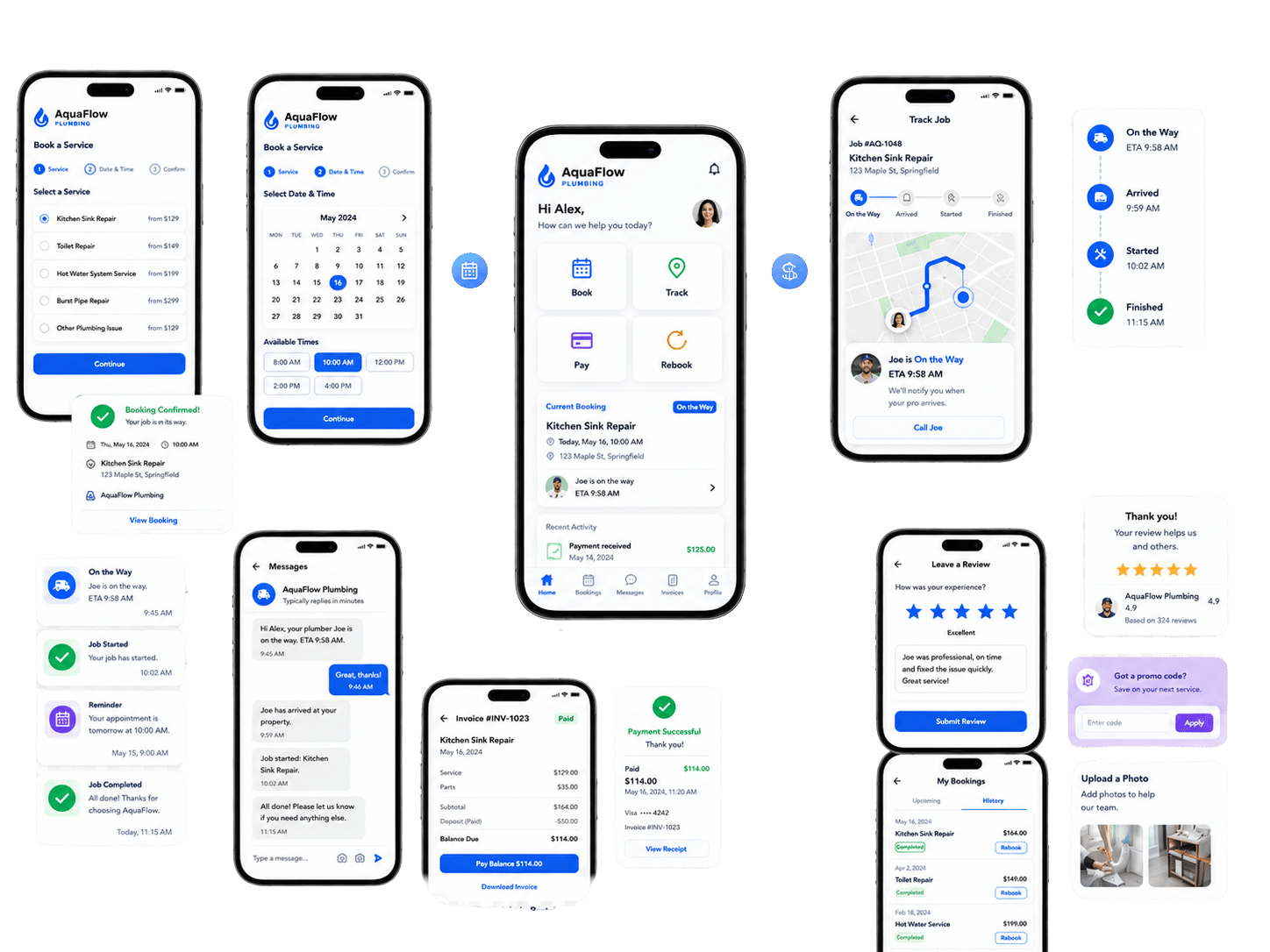
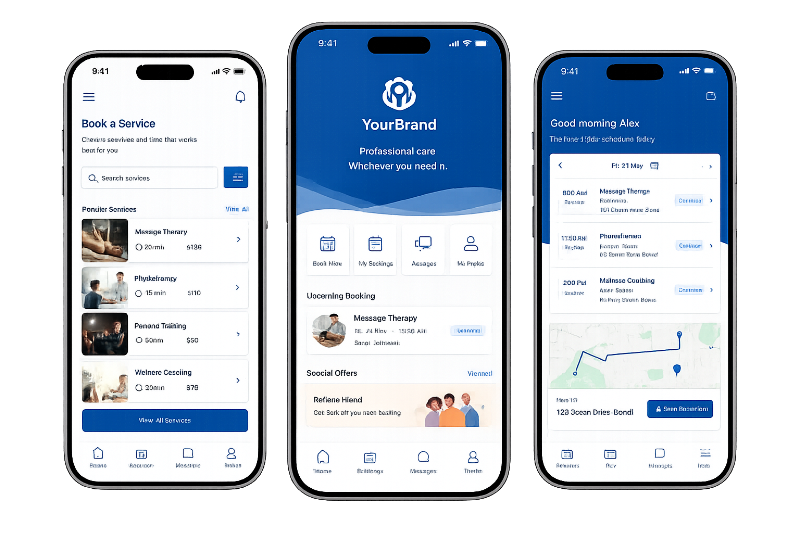
A polished mobile app for service businesses. Present your services, booking options, job updates, payments, reviews and repeat bookings in a branded customer experience connected to your OctopusPro workflow.
Test the workflow before you invest in the branded app launch
A branded app converts better when it is built around a workflow that already makes sense: quote requests, bookings, availability, payments, reminders, fieldworker updates, invoices, reviews and rebooking.
Start by using your OctopusPro trial to confirm the customer journey, then plan the app branding, store presence and launch support once the workflow is clear.
1. Customer flow
Confirm how customers book
Test services, quote requests, booking availability, customer details, forms, files, deposits and confirmation messages before app launch.
2. Operations flow
Confirm how jobs move
Check how bookings connect to fieldworkers, service areas, working hours, job updates, notes, photos, forms and completion steps.
3. Payment flow
Confirm how money is collected
Review deposits, invoices, payment terms, receipts, refunds, customer statements and the customer payment experience.
4. Retention flow
Confirm how customers return
Plan review requests, rebooking actions, vouchers, promotions, reminders and customer history so the app supports repeat work.
Choose the right customer experience for the stage you are at
The customer portal and branded app can work together. Use the portal to test the customer journey quickly, then launch the branded app when you want a stronger mobile presence, repeat engagement and App Store / Google Play visibility.
Customer portal
Best for testing and launching customer self-service quickly
The customer portal is browser-based and helps you validate online booking, quote requests, payments, customer files, service history and rebooking before investing in a full branded app rollout.
- Fast to activate from your website.
- Useful for testing service setup, forms and pricing rules.
- Works well for customers who prefer browser access.
- Can become the foundation for the branded app journey.
Branded app
Best for stronger brand presence and repeat engagement
The branded app gives customers a more premium mobile experience while keeping booking, tracking, payments, reminders, invoices and rebooking connected to OctopusPro.
- App Store and Google Play presence.
- Better for repeat customers and push engagement.
- Stronger brand ownership than a generic portal link.
- Useful for businesses that want customers to return often.
Recommended path: start with the portal and workflow configuration, confirm the customer journey, then launch the branded app when your services, pricing, payments, fieldworker workflow and communication rules are ready.
A branded app works best when the workflow is ready
Branded apps convert best when they are attached to a clear customer journey, not just a logo and app icon. The strongest launches usually have clear services, repeat customers, fieldworker workflows, payment rules and customer communication already mapped.
✓
You want repeat bookings
Customers return for future appointments, recurring services, maintenance, classes, packages or follow-up work.
✓
You want fewer manual calls
Customers should be able to quote, book, track, pay, review and rebook without waiting for staff.
✓
Your field team needs structure
Jobs, status updates, forms, photos, signatures, invoices and payments need to stay connected in one workflow.
A branded app may not be the right first move if…
- You only need a simple enquiry form or one-off booking page.
- Your services, pricing, forms or payment rules are not clear yet.
- You are not ready to manage bookings, customers and staff through OctopusPro.
- You do not expect customers to book, track, pay or rebook regularly.
Better first step: start with the OctopusPro trial and customer portal, then plan the branded app when the workflow is ready.
See the app experience across the whole job
Make the whole service workflow easy to understand: customers book and track work, fieldworkers update jobs from the app, and admins keep bookings, payments and reporting under control.
CustomerBook a service
Choose a service, answer booking questions, see availability and confirm.
CustomerTrack the job
View reminders, ETA, status updates, messages and booking details.
FieldworkerComplete the work
Update status, navigate, upload photos, complete forms and collect signatures.
AdminStay in control
Manage bookings, invoices, payments, reviews, reports and rebooking workflows.
Launch a branded app your customers will actually use
Business benefit
Reduce hesitation by showing that the branded app is not a disconnected technical project. It is a guided customer, fieldworker and admin workflow connected to the systems your business already needs to run.
OctopusPro features that deliver it
Branded app setup, customer portal configuration, booking rules, fieldworker workflows, payment settings, notifications, service content, reporting and rebooking tools are planned together around the customer journey.
Why business owners can trust the branded app workflow
You are not just launching an app icon. You are extending your booking, payment, dispatch and customer-retention workflow into a branded customer experience that is connected to your daily operations.
Launch support for real service operations
You do not need to plan every step alone. OctopusPro helps connect the branded app experience to the way customers book, fieldworkers complete jobs, invoices get paid and repeat work is encouraged.
Built for service businesses that need one connected workflow: customer bookings, fieldworker updates, payments, invoices, reminders, reviews and repeat work stay connected instead of being managed through separate apps, spreadsheets, messages and manual follow-up.
Designed for service businesses that rely on repeat work
Business benefit: focus the branded app on businesses where customer convenience, recurring work, fieldworker coordination and payment collection actually affect revenue.
OctopusPro features that deliver it: portal-first, app-first and fieldworker-first rollout options let you launch the parts that matter most first.
Best-fit businesses
Ideal for mobile service businesses, appointment-based teams, recurring service providers, businesses with fieldworkers, and companies that want customers to self-serve without losing admin control.
Features included
Online booking, customer portal, branded app, fieldworker app, recurring bookings, service areas, dispatch and reporting.
When it becomes a smart move
A branded app becomes more valuable when you are getting repeat customers, customers ask for updates, staff chase payments, fieldworkers need better job context, or you want more direct rebooking.
Features included
ETA updates, app notifications, payment links, job history, service reminders, reviews, vouchers and rebooking from history.
Launch without overwhelming the team
Start with the portal, branded app, fieldworker workflow or admin controls depending on your biggest bottleneck, then expand into the full connected workflow.
Features included
Customer portal settings, service setup, fieldworker permissions, working hours, booking rules, payment methods and analytics.
More setup guides
Not sure if this fits your business? The branded app is strongest when customers book repeatedly, need reminders or status updates, pay invoices online, use service history, or interact with fieldworkers before and after appointments.
See how the branded app supports different service businesses
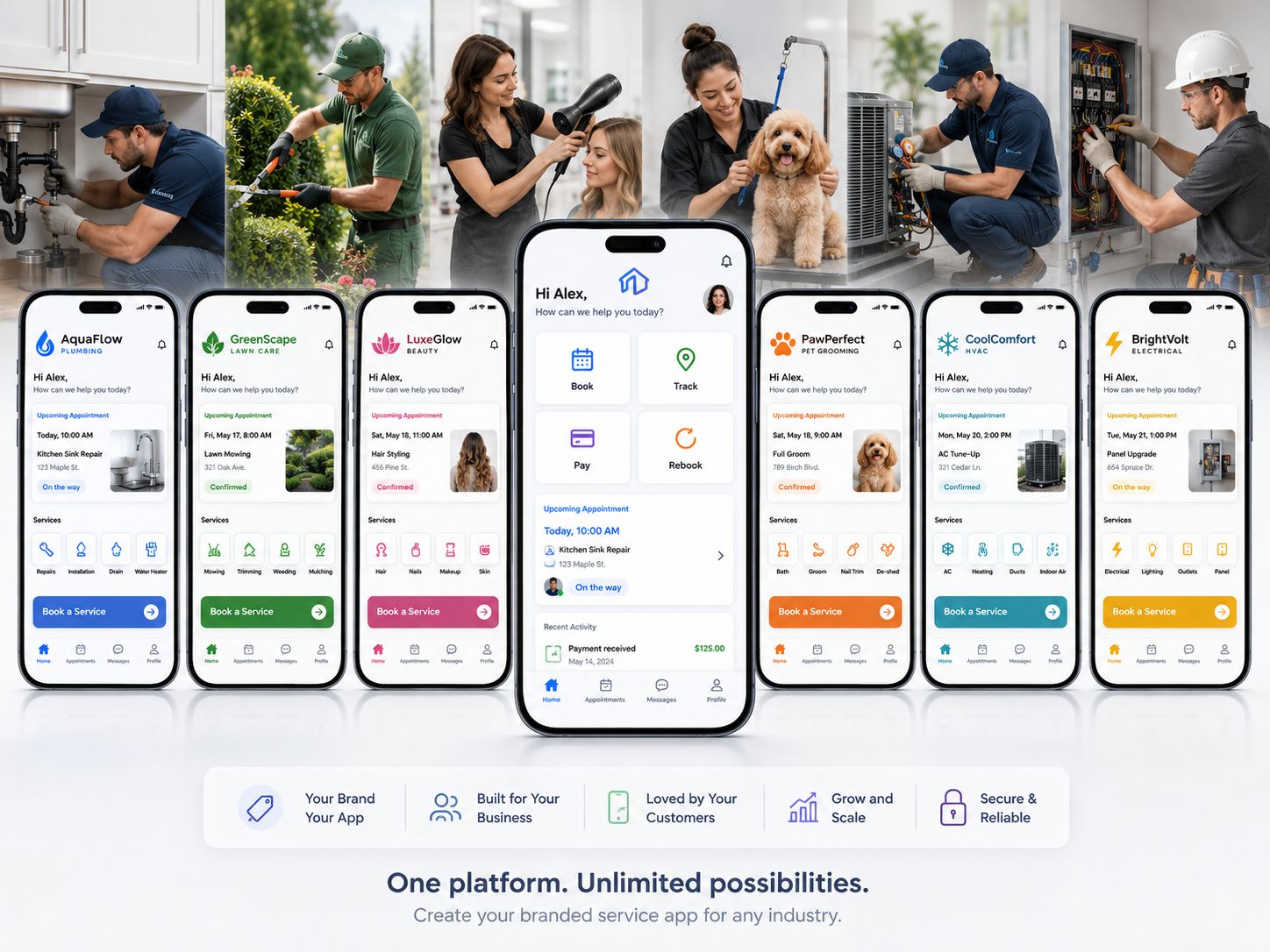
Business benefit: it is easier to choose the right workflow when you can recognise your own service model. A branded app is most valuable when customers repeatedly book, upload job details, receive updates, pay, review or rebook services.
OctopusPro features that deliver it: service setup, online booking, quote requests, customer portal, branded app access, fieldworker app workflows, service areas, recurring bookings, payments, invoices, reviews, reminders and rebooking tools.
Cleaning
Cleaning, pest control and maintenance
Customers can request quotes, upload site photos, book available times, approve work, track arrival, pay invoices and rebook recurring services.
Home services
Trades, repairs and property services
Customers can submit job details, attach files, choose times, receive updates, sign approvals and keep service history in one branded experience.
Wellness
Beauty, massage and wellness services
Customers can book repeat appointments, manage preferred times, receive reminders, pay deposits and rebook from their previous service history.
Healthcare
Mobile health, care and support services
Customers can schedule visits, complete required information, receive appointment reminders, manage dependents and access invoices or records online.
Automotive
Mobile mechanics, detailing and roadside services
Customers can request service, share vehicle details, track arrival, approve quotes, pay invoices and book follow-up maintenance from the app.
Education
Tutoring, coaching and remote services
Customers can book sessions, receive instructions, manage recurring services, pay online and access their service history through the portal or app.
Best fit: focus on the customer action that matters most for your industry — quote approval, booking, job tracking, payment, review or repeat booking — then connect that action to the app and portal workflow.
More setup guides
Not sure where to start? Start with the customer action that matters most — booking, quote approval, job tracking, payment, review or repeat booking — then configure the app and portal workflow around that outcome.
See how customers book, fieldworkers update jobs and admins stay in control
Benefit
Business owners can quickly understand how the branded app supports the customer journey before reviewing the deeper setup and feature details.
OctopusPro features that deliver it
Your branded app and portal connect online bookings, quote requests, customer profiles, reminders, job updates, fieldworker workflows, invoices, payments and repeat-booking actions.
Want to explore how this could work for your business? Start with the trial and support resources to map your customer booking journey, fieldworker workflow, pricing rules, payments, reminders and branded app options before planning the branded app launch.
More demo setup guides
Plan the workflow first
Map the customer journey before launching the branded app
Start with how customers quote, book, track, pay, review and rebook. Then connect the app, portal, fieldworker workflow, payments, invoices, reminders and reporting around those real customer actions.
Make booking, tracking, payment and rebooking easy for customers
Business benefit
The value is clearer when the app is presented as a simple customer journey: book the service, stay informed during the job, pay and come back again.
OctopusPro features that deliver it
Online booking, customer profile, appointment reminders, ETA/status updates, file uploads, quote approvals, digital signatures, invoices, payment methods, reviews, promotions and repeat booking from history.
Step 1
Book
Customers choose a service, answer required questions, see availability and request or confirm a booking.
Step 2
Track
Customers receive reminders, status updates and ETA information so they know what is happening.
Step 3
Pay & Rebook
Customers can pay invoices, leave reviews, redeem offers and rebook from their service history.
Replace manual chasing with a connected customer app
Business benefit
Reduce the friction that creates missed enquiries, manual follow-ups, unclear job updates, delayed payments and lost repeat work.
OctopusPro features that deliver it
Customer self-service, app and portal bookings, automated confirmations, reminders, job status updates, payments, reviews, reporting and rebooking tools remove those points of friction from the service journey.
Before OctopusPro
- Customers call or message because they cannot see availability, book online, upload job details or check appointment progress.
- Office staff manually chase confirmations, reminders, payments, reviews, follow-ups and repeat bookings.
- Fieldworkers depend on separate messages, paper notes, disconnected photos and manual job updates.
- Invoices, deposits, refunds, complaints, customer files and service history sit across too many disconnected steps.
After OctopusPro
- Customers can request quotes, book, confirm, reschedule, cancel, upload files, track ETA, pay and rebook from your app or portal.
- Automated confirmations, reminders, status updates, push notifications, SMS, email and WhatsApp workflows reduce manual chasing.
- Fieldworkers manage routes, checklists, forms, photos, signatures, payments, invoices and job updates from the mobile app.
- Your admin team controls dispatch, CRM, pricing, invoices, payments, refunds, reporting, complaints, files and audit trails in one system.
| Without a connected branded app | With OctopusPro branded app |
|---|---|
| Customers call or message to ask about availability | Customers see available services, times and booking options online. |
| Staff chase confirmations and job updates manually | Automated reminders, status updates, ETA alerts and messages keep jobs moving. |
| Fieldworkers rely on office instructions and separate notes | Fieldworkers manage schedules, routes, forms, photos, signatures, payments and updates in-app. |
| Payments and invoices are delayed or disconnected | Customers pay deposits and invoice balances online, with receipts and payment tracking linked to the job. |
| Repeat work depends on manual follow-up | Customers can rebook from history and receive promotions, vouchers, reminders and review prompts. |
More setup guides
Connect the app to bookings, fieldworkers, payments and rebooking
Business benefit: business owners can understand the full system quickly: customers get a simple branded experience, while your team keeps dispatch, pricing, payments, quality and reporting under control.
OctopusPro features that deliver it: the customer app, web portal, booking engine, fieldworker app, admin dashboard, payment tools, reporting and rebooking automations work together instead of operating as disconnected tools.
Customer step
Customer App & Portal
Customers request quotes, book services, upload files, track job progress, pay invoices, leave reviews and rebook from one branded experience.
Booking step
Bookings & Quotes
Real-time availability, smart pricing, custom fields, signatures, terms and service rules turn enquiries into clear booking workflows.
Fieldwork step
Dispatch & Fieldwork
Job requests, schedules, GPS, navigation, forms, checklists, photos and live status updates keep office and field teams aligned.
Payment step
Invoices & Payments
Deposits, balances, receipts, refunds, payment tracking and accounting sync connect billing directly to the completed work.
Growth step
Retention & Reporting
Reviews, vouchers, repeat bookings, dashboards, GA4 tracking and KPI reports help turn completed jobs into future growth.
Why this matters
The branded app is most valuable when the customer experience, bookings, fieldworker workflow, payments, reporting and rebooking all operate as one connected system.
More setup guides
Turn the branded app into a growth, efficiency and profitability channel
Business benefit
Business owners can quickly see why the branded app matters commercially: more completed bookings, less manual admin, faster payment collection and stronger repeat work.
OctopusPro features that deliver it
Online booking, customer portal, branded app, fieldworker app, automations, smart pricing, invoices, payments, reviews, vouchers, reporting and CRM history work together around the full service journey.

Growth
Benefit
Win and retain more work by making your business easier to find, book and return to.
Features
Branded app visibility, online booking, lead capture, quotes, reminders, push offers, vouchers, reviews, referral campaigns and repeat booking from customer history.

Efficiency
Benefit
Reduce avoidable admin by letting customers and fieldworkers handle routine actions inside connected workflows.
Features
Self-service booking, real-time availability, two-way calendar sync, automated confirmations, fieldworker job updates, checklists, forms, photos, signatures and status tracking.
Profitability
Benefit
Protect margins and improve cash flow by connecting pricing, approvals, invoices and payments to the job.
Features
Smart pricing, peak/seasonal/emergency rates, deposits, balances, invoice PDFs, receipts, refunds, payment tracking, Xero/QuickBooks sync and reporting.
More setup guides

Make your business easier to find, download and rebook
Benefit
Customers can recognise your brand, access your services from the channel they prefer and return to the same branded experience whenever they need you again.
OctopusPro features that deliver it
Your company name, logo and brand can appear in your branded app, the App Store, Google Play and your customer portal, while your website can continue accepting online bookings through the web portal and booking buttons. No technical knowledge is required from your team because OctopusPro can support the connected app, portal and workflow setup.
More setup guides
Give customers the actions they need before, during and after every job
Business benefit
Business owners can see the app as a practical customer tool, not just a logo in the App Store. It helps customers act before, during and after each job.
OctopusPro features that deliver it
Quoting, booking, uploads, ETA tracking, messaging, approvals, payments, reviews, promotions and rebooking are connected to the customer profile and service history.
Book a service
Benefit
Customers can commit when they are ready, without waiting for office follow-up.
Features
Quote requests, real-time availability, online booking, confirmations, rescheduling and cancellation rules.
Upload job details
Benefit
Your team arrives with better context and fewer missing details.
Features
Photos, videos, files, notes, custom fields, required uploads, service questions and customer profile details.
Track job progress
Benefit
Customers feel informed without calling to ask where the technician is.
Features
Automated reminders, ETA updates, running-late alerts, job status changes, push notifications, SMS and email.
Approve and sign
Benefit
Quotes and approvals move forward faster.
Features
Quote approval, quote decline, digital signatures, T&Cs acceptance, booking disclaimers and quote/booking history.
Pay and download invoices
Benefit
Payment collection becomes part of the customer journey instead of a separate chase.
Features
Deposits, balances, invoices, receipts, payment methods, refunds where permitted and invoice downloads.
Review and rebook
Benefit
Completed jobs are easier to turn into repeat work.
Features
Ratings, reviews, service history, promo codes, vouchers, seasonal offers, referral discounts and rebooking from history.
Let customers book available times without calling your office
Business benefit: customers get access when they want it, and your business reduces double-bookings, unavailable slots and avoidable scheduling mistakes.
OctopusPro features that deliver it: mobile app, web portal, online booking page, live availability, Google Calendar sync, booking start times, time-slot intervals and fieldworker availability settings.


Access anywhere, anytime
Business benefit: customers can manage services from the device they already use.
OctopusPro features that deliver it: mobile app, web portal, online booking page, saved customer profile, addresses and booking history.

Live availability
Business benefit: customers only choose times your team can actually service.
OctopusPro features that deliver it: integrated calendars, Google Calendar sync, booking start times, time-slot intervals and fieldworker availability.
Turn customer interest into bookings, payments, reviews and repeat work
The benefit is momentum: customers can act when they are ready, your office handles fewer repetitive tasks, and every completed job has a clearer path to payment, review and rebooking. The supporting features sit inside the app, portal and booking workflow.
Win more bookings with less back-and-forth
Business benefit: customers can act when they are ready, even outside business hours.
OctopusPro features that deliver it: request quotes, get instant accurate quotes, view real-time bookable slots, book, confirm, reschedule or cancel appointments from the branded app, online booking page or web portal.
Keep customers informed without manual chasing
Business benefit: fewer calls asking where the technician is or whether the appointment is still confirmed.
OctopusPro features that deliver it: automated confirmations, reminders, push notifications, SMS, email, WhatsApp if enabled, ETA/live status tracking, “running late” updates and reschedule notices.
Arrive prepared with better job information
Business benefit: your team gets the information needed before arriving on site.
OctopusPro features that deliver it: customers can upload photos, videos and files, complete required fields, provide addresses, update profile details, manage properties and add job context.
Move quotes and approvals forward faster
Business benefit: reduce delays between quote, approval and scheduled work.
OctopusPro features that deliver it: customers can approve or decline quotes, accept terms and conditions, sign digitally with legally binding e-signatures and access quote or booking history.
Collect deposits and balances more easily
Business benefit: payment becomes part of the customer journey, not a separate follow-up task.
OctopusPro features that deliver it: customers can pay deposits and balances, view invoices, download invoices and receipts, track payments and request refunds if permitted.
Turn completed jobs into repeat work
Business benefit: customers can come back without starting from scratch.
OctopusPro features that deliver it: rebook from history, manage recurring services, rate and review jobs or technicians, redeem promo codes, use seasonal offers, referral discounts, vouchers, gift cards and loyalty offers.
More setup guides
More customer guides
Help fieldworkers complete jobs with fewer delays and less office follow-up
Fieldworkers work faster and with fewer gaps when their schedule, job details, customer context, route, status updates, forms, evidence, payments and invoices are all in the same mobile workflow.
Keep schedules and availability clearer
Business benefit: fewer scheduling mistakes and better job acceptance.
OctopusPro features that deliver it: fieldworkers can see schedules, manage availability, block time off, receive new-job notifications, accept or decline job requests and propose alternative times with Reschedule Assist.
Reduce delays between jobs
Business benefit: workers know where to go and customers know what is happening.
OctopusPro features that deliver it: built-in maps, real-time route guidance, “leave now” prompts, running-late prompts, on-my-way/on-site/completed statuses, GPS location, ETA sharing and check-in/check-out.
Capture better evidence and job records
Business benefit: cleaner job records, fewer disputes and better service quality.
OctopusPro features that deliver it: custom forms, checklists, risk assessments, notes, photos, videos, audio notes and other files at the start or finish of jobs when required.
Finish admin while still on site
Business benefit: quotes, invoices, signatures and payments can be completed before the job goes cold.
OctopusPro features that deliver it: edit services/items, add discounts or surcharges, convert quotes to invoices, take deposits, payments, signatures and refunds, then email or SMS invoices instantly.
Improve timesheets, mileage and payroll accuracy
Business benefit: time and travel records become easier to review.
OctopusPro features that deliver it: start/finish workflows, automatic time tracking, GPS mileage, earnings dashboards, timesheet summaries and distance-based billing support.
Match the right worker to the right job
Business benefit: better assignment decisions and cleaner workforce management.
OctopusPro features that deliver it: fieldworker profiles, service areas, skills, documents, certifications, service preferences, subworkers, customer/office communication and private internal notes.
More fieldworker guides
Give customers self-service while your office keeps full control
The business benefit is controlled self-service: customers and fieldworkers can take action faster, while admin users still control dispatch, pricing, availability, messages, payments, records, permissions, reporting and service quality behind the scenes.
Customer experience
Customers self-serve more tasks through the app and portal, reducing repetitive office follow-up.
Fieldworker workflow
Fieldworkers update jobs in real time, giving the office better visibility without constant calls.
Office control
Admin users manage rules, permissions, payments, reports and exception handling from one dashboard.
See job progress before customers call
Business benefit: your office can monitor work as it happens.
OctopusPro features that deliver it: live GPS map, fieldworker status, booking progress, real-time job updates, status changes and activity history.
Assign work your way
Business benefit: control job allocation based on the way your business operates.
OctopusPro features that deliver it: manual, semi-automatic or fully automatic job assignment, job requests, first-accept dispatch, availability, service areas and fieldworker permissions.
Reduce communication gaps
Business benefit: customers and fieldworkers stay informed with less manual admin.
OctopusPro features that deliver it: in-app chat, discussion boards, email, SMS, push notifications, canned responses, message templates and Workflow Automations Log auditing.
Keep billing and payments connected to the job
Business benefit: fewer billing mistakes and easier financial follow-up.
OctopusPro features that deliver it: invoices, payments, deposits, refunds, payment tracking, receipts, customer statements, Xero and QuickBooks sync, invoice PDFs and reconciliation tools.
Keep customer history in one place
Business benefit: staff can act with the full customer context.
OctopusPro features that deliver it: enquiries, quotes, bookings, invoices, customer history, activity timeline, communication logs, attachments, properties, billing cycles and duplicate customer merging.
Resolve issues before they damage loyalty
Business benefit: complaints and job issues become trackable workflows.
OctopusPro features that deliver it: issues and complaints logs, complaint resolution, SLA tracking, audit trails, reopen workflows and booking/quote/invoice issue handling.
Protect margins with smarter pricing rules
Business benefit: pricing can reflect demand, location, technician, urgency and booking type.
OctopusPro features that deliver it: seasonal, peak-time, emergency, last-minute, location-based and technician-specific pricing, tiered pricing, volume discounts, bundles and minimum booking rules.
Collect the right information up front
Business benefit: fewer incomplete bookings and fewer surprises on site.
OctopusPro features that deliver it: custom booking forms, service fields, dropdowns, checkboxes, signatures, file uploads, conditional logic and price-adjusting dropdowns.
Improve decisions with operational visibility
Business benefit: understand revenue, bookings, payroll, cash flow and marketing performance.
OctopusPro features that deliver it: dashboards, KPIs, enquiry statistics, conversion funnels, lead sources, GA4, booking reports, business data export, payroll exports, timesheets and mileage logs.
More setup guides
Present a polished brand while OctopusPro handles the workflow rules
Customers see a polished branded experience, while your team uses rules to collect the right information, show the right pricing, assign the right staff and reduce billing errors.
Benefit
Customers see a polished branded experience, while your team uses rules to collect the right information, show the right pricing, assign the right staff and reduce billing errors.
OctopusPro features that deliver it
Custom branding, company name, logo, colours, fonts, imagery, service pages, FAQs, privacy links, branded app store presence, custom fields, conditional logic, file uploads, digital signatures, smart pricing and automated notifications.
Branding
Tailor the app and portal to your company’s visual identity.
Custom forms
Use dropdowns, checkboxes, signatures, file uploads and conditional logic.
Smart pricing
Calculate rates using service, location, worker, season, peak-time, emergency, last-minute, volume, bundle and minimum booking rules.
Automation
Send quote, booking, invoice, reminder and follow-up notifications by email, SMS and push notification.
More setup guides

Branded experience
Show your company name, logo, colours, fonts, imagery, service pages and FAQs consistently.
Data capture
Use custom fields, file uploads, digital signatures and conditional logic to collect the right job information.
Commercial rules
Apply service, location, worker, emergency, volume, bundle and minimum booking pricing rules.
Automation
Keep quotes, bookings, invoices, reminders and follow-ups moving automatically.
Offer customer convenience without losing business control
Business owners can launch a branded app with confidence because access, workflows, payments, permissions and communications remain configurable.
Benefit
Business owners can launch a branded app with confidence because access, workflows, payments, permissions and communications remain configurable.
OctopusPro features that deliver it
Role-based permissions, customer portal settings, fieldworker permissions, booking rules, cancellation rules, payment methods, address visibility, communication controls, automated message logs, issue handling, complaint management and reports.
- Control what customers can book, upload, cancel, reschedule, pay and view.
- Control what fieldworkers can see, edit, invoice, discount, refund or communicate.
- Audit booking activity, messages, invoices, payments, issues and customer history.
- Use reports, GA4, dashboards and conversion funnels to improve performance after launch.
More setup guides
Control stays visible at every step
Keep the customer experience simple on the front end while permissions, booking rules, payment controls and quality checks stay configurable behind the scenes.
Customer controls
Decide what customers can book, upload, cancel, reschedule, pay and view.
Fieldworker controls
Decide what fieldworkers can see, edit, invoice, discount, refund or communicate.
Audit trail
Review booking activity, message history, invoices, payments, issues and customer records.
Performance insight
Use reports, GA4, dashboards and conversion funnels to improve performance after launch.
What to prepare before planning your branded app
Branded app planning becomes easier when your branding, services, booking rules, payment flow and fieldworker workflow are clear. You do not need everything final on day one, but these items help map the app around your real customer journey.
BrandLogo, colours and app name
Prepare the name, logo, colours, imagery and customer-facing tone you want customers to see.
ServicesService categories and descriptions
List what customers can book, request, upload, approve, cancel, reschedule or rebook.
PricingRates, deposits and conditions
Confirm pricing rules, minimum charges, add-ons, payment terms, discounts and booking conditions.
FormsQuestions and required details
Prepare the fields, forms, checklists, signatures, file uploads and conditional questions you need.
OperationsFieldworker workflow
Decide how workers receive jobs, update status, upload evidence, invoice and collect payments.
MessagesCustomer communication
Plan booking confirmations, reminders, ETA updates, invoice messages, review requests and rebooking prompts.
StoresApp store details
Prepare store name, descriptions, support contact, privacy links and launch expectations for iOS and Android.
LaunchPromotion and adoption
Plan how customers will discover the app through your website, email, SMS, invoices and follow-up campaigns.
Use specific proof during launch
The strongest branded app rollout connects each promise to a visible customer action: booking screens for booking confidence, payment screens for payment clarity, fieldworker screens for operational trust and app store assets for brand credibility.
A clearer path from free trial to branded app launch
Business benefit: reduce uncertainty by separating the platform workflow from the branded app launch. Test the booking, pricing, payment, notification and fieldworker workflow first, then prepare the branded app around a proven customer journey.
OctopusPro features that deliver it: customer portal, app access, services, pricing, forms, working hours, fieldworker permissions, payment methods, automations, reporting and rebooking tools can all be configured before the branded app is launched.
Launch in practical stages
1Start your OctopusPro trial
Explore bookings, customers, services, fieldworkers, payments, invoices, reminders and reporting before making decisions about the branded app launch.
2Configure the workflow
Set services, categories, descriptions, pricing, deposits, minimums, packages, bundles, forms, required fields and booking availability.
3Prepare the branded experience
Define company name, logo, colours, imagery, app/portal presentation, customer profile options, FAQs, permissions and app store requirements.
4Launch, promote and improve
Use App Store/Google Play access, portal links, dashboards, GA4, reviews, complaints, reports, reminders and rebooking campaigns to improve performance.
More setup guides
More launch guides
Launch Support for Real Service Workflows
We help you plan the customer journey first, then connect the branded app, customer portal, service setup, fieldworker workflow, notifications, payments, reporting and rebooking actions so the app supports how your business actually operates.
- Map the quote, booking, payment, tracking, review and rebooking flow.
- Prepare service pages, forms, FAQs, pricing rules and payment terms.
- Connect dispatch, fieldworker permissions, service areas and working hours.
- Set up confirmations, reminders, status updates, invoice messages and follow-ups.
Explore the platform first, then plan the branded app setup
A branded app is a higher-consideration project. The easiest way to reduce risk is to confirm the booking, payment, customer and fieldworker workflow first, then decide how the branded app should be launched.
This keeps the sales path simple: test OctopusPro, map the workflow, prepare branding and launch support, then promote the app when the customer journey is ready.
Trial first
Test your workflow before app planning
Use the trial to confirm services, booking rules, forms, payments, notifications, fieldworker workflow, reporting and rebooking actions.
Separate planning
Plan app setup after workflow clarity
The branded app experience can be planned once your customer journey, operational rules, branding and launch needs are clear.
Launch support
Prepare app store and customer rollout
Plan the branded app presence, customer portal links, customer communication, permissions, staff workflow and promotion path together.
Control
Keep app actions connected to OctopusPro
Bookings, payments, invoices, reminders, fieldworker updates, reviews, complaints, reporting and rebooking stay connected to your account.
Questions business owners ask before launching a branded app
These questions focus on the main conversion concerns: testing before commitment, customer portal versus branded app, setup expectations, payments, fieldworker usage, permissions, app store approval and future workflow changes.
Can I test OctopusPro before committing to a branded app?
Yes. The best path is to test your services, booking rules, forms, payments, fieldworker workflow, reminders and customer portal first. Once the workflow is clear, the branded app setup can be planned around a proven customer journey.
Do I need both the customer portal and the branded app?
Not always, but they work well together. The portal is fast to activate from your website and helps validate the workflow. The branded app adds stronger brand presence, repeat engagement, push-style mobile habits and App Store / Google Play visibility.
Do customers need to use the app, or can they still book online?
Customers can use the branded app, your web portal or your online booking page depending on how you configure your customer journey. This lets you support app-first customers while still accepting web bookings from your website.
Why would customers keep using the app after the first booking?
The app remains useful after the first booking because customers can track appointments, receive reminders, pay invoices, access service history, redeem offers, leave reviews and rebook from history without calling your office.
Can the app match our branding?
Yes. Your branded app and customer portal can reflect your company name, logo, colours, imagery, service descriptions, FAQs, privacy links and customer-facing content.
Can fieldworkers use the app too?
Yes. Fieldworkers can manage schedules, accept or decline job requests, update job status, navigate to appointments, complete forms, upload files, collect signatures, create invoices and process payments where permitted.
Can customers pay through the app or portal?
Yes. Customers can pay deposits, balances and invoices through supported payment methods, while your team tracks invoices, payments, refunds and reconciliation workflows in OctopusPro.
Can we control what fieldworkers and customers can access?
Yes. Use role-based access, fieldworker permissions, customer portal settings, payment rules, booking rules and communication controls to decide what each user can view or do.
How long does branded app setup take?
Timing depends on how ready your services, booking rules, branding, app store details, payment flow and fieldworker workflow are. Use the trial and support resources to identify what needs to be prepared before the app launch process moves forward.
Can we update services, prices, forms and messages later?
Yes. Your services, pricing, forms, customer messages, booking rules, payment terms and fieldworker settings can continue to evolve in OctopusPro as your business changes.
Is App Store or Google Play approval guaranteed?
App store approval depends on Apple and Google review requirements. OctopusPro can help you prepare the branded app workflow and required app information, but final approval is controlled by the app stores.
What happens if our workflow changes after launch?
Your branded app should stay connected to your OctopusPro workflow. If your services, pricing, forms, messages, payment options, fieldworker rules or customer journey changes, those operational updates can be managed through the platform where supported.
Can we launch with the portal first and app later?
Yes. Many businesses start by improving their customer portal, booking forms, services, pricing and fieldworker workflows first, then extend the same customer journey into the branded iOS and Android app.
Create a trial and map the branded app around the right workflow
Map how customers request quotes, book, track appointments, pay invoices, leave reviews and rebook. Then connect services, pricing rules, payment methods, fieldworker workflow, notifications, permissions and app branding around that journey.
Start with the workflow first. No payment is required to explore the platform, and branded app setup can be planned once your services, pricing, booking rules, payment flow, notifications, fieldworker workflow and customer journey are clear.