
Live GPS workforce visibility from On The Way to Finished.
OctopusPro helps your office see where every fieldworker is, what stage each job is in, and what needs action next. Live GPS shows movement and proximity, fieldworker app statuses show job progress, and booking context helps your team update customers, recover schedules and close jobs faster.
Related guides:real-time fieldworker location tracking guidebooking GPS tracking guideStart and Finish job workflow guide
- See logged-on fieldworkers, live movement, nearby availability and travel progress throughout the workday.
- Follow booking-specific milestones including On The Way, Arrived, Started and Finished.
- Turn live visibility into practical office action: ETA updates, dispatch decisions, exception follow-up and completion handoff.
Built for service businesses that need live fieldworker location, app status updates, faster dispatch decisions, better customer ETA conversations and cleaner job completion records.
Use GPS, status and booking context to give a confident ETA or follow up on a delayed job.
ETA, delay and completion updates help reduce “where is the technician?” calls.
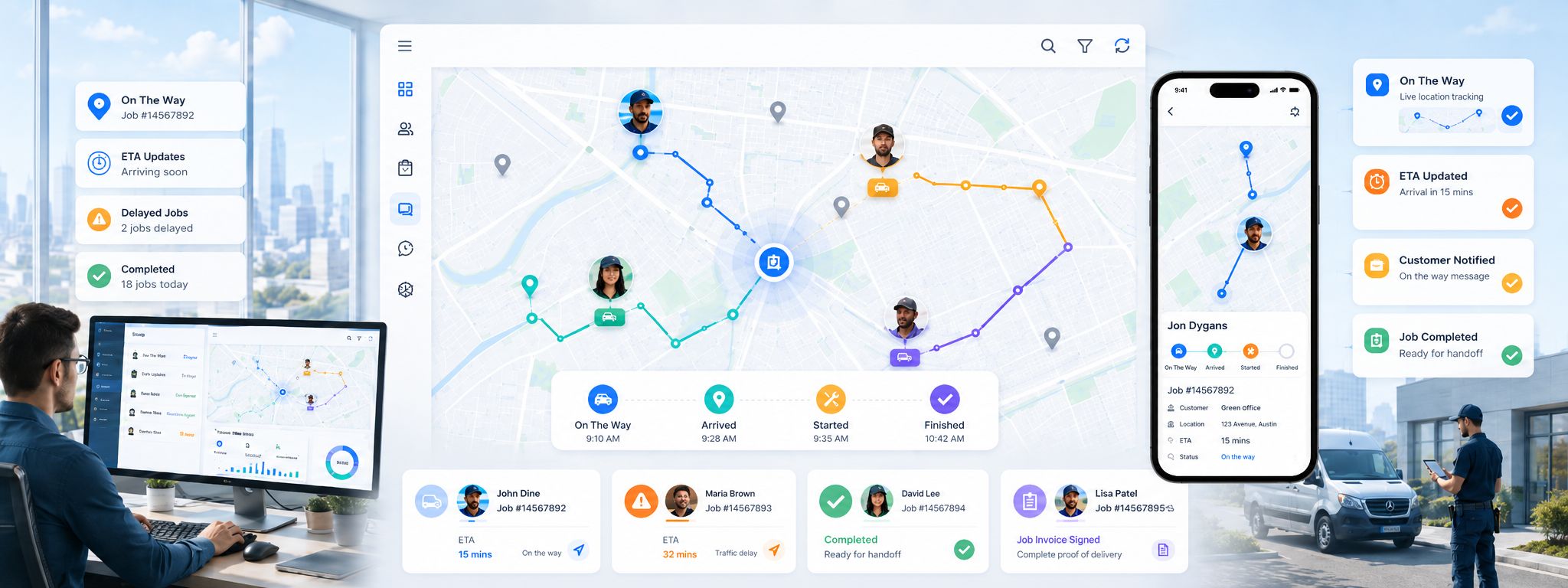
Turn every live field signal into the next clear office action.
This is the core workflow for live field operations: GPS shows where the fieldworker is, app statuses show the stage of the job, booking context explains what it means, and the office can act before the customer starts chasing.
Related guides:fieldworker GPS tracking guidefieldworker app job update workflow guidebooking details and status timeline guide
Fieldworker GPS tracking overview
See how GPS tracking connects live location, booking progress and office visibility so teams can understand the job day without chasing every update.
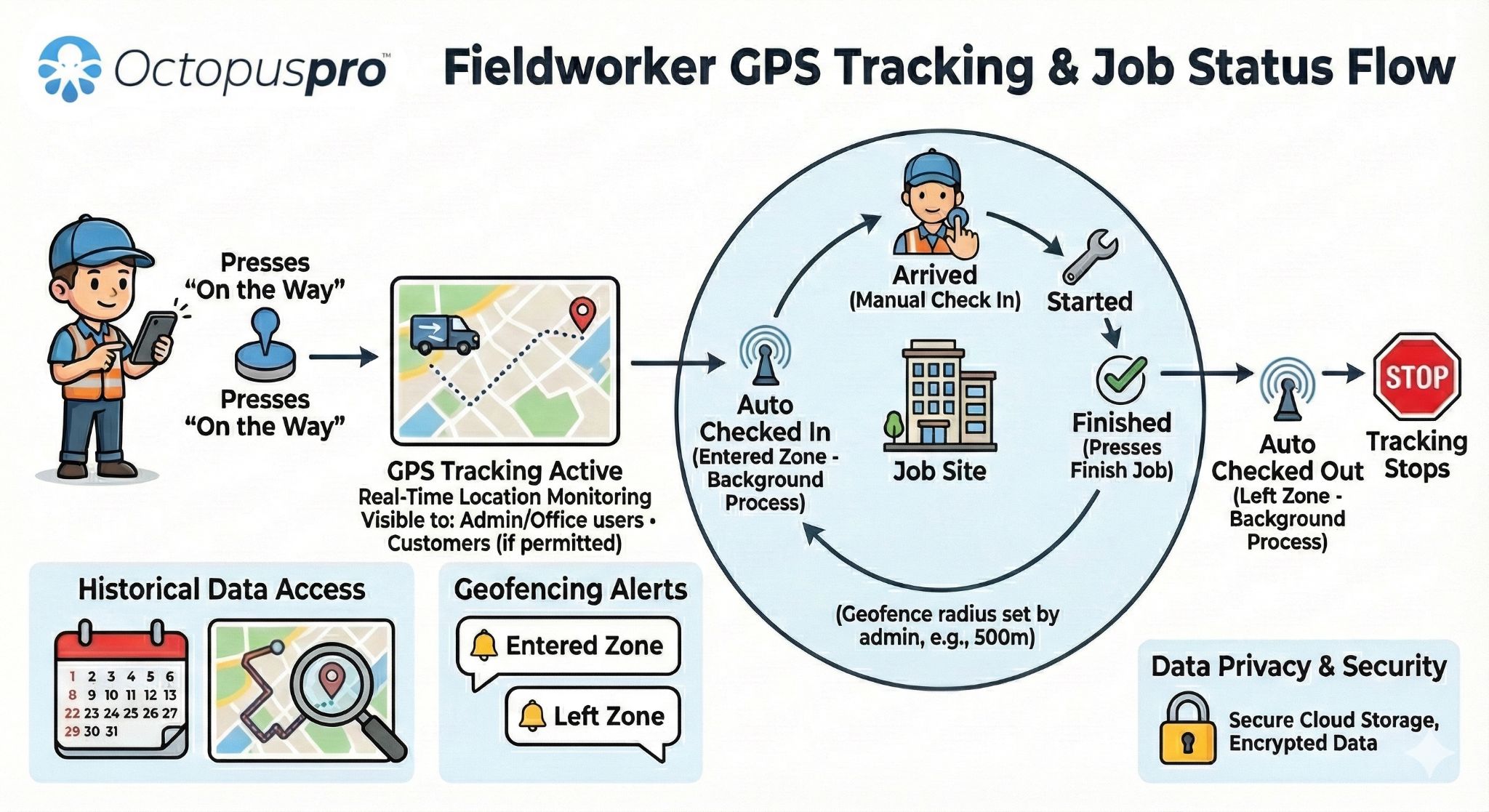
Live location, status and booking context in one workflow
Live GPS visibility connects fieldworker availability, active jobs, customer sites and dispatch decisions in one clear operational workflow.

Where are they?
See live movement, current position, proximity to the job and nearby availability.
Related guide:real-time fieldworker tracking guide
What stage is the job in?
On The Way, Arrived, Started and Finished updates create the live job timeline.
Related guide:Start and Finish job workflow guide
What does it affect?
Connect the live signal to the customer, address, scheduled time, service notes and next booking.
Related guide:view booking details guide
What should happen next?
Update the customer, protect the schedule, assign nearby work, request proof or prepare follow-up.
Related guide:job assignment and dispatch guide
What can the customer be told?
Give clearer ETA, delay, arrival and completion updates without calling the worker first.
Related guide:On The Way SMS notification guide
Live location, app status and booking context work together so the office can make better decisions and give customers clearer updates without chasing every fieldworker.
GPS shows where the worker is, status updates show what stage the job is in, booking context explains what it means, and office action turns that visibility into better customer communication.
- GPS answers where.
- Status answers what stage.
- Context answers what it means.
- Action turns visibility into results.
Want to see how live GPS updates would work for your team?
Book a quick demo or start a free trial to see how OctopusPro connects live location, app status updates, dispatch decisions and customer ETA messages in one workflow.
See how live field updates fit into the wider booking workflow.
Watch how OctopusPro helps connect bookings, fieldworker app updates and office visibility across the full job lifecycle.
Related guides:getting started with the fieldworker app guideupdate job workflow guideview booking details guide
See how booking updates, fieldworker app actions and office visibility connect.
This walkthrough shows how bookings, fieldworker app updates and office visibility work together across the job lifecycle.
Related guides:update job workflow guidegetting started with the fieldworker app guide
See how bookings move from schedule to fieldworker action and office visibility.
Use status changes, job context and customer communication together.
Relate live tracking to job records, follow-up, reporting and day-to-day operations.
See how field updates connect with the wider booking workflow, from scheduled work through to completion and follow-up.
See both the worker’s live workday location and the booking’s visit progress.
This distinction is important. Your office can use live worker visibility for dispatch decisions, while booking GPS tracking follows a specific appointment from departure through completion.
Related guides:real-time fieldworker location tracking guidebooking GPS tracking guide
Live Fieldworker Tracking
Shows logged-on fieldworkers on a live map during the workday, helping dispatchers understand who is active, nearby, busy, available or best positioned for urgent work.
Related guide:real-time fieldworker location tracking guide
Booking GPS Tracking
Starts when the assigned fieldworker taps On The Way for a specific booking, then follows that appointment through travel, arrival, start, finish and check-out.
Related guide:booking GPS tracking guide
Live worker tracking vs booking GPS tracking
This comparison separates wider mobile workforce visibility from booking-specific tracking, so the office can use the right signal for the right decision.

Live tracking vs proximity scheduling
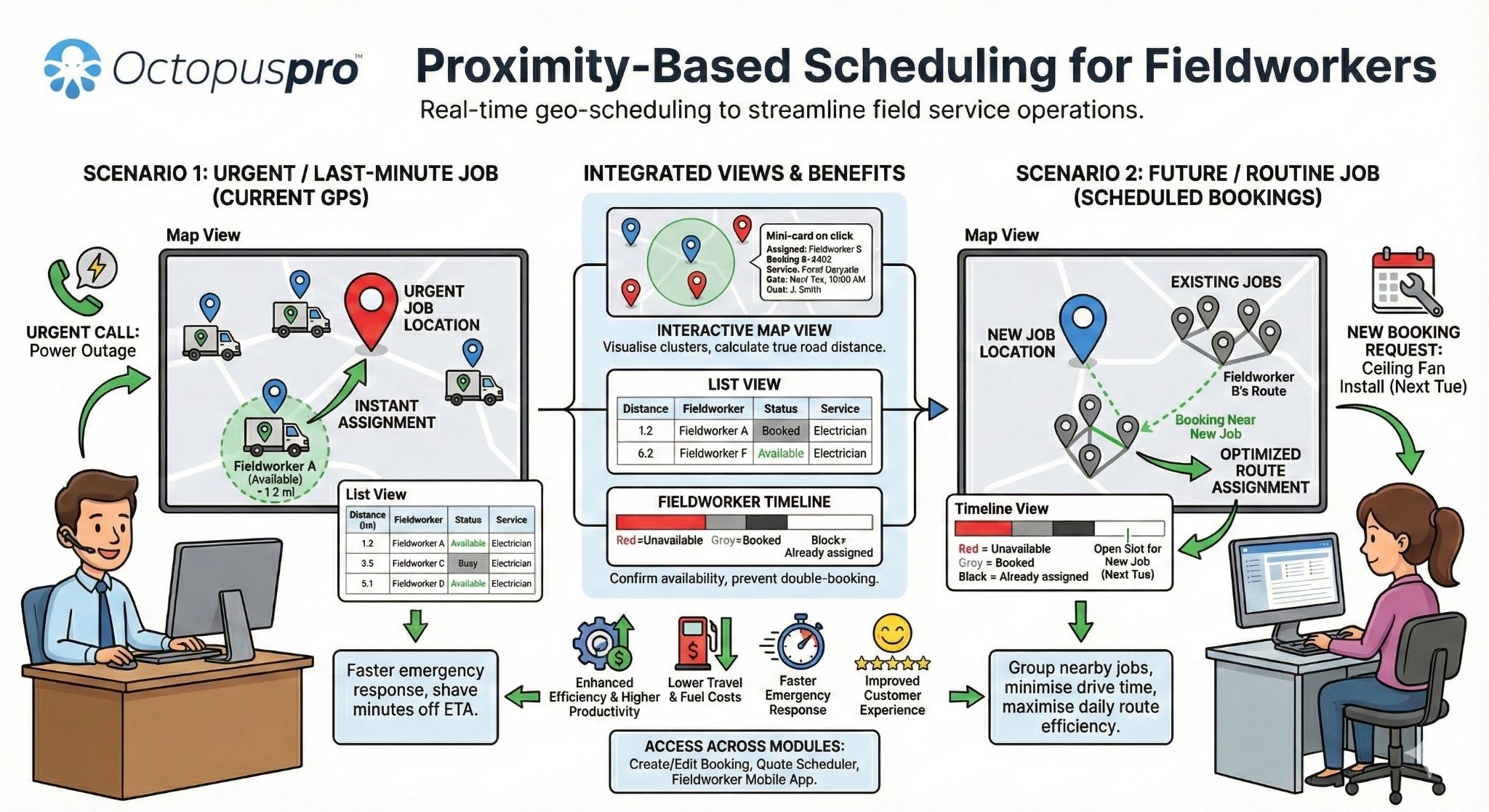
Live tracking shows where fieldworkers are now, while proximity scheduling helps dispatchers find nearby workers or jobs that can keep the schedule moving.
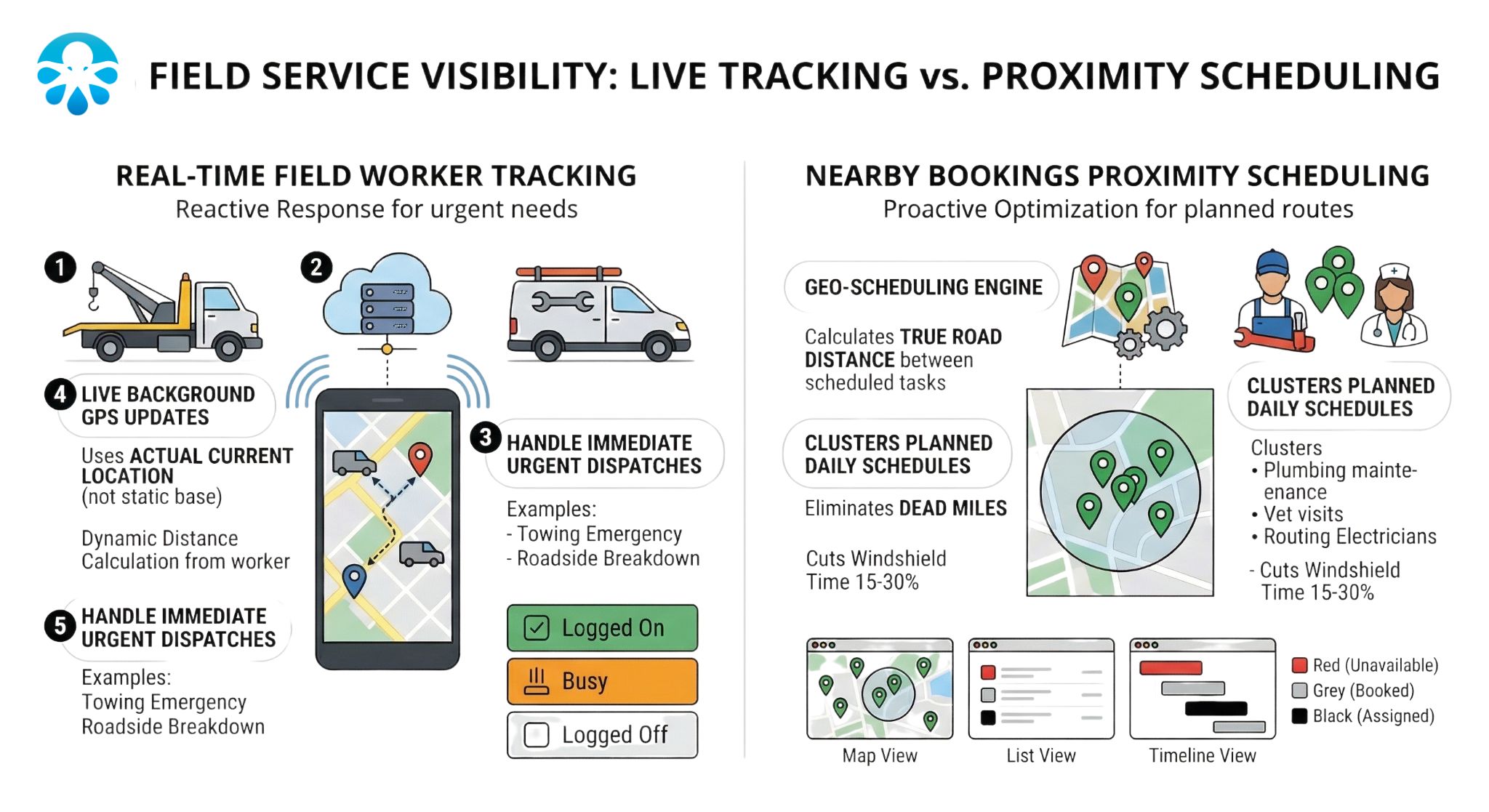
Nearby bookings, proximity scheduling and booking tracking
This diagram shows how nearby booking context, worker proximity and booking-specific GPS tracking work together to support faster dispatch decisions and clearer customer updates.
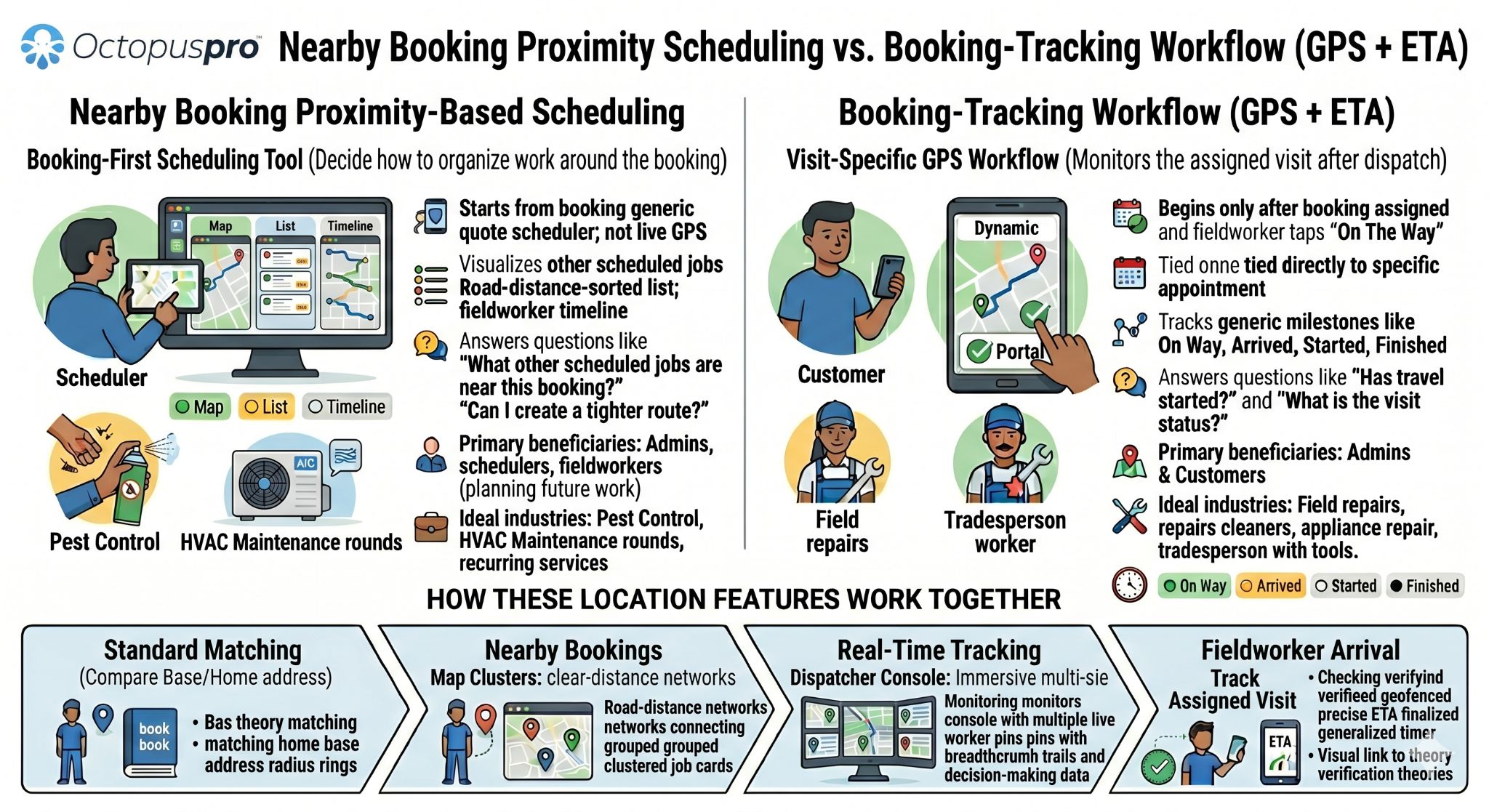
Best result: dispatchers can manage the whole mobile workforce while still seeing the exact timeline of each customer visit.
Not sure whether you need live tracking, booking tracking or proximity scheduling?
OctopusPro can support different visibility levels depending on how your team works, how customers are updated and how dispatch decisions are made.
Move from chasing updates to seeing the job day as it happens.
OctopusPro replaces scattered phone calls, guesswork and late updates with live GPS visibility, app status context and clearer office action.
Related guides:GPS booking tracking guideOn The Way SMS notification guidefieldworker activity log guide
The office reacts after the problem is already visible.
Without live GPS and app status updates, teams often rely on phone calls, manual notes and customer complaints to understand what is happening in the field.
Related guide:fieldworker activity log guide
- Staff call fieldworkers to ask whether they have left, arrived, started or finished.
- Customers chase the office because they do not know whether someone is actually on the way.
- Dispatch guesses who is closest or available for urgent same-day work.
- Late jobs, delayed starts and unfinished follow-up are discovered too late.
- Proof, photos, notes and time records can end up scattered across calls and messages.
The office acts earlier with live location and job status context.
OctopusPro connects GPS movement, fieldworker app taps and booking context so the office can make better decisions before customers start chasing.
Related guide:fieldworker GPS tracking guide
- Live GPS shows movement, proximity, nearby workers and travel progress.
- App statuses show whether the job is On The Way, Arrived, Started or Finished.
- Staff can give clearer ETA, delay, arrival and completion updates.
- Dispatch can identify risks, reassign urgent jobs and protect the schedule earlier.
- The job record keeps timestamps, proof, notes, photos, checklists and follow-up together.
Workers can update progress once, instead of answering repeated calls from the office.
No On The Way update, ETA risk, delayed starts and long jobs become easier to manage.
GPS context, status timestamps and proof help support customer service, payroll and quality review.
Reduce blind spots, check-in calls and customer uncertainty.
Live GPS and app status updates help the office act earlier, protect the schedule, update customers sooner, confirm job progress, reduce avoidable interruptions and close completed work faster.
Related guides:fieldworker GPS tracking guideOn The Way SMS notifications guidefieldworker activity log guide
Less phone chasing
Office staff can check GPS and status context before interrupting fieldworkers.
Related guide:fieldworker app communication guide
Earlier schedule recovery
Late departure, slow travel and long-running jobs become visible while there is still time to act.
Related guide:fieldworker app alarms and reminders guide
Better customer confidence
Customers can receive clearer ETA, arrival, delay and completion updates.
Related guide:On The Way SMS notification guide
Cleaner job completion
Finished updates can move the office into notes, evidence, invoicing, payment and follow-up faster.
Related guide:fieldworker activity log guide
From Assigned to Finished, every status should tell the office something useful.
Status updates are more than simple labels. Each fieldworker tap gives the office a clearer answer about travel, attendance, active work, schedule pressure and completion follow-up.
Related guides:fieldworker app Start and Finish job workflow guidefieldworker check-in and check-out guidebooking status management guide
Assigned
The booking is scheduled and allocated, so the office knows who owns the job before travel begins.
Related guides:job assignment and dispatch guideview booking details guide
On The Way
The worker confirms travel has started. Booking GPS tracking, ETA context and customer communication can begin.
Related guides:booking GPS tracking guideOn The Way SMS notifications guide
Arrived
The worker confirms they have reached the job location, giving the office stronger attendance and arrival visibility.
Related guides:fieldworker check-in and check-out guidemobile job navigation guide
Started
Work has begun, separating active job time from travel, waiting, access delays or forgotten check-ins.
Related guides:Start and Finish job workflow guideusing forms and checklists guide
Finished
The job is complete and the office can move into notes, photos, invoicing, payment, feedback or follow-up.
Related guides:update job workflow guidefieldworker photo upload on visit completion guide
Each major app tap records a meaningful stage of the visit, not just a generic status label.
Staff can understand travel, attendance, active work and completion without calling every worker.
The office can provide clearer ETA, arrival, delay and completion updates when customers ask.
From On The Way to Finished
Fieldworker status updates become GPS-backed attendance, job progress and completion records that the office can review later.

Stop guessing where the job stands.
Give your office one clear workflow for seeing location, checking job status, protecting ETAs and moving completed work into follow-up without constant phone calls.
Related guides:booking status management guideview booking details guide
Once the job timeline is clear, every update should lead to a useful next step.
Each status update can trigger a practical dispatch, accountability, customer communication or follow-up action.
Related guides:update job workflow guidejob assignment and dispatch guidebooking communication guide
Travel has started.
Worker location and movement can be checked against the booking schedule.
Confirm ETA, prepare the customer and review delays before they become complaints.
More accurate arrival updates and fewer “where are they?” calls.
Worker is on site.
Arrival timing becomes visible for the booking record.
Confirm attendance, review job timing and follow up if the worker has not started.
Better confidence that the appointment is being attended.
Work has begun.
The job is active and the worker is no longer just travelling or waiting.
Monitor long-running jobs, manage the next booking and reduce schedule surprises.
Better progress communication when a job affects later appointments.
Work is complete.
The job can move toward completion notes, evidence, invoice, payment or follow-up.
Trigger the next admin step sooner and keep booking records cleaner.
Faster completion updates and a smoother post-job experience.
Turn the live map into a dispatch board.
Live GPS should not be just a dot on a map. OctopusPro combines worker location, job status, booking context and ETA risk so your office can decide who to send, who to call, which customer to update and which job needs attention next.
Related guides:real-time fieldworker location tracking guidenearby bookings and proximity scheduling guidejob assignment and dispatch guide
See who is close, who is busy and who can take action now.
Instead of calling every worker for an update, staff can start with live location and status context. The office can see active fieldworkers, nearby workers, jobs at risk and urgent work that needs a faster dispatch decision.
Related guides:real-time fieldworker location tracking guidenearby bookings proximity scheduling guide
Check who is near the job address or finishing nearby before assigning urgent work.
Use job status context to avoid assigning work to someone still travelling, waiting or actively working.
Spot late movement, slow travel, unstarted work and long-running jobs before customers start chasing.
Recover the day faster when a worker is delayed, unable to attend or positioned near a better next job.
Office decision
- Assign urgent job to Sam nearby.
- Keep Alex on current ETA.
- Check Maya if active job runs long.
- Update customer before they call.
Staff interrupt workers to ask where they are, whether they left and when they will arrive.
The office sees movement, On The Way progress, arrival, active work and nearby availability.
Assign urgent jobs, recover delayed work, call the right worker or update the customer earlier.
Fewer unnecessary calls, faster reassignment, better ETA conversations and stronger job records.
Real-time fieldworker location tracking
See active workers, current jobs, nearby availability and location context so dispatchers can make faster decisions during the day.
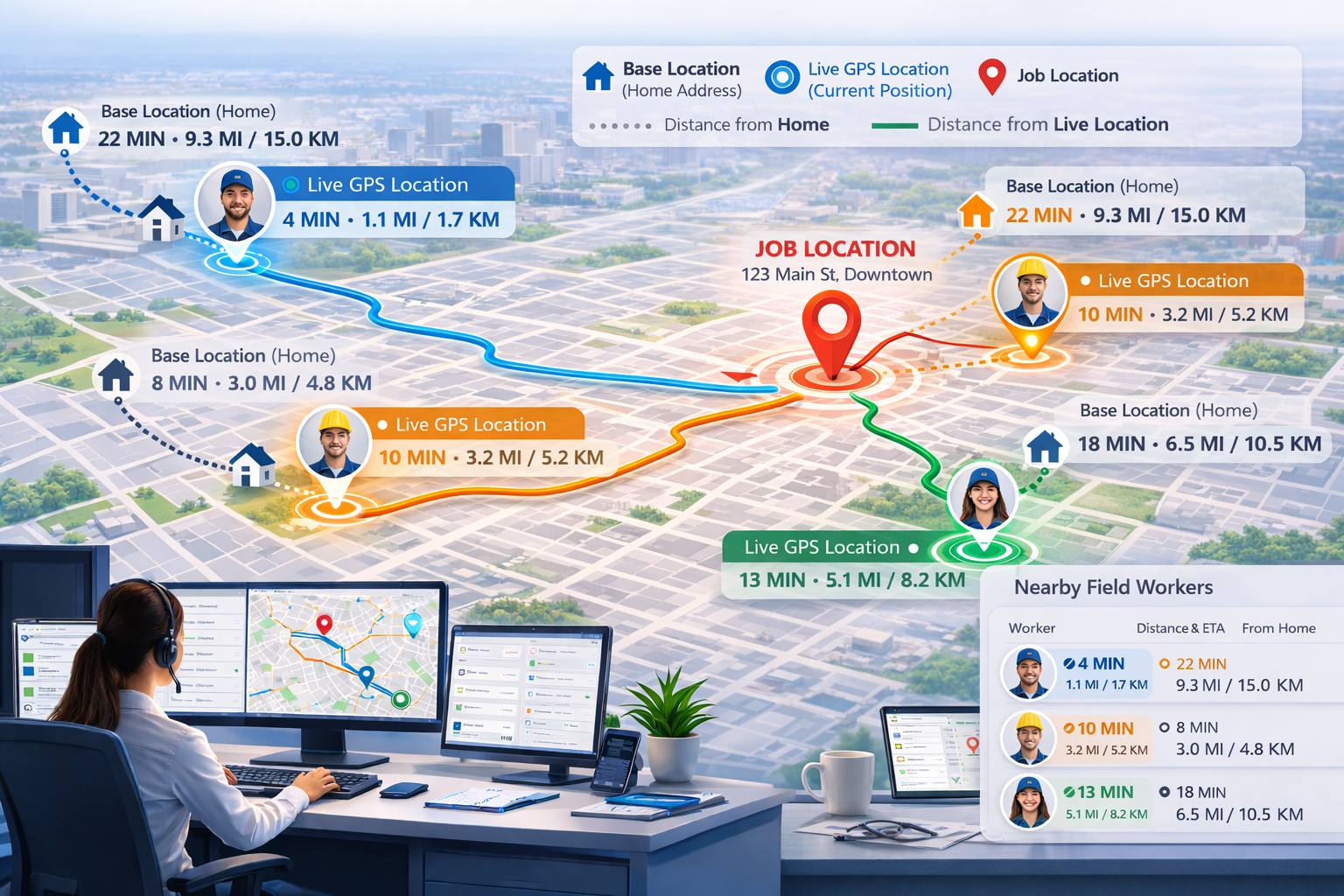
Find nearby workers and respond faster
Proximity, location and availability help the office choose the best worker for urgent jobs, nearby bookings and schedule changes.
Ready to stop guessing who is closest or available?
Give your office a clearer view of worker location, job progress and urgent schedule changes so staff can assign work faster and update customers earlier.
Know what to check first when the live schedule changes.
A busy day should not force staff to chase every booking manually. Live status grouping helps the office identify safe jobs, customer update risks and bookings that may need reassignment.
Related guides:fieldworker booking summary guidecalendar booking status filter guideview booking details guide
No departure signal yet
Check jobs that are approaching their start time but do not yet have an On The Way update.
Related guide:fieldworker app alarms and reminders guide
Travel is active
Compare live movement and ETA risk against the appointment time, then update the customer early if needed.
Related guide:fieldworker GPS tracking guide
On-site progress is visible
Confirm attendance, check whether work has started and identify long-running jobs before they affect later bookings.
Related guide:check-in and check-out guide
Office handoff is due
Move the job toward notes, photos, invoice, payment request, review request or follow-up while the details are fresh.
Related guide:update job workflow guide
When the day goes off plan, the office needs a clear next step.
Live visibility is most valuable when it turns uncertainty into action. This matrix shows the problem, the signal your team can review, the office action to take and the outcome you can protect.
Related guides:fieldworker app alarms, alerts and reminders guiderequest booking update guidebooking settings guide
The appointment is approaching, but the worker has not confirmed travel.
No en-route update, no active travel signal and no ETA confidence yet.
Message or call the worker, check whether they are leaving now, or prepare a reassignment before the window is at risk.
The office can act before the customer has to chase or the next job is affected.
The worker is moving, but live location suggests arrival could be late.
Movement, distance and appointment time do not line up with the expected arrival window.
Update the customer, check whether a nearer worker can help, or adjust the rest of the day earlier.
Customers get a calmer update and dispatchers can protect later appointments.
The worker confirms a delay from the app or the office can see delay risk building.
A running-late update, revised travel context or slow route progress gives staff a clearer reason to respond.
Updated ETA context helps staff set expectations before delays turn into customer frustration.
The customer hears from you first instead of wondering where the fieldworker is.
The worker cannot attend or the office identifies a serious attendance issue.
No realistic travel progress, no arrival confirmation or an unable-to-attend update needs office action.
Find a nearby available worker, contact the customer with options, or move the booking before it fails.
The booking can be saved, rescheduled properly or handled professionally.
The worker appears to be on site, but the job has not moved into active work.
Arrived status or location context exists, but there is no Start Job update.
Review notes, contact the worker, confirm parking/access/customer availability or remind them to start the job.
The office can separate real job-site delays from forgotten app updates.
The job is active, but it is taking longer than expected.
Started time, schedule duration, notes and worker location show the job may overrun.
Send help, update later customers, adjust the schedule or prepare a follow-up before the delay spreads.
One long job does not silently damage the rest of the day.
The office focuses on exceptions that affect customers, schedules and completion records.
Review GPS movement together with app status, booking notes, ETA context and worker communication.
When the signal is clear, staff can send a confident update before the customer needs to ask.
When a job is at risk, your office can respond earlier.
Use GPS, app status and booking context to confirm departure, update the customer, reassign work, send help or protect the next appointment before the issue becomes a complaint.
Related guides:fieldworker app alarms, alerts and reminders guiderequest booking update guide
Connect live field visibility to the next office action.
Each field update can support the next booking, customer message, invoice, payment follow-up or admin step without waiting for manual check-ins.
Related guides:job assignment and dispatch guideOn The Way SMS notification guidefieldworker app update job workflow guide
Prepare the customer
Protect the ETA and monitor travel progress.
Related guide:On The Way SMS notification guide
Confirm attendance
Check access and on-site readiness before work starts.
Related guide:check-in and check-out guide
Track active work
Watch duration and pressure on upcoming bookings.
Related guide:Start and Finish job workflow guide
Trigger completion
Move to notes, photos, invoices, payment requests and follow-up.
Related guide:update job workflow guide
Keep customers updated before they start chasing you.
When a fieldworker taps On The Way, OctopusPro can help the office move from internal visibility to customer communication. Use live GPS movement, ETA context and app statuses to send clearer updates by SMS, email, app notification or manual follow-up.
Related guides:On The Way SMS notifications guideSMS templates guideSMS template placeholders guide
- Send On-the-Way updates with the fieldworker name and arrival context.
- Use ETA and optional tracking-link visibility where configured.
- Handle delays, arrivals and completion follow-up before customers feel ignored.
Turn every live job signal into a customer-ready update.
Instead of giving vague answers like “we will check and call you back,” OctopusPro helps the office use live GPS movement, On The Way updates, ETA context, Running Late, Arrived and Finished statuses to communicate with customers earlier and more confidently.
Related guides:On The Way SMS notifications guideSMS templates guidecustomer communication history guide
Turn arrival updates into a more professional customer journey.
Use On The Way, ETA, Running Late, Arrived and Finished updates to reduce “where are you?” calls and keep customers informed before they need to chase.
Add more confidence around arrival, address access and check-out.
Live visibility becomes more useful when the workflow also helps control when addresses are revealed, when arrival can be recorded and when job attendance should be checked out.
Related guides:mobile job navigation guidedisplay full address after On The Way guidefieldworker check-in and check-out guide
Validate arrival with location context
Use GPS context and arrival-distance rules to help confirm the fieldworker is close enough to the site before marking themselves as arrived.
Related guides:mobile job navigation and arrival radius guidefieldworker check-in and check-out guide
Reveal the full address at the right moment
Where enabled, OctopusPro can hide the full street address until the fieldworker taps On The Way, encouraging the correct travel and ETA workflow.
Related guide:display full booking address settings guide
Reduce missed finish/check-out steps
Geofence-based auto check-out can help record when a fieldworker leaves the job-site area, supporting cleaner time logs and fewer forgotten updates.
Related guides:fieldworker check-in and check-out guidebooking settings guide
Geofence and automated job-site attendance
Job-site boundaries and automated attendance rules help create cleaner arrival, start, finish and check-out records.

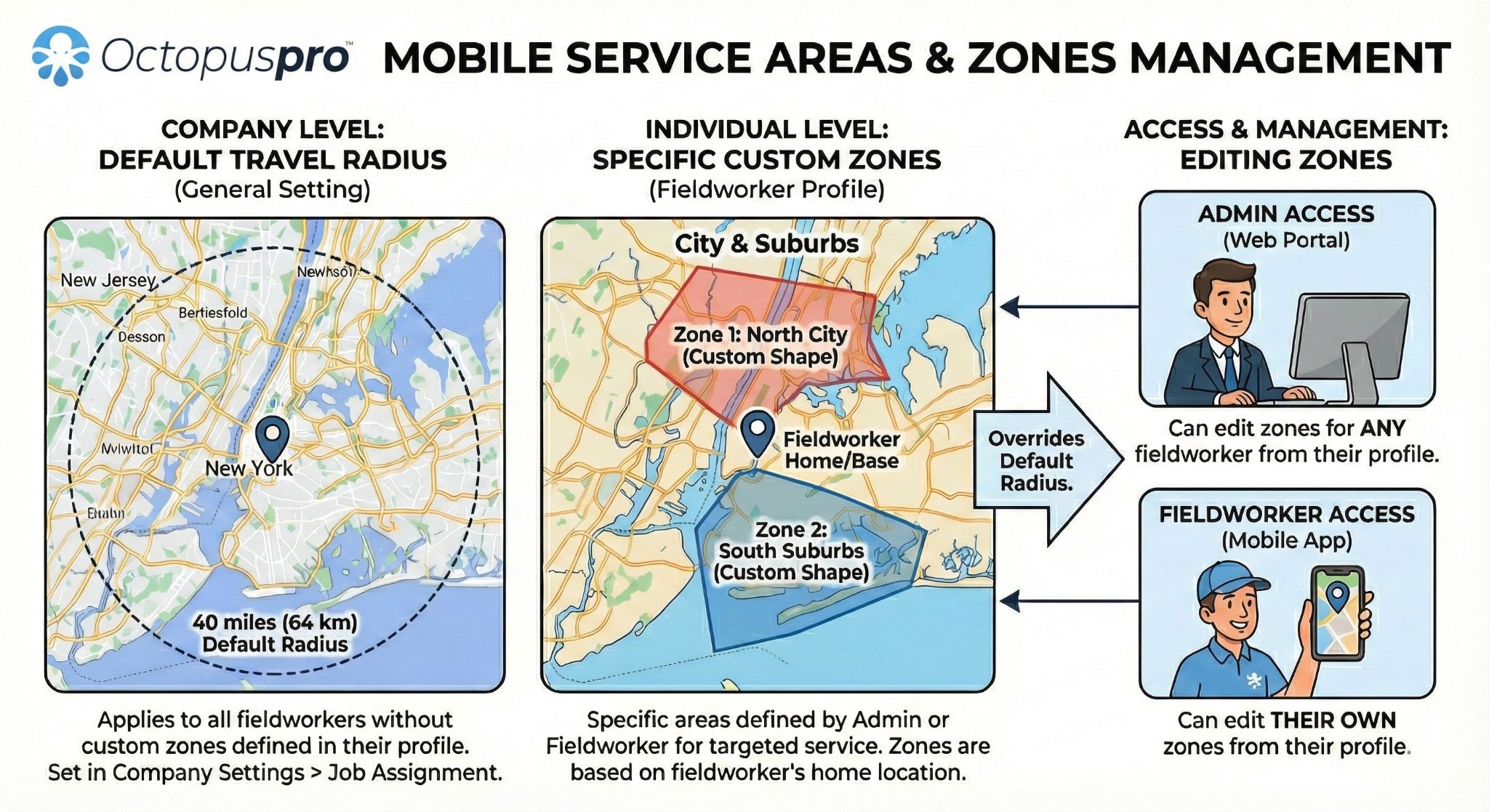
Mobile service areas and zones
Service areas, location rules, worker availability and dispatch coverage help mobile teams control where jobs are offered and assigned.
Turn every visit into a cleaner job record your office can review.
On The Way, Arrived, Started and Finished updates become more useful when they sit beside GPS context, timestamps, photos, forms, notes and follow-up history in one practical booking record.
Related guides:GPS check-in and check-out guideStart and Finish job workflow guidefieldworker activity log guide
Mobile service visit — example timeline
GPS and app status updates create a clearer story from travel through completion.
Related guides:booking activity guidefieldworker activity log guide
Travel begins, GPS visit context can start, and the office can monitor ETA risk.
Arrival is recorded with time and location context so attendance is easier to review.
Active work begins, helping separate work time from travel, parking, access or waiting time.
The job is complete and ready for notes, proof, invoice, payment or follow-up.
What the record supports
Proof without turning the day into a phone chase.
Managers can review the booking record after the visit and understand the important moments, evidence and next steps without relying only on calls, memory or manual updates.
Related guides:forms and checklists introduction guidebooking attachments and photos guide
Capture travel, arrival, start, finish and check-out context for cleaner review.
Clarify actual work time versus access delays, travel, waiting and completion follow-up.
Use before, progress and after proof for customer communication and quality control.
Capture safety checks, job notes, signatures, service details or required fields.
Keep status updates, notes, photos, customer communication and office follow-up together.
Review late arrivals, long jobs, missed updates, timesheet questions and customer disputes more fairly.
The aim is to make the live job workflow useful after the job too: for completion checks, customer questions, timesheets, payroll review and service quality follow-up.
Fieldworker timesheet management overview
Fieldworker activity, timestamps and job updates create a clearer record for timesheet review, payroll checks and operational reporting.

Make proof, timestamps and job activity easier to review.
Connect GPS context, app status updates, photos, forms and notes so your office has a clearer record for follow-up, timesheets, quality control and disputes.
Connect the field to your office, and your office to the field.
Related guides:field service notifications, discussions and SMS guidefieldworker app communication guidebooking photos and file attachments guide
Save time with photo and video sharing
Share files between fieldworkers, customers and the office to clarify customer bookings, resolve issues faster and avoid long explanations over the phone when a quick photo or video can show what is happening on site.
Related guides:booking photos and file attachments guideupload photos on visit completion guide
- Give the office clear field context during the job.
- Support better issue resolution and customer communication.
- Keep completion records clearer with photos, notes, forms and field evidence.
Keep updates moving, even when the job is messy.
Live GPS and app statuses work best when fieldworkers can still communicate, receive alerts, upload evidence and update progress even when reception, access or job conditions are not perfect.
Related guides:fieldworker app communication guidefieldworker app real-time notifications guidefield service notifications, discussions and SMS guide

Chat around the job
Speed up communication between the office, fieldworkers and customers so questions, access issues, delays and job notes stay connected to the live job workflow.
Related guides:fieldworker app communication guidefield service discussion and SMS guide
Notifications and alerts
Support the day with confirmations, reminders, On-the-Way updates, delay alerts and completion prompts so staff and fieldworkers stay aligned before, during and after the appointment.
Related guides:fieldworker app real-time notifications guidefieldworker app alarms and alerts guide

Offline access and sync
When reception drops, fieldworkers can still work from previously loaded job information, record progress where supported and sync updates back to the cloud when the app reconnects.
Related guide:getting started with the fieldworker app guide

Mobile and browser visibility
Receive field updates through mobile and browser access so managers can stay informed even when they are away from the office or moving between jobs themselves.
Related guide:live reports and analytics guide
Built for visibility, not micromanagement.
GPS tracking works best when everyone understands the purpose: helping the office dispatch smarter, protect the schedule, update customers earlier and keep a clearer job record — not watching every movement without context.
Related guides:fieldworker permissions guiderole-based access control guidefieldworker device audit guide
Use GPS as job-day context alongside app statuses and booking records.
Live location tells the office where a worker is. App statuses explain what stage the job is in. Booking notes, photos, forms and customer communication explain what actually happened. Together, they give managers a fairer way to review exceptions, support workers and keep customers informed.
Related guides:fieldworker permissions guidefieldworker device audit guide
Permission-controlled visibility
Use role permissions so the right office users can view live location, job status and activity records while keeping access aligned with operational responsibility.
Related guides:fieldworker permissions guiderole-based access control guide
Transparent fieldworker expectations
Explain when fieldworkers should tap On The Way, Arrived, Start and Finish, why those actions matter, and how updates reduce interruption calls during the day.
Related guides:fieldworker booking summary guidefieldworker working hours management guide
Customer and address privacy controls
Support privacy-focused workflows such as revealing the full job address only when the worker is ready to travel, where configured.
Related guides:display full address settings guiderestrict fieldworker communication guide
Best practice: review GPS location together with app statuses, booking timing, customer notes, photos, forms and communication history before making decisions about delays, attendance, timesheets or disputes.
Give every role clearer live context without adding more admin.
Live GPS, app status updates and booking context help each person see the part of the job day that matters to them: where the worker is, what stage the job is in and what should happen next.
Related guides:live reports and analytics guidefieldworker booking summary guidecustomer portal settings guide
Business owners
See the operation from a higher level without relying on manual end-of-day updates.
Related guide:live reports and analytics guide
- Better visibility over active fieldwork
- Cleaner accountability and service quality
- Fewer avoidable customer escalations
Dispatchers
Make faster decisions when jobs move, workers run late or urgent work appears nearby.
Related guides:job assignment and dispatch guidenearby bookings proximity scheduling guide
- Nearest worker and ETA context
- Earlier exception handling
- Faster reassignment decisions
Fieldworkers
Update the office with simple app taps instead of constant phone calls during the day.
Related guide:getting started with the fieldworker app guide
- On The Way, Arrived, Started and Finished
- Fewer interruption calls
- Clearer proof of job progress
Customers
Receive clearer answers about arrival, delays, progress and completion before they need to chase.
Related guides:customer portal settings guideOn The Way SMS notifications guide
- On-the-way and ETA updates
- Better delay communication
- More confidence the booking is moving
Admin staff
The same status trail supports records, completion checks, timesheets and follow-up.
Related guides:fieldworker timesheet summary report guidefieldworker activity log guide
- Cleaner job records
- Photos, notes and forms in context
- Easier payroll and dispute review
Built for service teams that need live visibility across the day.
Use GPS location, app status updates and booking context anywhere workers travel between customer sites, fixed locations, urgent jobs, multi-stop routes or crew-based appointments.
Related guides:fieldworker service areas guidemulti-address bookings guidejob assignment and dispatch guide
Cleaning and property services
Track cleaners, property maintenance teams, inspectors and recurring service crews moving between customer sites.
Related guide:fieldworker service areas guide
Trades and technical work
Give HVAC, plumbing, electrical, pest control and installation teams a clearer On The Way to Finished workflow.
Related guide:job assignment and dispatch guide
Mobile mechanics and tyre services
See who is travelling, who is on site, who is delayed and who can handle the next nearby vehicle job.
Related guides:GPS mileage billing software guidedistance-based travel fee guide
Healthcare and home visits
Support mobile care, therapy, allied health and in-home appointments with clearer ETA and attendance visibility.
Related guide:display full address settings guide
Courier, towing and transport
Use location, job status and route context for urgent pickups, drop-offs, towing, delivery and driving-based services.
Related guides:GPS mileage billing software guidemulti-address bookings guide
Installation and inspection crews
Keep office teams informed when workers arrive, start, need longer on site or finish with follow-up still required.
Related guides:forms and checklists guidephoto upload on visit completion guide
Mobile beauty and wellness
Reduce customer uncertainty with On The Way updates, ETA context and a cleaner arrival-to-completion job record.
Related guide:customer portal settings guide
Urgent and on-demand support
Find nearby workers, spot ETA risk earlier and reassign work before a late job becomes a customer complaint.
Related guides:nearby bookings proximity scheduling guidedispatch and job assignment guide
Make live workforce visibility useful beyond the live map.
GPS, live location and app status updates become more valuable when they connect to the rest of your OctopusPro workflow: timesheets, crews, customer communication, travel charges, reports and job history.
Related guides:fieldworker timesheet summary report guideassign multiple fieldworkers to a booking guideGPS mileage billing software guidelive reports and analytics guide
Compare scheduled and actual work
Use Start, Finish, Arrived and GPS context to support attended hours, job duration review, missed updates, overruns and payroll questions.
Related guide:fieldworker timesheet summary report guide
Track team and crew progress
For jobs with multiple assigned fieldworkers, the office can still review key appointment milestones and understand how the team is progressing.
Related guide:assign multiple fieldworkers to a booking guide
Support distance-based workflows
Where configured, travel distance, mileage or GPS odometer-style information can support travel fees, driving-based services and distance-related billing workflows.
Related guides:distance-based travel fee guideGPS mileage billing software guide
Share progress where appropriate
Customer-facing visibility can be enabled where useful, giving customers better status or tracking context without requiring constant phone calls.
Related guides:customer portal settings guideOn The Way SMS notifications guide
Review performance after the day
Use booking, fieldworker, communication and activity reporting to review delays, missed updates, workload, customer communication and operational bottlenecks.
Related guides:live reports and analytics guidefieldworker activity log guide
Plan around location and route context
Use proximity and location context to improve same-day dispatch, route decisions, service area planning and urgent job assignment.
Related guides:nearby bookings proximity scheduling guidefieldworker service areas guide
Timesheet summary reporting
GPS-backed attendance and job status updates can support reporting, payroll review and operational analysis.

Use GPS data beyond the live map.
Link field visibility with timesheets, reporting, customer communication and job history so your team can improve scheduling, payroll review and operational control over time.
Common questions about live GPS, app status updates and mobile workforce visibility.
Find clear answers about GPS tracking, fieldworker app status updates, customer ETA messages, privacy controls and job records.
Related guides:fieldworker GPS tracking guidereal-time fieldworker location tracking guideOn The Way SMS notifications guide
When does visibility matter most?
When the office needs to know who has left, who has arrived, who is working, who is delayed and which customer needs an update.
Related guides:fieldworker GPS tracking guidereal-time fieldworker tracking guide
What do customers see?
Your team controls the customer experience: On-the-Way messages, ETA context, optional tracking links and delay/completion updates where configured.
Related guides:On The Way SMS notification guidecustomer portal settings guide
How do you roll it out fairly?
Use GPS as job-day context, not as a standalone judgement. Review location, app statuses, booking notes and customer context together.
Related guides:fieldworker permissions guiderole-based access control guide
Live visibility and dispatch
What is the difference between live fieldworker tracking and booking GPS tracking?
Live fieldworker tracking helps the office see logged-on workers during the workday. Booking GPS tracking is tied to a specific appointment and follows the visit from On The Way through arrival, start, finish and check-out.
When does booking GPS tracking start and stop?
Booking-specific GPS tracking can start when the fieldworker taps On The Way for the assigned appointment, then continue through arrival, Start Job, Finish Job and check-out depending on your settings.
How does GPS visibility help dispatchers?
Dispatchers can check who is nearby, who is travelling, who is on site, who is delayed and who may be suitable for urgent or same-day work, reducing phone chasing and improving schedule recovery.
What is the difference between GPS and app status updates?
GPS shows movement and location context. App status updates explain the job stage: On The Way, Arrived, Started or Finished. Together, they give the office a clearer view than either signal alone.
Can this work for small teams as well as large teams?
Yes. Even small teams benefit when the office can see who has left, who is on site, who is still working and which customer needs an update.
Fieldworker app workflow
What status updates can fieldworkers send from the app?
Fieldworkers can update progress through stages such as On The Way, Arrived, Started and Finished, with supporting context such as time, booking details, notes, photos, forms or checklists depending on your setup.
What happens if the day goes off plan?
The office can use signals such as no On The Way update, ETA risk, Running Late, Unable to Attend, Arrived but not Started, and long-running jobs to act earlier instead of discovering problems after the customer complains.
What happens when a fieldworker has poor reception?
The OctopusPro app can support previously loaded job details and progress updates while offline, then sync updates back to the cloud when the device reconnects.
Does GPS tracking replace communication with fieldworkers?
No. It reduces unnecessary check-in calls by giving the office live context, while keeping chat, notifications and direct communication available when an exception needs attention.
Customer ETA updates
Can customers receive an On-the-Way SMS?
Yes. When configured, customers can be notified when the fieldworker taps On The Way, with details such as the fieldworker name, booking context and ETA information.
Can customers receive a live tracking link?
Where customer tracking is enabled, the On-the-Way communication can include a tracking link so customers can follow progress without repeatedly calling your office.
Can customers be updated without seeing the full internal map?
Yes. Your office can use live GPS and status context internally to provide clearer ETA, delay, arrival and completion updates without exposing every operational detail.
Can staff update customers during delays?
Yes. Running Late updates, ETA risk, slow travel and long-running job context help staff send earlier delay updates instead of waiting for the customer to chase.
What should the office say when a customer asks where the worker is?
Staff can use On The Way, live GPS movement, Arrived and Finished context to give a clearer answer without first chasing the fieldworker for a manual update.
Control, proof and records
Can arrival be validated with GPS or geofencing?
Yes. Arrival-distance and geofence settings can help confirm the fieldworker is close enough to the job location before recording arrival, depending on your configuration and workflow.
Can the full address be hidden until the worker is on the way?
Yes. Where enabled, OctopusPro can hide the full address until the fieldworker taps On The Way, helping protect customer details and encourage the correct travel-status workflow.
Can OctopusPro help if workers forget to check out?
Yes. Geofence-based auto check-out can help reduce missed check-out steps by recording when a fieldworker leaves the job-site area, depending on your settings.
Can managers review proof and activity history later?
Yes. Status timestamps, GPS context, Start/Finish updates, photos, notes, forms, checklists, customer communication and activity history can help with quality control, payroll review and dispute questions.
Can this help reduce customer complaints?
Yes. When the office can see late departures, delayed arrivals, long-running jobs and completion updates earlier, customers can be updated before they feel ignored or need to chase.
Connected OctopusPro features
Can this connect with timesheets?
Yes. Arrived, Started, Finished and GPS context can help managers compare scheduled time with actual attendance and review missed updates, overruns or time-dispute questions more fairly.
Can this support jobs with multiple fieldworkers?
Yes. For team or crew-based work, live job milestones can still help the office understand who is assigned, who is on site, what stage the job is in and what follow-up is needed.
Can GPS data help with travel fees or mileage?
Where configured, GPS and distance-related workflows can support travel fees, mileage, driving-based services or GPS odometer-style billing, depending on the service setup.
Can managers report on fieldworker visibility later?
Yes. Booking status history, fieldworker activity, communication records and reporting tools can help review delays, workload, customer updates and job completion trends after the day is done.
Fair rollout and trust
How should businesses introduce GPS tracking to fieldworkers?
Introduce it as a workflow improvement that reduces interruptions, improves dispatch, protects accurate job records and helps customers receive better updates.
How can GPS tracking stay fair for fieldworkers?
Use clear status rules, explain the purpose, set role-based permissions, focus on job-day exceptions and review GPS alongside app statuses, booking notes, photos, forms and customer context instead of using one signal on its own.
Give your office live visibility from departure to completion.
Track fieldworkers, monitor job status, update customers and act earlier when the day changes. OctopusPro connects live GPS, app status updates, booking context and job records so your team can manage the workday with less chasing.
Related guides:fieldworker GPS tracking guideStart and Finish job workflow guidelive reports and analytics guide
Start with the live workflow your team uses every day, then connect it with customer updates, proof, timesheets and reporting as your process matures.