
Convert more website visitors into bookings, payments, approvals, and repeat customers through one branded portal
Give customers a faster way to book, approve quotes, sign terms, pay deposits or invoices, manage appointments, redeem vouchers, and book again — while reducing back-and-forth for your team.
OctopusPro helps customers complete more actions online while your business stays in control of availability, permissions, payments, service rules, branding, and customer-facing content.
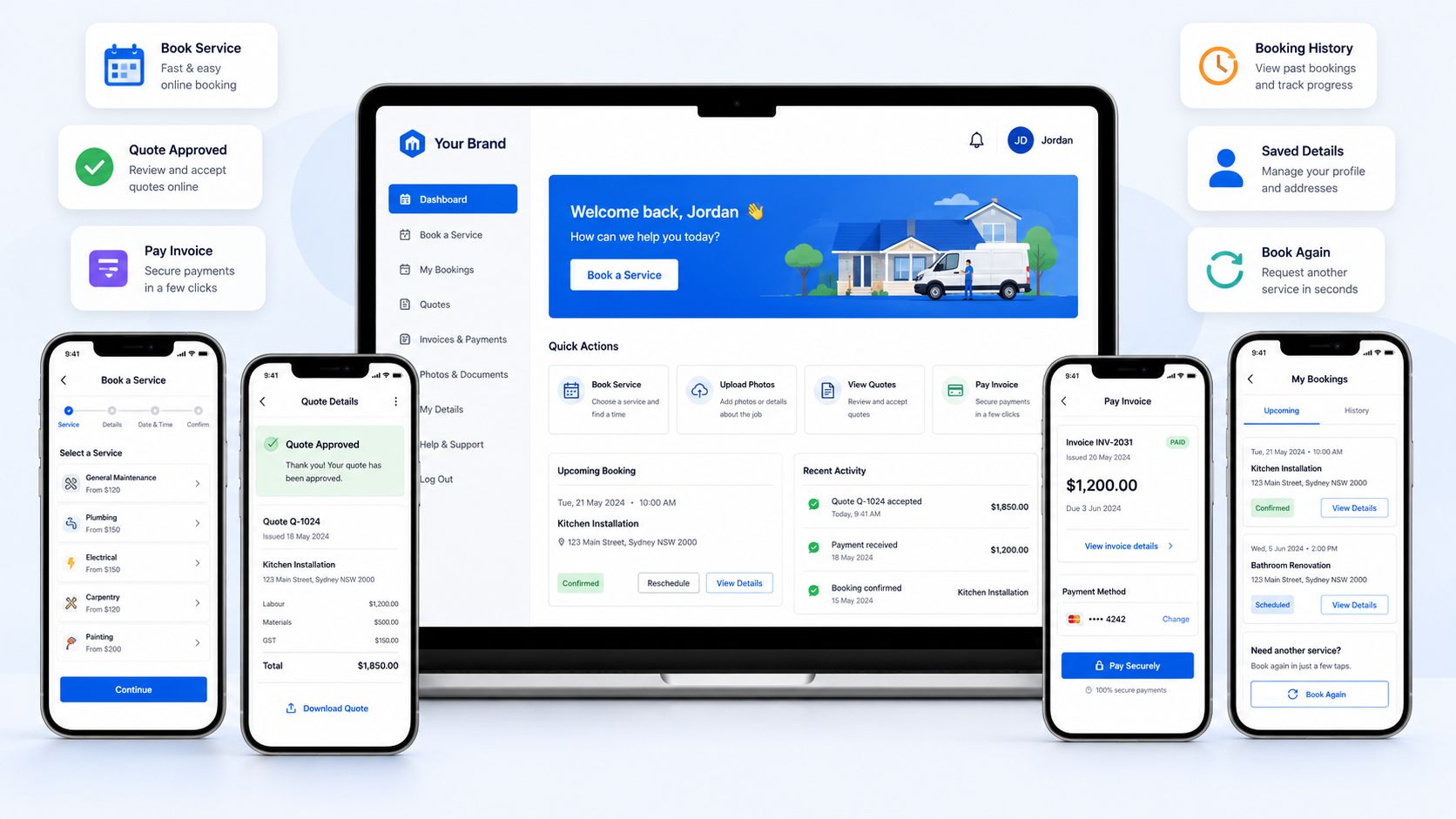
Match every visitor with the action they are ready to complete
Send website visitors, quote recipients, invoice payers, voucher buyers, and returning customers to the portal path most likely to convert.
Keep customers moving after every booking
Let customers manage bookings, quotes, invoices, profiles, saved cards, vouchers, changes, and service details themselves.
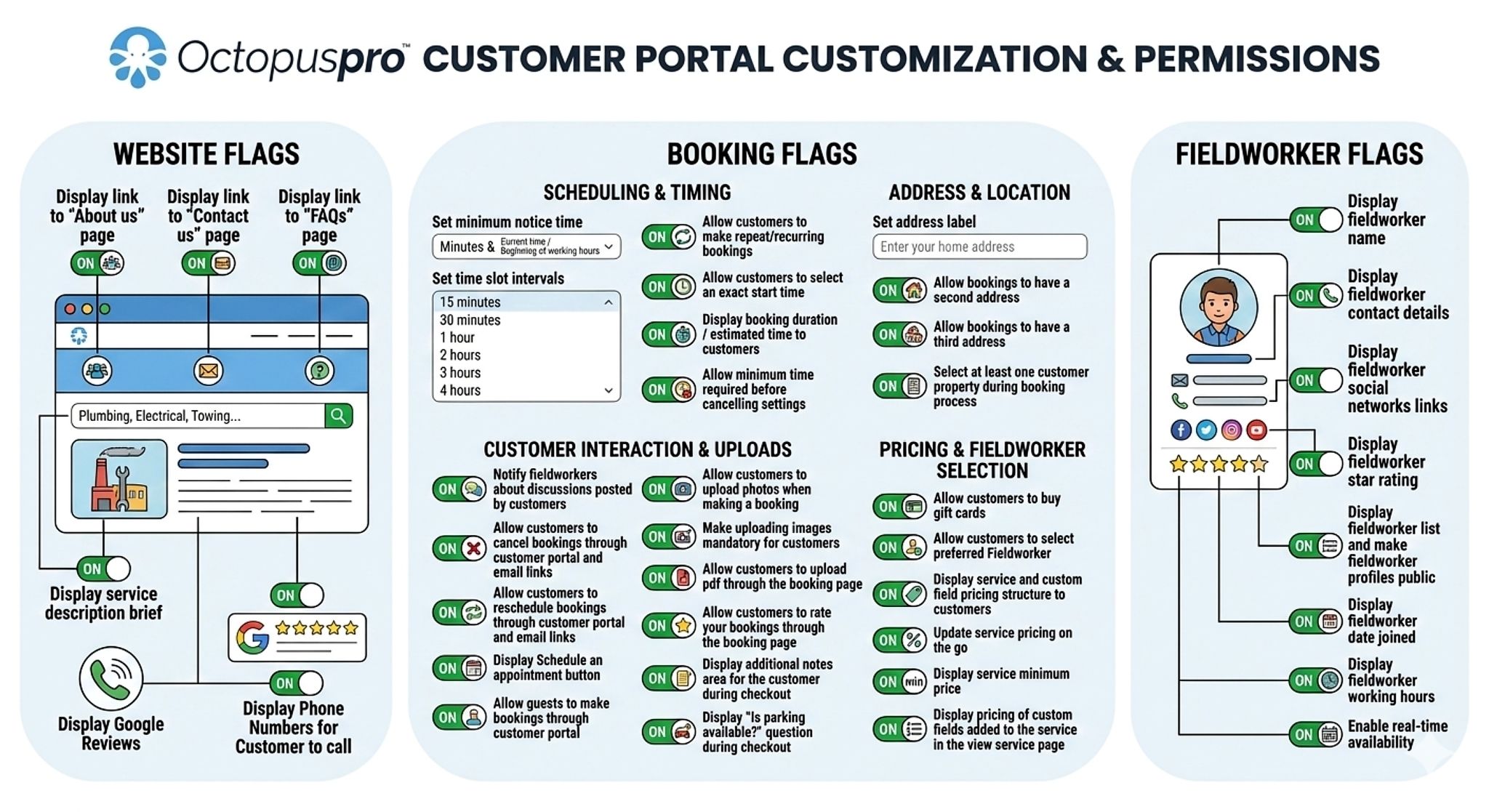
Control what customers can see, do, and book online
Configure availability, payments, deposits, taxes, recurring bookings, preferred fieldworkers, cancellations, and service permissions.
Strengthen your brand
Use a branded portal, white-label URL, homepage content, reviews, tracking, and app promotion to build trust and convert more visitors.
Turn customer intent into bookings, payments, approvals, and repeat business
Show visitors exactly what they can do next while keeping the experience branded, measurable, and controlled by your business rules.
Faster payments
Cleaner approvals
More repeat customers
Send each visitor to the right action
Guide website visitors, quote recipients, invoice payers, voucher buyers, and returning customers to the portal path most likely to convert.
Make bookings easier to complete
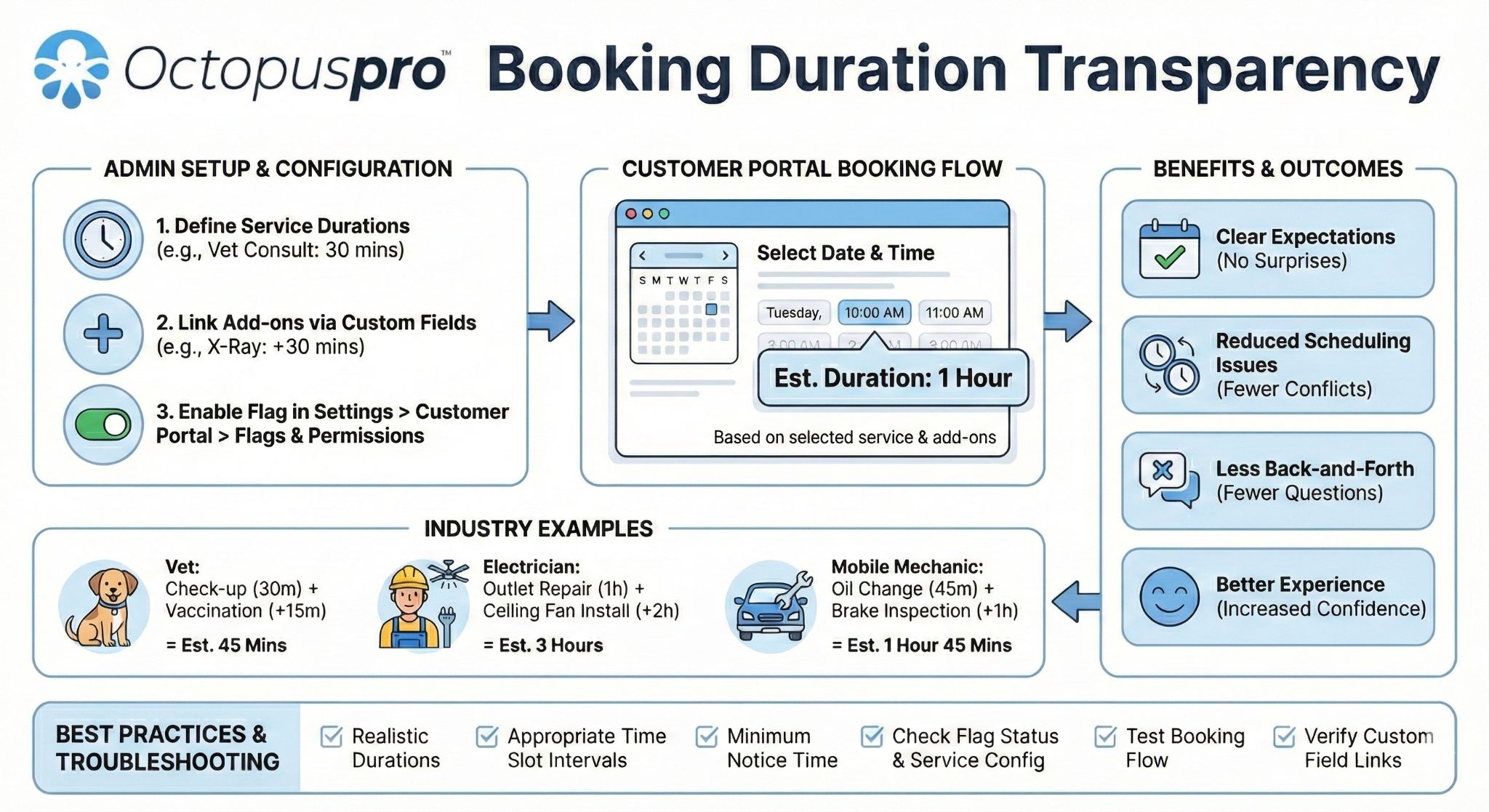
Let customers choose services, locations, available times, booking options, required details, uploads, and payment steps without unnecessary back-and-forth.
Keep rules protected while customers self-serve
Control availability, booking questions, deposits, taxes, cancellation limits, pricing visibility, preferred fieldworker settings, and service-specific permissions.
Bring customers back after the first booking
Give customers a clear place to manage appointments, pay invoices, approve quotes, redeem vouchers, update account details, and book again.
Ready to turn more customer intent into confirmed action?
Start with the portal journey most likely to produce bookings, approvals, payments, or repeat customers, then expand once the path is clear and measurable.
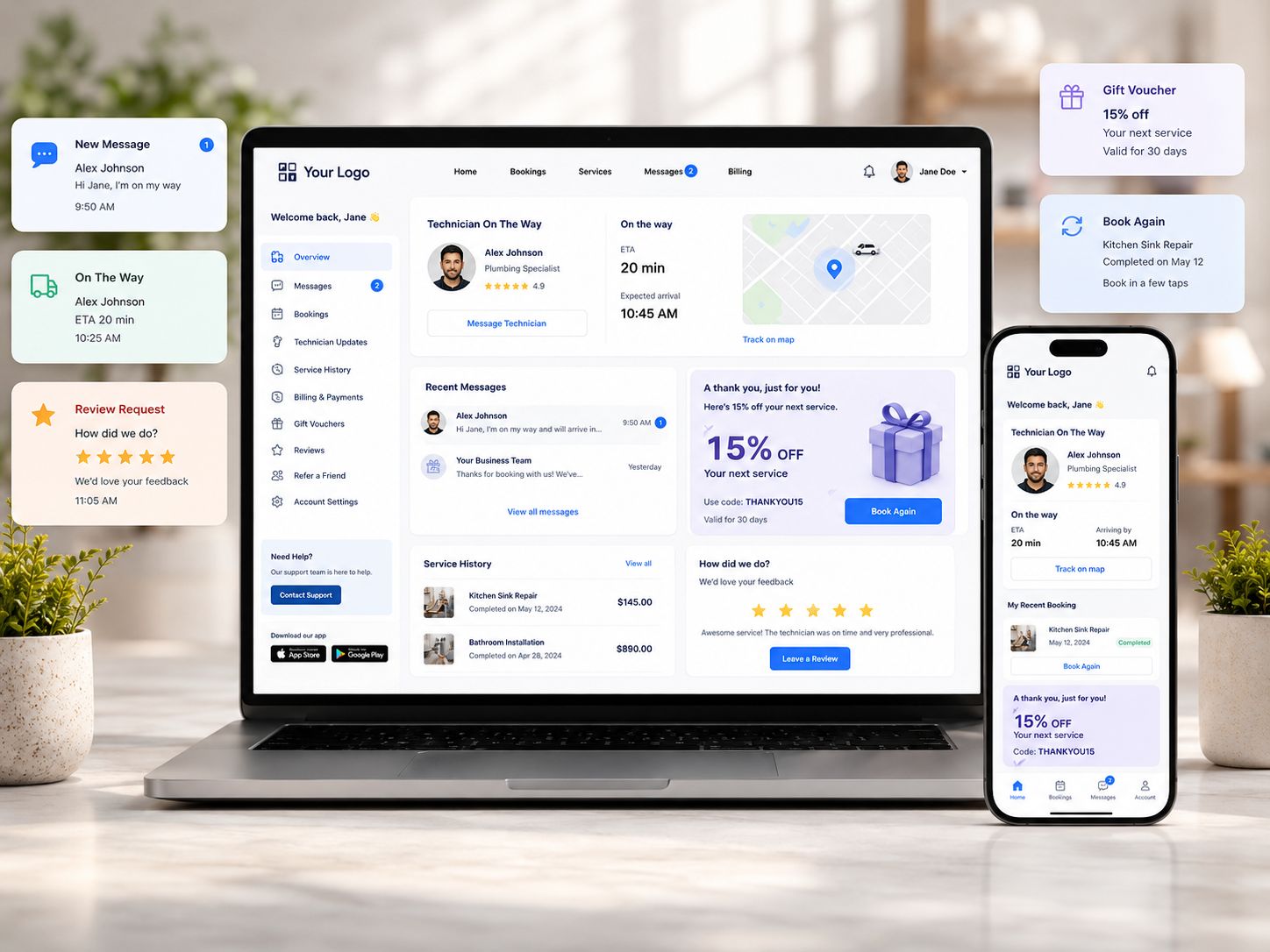
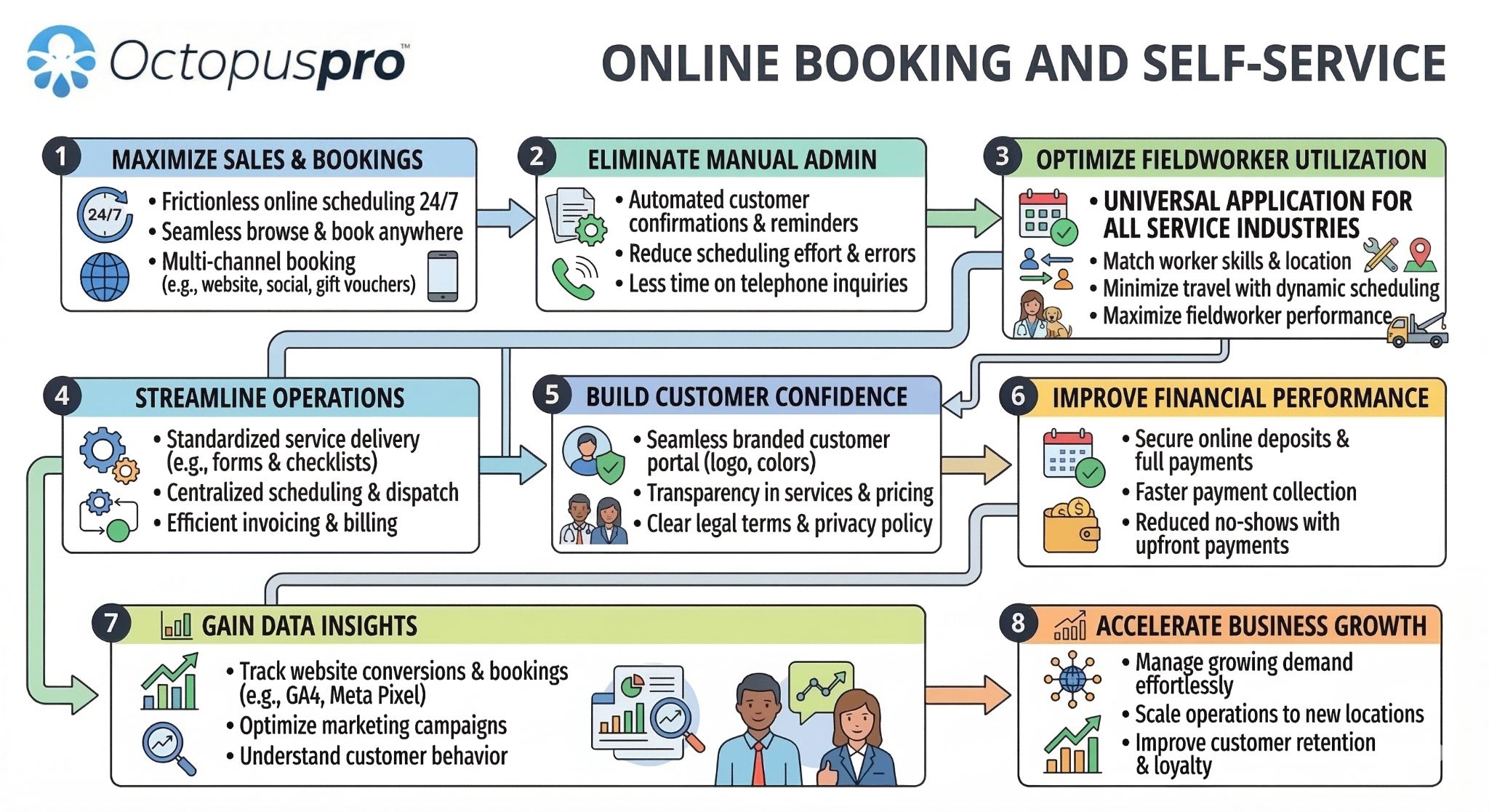
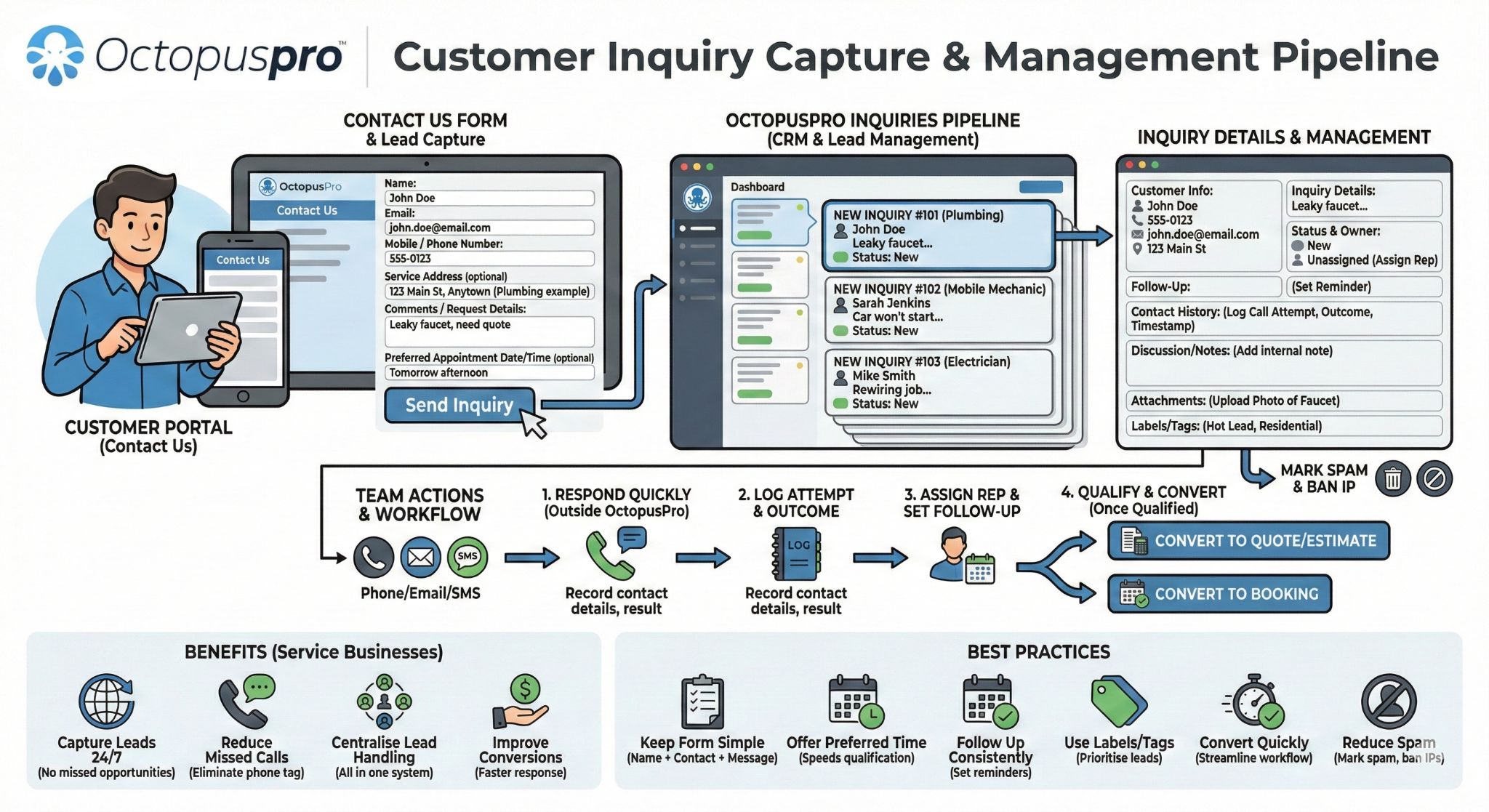
Turn every traffic source into a direct booking, payment, or account action
Connect website pages, service links, landing pages, campaigns, QR codes, and booking buttons to the right customer action.
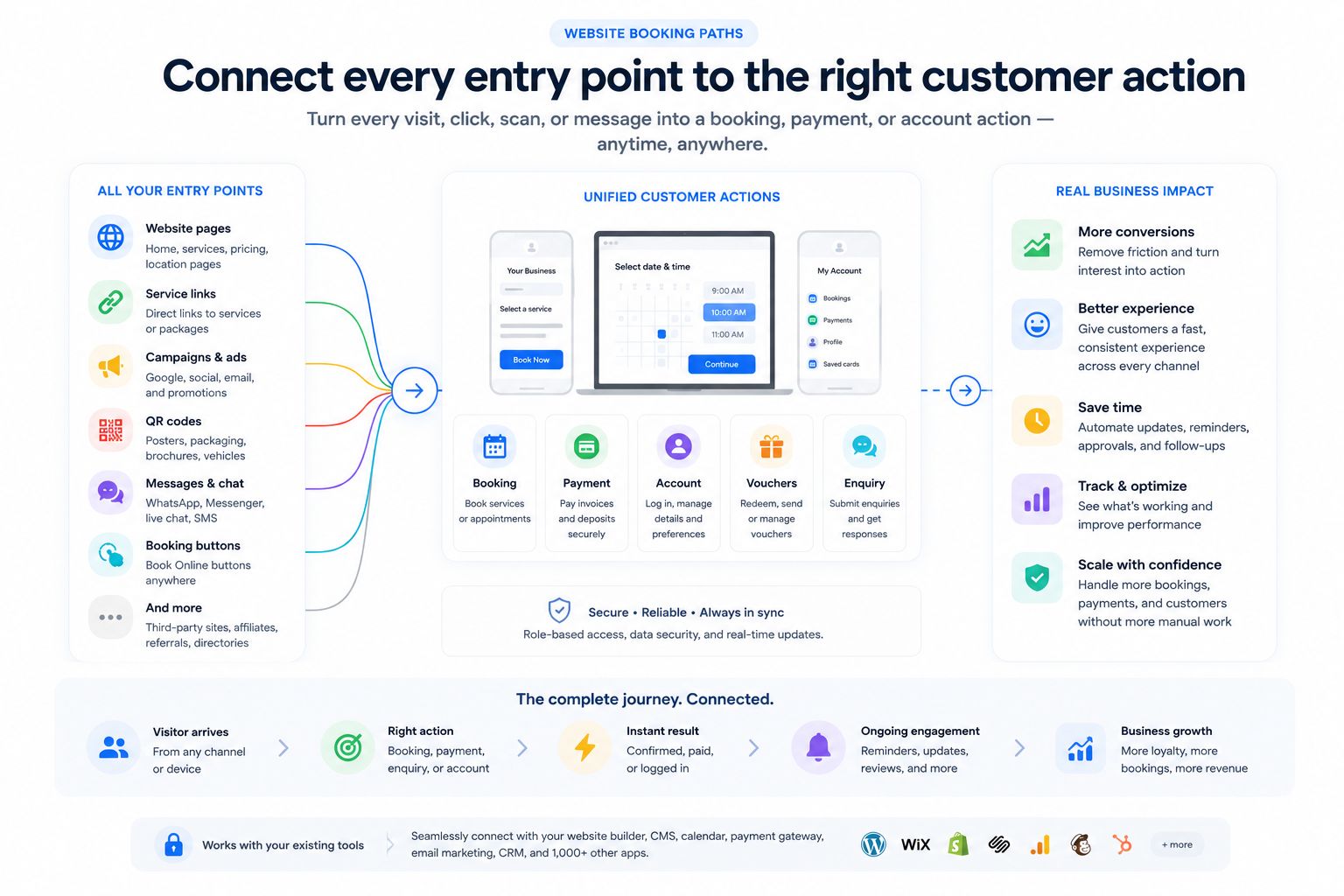
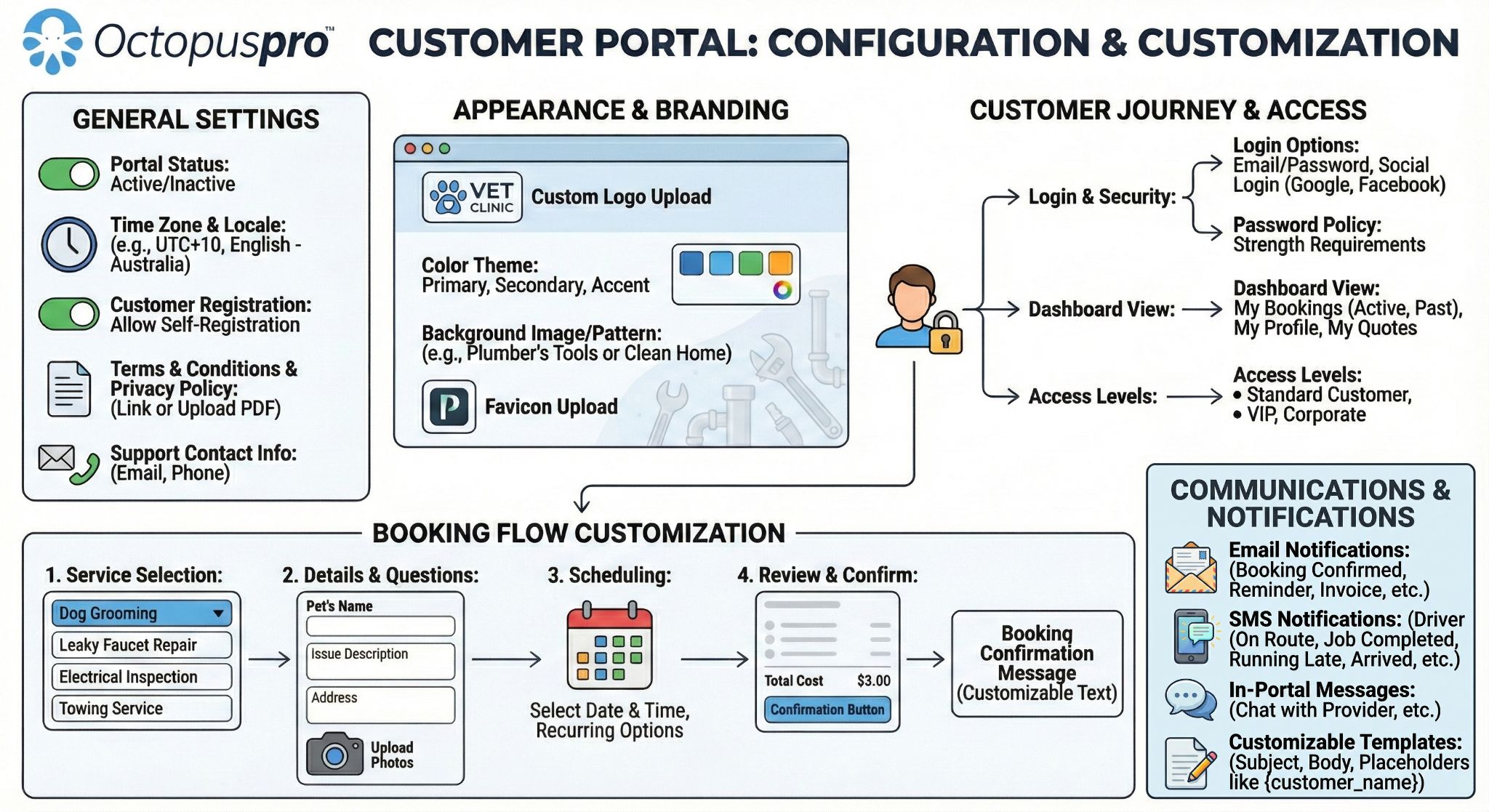
Launch a professional branded customer-facing portal with your logo, colours, homepage content, services, locations, booking rules, reviews, contact details, online booking, payment options, login, and approved self-service actions.
Add Book Online, gift voucher, service-specific booking, enquiry, payment, login, QR, campaign, and white-label portal links to your current site, regardless of the website builder, CMS, or editor your business uses, so visitors move straight into the right booking flow without rebuilding your main website.
Give customers one place to log in, save details, manage bookings, approve quotes, pay invoices, redeem vouchers, save cards, update profiles, submit feedback, leave reviews, and book again faster with fewer steps.
Choose the first customer action to launch
Start with the portal path closest to revenue or retention, then add supporting options once that path is clear, measurable, and easy for customers to complete.
Turn ready visitors into bookings
Use service-specific Book Online paths so customers can choose services, locations, times, required details, uploads, payments or deposits, and confirmations in one flow.
Move accepted quotes into scheduled work
Send quote recipients to approve terms, sign where needed, pay deposits, and continue into a confirmed booking without extra back-and-forth.
Make payment easier to complete
Give invoice payers direct payment links and account access so they can view balances, pay invoices, use saved cards or offline instructions, and complete payment with less follow-up.
Give returning customers a faster path back
Let customers log in, view booking history, reuse saved details and cards, redeem vouchers, approve quotes, manage profiles, choose preferred fieldworkers where enabled, and book again faster.
Choose the customer action that creates the quickest win
Whether your biggest opportunity is online booking, quote approval, invoice payment, deposits, vouchers, or rebooking, OctopusPro helps you launch a focused portal path before adding more complexity.
Match the portal to how customers choose, buy, and rebook your services
Shape the portal around how customers choose, book, pay for, and rebook your services — whether they need to compare services, choose a location, submit job details, approve a quote, pay upfront, manage an account, or book again.
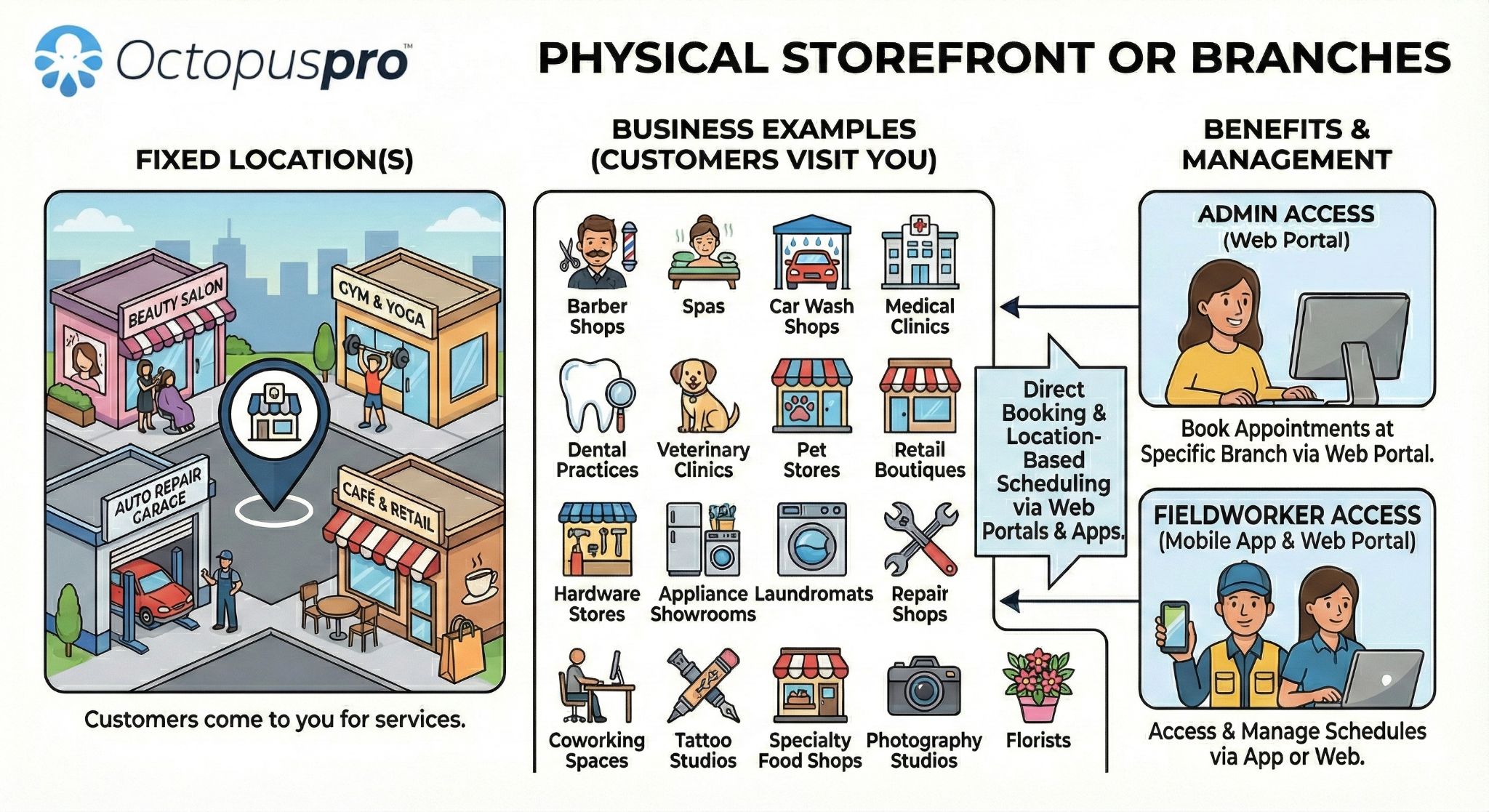
Best for clinics, salons, studios, training centres, workshops, and branch-based businesses where customers choose a branch, service, staff member, resource, class, or available time.
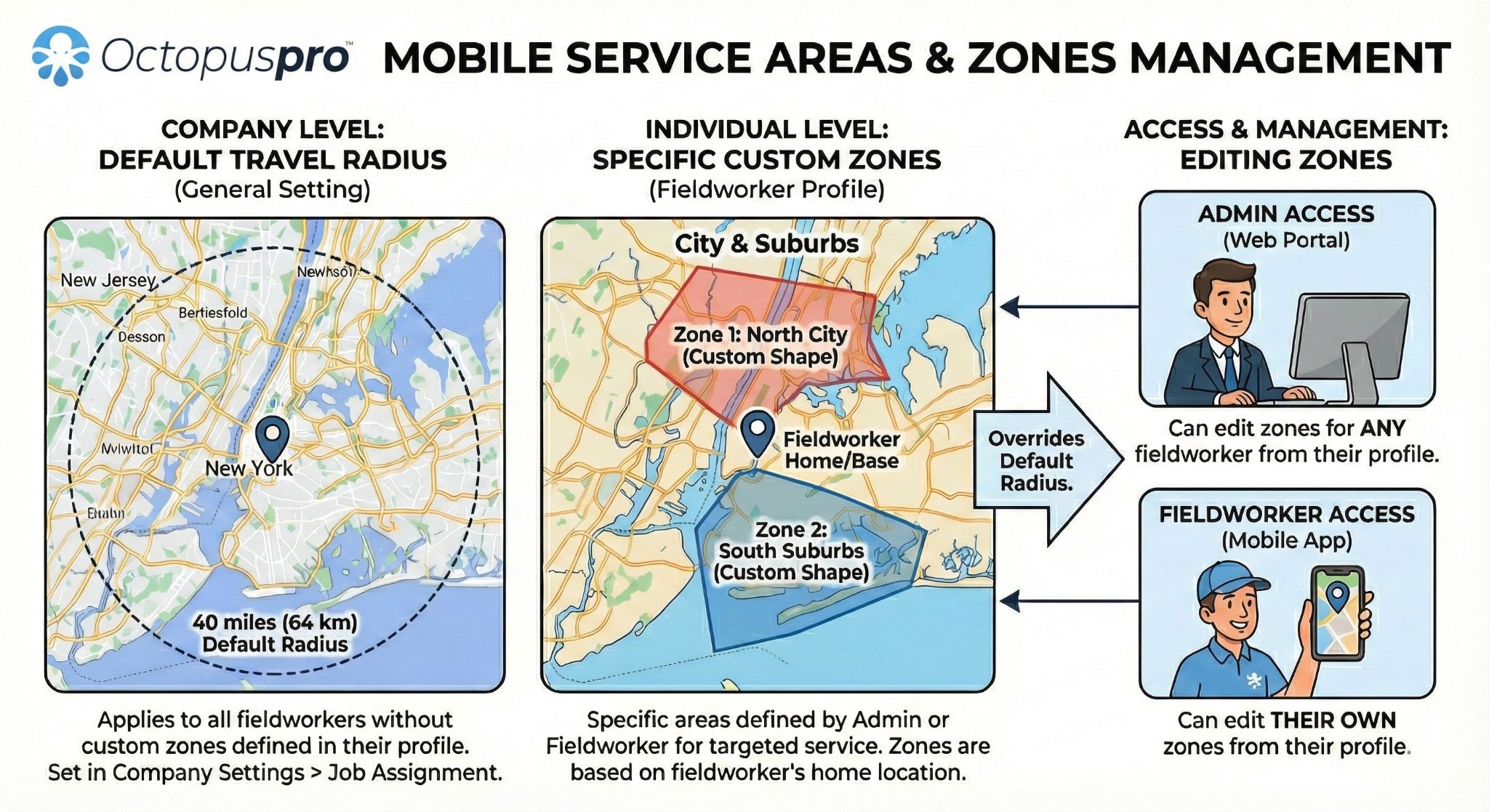
Best for field service, cleaning, trades, pet care, onsite inspections, mobile mechanics, and home services that need service addresses, photos, access notes, travel rules, service areas, and availability controls.
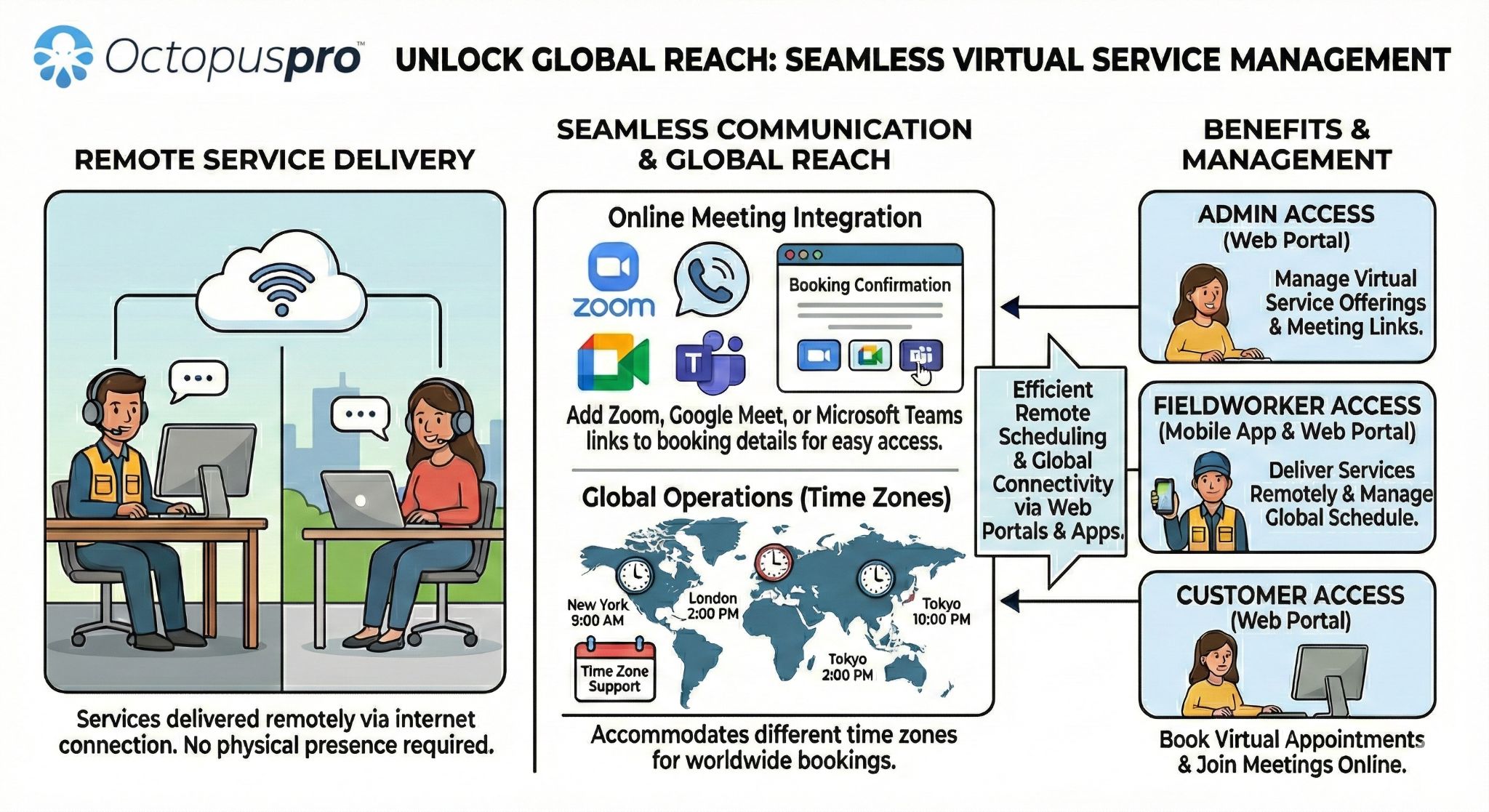
Best for coaching, consulting, tutoring, telehealth, remote support, and virtual services that rely on clear booking steps, time-zone aware scheduling, online meeting details, digital instructions, and simple customer account access.
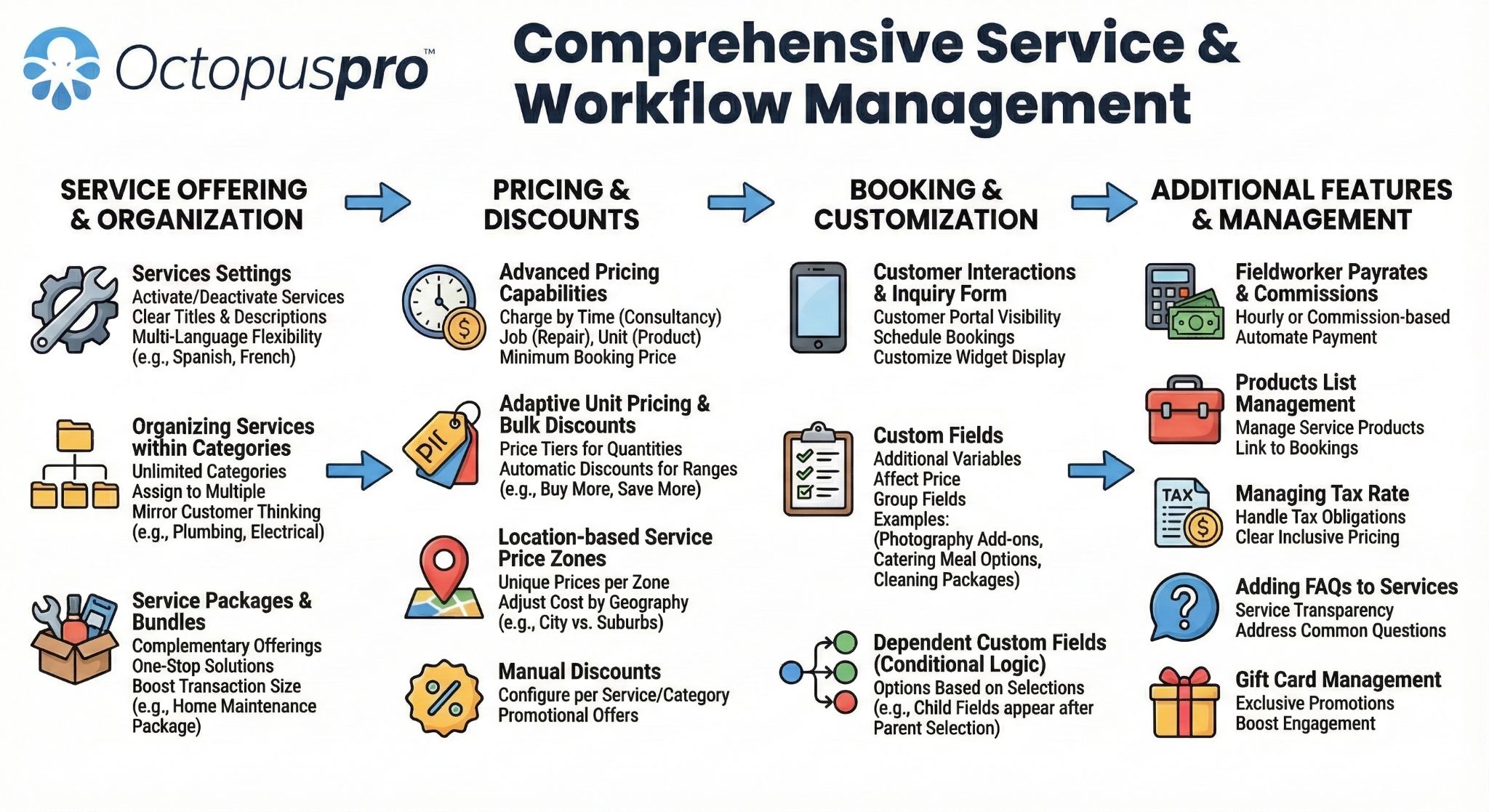
Best for businesses that need service-specific questions, custom fields, uploads, deposits, quote approvals, recurring bookings, multi-address workflows, and different booking rules by service.
Best for businesses that want customers to log in, view booking history, pay invoices, reuse saved details, redeem vouchers, manage profiles, choose preferred fieldworkers where enabled, and book again faster.
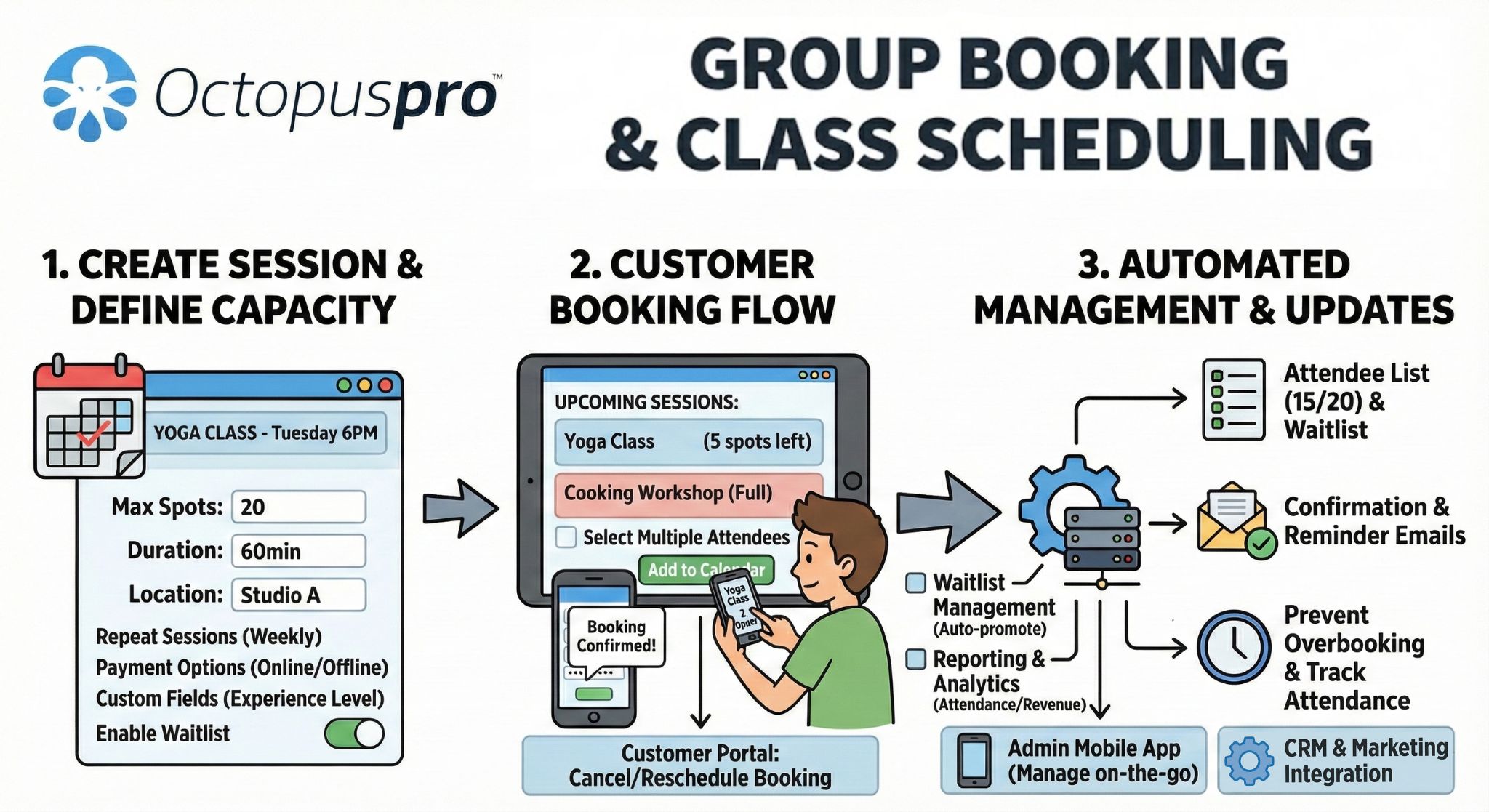
Best for classes, workshops, tours, events, training sessions, group services, and shared bookings where customers choose a session, join available capacity, and receive clear booking instructions.
Give each service the booking journey customers expect
Match the portal experience to how your services are sold, scheduled, delivered, and paid for, so customers see the right questions, pricing, availability, and next steps.
Let customers self-serve while your business stays in control
Replace routine calls, emails, and disconnected forms with guided portal actions for booking, quote approval, payment, rescheduling, account updates, feedback, and repeat bookings — while OctopusPro keeps availability, permissions, pricing, policies, branding, and customer data controlled in one platform.
Customers can complete more online
Give customers one branded place to take action without waiting for your team.
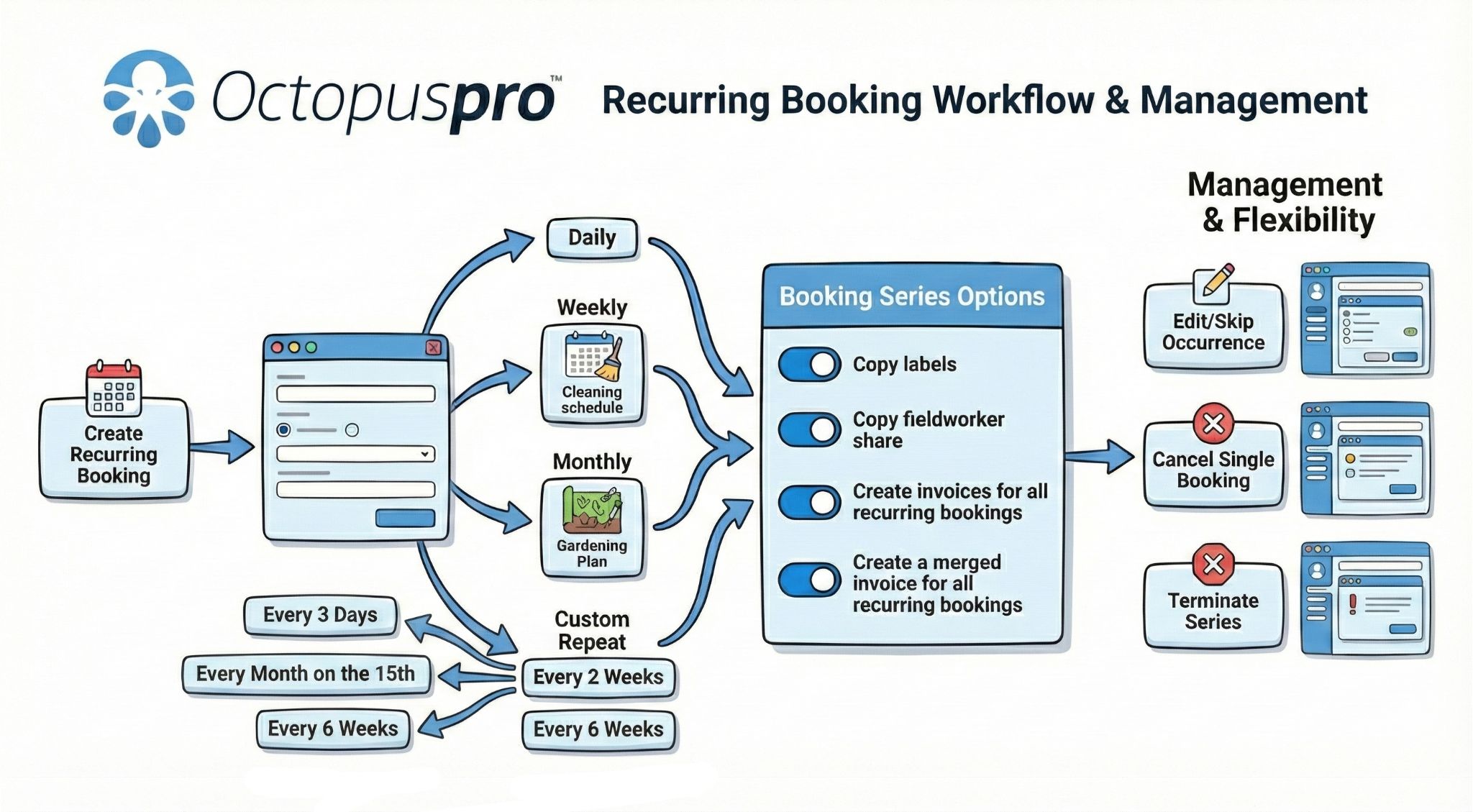
- Browse services, choose locations, select available times, request recurring bookings, and book through direct links or portal pages.
- Answer booking questions, choose service options, upload photos or files, and provide details your team needs before the job is accepted.
- Approve quotes, accept required terms, receive confirmations, and continue into scheduling where your workflow allows it.
- Pay deposits, invoices, partial balances, or full balances; redeem gift vouchers; save payment methods; and view billing history.
- Manage bookings, request updates, reschedule or cancel where enabled, update profiles, save addresses, submit feedback, and book again faster.
Your business controls every rule
Let customers self-serve only when the request fits your service, payment, scheduling, and permission settings.
- Control bookable, quote-first, hidden, or restricted services, plus service permissions, required questions, custom fields, and add-ons.
- Protect availability with time slots, working hours, minimum notice, service areas, location types, multi-address workflows, fieldworker eligibility, and preferred fieldworker options.
- Manage deposits, taxes, gateways, saved-card options, invoices, gift vouchers, offline instructions, checkout visibility, and payment timing.
- Show pricing and policy terms before confirmation, including cancellation windows, rescheduling limits, call-out rules, no-show fees, refund expectations, and legal links.
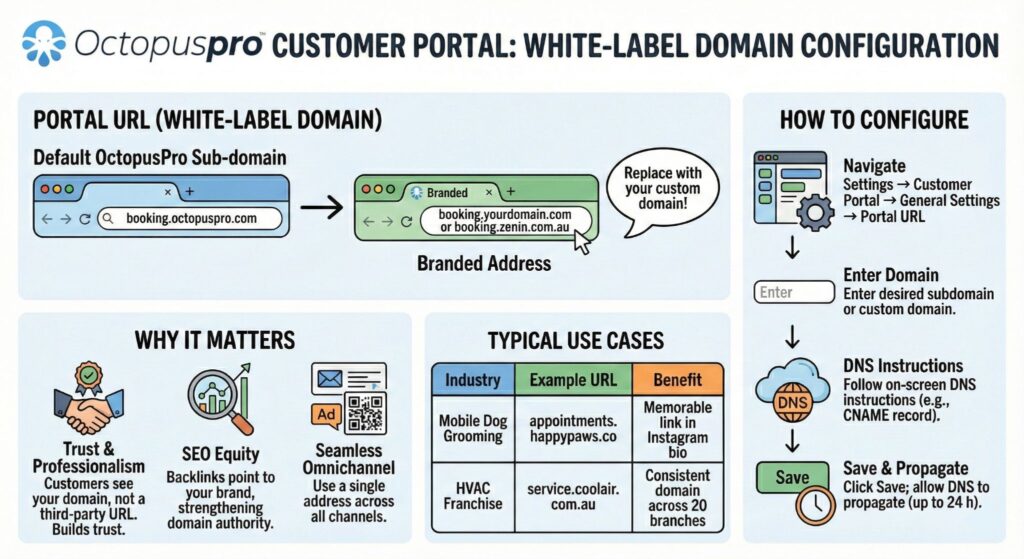
- Keep branding, homepage content, white-label URLs, language settings, Google Reviews, social links, app prompts, SEO, analytics, ad tracking, campaign links, and feedback connected.
Customers can select services, locations, time slots, options, uploads, and required details.
Quote approvals, signatures, acknowledgements, deposits, and confirmations stay connected.
Support checkout, invoice links, vouchers, saved cards, tax settings, and offline instructions.
Customers can manage appointments, addresses, saved cards, booking history, and account details.
Saved profiles, addresses, payment methods, vouchers, recurring options, and history speed up repeat bookings.
Reviews, fieldworker ratings, feedback, social links, About Us content, contact details, and app promotion help customers continue.
Use booking links, service-specific CTAs, SEO settings, tracking, reviews, campaign paths, and branded content to convert more visitors.
Use availability rules, location types, fieldworker selection, time slots, minimum notice, and customer-uploaded details to reduce scheduling issues.
Use deposits, invoice payments, vouchers, saved payment methods, tax settings, offline instructions, and account history to make payment easier to complete.
Book Online button setup guide
Customer Portal payment methods guide
Quote approval guide
Cancellation and rescheduling controls guide
Repeat booking guide
Profile management guide
Permissions and visibility controls guide
Bookable service control guide
Booking disclaimer guide
Cancellation fees guide
Reschedule bookings guide
Request booking update workflow guide
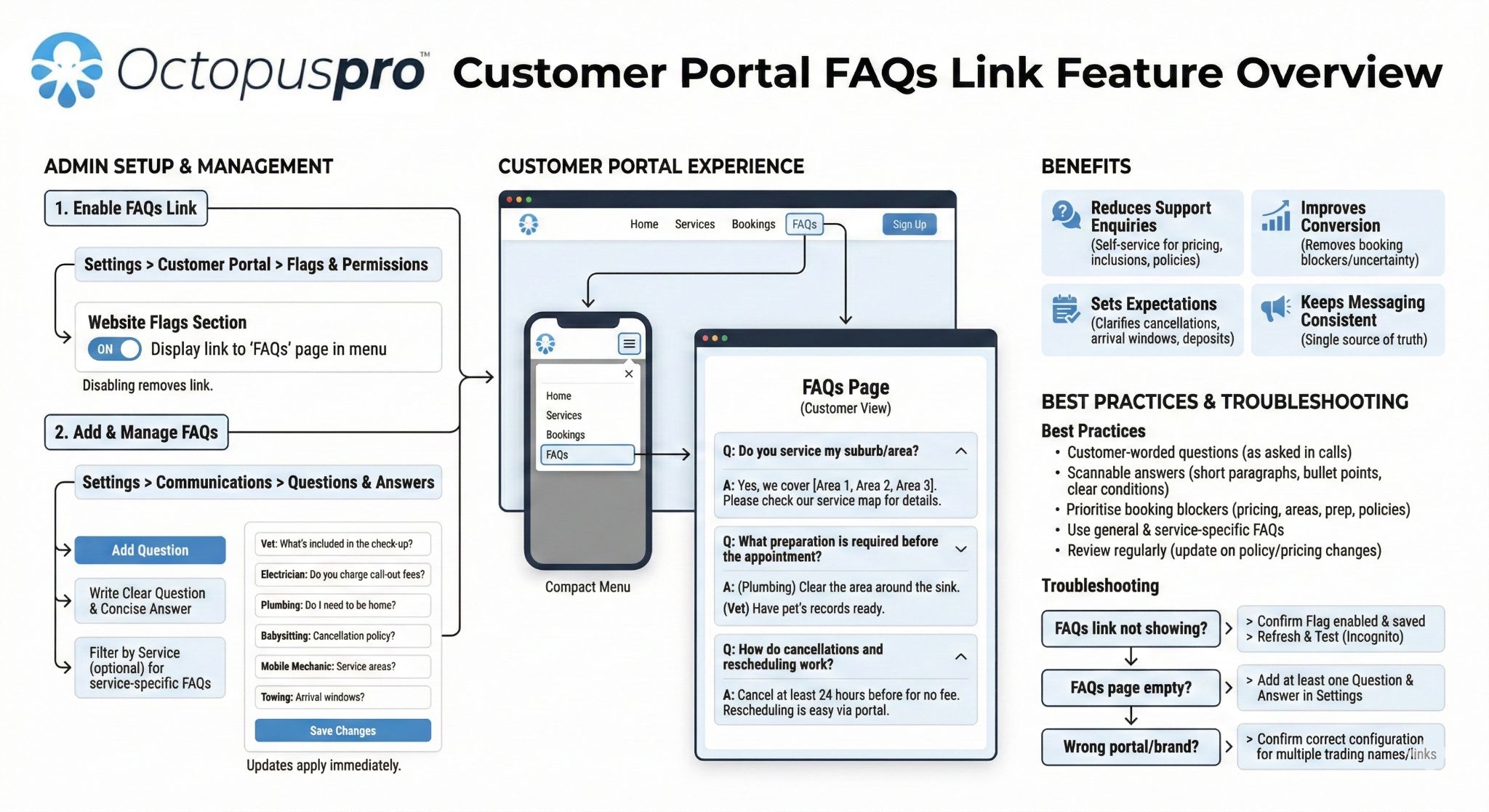
Show a FAQs link in the Customer Portal menu
Give customers a clear place to find answers before they call, message, or abandon the booking flow. The FAQs link can open a customer-facing questions-and-answers page for common topics such as pricing, inclusions, service areas, preparation steps, deposits, arrival windows, cancellations, and rescheduling.
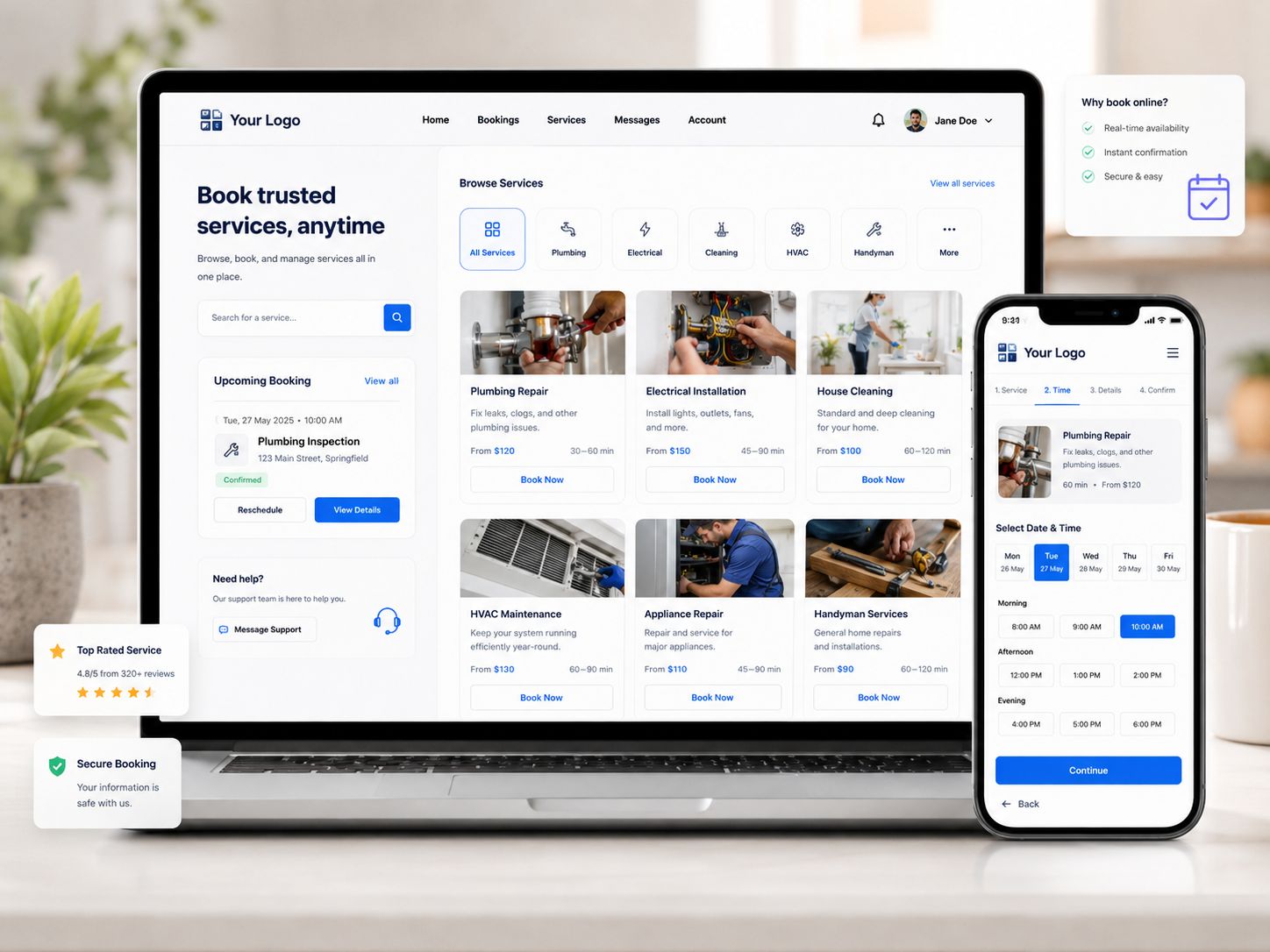
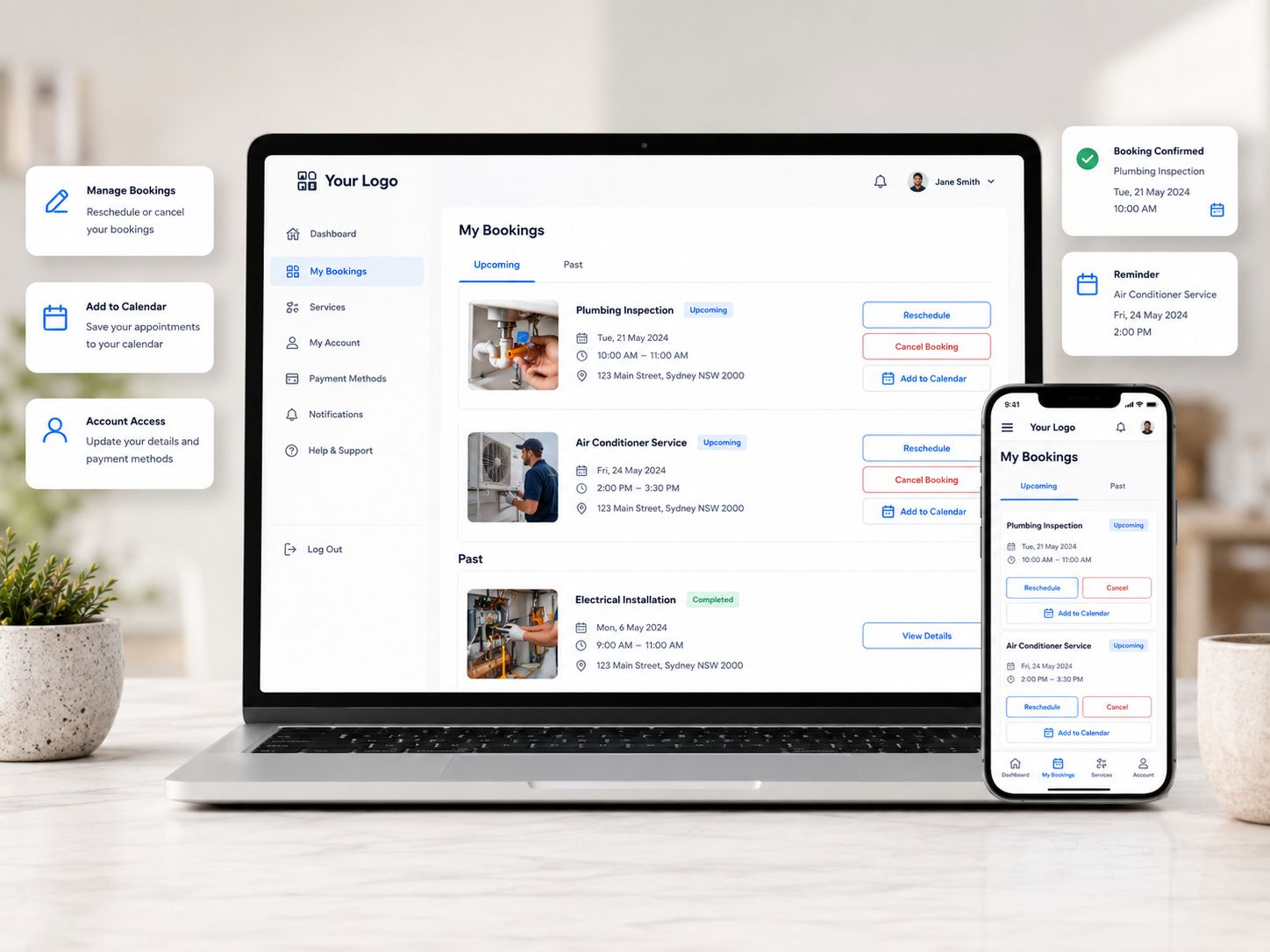
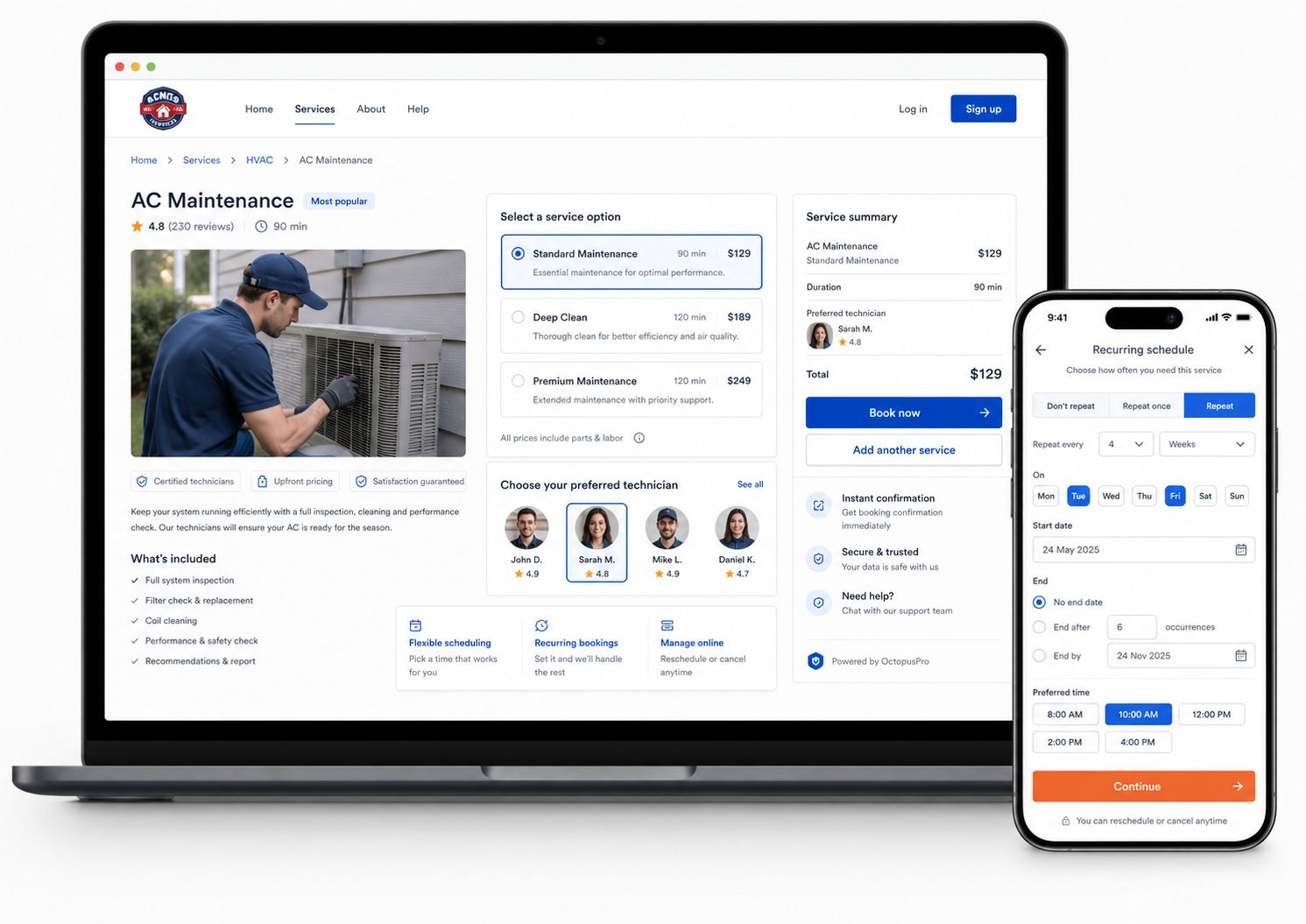
Let customers book the way your services are bought and delivered
Support single bookings, multi-service checkouts, recurring bookings, preferred fieldworker selection, and quote-first journeys while keeping each service on the path most likely to convert.
Turn gift vouchers into repeat customer bookings
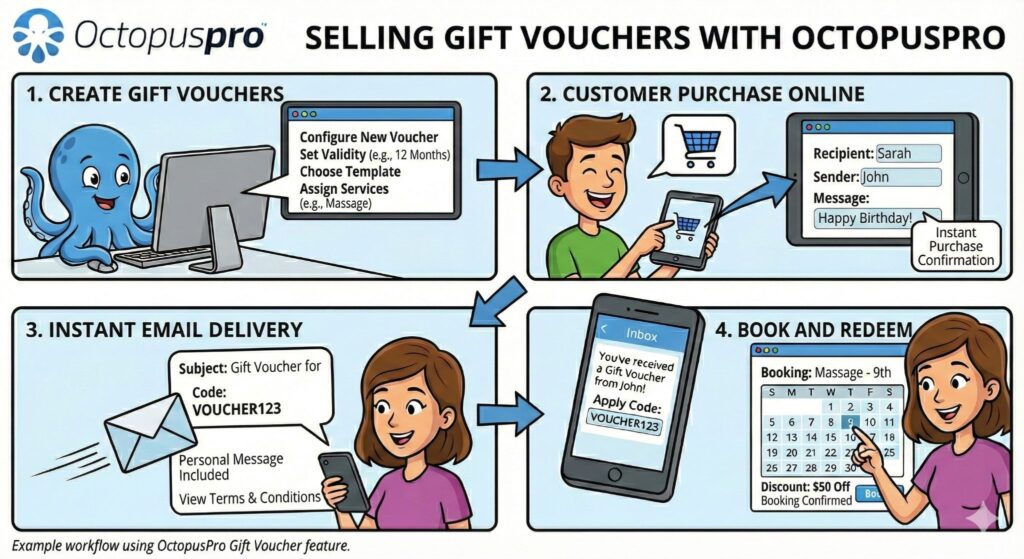
Customers can buy a voucher online, receive it by email, and return to book an eligible service using the voucher code.
Turn gift vouchers into returning customer bookings
Make vouchers easier to buy, redeem, track, and convert into completed services, so gift purchases become measurable revenue instead of disconnected admin work.
Turn online bookings into jobs your team is ready to deliver
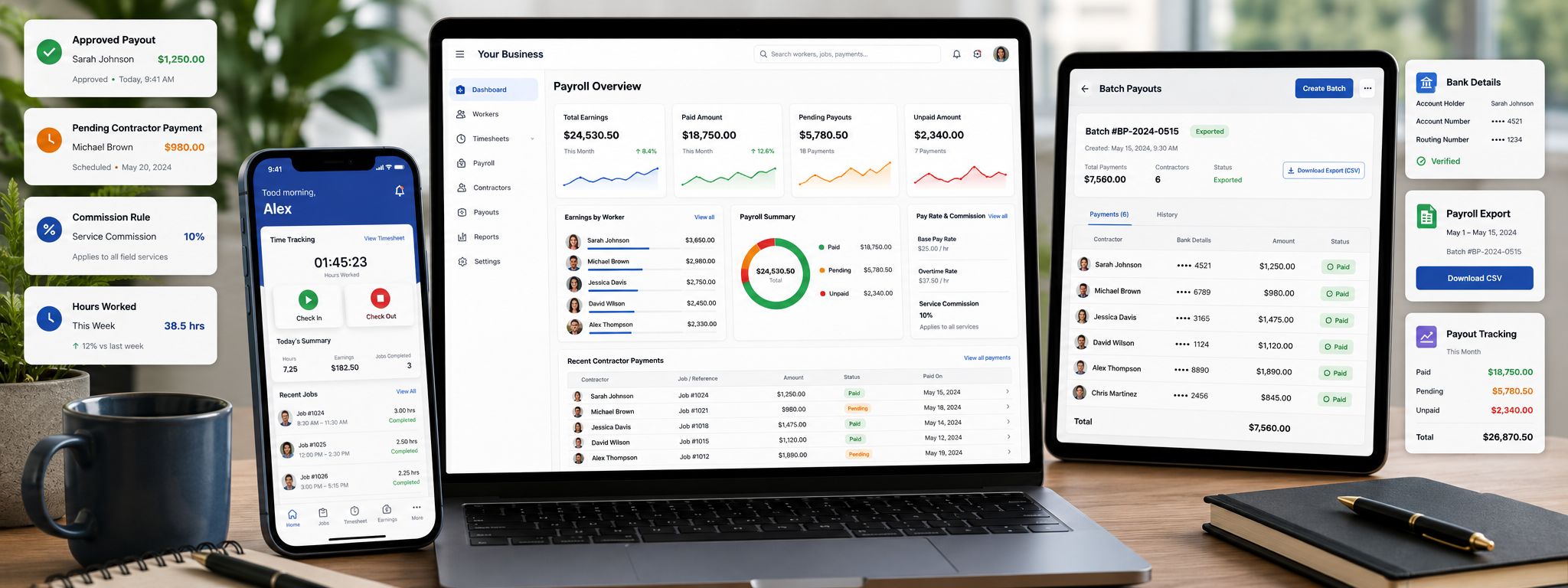
As customer demand moves online, OctopusPro keeps service delivery organised from the first click to the completed job — showing customer confidence signals before booking while connecting every accepted request to the right fieldworkers, preferred selection rules, recruitment links, onboarding workflows, contractor readiness checks, service details, approvals, and delivery controls.
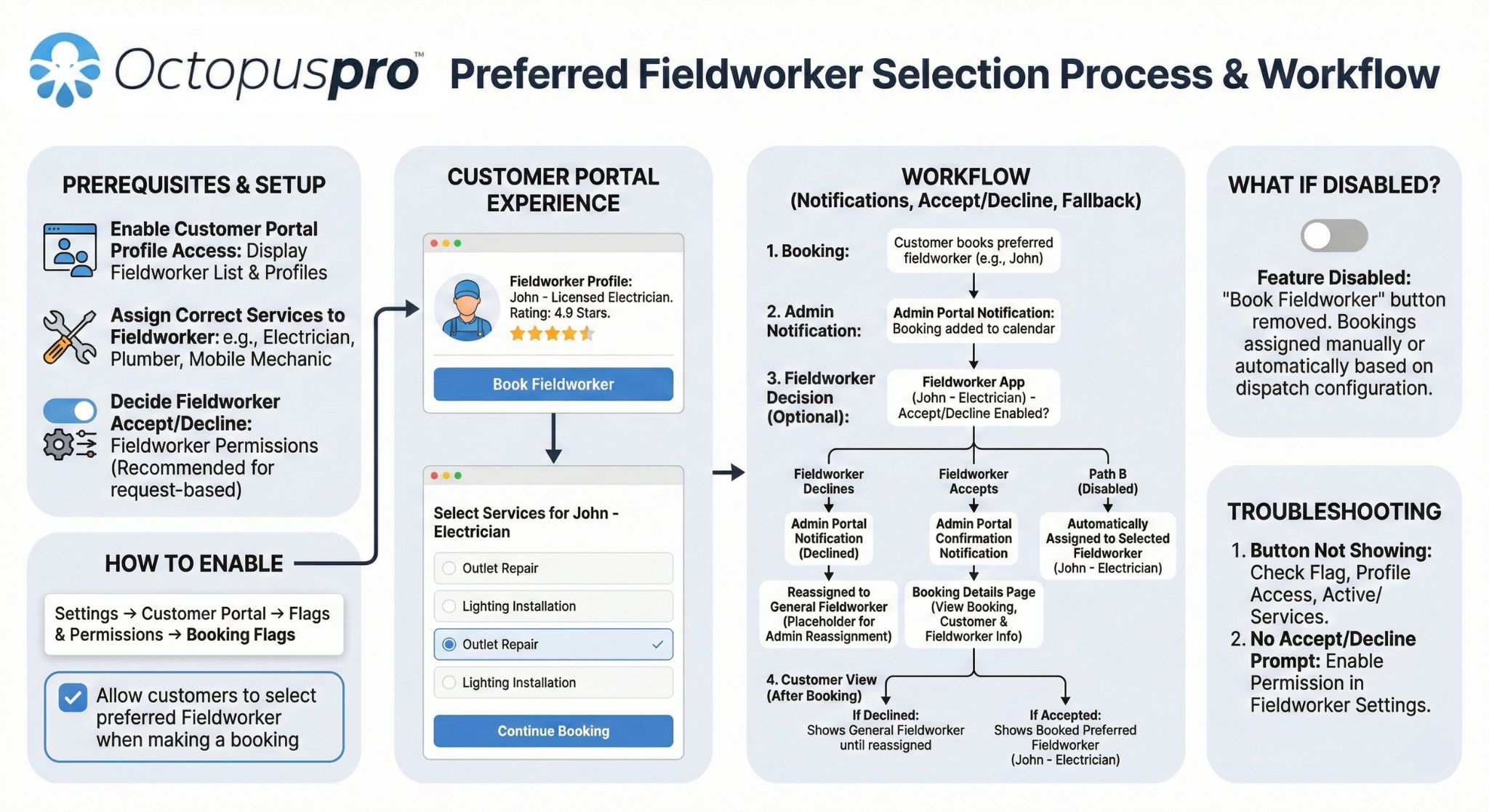
Use fieldworker profiles, ratings, service details, and preferred fieldworker options so customers can feel confident before selecting a worker or booking a service.
Fieldworker profiles guide
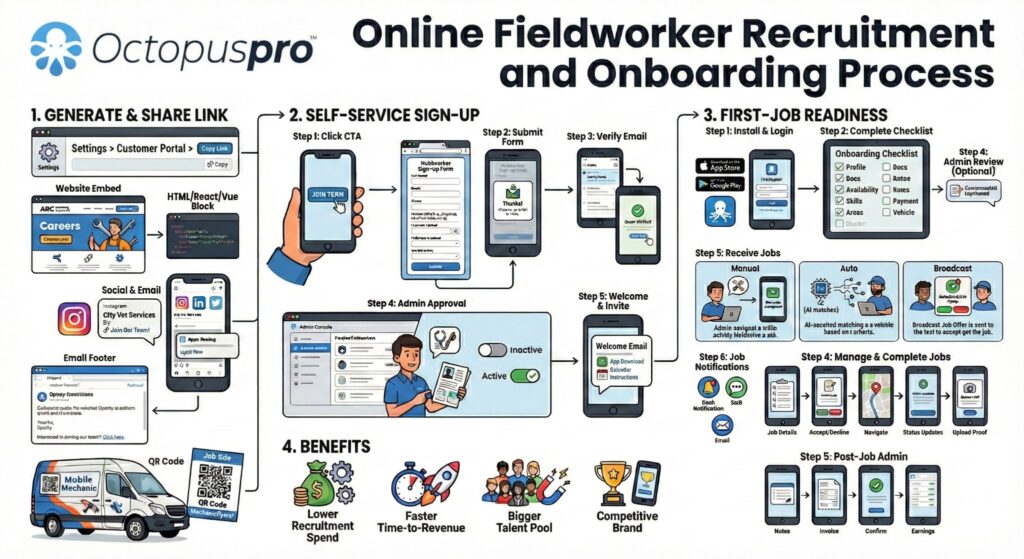
Share recruitment links through your portal, website, social channels, email, or QR codes, then collect applications, verify details, and approve workers before they are made available.
Fieldworker onboarding guide
Use welcome steps, onboarding checklists, service expectations, documents, app access, profile setup, and readiness checks before new fieldworkers receive work.
Keep assignments connected to service areas, location types, branch rules, capacity, worker eligibility, preferred selection, customer expectations, and dispatch controls.
Let customers choose available times while your schedule stays protected
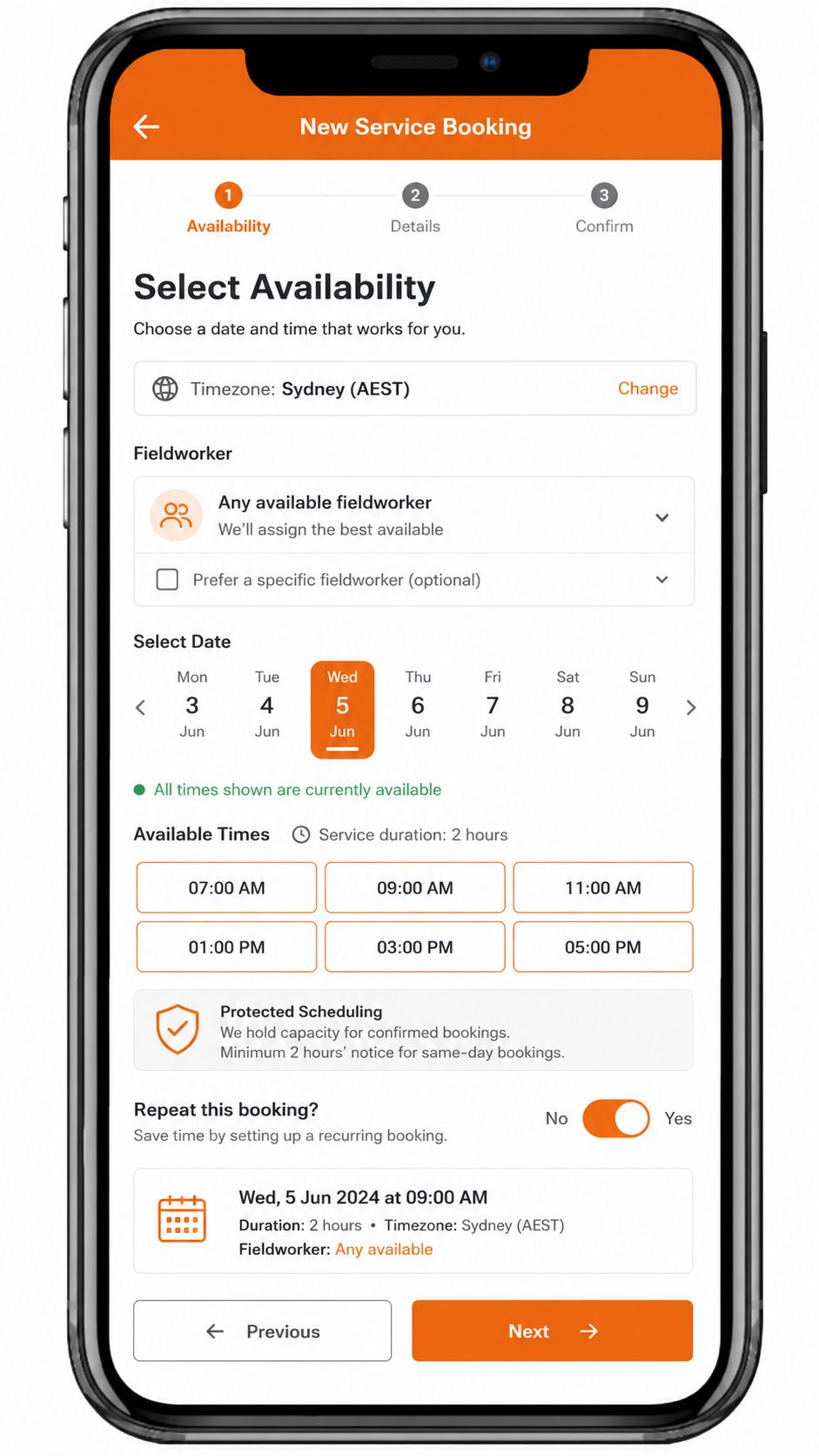
Give customers a clear way to choose appointment times, arrival windows, quote self-scheduling options, and rescheduling paths while OctopusPro protects capacity with availability rules, notice periods, time slots, fieldworker eligibility, location rules, and service permissions.
Protect fieldworker and dispatch capacity
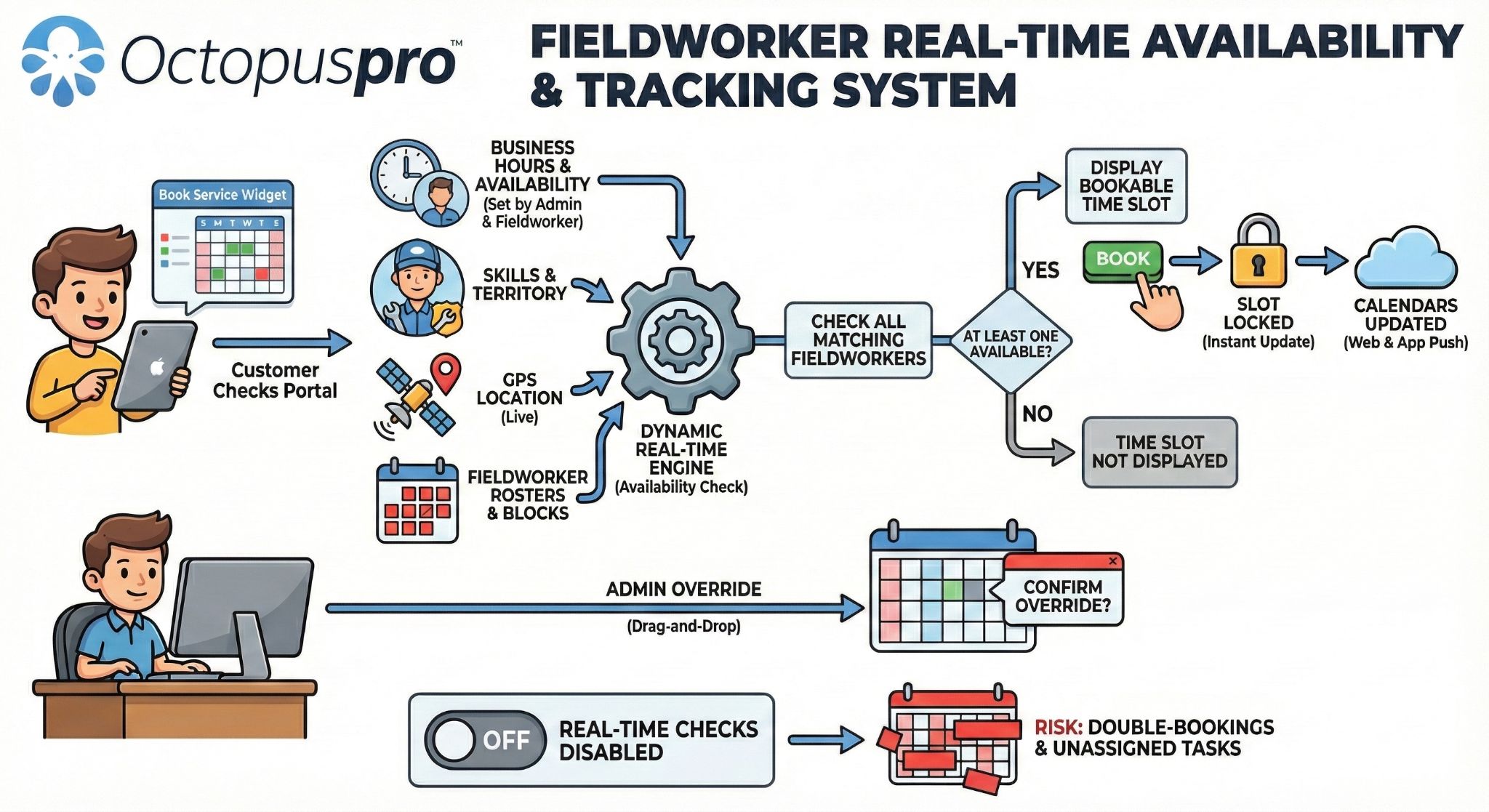
Respect fieldworker eligibility, preferred fieldworker selection, service areas, multi-address workflows, branch rules, location types, appointment windows, and resource capacity before a booking is accepted.
Offer exact times or arrival windows
Let customers choose a specific appointment time when the workflow allows it, or use arrival windows when your team needs dispatch flexibility.

Support virtual and multi-region bookings
Use time-zone-aware scheduling so customers and your team see the correct appointment times across cities, countries, remote services, virtual services, and online sessions.
Let accepted quotes become scheduled work
After a customer accepts a quote, let them choose an available time from the portal using your availability, notice, working-hour, blocked-time, service, payment, and approval rules.

Connect signatures, channels, and booking links
Keep scheduling connected to quote approval, digital signatures, terms acceptance, service links, social channels, booking CTAs, and campaign paths so customers move into the right action faster.
Show only times customers can actually book
Use live calendars and portal booking rules so customers choose options that match your business hours, service setup, booking permissions, fieldworker availability, and scheduling rules.
Control time slots, notice, and booking windows
Protect your team with time-slot intervals, minimum notice, working-hour rules, blocked-time rules, recurring booking settings, and service-specific booking windows.
Recover bookings when timing changes
Use rescheduling limits, cancellation rules, alternate time suggestions, and Reschedule Assist-style workflows to help customers choose a better slot when the first time cannot be accepted.
Customer reviews the proposed scope, pricing, terms, and next action.
Customer accepts the quote, confirms required terms, and signs where needed.
Customer selects an available appointment slot based on working hours, notice rules, and availability settings.
Collect a deposit, partial payment, full payment, or invoice payment before the work is confirmed.
The booking stays connected to the accepted quote, customer details, payment status, and scheduling workflow.
Let customers book faster without opening risky time slots
Use controlled availability, service rules, capacity settings, fieldworker eligibility, and clear booking windows to offer convenience without losing operational control.
See how the customer portal fits different service business models
See how different service businesses can use OctopusPro to convert bookings, manage approvals, collect payments, and support service delivery.
Use photos, parking questions, access notes, deposits, service-specific questions, and arrival windows.
Use fixed-location booking, reminders, customer accounts, cancellation cut-offs, payments, and reviews.
Use virtual bookings, time-zone support, recurring sessions, group classes, and customer self-scheduling.
Use dependents, pets, saved profiles, custom questions, consent, documents, and repeat-booking options.
Use saved properties, tenants, site contacts, business profiles, documents, photos, and multi-address jobs.
Use group bookings, capacity-based sessions, vouchers, reminders, and campaign-specific booking links.
Make every customer action feel like part of your brand
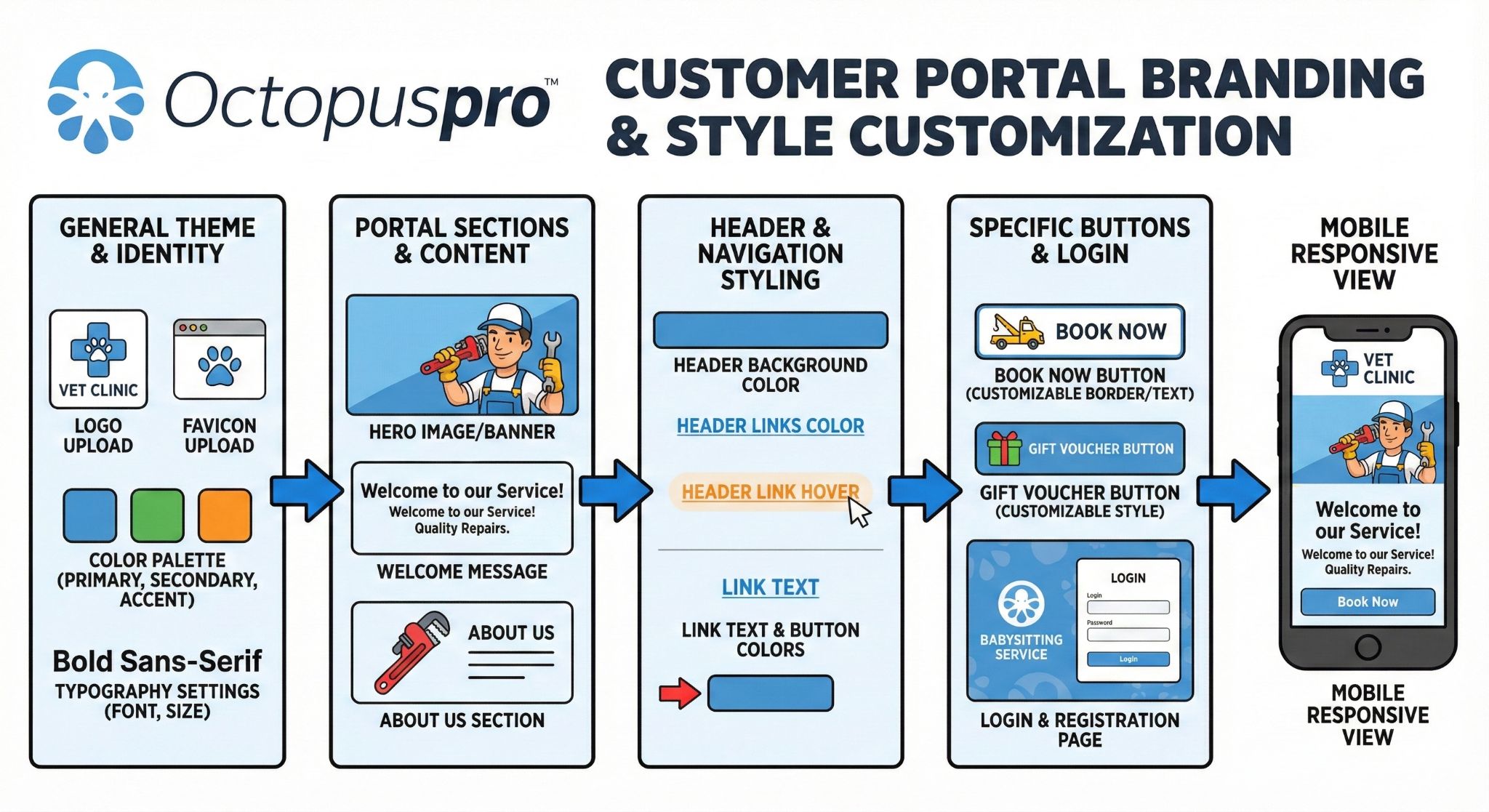
Turn the Customer Portal into a branded front door for bookings, quote approvals, payments, vouchers, customer accounts, repeat bookings, and app prompts. Keep the experience consistent from your website to every next step without rebuilding your website or writing custom code.
Use your logo, colours, homepage content, service discovery, contact details, FAQs, About Us content, reviews, promotions, and action-focused calls to action to guide customers confidently toward the right outcome.
Launch without code or web design work
Configure settings instead of rebuilding your website. Use ready-made controls for branding, navigation, booking permissions, homepage content, and calls to action so you can launch faster and improve the experience over time.
Guide visitors with the right message
Use service discovery, reviews, FAQs, About Us content, contact details, promotions, business details, and action-focused CTAs to help customers understand what to do next.
Ask only for details that help delivery
Collect service-specific questions, uploads, disclosures, and confirmations only where they help your team schedule, prepare, price, or deliver the service properly.
Support multilingual customer journeys
Let visitors switch to their preferred portal language so booking is easier for local, international, and multilingual audiences.
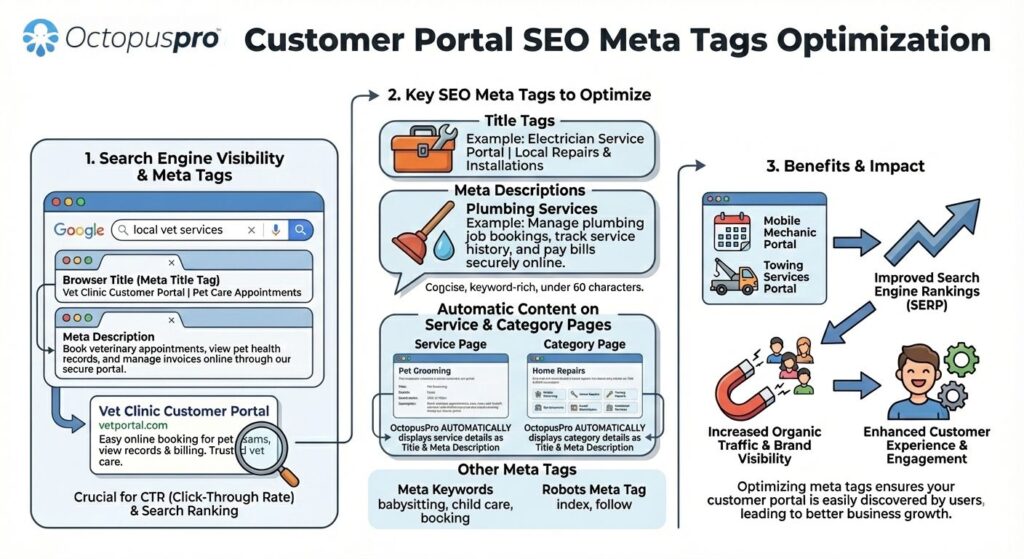

Use portal and branded app promotion areas to guide customers toward the next useful action, including bookings, approvals, payments, vouchers, repeat bookings, fieldworker onboarding pages, or campaigns.

Use promotional panels for app adoption, fieldworker onboarding, campaigns, service education, vouchers, repeat bookings, or other high-value portal actions.
Keep the handoff branded from first click to repeat booking
Customers may arrive from a service page, direct booking link, voucher, campaign, account area, or app prompt. Keep the copy, design, and next-step language consistent so every path feels connected to the same brand.
Turn online bookings into assigned jobs without manual chaos
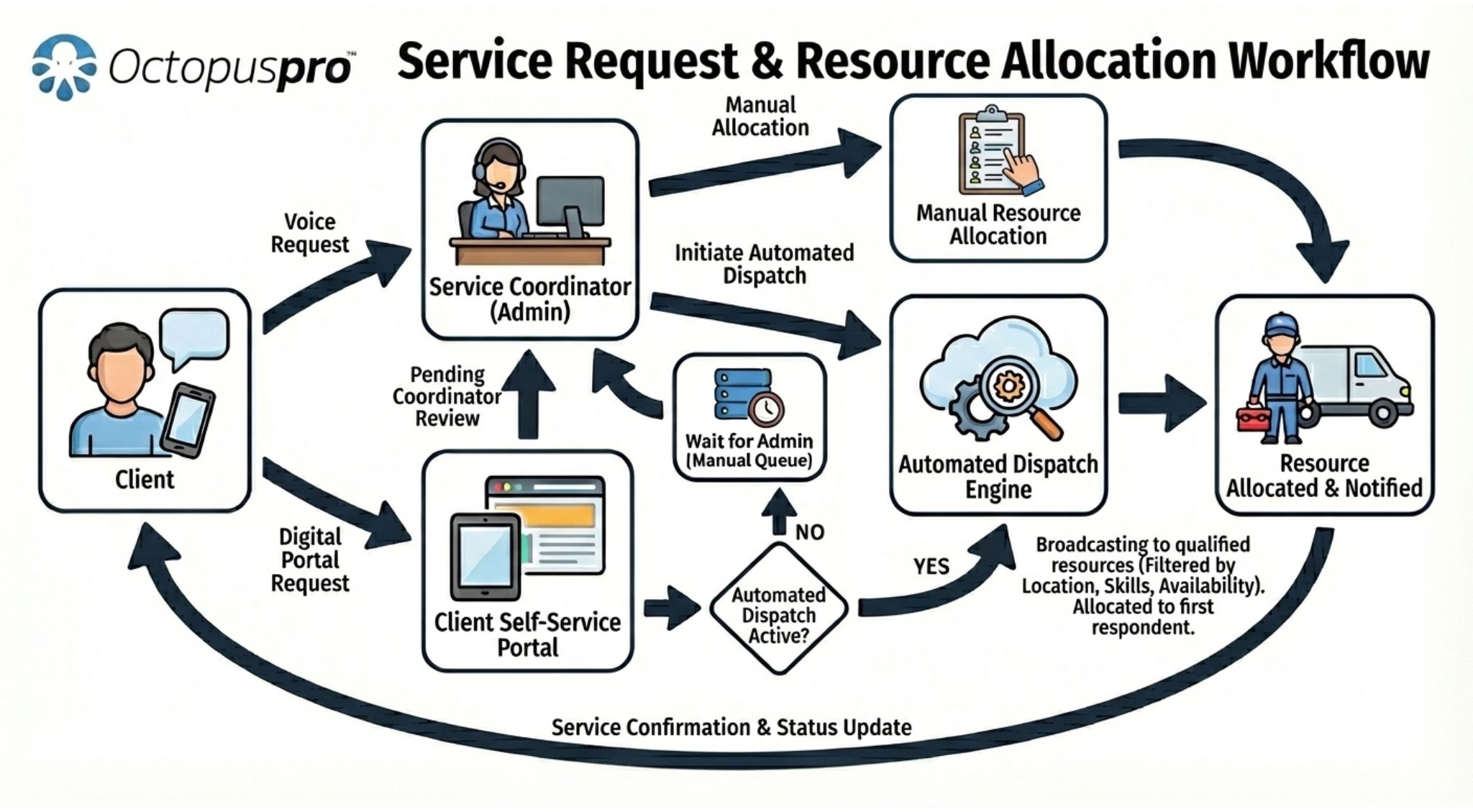
Once a customer books through your Customer Portal, OctopusPro can move that request into the right assignment workflow. Keep full control with manual assignment, speed up response times with first-to-accept automatic dispatch, or combine both based on the service, urgency, and team structure.
Use matching rules such as service eligibility, skills, travel radius, service areas, working hours, calendar availability, and permissions so the right fieldworkers see the right work — and customers get faster confirmation with less back-and-forth.
Show each booking to eligible fieldworkers based on services, skills, territories, travel distance, availability, and permissions.
Use dispatcher-controlled assignment for complex jobs, or let OctopusPro automatically route urgent and high-volume work.
Connect assignment, confirmations, reminders, and re-dispatch workflows so the customer journey stays clear after booking.
Show what happens after the customer clicks book
Booking should not stop at scheduling. OctopusPro can validate the request, check matching rules, and route the job into the right assignment workflow before the appointment is confirmed and delivered.
Keep full control for complex, high-value, or VIP jobs
Use manual assignment when your dispatcher or admin team should review available fieldworkers, send job requests, compare responses, and confirm the final assignment themselves.
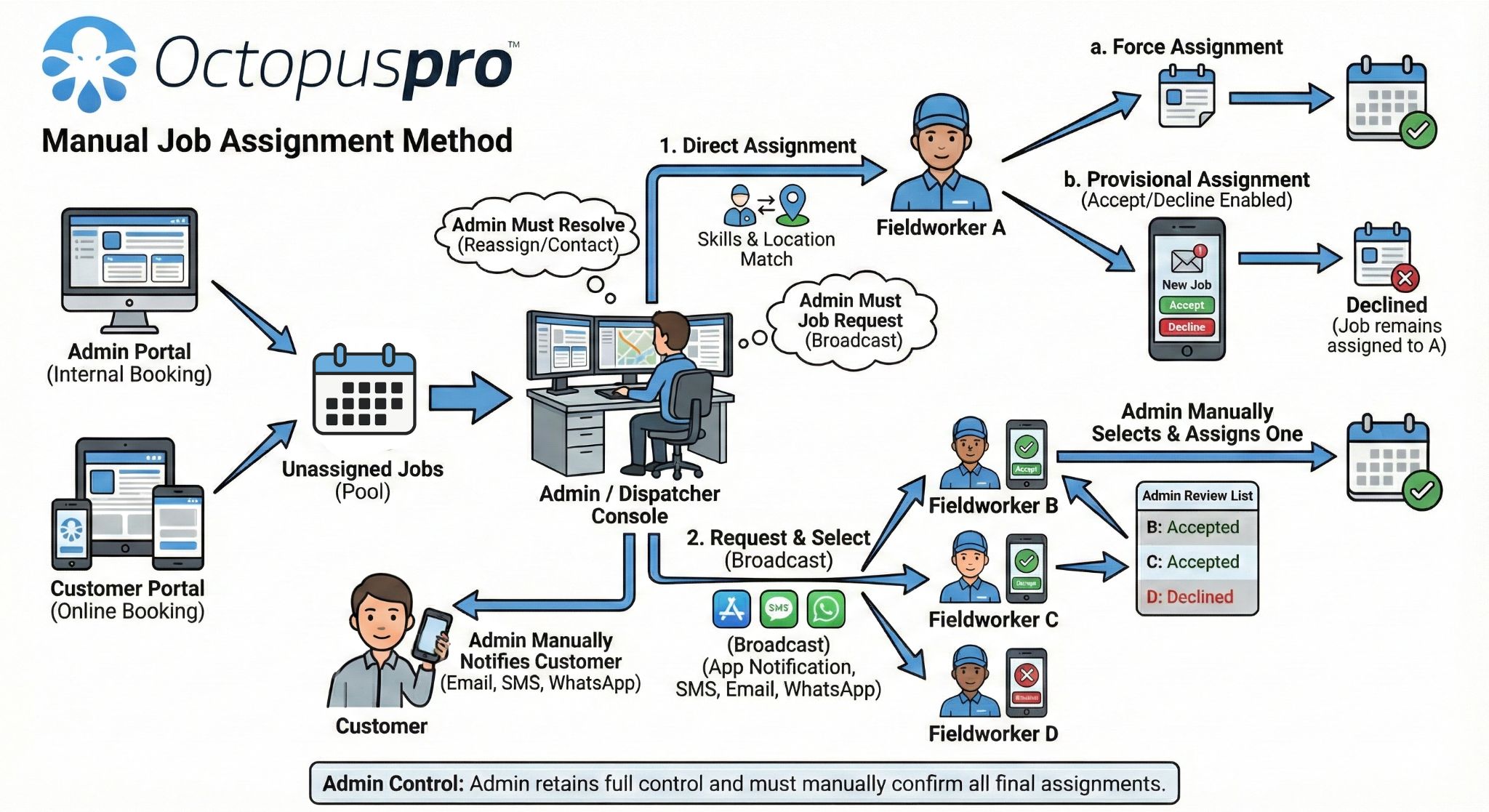
- Best for premium services, strict routing rules, multi-step approvals, and jobs that need extra review.
- Fieldworkers can accept or decline, but the booking stays unassigned until an admin confirms who gets the job.
- Review proximity, availability, service fit, skills, ratings, and cost before you lock in the assignment.
Fill jobs faster with first-to-accept automation
Use automated dispatch when you want OctopusPro to send the job request to all eligible fieldworkers and instantly assign the first qualified person who accepts.
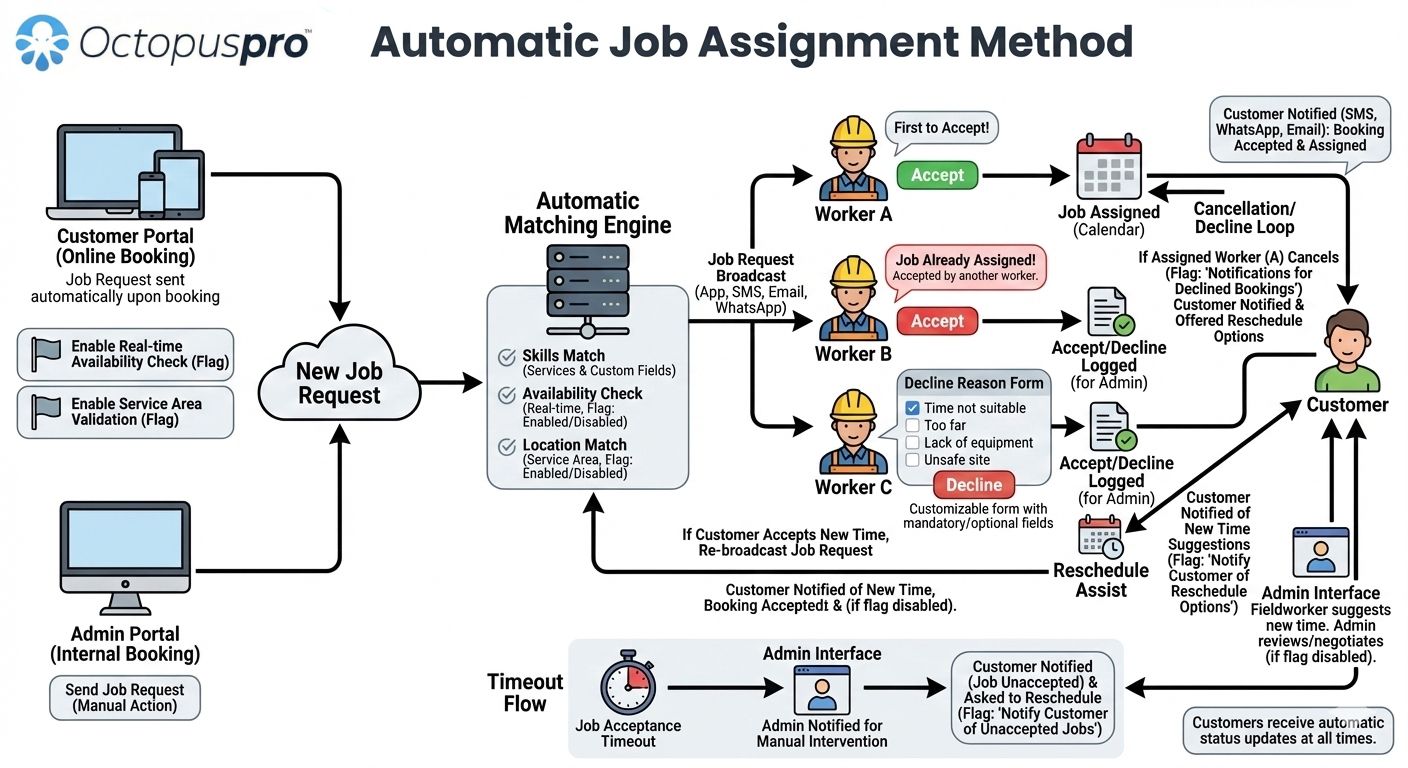
- Best for on-demand work, after-hours coverage, urgent response, and larger contractor or fieldworker fleets.
- Fieldworkers can accept in the app, and the first eligible acceptance is assigned immediately.
- If nobody accepts, you can re-broadcast, adjust matching rules, or move the booking back to manual review.
Match work by service, qualifications, equipment, or special permissions so only the right fieldworkers receive the request.
Protect customer experience by checking calendar availability, service territories, travel radius, and working hours before the request is offered.
Let fieldworkers accept or decline in the app, record decline reasons, and re-offer or manually reassign work when the first match does not take the job.
Choose the assignment model that fits each service you offer
Use manual assignment where control matters most, enable automatic dispatch where speed matters most, and fine-tune matching rules so each booking reaches the right fieldworker faster.
Make every payment step clear, secure, and easy to complete
Give customers one connected payment journey for booking deposits, quote deposits, invoice links, saved-card payments, voucher redemption, taxes, balances, and offline instructions, while your business controls when payment is required and which options appear for each service, quote, invoice, booking, or customer type.
Control what customers pay before they confirm
Set the right payment rule for each service, package, quote, booking type, or customer type — from fixed or percentage deposits to prepayment, milestone payments, pay-on-invoice, pay-later, or card-on-file options.
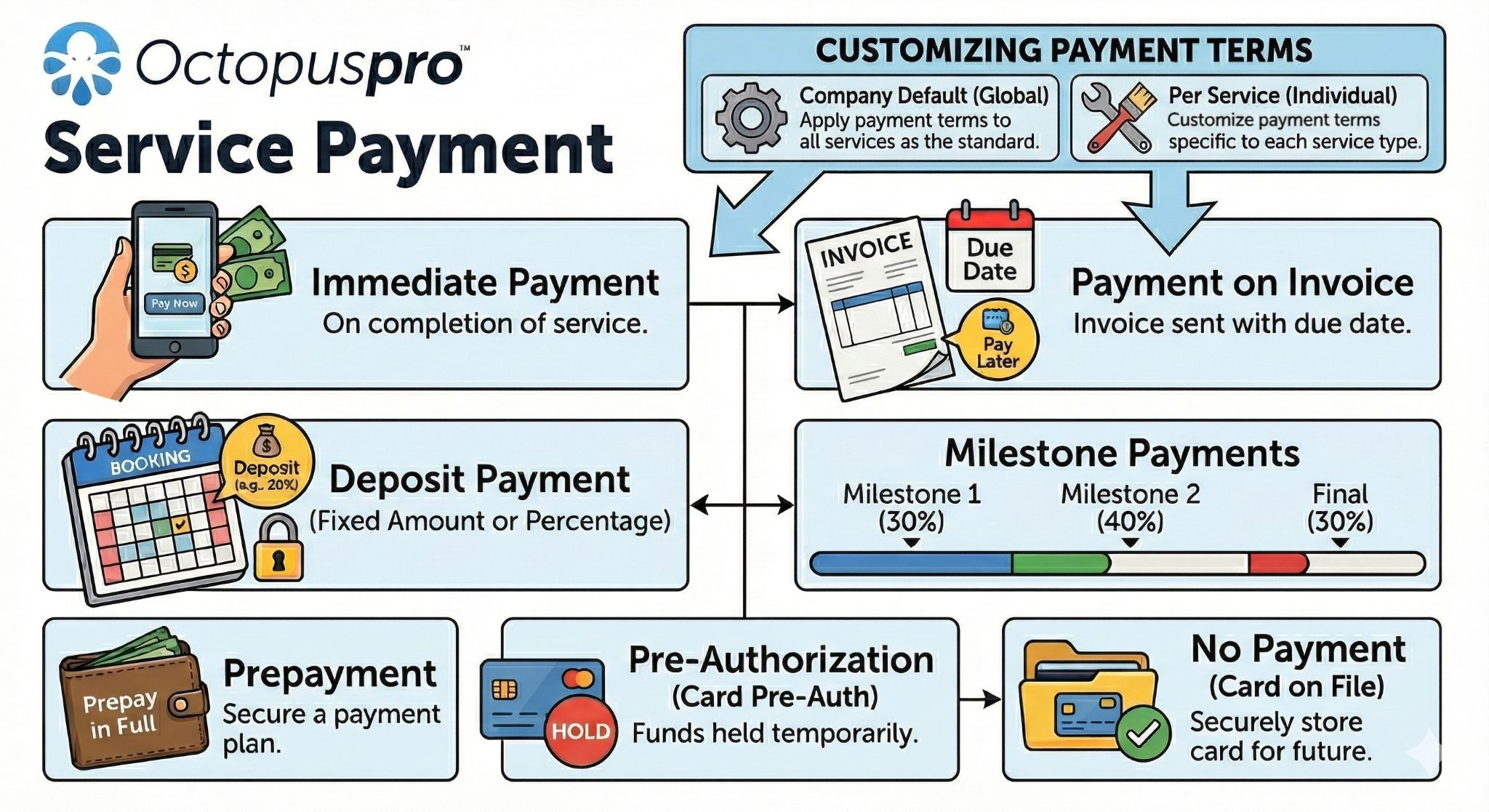
Make invoice payment faster
Send customers from reminders, account dashboards, and billing messages to invoice payment links, visible balances, payment status, and billing history.
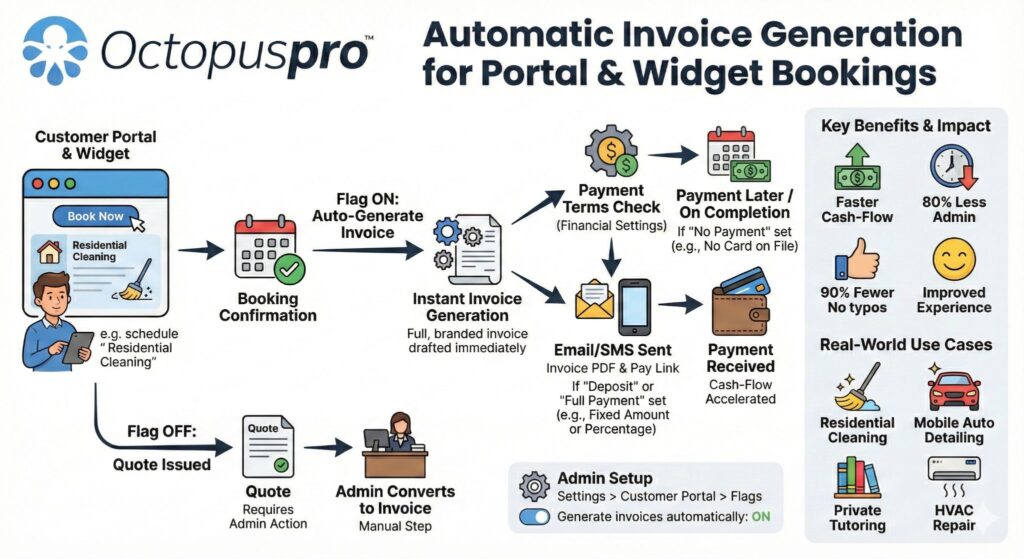
Reduce friction for returning customers
Let customers reuse saved payment methods where enabled, see the amount due, and complete payment without repeating the same checkout steps.
Keep voucher redemption connected
Make voucher purchase and redemption part of the booking and account journey so voucher value, balances, invoices, customer profiles, and booking records stay connected.
Show the right payment path at the right step
Choose which payment options customers see during booking, quote approval, invoice payment, voucher redemption, and account self-service. Configure online, offline, hybrid, invoice, saved-card, and voucher payment options for the customer actions where they apply, and control when the portal shows an online gateway, offline payment instruction, invoice payment option, saved-card option, or voucher path at each stage of the customer journey.
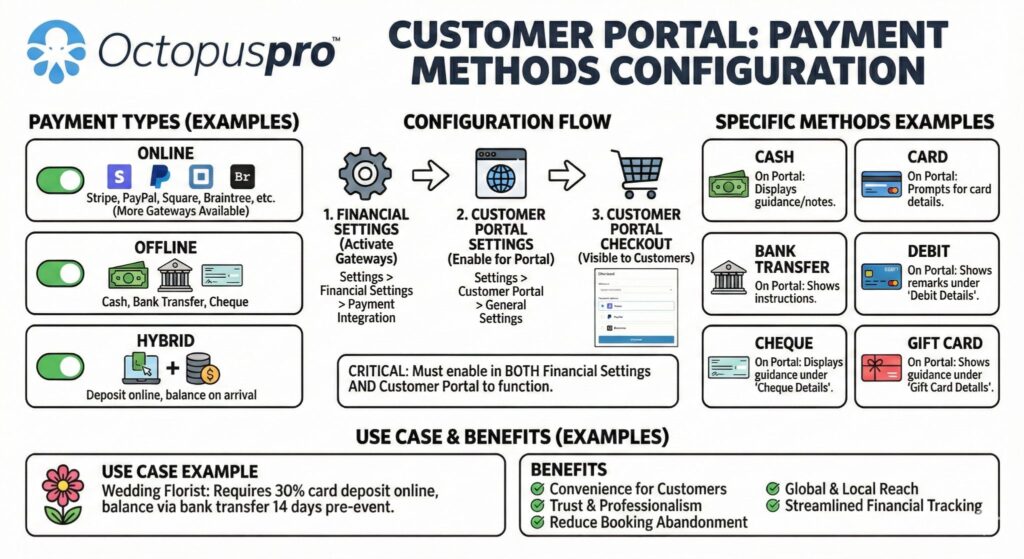
Connect price, tax, deposits, and terms before checkout
Connect payment requirements to service pricing, taxes, minimum charges, deposits, packages, seasonal pricing, and customer-facing checkout clarity. Show expected price, accepted methods, Terms & Conditions, Privacy Policy links, disclaimers, and checkout instructions before customers commit, then link deposits, balances, invoice payments, and offline instructions with refund expectations, cancellation fees, call-out rules, no-show protection, and service terms.

Accept secure payments without losing workflow control
Accept secure payments through supported gateways such as PayPal, Stripe, Square, WePay, Authorize.Net, eWay, Tap, and Checkout.com while still offering invoice, offline, saved-card, and voucher options where your workflow allows them. Keep gateway choice, payment timing, payment visibility, voucher redemption, account balances, and customer-facing instructions connected to the booking journey.

Customer Portal payment methods guide
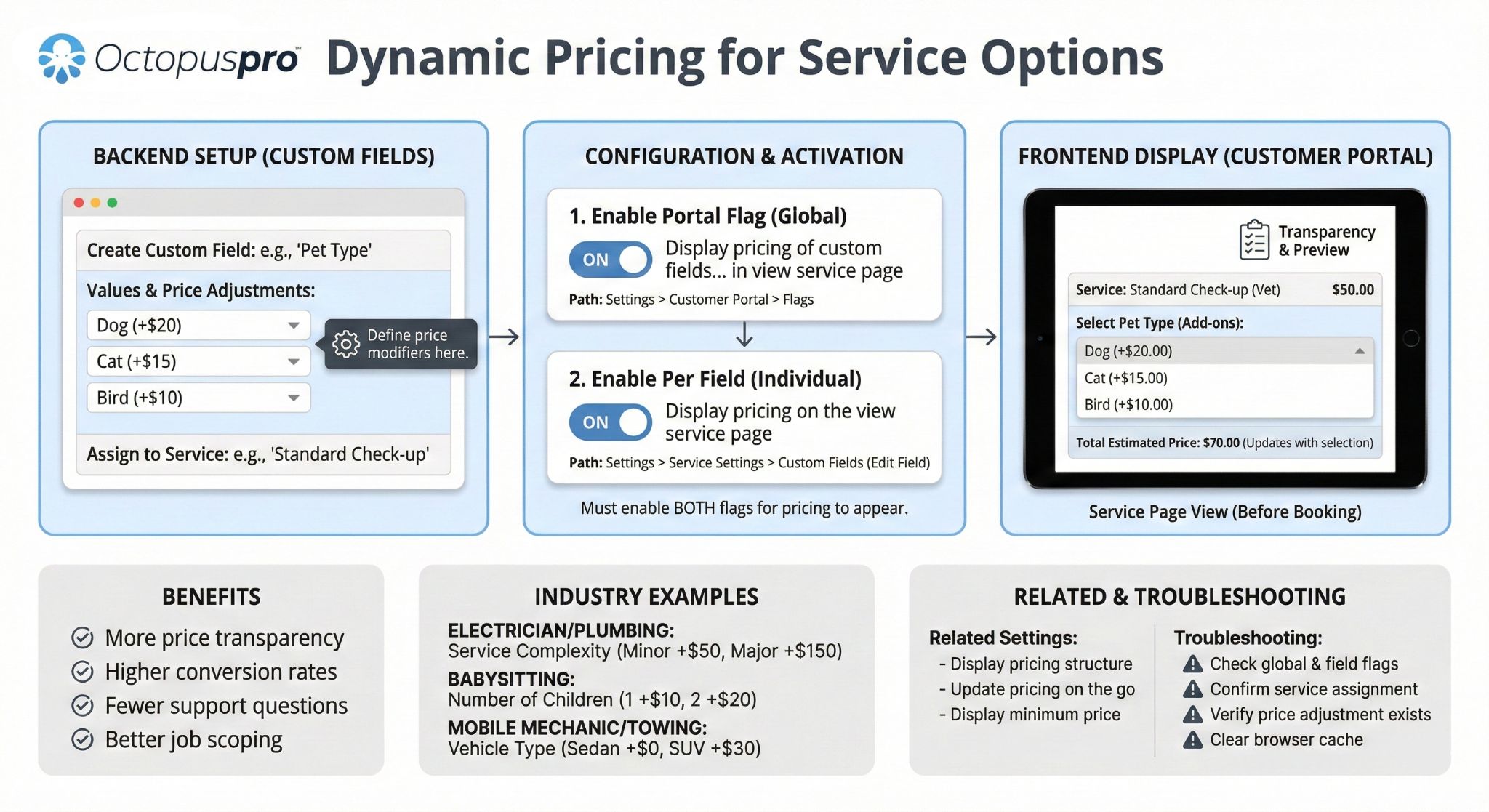
Real-time service pricing guide
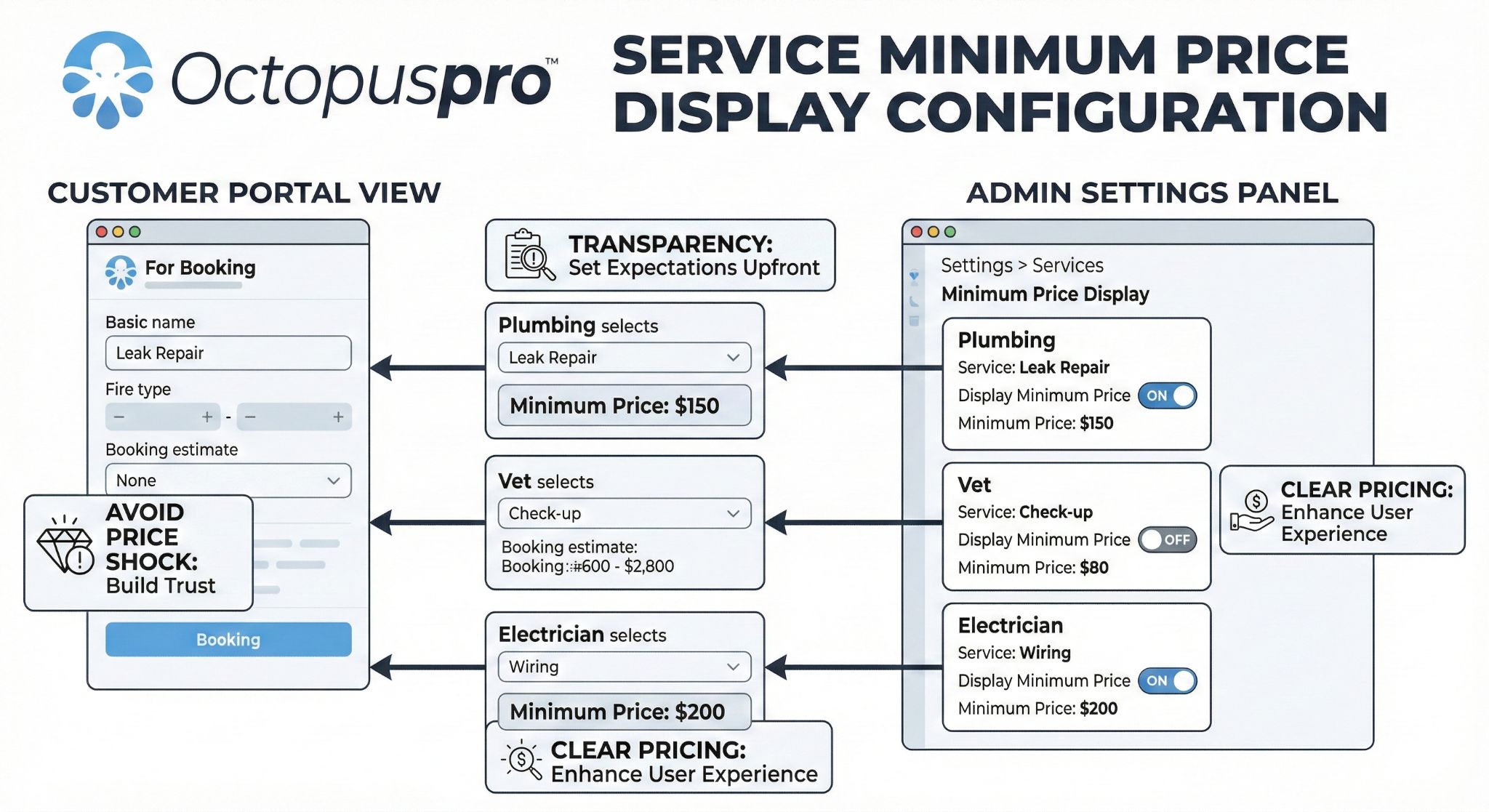
Minimum price display guide
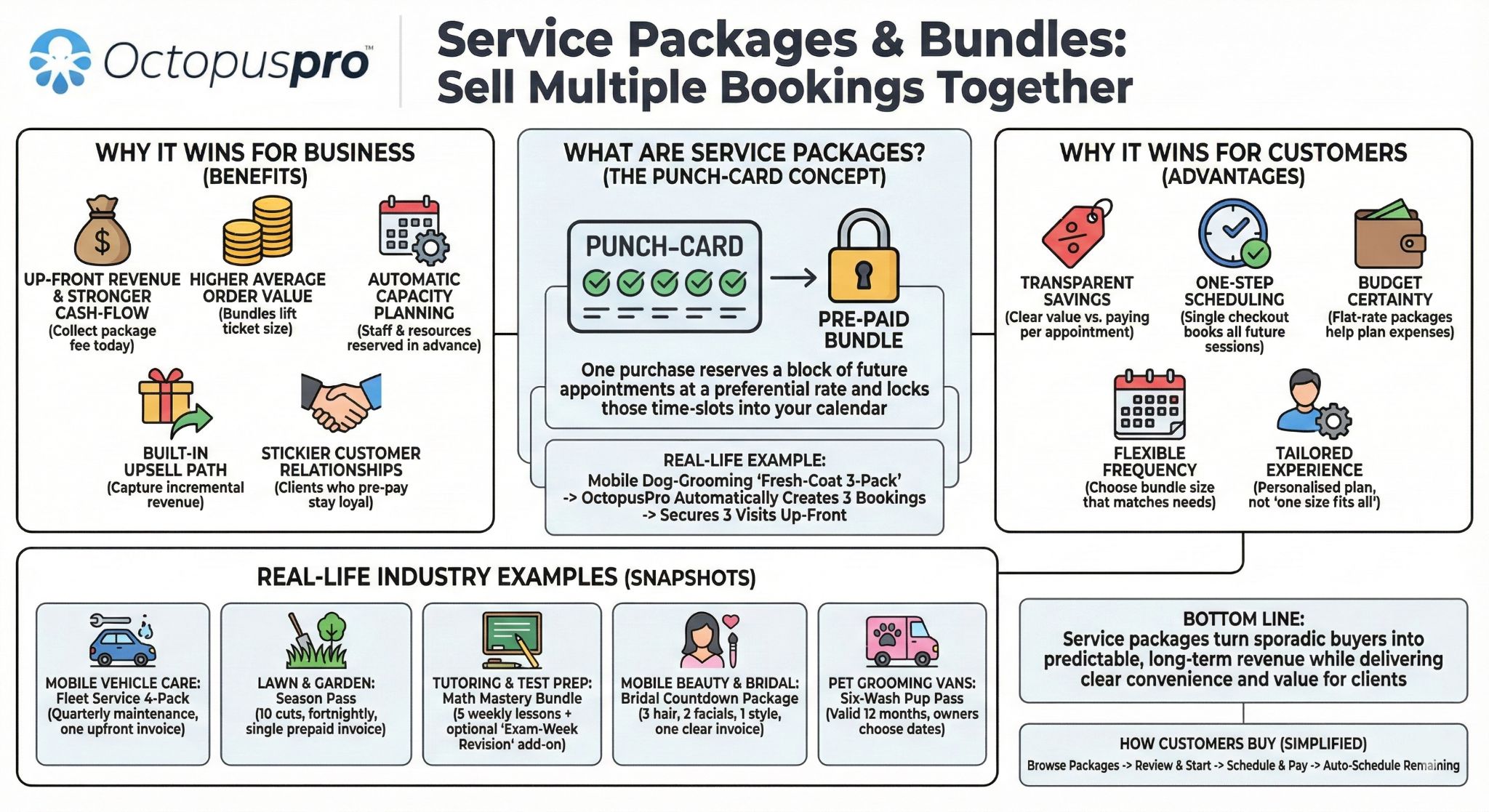
Service packages and bundles guide
Auto invoices for portal bookings guide
Booking payment tracking guide
Tax settings guide
Payment terms and deposits guide
Selling gift vouchers online guide
Cancellation and payment rule guide
Make the payment step feel simple, secure, and obvious
Give customers a clear path to pay deposits, invoices, vouchers, balances, and repeat booking payments without needing your team to chase every transaction.
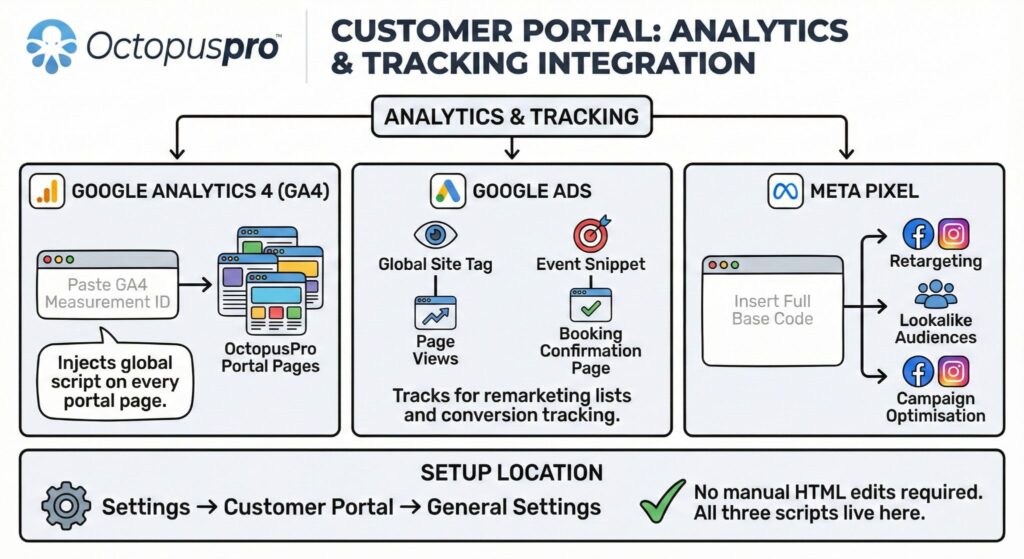
Measure which website links, campaigns, and booking paths convert
Turn website pages, service links, landing pages, ads, email, SMS, QR codes, social profiles, white-label portal URLs, and customer communications into direct paths for booking, quote approval, invoice payment, voucher purchase or redemption, login, and repeat bookings — then connect tracking so performance is measured by outcomes, not just clicks.
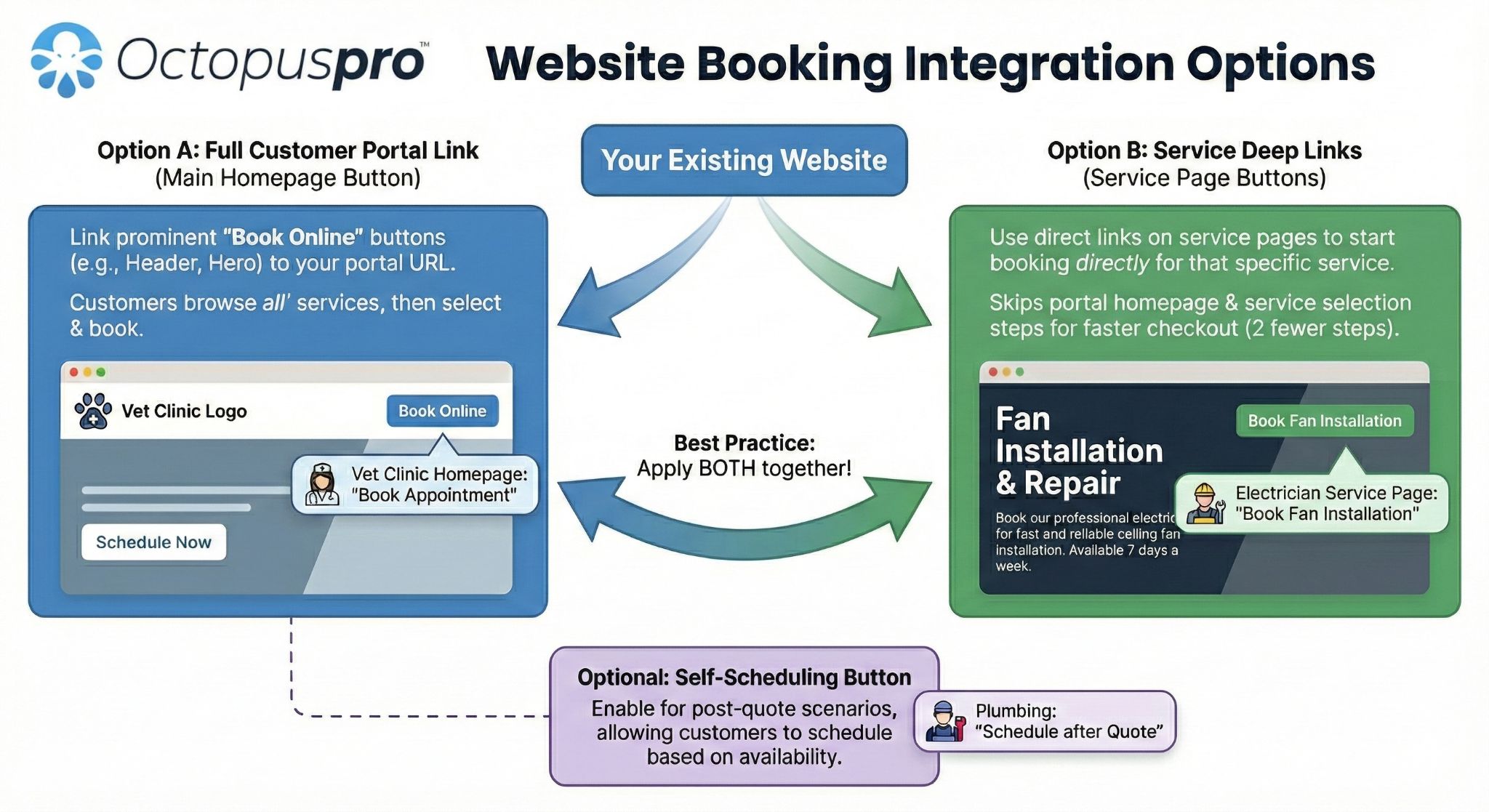
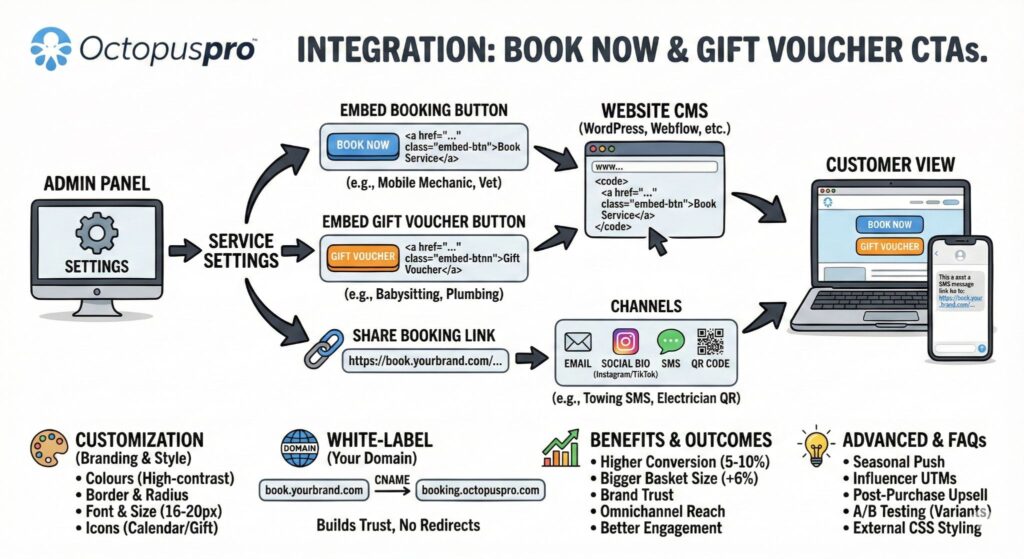
Book Online and service-specific links
Place general booking CTAs on your homepage, header, footer, service pages, price pages, landing pages, and high-intent content, or send customers straight into the relevant service, location, questions, availability, pricing, payment, and confirmation steps.
Quote, invoice, and voucher links
Send quote, invoice, and voucher recipients directly to the approval, signature, payment, purchase, or redemption action they came to complete.
Ads, QR codes, email, SMS, and social links
Use campaign-specific URLs, social bio links, QR paths, email signatures, printed material, and SMS templates to reduce the number of steps between interest and action.
Login and repeat-booking paths
Give returning customers quick access to saved details, repeat bookings, booking history, invoices, vouchers, preferred fieldworkers where enabled, account messages, and profile updates.

GA4Measure portal traffic and conversions
See how customers discover services, where they drop off, and which portal paths turn visits into bookings, quote approvals, payments, vouchers, and repeat-customer actions.

Google AdsTrack paid traffic and campaign bookings
Monitor ad performance, build remarketing audiences, and track booking conversions from paid traffic without adding manual code to every page.

Meta PixelRetarget visitors and optimise ads
Improve audience targeting and retarget portal visitors based on customer behaviour, booking steps, and campaign interactions.
Compare general portal URLs, service-specific links, quote links, invoice payment links, voucher buttons, QR codes, email campaigns, SMS links, social bios, Google Business Profile, and landing pages.
Connect direct links, campaign URLs, QR paths, source tracking, analytics, and ad tracking so each channel can be compared by enquiries, bookings, payments, voucher sales, and repeat bookings.
Test different offers, button labels, service-page calls to action, QR destinations, landing paths, and follow-up prompts so campaigns improve based on completed portal actions, not assumptions.
Use codes for seasonal offers, partner campaigns, referral deals, gift voucher campaigns, and special customer segments.
Add portal homepage promotions, banners, offer blocks, service highlights, or campaign content to guide visitors toward the next action.
Promote gift voucher purchase paths for birthdays, holidays, corporate gifts, seasonal campaigns, and repeat-customer offers.
Compare traffic from Google Business Profile, website menus, footers, service pages, email signatures, and digital campaigns against completed portal actions.
Book Online and Gift Voucher button setup guide
Customer Portal URL and direct booking links guide
Social media icons setup guide
Lead source tracking guide
Template placeholders guide
SMS templates guide
Google Analytics integration guide
Google Ads tracking guide
Meta Pixel integration guide
Discount voucher code guide
Portal promotions guide
Selling gift vouchers online guide

Make repeat bookings faster with customer accounts and saved details
Give returning customers a faster path back with email-and-password access, booking-number login, optional social sign-in, saved details, booking history, invoices, vouchers, saved payment methods, repeat booking options, and branded follow-up paths that keep them connected to your business after the first booking.
Let customers return without starting over
Customers can continue from their account or booking history instead of re-entering the same information every time they return.
Reuse saved details automatically
Saved addresses, profiles, payment methods, vouchers, booking history, and preferences reduce repeated data entry on future visits.
Guide the next best action
Customers can rebook, pay invoices, approve quotes, manage account details, leave feedback, or return to branded app and portal journeys.
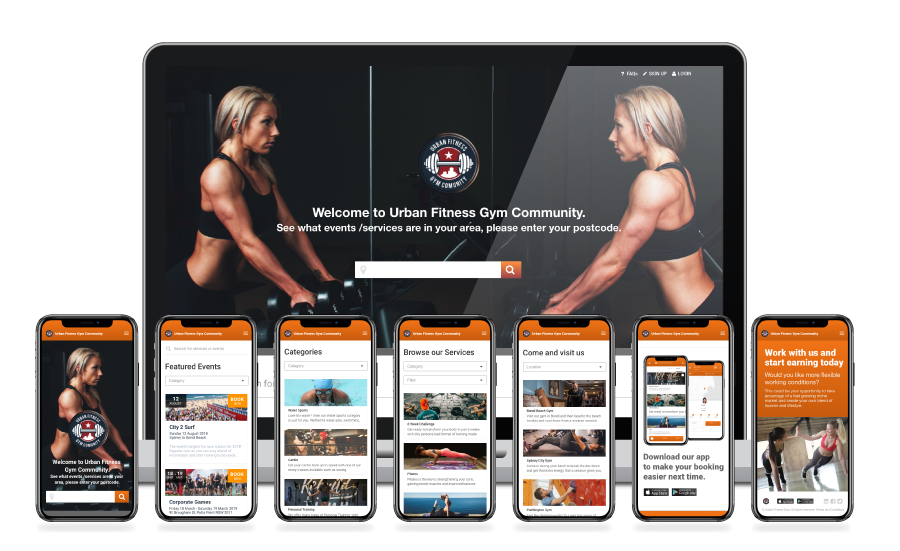
Give customers a faster way back
Customers can continue booking, paying, reviewing, or managing their details with less friction using a secure customer account and familiar return paths.
Reduce repeated data entry
Saved addresses, account details, customer profiles, saved payment methods, booking history, vouchers, recurring options, and saved preferences help customers complete future bookings faster.
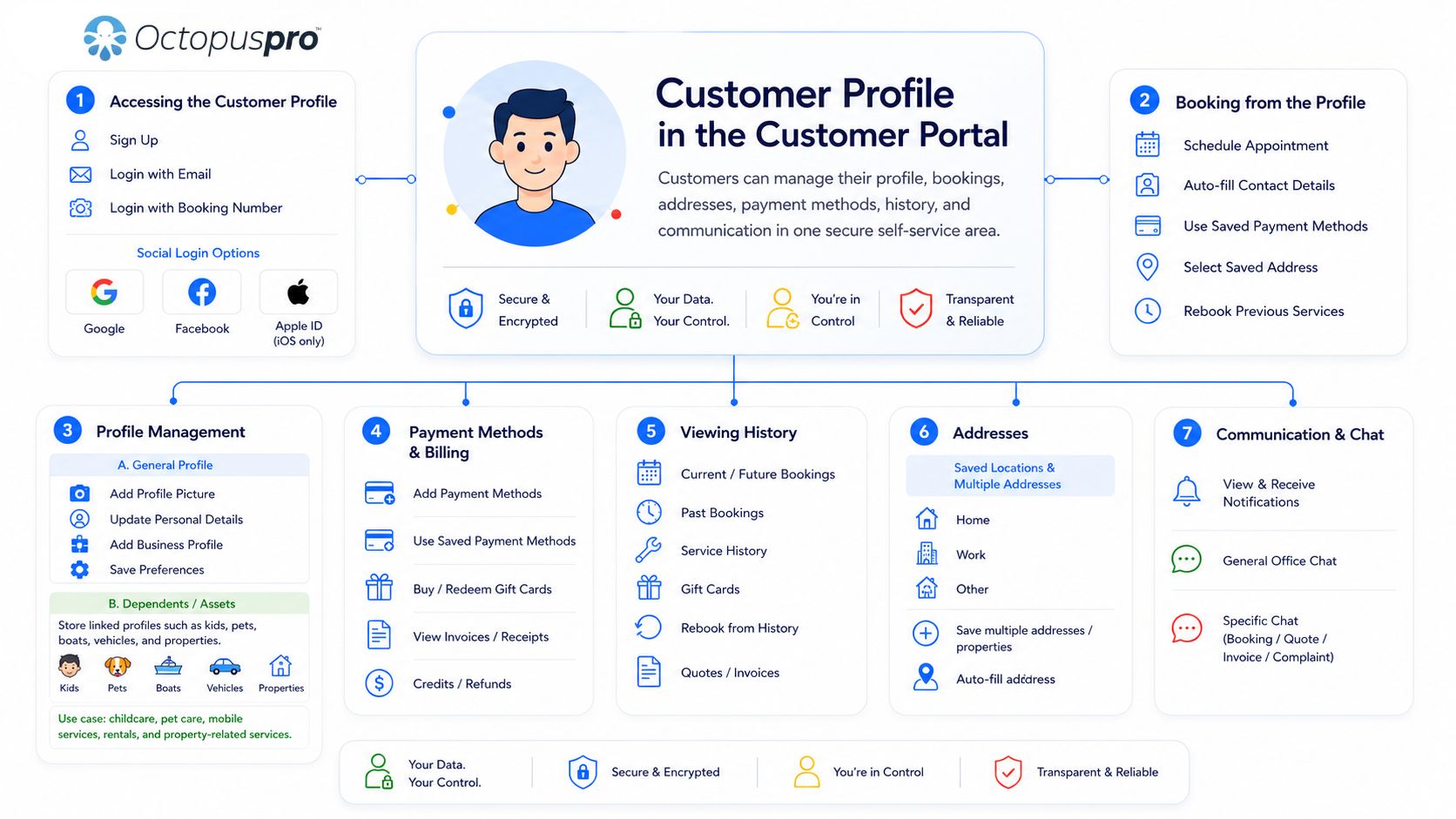
Keep bookings, invoices, quotes, and vouchers accessible
Customers can manage profile details, invoices, quotes, saved cards, gift vouchers, booking history, booking updates, and repeat booking actions from one customer-facing account area.
Keep useful business details visible
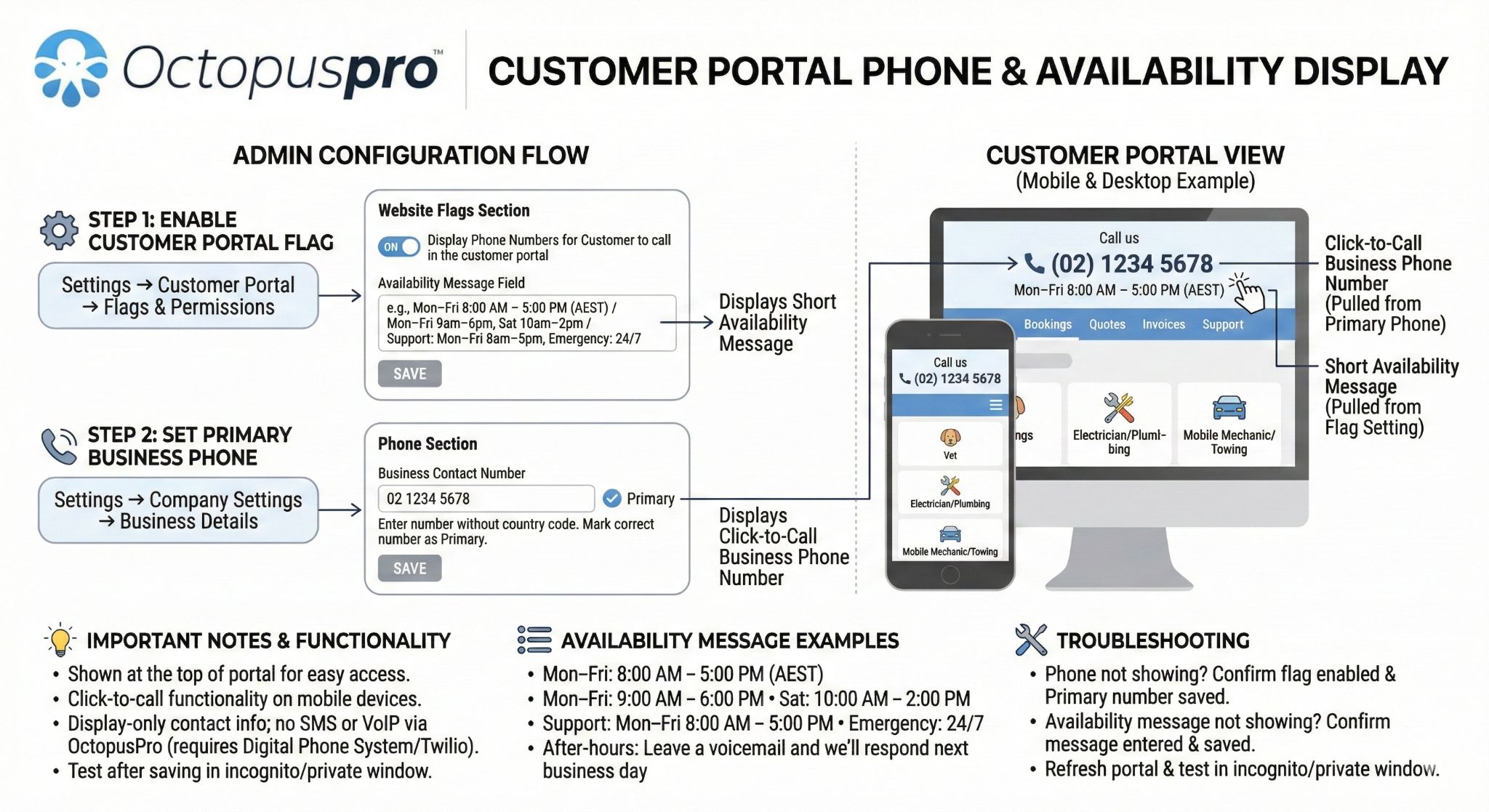
Display phone numbers, business hours, About Us content, trusted social links, service updates, and support paths so returning customers know how to continue when they need help.
Let customers reuse saved homes, sites, pools, rentals, children, pets, patients, vehicles, boats, equipment, companies, branches, billing entities, partners, assistants, tenants, and site contacts.
Use saved details, booking history, recurring booking options, vouchers, repeat service links, preferred fieldworker options where enabled, and customer account access to increase return visits.
For training, tutoring, events, workshops, classes, or group services, let customers reserve places instead of booking a one-to-one appointment.
Use portal promotions and app prompts to encourage app downloads, repeat bookings, booking management, customer communication, service updates, and loyalty campaigns.
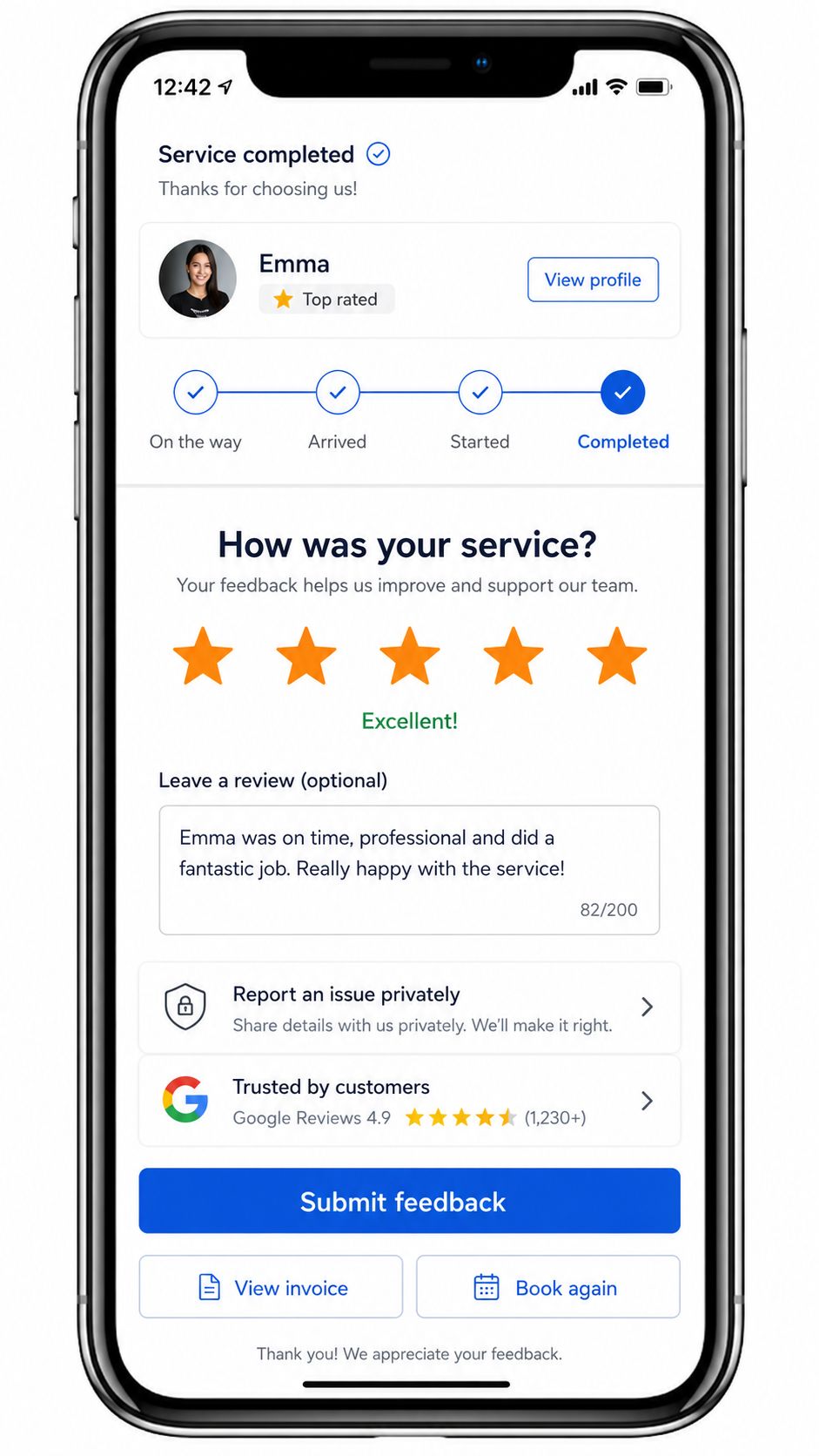
Build trust before booking and collect useful feedback after service
Help customers feel confident enough to book online by showing the right proof before they commit, the right fieldworker details before arrival, and the right feedback options after service — all connected to the booking and customer profile inside OctopusPro.
Show proof that reduces hesitation
Display Google Reviews, first-party ratings, About Us content, business details, contact details, service explanations, homepage videos, promotional content, social links, and branded portal design so customers feel safer taking the next step.
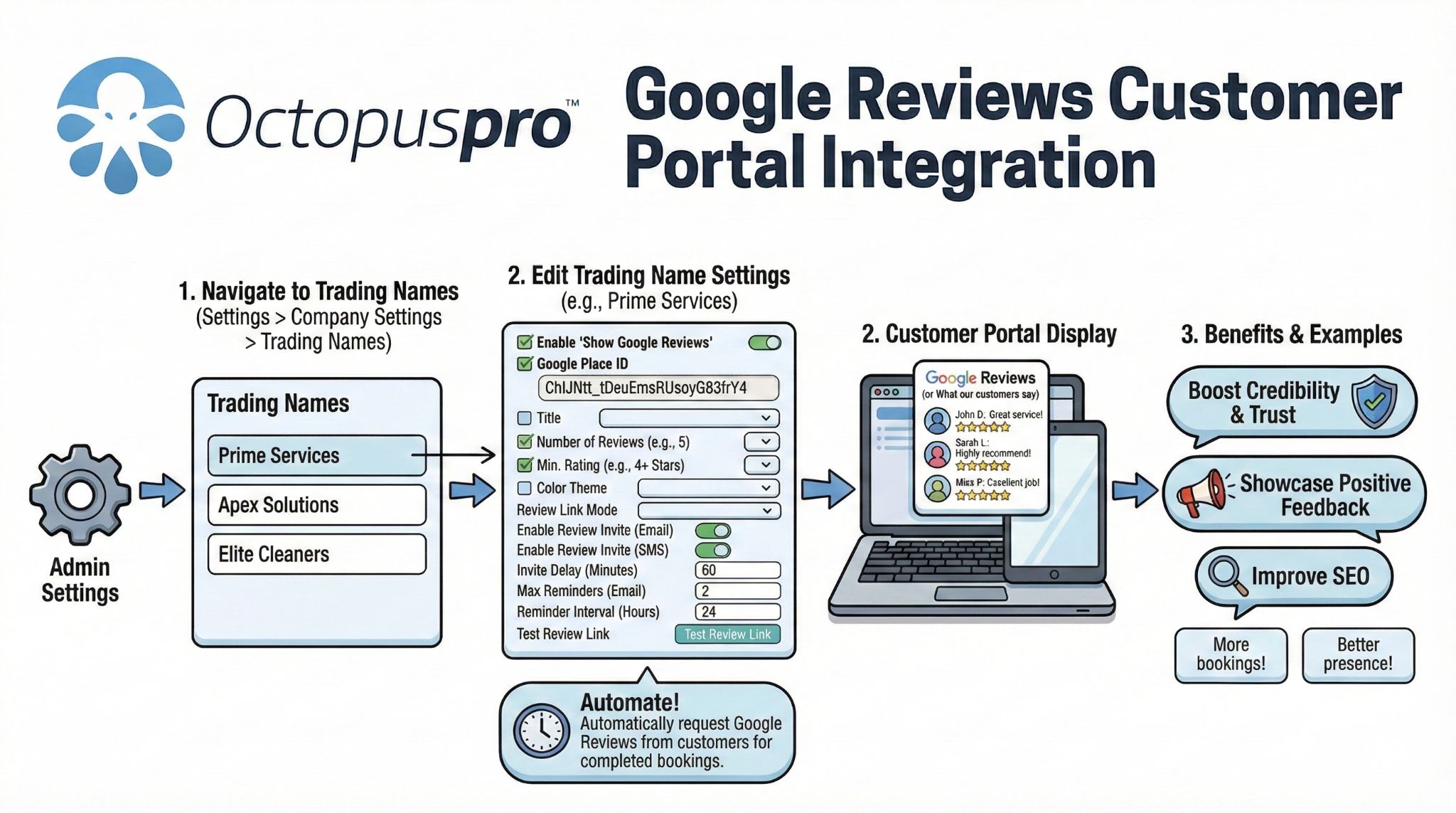
Use fieldworker profiles and ratings
Where enabled, show fieldworker names, public profiles, star ratings, joined dates, profile links, customer-facing fieldworker details, trust signals, and booking messages so relationship-based services can build confidence before the appointment while you control what customers can see.
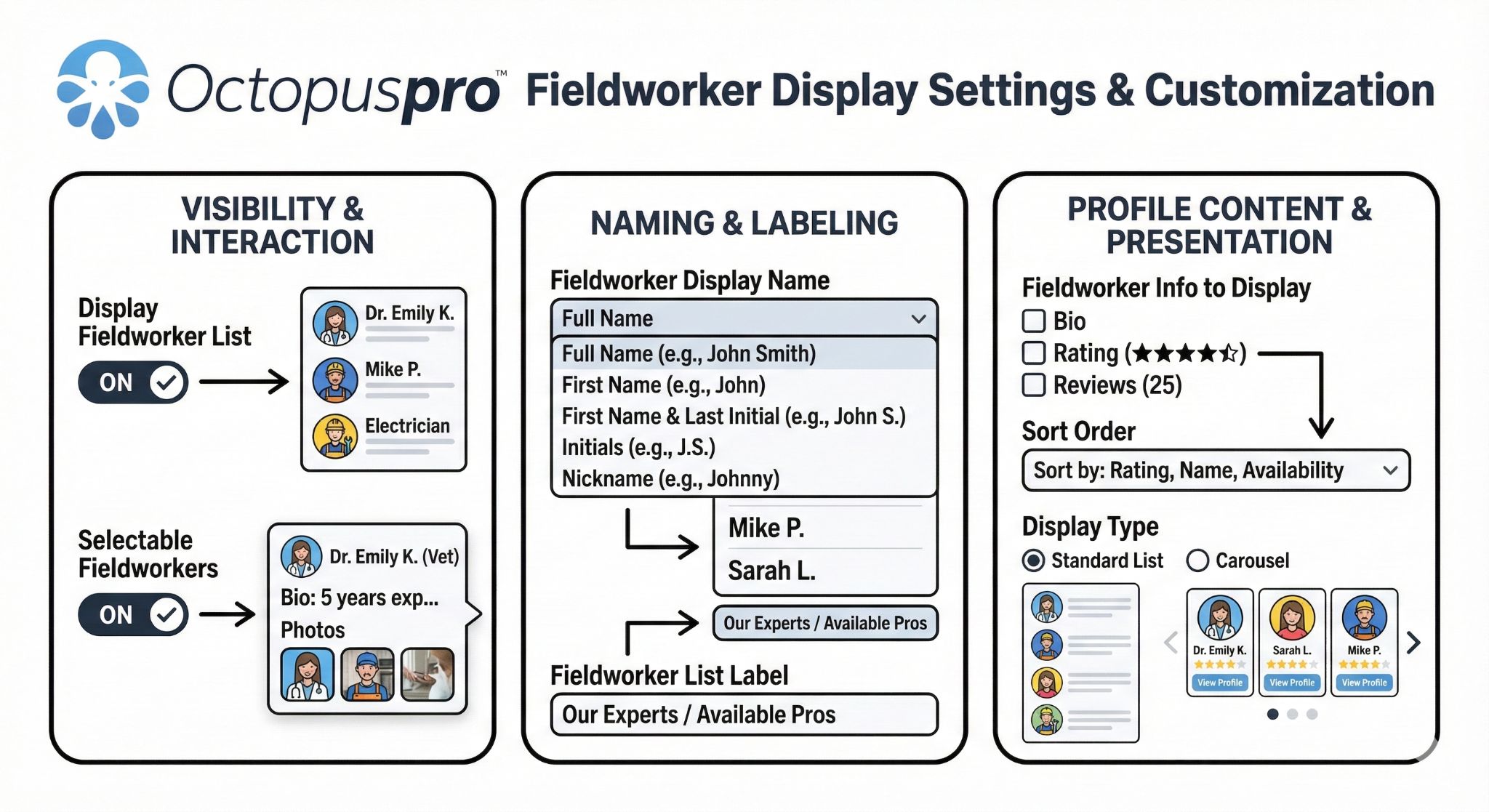
Collect ratings, reviews, and private feedback
Collect customer ratings, review requests, rating tags, private feedback, issue reports, and review signals after the job so your team can improve service quality, support recovery, encourage more public reviews, and strengthen future booking confidence.
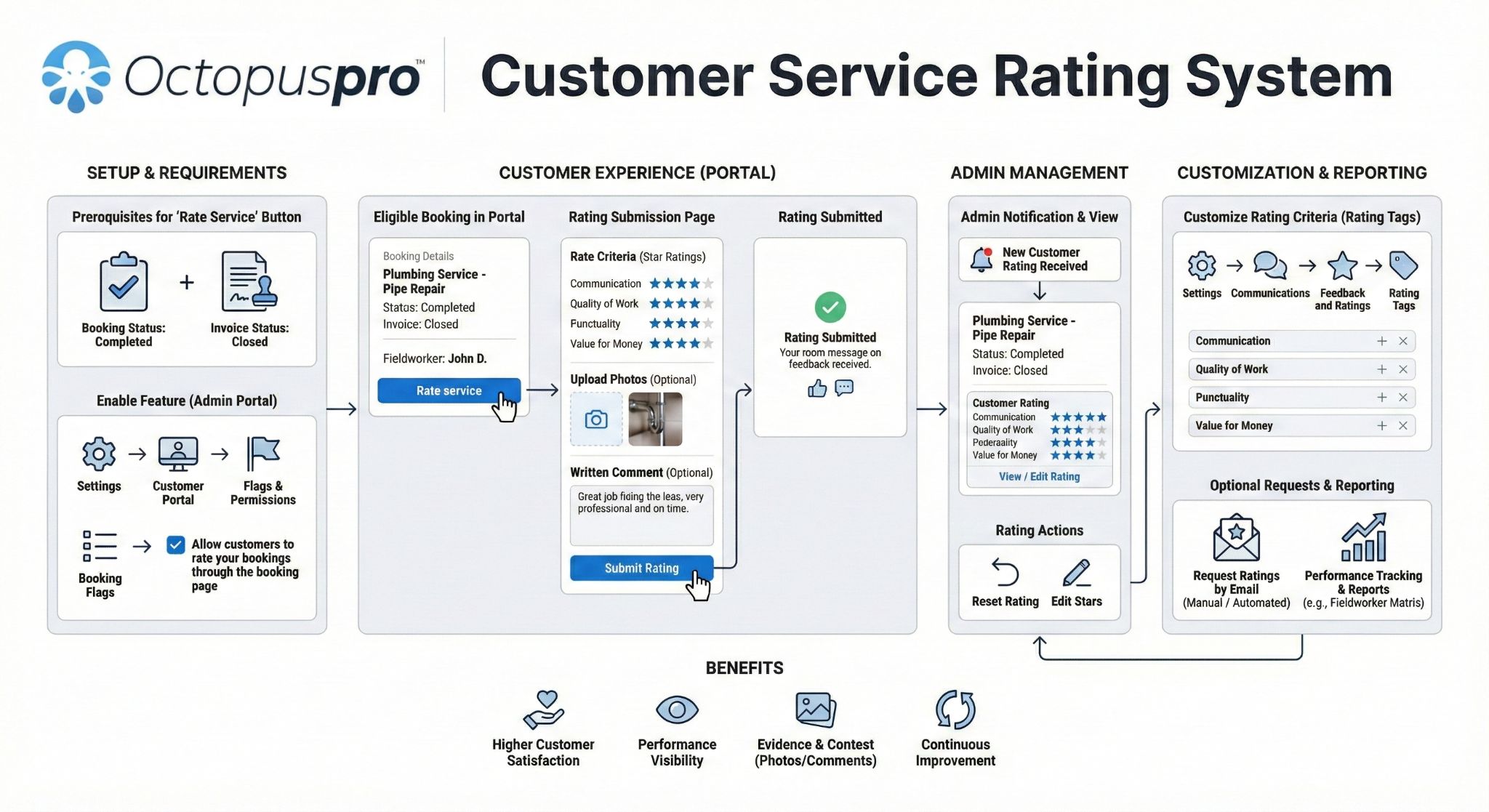
Resolve issues and complaints with a connected workflow
Give customers a private path to report concerns while your team tracks the issue, assigns follow-up, records actions, resolves complaints, and keeps recovery connected to the booking and customer record.
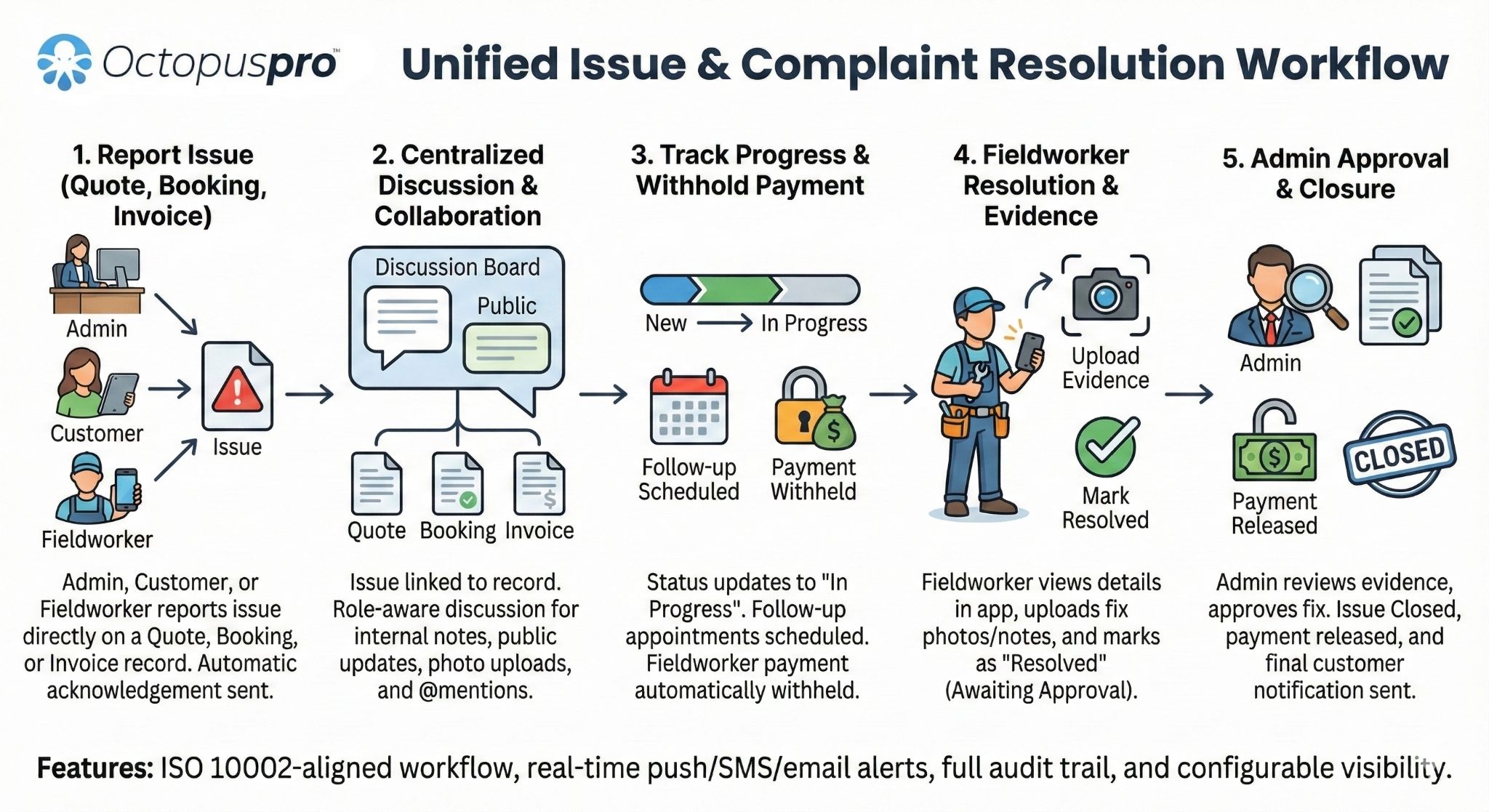
Use service explanations, About Us content, Google Reviews, business details, FAQs, social links, contact details, and professional branding before customers compare alternatives or call.
Let customers view booking progress, receive email or SMS updates, and access customer-visible booking discussions or instructions when clear communication is needed after booking.
Give customers a private way to raise concerns while your team keeps feedback, follow-up, and service recovery connected to the booking and customer journey.
Help customers feel confident before and after every service
Use portal branding, fieldworker profiles, reviews, ratings, confirmations, and feedback paths to build confidence before booking and improve the experience after service.
Collect the right details before the booking reaches your team
Reduce follow-up and improve booking quality by asking the right questions at the right moment. OctopusPro helps customers provide the information needed to price, qualify, schedule, prepare, and deliver the service without making simple bookings feel unnecessarily heavy.
Ask service-specific questions
Attach custom fields, options, add-ons, and service questions to each service so customers only answer what matters for that booking, while required and optional fields stay controlled by your rules.
Route complex requests before they become bookings
Use enquiry or lead-capture forms when a request needs review, pricing, inspection, approval, eligibility checks, extra questions, or quote-first handling before it can be confirmed.
Let simple bookings stay simple
Support guest checkout and capture the details needed for the current booking, while the customer account section covers saved details, booking-number login, profiles, payment methods, booking history, vouchers, and recurring options for returning customers.
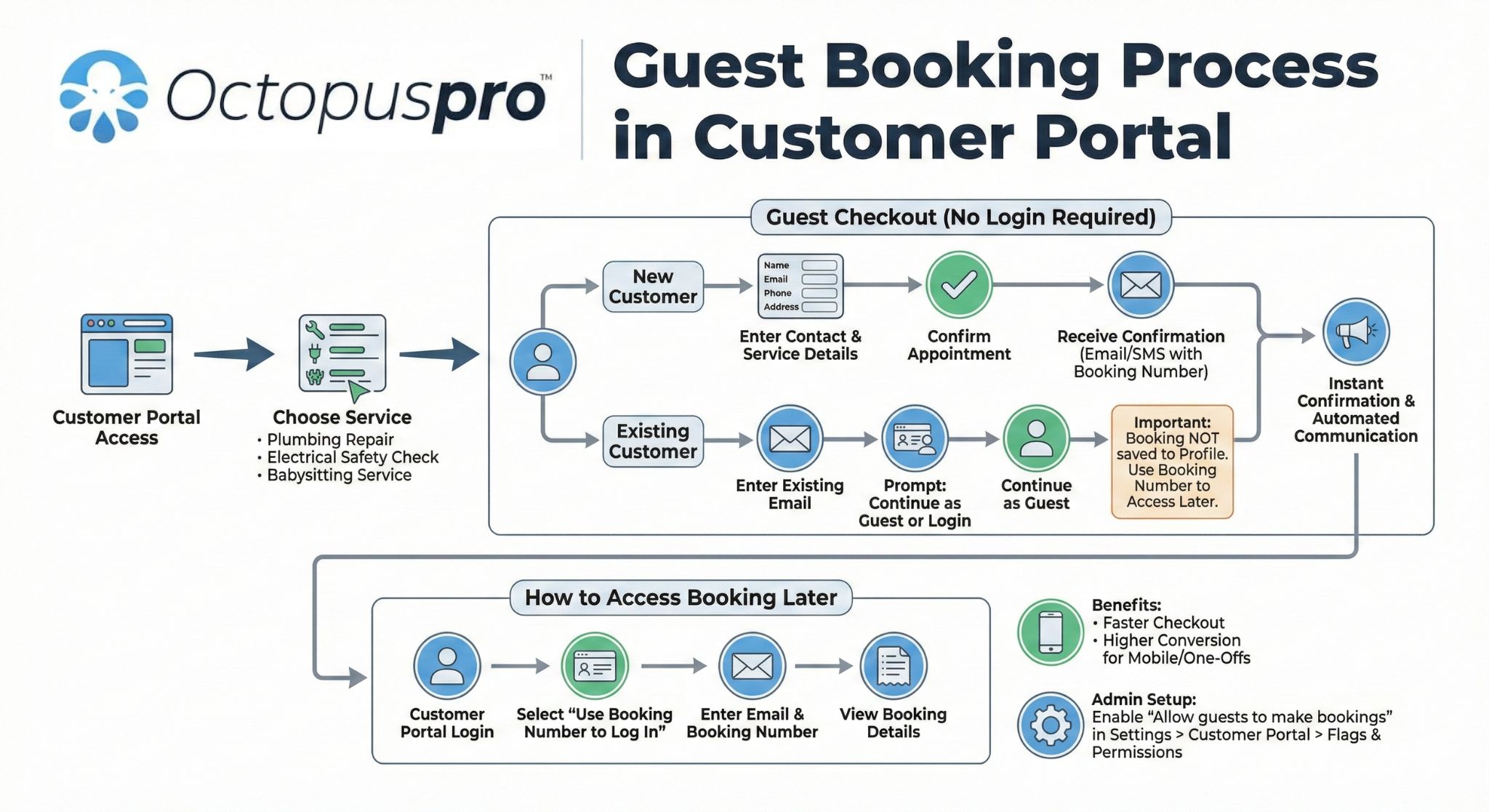
Link the booking to the correct person, property, or asset
Connect bookings to the right home, site, pool, rental, dependent, child, pet, patient, asset, vehicle, boat, equipment, company, branch, billing entity, business profile, partner, assistant, tenant, or site contact.
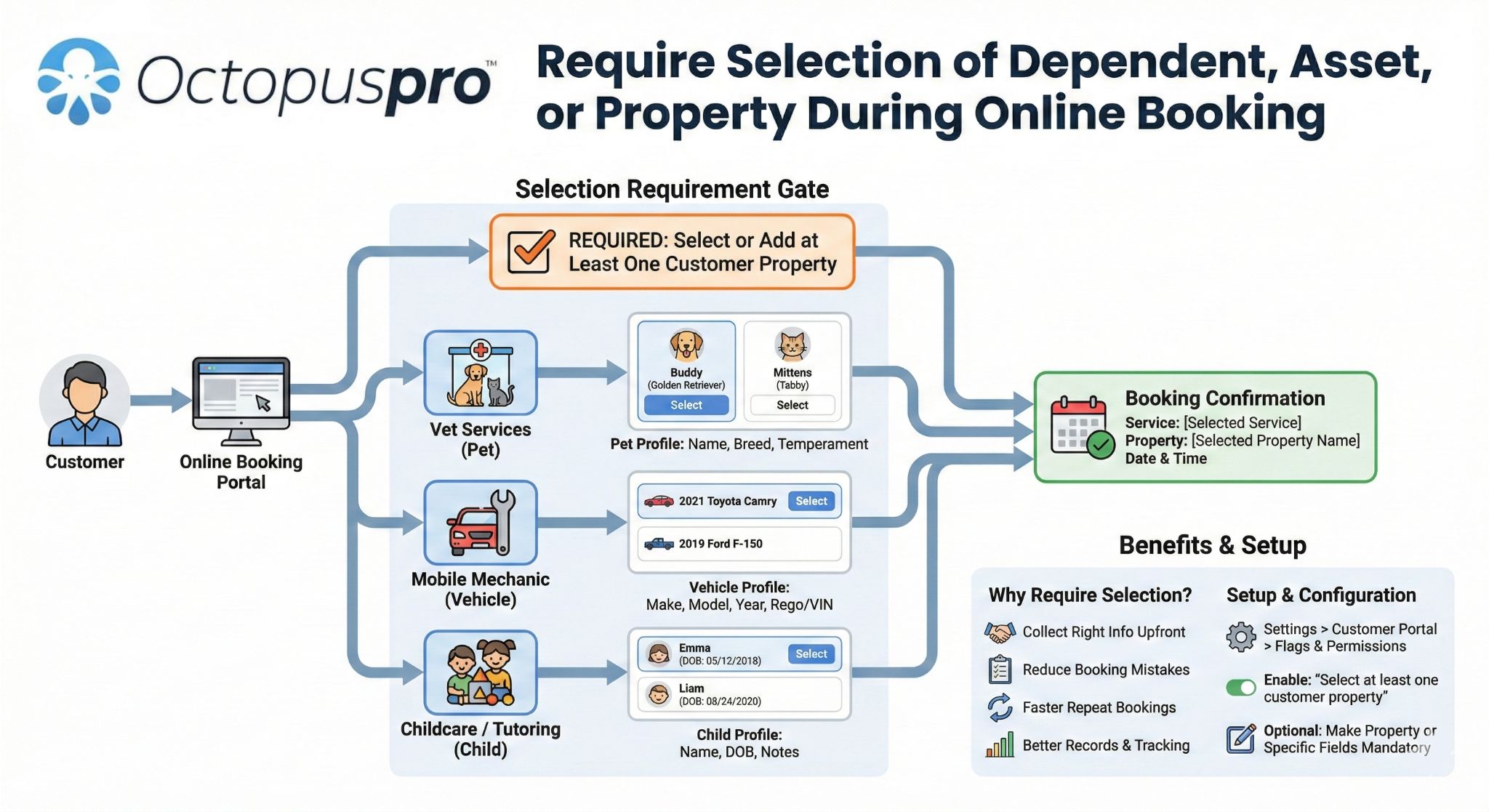
Collect photos before the team arrives
Make photos optional or mandatory, request the right angles or evidence, and collect damage photos, access photos, before-service evidence, or job photos early so your team can prepare before arrival.
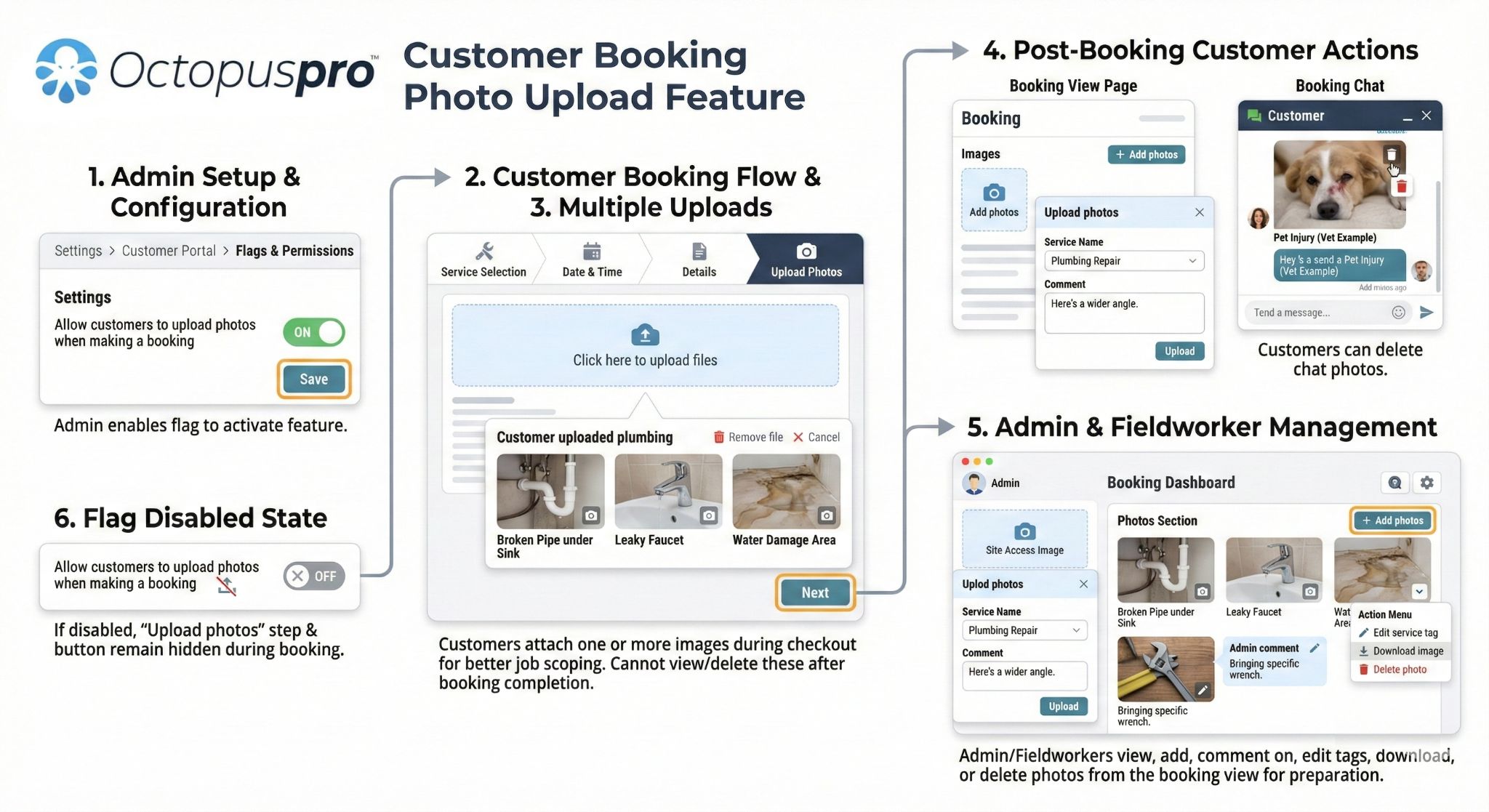
Collect PDFs and supporting files
Keep plans, permits, forms, briefs, certificates, and attachments connected to the customer and booking, and let customers upload supporting documents where the booking needs files.
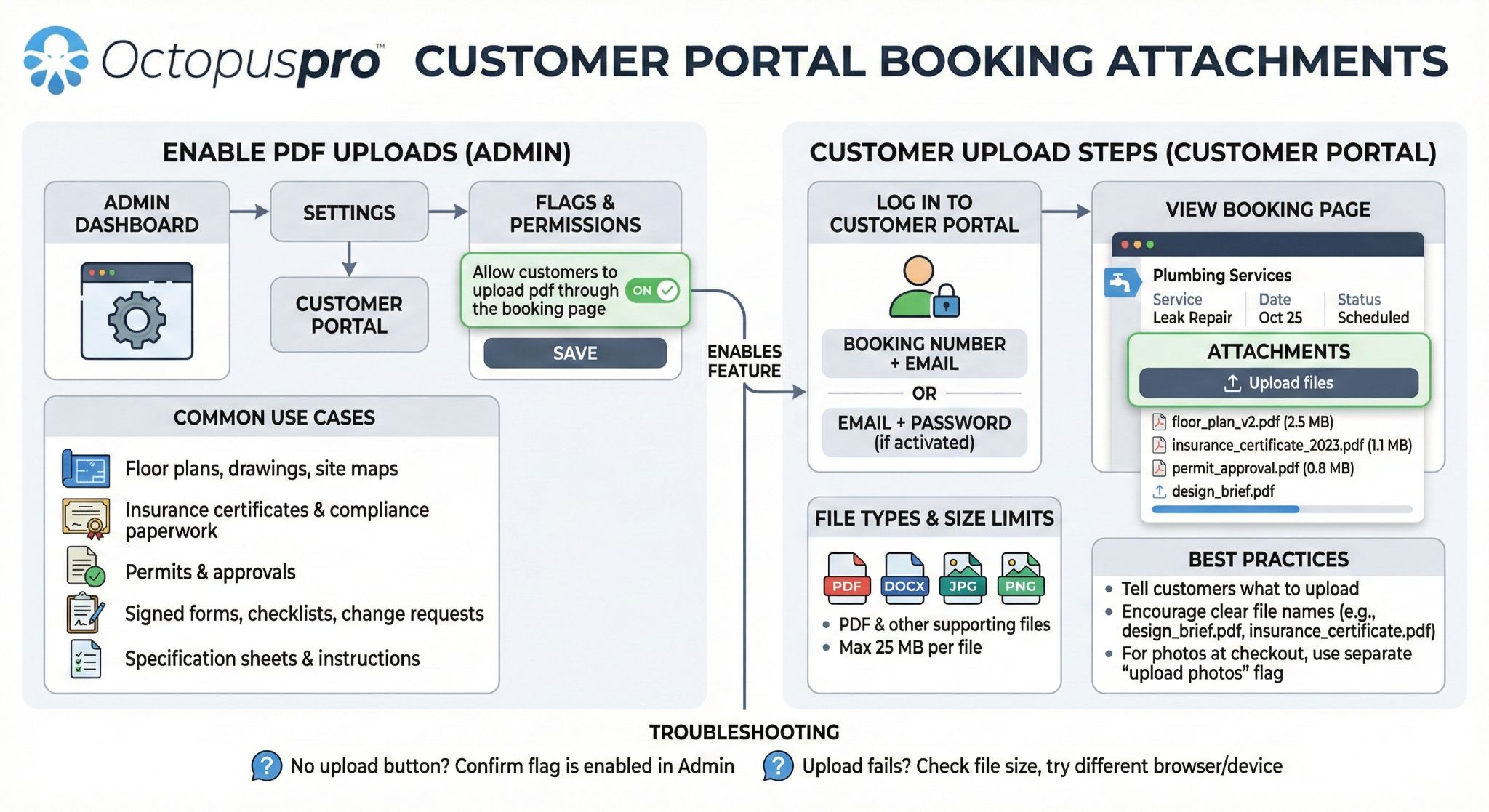
Prepare the team before arrival
Capture parking availability, keys, access notes, gate codes, tenant contacts, pet notes, hazards, preferred contact instructions, site details, and job notes before dispatch.
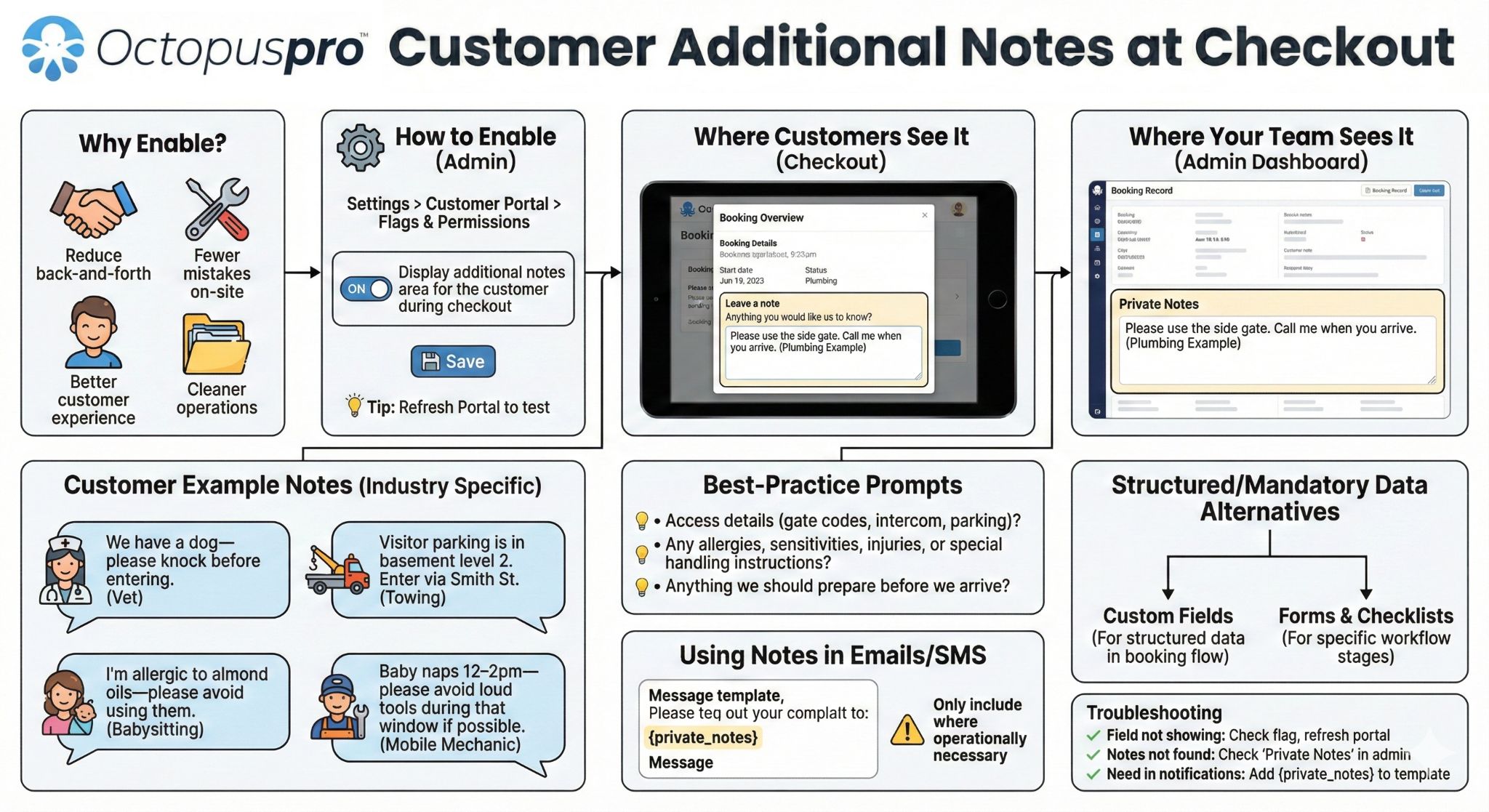
Collect structured job requirements
Ask customers to complete pre-job forms, consent confirmations, safety questions, site checklists, measurements, access requirements, and post-service details so important answers stay connected to the booking.
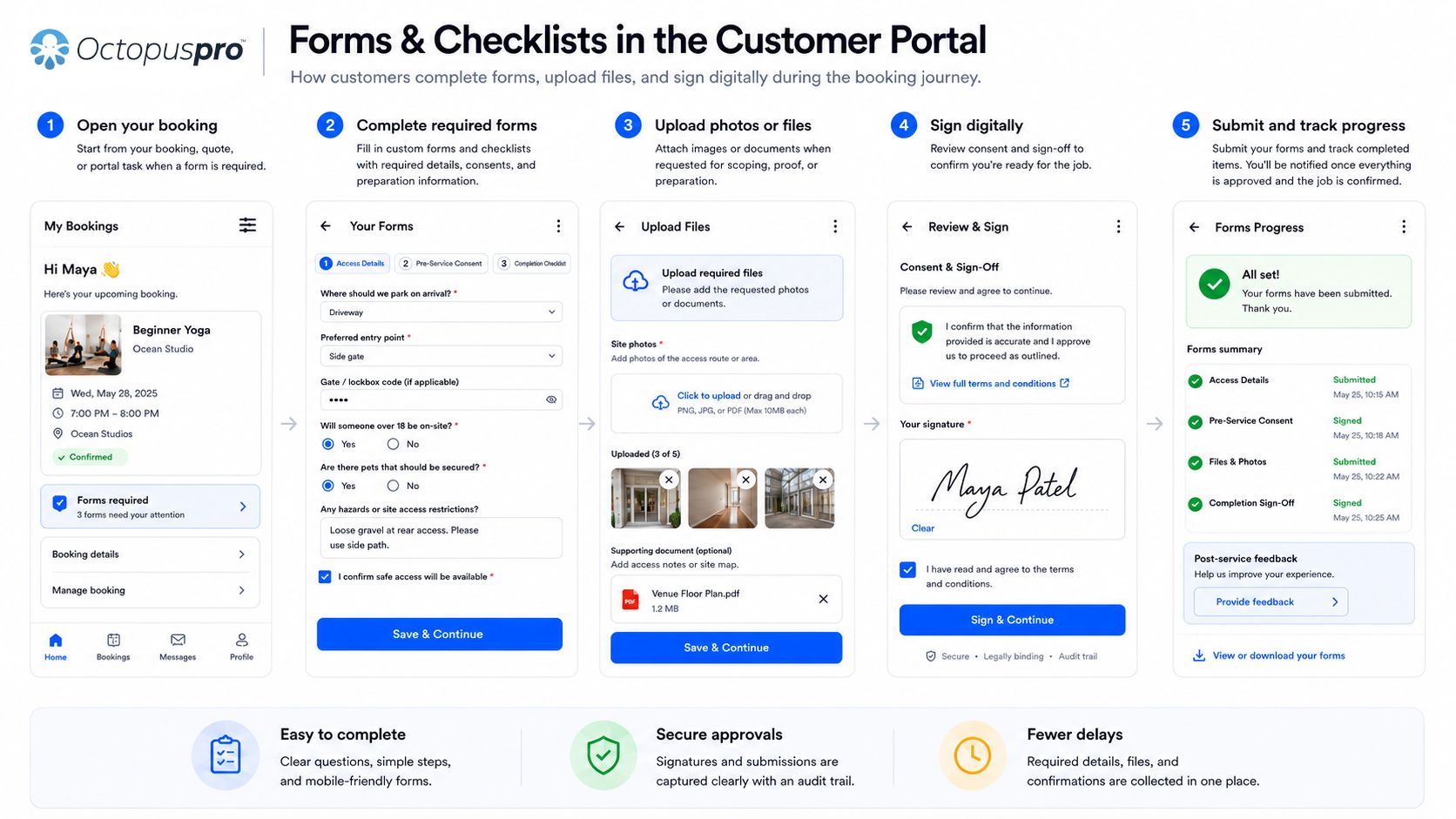
Make important questions required while keeping less important details optional so your team gets what it needs without making the form feel heavy.
Use custom field groups to split longer forms into clearer steps such as site details, access instructions, measurements, requirements, approvals, and supporting files.
Collect information that supports pricing, eligibility, add-ons, service fit, customer expectations, job preparation, and team readiness before dispatch.
Saved booking context can be reused where enabled so returning customers do not have to repeat details that already exist in their account.
Custom fields for booking and lead capture guide
Attach custom fields to services guide
Multi-step booking forms guide
Pricing and add-on details guide
Mandatory image upload guide
PDF upload and booking attachments guide
Parking availability checkout question guide
Lead capture and inquiry form guide
Customer profile, properties, assets, and contacts guide
Portal permissions guide
Collect the details your team needs before work starts
Ask the right booking questions, collect files, photos, signatures, property details, and service requirements so every booking reaches your team with fewer gaps.
Keep customers updated automatically after they book, approve, pay, or ask a question
Keep customers informed with automated updates for confirmations, reminders, payments, approvals, and next steps, reducing repetitive follow-up while keeping the journey clear.
Booking confirmations and reminders
Send confirmation and reminder messages so customers remember their appointment, understand timing, and know what to prepare before the visit or session.
Quote, invoice, and payment links
Guide customers back to the right portal action when they need to approve, pay, deposit, reschedule, cancel, upload details, or review their booking.
Customer-visible questions and replies
Keep customer conversations connected to the booking, quote, invoice, enquiry, or issue so updates are easier to follow and less likely to disappear across separate channels.
Email, SMS, portal, and messaging updates
Use enabled communication channels to send reminders, confirmations, payment prompts, booking updates, review requests, and other customer-facing messages.
Remove booking friction before customers drop off
Customers are more likely to book when service fit, availability, pricing, trust signals, required details, approvals, and next steps are clear at the moment they need them.
Use service setup, booking location types, service areas, branch rules, and mobile or virtual delivery options to guide customers into the right booking path.
Send customers into approved booking options while the dedicated scheduling rules protect availability, fieldworker capacity, notice requirements, and service timing.
Make checkout expectations clearer with deposits, partial payments, payment methods, tax settings, gift vouchers, invoice payments, and offline payment instructions where enabled.
Use service-specific questions, required fields, upload steps, address capture, profile details, and booking instructions so customers provide the right information before work is scheduled.
Support quote acceptance, digital signatures, terms acknowledgement, deposits, and booking confirmation paths so customers can move from interest to approval faster.
Give customers account access for bookings, invoices, quotes, saved cards, vouchers, profile updates, cancellations, rescheduling, feedback, and repeat bookings.
Turn every portal visit into a clear next action
A strong Customer Portal does more than list services. It removes uncertainty, explains the rules, confirms the next step, and gives customers enough confidence to book, approve, pay, manage, and return without needing to contact your team first.
Every important portal path should answer five customer questions before they leave: what should I choose, what will it cost, can I trust it, what happens next, and how can I manage or repeat it later?
Can I book the time I need?
Show appointment options that already respect service availability, location type, booking windows, working hours, capacity, and fieldworker eligibility.
What do I need to pay now?
Make deposits, partial balances, full balances, invoice payments, voucher redemption, saved cards, taxes, offline instructions, and payment timing clear before customers commit.
Is this the right service for me?
Use clear service descriptions, service-specific questions, required uploads, location rules, fixed-site, mobile, virtual, and booking instructions to guide the right choice.
Can I trust this business?
Use branded portal design, white-label URLs, Google Reviews, ratings, fieldworker profiles, social links, About Us content, contact details, business hours, and secure checkout paths.
Can I change something later?
Explain account login, saved addresses, profile updates, rescheduling, cancellation rules, booking history, quote approvals, invoices, vouchers, and self-service permissions.
What happens after I act?
Use confirmations, account access, reminders, payment status, quote approval steps, signatures, feedback requests, and repeat-booking prompts to keep the journey connected.
A professional path from first choice to repeat booking
Present the right service, location type, booking option, availability, and required details before the customer reaches checkout.
Clarify pricing, payment requirements, policies, trust signals, service expectations, and what the customer can manage later.
Keep booking, quote approval, payment, signatures, confirmation, and account access connected in one controlled customer flow.
Use saved details, booking history, invoices, vouchers, feedback, reviews, preferred fieldworker options, and rebooking prompts to support repeat visits.
Turn the portal into a full customer lifecycle channel
A strong customer portal connects the full customer lifecycle, from discovery and booking to approvals, payments, account access, feedback, and repeat bookings.
Use website buttons, service links, social channels, ads, email campaigns, SMS, QR codes, reviews, and white-label URLs to bring customers into the right portal path.
Present services, locations, pricing expectations, availability, fieldworker ratings, Google Reviews, business details, FAQs, and trust signals before the customer commits.
Capture service questions, addresses, uploads, preferred fieldworkers, recurring options, location types, time slots, booking rules, and customer contact details.
Support quote approvals, signatures, deposits, full payments, partial payments, invoice payments, tax rules, gift vouchers, and saved payment methods.
Let customers view bookings, reschedule or cancel where allowed, update profiles, manage saved addresses, check invoices, access quotes, and review account history.
Encourage repeat bookings with saved details, recurring bookings, customer accounts, vouchers, feedback requests, reviews, reminders, and branded app promotion.
Use clearer portal copy to increase customer confidence and action
Portal settings control what customers can do; portal copy helps them feel confident enough to continue. Use clear messaging around buttons, checkout steps, approvals, payment requests, and confirmations so the next action is obvious.
Explain who the service is for, where it is available, what location type applies, and what information customers should have ready before they start.
Clarify that customers can only choose approved booking options, with detailed scheduling controls handled in the availability section.
Tell customers whether they are paying a deposit, full balance, partial amount, invoice, gift voucher amount, or offline payment instruction.
For quotes and signatures, make the approval step clear so customers know whether they are accepting terms, confirming work, paying a deposit, or securing a booking.
Use confirmation copy, reminders, account access, invoice links, rescheduling rules, feedback requests, and repeat-booking prompts to keep next steps clear.
Use FAQs, support links, phone numbers, business hours, contact options, and office chat copy so customers know where to get help without abandoning the booking path.
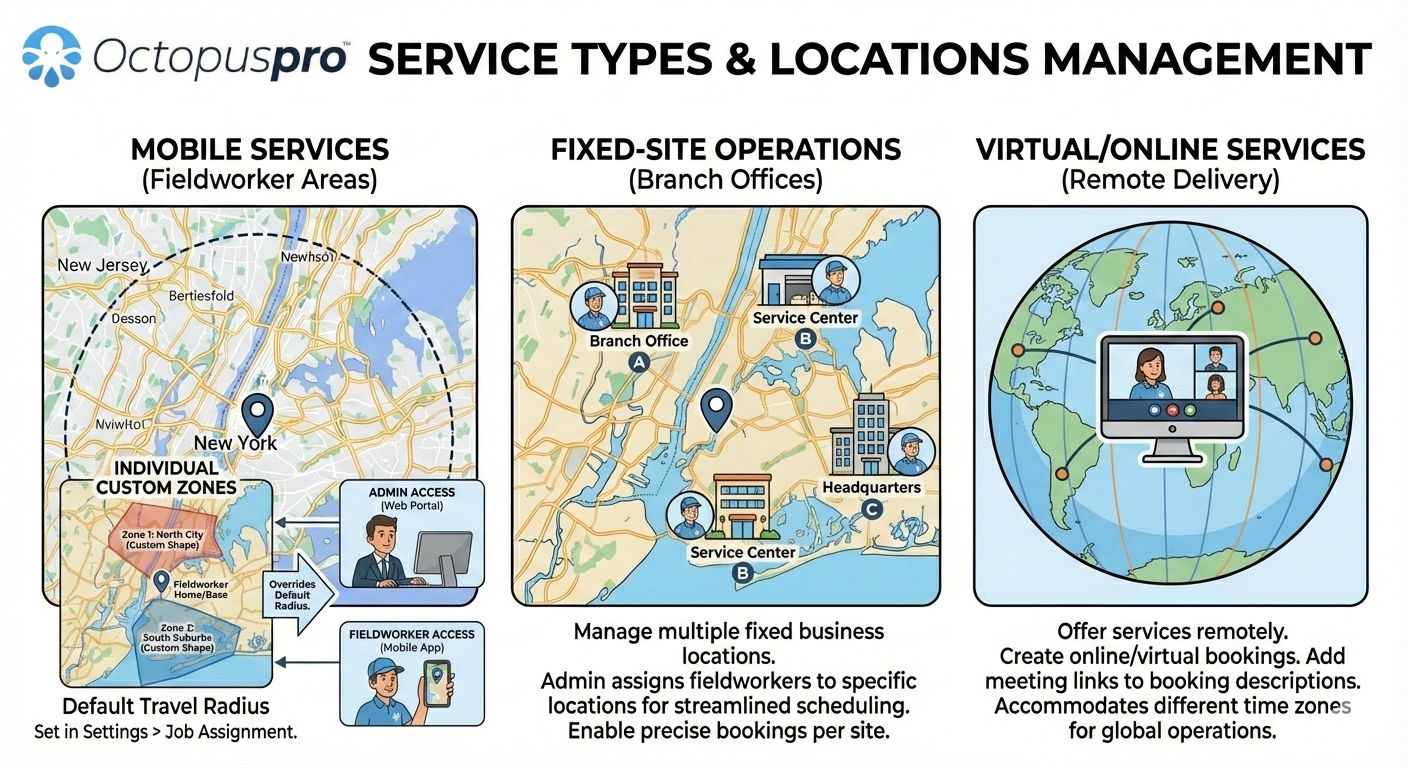
Handle fixed-site, mobile, virtual, and multi-address workflows with the right booking experience
Shape the portal around what each service requires, whether customers need to choose a location, provide details, approve a quote, pay a deposit, schedule a pickup, manage a multi-address booking, or complete a virtual service flow.
Branch and location selection
Let customers choose the right clinic, salon, studio, workshop, store, branch, or training centre, then show the selected location, appointment time, and arrival details clearly.
Address capture and travel-aware booking
Collect service addresses, saved locations, multi-address details, parking notes, access instructions, photos, and job details for mobile and on-site work.
Online and remote service bookings
Support remote consultations, coaching, tutoring, support sessions, telehealth-style workflows, and time-zone-aware booking without location confusion.
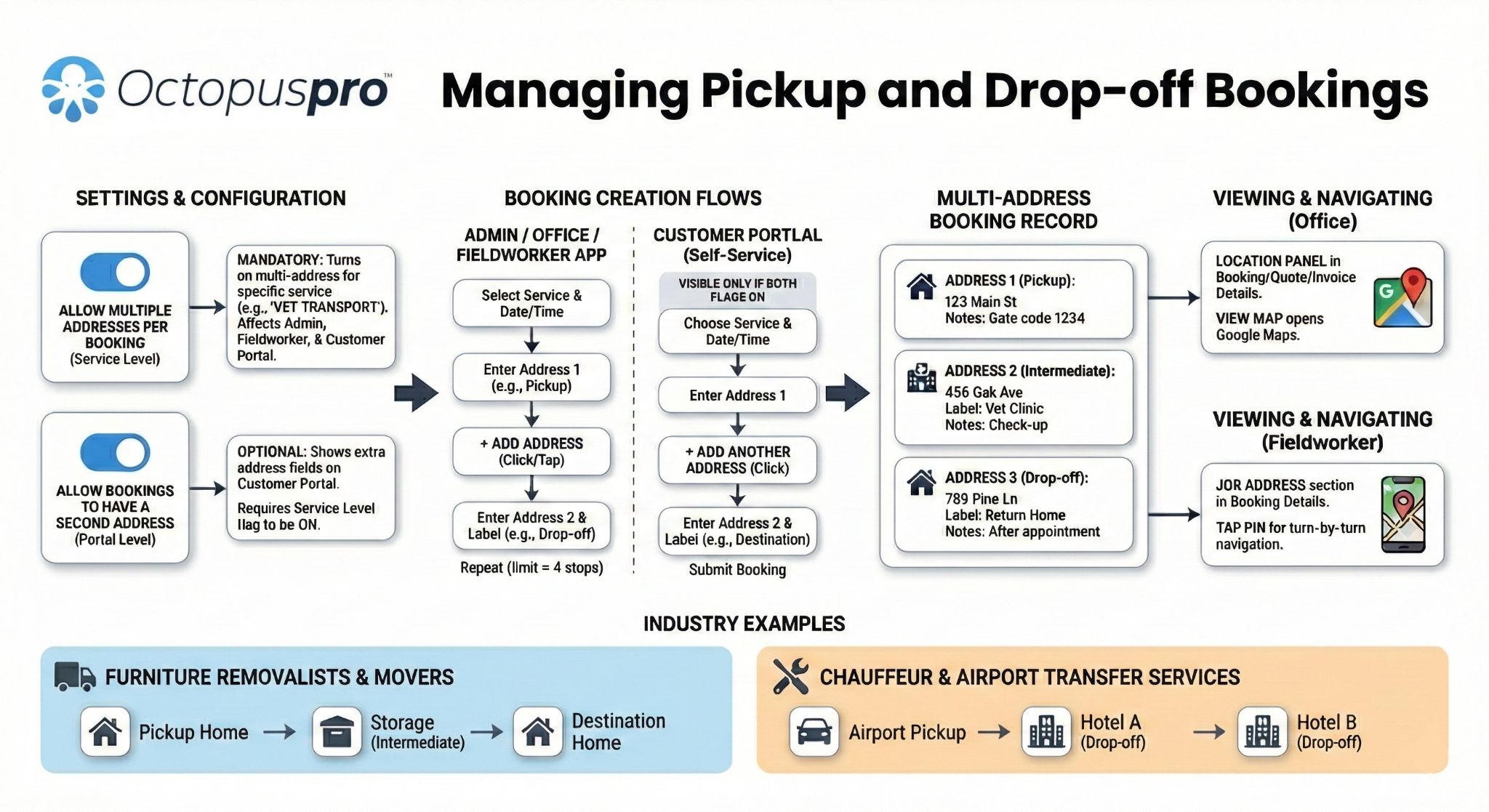
Pickup, drop-off, and complex service journeys
Where needed, structure services that involve more than one location, staged work, customer drop-off, fieldworker pickup, later return, quote approval, or payment before service delivery.
Learn more about booking location types
Shape the portal around how each service is delivered
Use one portal framework, then adjust the details that shape the journey: location choice, resource capacity, travel rules, pre-dispatch information, approval steps, payment timing, and repeat-account needs.
Customer portal booking permissions guide
Sports and fitness software
Healthcare scheduling software
Beauty and salon scheduling software
Office support and meeting room scheduling
Education services management software
Entertainment services management software
Transportation booking and dispatch software
Animal care and mobile grooming software
Automotive and mobile mechanic software
Trades and services software
Home maintenance and pool service software
Real estate and facility maintenance software
Cleaning scheduling software
Hospitality and catering staff software
Launch the highest-impact portal path first, then expand using real results
Start with the customer journey closest to a measurable business outcome without needing a custom website build. Confirm that customers can find it, understand it, trust it, complete it, and stay within your rules, then expand across mobile, fixed-site, virtual, branded, and advanced self-service journeys once the path is converting.
Use service-specific booking paths, location rules, required questions, uploads, live availability, and confirmation messaging to reduce drop-off.
Move quote recipients into acceptance, signatures, deposits, payment instructions, scheduling, and confirmation from one connected path.
Connect checkout, deposits, invoice payment links, saved cards, tax settings, gift vouchers, offline instructions, and payment reminders.
Strengthen account access, saved details, booking history, invoices, vouchers, recurring bookings, and repeat-booking prompts.
Match homepage CTAs, service links, quote links, invoice links, gift voucher links, social links, QR codes, and campaigns to the right destination.
Turn common questions into guided actions for bookings, payments, quote approvals, booking changes, enquiries, and repeat bookings.
Book Online buttons, direct service links, voucher links, portal URLs, social links, QR codes, campaign links, and customer login links are visible where customers decide.
Customers understand what to choose, which details to enter, when payment, signature, approval, or upload is required, and what happens after they act.
Availability, service questions, cancellations, rescheduling, payments, taxes, preferred fieldworker options, location rules, permissions, and role-based access match your operating model.
Logo, colours, imagery, homepage content, white-label URL, About Us content, reviews, social links, contact details, secure checkout, and consistent wording build confidence.
SEO settings, analytics, Google Ads, conversion paths, campaign links, customer feedback, ratings, reviews, audit trails, and reporting help refine the portal after launch.
Confirm service pages, bookable or quote-first services, location types, time slots, required questions, customer login, phone number, business hours, contact details, primary Book Online calls to action, branded customer journey basics, and the rules that keep booking under your control.
Enable deposits, invoice payment options, tax settings, quote approval, eSignatures, payment instructions, gift vouchers, saved payment methods, disclaimers, policies, and confirmation steps.
Add SEO, analytics, ad tracking, reviews, social links, app promotion, repeat bookings, preferred fieldworker settings, campaigns, QR tracking, lead-source reporting, and customer accounts.
Review the path from homepage, service page, ad, email, social post, quote, invoice, voucher campaign, QR code, or account dashboard to the final action: book, approve, sign, pay, redeem, manage, or rebook.
Customer Portal setup guide
Customer Portal general settings guide
Permissions and flags guide
Service settings guide
Booking disclaimer guide
Payment terms and deposits guide
Payment methods guide
Selling gift vouchers online guide
Discount voucher code guide
Quote approval guide
Quote-to-booking conversion guide
Profile management guide
Analytics integration guide
Google Ads conversion tracking guide
Lead capture guide
Phone number and business hours guide
Questions service businesses ask before launching a customer portal
Get clear answers on how OctopusPro connects your website to online bookings, quote approvals, invoice payments, customer accounts, vouchers, reviews, and self-service features your customers can use confidently.
Start with the highest-value customer action
Which customer action should I enable first?
Start with the customer action closest to commercial impact: service booking, quote approval, deposit payment, invoice payment, voucher purchase, or repeat booking. Add deeper self-service after that path is clear and converting.
Do I need to enable every portal feature at once?
No. Start with the customer action visitors are most ready to complete, then add supporting features such as permissions, reviews, analytics, vouchers, recurring bookings, app promotion, and customer accounts once the core flow is working.
Can I launch the portal for selected services first?
Yes. Start with selected services, service categories, locations, or customer actions, test the customer journey, then expand once the booking, payment, approval, and follow-up steps are clear.
Website setup and service models
Can it work as a booking website or connect to my current website?
Yes. Use the portal as a branded booking website, or connect your existing website with Book Online buttons, service-specific links, gift voucher buttons, campaign links, and white-label portal URLs.
Can the portal support different service models?
Yes. It can support fixed-location, mobile, onsite, virtual, recurring, multi-address, group or class-based workflows, preferred fieldworker selection, and service-specific booking questions where enabled.
How should I send visitors to the right portal path?
Use general Book Online buttons for broad pages, service-specific links for ready-to-book traffic, account login for returning customers, invoice links for payers, voucher links for gift campaigns, and quote approval links for quote recipients.
Controls, approvals, payments, and repeat bookings
How much control does my team keep?
Your team controls booking permissions, service rules, time slots, minimum notice, cancellation and rescheduling options, payments, pricing visibility, profile access, fieldworker options, branding, and customer-facing content.
Can I control cancellations, rescheduling, and booking changes?
Yes. You can set who can cancel or reschedule, how much notice is required, whether fees or payment rules apply, and which booking changes customers can make from their account.
Can customers approve quotes and pay online?
Yes. Customers can approve quotes, accept terms, provide signatures where configured, pay deposits or invoices, use saved payment methods where enabled, and redeem vouchers without a separate manual process.
Can returning customers manage details and book again?
Yes. Returning customers can log in to manage bookings, invoices, quotes, saved details, payment methods, vouchers, profile details, repeat bookings, and other approved account actions.
Trust, conversion, and booking qualification
Can the portal build trust before customers book?
Yes. Use branding, reviews, contact details, About Us content, secure checkout, service explanations, public fieldworker profiles, and star ratings where enabled to reduce hesitation before booking.
How do I improve conversion after launch?
Compare customer source, portal link, completed action, and follow-up required. Review drop-off points, confusing questions, payment clarity, approval steps, and whether returning customers use account and repeat-booking tools.
What details should I ask customers for?
Ask only for what is needed to qualify, price, schedule, or prepare the service. Keep simple bookings short, then add questions, uploads, signatures, deposits, addresses, or approvals only when they help completion.
Should every visitor start from the portal homepage?
Not always. Broad visitors can start from the portal homepage. Ready-to-act customers usually convert better through focused booking, quote approval, invoice payment, voucher, or account paths.
Ready to launch a customer portal journey that converts?
Our Customer Success team can help you launch the highest-impact portal path first, connect the right website and campaign links, configure branding, permissions, payments, service rules, quote approvals, invoice payments, vouchers, customer accounts, and self-service settings, then expand using real customer behaviour.