
.op-crm-v56-showcase-card .op-crm-v41-guides,.op-crm-v56-billing-visual .op-crm-v41-guides{margin-top:14px!important;padding-top:12px!important;border-top:1px solid rgba(15,65,105,.12)!important}.op-crm-v56-navy-showcase .op-crm-v41-guides{border-top-color:rgba(255,255,255,.18)!important}
Turn every enquiry, booking, message and payment into a stronger customer relationship
OctopusPro gives field service businesses an operational CRM that connects customer profiles, lead capture, quotes, bookings, communication, fieldworkers, invoices, payments, feedback, campaigns and reporting in one place. Your team gets the context to respond faster, deliver better service and turn first-time customers into repeat customers.
Capture and follow up every enquiry, quote and booking request so opportunities move forward without getting lost.
Give staff and fieldworkers the history, access notes, preferences, addresses, files and communication context they need before acting.
Use billing cycles, statements, stored payment methods, reminders, feedback, campaigns and portal self-service to reduce admin and keep customers coming back.
Related guides: customer management CRM guide • customer activity timeline guide • universal search and advanced filters guide
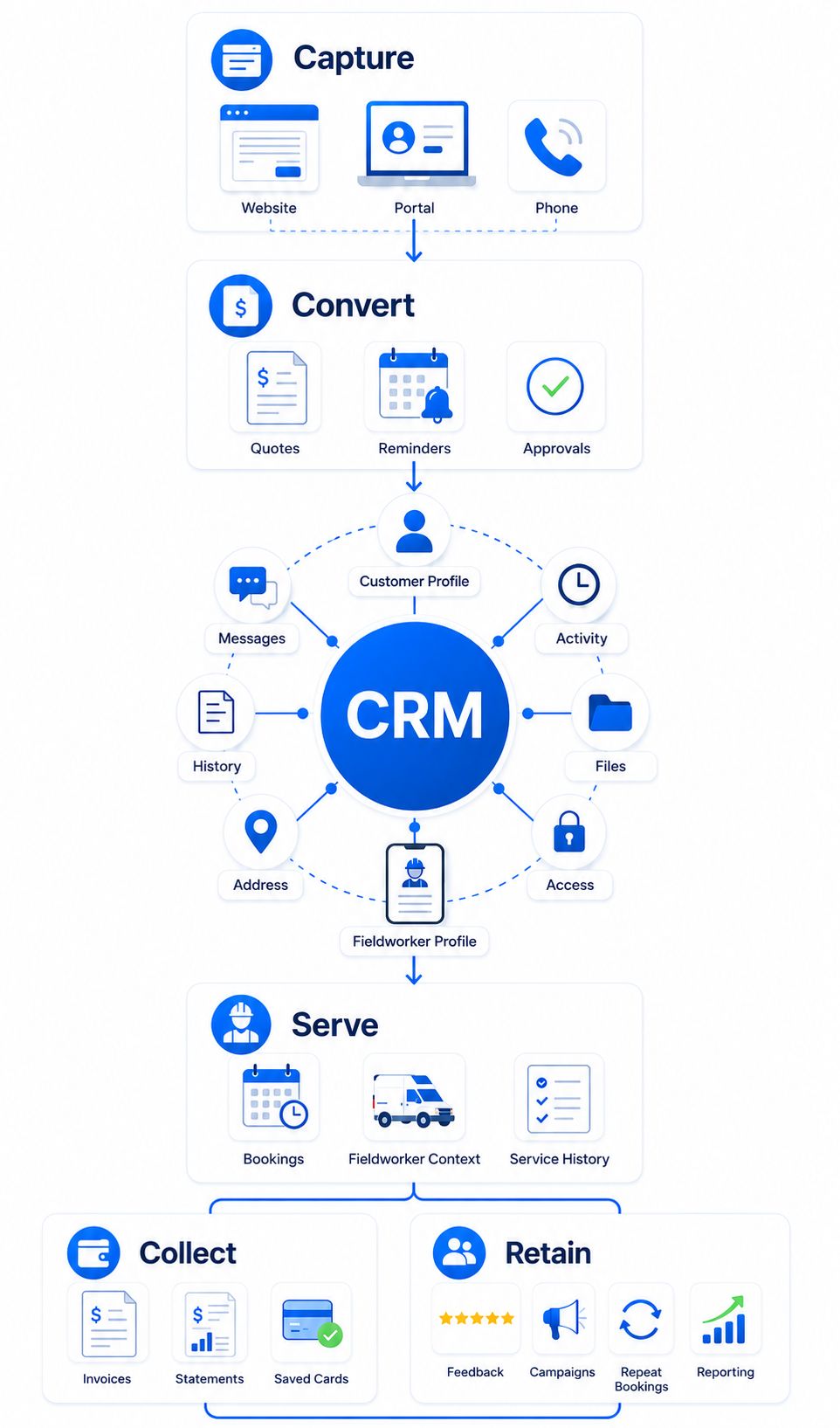
Customer context stays connected from first enquiry to repeat service
Instead of forcing staff to piece together sales, service, billing and portal activity from separate places, OctopusPro keeps the customer story attached to the operational work your team needs to complete.
- Built for field service workflowsQuotes, bookings, invoices, payments and customer history stay connected to the same operational record.
- Self-service stays visiblePortal bookings, payments, approvals, uploads and customer updates feed back into the CRM instead of sitting separately.
- Fieldworkers arrive preparedAccess notes, service history, forms, photos and customer preferences are available before work starts.
- Managers get clearer controlSales, service, billing, follow-ups and retention activity stay measurable across the full customer lifecycle.
Everything your team needs to manage the customer relationship and the work behind it
OctopusPro connects the CRM features field service businesses compare first: customer profiles, communication history, quotes, bookings, invoices, payments, portal access, reminders, feedback, reporting and fieldworker context.
Win work faster, serve customers better and keep every relationship moving
OctopusPro helps field service businesses capture demand, keep teams informed, reduce admin and turn good service into repeat revenue by connecting the customer record to every operational touchpoint.
Win Business 24/7
Capture website enquiries, portal bookings, quote requests and repeat-service demand even when the office is closed.
Respond with context
Give staff instant access to customer history, preferences, communication logs, service addresses, files and billing details.
Collect with less chasing
Use deposits, stored payment methods, billing cycles, account statements, due dates and invoice communication history to keep payments moving.
Improve retention
Use feedback, reminders, newsletters, campaigns, vouchers, memberships and repeat bookings to keep customers coming back.
See how customer context becomes action inside OctopusPro
Customers do not experience your business as separate departments, and your CRM should not either. OctopusPro connects profiles, enquiries, quotes, jobs, communication, invoices, payments and repeat service so your team can move from first contact to completed work without losing context or asking the same questions twice.
Customer records stay connected to quotes, bookings, invoices, communications, service addresses, dependents, files and activity history.
Office staff, fieldworkers, finance teams and managers work from the same customer context instead of chasing information across disconnected tools.
Less handover risk
Customer details stay attached to the work, not scattered across inboxes or spreadsheets.
Faster decisions
Staff can see the quote, job, payment and communication context before acting.
Cleaner follow-up
Every enquiry, quote and booking can keep a clear next step.
Better repeat service
Preferences, addresses, saved cards, reminders and history make returning easier.

Most CRMs stop at contact details. OctopusPro connects the customer relationship to the service work behind it.
Generic CRMs can store names, numbers and notes. Field service businesses also need quotes, bookings, service addresses, fieldworker notes, forms, files, invoices, payments and portal activity connected to the same customer record.
Sales to service context
Billing and retention connected
What a connected customer record includes
Result: your team can answer faster, avoid repeated questions, recover issues sooner and keep the full customer relationship moving from first enquiry to repeat service.
CRM context becomes action
Enquiries become quotes, quotes become bookings, bookings become invoices, and invoices become repeat-service opportunities.
Service history stays useful
Access notes, photos, forms, customer preferences and fieldworker updates remain available for future bookings and support.
Revenue workflows stay connected
Deposits, stored payment methods, billing cycles, statements, invoice reminders and refunds stay connected to the customer relationship.
From scattered admin to a connected customer operating system
When customer data is connected to enquiries, quotes, bookings, fieldworkers, invoices, payments and repeat service, your team can move work forward without chasing history or asking customers to repeat themselves.
Disconnected admin slows every team down
-
Customer history is scattered.Notes live across inboxes, spreadsheets, staff memory and disconnected documents.
-
Sales and service are separated.Quotes, bookings, invoices, payments and job updates are harder to follow end to end.
-
Follow-up depends on memory.Reminder calls, rescheduling, payment chasing and repeat-service opportunities can be missed.
-
Managers have limited visibility.It is harder to connect customer acquisition, service delivery, billing, feedback and retention.
Every customer interaction becomes easier to act on
-
One customer record stays connected.Profiles, communication, quotes, bookings, files, invoices, payments and complaints stay together.
-
Teams know the next action.Office staff, fieldworkers, finance and managers can see the context they need before acting.
-
Customers can self-serve more often.Portal access helps customers book, approve, pay, reschedule, upload files and return for repeat service.
-
Growth is easier to control.Reporting, permissions, integrations, labels, data hygiene and audit history help the CRM scale with the business.
Remove the daily CRM friction that slows service teams down
When customer details, bookings, payments and follow-ups are spread across different tools, work slows down and opportunities get missed. OctopusPro connects those touchpoints in one CRM, so your team can act faster, reduce admin and deliver a better customer experience.
“I can’t find what happened last time.”
Keep enquiries, notes, bookings, invoices, photos, forms, communication, complaints and payments attached to the customer record.
“Quotes and callbacks are being missed.”
Use quote reminders, booking actions, inquiry follow-ups, portal requests and campaign tools to keep opportunities moving.
“Customers keep calling for updates.”
Give customers clearer communication, self-service access, booking history, rescheduling, payment options and service visibility.
“Invoices and payments are hard to track.”
Connect invoices, deposits, statements, stored payment methods, billing cycles, due dates, refunds and payment history.
“Fieldworkers do not have the full job context.”
Share service addresses, access notes, customer preferences, files, forms, photos, booking history and job notes before arrival.
“The CRM gets messy as the business grows.”
Use labels, permissions, data hygiene, duplicate management, reporting, integrations, API access and audit history to scale cleanly.
Move beyond a basic CRM and manage the full service lifecycle
A basic CRM stores customer data. OctopusPro turns that data into action by connecting it with bookings, fieldworkers, customer self-service, billing, communication, feedback and reporting.
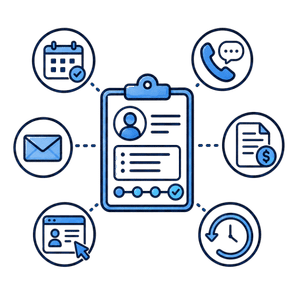
Basic CRM or contact database
Stores customer details, notes and sometimes a sales pipeline, but often leaves bookings, fieldworker communication, invoices, payments, portal activity and service history in separate systems.
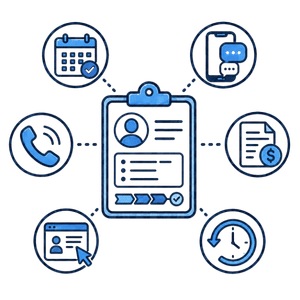
OctopusPro operational CRM
Connects customer profiles with lead capture, quote conversion, job scheduling, fieldworker activity, customer portal self-service, billing, payment history, feedback, campaigns, permissions and reporting.
Related guides: field service management software guide • service booking management guide • operational customer management CRM guide
Ready to replace disconnected CRM notes with one operating record?
Start with OctopusPro and give your team the customer, booking, invoice and payment context they need to move faster.
Built for service businesses where customers, bookings and payments need to stay connected
OctopusPro is designed for field service teams that need more than a list of contacts. It helps businesses manage customer relationships alongside quotes, jobs, fieldworkers, service addresses, recurring work, billing and repeat communication.
Mobile and on-site service teams
Keep customer profiles, service addresses, access notes, booking history and fieldworker updates connected from enquiry to completed job.
Trades, cleaning and home services
Convert enquiries into quotes and bookings while managing reminders, payments, invoices, recurring jobs, customer feedback and follow-up.
Health, wellness and appointment businesses
Support repeat visits, preferences, memberships, dependents, customer portal access, booking history and payment details in one record.
Commercial and multi-location accounts
Manage business profiles, multiple contacts, several service addresses, billing relationships, statements and account-level reporting.
Franchises and growing teams
Use permissions, reporting, integrations, data hygiene and consistent customer workflows to scale without losing operational control.
Businesses moving from spreadsheets
Bring customer data, communication, files, bookings and billing history into a cleaner CRM built for everyday service operations.
CRM workflows that fit the way different service businesses operate
The same connected customer record can support different service models, whether you dispatch mobile teams, manage recurring appointments, serve commercial accounts or rely on repeat bookings.
Cleaning and property services
Track properties, tenants, access notes, recurring bookings, before/after photos, complaints, statements and repeat service reminders.
Trades and mobile technicians
Connect enquiries, quotes, service addresses, dispatch notes, fieldworker updates, invoices, payments and customer communication history.
Health, wellness and personal services
Manage preferences, memberships, dependents, booking history, payments, forms, reminders and customer portal access in one profile.
Commercial and facilities teams
Support business profiles, multiple contacts, service locations, account statements, third-party bill payers and role-based visibility.
Education, coaching and appointments
Keep students, guardians, repeat appointments, files, notes, payments, feedback and communication history connected.
Pet, home and lifestyle services
Remember pets, households, service preferences, saved addresses, repeat bookings, feedback, vouchers and customer history.
Support simple jobs, complex accounts and repeat customers from the same CRM
Field service customer relationships are rarely just a name and phone number. OctopusPro helps you manage individual customers, business accounts, properties, dependents, third-party bill payers, recurring work and memberships without splitting the customer story across separate records.
Individual customers
Remember preferences, access notes, birthdays, membership IDs, saved locations, saved payment methods, service history and repeat booking patterns.
Business and commercial accounts
Manage business profiles, multiple contacts, service addresses, billing details, custom fields, account statements and invoice workflows from one customer record.
Properties, dependents and bill payers
Keep children, pets, vehicles, properties, tenants, agencies, real estate managers, insurance, NDIS and third-party bill payers connected to the right customer relationship.
Recurring and membership customers
Support memberships, repeat bookings, recurring bookings, billing cycles, reminders, saved cards, quote approvals, portal access and follow-up campaigns.
Every team gets customer context they can act on
The CRM becomes more valuable when every team can use the same customer record for the job they are responsible for. OctopusPro gives owners, operations, finance and customer experience teams the context they need without forcing them into separate systems.
Owners and managers
01
See how leads, quotes, bookings, revenue, feedback, customer retention, fieldworker performance and reporting connect across the full customer lifecycle.
Operations teams
02
Use one customer record to understand job history, service addresses, property details, preferences, access notes, files, photos, forms, complaints, fieldworker updates and scheduling context.
Finance teams
03
Keep billing relationships clear with service and billing addresses, account statements, payment methods, deposits, refunds, credits, due dates, billing cycles and third-party bill payers.
Customer experience teams
04
Answer faster with communication history, complaint records, inquiry notes, customer preferences, portal activity, feedback, reviews and the full record of what has already happened.
Replace scattered admin with one customer operating record
The biggest CRM gains come when customer information is not trapped in separate tools. OctopusPro gives your team the answers they need to book cleaner, invoice sooner, respond faster and improve every repeat interaction from the same connected customer record.
What changes when customer context is connected?
Instead of relying on staff memory, spreadsheets, inbox searches and disconnected notes, OctopusPro keeps the customer story attached to the operational work your team needs to complete.
Less rework for staff
Staff can see what the customer asked for, what was quoted, where the service happens, who attended, what was billed and what needs follow-up without jumping between systems.
More confidence for customers
Customers receive clearer communication, self-service options, arrival visibility, easier payments and a more consistent experience because the business has their full context.
Better control as you scale
Managers can keep data clean, protect sensitive information, track activity, monitor pipeline performance and connect CRM data with accounting, calendar, payment and marketing tools.
Who is this customer?
See customer type, profile fields, labels, memberships, preferences, dependents, properties, addresses, files and relationship history in one place.
What has already happened?
Review enquiries, quotes, bookings, invoices, payments, notes, communication, complaints, photos, forms, signatures and activity history without searching multiple tools.
What should happen next?
Use inquiry follow-ups, quote reminders, booking actions, portal requests, job updates, invoice due dates, statement sending, feedback requests and campaigns to move work forward.
Who can see or change it?
Protect sensitive customer, payment, billing and internal information with role-based access, fieldworker visibility controls, audit logs, import/export control and API permissions.
Why it matters: every team member can quickly understand the customer, the history, the next step and the access controls before taking action.
Give your team one CRM record for sales, service, billing and retention
OctopusPro is strongest when customer information, operational work and payment history stay connected. That means fewer missed follow-ups, fewer repeated questions and a clearer path from enquiry to repeat service.
From first enquiry to repeat customer, every step has a clear next action
A useful CRM should make the next step obvious at every stage. OctopusPro keeps sales, service, billing and retention tied to one customer record so work moves forward without losing context.
Capture demand
Turn website enquiries, portal requests, calls and admin-created leads into trackable CRM records.
Convert work
Use quotes, reminders, labels, follow-ups and approvals to move opportunities into bookings.
Deliver service
Give staff and fieldworkers the right customer context, files, addresses, notes and history.
Bill and retain
Collect payment, send statements, request feedback, run campaigns and encourage repeat bookings.
See how enquiries become booked jobs, paid invoices and repeat customers
Give your team a clearer path from first contact to completed service with automation, portal access, reminders and reporting working together.
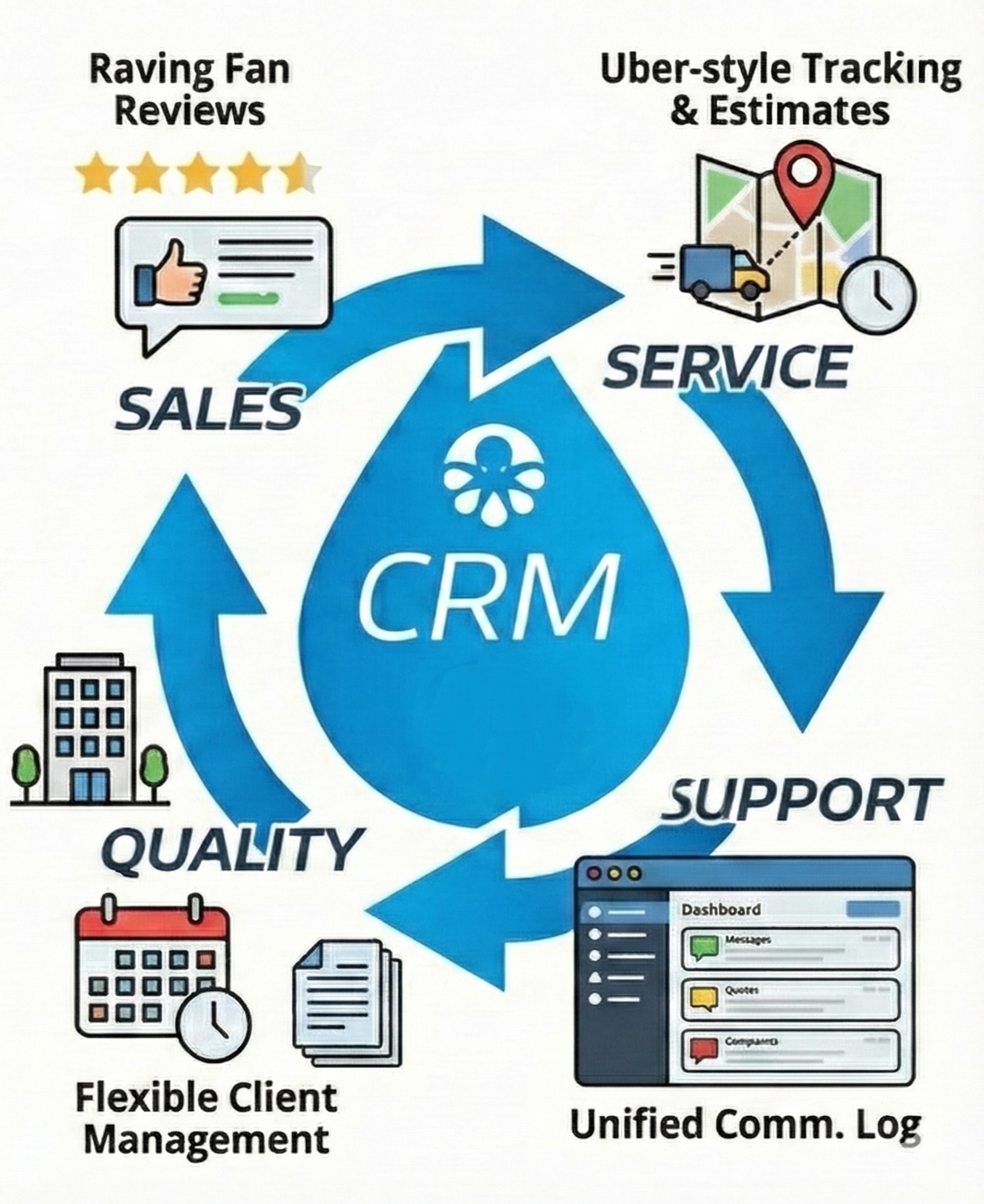
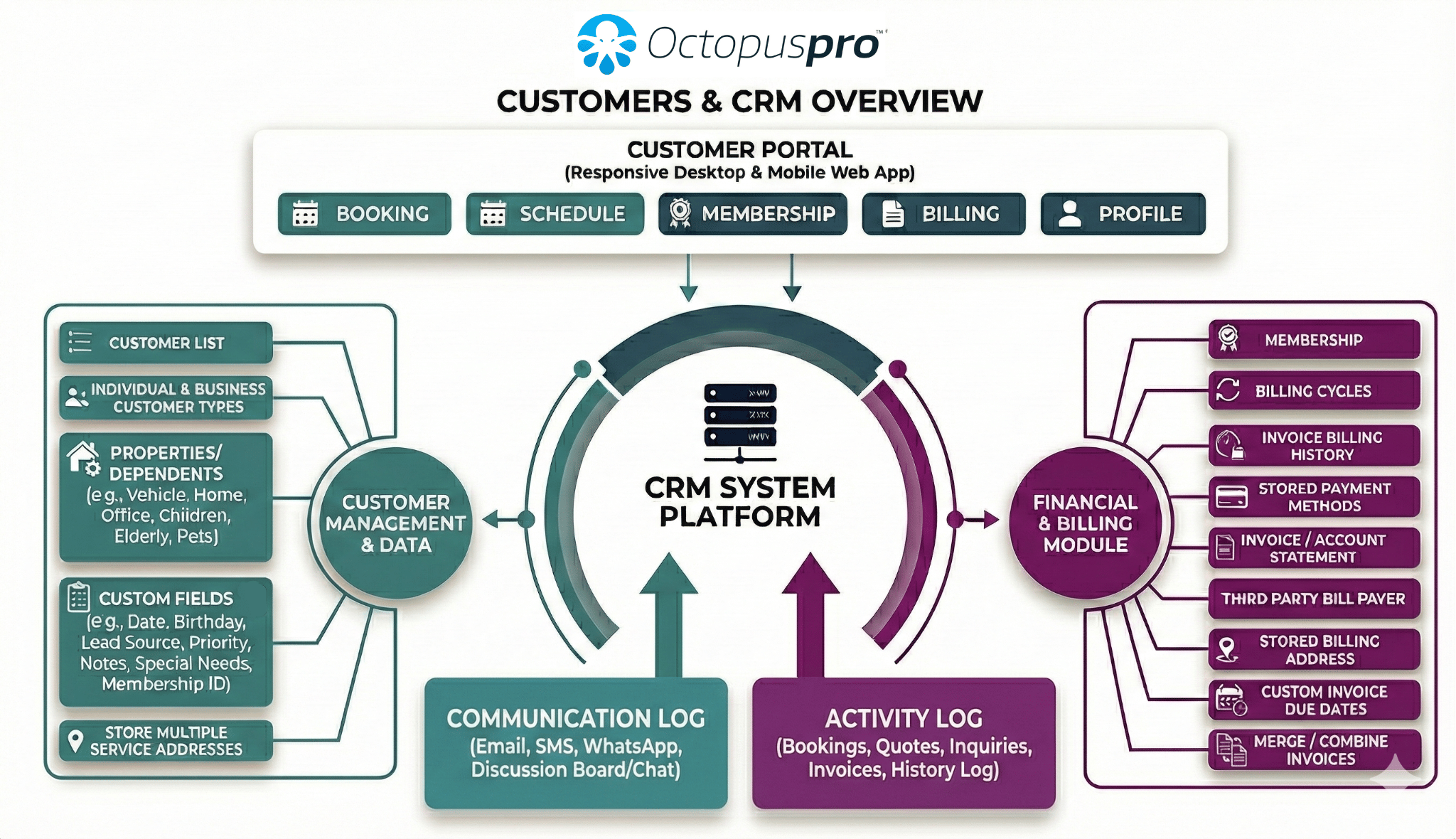
See how the pathway connects across the full customer lifecycle
The pathway above becomes more powerful when every customer action is connected. This visual map shows how OctopusPro links sales, service, support, billing, quality and customer history into one CRM-driven operating system.
Explore the CRM capabilities behind each outcome
Now that the workflow is clear, the sections below show the CRM features that help your team manage customer records, commercial contacts, account ownership, pricing rules, lead conversion, communication preferences, response-time follow-up, portal self-service, billing, lifecycle stages, retention, visibility controls and data governance at scale.
Capture, convert, serve, bill, recover, retain, report and control from one system
Each stage adds useful customer context. A captured enquiry can become a quote, a booking, a completed job, an invoice, a follow-up campaign and a repeat customer record without your team losing the story along the way.
Capture
Turn website forms, portal requests and phone enquiries into trackable customer opportunities.
Convert
Follow up quotes, approvals and reminders before leads go cold.
Serve
Give staff and fieldworkers the address, access, preference, form, file and communication context they need.
Bill
Use billing cycles, statements, due dates, stored payment methods and third-party bill payers to collect faster.
Recover
Handle complaints, evidence, approvals, reopened issues and feedback without losing the customer story.
Retain
Use reminders, newsletters, campaigns, vouchers, repeat bookings and personalised service to bring customers back.
Report
Track activity, lead sources, sales pipeline, inquiries, bookings, payments, feedback and team performance.
Control
Protect sensitive data with permissions, visibility controls, audit history, imports, exports and integrations.
Related guides: lead capture and inquiry management guide • quote to booking conversion guide • customer account statement guide • role-based access control guide
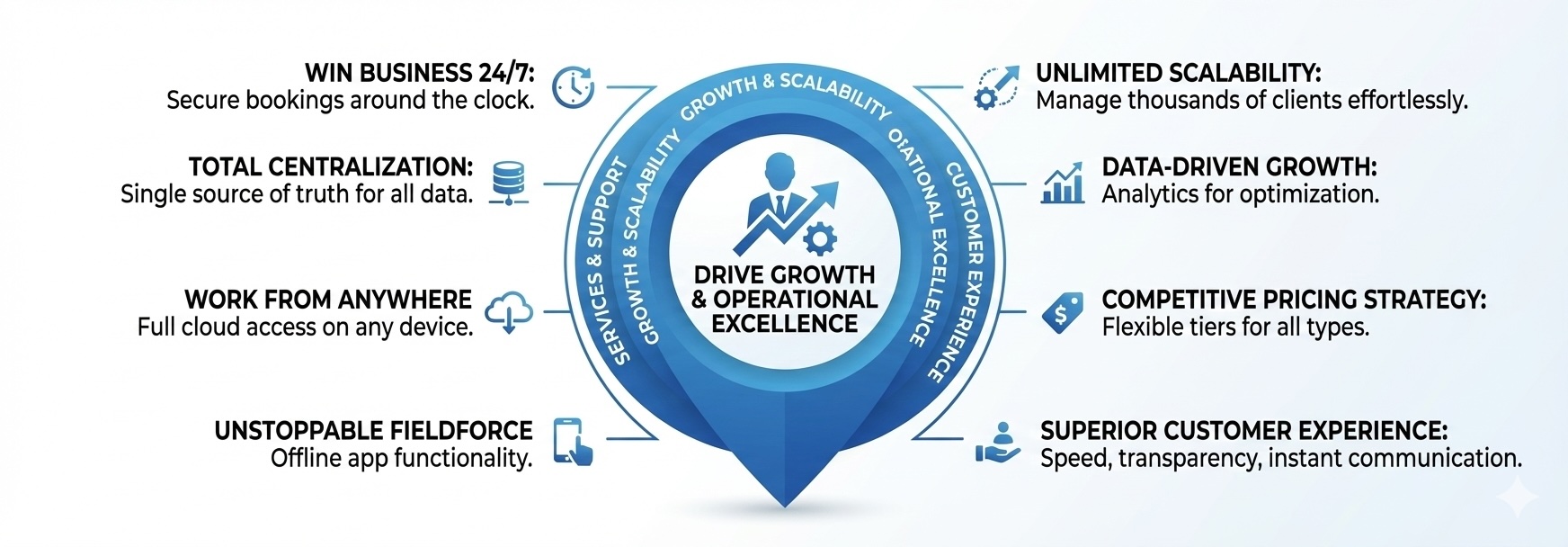
Choose the CRM area you want to explore next
Jump straight to the areas your team is most likely to compare first: customer records, lead conversion, portal self-service, billing, retention and governance.
Serve every customer more personally because the details are never lost
A better customer experience starts with knowing who the customer is, what they need, where the service happens, who pays, what was promised and what has already happened. These profile and segmentation tools give your team fast access to the details that normally get buried in notes, spreadsheets and disconnected systems.
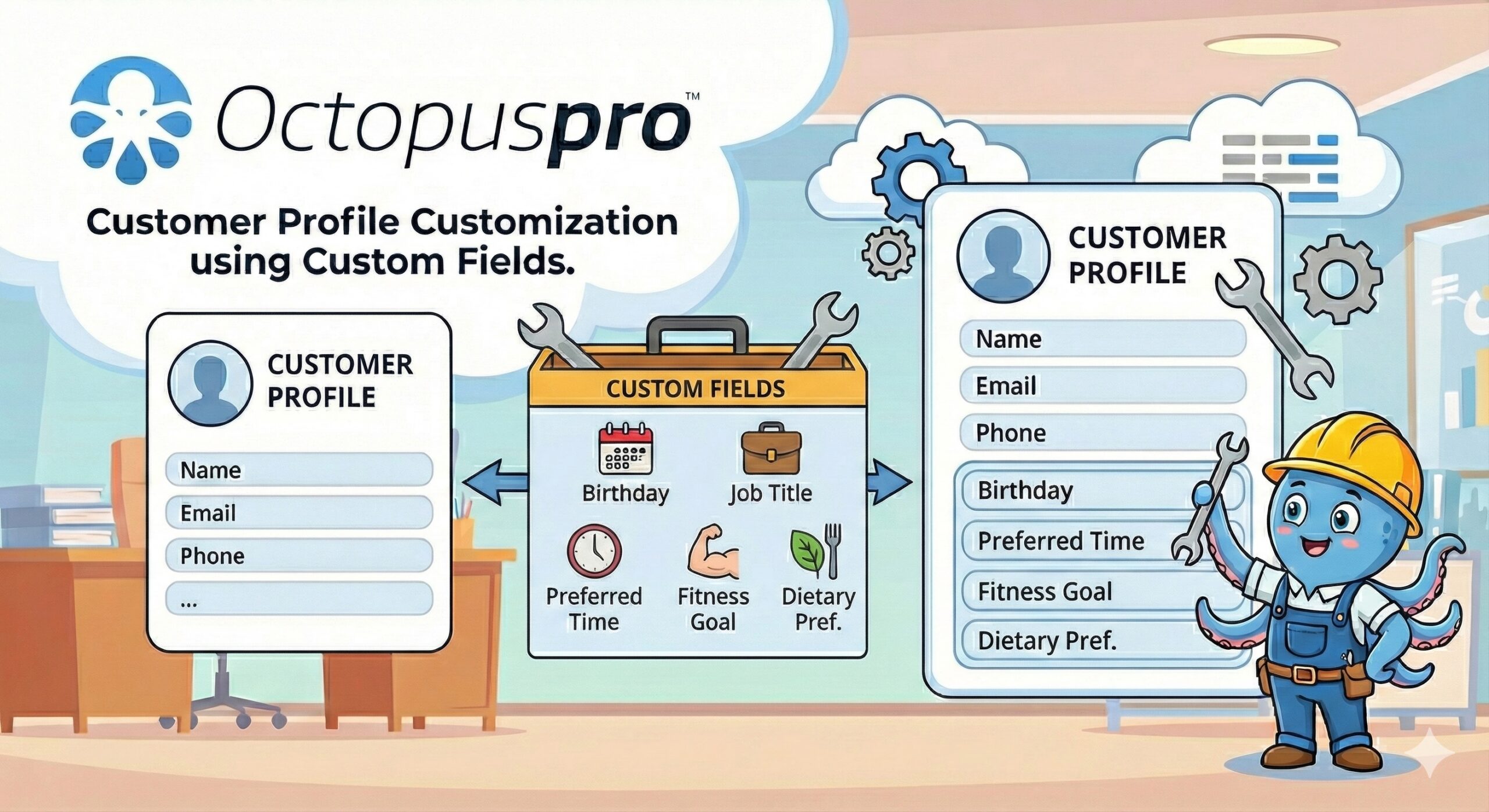
Capture the customer details your workflow depends on
Use custom fields to record access notes, preferences, membership IDs, service requirements and industry-specific details directly inside the customer profile.
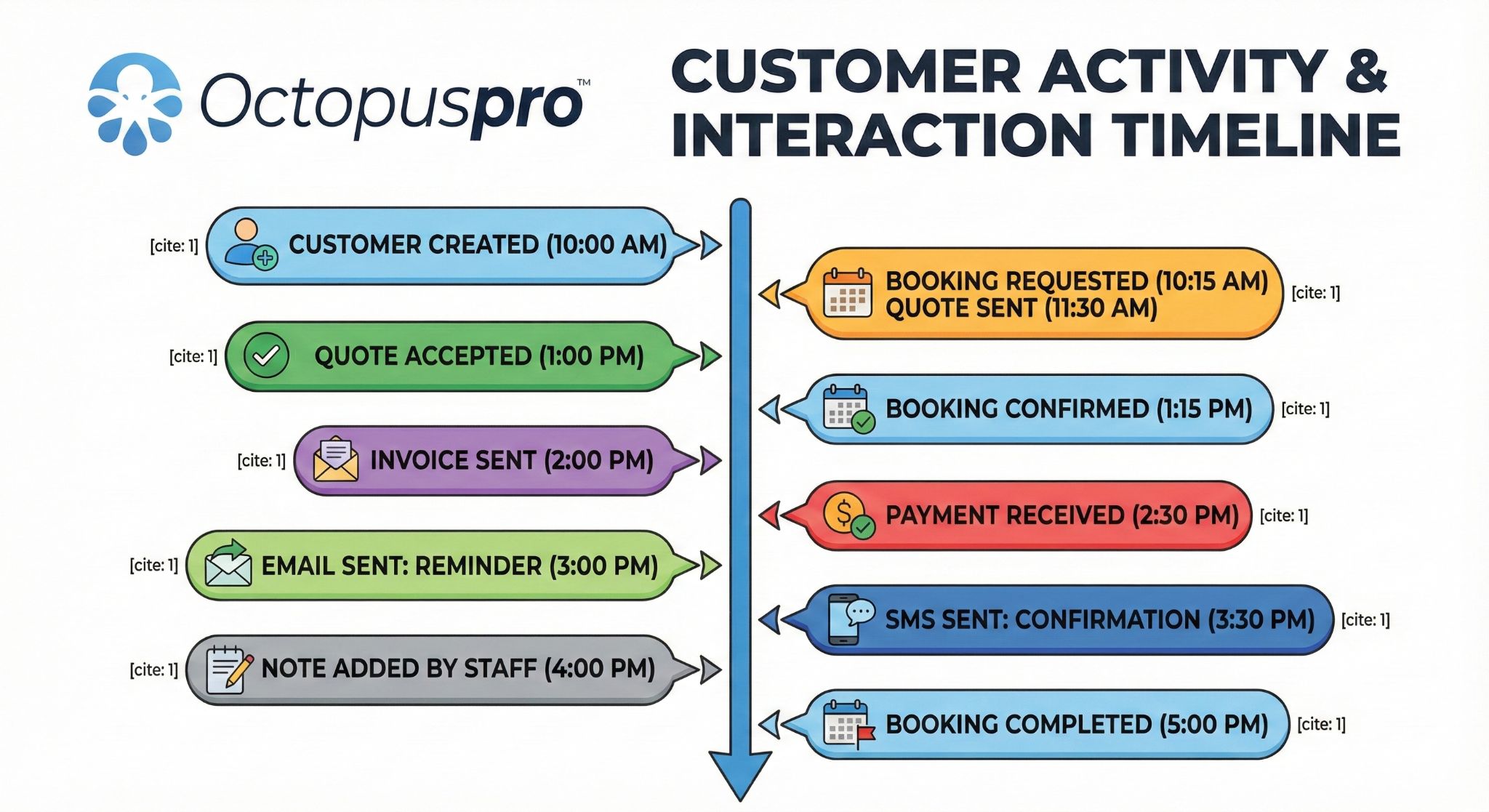
See the customer story before anyone takes action
Give staff a clearer view of enquiries, bookings, communications, payments, updates and interactions before they respond.

Centralized CRM hub
Outcome: one customer source of truth
Connect customer enquiries, quotes, bookings, invoices, payments, complaints, notes and files into one customer record so staff can see the full client lifecycle before taking action.

Smart search and segmentation
Outcome: find the right customers faster
Find customers quickly using universal search, advanced filters, customer type, location, labels, status, tags, lead source and service history so your team can act without hunting through records.
Custom fields and profile intelligence
Outcome: capture details your workflow depends on
Capture industry-specific details such as gate codes, birthdays, membership IDs, access instructions, preferences, special needs and conditional data using custom fields, tags and profile configuration.

Smart Labelling, Labeling and Categorization
Outcome: cleaner targeting and prioritization
Organize customers by priority, service type, customer type, status, campaign segment, location, pricing group or operational category so communication and reporting stay targeted.
Multi-Property & Dependent Management
Outcome: manage complex customer relationships
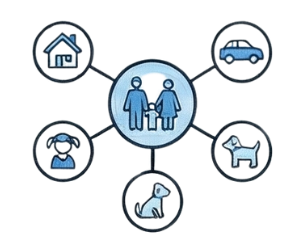
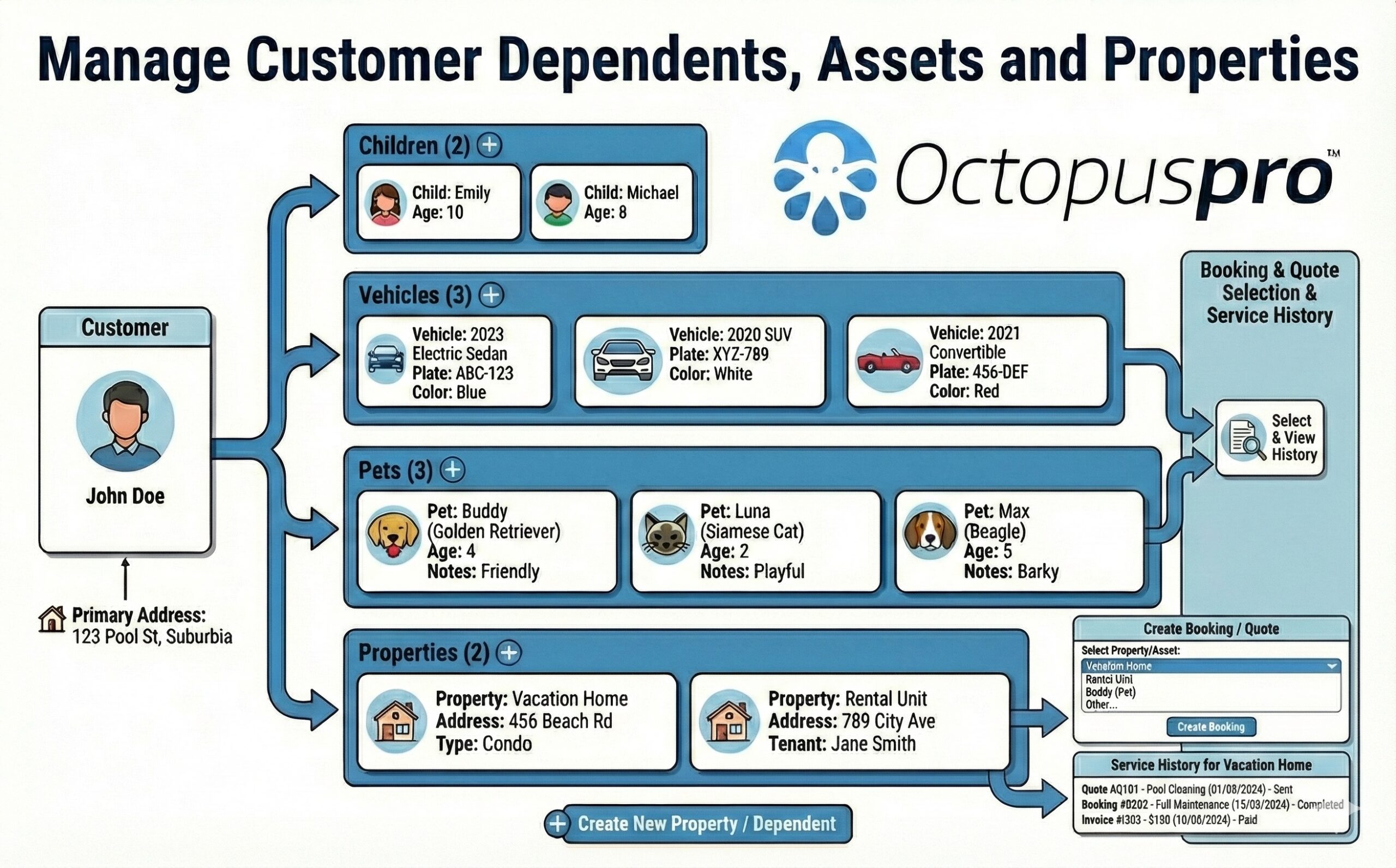
Manage one-to-many relationships such as multiple properties, vehicles, children, pets, dependents, tenants or family members under the right customer profile for easier service and billing.

Service vs. Billing Addresses and Multi-Address Management
Outcome: fewer billing and scheduling errors
Support customers with multiple locations, separate service and billing addresses, landlords, property managers, businesses, agencies and clients with several sites under one account.
Want every customer detail ready before your team takes action?
Keep profiles, addresses, dependents, files, access notes, communication history and booking context connected so staff and fieldworkers can respond with confidence.
Respond faster, follow up better and convert more inquiries into paid work
Your team can turn more enquiries into paid work because every lead has a clear next step, the right customer information, professional quote tools and timely follow-up before opportunities go cold.
Capture every opportunity
Outcome: fewer missed enquiries
Turn website forms, Book Online buttons, customer portal lead forms, phone enquiries and admin-created inquiries into trackable CRM records with customer details, custom fields, photos and files attached.

Sales pipeline management
Outcome: clearer quote and lead progress
Visualize your sales funnel from initial inquiry to quote, approval, booking and invoice. Track labels, status, sales ownership, quote expiry, follow-up dates and quote-to-booking conversion.

Automated follow-up and reminders
Outcome: more quotes move forward
Reduce missed opportunities with inquiry autoresponders, To Follow queues, quote reminders, canned Email/SMS replies, template placeholders, automated booking confirmations, Automated Booking Reminders, customer status updates and newsletters.
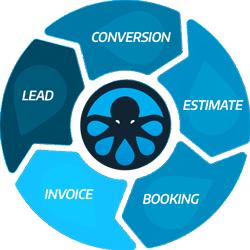
Keep the sales path connected from enquiry to invoice
This workflow view shows how a customer enquiry can move through quote, estimate, booking, job completion, invoice and payment without losing the customer context your team needs.
Give customers clear answers because your team can see the full context
Fewer repeated questions, fewer disputes and faster complaint resolution come from having customer communication, booking history and issue evidence connected to the same CRM record.
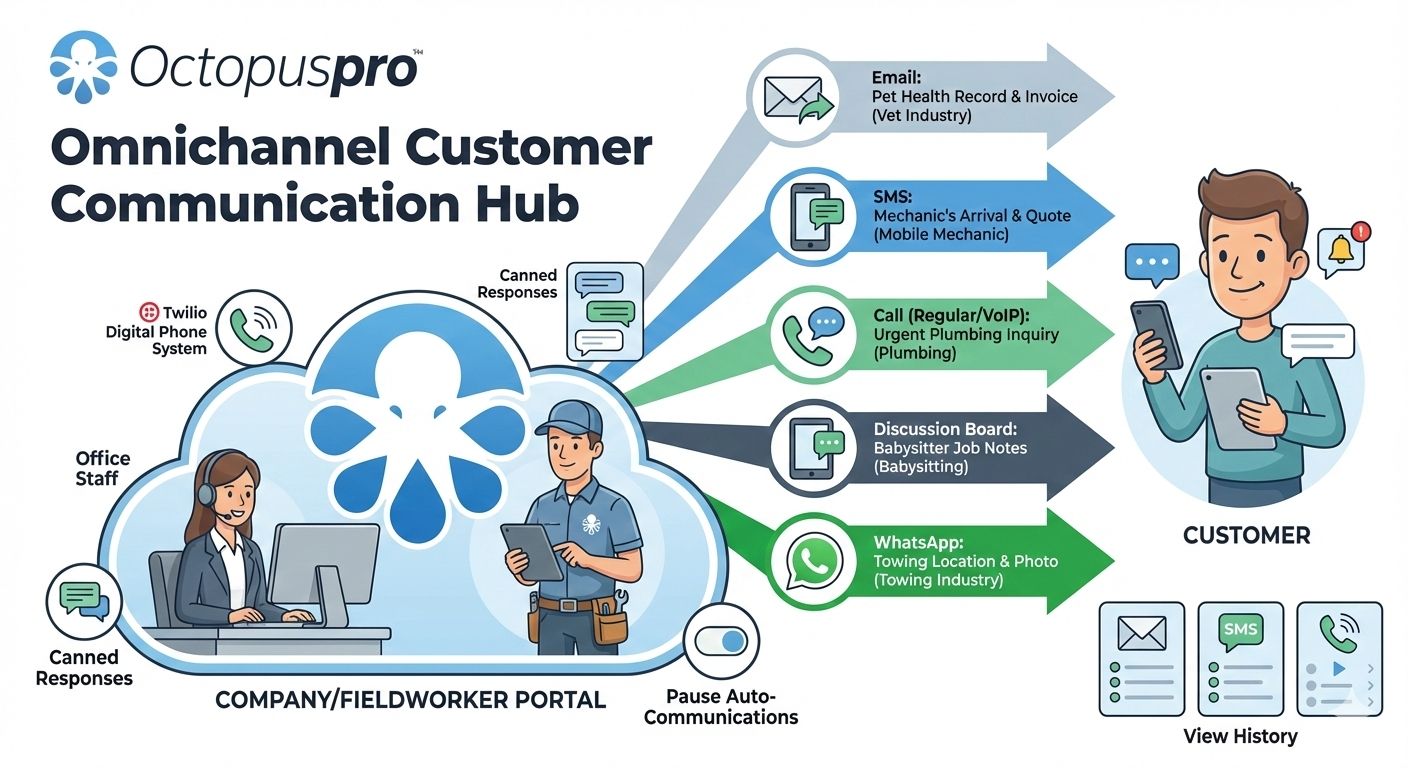
Keep every communication channel connected
Bring Email, SMS, WhatsApp, calls, booking messages and portal communication into a clearer customer record.
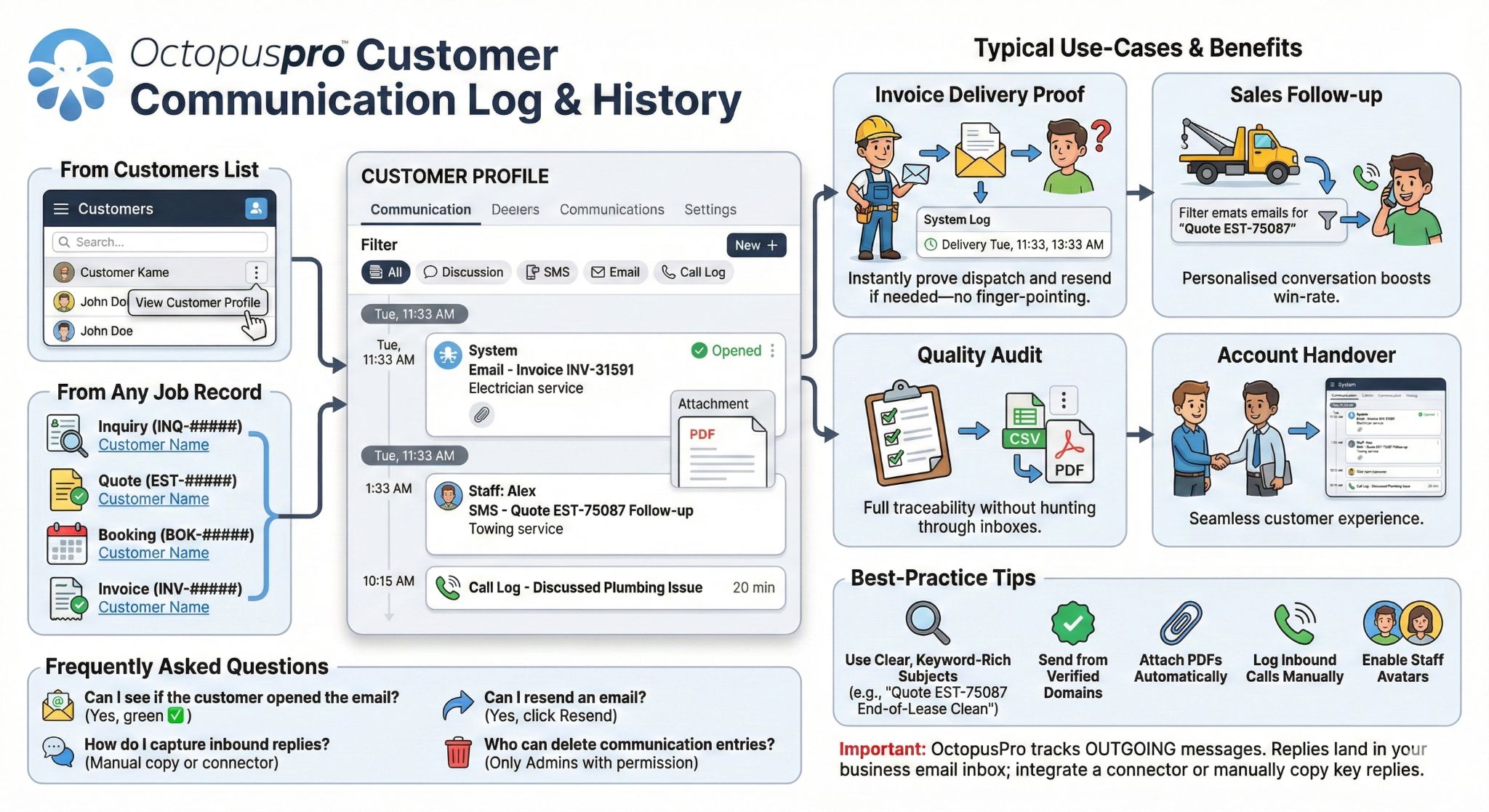
Review the full communication history
Help staff answer faster by seeing previous messages, replies, booking updates and customer contact activity in context.
Understand what happened before the next reply
Use the activity timeline to connect enquiries, quotes, bookings, invoices, payments, notes and customer actions.
Unified communication log
Outcome: fewer repeated questions
Review Email, SMS, WhatsApp, discussion board, booking communication, invoice messages, quote messages and customer contact history from one searchable timeline.
Instant communication retrieval
Outcome: faster customer responses
Find past correspondence, call records, internal notes, customer replies and dispute evidence quickly so staff can respond with confidence instead of asking customers to repeat themselves.
Comprehensive activity history
Outcome: better accountability
Maintain a permanent record of enquiries, quotes, bookings, invoices, payments, complaints, files, photos, forms, signatures, status changes and billing cycles for better accountability.

Complaint and issue recovery
Outcome: protect trust before it is lost
Track complaints, assign issue ownership, store evidence, request updates, approve closure, reopen cases and use feedback to improve service quality across the team.
Help every customer reply, call, handover and feedback signal become something your team can act on
A CRM should do more than store history. It should help staff respond consistently, recover missed conversations, hand over context clearly, target the right customers and notice relationship risk before it becomes lost revenue.
Why this matters to CRM buyers
Teams usually do not lose customers because the record is missing. They lose them because the next reply, callback, document, campaign or recovery action is unclear. These controls turn communication history into practical work.
Answer common questions faster while keeping every message on-brand
Benefit first Customers get quicker, clearer replies and staff spend less time rewriting the same answers for booking confirmations, quote follow-ups, reminders, payment requests and support updates.
Recover phone enquiries and callback promises before they go cold
Benefit first Missed calls and phone conversations stop becoming invisible revenue leaks when the next staff member can see call context, contact attempts and follow-up responsibility.
Give every staff member the handover context they need before responding
Benefit first Customers do not have to repeat themselves when office staff, managers, dispatchers and fieldworkers can see what was discussed, what changed and who still needs to act.
Reach the customers most likely to book, return, pay or need attention
Benefit first Campaigns and worklists become more useful when staff can quickly group VIPs, inactive customers, overdue accounts, reactivation prospects, repeat-service customers and expiring-agreement segments.
Keep customer documents and expiry-related work from disappearing after the job
Benefit first Teams reduce risk when signed documents, uploaded photos, inspection forms, certificates, service reports and renewal-related files stay easy to find when the next booking, audit or customer question comes up.
Find unhappy, inactive or high-risk customers before they quietly leave
Benefit first Ratings movement, repeated complaints and poor feedback become early warning signs your team can act on before they become churn, refunds, negative reviews or lost repeat work.
Keep two-way replies visible, assignable and connected to the booking, quote or customer record
Benefit first Customer replies are easier to manage when email, SMS, WhatsApp, booking communication and contact history stay connected to the customer record instead of living in separate personal inboxes.
Let customers self-serve without losing CRM visibility
Give customers a polished self-service experience while your team keeps full visibility across the CRM. OctopusPro lets customers book, approve, pay, update details, upload files, reschedule, cancel and return for repeat service without turning the customer journey into disconnected portal activity.
Reduce admin calls with self-booking, rescheduling, cancellations and invoice payments.
Keep customer activity connected to profiles, bookings, payments, communication and reporting.
Support repeat business with secure login, memberships, recurring bookings and saved details.
Control branding, permissions, promotions, analytics and conversion tracking from one portal setup.

Self-service client portal
Let customers manage portal and app access, profile details, saved cards, saved locations, business profiles, additional contacts, quote approvals, invoice payments and uploaded files from one branded experience.

Membership and login
Give customers secure account access so they can log in, view booking history, approve quotes, pay invoices, manage memberships, use social login and come back quickly for repeat service.
Booking control
Support online bookings, repeat bookings, recurring bookings, rescheduling, cancellations, minimum notice, preferred fieldworker selection, uploads, ratings, gift vouchers and gift cards without losing control of the workflow.
Portal configuration
Control portal branding, style, language, FAQs, privacy policy, service descriptions, booking disclaimers, pricing visibility, promotions, permissions, analytics, Google Ads and Meta Pixel tracking.
Let customers book, approve, pay and return without adding manual work
Launch a branded self-service experience while keeping every portal action connected to the customer record, booking history and payment workflow.
Reduce uncertainty before, during and after every appointment
Customers trust you more when they know what is happening, your team can see where work stands, and fieldworkers have the customer context they need on the job.
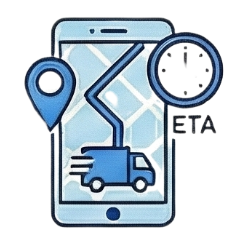
Real-time arrival transparency
Outcome: fewer customer check-in calls
Provide Uber-style fieldworker tracking, on-the-way notifications, ETA visibility and booked worker location updates so customers are not left wondering where your team is.
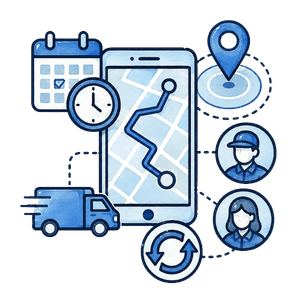
Availability and dispatch
Outcome: smarter booking decisions
Use Dynamic Real-Time Availability, fieldworker availability, job assignment, service areas, travel logic, location types and Fieldworker Reschedule Assist to keep bookings moving.
Fieldworker context
Outcome: better prepared fieldworkers
Give fieldworkers job summaries, service notes, customer preferences, forms, photos, signatures, files, check-in/check-out workflow and mobile app access, including offline-ready job context where available.
Collect faster while keeping every billing relationship clear
Finance teams need more than invoices. They need customer billing history, third-party payer context, payment methods, account statements, due dates, credits, refunds and audit trails in one place.
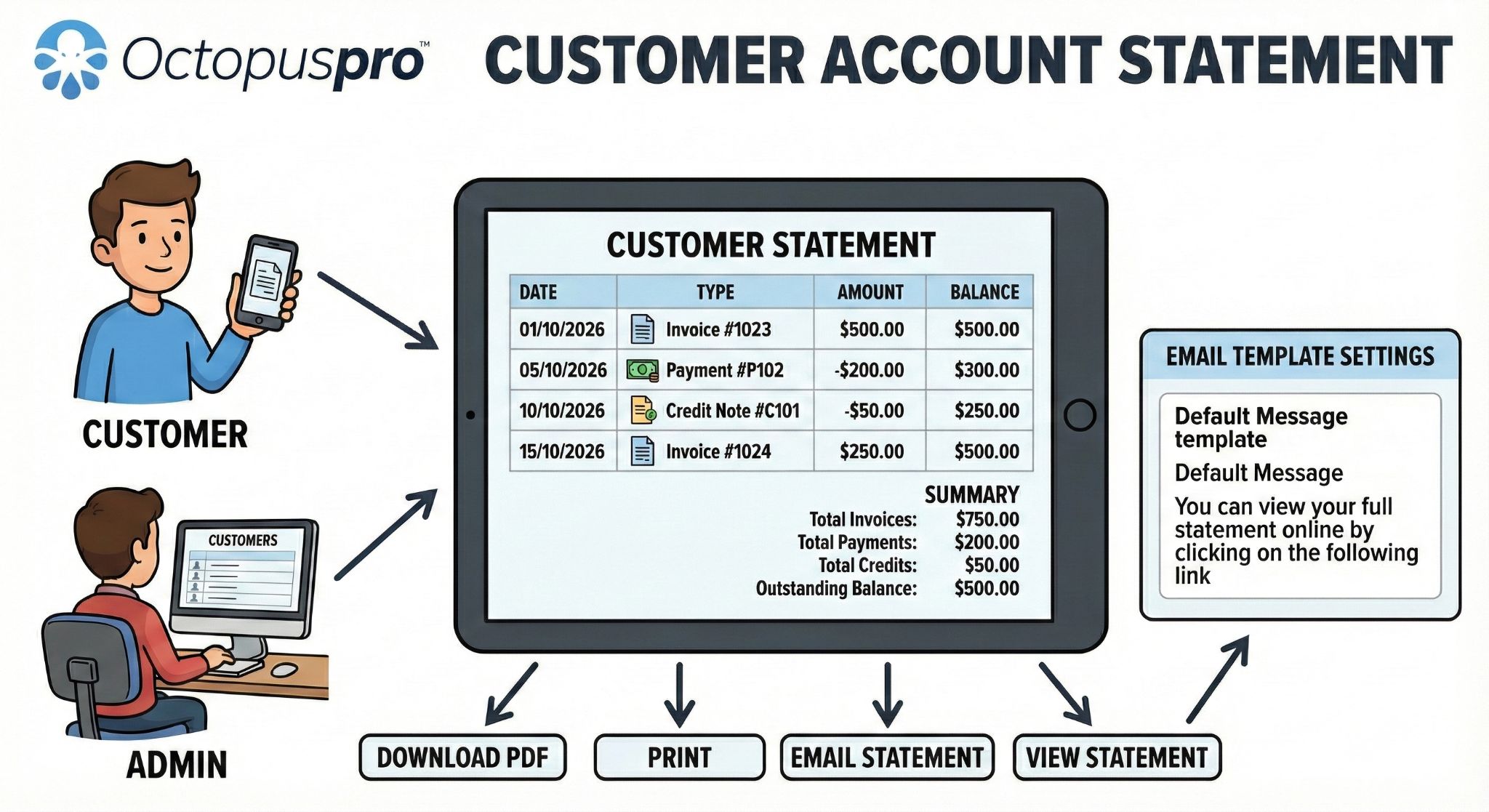
Give customers and finance teams a clearer account view
Customer account statements help consolidate invoices, payments, credits, balances and payment history so billing conversations are easier to understand and easier to resolve.

Flexible invoicing and payments
Outcome: simpler payment collection
Manage service and billing addresses, insurance, NDIS, real estate, agency, business and third-party bill payers, account statements, custom invoice due dates and service payment terms.
Stored payment methods
Outcome: faster repeat payments
Securely save customer payment details, support deposits, payment tracking, partial payments, pending payment reconciliation, credits, refunds, card surcharges and payment gateway integrations.

Custom billing cycles
Outcome: recurring revenue with less manual work
Automate recurring revenue with weekly, monthly, annual or custom billing schedules linked to each customer, contract, service arrangement or account statement workflow.
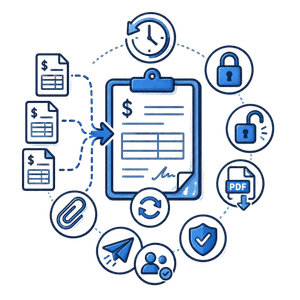
Invoice control and audit history
Outcome: cleaner financial records
Merge and consolidate invoices, lock/unlock merged invoices, convert invoices, attach files, send invoices, track invoice history, export PDFs and protect invoice changes with permissions.
Make it easier for customers to pay and easier for your team to reconcile
Use invoices, deposits, stored payment methods, billing cycles, statements and reminders to reduce chasing and keep payment history connected.
Use every customer interaction to improve service quality and grow revenue
A CRM should help you do more than store customer history. OctopusPro turns feedback, sales pipeline activity, campaigns, analytics, newsletters and customer segments into practical growth signals your team can act on.
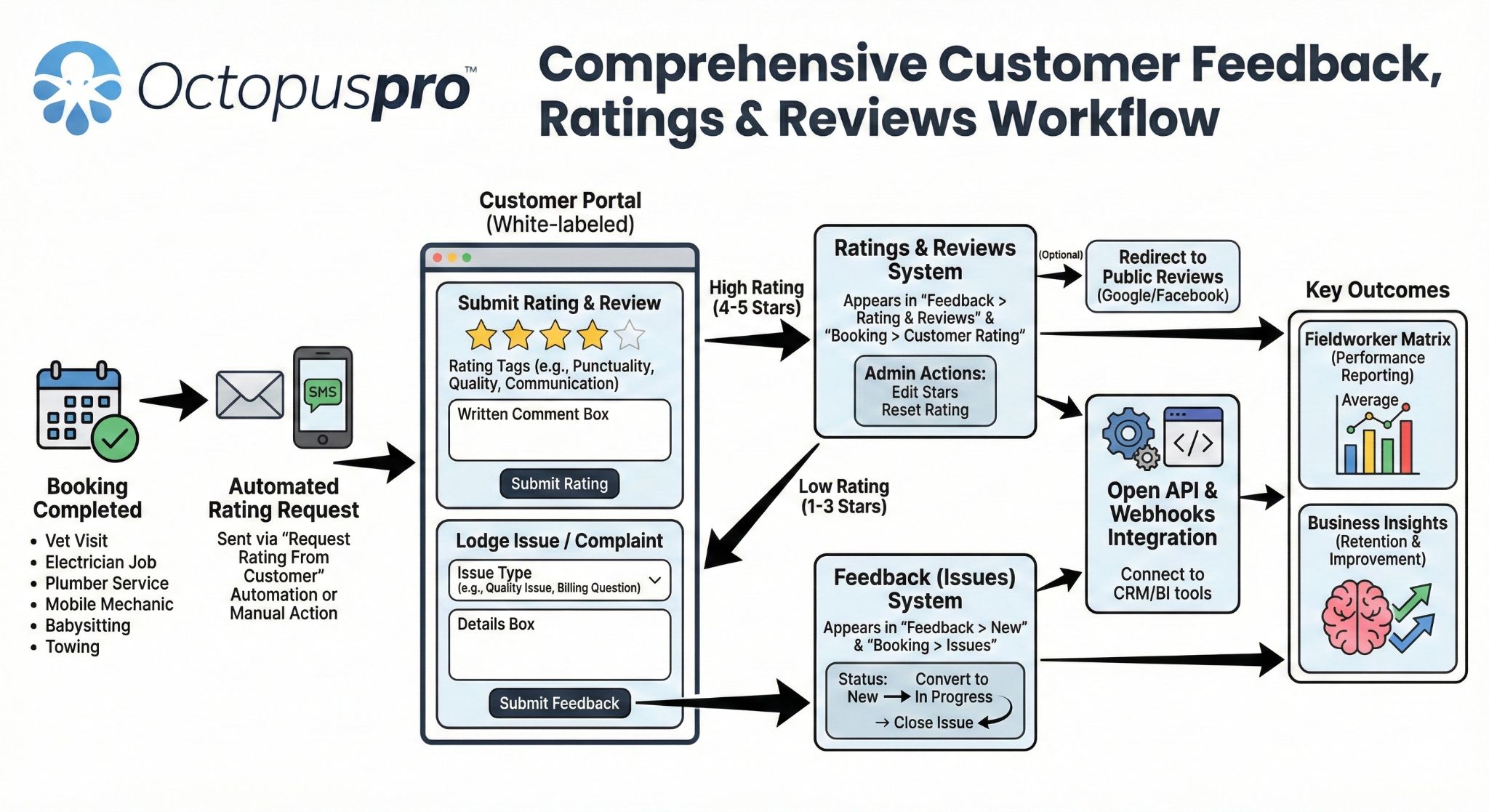
Automated feedback loops
Outcome: improve retention and reviews
Automatically request ratings and reviews after service, let customers rate your services and fieldworkers, monitor service quality, identify top-performing fieldworkers and use verified customer feedback to improve retention and reputation.

Advanced reporting and analytics
Outcome: better decisions from live data
Understand business performance with dashboards, live reports, inquiry statistics, booking statistics, customer activity, sales performance, revenue trends and service quality insights.
Marketing and mailing lists
Outcome: bring customers back more often
Use customer segmentation, mailing lists, Email/SMS/WhatsApp campaigns, Mailchimp integration, unsubscribe insight, vouchers, promotions, reminders and re-engagement campaigns to keep customers returning.
Protect customer data while connecting CRM to the rest of your operation
Advanced CRM value depends on trust and control. OctopusPro helps you manage permissions, audit logs, exports, integrations, webhooks and customer-data visibility as your team grows.
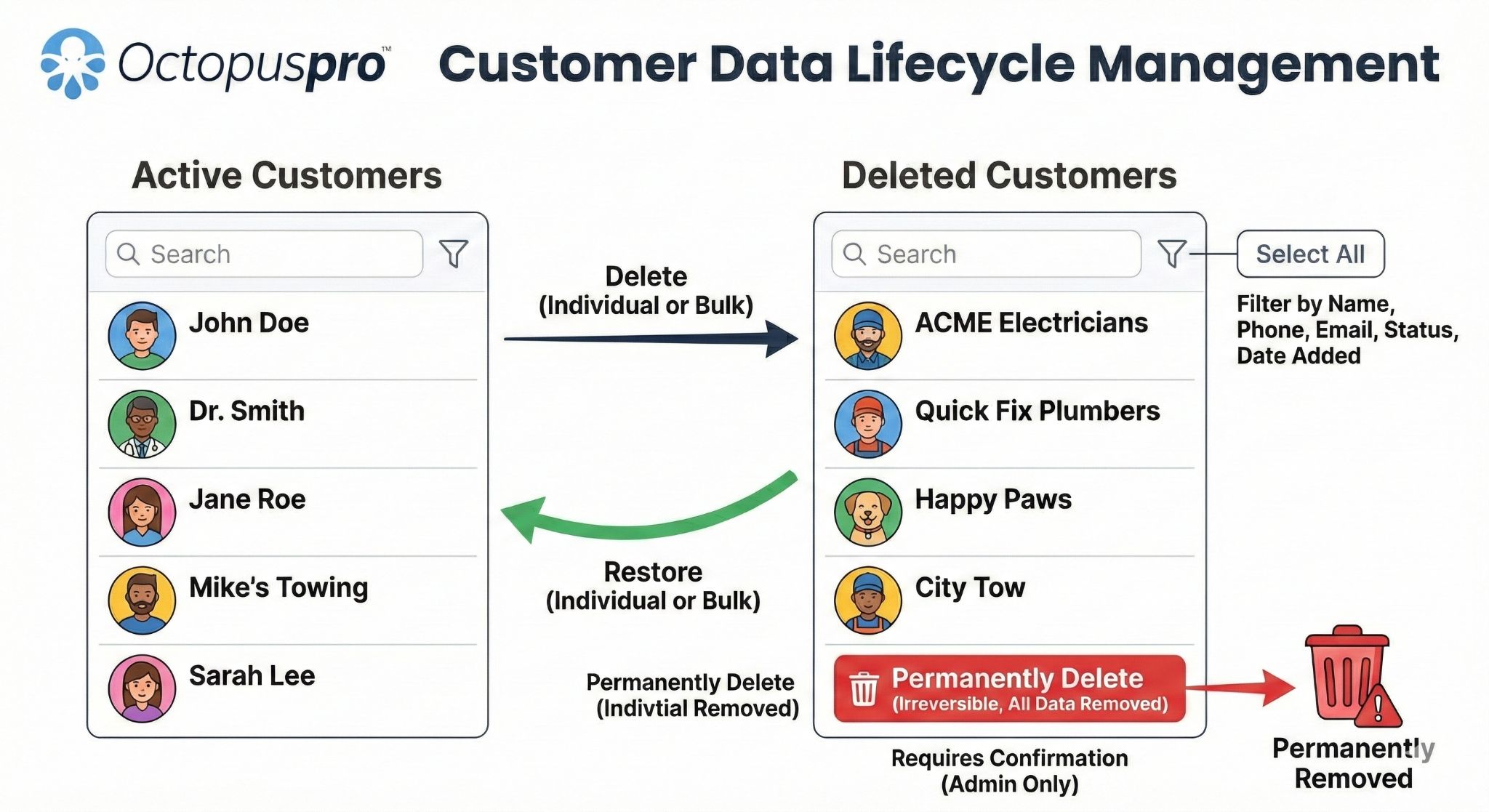
Manage customer data across its full lifecycle
Support cleaner data from capture and import through updates, activity history, access control, reporting, integrations and long-term retention.
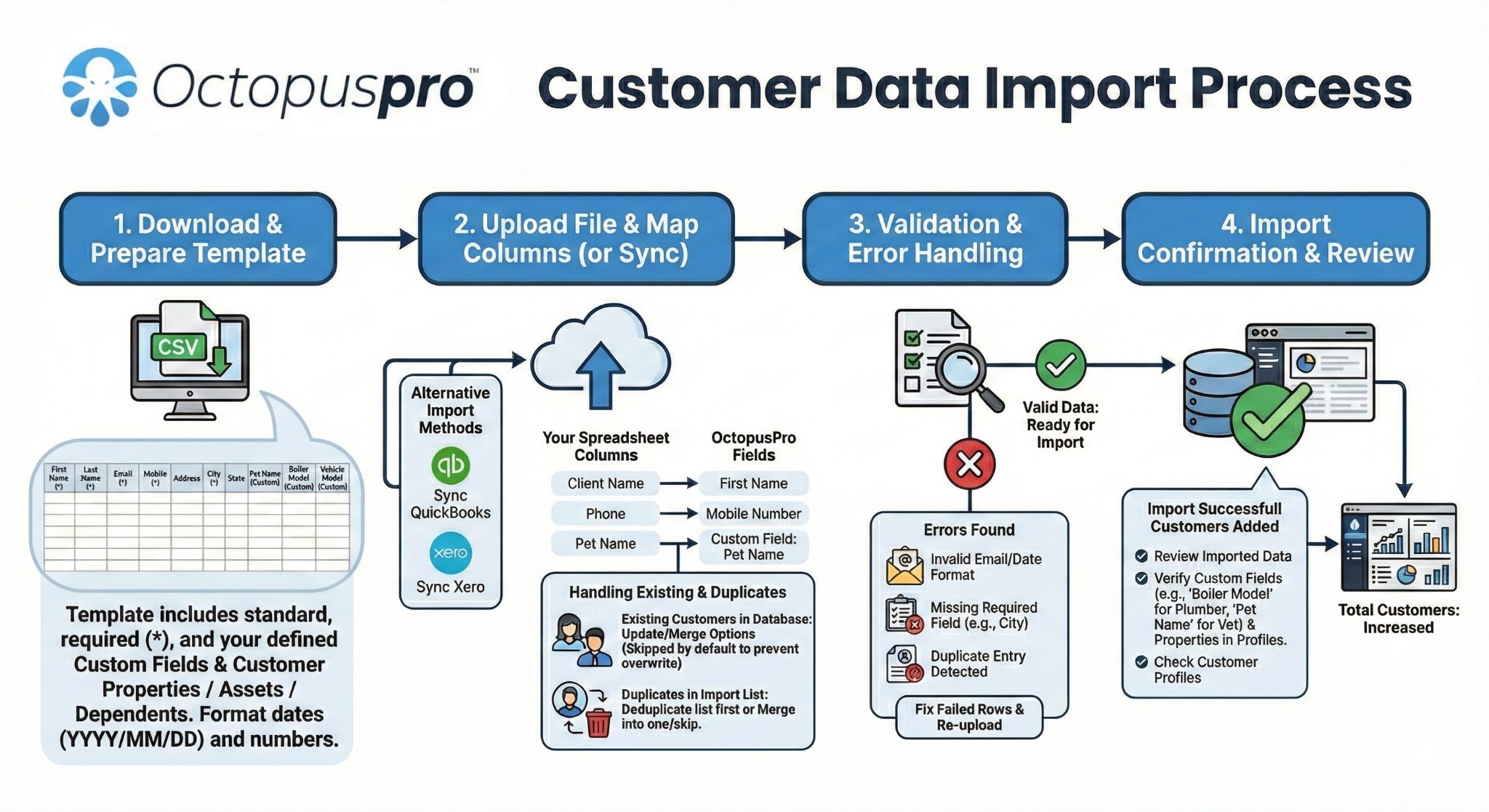
Import customer records with more structure
Move customer details, addresses, properties and related records into a cleaner CRM foundation instead of starting from scratch.
Seamless data migration
Outcome: switch without starting from scratch
Bulk import your existing customer records, properties and related information into OctopusPro, then export data when needed for external reporting, compliance or analysis.
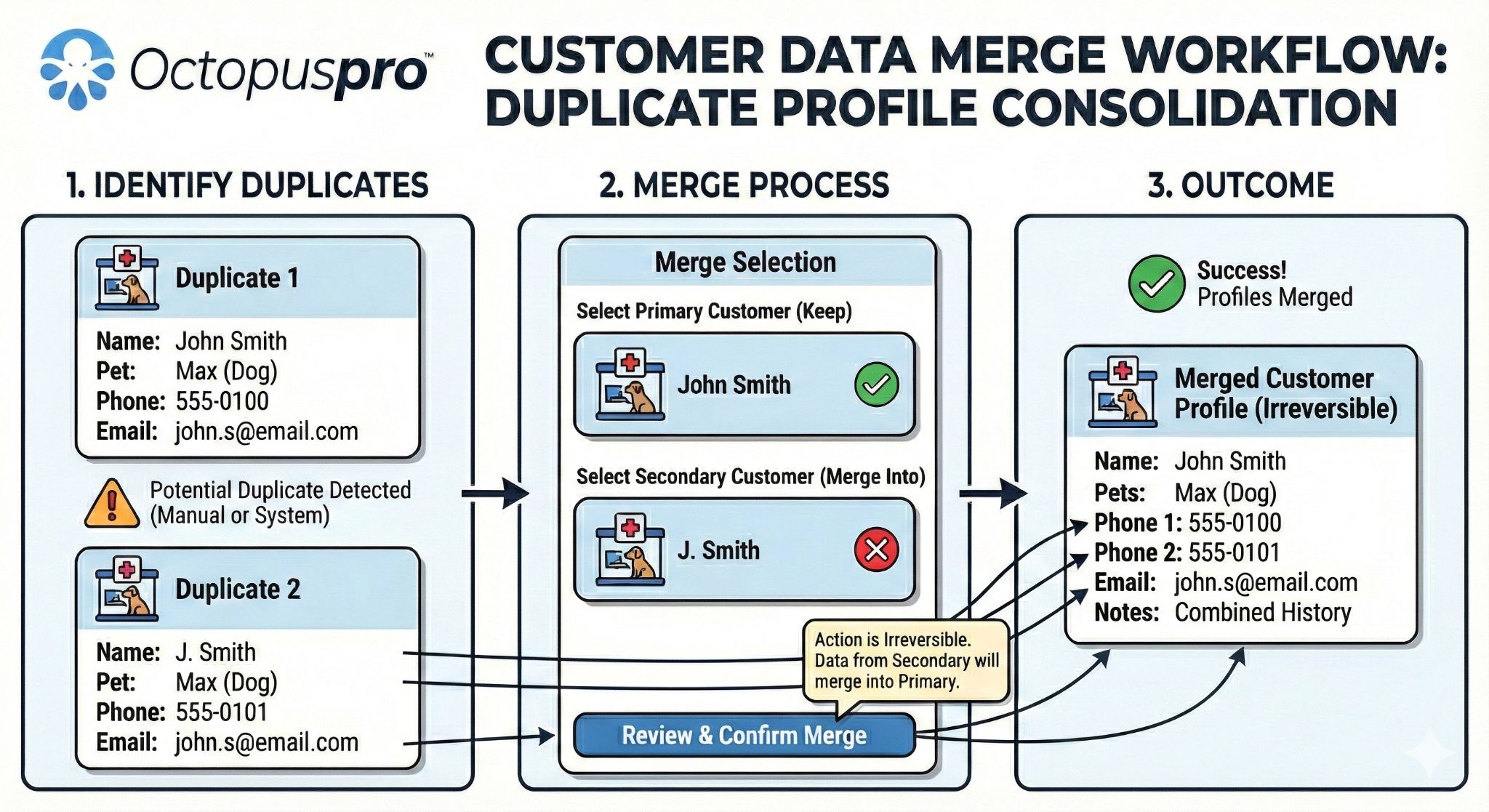
Automated data hygiene
Outcome: cleaner records as you scale
Keep your customer database clean by detecting duplicate customer profiles, merging duplicates, restoring deleted customer records and protecting important customer information.
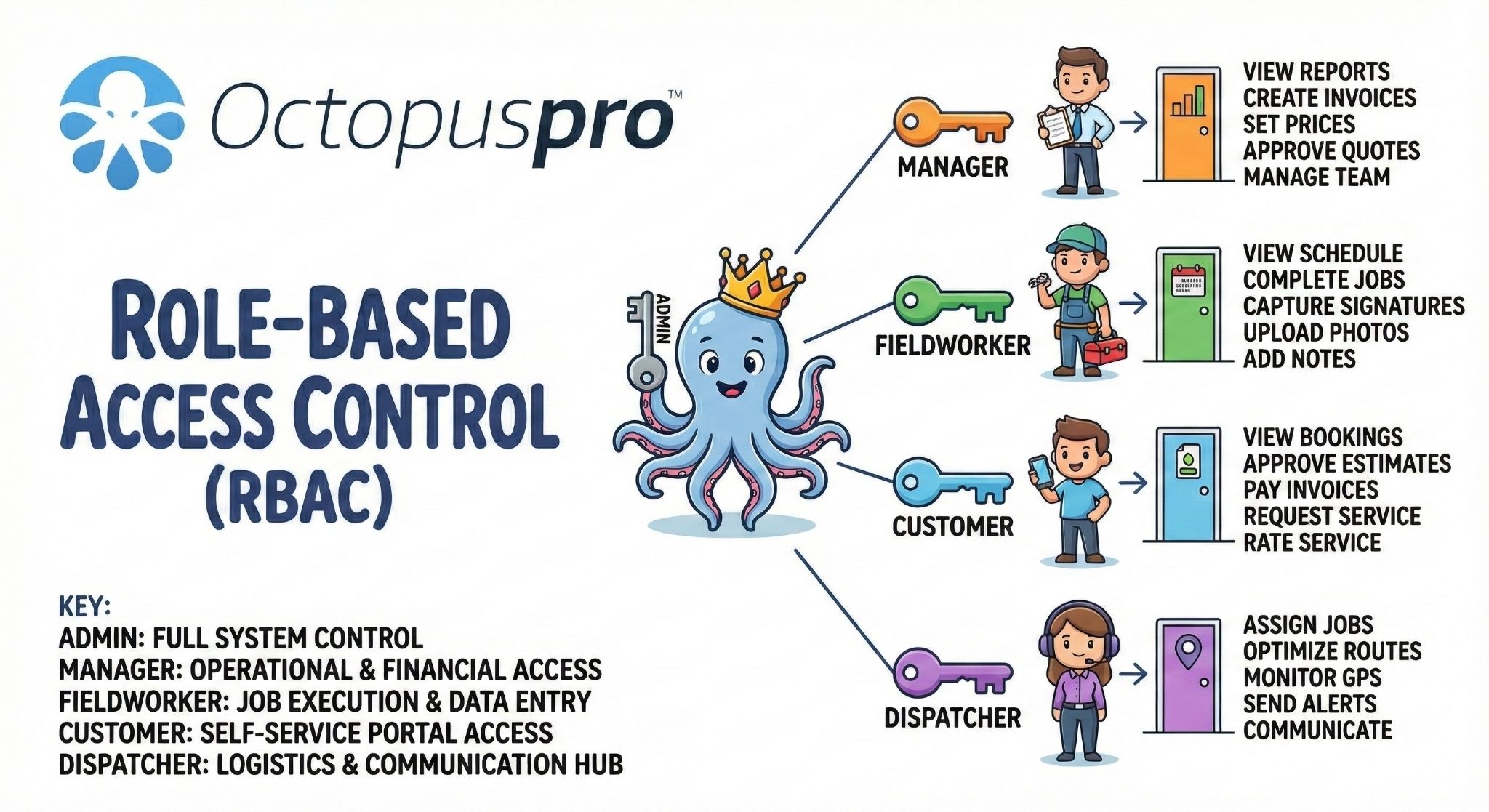
Roles, permissions and visibility
Outcome: protect sensitive customer data
Control who can see customer details, internal notes, payment information, billing data, exports, refunds, settings, fieldworker app access and sensitive admin actions.
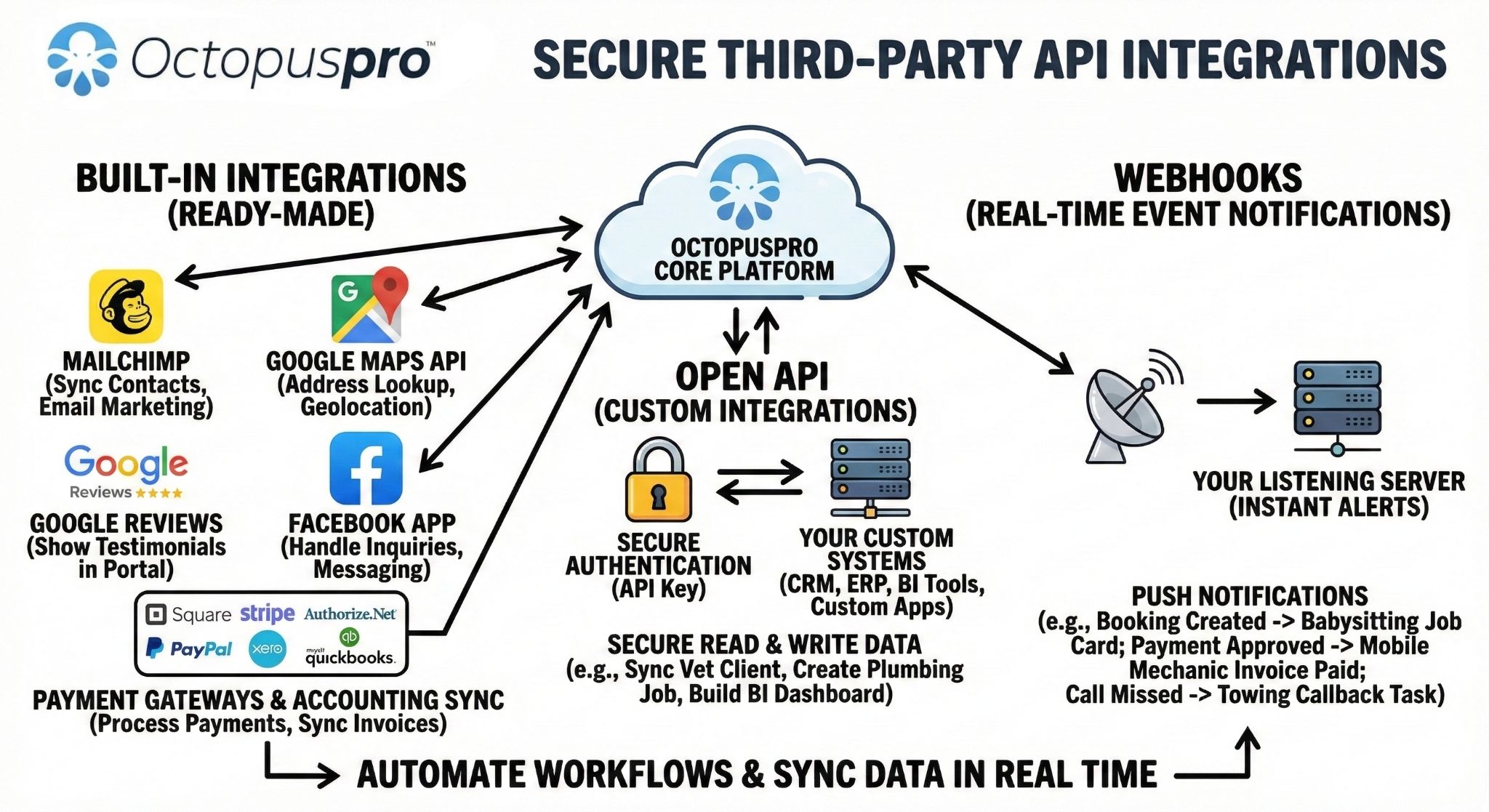
Open API, webhooks and integrations
Outcome: connect CRM data to the wider business
Connect CRM data with accounting, calendar, payment, mapping, reviews, marketing and external systems using integrations, Open API access, authorised API connections and webhooks.
Connect your CRM without losing visibility or governance
Use permissions, integrations, reporting, data hygiene and API-ready workflows to support growth while protecting sensitive customer and payment information.
Connect customer data with the tools your team already uses
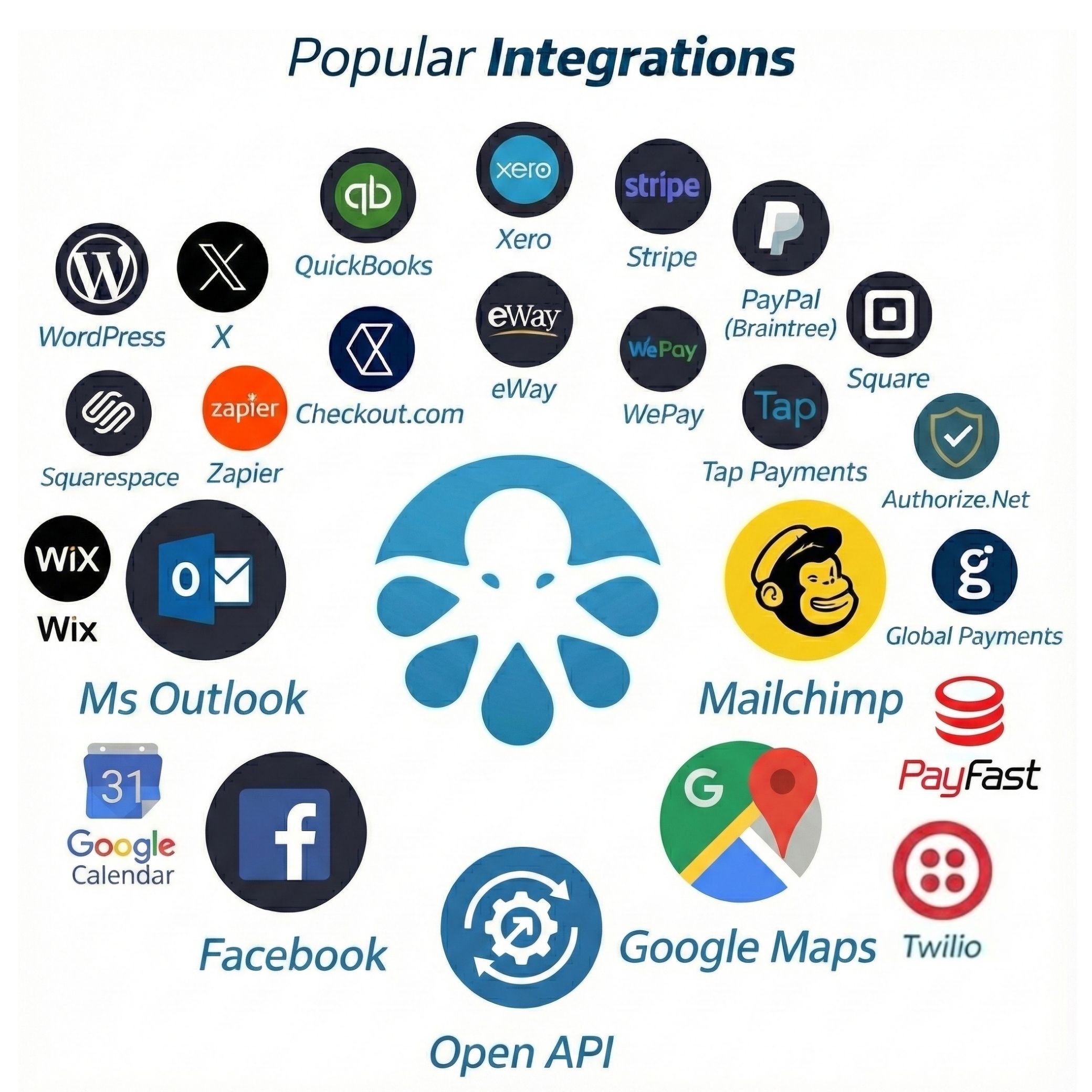
Use integrations, Open API access and webhooks to connect OctopusPro with accounting, calendars, payments, maps, communications, marketing and external systems.
Switch to a cleaner CRM without losing your customer history
CRM switching can feel risky when your customer list, notes, addresses and payment history matter. OctopusPro helps you move toward cleaner records, better structure and less duplicate data so your team can keep working with confidence.
Import customer records
Bring customer details, addresses, notes, labels and profile information into a more structured CRM environment.
Clean and organise data
Use labelling, categorisation, duplicate management and consistent profile fields to make customer records easier to trust.
Connect history to operations
Attach communication, quotes, bookings, invoices, files and payments to the customer story your team uses every day.
Scale with control
Use permissions, reporting, integrations, APIs and webhooks to keep CRM data useful as the business grows.
Controls that help customers stay organised as relationships become more complex
The CRM becomes more valuable when it protects revenue, prevents missed follow-ups, keeps sensitive information controlled and gives every team member the right customer context before they act.
Keep service agreements, contracts and recurring commitments organised
Customers get a more consistent service experience because repeat work does not need to be rebuilt from scratch. OctopusPro keeps recurring bookings, agreed service terms, service packages, reminders, billing cycles and saved customer context connected to the same customer record.
Keep asset, equipment and property history attached to the customer
Your team can serve faster because they can see what is being serviced, where it is located and what happened last time. Link properties, assets, vehicles, equipment, dependents and service locations to the customer profile so future bookings keep the right operational context.
Make customer record changes easier to trace
Managers can resolve questions faster because customer activity is easier to review. Use customer activity, booking history, profile edits and user activity logs to understand what changed, who acted, and when the change happened.
Give follow-ups clear ownership and accountability
Opportunities keep moving because callbacks, quote follow-ups, booking updates and payment chases do not depend on memory. Track unassigned tasks, lead reminders, quote follow-up automation and booking update requests so the next action stays visible.
Separate internal notes from customer-visible information
Staff can keep useful context without exposing sensitive notes to the wrong audience. Control internal notes, customer-facing details, portal-visible information and fieldworker visibility so each person sees only the information they need.
Manage commercial account hierarchy without spreadsheet workarounds
B2B and multi-site customers stay easier to manage because the account, contacts, sites and billing context remain connected. Support business profiles, multiple contacts, service addresses, properties, billing contacts, account statements and third-party payer relationships.
Use priority, VIP tags and service rules to guide how customers are handled
High-value, urgent, commercial or repeat customers can be treated with the right level of attention. Segment customers using priority labels, VIP status, service types, locations, lead sources, operational rules and custom fields so staff can route communication, reporting, pricing and service expectations more intelligently.
Help staff know who matters, what to do next and how each customer should be handled
A CRM should not only store customer details. It should help your team prioritise the right customers, contact them through the right channel, understand where they came from, identify risk early and keep every follow-up moving.
What this helps your business do
Respect customer communication preferences without slowing staff down
Benefit first: customers receive fewer irrelevant messages, staff avoid guesswork, and marketing becomes easier to control.
CRM capability: track communication history alongside preferred channels, SMS, email and WhatsApp usage, marketing lists, unsubscribe feedback and portal-driven communication settings.
See which lead sources produce real booked work and revenue
Benefit first: managers can stop guessing which marketing channels work and focus budget on enquiries that turn into quotes, bookings and paid invoices.
CRM capability: capture lead sources from website forms, portal requests, campaigns, referrals, Google Ads, Meta Pixel, Google Analytics and admin-created enquiries.
Identify valuable, inactive and at-risk customers before they disappear
Benefit first: your team can prioritise customers who are worth keeping, need reactivation, have payment issues or may be unhappy after poor feedback or complaints.
CRM capability: combine account statements, invoice/payment history, booking frequency, feedback, complaints, repeat bookings, marketing segments and live reports.
Give staff a clear queue of follow-ups, callbacks and customer actions
Benefit first: sales, service and accounts teams can see what needs attention without relying on memory, inbox searches or someone remembering to chase manually.
CRM capability: surface quote follow-ups, overdue callbacks, unassigned tasks, booking update requests, invoice due dates, complaint responses and issue recovery actions.
Move customers through clear lifecycle stages instead of treating every record the same
Benefit first: staff can quickly understand whether a customer is a new lead, active customer, repeat client, VIP, overdue account, inactive contact or reactivation opportunity.
CRM capability: use labels, statuses, activity history, booking/quote states, follow-up reminders and profile segmentation to manage lifecycle stages such as prospect, quoted, booked, active, recurring, VIP, inactive, overdue or reactivation target.
Keep complex customer relationships clear, accountable and profitable
As accounts grow, customer management gets harder: more contacts, special terms, recurring commitments, urgent callbacks, duplicated records and unclear ownership. OctopusPro helps keep those details attached to the customer workflow so staff know who to contact, what rules apply, who owns the next step and which commitments need attention.
What this helps prevent
Unowned follow-ups
Incorrect pricing or terms
Missed renewals and SLAs
Multiple contacts and account roles
Staff can separate decision makers, billing contacts, site contacts, portal users and property-related contacts, so customer communication goes to the right person the first time.
Connect business customers, service addresses, bill payers, site contacts, portal users and customer profiles so commercial relationships stay organised as they grow.
Account owner and responsible staff
Follow-ups, complaints, account questions and operational tasks are less likely to sit unresolved when staff can see who should act and what needs attention next.
Use user roles, permissions, unassigned tasks, dispatch workflows and team visibility to clarify responsibility across sales, admin, operations, finance and field teams.
Customer-specific pricing, terms and service rules
Commercial clients, VIP customers and repeat customers can be handled consistently, without staff relying on memory for agreed rates, payment expectations or special service rules.
Combine service payment terms, discount/voucher rules, billing cycles, customer categories, dynamic pricing and custom fields to support agreed customer handling.
SLA-style response-time tracking
Urgent enquiries, delayed quotes, overdue callbacks and unresolved complaints become easier to spot before they damage trust or create avoidable service recovery work.
Use lead reminders, quote follow-up automation, issue management, complaint workflows and service reminders to keep time-sensitive customer actions visible.
Duplicate prevention at lead capture
Your team can trust the customer record more because new enquiries are less likely to create duplicate profiles, split communication history or confuse follow-up ownership.
Use structured lead capture, required fields, universal search, customer matching, duplicate merge tools and profile hygiene workflows to reduce messy CRM data from the start.
Renewal and expiry reminders for contracts and service agreements
Contracts, recurring service commitments, future bookings and service reminders are less likely to lapse unnoticed, helping your team retain customers before work goes cold.
Connect recurring bookings, service reminder automation, billing cycles, future booking visibility and customer profile notes so renewal follow-up becomes part of the workflow.
Turn customer data into timely action, cleaner revenue control and safer CRM governance
A CRM is more valuable when it helps your team act before work stalls, revenue is missed or customer relationships weaken. OctopusPro connects automation, billing context, privacy controls, customer health signals and sales reporting so managers can see what needs attention before it becomes a lost booking, disputed invoice or unhappy customer.
What this helps your business do
Move from passive customer records to a CRM that supports decisions, follow-up discipline and operational control.
- Trigger the next step when important customer events happen.
- Protect pricing, billing terms and expected revenue.
- Spot at-risk customers, governance issues and follow-up gaps earlier.
Stop important customer moments from becoming forgotten admin
Benefit first: when a quote is sent, a booking changes, an invoice becomes overdue, a complaint is logged or a service reminder is due, your team should not have to rely on memory to keep the customer moving forward.
Reduce invoice disputes by keeping commercial terms visible
Benefit first: commercial customers often expect agreed pricing, deposits, due dates, statements, purchase order references or billing-cycle handling. When those rules stay connected to the customer workflow, staff are less likely to quote, invoice or collect incorrectly.
Give managers more confidence over customer data control
Benefit first: customer records contain contact details, service history, payments, notes and sometimes sensitive access information. Stronger visibility and audit controls help teams scale without exposing more data than necessary.
Find unhappy, inactive or high-risk customers before they disappear
Benefit first: declining ratings, repeated complaints, unpaid balances, low engagement or long gaps between bookings can signal a relationship that needs attention before the customer quietly leaves.
Plan capacity and cash flow before revenue reaches the invoice stage
Benefit first: managers need to understand likely future revenue while work is still in the enquiry, quote and future-booking stages, not only after jobs are completed and invoices are issued.
Give staff the customer context, worklists and documents they need to act without searching everywhere
The real value of a CRM is not only storing customer records. It is helping your team know which conversations need a reply, which customers need attention, which fieldworker is suitable, which documents matter and whether imported data can be trusted. OctopusPro helps turn those daily decisions into connected customer workflows.
Why this matters to buyers
These controls reduce the day-to-day friction that makes CRM systems fail after setup: missed messages, unclear priorities, poor staff handover, risky migration and customer files that live outside the service record.
Respond fasterKeep communication context visible before the customer follows up again.
Prioritise betterSurface customers, tasks and issues that need action now.
Serve consistentlyMatch preferences, instructions and document history with the work.
Migrate with confidenceBring existing customer data into a cleaner, more useful structure.
Keep every customer conversation visible before replies get missed
Benefit first Staff can respond with confidence when email, SMS, WhatsApp, call activity, booking messages and internal discussions are easier to find from the same customer or job context.
Give staff ready-made worklists instead of making them search from scratch
Benefit first Managers can keep work moving when staff can quickly find VIP customers, inactive accounts, overdue balances, open complaints, unassigned tasks and follow-ups waiting for action.
Send the right fieldworker with the right context more consistently
Benefit first Customers receive a more personal service when preferences, skills, access instructions and previous service history help guide who is assigned and what they need to know before arriving.
Move to a new CRM with cleaner data and less operational risk
Benefit first Switching feels safer when existing customers, addresses, properties, labels, notes and profile data can be imported, cleaned, merged and organised into a structure staff can trust.
Keep customer documents, certificates and evidence attached to the service relationship
Benefit first Teams spend less time chasing files when signed agreements, PDFs, photos, inspection forms, service reports, certificates, invoice attachments and portal uploads stay connected to the customer and job history.
A complete CRM built for the full customer lifecycle
Use this feature matrix to see the CRM depth available in OctopusPro across customer records, sales, service delivery, billing, portal self-service, communication, automation, reporting and governance.
Customer records
- Centralized Search
- 360-Degree History
- Individual and Business customer types
- Commercial account hierarchy, multiple contacts, contact roles and billing relationships
- Customer files, certificates, signed documents and compliance evidence attached to customer history
- Account owner and responsible staff context
- Custom fields, tags and smart labelling/labeling
- Customer priority, VIP status, customer-specific pricing and service rules
- Preferred fieldworker, avoided fieldworker and customer service preference context
- Customer lifecycle stages, status management and reactivation segments
- Dependents, vehicles, children, pets, properties and assets/equipment history
- Multi-Property & Dependent Management
- Memberships, internal notes, customer-visible details, files and preferences
- Birthdays, Membership IDs and Access Codes
- Service vs. Billing Addresses
- Customer record change and activity audit trail
- Fast service from instant profile access
Lead and sales CRM
- Lead capture and website forms
- Duplicate prevention and customer matching at lead capture
- Lead source and marketing attribution
- Campaign, referral and portal enquiry source tracking
- Inquiry autoresponders
- Automated workflow triggers for enquiries, quotes and follow-ups
- Follow-up task ownership and accountability
- Account owner and responsible staff visibility
- SLA-style response-time tracking for quotes and callbacks
- Unassigned task and next-action queues
- To Follow queues
- Canned replies and templates
- Sales pipeline visibility
- Pipeline forecasting and expected revenue indicators
- Quote value, conversion performance and future revenue reporting
- Quote expiry and quote reminders
- eSignatures
- Quote-to-booking conversion
Communication
- Email, SMS and WhatsApp history
- Unified customer inbox and shared communication queue context
- Unresolved customer replies and internal discussion visibility
- Customer communication preferences and consent visibility
- Unsubscribe feedback and campaign list controls
- Discussion boards
- Booking communication
- Call logs
- Outbound email audit trails
- Templates and placeholders
- Notifications
- Complaint management and feedback loops
Portal and app
- Customer portal and branded app
- Profile management
- Customer profile updates, uploaded documents and service preferences feeding back into the CRM
- Self-booking and repeat bookings
- Membership status visibility
- Service agreements, recurring customer commitments and saved customer context
- Renewal, expiry and recurring agreement reminders
- Quote approval and invoice payment
- Saved cards and saved locations
- Recurring bookings, cancellation and rescheduling
- Uploads, ratings and social login
Scheduling and field service
- Dynamic Real-Time Availability
- Real-Time Tracking
- Fieldworker availability and service areas
- Job assignment
- Preferred fieldworker and service preference context
- Booking location types
- ETA notifications and Automated Booking Reminders
- SLA-style response visibility for urgent service actions
- Job summaries and mobile workflows
- Forms, photos and signatures
Billing and payments
- Billing cycles
- Customer-specific pricing, credit terms, purchase order/reference requirements and service rules
- Account statements
- Payment terms, deposits, invoice due dates and billing approvals
- Invoice due dates
- Consolidated invoices
- Lock/unlock merged invoices
- Third-party bill payers
- Stored payment methods
- Deposits, partial payments, credits, refunds and reconciliation
Marketing and retention
- Mailing lists and campaigns
- Email/SMS/WhatsApp messaging
- Mailchimp integration
- Unsubscribe insight and communication consent signals
- Lead source and campaign attribution
- Customer value, inactive customer and retention risk segments
- Vouchers and promotions
- Booking reminders and newsletters
- Feedback ratings and Google Reviews
- Customer satisfaction trends, complaint frequency and health scoring signals
- Customer re-engagement
Reporting and control
- Live reports and analytics
- Saved CRM views, worklists and filtered customer segments
- Customer value and retention risk insights
- Customer satisfaction trends, complaint frequency and health scoring signals
- Pipeline forecasting and expected revenue dashboards
- Next-best-action dashboard and task queues
- SLA, overdue response and escalation visibility
- Renewal and expiry reminder visibility
- Inquiry, booking, quote and invoice history
- Customer record change audit trail
- Activity logs and user activity visibility
- Internal notes vs customer-visible notes control
- Permissions and visibility controls
- Customer data privacy, export, deletion and retention controls
- Import/export
- Customer onboarding and migration support for records, addresses, properties and profile fields
- Duplicate merging
- Deleted customer restore
- API integrations, automated workflow triggers and webhooks
Need to compare features in detail? Use this matrix to compare OctopusPro against basic CRM tools and confirm the customer, sales, service, billing, reporting and governance features your team needs are covered.
Questions field service teams ask before switching CRM
Use these answers to understand how OctopusPro works as an operational CRM for customer records, bookings, communication, payments and field service delivery.
Is OctopusPro a CRM?
Yes. OctopusPro includes customer profiles, activity history, communication logs, labels, custom fields, files, segmentation, campaigns and reporting, connected to bookings, quotes, invoices and payments.
How is it different from a generic CRM?
Generic CRMs usually stop at contact management and sales notes. OctopusPro connects the customer record to field service workflows, customer portal actions, fieldworker updates, billing and payment history.
Can customers manage their own bookings?
Customers can use the portal to book, repeat bookings, reschedule, cancel, approve quotes, pay invoices, manage payment methods and update profile details where enabled.
Can fieldworkers access customer history?
Fieldworkers can access relevant job and customer context, including service details, addresses, notes, forms, photos, booking instructions and communication needed to complete the work.
Does it support payments and invoices?
OctopusPro connects invoices, deposits, stored payment methods, account statements, billing cycles, credits, refunds and payment history to the customer profile.
Can we control who sees customer information?
Role-based permissions, fieldworker visibility controls, audit history and account settings help protect sensitive customer, payment, billing and operational information.
Build stronger relationships while reducing admin and improving cash flow
OctopusPro turns customer management into a practical growth engine. Instead of juggling disconnected systems, your team gets one operational CRM that helps you win more work, respond faster, bill more clearly and create a more reliable customer experience.
Win Business 24/7
Lead capture, online booking, quote reminders, sales pipeline visibility and portal requests help turn demand into revenue at any time.
Total Centralization
Customer profiles, 360-degree history, communication logs, files, invoices, payments, bookings and complaints stay connected in one source of truth.
Work From Anywhere
Cloud access helps staff manage customer relationships, bookings, invoices, communication and follow-up from any browser or device.
Unstoppable Fieldforce
Fieldworkers can access job context, customer details, notes, forms, photos, navigation and mobile workflows, including offline-ready app value where available.
Unlimited Scalability
Manage thousands of customers, properties, service addresses, dependents, bill payers, bookings and billing relationships without relying on spreadsheets.
Data-Driven Growth
Use analytics, inquiry statistics, booking reports, feedback, sales pipeline insight and customer activity history to improve operations and marketing.
Competitive Pricing Strategy
Use individual and business customer types, locations, custom pricing tiers, service settings, discounts, vouchers and dynamic pricing options to win more quotes.
Superior Customer Experience
Meet customer expectations for fast responses, transparency, real-time tracking, self-service, clear communication, feedback and repeat-service convenience.

Why these outcomes compound over time
Every enquiry, booking, payment, complaint and follow-up stays connected to one customer record.
Your team can serve better, collect faster and build more repeat business without relying on memory or disconnected notes.
The same CRM record supports sales, operations, finance and customer experience teams as the business scales.
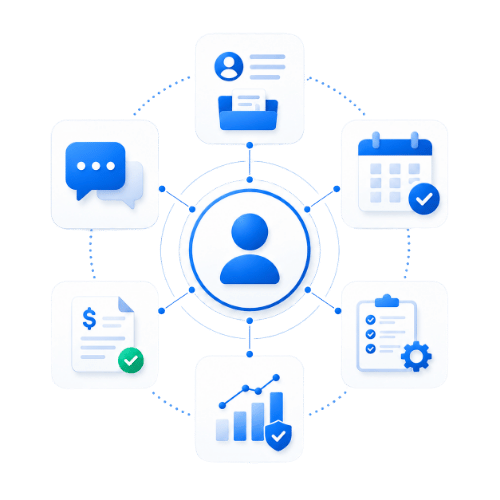
Replace scattered customer records, missed follow-ups and payment chasing with one connected CRM
OctopusPro gives field service businesses the customer, booking, invoice, payment, communication, portal and reporting context needed to serve faster, collect sooner and keep customers coming back.