
Reduce Accounting Admin, Get Paid Faster & Keep Every Job Financially Connected
Save admin time, collect payments sooner and give your team clearer financial visibility across every job. OctopusPro connects quotes, bookings, on-site invoicing, deposits, customer balances, timesheets, contractor payouts, reporting, reconciliation and accounting sync in one workflow, with Xero and QuickBooks Online integration plus MYOB integration coming soon.
Built for teams that want connected invoicing, fieldworker payment collection, contractor payout control and cleaner accounting records without duplicate admin.
Faster payment follow-upCreate invoices sooner, collect on-site where enabled and track balances with fewer manual checks.
Cleaner payout visibilitySee contractor payouts, commissions, earnings and payment holds more clearly.
Better accounting alignmentKeep reporting, sync workflows and reconciliation easier to manage.
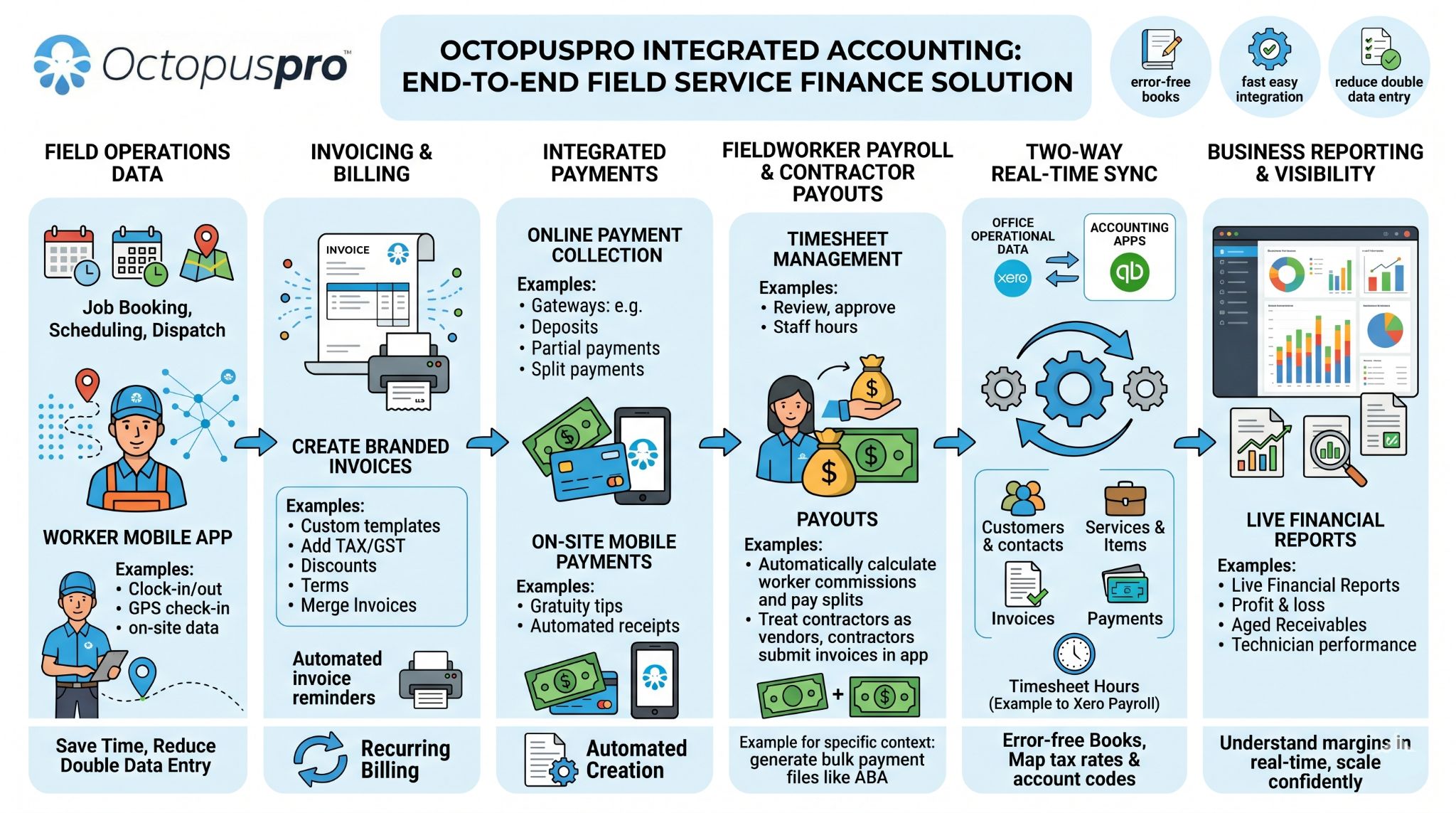
See What Is Paid, Owed, Synced and Ready to Action
Give your team a faster way to understand financial status across every job. OctopusPro supports that benefit by connecting accounting sync, invoice automation, online payments, customer statements, reconciliation, fieldworker earnings, contractor payouts, financial reporting, tax settings, payment controls and audit history.
Quick links for the main accounting, payment, payroll and reporting sections.
Cleaner accounting records
Connect customers, invoices, payments, services, items, tax settings and account codes with Xero or QuickBooks.
Faster cash flow control
Manage deposits, part-payments, portal payments, reminders, statements, refunds and reconciliation.
Simpler payroll and payouts
Track timesheets, commissions, bank details, payment holds, batch exports and contractor payout workflows.
More confident reporting
Review invoice history, payment approvals, job profitability, customer balances and live financial reports.
Most relevant setup guides for this section
Give Every Job a Clear Financial Path From Booking to Reconciliation
Reduce confusion between operations, finance and accounting by giving every job a clear financial trail. OctopusPro delivers that benefit by connecting job activity, invoice records, payment status and payout data so service teams, finance teams and accounting records stay aligned.
Quotes, bookings, invoices, payments, payroll, contractors and reporting stay connected as work moves from request to completion.
Customer balances, payment status, audit history, invoice activity and payout data are easier to review before problems build up.
Xero and QuickBooks workflows help reduce double entry, improve reconciliation and keep operational finance records aligned.
What this helps you improve
Use OctopusPro to reduce disconnected admin first, then support that outcome with connected daily job activity, invoices, payments and accounting records.
- Invoices, deposits, part-payments and outstanding balances
- Fieldworker earnings, contractor payouts and payment holds
- Customer statements, payment history and audit records
- Xero or QuickBooks sync, tax settings and reconciliation
Start With the Outcomes That Create the Biggest Financial Impact
Before reviewing the complete feature directory, start with the outcomes most service businesses want first: cleaner accounting records, faster payment collection, easier reconciliation, simpler fieldworker payouts, stronger overdue balance control and clearer financial reporting. The workflows below show which OctopusPro features deliver those outcomes.
Use these six workflows as the practical roadmap for connecting day-to-day job activity with invoicing, payments, payroll-ready data and accounting records.
Payment collection
Reconciliation
Workforce payouts
Sync invoices with Xero or QuickBooks
Keep customer, invoice, item, tax and payment records aligned with your accounting platform, reducing double entry and keeping financial records easier to reconcile.
Collect payments faster
Use online payments, deposits, part-payments, reminders and customer portal payment links to make it easier for customers to pay on time.
Reconcile payments with confidence
Match imported bank records, unknown payments, gateway activity and recorded payments to the correct invoices for cleaner accounts receivable control.
Manage fieldworker payouts
Track timesheets, commissions, bank details, payment holds, batch exports and remittance workflows for employees, fieldworkers and contractors.
Track overdue balances
Monitor outstanding invoices, customer balances, account statements, payment reminders and follow-up activity from the same operational workflow.
View financial reports
Review revenue, payments, refunds, customer balances, fieldworker earnings and job-level profitability so managers can make faster decisions.
See how OctopusPro turns field service work into cleaner financial control
Start a free trial to connect bookings, invoices, payment collection, customer balances, payroll-ready data, contractor payouts, reporting and accounting sync in one workflow instead of separate spreadsheets and disconnected tools.
Collect deposits and balances sooner
Keep Xero and QuickBooks aligned
Track commissions, payouts and approvals
Reduce Finance Admin by Connecting the Records Behind Every Job
Save time, reduce errors and improve cash-flow visibility by keeping job records, invoices, payments, timesheets, contractor payouts and customer balances connected. OctopusPro supports those outcomes by linking your field service workflow with invoicing, payment collection, reconciliation, payroll-ready reporting and accounting sync.
Connect bookings, invoices, payments, customer balances, fieldworker earnings and accounting sync in one workflow.
Reduce spreadsheet work, missed follow-up and delayed invoicing.
Keep balances, payments, reports and accounting records easier to reconcile.
Track timesheets, commissions, bank details, payouts and payment holds.
See revenue, balances, labour costs and job profitability faster.
Fewer manual finance gaps
Reduce spreadsheet work, missed payment follow-up, delayed invoicing and inconsistent payout tracking.
Cleaner accounting sync
Keep invoices, payments, customers, services, tax rules and accounting records aligned with Xero or QuickBooks.
Clearer decisions for your team
Give admin staff, managers and accountants better visibility across revenue, balances, payments and costs.
Before: finance work becomes reactive
Manual records, delayed invoicing and disconnected payments make reconciliation harder.
- Invoices are created manually after jobs are completed.
- Payments, deposits, tips, surcharges, and part-payments are hard to reconcile.
- Overdue balances are chased late or inconsistently.
- Timesheets, commissions, bank details, and contractor payouts require extra spreadsheets.
- Accounting records can fall behind operational activity.
After: finance work becomes easier to control
OctopusPro keeps operational finance, payment collection and accounting sync connected.
- Completed jobs and online bookings can become branded invoices automatically.
- Payments are linked to the correct booking, invoice, customer, and payment method.
- Reminders, confirmations, receipts, and statements can be sent by email or SMS.
- Payroll-ready data, commissions, contractor payouts, and payment holds are easier to manage.
- Xero and QuickBooks can stay aligned with your operational data.
Move From Manual Finance Admin to Clearer, Faster Financial Control
Improve speed, accuracy and visibility by replacing scattered spreadsheets, delayed invoicing and disconnected payment records with a connected workflow. OctopusPro then provides the operational tools that keep jobs, invoices, payments, payouts and accounting records aligned.
Faster invoice follow-up
Clearer payout control
Cleaner accounting records
Manual, delayed and difficult to reconcile
- Invoices are created manually after jobs are completed.
- Payments are tracked separately from bookings and field activity.
- Contractor payouts, commissions and timesheets live in spreadsheets.
- Xero or QuickBooks records are updated later, often by hand.
Connected, visible and easier to control
- Quotes, bookings and completed jobs can flow into invoices.
- Payments, deposits, balances and statements stay connected to the job.
- Timesheets, fieldworker shares and payout reports are easier to review.
- Accounting sync keeps customers, invoices, payments and items aligned.
Turn approved work and completed jobs into branded invoices with fewer manual steps.
Keep deposits, part-payments, balances and reminders connected to the right customer and job.
Review timesheets, commissions, fieldworker shares and contractor payment status in one workflow.
Keep invoices, payments, customers, items, tax rules and account codes aligned with Xero or QuickBooks.
Replace disconnected accounting admin with one connected workflow
Use OctopusPro to connect daily field service work with invoicing, payments, customer balances, reporting, contractor payouts and accounting sync so your team spends less time chasing records and more time managing outcomes.
The Business Outcomes Integrated Accounting Should Deliver
Start with the outcomes your team wants most: less admin, faster payment collection, cleaner financial records and stronger profit visibility. OctopusPro helps deliver those results by connecting quoting, booking, invoicing, payments, payroll, reporting and accounting sync in one workflow.
More control, faster cash flow, fewer admin bottlenecks
Integrated accounting should help your business collect sooner, reduce rework, improve reporting confidence and make job-level profitability easier to track. OctopusPro supports those benefits with connected invoicing, online payments, reminders, payroll-ready payout data, reconciliation tools and accounting sync.
Less double entry
Spend less time retyping and correcting records by keeping customer, job, invoice and payment data connected across your workflow, accounting system and bank-ready reporting.
Faster payment collection
Bring cash in sooner with faster invoicing, deposits, online payment options, automated reminders, statements and clearer customer balances.
Cleaner financial records
Keep accounting cleaner and reconciliation easier by aligning invoices, payments, tax/GST, service items, account codes, due dates and customer records.
Better profit visibility
Make better decisions with clearer visibility into revenue, labour costs, contractor payouts, commissions, fees, balances and job-level profitability through live reporting.

Growth
Take on more jobs without adding unnecessary admin overhead by connecting quoting, scheduling, invoicing, payments, reporting and payout workflows as your business scales.
Efficiency
Reduce manual entry, spreadsheet tracking, payment chasing, invoice edits and reconciliation delays by keeping field service activity connected to financial records.

Profitability
Understand margins with job-level reporting, fieldworker earnings, contractor costs, tips, fees, travel charges, payment visibility and payout controls.
Turn Finance Admin Into Faster Payments, Cleaner Records and Better Decisions
Give your team a cleaner way to manage the financial side of field service work. OctopusPro helps you reduce duplicated admin, collect money faster, keep records accurate, control workforce payouts and make better decisions from live reporting — then supports those outcomes with automated invoicing, online payments, reconciliation tools, payroll-ready data and Xero or QuickBooks sync.
Jobs, invoices, payments, customer balances, payroll-ready records and accounting sync stay connected so your business can move from completed work to collected revenue with fewer manual steps.
- Reduce manual updates between operations, payment gateways and accounting files.
- Improve visibility across revenue, balances, labour costs and payout status.
- Give customers and staff clearer records, confirmations and statements.
Get paid faster
Send invoices sooner, accept more payment methods, automate follow-up and give customers easier ways to pay online or on-site.
Keep records cleaner
Align invoices, payments, tax/GST, currency settings, customer records, service items, account codes and invoice edits across your workflow.
Make better decisions
See revenue, balances, fieldworker earnings, contractor costs, tips, fees and job-level profitability through real-time reporting.
The features that create those benefits
Included
- Eliminate double entry with two-way sync to Xero and QuickBooks for invoices, payments, contacts, and items.
- Get paid faster with online payments, deposits, automated receipts, confirmations, portal checkout options, and payment links.
- Cut admin time with automated invoicing from quotes, bookings, online bookings, and completed jobs.
- Improve cash flow control with accounts receivable visibility, balance tracking, overdue reminders, and payment approval workflows.
- Reduce errors and compliance risk with consistent tax/GST, currency settings, pricing, customer records, invoice edits, and account-code mapping.
- Close your books faster with reconciliation tools and audit-ready records.
- Boost profitability with real-time reporting by job, service, customer, and fieldworker.
- Simplify payroll and contractor payouts with timesheets, commissions, bank details, batch-payment exports, and bulk payouts.
- Scale confidently with centralised billing, reporting, role-based access, fieldworker permissions, and payout controls.
- Improve customer experience with professional invoices, clear terms, self-service portals, account statements, receipts, PO references, signatures, and online payment links.
- Access insights anywhere with secure, cloud-based dashboards and reports.
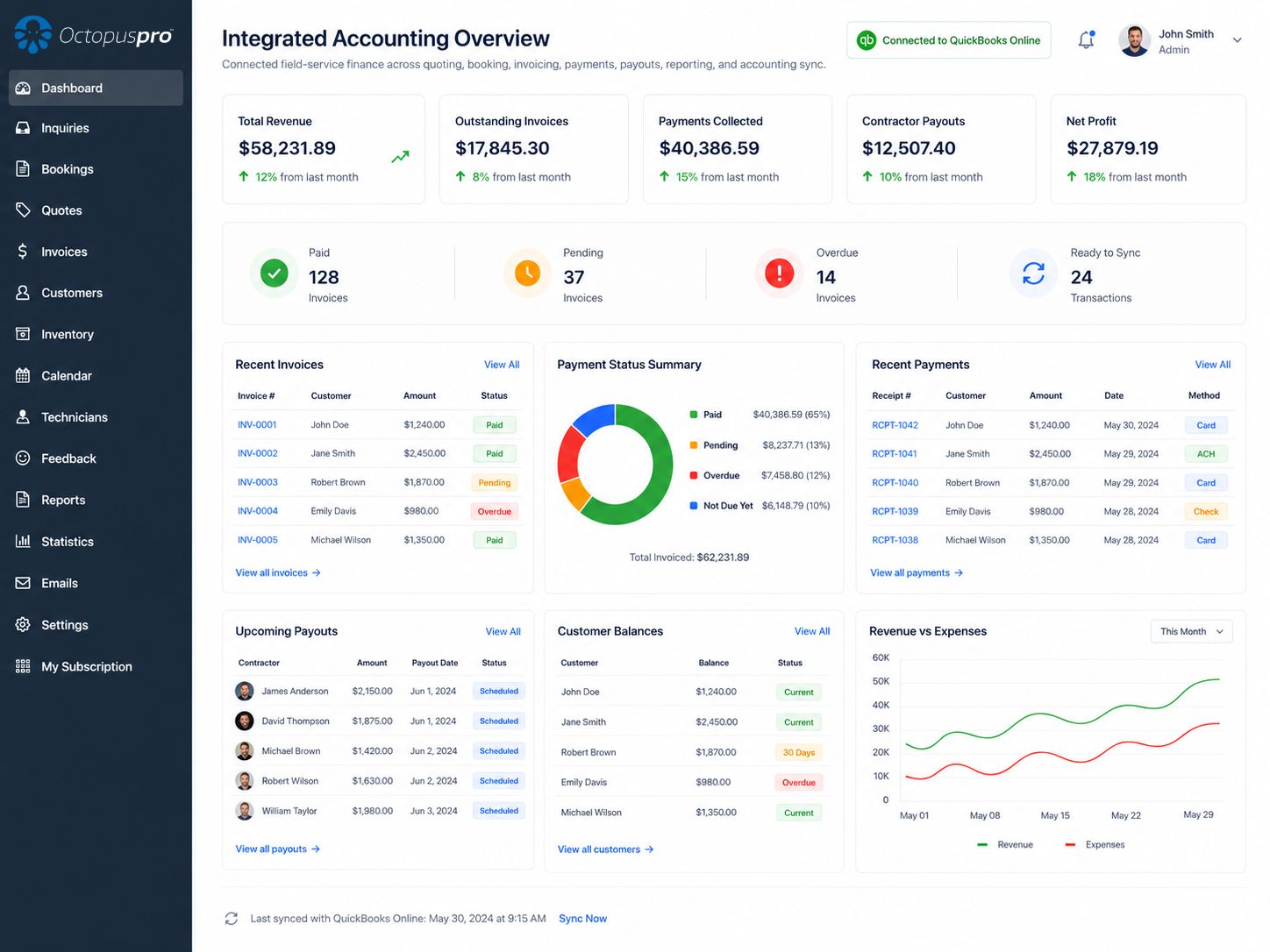
Keep Every Financial Step Moving From Quote to Reconciliation
Get clearer visibility from the first customer request through to final reconciliation. OctopusPro supports that outcome by connecting quote approval, booking scheduling, job completion, invoice creation, customer payment, payment reconciliation and fieldworker or contractor payout workflows.
Quotes, bookings, job completion and customer communication stay connected.
Invoices, deposits, tips, part-payments and balances stay visible.
Payments, payroll-ready data, reporting and accounting sync stay aligned.
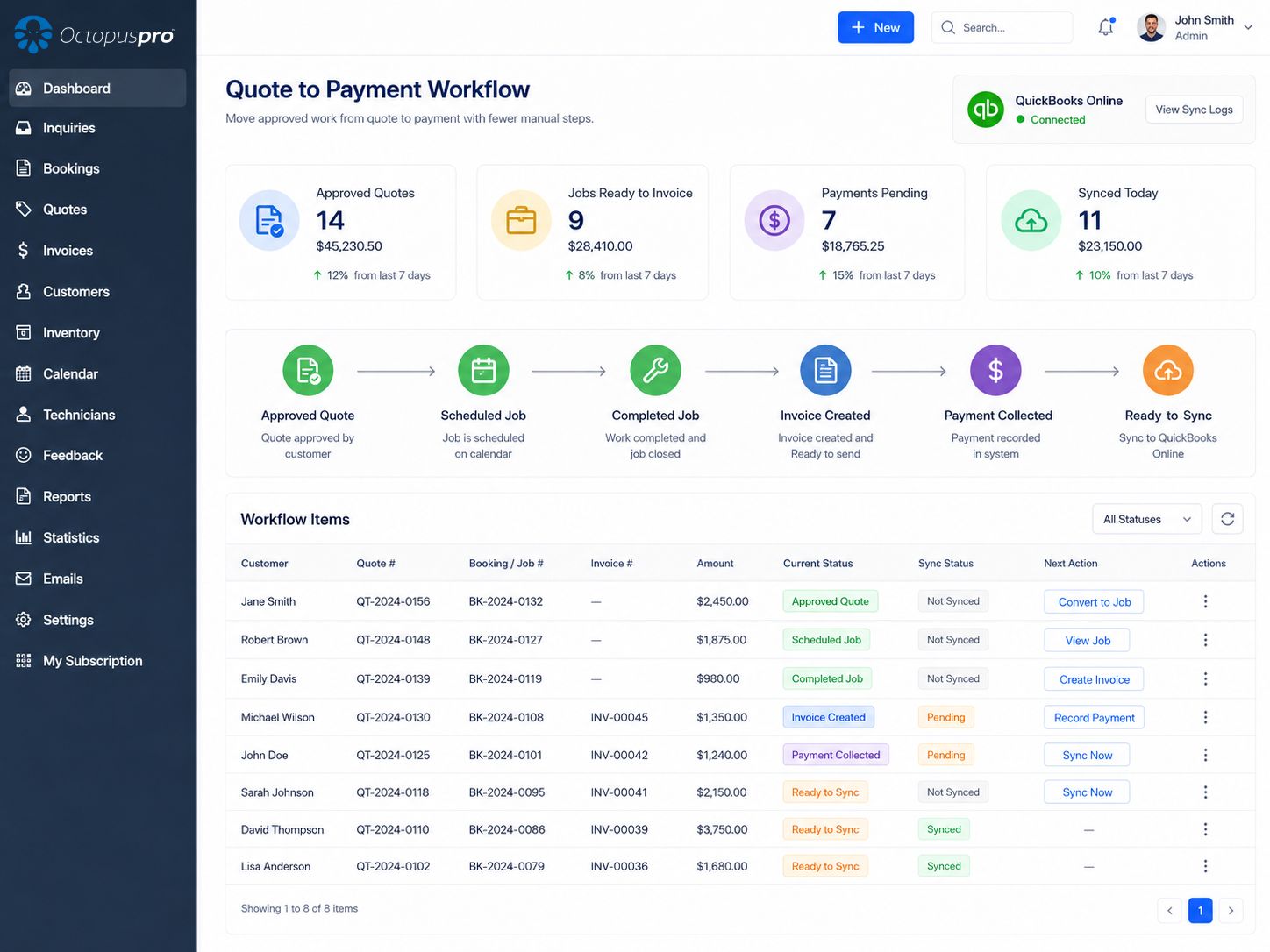
How the workflow moves from work requested to money reconciled
Each step keeps the commercial record connected to the job, so your team can follow the same financial trail from the first quote through payment, payout and reporting.
Quote
Create or approve service quotes.
Book
Schedule jobs and online bookings.
Complete
Track work, time, fees, and job status.
Invoice
Generate branded invoices automatically.
Collect
Accept payments, deposits, tips, and part-payments.
Sync
Send records to accounting and reporting.
Move approved work to payment with fewer manual steps
Reduce the delay between quote approval, job completion, invoicing and payment collection by connecting quote approvals, bookings, invoices, online payments, reminders, payouts and accounting sync in one platform.
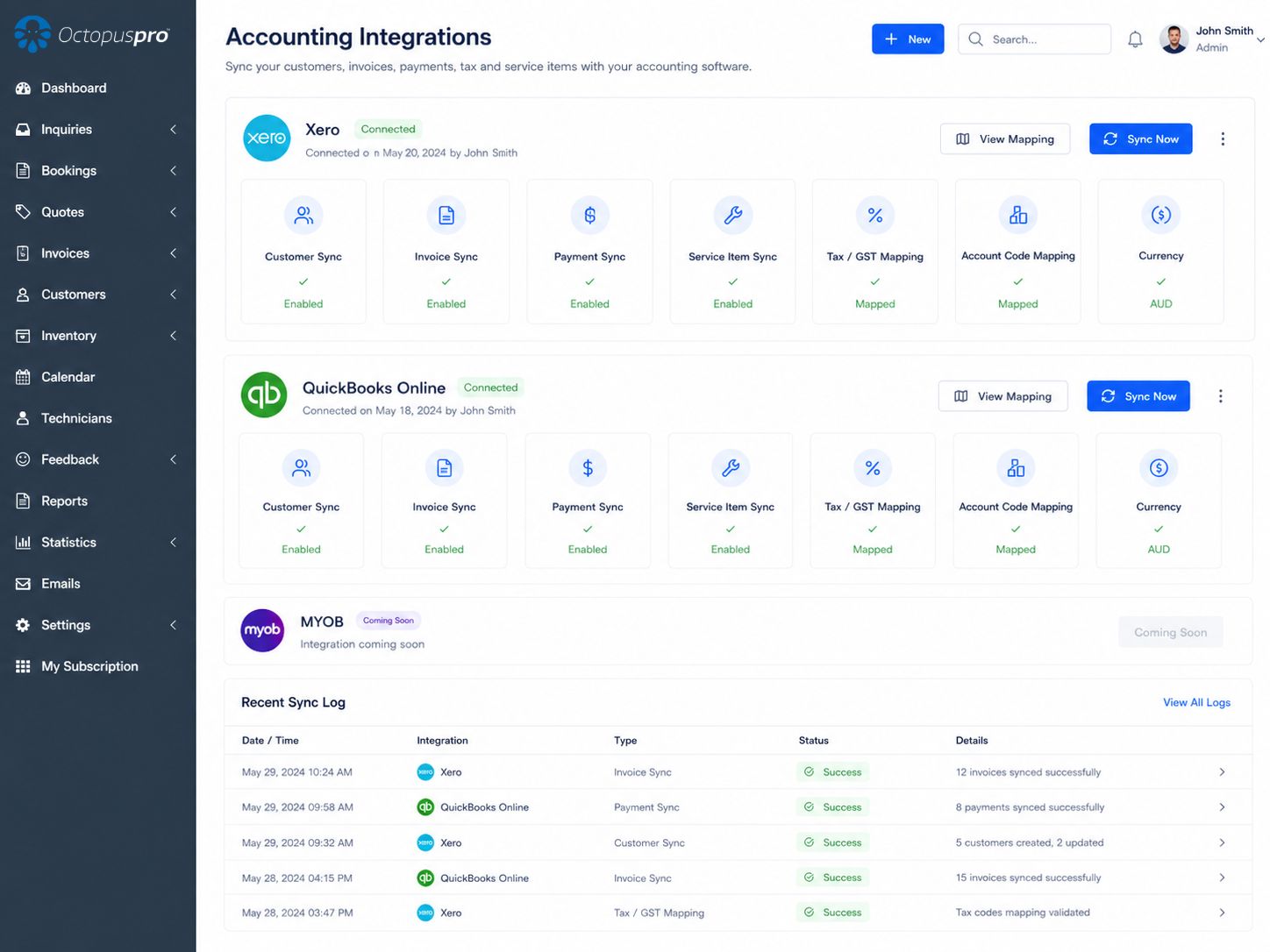
Keep Xero and QuickBooks Accurate Without Re-Entering Job Data
Reduce double entry and keep your accounts cleaner by aligning job, invoice, customer, payment and service data with Xero or QuickBooks Online. OctopusPro provides the integration layer that keeps operational finance records and your accounting file working from the same source of truth.
That benefit is delivered through two-way sync for customers, fieldworkers, contractors, services, products, items, invoices and payments. You can push an OctopusPro invoice to QuickBooks, import client lists from Xero during setup, and keep services or items consistent across both systems.
- Send invoices to Xero or QuickBooks in one click or as part of your configured workflow.
- Sync customers and contacts between OctopusPro and your accounting platform.
- Keep invoice payments aligned so payments do not need to be entered twice.
- Sync services, products, items, and invoice line items to keep pricing and records consistent.
- Map tax/GST, currency, and account codes so invoices post correctly in your accounting system.
- Track balances, overdue amounts, payment status, and reconciliation progress from a single source of truth.
- MYOB integration is coming soon for businesses that use MYOB accounting workflows.
Keep Financial Records Consistent Across Operations and Accounting
Improve accuracy and reduce reconciliation work by keeping the most important operational and accounting records aligned. OctopusPro syncs or connects customer billing, payments, tax/GST, service items, fieldworker earnings, contractor payouts and reporting so your team has one clearer source of truth.
More consistent customer billing records
Sync customer and contact details between OctopusPro and your accounting system so invoices, statements and account records stay consistent.
Fewer invoice posting errors
Push invoices created from quotes, bookings, online bookings and completed jobs, including service line items, pricing, tax/GST, discounts and payment terms.
Clearer accounts receivable control
Keep paid, unpaid, overdue, deposit, part-payment, surcharge, tip and balance-due information aligned so customer balances are easier to manage.
More reliable service and product billing
Keep service names, products, items, pricing and invoice line references consistent between OctopusPro and your accounting file.
Cleaner tax and ledger reporting
Map tax rules, default currency preferences, account codes and ledger references so invoices post more accurately and reporting stays cleaner.
Simpler payroll-ready payout records
Use approved timesheets, commissions, fieldworker earnings, bank details and contractor payout reports to simplify payroll and supplier-style payment workflows.
Set Up Payment, Invoice and Payout Rules Around How You Actually Get Paid
Get the financial workflow working the way your business operates. OctopusPro supports simple invoice syncing as well as advanced setups for deposits, part-payments, recurring billing, consolidated invoices, contractor payouts, payroll-ready reporting, refunds, surcharges, tax rates, currency settings and payment reconciliation.
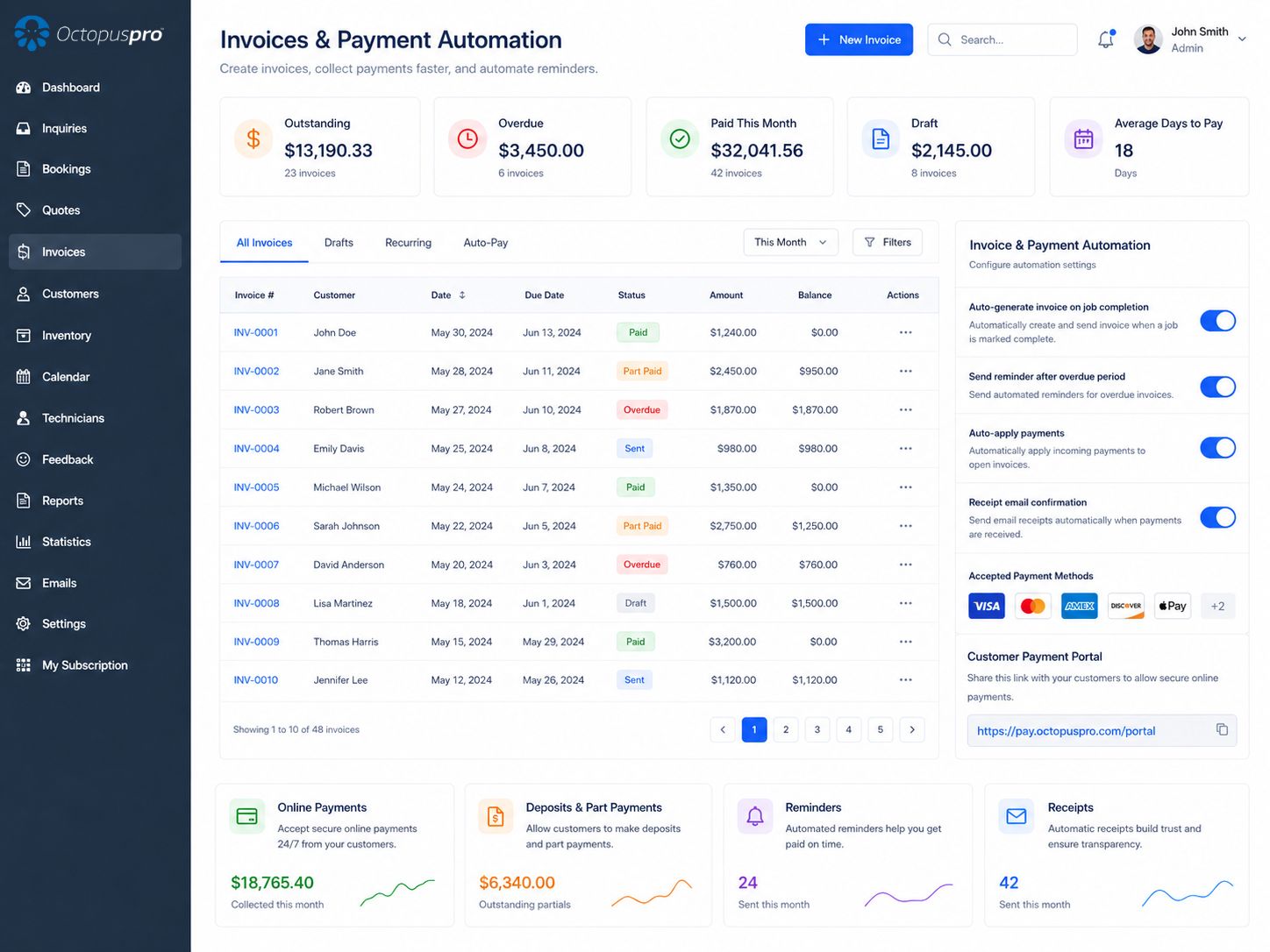
Get paid on clearer invoice terms
Choose when invoices are generated, how customers pay, when reminders are sent, and how deposits, part-payments, recurring billing and consolidated invoices are handled.
Pay fieldworkers and contractors with more control
Review timesheets, commissions, contractor earnings, payment holds, submitted invoices, bulk payout files, Stripe Connect split payments and payroll-ready exports.
Keep your accounts accurate without duplicate entry
Connect OctopusPro with Xero or QuickBooks Online to keep customers, invoices, payments, tax rules, service items, payment settings and financial reports aligned.
Turn completed jobs into invoices and payments faster
Automate invoice creation, payment collection, confirmations, reminders, due dates, invoice records and accounting sync from one connected workflow.
Easier online payment collection
Automated reminders and receipts
Cleaner accounting records
Improve cash flow with faster invoices, clearer balances and automated follow-up
Use OctopusPro to track deposits, part-payments, overdue balances, reminders, customer statements, refunds, payment approvals and reconciliation from one place.
Know What Is Paid, Owed, Pending and Ready to Release
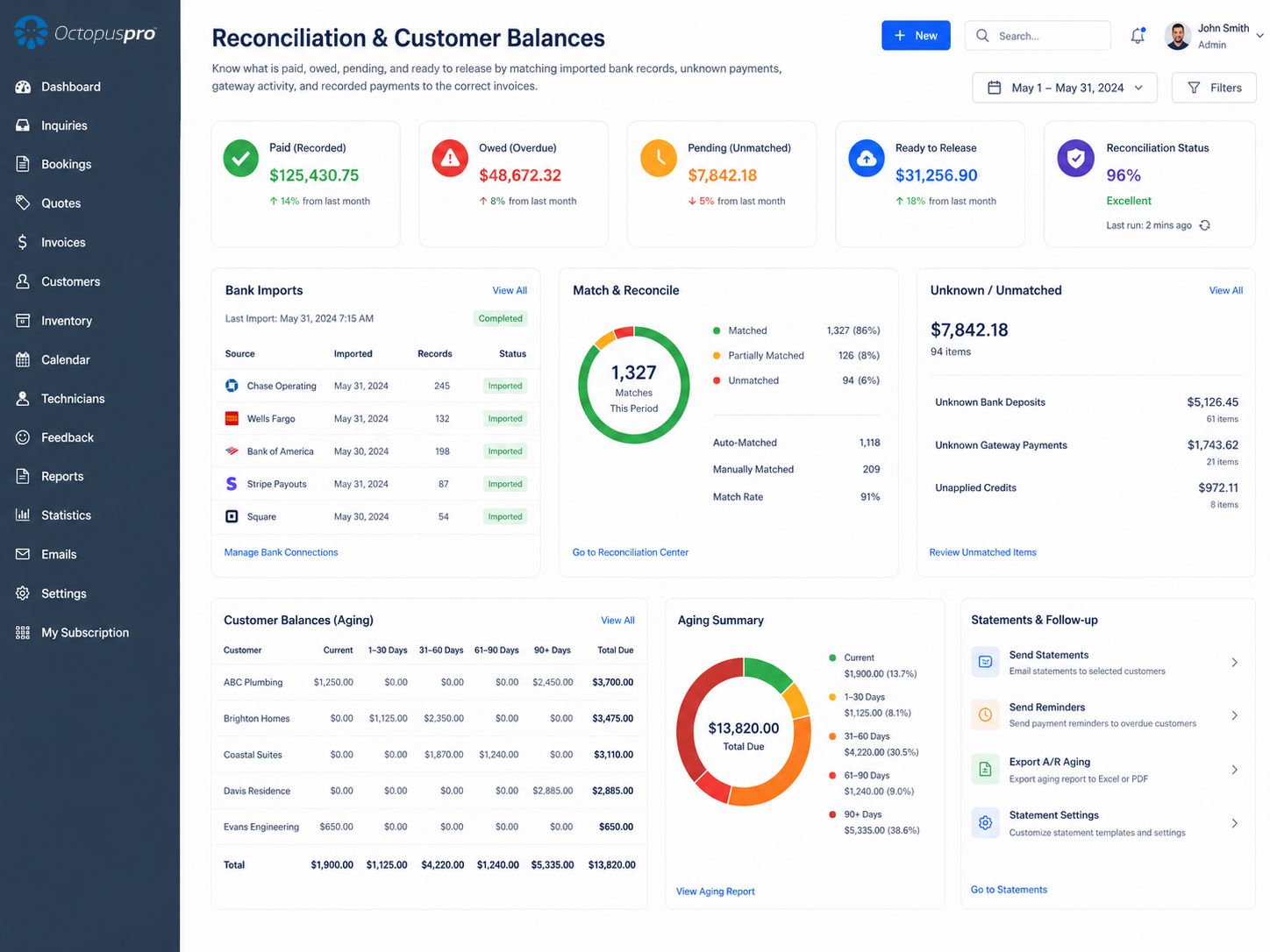
Give your team clearer control over incoming and outgoing money. OctopusPro keeps invoices, payments, payouts and adjustments connected to the correct job, customer and fieldworker, so you can see what has been paid, what is overdue, what is pending and what needs attention.
Know exactly how each job has been paid
Track online payments, manual payments, deposits, part-payments, surcharges, tips and booking-level payment records in one place.
Reduce late payments and protect cash flow
See overdue balances quickly, follow up faster and automate invoice reminders by email or SMS.
Spend less time turning work into invoices
Automatically generate invoices from quotes, bookings, online bookings or completed jobs, or let authorised fieldworkers create or update invoices on-site before syncing invoice and payment data to Xero or QuickBooks Online.
Give customers a clearer, easier payment experience
Create professional branded invoices with GST/tax, discounts, payment terms, online payment links, receipts and customer-friendly reminders.
Control workforce payments before money is released
Approve timesheets, calculate commissions, export payroll-ready data, manage payout approvals, hold payments and prepare bulk payments.
Support more accounting workflows as you grow
OctopusPro currently supports Xero and QuickBooks Online integration, with MYOB integration planned to support more accounting workflows.
Help Contractors Invoice, Collect Payment and Close Out Jobs Before Leaving Site
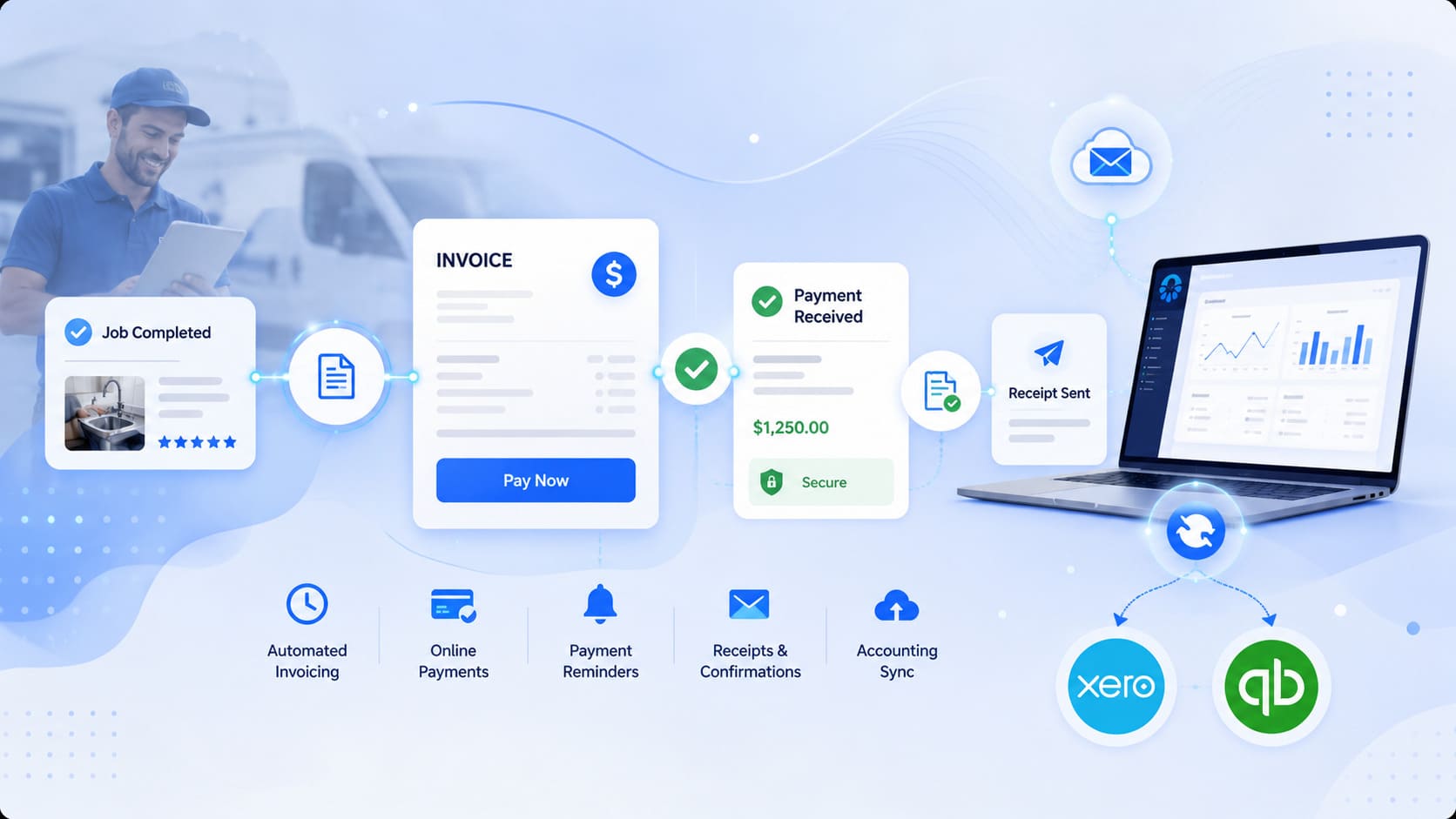
For contractors, subcontractors, mobile technicians and field service teams, the fastest way to improve cash flow is to turn completed work into an invoice while the job is still fresh. OctopusPro helps authorised fieldworkers create or update invoices on-site, record payment before leaving the customer, and keep the invoice, booking, payment and accounting records connected.
Create invoices sooner
Generate invoices from quotes, bookings, completed jobs or fieldworker updates so work can move to payment without waiting for office staff to rebuild the job later.
Collect payment in the field
Let authorised fieldworkers accept or record on-site payments, including card, cash or cheque workflows depending on your configured payment options and permissions.
Keep contractor records connected
Link each invoice and payment back to the booking, customer, fieldworker, timesheet, commission, payout status and accounting sync workflow.
- Supports contractor-focused workflows such as mobile trades, cleaning, repairs, installation, inspection, maintenance, transport and home services.
- Helps reduce duplicate admin by keeping the invoice connected to the original quote, booking, service line items, photos, notes and customer history.
- Improves payout visibility because customer payment status, fieldworker earnings, commissions and contractor payment holds can be reviewed together.
- Gives owners clearer cash-flow visibility by showing what has been invoiced, paid, partly paid, overdue, pending approval or ready to reconcile.
Pay Fieldworkers, Contractors and Subcontractors With Clearer Payout Records
Reduce payroll questions, payout disputes and spreadsheet work by connecting completed jobs, on-site invoices, customer payments, timesheets, check-ins, earnings, commissions and payout approvals in one place. OctopusPro helps your team see what each fieldworker has earned, what has been approved, what is being withheld and what is ready to export to payroll or accounting.
Use completed work as the source of truth
Generate payout records from bookings, completed jobs, check-ins, work time, travel time, timesheets and fieldworker activity.
Calculate commissions and pay splits faster
Apply fixed wages, hourly rates, service-based rates, percentage commissions, contractor shares, tips, bonuses and product upsell shares.
Approve, hold and export payouts with control
Review earnings, approve timesheets, withhold disputed payments and prepare payroll-ready or contractor payout data before money is released.
From job completion to payroll-ready records
Instead of rebuilding payroll manually, OctopusPro keeps fieldworker earnings connected to the job, customer, on-site invoice, payment status and approval history.
- Approved timesheet hours can be prepared for payroll processing, including Xero payroll workflows where supported.
- Contractor payouts can be handled as supplier-style bills, payout reports, remittance records or accounting exports.
- Admins can review, adjust, dispute or hold payouts when complaints, quality issues or unresolved job concerns need attention.
- Fieldworkers can view earnings, pay statements, outstanding payments, commissions and payout status in the Fieldworker App where enabled.
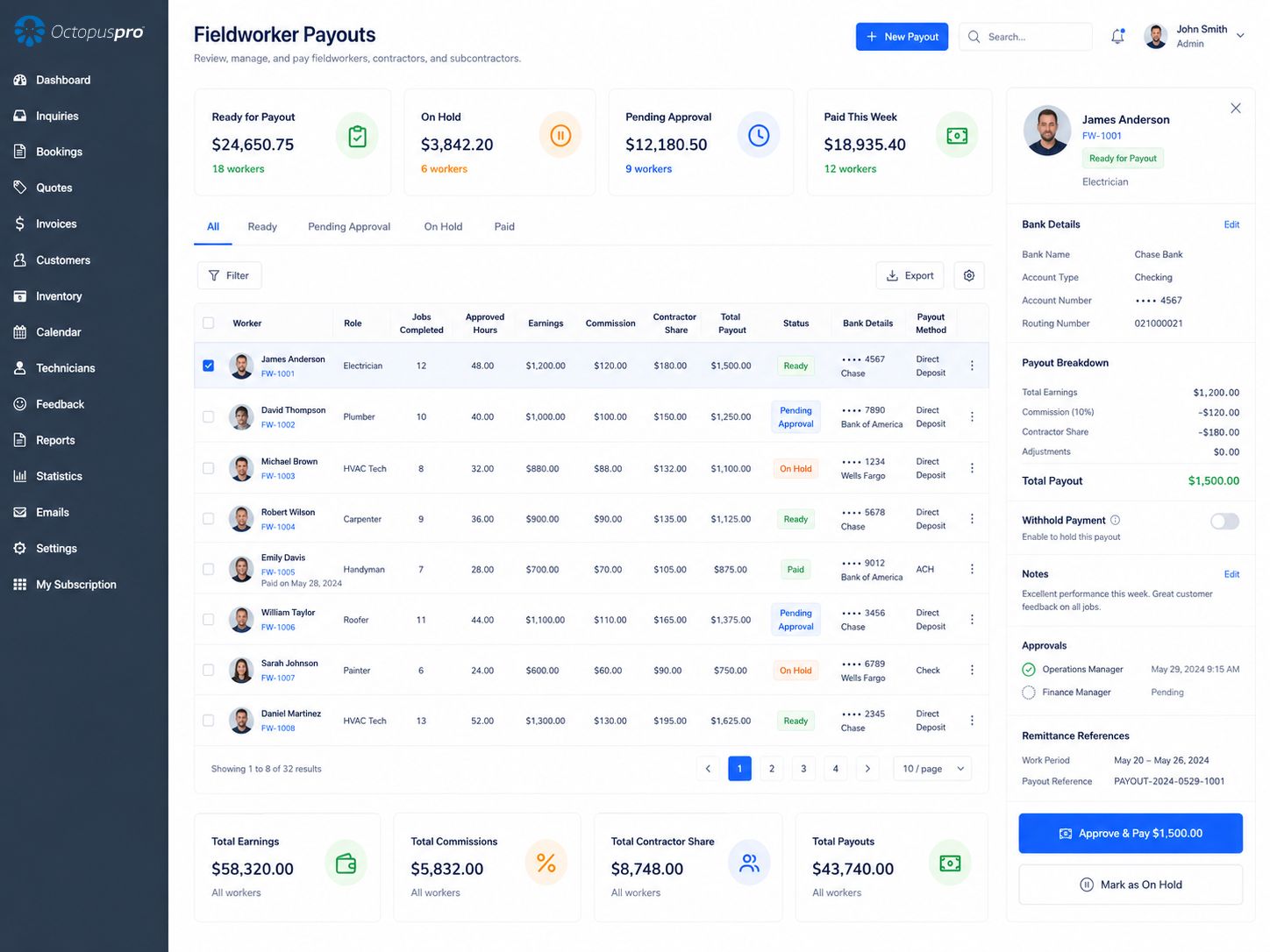
OctopusPro helps you manage both sides of field service finance: money collected from customers and money paid to your workforce. Revenue, labour costs, commissions, contractor shares, payout status and job-level profitability stay easier to review because the financial records remain connected to the booking history.
Protect Cash Flow With Approval Controls, Payment Holds and Clear Audit History
Keep financial decisions accountable before money is released. OctopusPro helps authorised users review payments, approve payouts, hold disputed funds, track invoice changes and reconcile financial activity from one connected workflow.
Hold disputed payouts safely
Pause fieldworker, contractor or subcontractor payouts when a job has a complaint, quality issue, missing evidence, unresolved customer concern or payment dispute.
Approve before funds are released
Review timesheets, earnings, commissions, contractor invoices, payout reports, fieldworker-entered payments and payment breakdowns before releasing money.
Keep invoice activity traceable
Track changes across quotes, bookings, invoices, invoice numbers, labels, attachments, payments, refunds, adjustments, credit notes and payout actions.
Reconcile records with confidence
Match customer payments, imported records, accounting data, bank transactions and pending approvals so balances stay cleaner and audit-ready.
Every important finance action stays easier to verify
The invoice history and audit trail gives admin users, managers and finance teams a clearer record of what happened across the customer, booking, invoice and payout lifecycle.
- See payment, refund, credit note and adjustment history.
- Connect approvals to the user, time, invoice and related job.
- Use history logs to investigate disputes without digging through separate spreadsheets or email threads.
- Keep permissions, accountability and reconciliation aligned as your team grows.
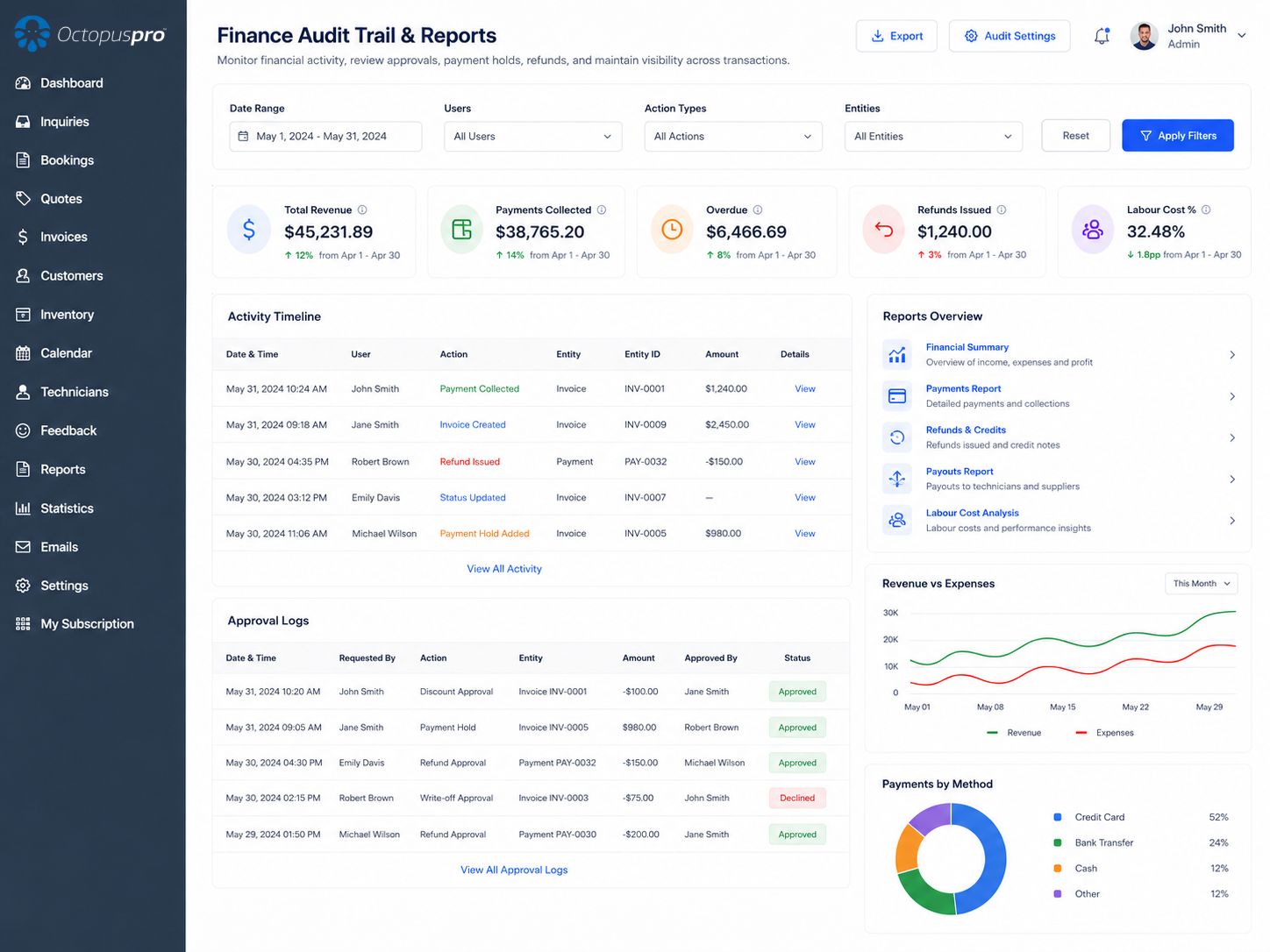
Manage incoming payments and workforce payouts in one connected workflow
Track customer payments, labour costs, timesheets, commissions, contractor invoices, payout approvals, bank exports and payment holds from the same operational finance record.
Timesheets and commissions feed payout reviews
Payment holds protect disputed or incomplete work
Reports stay cleaner for accounting and cash-flow checks
Keep billing, reporting and accounting access connected
Reduce wasted space and scattered information by grouping the core finance capabilities your team relies on every day into one cleaner, easier-to-scan section.
Real-Time Financial Visibility
Track invoices, payments, overdue balances and performance metrics in real time so office teams and decision-makers always work from the latest financial picture.

Sync With Xero & QuickBooks
Keep customers, invoices, payments and service items aligned to reduce double entry, improve accuracy and simplify reconciliation and tax-time preparation. MYOB is coming soon.

Import & Export Data
Import customers and records, or export invoices, payments, reports and payroll-related data so your finance information stays portable, useful and audit-ready.
Access Anywhere, Anytime
Secure cloud access lets your team manage billing, reporting and accounting activity from the office, in the field or on the move without relying on local installations.
Ready for clearer financial visibility across every job?
Track revenue, invoice status, payment history, customer balances, fieldworker earnings, contractor payouts, refunds and audit activity with connected reporting.
See payouts and earnings clearly
Export cleaner reports
Keep audit history visible
Give Each Team Member the Right Financial Visibility Without Losing Control
Give owners, admin staff, accountants, dispatchers, fieldworkers, contractors and customers the financial information they need without exposing sensitive records to everyone. Permissions help each role see the right invoices, payments, payouts, statements and reporting context.
Use permissions to keep sensitive financial data protected while still giving each team member the context needed to do their job.
Business owners and managers
Monitor revenue, cash flow, outstanding balances, labour costs, contractor payouts, job profitability, fees, surcharges, and overall financial performance.
Admin and office staff
Create invoices, send reminders, record payments, manage customer balances, process refunds, manage payment approvals, and keep booking records up to date.
Accountants and bookkeepers
Work with cleaner invoice, payment, customer, tax/GST, currency, reconciliation, bank import, and accounting-sync data in Xero or QuickBooks Online.
Fieldworkers and contractors
View relevant job activity, timesheets, earnings, commissions, submitted invoices, payout status, bank details, pay statements, and payment-related updates where permitted.
Customers
Receive professional invoices, quote PDFs, payment confirmations, receipts, overdue reminders, saved payment methods, gift vouchers, online payment links, portal checkout options, and access to account statements.
Dispatch and operations teams
Keep job status, fieldworker assignment, customer communication, quote approvals, invoicing, payment visibility, booking payments, property history, and financial follow-up connected to daily service delivery.
Roll Out Accounting Automation in the Right Order
Get value faster by setting up the financial workflow in the right order. This sequence helps you connect accounting, configure invoice rules, set payment methods, define payout controls and activate follow-up in a way that supports clean reporting and reconciliation.
Reference library
Find Every Feature That Supports Cleaner Finance, Faster Payments and Better Control
Use this compact directory to match each financial outcome with the OctopusPro feature that supports it. Start with the most-used guides, then expand only the grouped feature area you need.
Most used accounting and payment guides
For accounting teams
Cleaner invoice, payment, tax, customer, reconciliation and account-code data that can sync with Xero or QuickBooks.
For operations teams
Bookings, job completion, customer communications, payments, fieldworker activity and invoice history remain connected.
For business owners
Clearer visibility over revenue, outstanding balances, labour costs, contractor payouts, profit and cash flow.
Accounting setupAccounting Integration, Xero & QuickBooks OnlineView links
- Core accounting sync
- Import customers and contacts from Xero or QuickBooks
- Import users, employees or contractor records from connected accounting tools
- Import and sync service items from Xero or QuickBooks
- Setup and mapping
- Sync products and invoice line items to Xero or QuickBooks
- Manage tax rates including GST, VAT and sales tax for invoicing and accounting workflows
- Manage account currency preferences and default currency settings
- Sync and reconcile payments with Xero or QuickBooks
- Extended accounting workflows
Invoice lifecycleInvoicing & BillingView links
- Invoice creation
- Built-in field service invoicing and billing
- Automatic invoice creation from completed jobs
- Convert quotes, bookings and jobs into invoices
- Automatic invoices for Customer Portal and Booking Widget bookings
- Auto-create invoices for Customer Portal bookings
- Display Purchase Order (PO) numbers on quotes, bookings, invoices, PDFs and the customer portal for business customers
- Invoice controls
- Capture customer signatures on quotes, bookings and invoices for approval, completion sign-off and dispute reduction
- Manage quote-to-booking-to-invoice workflows with accepted quote line items carried through to billing
- Attach supporting files, photos and documents to quotes before approval or invoicing
- Transfer quote, booking or invoice ownership for sales rep responsibility and reporting
- Change quote numbers or quote reference IDs where permitted
- Export quote PDFs for approvals, procurement, insurance, internal review and offline records
- Billing workflows
- Edit quote scope, pricing, discounts, customer details and resend updated quote PDFs before approval
- Create quotes with services, products, taxes, discounts, voucher codes, expiry dates and follow-up reminders
- View and manage invoice details, totals, payments and history
- Configure invoice payment terms, deposits and due dates
- Branded invoices with tax/GST, discounts, terms and payment instructions
- Attach photos, receipts, certificates, reports and files to invoices
- Attach invoice documents, photos, files, receipts and supporting records
- Export invoices to PDF
- Allow authorised fieldworkers to create, update or send invoices on-site from the job workflow
- Send invoices to customers and third-party bill payers by email or SMS
- Edit invoice line items, prices, quantities, discounts, taxes, due dates and billing details
- Handle invoice editing restrictions for paid, voided or approved-payment invoices
- Change invoice number or invoice reference ID where permitted
- Void issued invoices while preserving invoice history and audit records
- Delete eligible draft, void or allowed invoice records based on permissions and invoice status
- Add invoice labels and tags to organise, filter and track invoice records
- Customize invoice and quote PDF templates for branding and layout control
- Manage invoice due dates including Net terms, booking-based due dates and monthly billing dates
- Convert eligible invoices back to draft
- Merge invoices for consolidated billing
- Manage billing cycles, lock merged invoices and unlock them when required
- Recurring billing and multi-currency invoicing workflows
Payment collectionPayments, Deposits, Refunds & ReconciliationView links
- Payment collection
- Online and offline invoice payments
- Add payments to invoices by card, cash, cheque, bank transfer or imported records
- Configure system-wide accepted payment methods and payment types
- Set payment methods available during Customer Portal and online booking checkout
- Sell gift vouchers or gift cards online with full payment at checkout and later redemption workflows
- Use tokenised card-on-file workflows through supported gateways without storing raw card details in OctopusPro
- Payment controls
- Allow customers to manage saved payment methods in the Customer Portal for repeat billing and faster future checkouts
- Set up company and fieldworker bank details for invoices, bank transfers and batch-payment workflows
- Configure credit card surcharges and card processing fee recovery
- Deposit payment management for service bookings
- Accept customer payments through website, portal, app or mobile payment link
- Fieldworker app payment recording for card, cash, cheque, bank transfer and other enabled methods
- Reconciliation and refunds
- Track deposits, part-payments, paid amounts and remaining balances
- Support payment-on-invoice, card-on-file, pre-authorisation and milestone or progress payment workflows
- Track booking-level payments including deposits, partial payments, tips, adjustments and refunds
- View invoice payment history, transaction metadata, receipts, refunds and approval actions
- Payment receipts, confirmations and secure transaction records
- Automated payment reminders and overdue invoice follow-ups
- Keep fieldworker-entered payments pending until approved or reconciled by an authorised user
- Import and reconcile payments from CSV bank transactions
- Assign, reassign and unlink unapplied or unknown payments
- Apply call-out, cancellation and no-show fees with tax, ledger and invoice line-item mapping
- Manage booking and invoice refunds with approval workflows
- Credit notes, refund sync and refund reporting workflows
- Tips and gratuities collection and payout management
- Connect payment gateways including Stripe, Square, Authorize.net, PayPal, Checkout.com, WePay, eWay, Tap, PayFast and Global Payments
Workforce payoutsFieldworker Payroll, Commissions & Contractor PayoutsView links
- Pay rules
- Fieldworker payroll and commission management
- Set fieldworker share, commission rates and payout rules
- Hourly pay, overtime, flat fees, percentage commissions and hybrid pay models
- Company-wide defaults, worker-specific agreements and service-level overrides
- Booking-level overrides, bonuses, corrections and custom pay splits
- Multi-fieldworker and multi-service payout allocation
- Fieldworker visibility
- Fieldworker Bookings Summary for job-level earnings and unpaid items
- Payment to Fieldworkers payout ledger and remittance register
- Fieldworker My Earnings dashboard for real-time earnings, outstanding payments and pay statements
- Manage fieldworker bank details for single payments, bulk batch exports and marketplace payout workflows
- Use fieldworker bank details for ABA, NACHA/ACH and BACS batch-payment exports
- Control fieldworker access to billing, payments, earnings and customer financial information through permissions
- Payout workflows
- Timesheets, check-in/out tracking, GPS time logs and payroll reporting
- Export ABA, NACHA, BACS, SEPA XML, CPA-005, CSV and Excel payout files
- Product share and upsell-related payout calculations
- Stripe Connect split payouts for marketplace-style workflows
- Approve, adjust, dispute, hold and export fieldworker payments
- Payroll-ready reports and supplier-style contractor payout workflows
Financial reportingReporting, Audit Trail & Financial VisibilityView links
- Reporting visibility
- Live business activity and financial reporting
- Revenue, sales, payment, customer balance and fieldworker earnings reports
- Filter reports by job, service, customer, fieldworker, contractor, date range and payment status
- CSV and Excel export for financial reporting, analysis and backup
- Payment reports and XLS exports for reconciliation and cash-flow monitoring
- Audit records
- Booking-level payment tracking for deposits, tips, adjustments, refunds and reconciliation
- Detailed invoice payment records including method, reference, status, receipts and refund actions
- Invoice history, payment history and invoice audit trail
- Booking history audit log for changes to schedules, statuses, invoices, payments and customer updates
- Transfer invoice ownership or assign sales rep responsibility for invoice accountability and reporting
- Use invoice discussion boards for internal billing notes, payment follow-up and finance communication
- Permission controls
- Pause or resume automated invoice reminders during disputes, payment arrangements or finance review
- Manage invoice issues and complaints linked to disputes, refunds, payment holds and customer billing concerns
- Refund approval history and refund audit trail
- Role-based access control for financial actions and sensitive records
- Permission-based fieldworker payment recording and pending-payment approval controls
Operational financeRelated Operational Finance FeaturesView links
- Products and services
- Products as invoice line items with pricing, tax and cost data
- Review customer profile billing history, quotes, bookings, invoices, account statements, properties and saved payment methods from one CRM view
- Link customer properties, assets, dependents or service locations to quotes, bookings, invoices, PDFs and activity history
- Track product costs, markup, supplier details, stock levels and inventory movement for invoice-line-item margin visibility
- Product CSV import/export and product list management
- Service pricing, packages, custom fields and portal booking settings
- Customer and booking finance
- Sell prepaid or pay-as-you-go service packages and bundles with package invoicing rules
- Add distance-based travel fees and GPS mileage billing as invoice line items that support cost recovery
- Configure service payment terms, upfront payments, deposits, card-on-file, pre-authorisation and milestone payment workflows
- Service payment terms, deposits and due-date settings
- Third-party bill payer invoicing for agencies, property managers and corporate billing
- Provide customer account statements showing invoices, payments, credits and outstanding balances
- Operational finance settings
- Customer portal payment links and payment visibility
- Finance notifications, refund approvals and accounting/reporting sync
- Call-out, cancellation and no-show fee automation for failed, missed or late-cancelled bookings
- Map call-out and no-show fees to tax rates, ledger codes and Xero/QuickBooks product IDs
- Manage booking cancellation fees separately from call-out and no-show fees
- Create and manage discount voucher codes that affect booking, invoice and payment totals
- Customer billing cycle management for recurring account clients and scheduled consolidated invoicing
- Booking financial summary showing invoice status, paid amounts, deposits and outstanding balance
- Expense management and reimbursement-related workflows
- Platform setup sequence including payment methods and optional Xero/QuickBooks sync
Need help choosing the right accounting, payment and payout setup?
Whether you use Xero, QuickBooks, contractor payouts, deposits, consolidated invoices, customer statements or payment reconciliation, OctopusPro can support a setup that matches your workflow.
Common questions about OctopusPro integrated accounting, invoicing and payments
Quick answers for businesses comparing accounting sync, invoicing, payments, reconciliation, contractor payouts, customer statements and reporting workflows.
Organised by accounting, invoicing, payments, payroll, portal and reporting topics
Accounting integrations
Questions about Xero, QuickBooks, MYOB, tax, currency, products, services and accounting-sync behaviour.
Does OctopusPro replace Xero or QuickBooks?
No. OctopusPro manages the operational side of field service work, including bookings, invoicing, payments, fieldworker earnings, and reporting, while syncing financial data to Xero or QuickBooks for accounting and tax workflows.
Is MYOB supported?
OctopusPro currently supports Xero and QuickBooks Online integration, with MYOB integration coming soon for businesses that use MYOB accounting workflows.
What accounting data can sync with Xero or QuickBooks?
OctopusPro can sync key operational and financial records such as customers, contacts, invoices, payments, services, items, tax/GST details, account code mappings, and related payment status information depending on your integration settings.
Can OctopusPro manage tax rates and account currency settings?
Yes. OctopusPro includes financial settings for managing tax rates such as GST, VAT or sales tax, as well as account currency preferences for invoicing and reporting workflows.
Can products and service items sync to accounting platforms?
Yes. Products and service items can be used as invoice line items and may be synced to Xero or QuickBooks as part of the invoice and item sync workflow, depending on configuration.
Invoicing and billing
Questions about invoice creation, editing, templates, consolidated invoices, recurring billing and invoice records.
Can invoices be created automatically?
Yes. OctopusPro can generate invoices from quotes, bookings, online bookings, and completed jobs, then send them to customers and sync them to your accounting system where configured.
Can OctopusPro auto-create invoices for online bookings?
Yes. OctopusPro can automatically create invoices for Customer Portal or online booking workflows, helping reduce manual invoice creation after customers book online.
Can fieldworkers create and send invoices on-site?
Yes. Where permissions allow, authorised fieldworkers can create, update or send invoices from the mobile app while they are still on-site, then record payment before leaving the customer. The invoice and payment record stays linked to the booking, customer, fieldworker, payout workflow and accounting sync process.
Can invoices be edited after they are created?
Yes, where permitted. Invoices are usually updated by editing the linked booking, allowing changes to line items, pricing, discounts, taxes, customer details and due dates, subject to restrictions for paid, voided or approved-payment invoices.
Can invoice numbers, labels and attachments be managed?
Yes. OctopusPro includes invoice management tools for changing invoice reference numbers where permitted, adding labels or tags, attaching supporting files, and maintaining invoice records.
Can OctopusPro create consolidated invoices?
Yes. Multiple invoices or bookings can be merged into a consolidated invoice for billing cycles such as weekly, fortnightly, monthly, or custom billing periods.
Can OctopusPro support recurring billing?
Yes. OctopusPro supports recurring services and consolidated invoicing workflows, including merging multiple bookings into a single invoice for a billing cycle.
Payments and reconciliation
Questions about deposits, part-payments, online payments, reconciliation, refunds, surcharges and payment approvals.
Can customers pay deposits or part-payments?
Yes. OctopusPro supports deposits, partial payments, balance tracking, online payments, on-site payments, and customer account statements through the customer portal.
Does OctopusPro support overdue invoice reminders?
Yes. Payment reminders can be sent manually or automatically by email or SMS, helping your team reduce late payments and manage accounts receivable more efficiently.
Can OctopusPro add credit card surcharges?
Yes. OctopusPro can support credit card surcharge configuration so businesses can recover card processing fees where permitted and configured.
Can OctopusPro reconcile imported bank payments?
Yes. OctopusPro supports payment import and reconciliation workflows so imported bank transactions can be matched, approved, reassigned, ignored, or linked to the correct invoices.
Can OctopusPro manage unknown or unapplied payments?
Yes. Unapplied or unknown payments can be reviewed, matched manually or automatically, reassigned, unlinked, approved, or rejected without losing audit history.
Can fieldworkers accept payments on-site?
Yes. Fieldworkers can accept or record payments on-site using the OctopusPro mobile app where supported, including card payments, cash, or cheque payments depending on your configured workflow.
How quickly are online payments settled?
Settlement timing depends on the payment gateway, country, card network, bank and merchant account setup. OctopusPro helps capture the payment, update invoice status and keep the payment connected to the job and reconciliation workflow, while actual fund settlement follows your gateway and bank processing times.
Can customers view their account statements?
Yes. Customers can access account statements through the customer portal, giving them visibility over past invoices, payments, and outstanding balances.
Can customers save payment methods for future payments?
Yes. Where enabled through supported payment gateways, customers can manage saved payment methods in the Customer Portal so repeat bookings, invoice payments and card-on-file workflows are faster and easier.
Fieldworker payroll and payouts
Questions about payroll-ready data, contractor payouts, fieldworker earnings, batch payments and payment holds.
Can OctopusPro help with contractor payouts?
Yes. OctopusPro can track timesheets, commissions, contractor earnings, submitted contractor invoices, payout approvals, bulk payout files, withheld payments, and Stripe Connect split payment workflows.
Can fieldworkers view their earnings and pay statements?
Yes. Where enabled, the Fieldworker App includes a My Earnings dashboard showing real-time earnings, outstanding payments, and pay statements or remittance summaries.
Can OctopusPro export batch payments for fieldworkers?
Yes. Fieldworker bank details can support downstream payout workflows, including bulk batch-payment exports such as ABA, NACHA/ACH and BACS, depending on region and configuration.
Can payments entered by fieldworkers require approval first?
Yes. OctopusPro can keep fieldworker-entered payments pending until an authorised user reviews, approves or reconciles them, helping reduce payment mistakes and improve financial control.
Can OctopusPro handle tips and gratuities?
Yes. OctopusPro supports tips and gratuities management so customer tips can be tracked and included in fieldworker payout workflows where enabled.
Can payments be withheld for disputed jobs?
Yes. OctopusPro includes controls such as Withhold Payment, allowing you to hold contractor or fieldworker payouts for jobs with complaints, quality issues, disputes, or unresolved concerns.
Fees, customer portal and reporting
Questions about portal payments, customer statements, fees, reporting, discounts and customer-facing finance workflows.
Can OctopusPro apply call-out or no-show fees?
Yes. OctopusPro can support call-out, cancellation and no-show fees, including invoice line-item creation, tax and ledger mapping, customer transparency, and reconciliation with accounting workflows.
Can OctopusPro manage cancellation fees separately from no-show fees?
Yes. OctopusPro supports booking cancellation fee workflows as well as call-out and no-show fee automation, allowing different fee rules for different booking scenarios.
Other accounting questions
Additional finance-related questions covering quotes, purchase orders, signatures, properties, inventory, vouchers and billing evidence.
Can OctopusPro add purchase order numbers to invoices?
Yes. OctopusPro can display Purchase Order (PO) numbers on quotes, bookings, invoices, PDFs and in the customer portal for business customers, helping accounts-payable teams match invoices to internal purchase orders.
Can OctopusPro charge travel or mileage fees?
Yes. OctopusPro can support distance-based travel fees and GPS mileage billing so travel charges can be added as invoice line items and recovered through the billing workflow.
Can OctopusPro handle package or bundle invoicing?
Yes. Service packages and bundles can be sold as prepaid or pay-as-you-go offers, with invoicing rules that create one invoice for the package, individual invoices per booking, or manual invoicing depending on the workflow.
Can customer signatures support billing and approvals?
Yes. Customer signatures can be captured on quotes, bookings and invoices to support approvals, completion sign-off, dispute reduction and a clearer billing audit trail.
Can booking history track invoice and payment changes?
Yes. Booking history and activity logs can help teams review changes to schedules, statuses, invoices, payments and customer updates, supporting clearer financial audit trails.
Can customer properties or assets be linked to invoices?
Yes. Customer properties, assets, dependents or service locations can be linked to quotes, bookings, invoices, PDFs and activity history, helping teams track financial and service history by site or asset.
Can quotes be managed before they become bookings or invoices?
Yes. OctopusPro can create, edit, send, track, export and manage quotes or estimates, including services, products, taxes, discounts, voucher codes, expiry dates, files and approval workflows before converting accepted quotes into bookings or invoices.
Can product costs, stock and markup be tracked for invoices?
Yes. Products can include pricing, tax, cost, markup, supplier and inventory details, helping businesses understand invoice-line-item margins and manage product-related billing more accurately.
Can OctopusPro sell gift vouchers or gift cards online?
Yes. OctopusPro can support gift voucher purchases through the Customer Portal, with full payment at checkout and later redemption for eligible services.
Best for Teams That Want Less Admin, Faster Payments and Cleaner Financial Control
OctopusPro is especially useful when the benefit you want is not just “send an invoice”, but a cleaner end-to-end financial workflow where service operations, on-site invoicing, payments, payroll, contractor payouts and accounting records stay connected.
Still using Xero or QuickBooks while invoicing manually?
Keep invoices, payments, customers, tax settings and account records aligned without repeated entry.
Still calculating contractor payouts, commissions or fieldworker shares by hand?
Track timesheets, earnings, commissions, payout approvals, payment holds and batch-payment workflows.
Still chasing deposits, balances or overdue invoices manually?
Give customers clear invoices, payment links, account statements, receipts and automated payment reminders.
Still relying on spreadsheets for audit-ready financial records?
Connect bookings, quotes, invoices, payments, refunds, discussions, issues and reconciliation history.
Online, on-site payments and part-payments
On-site invoices from authorised fieldworkers
Fieldworker payroll and contractor payouts
Audit-ready records and reconciliation
Connect your jobs, payments, payroll and accounting with OctopusPro
Use OctopusPro to manage jobs, invoices, payments, reports, accounting sync, financial settings, portal billing and contractor payouts from one connected platform.