
Turn completed service work into approved, paid, finance-ready invoices.
OctopusPro connects the full billing journey: enquiry, quote, booking, job completion, invoice creation, approval proof, online payment, reminders, reconciliation, account statements, consolidated billing, reporting, and accounting sync. Instead of creating invoices in isolation, your team bills from the work that was actually delivered.
Related user guides: field service invoice management guide online invoice payments and deposits send invoices to customers

Built for teams that need billing to stay connected, secure, and finance-ready.
OctopusPro gives service businesses a stronger billing workflow than a stand-alone invoice document by connecting the customer, job, fieldworker, proof, payment, and accounting context.
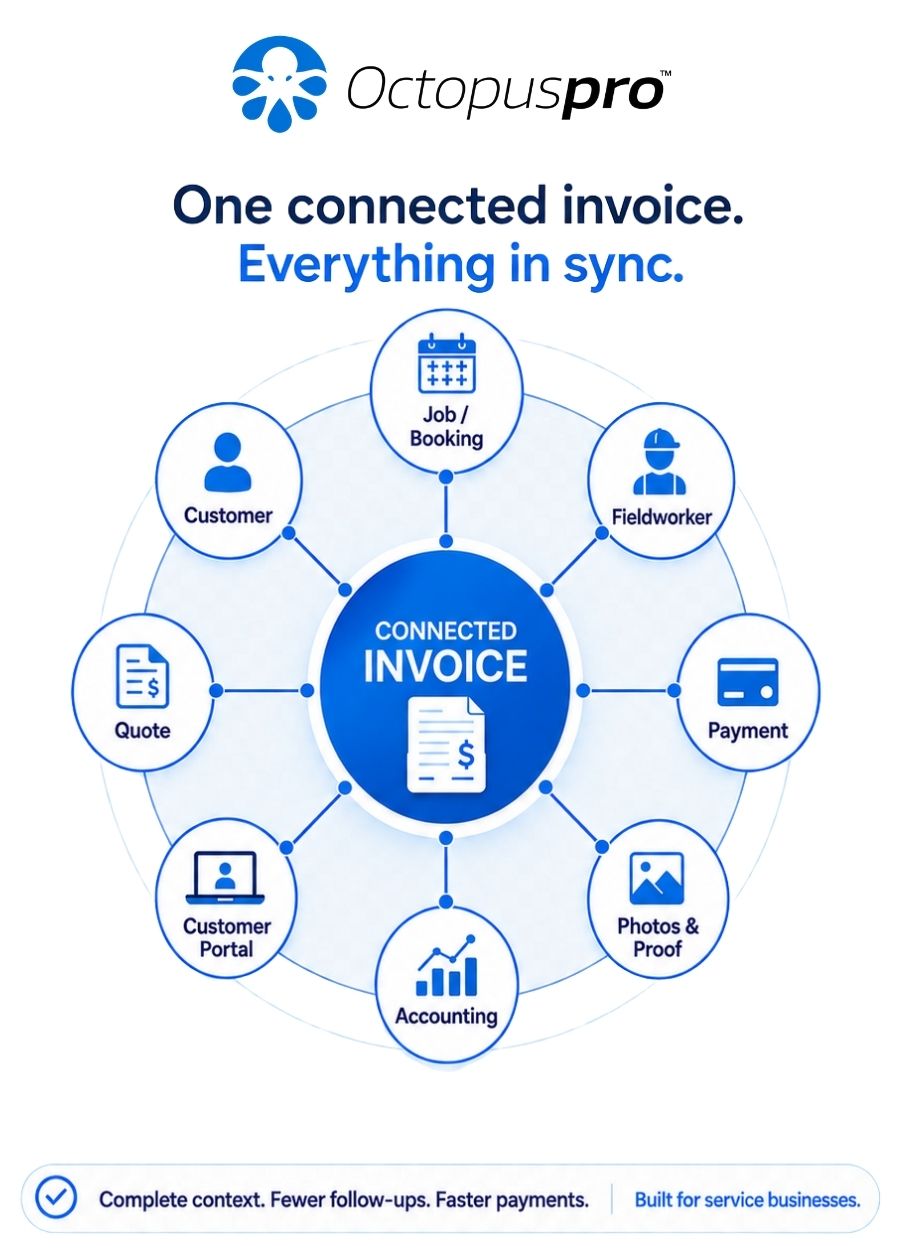
Get invoices out faster without losing the job, customer, or payment context
OctopusPro’s invoicing and billing tools are built for businesses that need to invoice fast, get paid sooner, and keep financial records clean. It suits electricians, plumbers, towing companies, mobile mechanics, cleaners, pest control, lawn and garden services, HVAC, security, painting, tiling, pet care, babysitting, tutoring, healthcare-style appointment services, class-based businesses, branch-based teams, and other field, mobile, storefront, or online service operations.
It is also a strong fit for real estate agencies, builders, facilities managers, strata companies, commercial maintenance teams, and businesses that coordinate repeat work across multiple properties, sites, customers, fieldworkers, branches, attendees, and billing cycles.
Related user guides: manage invoices in OctopusPro field service invoice payment workflows booking location types and service models
Keep invoicing consistent across mobile jobs, storefronts, remote services, and group sessions
Many service businesses do not bill in just one way. OctopusPro supports different service delivery models while keeping invoices, payments, deposits, balances, refunds, customer history, and reporting connected in the same billing workflow.
Branch, storefront, and POS-style service billing
Take deposits online, record counter or in-store payments, collect the balance later, sell products or add-ons, and keep service revenue, payments, invoices, receipts, refunds, and outstanding balances connected to the correct branch, location, customer, and booking.
Mobile and on-site field service billing
Create invoices from work completed on site, attach proof, take payment through the fieldworker app, record cash or offline payments where allowed, and send customers an invoice or payment link before the job context is lost.
Remote and virtual service billing
Use online checkout, deposits, pay-in-full rules, card-on-file settings, portal invoices, and automatic invoice creation for online appointments such as consulting, coaching, telehealth-style services, tutoring, or other virtual sessions.
Group bookings, classes, and shared sessions
Support per-person pricing, flat-rate per-session pricing, public or invite-only sessions, single-seat or multi-seat checkout, unified payment by one organiser, or split payment across attendees while keeping capacity, payments, attendance, invoices, and refunds easier to manage.
Related user guides: POS software for multi-location service businesses remote service management and online payments group booking and class scheduling booking location types
See how connected invoicing works in real service scenarios
Different industries bill differently, but the goal is the same: create the invoice from the work record, give the customer enough context to approve it, and collect payment without creating extra admin.
Plumbing and emergency repairs
Create a call-out invoice from the completed booking, include labour, parts, tax, photos, and a payment link before the job context is forgotten.
Cleaning and maintenance
Use recurring bookings, billing cycles, customer statements, and consolidated invoices for account customers with multiple sites.
Mobile mechanics
Add before/after photos, parts receipts, signed job cards, and on-site payment collection from the fieldworker app.
Tutoring, classes, and coaching
Use deposits, per-seat payments, pay-in-full rules, and portal checkout for group sessions or remote appointments.
Property and facilities teams
Track the customer, property, site contact, bill payer, proof, purchase order, and invoice history in one workflow.
Related user guides: recurring bookings and repeat work customer billing cycles field service invoice payments
Solve the billing problem slowing down payment and finance work
Start with the billing challenge your team needs to solve first, then explore the controls that support each workflow.
Invoice immediately after the job
Create invoices from bookings, jobs, estimates, or quotes without double entry. Ideal for urgent call-outs, repairs, mobile services, and high-volume teams that need invoices sent while the job context is fresh.
Help customers approve and pay faster
Add proof, attachments, notes, signatures, payment instructions, online payment links, and communication history so customers have fewer reasons to delay or question an invoice.
Manage account customers properly
Use customer-level terms, statements of account, billing cycles, consolidated invoices, lock/unlock controls, and recurring automations for weekly, fortnightly, monthly, or custom billing cycles.
Give finance cleaner records
Track statuses, payments, refunds, partial payments, unknown payments, reconciliation, ownership, audit history, reporting, and Xero or QuickBooks sync from one connected billing workflow.
Related user guides: field service invoice payments and deposits customer billing cycle management customer statements of account
OctopusPro is strongest when billing needs to stay connected to real service work.
It is ideal when invoicing is not just a document, but part of dispatch, job completion, proof collection, customer approval, online payment, account billing, finance reporting, and accounting sync.
Built to improve growth, efficiency, and profitability
The same billing controls support faster revenue collection, cleaner admin, and better financial visibility.

Growth
Grow faster with invoicing and billing that scales: automated reminders, faster payments, cleaner records, and accounting integrations.

Efficiency
Invoice more jobs per staff member using one-click invoice generation, bulk actions, filters, and reconciliation tools.

Profitability
Reduce revenue leakage with accurate billing, due dates, deposits, refunds tracking, and consolidated billing cycles.
Related user guides: invoice management and payment tracking live reports and analytics
Basic invoicing tools create documents. OctopusPro connects billing to the full service workflow.
Most billing delays happen because the invoice is disconnected from the job, proof, customer communication, payment activity, or finance review. OctopusPro is built to keep those pieces together.
Create the invoice, then chase the context
Standalone invoices often need separate job notes, photos, payment updates, reminders, and customer history before finance can close the record.
Flexible, but hard to control
Manual registers can track totals, but they make approvals, reminders, audit history, customer statements, and reconciliation harder to manage at scale.
Good for calendars, weaker for finance
Scheduling tools can capture appointments, but many do not connect deposits, job proof, account billing, refunds, statements, and accounting sync deeply enough.
Connect work, proof, payment, and finance
Create invoices from real service records, collect online, automate follow-up, manage exceptions, and keep finance visibility in one connected workflow.
Replace scattered billing admin with one controlled revenue workflow
Basic invoice tools can create a document, but field service billing usually needs more than a document. OctopusPro keeps the invoice connected to the work, customer, communication, proof, payment activity, and finance review.
Without a connected workflow
- Invoices are recreated manually from jobs or spreadsheets.
- Proof, photos, signatures, and receipts sit in separate places.
- Customers ask for context before approving payment.
- Reminders continue during disputes unless someone remembers to stop them.
- Payments and refunds are harder to match at month-end.
With OctopusPro
- Invoices are generated from quotes, bookings, and completed jobs.
- Attachments, notes, signatures, and communication history stay linked.
- Customers can review, approve, and pay online.
- Reminders can be automated, paused, resumed, and tracked.
- Accounts can reconcile payments, refunds, balances, and accounting sync with more confidence.
Related user guides: invoice management workflow view invoice details and history field service invoice payments
Move from enquiry to payment without double entry
OctopusPro connects the full path from enquiry, estimate and job delivery through to invoice, payment, reminders, consolidated billing and closure. The lifecycle view shows how each revenue step stays connected, so teams can move from enquiry to payment with less rework and fewer missed handovers.
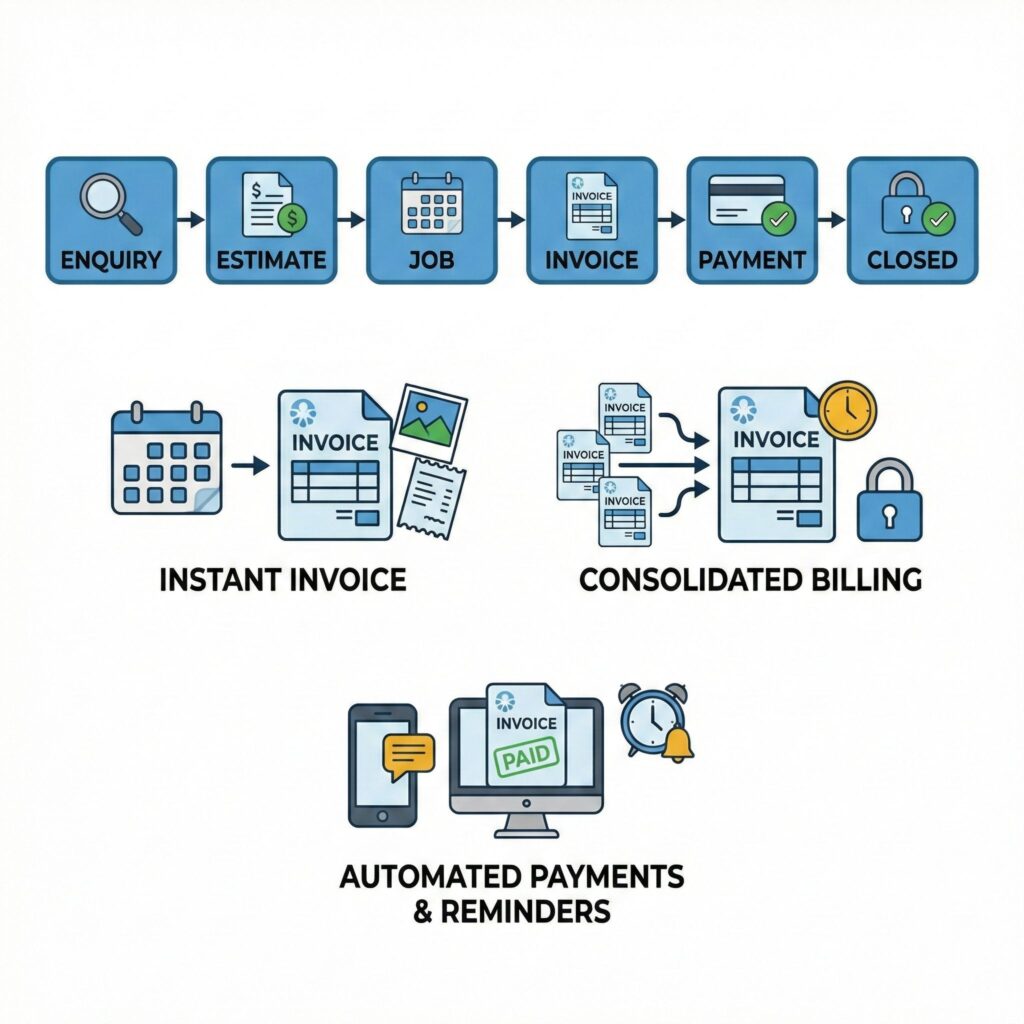
Related user guides: convert inquiries into estimates convert approved quotes to bookings send invoices to customers add payments to invoices
Invoice faster without disconnecting billing from the job.
Create clean invoices from completed service work, then collect payment with proof, reminders, and finance controls already connected.
Get paid, reconcile faster, and reduce billing admin
These are the practical controls your team needs to invoice, collect, reconcile, and manage billing exceptions at scale.
- Convert quotes and bookings into invoices in a few clicks with no double entry.
- Advanced invoice search and filters by customer, job, status, date range, label/tag, invoice number, fieldworker, and more.
- Complete customer billing history showing every invoice, payment, refund, balance, and due date tied to the customer record.
- Communication history and audit trail for invoice emails, SMS, reminders, and internal notes.
- Fast billing for urgent call-outs such as electricians, plumbers, towing, mobile mechanics, and emergency repairs.
- Automated reminders and follow-ups by email and SMS, with the ability to pause or resume reminders per invoice.
- Payment confirmations and receipts so acknowledgements are sent and payment activity stays visible.
- Payment tracking, refunds, and balances including partial payments and accurate remaining balances.
- Payment import and reconciliation with matching workflows, confidence review, and handling for unknown or unapplied payments.
- Online payments through your website, customer portal, or app.
- Connected workflow across enquiries, estimates, quotes, bookings, invoices, payments, refunds, and issues.
- Billing cycles and consolidated invoicing for weekly, monthly, or custom account billing.
- Xero and QuickBooks sync to align billing and payment data with your accounting system.
- Customer account statements showing invoices, payments, credits, and total balance owing.
- Auto-generated invoices for Customer Portal and Booking Widget bookings.
Related user guides: invoice management in OctopusPro send an invoice to a customer customer billing cycles and consolidated billing field service invoice payments

Make invoice review and payment easier for every customer
Customise your invoices
Add your logo, business details, customer information, tax settings, payment terms, notes, attachments, and payment instructions.
From quote to invoice
Turn accepted estimates, quotes, active jobs, or completed bookings into invoices while preserving traceability and ownership.

Bill anytime, anywhere
Fieldworkers can generate and send invoices from iOS and Android apps while still on site or as soon as the job is finished.

Accept online payments
Customers and authorised staff can pay by card through your website, customer portal, or app, with payments recorded against invoices.
Related user guides: customise invoice templates convert quotes to bookings fieldworker invoice creation permissions accept invoice payments online

Keep billing professional as your services, regions, and customer types grow
OctopusPro gives you the practical controls needed to keep invoices professional, compliant, flexible, and consistent across locations, services, customers, and trading names.

Multi-currency and account currency control
Bill customers in the right currency for international or multi-region operations, while keeping your account currency, invoice totals, taxes, discounts, refunds, balances, payment processing context, and financial reporting consistent with your operating region.

Branded invoice templates
Create professional invoice and quote layouts with logo upload, logo alignment, font size and font family controls, font and border colours, branded headers and footers, payment instructions, terms, payment advice, and optional PDF/text attachments for customer-facing documents.

Payment and invoice tracking
Track statuses, due dates, balances, payment history, receipts, pending payment approvals, refunds, and the full audit trail from draft through to closed or void.
Recurring billing
Automate billing for weekly cleaning, tutoring, commercial maintenance, repeat appointments, packages, bundles, and ongoing contracts.
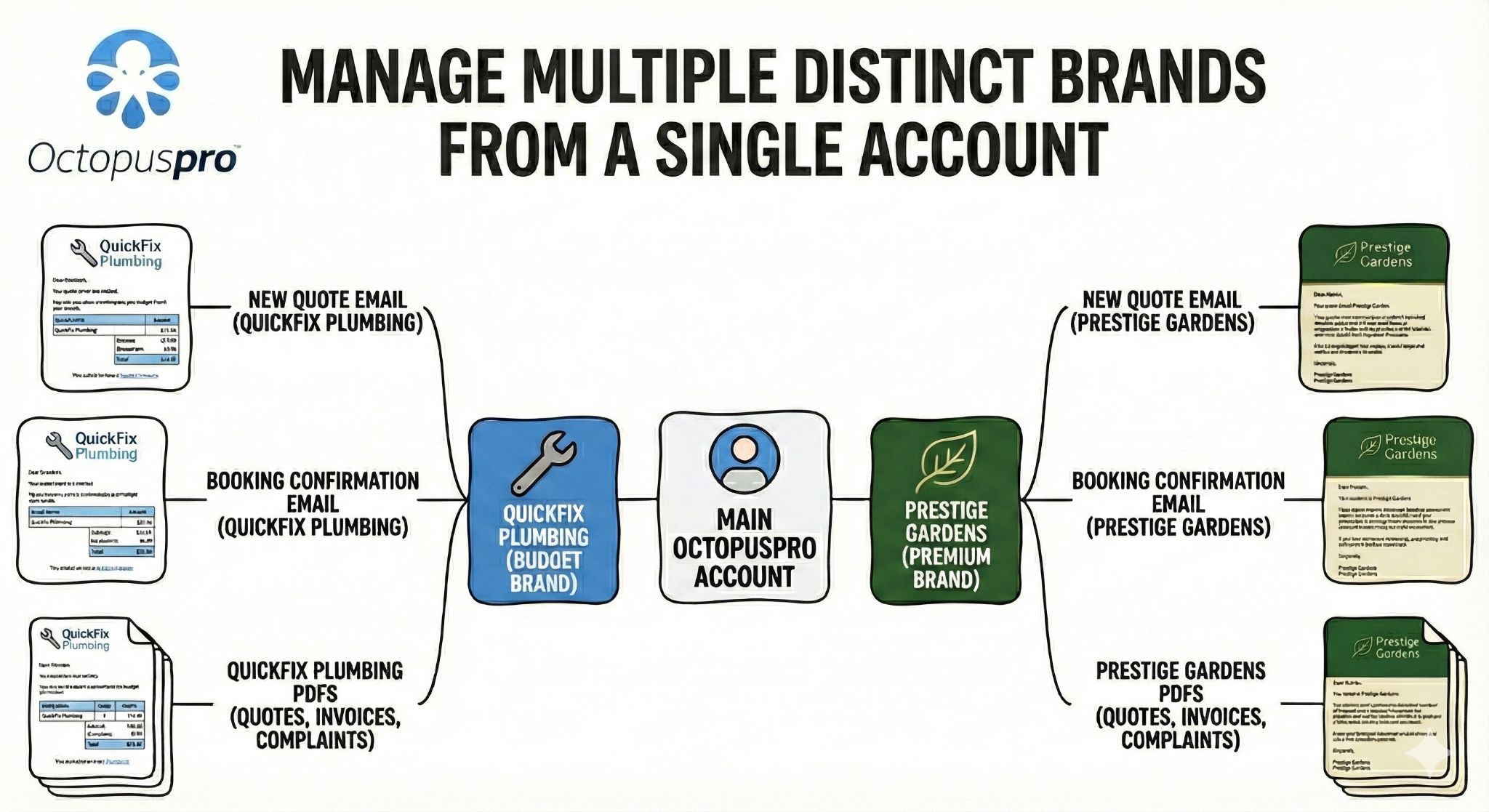
Trading-name and sub-brand support
Use global invoice defaults while allowing trading-name overrides for logos, document styling, payment instructions, legal wording, and customer-facing details when your business operates multiple brands, regions, or service lines.
Tax and compliance controls
Support tax-inclusive or tax-exclusive pricing, multiple GST/VAT/Sales Tax rates, default and item-level tax behaviour, zero-rated or exempt items, service/product tax overrides, booking or quote tax adjustments, compound/location-aware tax rules where configured, and tax details that appear clearly on invoice PDFs and customer checkout screens.
Template placeholders
Use dynamic customer, booking, invoice, and fieldworker details in email and SMS templates so billing communication stays personalised without manual rewriting.
Trading-name invoice branding preview
Run multiple brands, regions, or service lines from one account while keeping customer-facing invoices, logos, styling, entity details, and payment instructions aligned with the correct trading name.


Move approved quotes into paid work without retyping the commercial record
For businesses that quote before they book or invoice, OctopusPro keeps the approval, scope, pricing, files, reminders, and customer response connected before the invoice is created.
Send and track quotes before invoicing
Email or SMS professional estimates using branded templates, quote PDFs, attachments, terms, photos, plans, and scope documents, then keep the sending activity recorded in the quote history.
Capture customer accept, decline, or sign-off
Let customers accept, decline, or sign and approve quotes where enabled. Store acceptance proof, decline reasons, communication history, and customer responses so the future invoice has a clearer approval trail.
Use expiry dates and automated follow-ups
Track sent, accepted, declined, and expired quotes, use expiry and follow-up indicators, and automate quote reminders by email, SMS, or WhatsApp where configured so approved work does not go cold.
Convert approved quotes into bookings
Move accepted quotes into bookings without retyping customer details, service location, line items, quantities, prices, discounts, taxes, notes, discussions, or attached files.
Let customers self-schedule after approval
When your workflow allows it, customers can approve a quote and then move into scheduling, deposit, payment, or booking confirmation steps through the customer portal or guided communication flow.
Keep sales and billing accountability together
Quote ownership, labels, follow-up status, customer history, and conversion records help managers see which quotes became paid work and which approvals need attention before invoicing.
Related user guides: quote and estimate management send quotes to customers customer quote accept or decline workflow quote follow-up reminder automation convert quotes to bookings
Start cash-flow actions the moment work becomes billable
OctopusPro can support invoices being created automatically or on demand from the booking, job, portal, payment, cancellation, or deposit workflow so cash-flow actions start when the business has a legitimate reason to bill.
Completed jobs
When an appointment is marked completed, OctopusPro can generate the invoice from the billable work, send it to the customer, and start payment follow-up without rebuilding the job manually.
In-progress and milestone billing
For longer jobs, projects, materials-heavy work, deposits, or progress payments, invoices can be generated before final completion so partial or milestone payments can be requested earlier.
Failed, cancelled, or no-show jobs
Where policy allows, failed bookings, late cancellations, inaccessible sites, or no-shows can trigger call-out, no-show, or cancellation fee invoices so revenue recovery is not forgotten.
Deposit-required bookings
When customers pay a deposit, choose bank transfer, or need to secure materials or an appointment slot, the system can generate a deposit invoice with payment instructions or checkout options.
Portal and widget confirmations
Customer Portal and Booking Widget bookings can create invoices as soon as the customer confirms, giving the office an immediate receivable and the customer a clear payment path.
Manual force generation
Staff can still generate invoices on demand from bookings, the calendar, list views, or invoice actions when a job requires early billing, a manual deposit request, or a special payment arrangement.
Related user guides: invoice generation and payment workflows auto-generate invoices from customer portal bookings payments and deposits for bookings call-out and no-show fee setup booking cancellation fees
Want invoice creation and payment rules set up correctly?
Speak to an expert to configure portal invoices, deposits, cancellation fees, payment links, reminders, and approval rules around the way your business actually bills.
Create invoices fast, send them instantly, and get paid online
Admin work should not delay cash flow. With OctopusPro, you can generate a professional invoice in seconds, send it to the customer by email and SMS where enabled, and let them pay online through your website, customer portal, or app.
- Convert quotes and bookings into invoices without double entry.
- Create invoices from jobs when work starts, progresses, or finishes.
- Allow fieldworkers to generate invoices on-site where permissions allow.
- Let fieldworkers add approved custom services or extra line items from the field when the job scope changes.
- Apply customer-specific payment terms, due dates, deposits, card-on-file rules, pre-authorisation, or pay-later settings.
- Attach photos, receipts, certificates, signed job cards, reports, or timesheets.
- Track balances, due dates, partial payments, payment approvals, refunds, receipts, and invoice status in real time.
Related user guides: send invoices to customers add a payment to an invoice attach files to invoices field service invoice payments
Capture payment sooner when customers book online
When a customer confirms an appointment through your Customer Portal or Booking Widget, OctopusPro can automatically create a branded invoice, link it to the booking, and send it using your configured email and SMS rules.

- Automatically draft or send invoices when online bookings are confirmed.
- Attach the invoice to the booking and invoice list for easy tracking.
- Support deposits or upfront payments when required to secure the appointment.
- Let customers view invoices, payment history, and account details through portal self-service where enabled.
- Support saved payment methods in the portal when tokenised storage and gateway settings are configured.
- Keep quoting-first workflows available when the job needs assessment before billing.
Related user guides: auto-generate invoices for Customer Portal bookings accept online bookings through your website Customer Portal payment methods
Give customers a branded place to confirm, review, pay, cancel, and return
Invoice conversion improves when customers recognise the payment environment and understand what to do next. OctopusPro can connect billing to a branded portal experience, online booking checkout, customer self-service, cancellation rules, payment method visibility, and reusable payment communication templates.
White-label portal domain
Use a branded customer portal URL where configured so invoice payments, quote confirmations, booking checkout, account review, and customer self-service feel connected to your business rather than a disconnected third-party tool.
Portal branding and styling
Align customer-facing payment and booking experiences with your logo, colours, trading name, portal styling, payment instructions, payment advice, and customer-facing wording.
Two-step payment method visibility
Enable payment methods in Financial Settings, then choose which of those methods appear on the Customer Portal checkout, so customers only see approved card, gateway, bank transfer, cash, cheque, debit, voucher, or pay-later options.
Offline payment instructions
Show notes or remarks for bank transfer, cash, cheque, gift card, debit, or other offline methods so customers know exactly what reference to use and what happens after they submit payment.
Customer invoice self-service
Let customers review invoices, payment history, statements, saved payment details, booking records, and account information without needing your office team to resend the same documents repeatedly.
Policy checkpoints and disclaimers
Add customer-facing booking disclaimers, cancellation windows, payment expectations, safety notes, or extra-charge warnings before customers confirm, helping reduce billing disputes and chargebacks later.
Multi-language and region-ready experience
For multi-region or bilingual teams, portal settings can support clearer customer communication, localised wording, service names, disclaimers, payment instructions, and trading-name presentation where configured.
Checkout confidence
Keep the invoice, payment amount, tax, surcharge, deposit, discount, voucher, cancellation policy, and balance details clear before the customer submits payment.
Related user guides: Customer Portal general settings white-label Customer Portal URL setup Customer Portal branding and style settings Customer Portal payment method visibility customer portal booking cancellation settings
Show customers the right details so invoices are approved faster
A clean invoice is not only about the total. OctopusPro can help you control the way service details, appointment information, line items, tax, entity details, trading names, terms, and payment advice appear on the documents customers, bill payers, insurers, and accounts teams review.
Itemised or simplified cost breakdowns
Choose whether customer-facing PDFs show detailed service line items, unit pricing, quantities, subtotals, tax, and discounts, or a cleaner total-focused layout when a simplified document is better for the customer relationship.
Appointment visibility on PDFs
Show or hide scheduled appointment dates, start times, end times, and service timing details on invoice, quote, and booking PDFs depending on whether timing helps the customer approve the work or makes the document unnecessarily busy.
Preview before sending
Preview invoice and quote PDFs before sending so your team can check branding, line items, tax, scheduled appointment details, payment advice, and the final customer-facing layout before the document leaves the system.
Business or individual invoice entity
Where your workflow requires it, control whether customer-facing PDFs display business details or individual/fieldworker seller details, helping marketplace, subcontractor, franchise, and multi-entity billing workflows stay clearer.
Terms, payment advice, and attachments
Add Terms and Conditions, payment advice, custom headers, footers, supporting PDFs, text attachments, or customer instructions so invoices carry the payment and approval information your customers need.
Trading-name PDF overrides
Apply global invoice settings while allowing trading names or sub-brands to use their own logo, styling, payment instructions, entity details, and customer-facing wording when required.
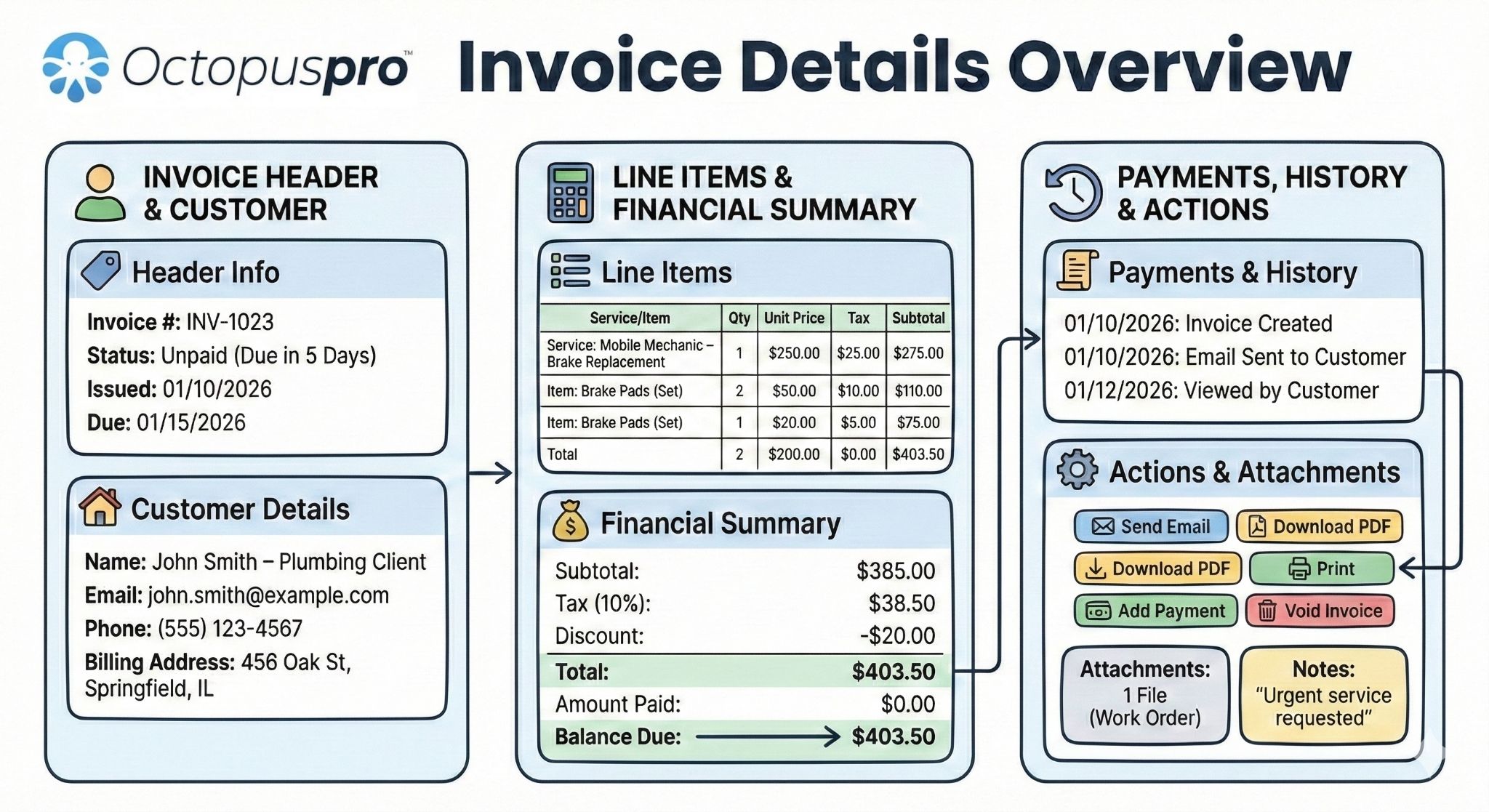
Invoice details and review screen
Review invoice details, actions, history, payments, and supporting records from one workspace so staff can answer customer questions without switching between disconnected systems.
Give customers proof upfront so approvals happen faster
Attach supporting files directly to invoices so approvals happen faster and fewer disputes come back to your team.

- Photos and before/after evidence.
- Signed job cards and customer authorisations.
- Compliance certificates and inspection reports.
- Completed forms, checklists, custom-field answers, job photo tags, and service-specific evidence collected during the job.
- Parts receipts, material receipts, and supplier invoices.
- Timesheets, service records, and other supporting documents.
Example: A mobile mechanic attaches before/after photos and the parts receipt. The customer sees proof immediately and can pay faster.
Related user guides: attach files to invoices booking, quote and inquiry attachments fieldworker photo upload on job completion
Get invoice approvals signed without chasing customers
Get invoices approved faster and reduce disputes with built-in eSignature capture. Customers can sign on site, remotely from an email or SMS link, or through the customer portal.

- On-site signature capture: fieldworkers can hand the device to the customer before leaving the job.
- Remote signing: customers can sign from their own phone for off-site approvals or after-hours work.
- Customer portal signing: customers can review and sign online without installing an app.
- Reusable master signature: store a customer signature for repeat work where appropriate.
Related user guides: collect customer signatures digital signature custom field setup
Export or download a professional invoice PDF anytime
Generate invoice PDFs for customer emails, job records, insurance claims, manual approvals, account documentation, or internal review.

- Download, export, or print invoices as professional PDFs.
- Email invoices as payment requests, receipts, or paid-to-date summaries showing totals, tax, paid amounts, and remaining balance.
- Use PDFs for approvals, insurer processing, customer records, or dispute handling.
- Keep supporting evidence associated with the invoice record.
Example: A towing company exports a PDF invoice with attached evidence and tow authorisation for insurer processing.
Related user guides: export invoice PDF view invoice details send invoice to customer
Manage every invoice status, edit, correction, and audit trail with confidence
OctopusPro gives your team clear invoice statuses so everyone knows what is still being prepared, what has been sent, what is overdue, what has been paid, and what has been cancelled. Instead of treating invoices as static PDFs, OctopusPro helps you manage the full lifecycle of each invoice with safeguards for changes, payments, accounting sync, and closed billing periods.

- Edit invoice details when allowed: update line items, prices, taxes, discounts, customer billing details, or job-related charges while respecting invoice status, payment, and accounting-sync rules.
- Convert invoices to Draft when line items need to be reworked before sending, subject to invoice status and payment restrictions.
- Void an invoice for duplicates, cancellations, or invoice errors while keeping the record, safeguards, and audit history intact.
- Delete invoices only where permitted so removal is controlled, intentional, and aligned with your billing workflow.
- Manage invoice numbers and reference IDs where your business needs controlled numbering, starting sequences for migration, unique customer-facing references, corrected invoice numbers, or sync-aware updates for Xero and QuickBooks.
- Protect locked or consolidated invoices so closed billing periods are not edited accidentally.
- Keep history visible with invoice activity, communication records, ownership, notes, status changes, and payment activity connected to the invoice record.
Related user guides: view invoice details edit invoices convert invoices to draft convert invoices to void delete invoices safely invoice history log
Keep invoice numbering, references, and duplicate checks clean as you grow
When you move from another system or manage high-volume billing, invoice control is not only about creating new invoices. Your team also needs predictable numbering, searchable references, duplicate checks, and clean links between payments, statements, jobs, and accounting records.
Starting invoice numbers
Set controlled starting numbers for invoices and related records during setup or migration so your next invoice sequence can continue from your previous billing system instead of restarting from scratch.
Invoice number and reference changes
Update invoice numbers or customer-facing reference IDs where permitted, while keeping the change visible in the invoice record and aligned with payment matching and accounting sync rules.
Duplicate invoice checks
Spot duplicate invoice-number risks before they cause payment confusion, customer disputes, duplicate exports, or month-end cleanup work.
Payment reference discipline
Use invoice numbers, booking numbers, payment references, purchase orders, work-order numbers, cost codes, and bank-transfer notes to connect incoming payments to the right record.
Migration-friendly history
Preserve billing continuity when importing or rebuilding customer records, especially for businesses that need old invoice references, account customers, property records, or recurring billing history to stay searchable.
Cleaner accounting exports
Keep numbering, item codes, tax settings, customer contacts, and payment references consistent so exported records are easier for finance teams and bookkeepers to trust.
Related user guides: set starting numbers for invoices, quotes and bookings edit invoice numbers add labels to invoices universal search and advanced filters
Set due dates that match each customer, job, and billing policy
Payment terms should not be one-size-fits-all. OctopusPro lets you control due dates using a clear hierarchy: invoice-level overrides first, then customer-level defaults, then the company-wide fallback. That keeps standard billing consistent while still allowing exceptions for urgent work, account customers, disputes, or special arrangements.

- Invoice-level overrides: set a specific due date or custom exception for one invoice.
- Customer-level defaults: apply agreed terms such as Net 7, Net 14, Net 30, or custom Net days for commercial accounts.
- Company-level defaults: keep a global fallback for new invoices when no customer or invoice override exists.
- Booking-based due dates: support payment timing based on booking start, booking completion, fixed monthly billing days, or days after invoice creation where configured.
- Outstanding invoice updates: when customer or company terms change, eligible outstanding invoices can be reviewed so finance does not lose control of existing balances.
Example: An electrician can set retail clients to Net 30, residential jobs to due on completion, and urgent call-outs to a custom invoice-level due date.
Related user guides: invoice due dates and payment terms service payment terms customer billing cycle management
Give customers the right way to pay while keeping finance in control
OctopusPro does more than add a payment link. It helps you control when payment is required, how it is collected, who can record it, and how approvals are handled before the invoice is treated as paid.
Deposits, upfront payment, and pay-later
Set payment rules that match the service: collect a fixed deposit, percentage deposit, full upfront payment, or allow payment after the job where appropriate.
Card-on-file and pre-authorisation
For selected services, require a saved card or pre-authorise payment before work begins so bookings are more serious and collection risk is lower.
Online and offline payment methods
Accept online card payments while still recording cash, bank transfer, cheque, external terminal payments, gift cards, or other configured payment types.
Partial payments and receipts
Record multiple payments against one invoice, keep balances accurate, and send receipts or confirmations so customers and staff know what has been paid.
Pending payment approvals
Keep manual or field-recorded payments pending until authorised users approve them, helping reduce payment-entry errors and internal control risks.
Saved cards and portal self-service
Let customers manage saved payment methods and view/pay invoices through the customer portal where your account and gateway settings support it.
Related user guides: field service invoice payment methods payments and deposits for bookings payment method configuration Customer Portal payment methods
Control when payment is required before, during, and after the job
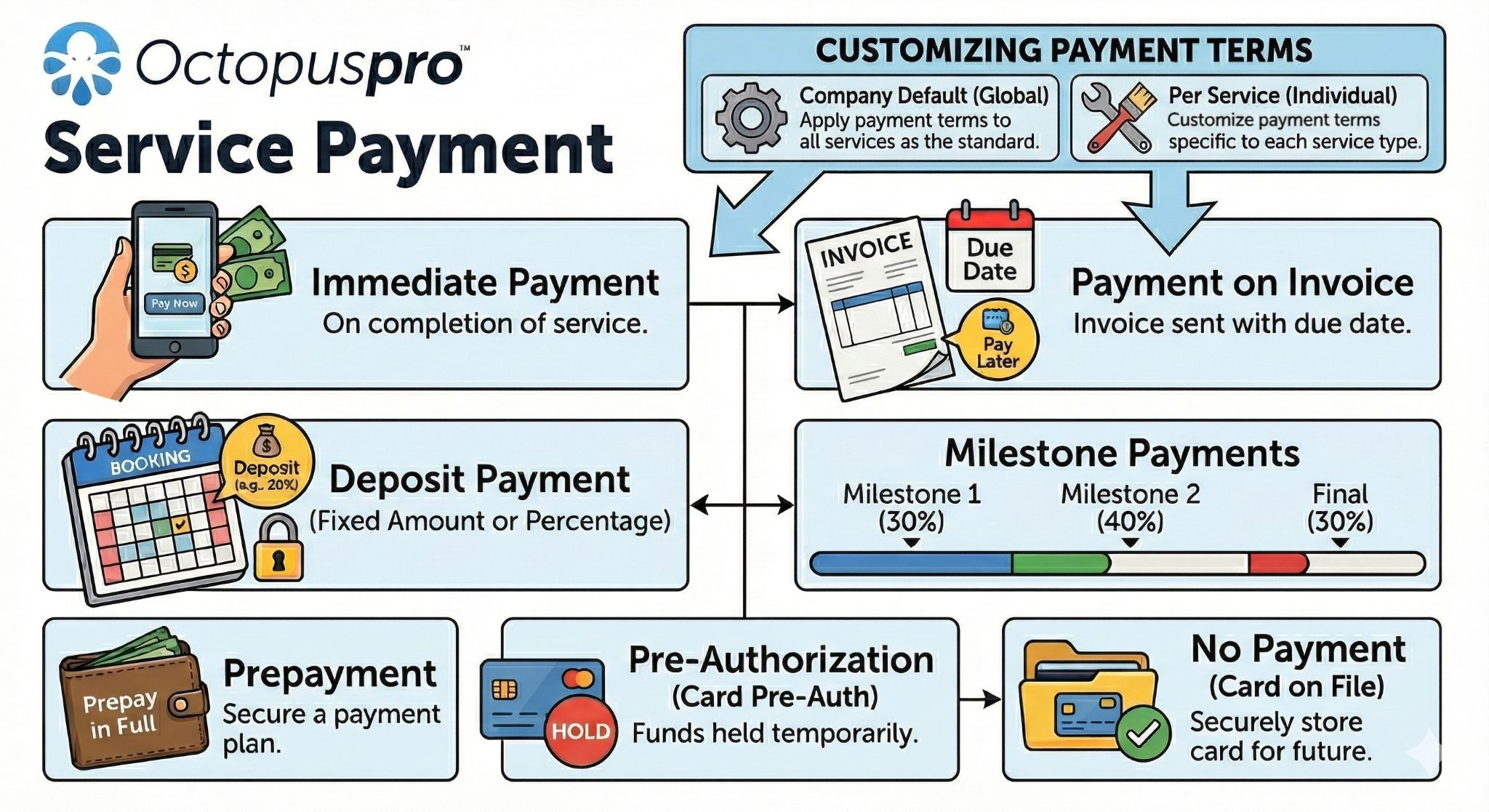
Different services need different payment rules. OctopusPro can support company-wide defaults and service-level overrides so simple jobs, inspections, emergency call-outs, long projects, and online bookings can each follow the right payment path.
No payment or pay later
Let customers book without paying upfront for inspections, quote-first work, trusted account customers, or services where your team invoices after completion.
No payment with card on file
Capture a saved card without charging immediately, helping reduce no-shows while still allowing your team to charge later for the final invoice, add-ons, cancellation fees, or approved balances.
Fixed or percentage deposits
Require a fixed deposit or percentage of the booking total, and record it as a partial payment so the remaining balance stays visible on the invoice.
Charge on booking creation or acceptance
For Customer Portal bookings, collect payment immediately when the booking is created or only after the job is accepted or approved, depending on the service workflow.
Full payment and pre-authorisation
Require full payment for selected services or use a pre-authorisation hold for security deposits, equipment rentals, high-risk bookings, or jobs where payment confidence is important before dispatch.
Delayed full-payment timing
For services that need approval first, support payment timing rules such as charging on booking creation, on booking acceptance, or after a configured grace period, so the payment rule matches how the job is confirmed.
Pre-authorisation capture and release
Use card holds where the final price may change, then capture the final amount, capture a partial amount, or release/void the hold depending on job outcome, gateway rules, and expiry timing.
Progress and milestone billing
Support longer jobs with deposits, progress invoices, milestone instalments, and final invoices so cash flow can follow the work rather than waiting until the end.
Terms and Conditions on documents
Attach or display business terms across quotes, bookings, and invoices so deposit rules, cancellation rules, payment deadlines, and approval conditions are clear before customers commit.
Service-level overrides
Use different payment requirements by service, such as full payment for emergency call-outs, deposits for high-value work, or pay-later terms for commercial accounts.
Deposit reminders and balance follow-up
Pair upfront payment settings with automated reminders, receipts, refund controls, and balance tracking so deposits do not become disconnected from the final invoice.
Service payment terms setup
Set payment rules by service so deposits, pay-later options, card-on-file settings, pre-authorisations, and timing requirements match the way each job is booked and billed.
Related user guides: service payment terms setup payments and deposits for bookings credit card surcharge setup
Make it easier for customers, staff, and fieldworkers to complete payment correctly
Every payment path should lead back to the right invoice. OctopusPro can support payment links, hosted checkout, saved-card charging, bank-transfer instructions, tip and surcharge handling, updated balances, receipt PDFs, and approval controls so collection feels professional from the office, the field, or the customer portal.
Pay Invoice links in email and SMS
Send customers a direct Pay Invoice link by email or SMS so they can open a secure checkout page, review the invoice summary, confirm the balance, and pay without calling the office.
Hosted checkout with saved-card options
Let customers pay through gateway-hosted checkout using a saved card, new card, compatible digital wallet, or enabled bank-transfer option, while tokenisation keeps raw card data outside your systems.
Quick-send deposit requests
Request a deposit from a booking or invoice workflow by sending a checkout link with the deposit amount already prepared, helping secure materials, appointments, or high-value work before dispatch.
Tip, surcharge, reference, and notes capture
Capture payment amount, optional tip, surcharge where configured, payment reference, purchase order number, work-order number, and internal notes so the payment record is useful for both customer service and finance.
Instant receipts and PDF proof
After successful payment, customers can receive confirmation, emailed receipts, downloadable PDF proof, and updated invoice balances so fewer customers contact your team asking whether payment went through.
Role-based payment paths
Support back-office payment entry, fieldworker app payment collection, customer self-service checkout, and admin approval of offline methods while keeping the transaction linked to the invoice.
Related user guides: invoice payment links and checkout send invoices by email SMS templates for payment reminders email template settings
Give customers familiar ways to pay while keeping every transaction reviewable
OctopusPro can support online gateways, payment links, offline instructions, customer-facing receipts, payment references, and audit-ready records so customers know how to pay and finance can verify what happened.
Payment gateways and digital wallets
Use supported gateway and checkout workflows such as Stripe, Square, PayPal/Braintree, eWay, Authorize.net, Checkout.com, PayFast, Tap, GlobalPayments, Afterpay, Zip Pay, Apple Pay, Google Pay, Google Wallet, Samsung Pay, WePay, 2Checkout, BitPay, Telr, and other regional options where available through your setup.
Secure hosted checkout
Send invoice payment links that direct customers to a gateway-backed payment experience, reducing manual card handling and supporting tokenised, PCI-DSS-aware payment workflows where your gateway supports it.
Clear bank transfer instructions
Display company bank details, payment reference or PO guidance, offline payment instructions, and invoice notes so bank transfer, ACH/EFT, cash, cheque, money order, voucher, and manual payments are easier for customers to make and easier for accounts to match later.
Surcharge and fee transparency
Configure surcharge rules by gateway and card type where supported, show surcharge amounts during payment, on invoice/payment views, and in invoice PDFs, and keep payment terms, cancellation rules, travel charges, refund conditions, and other payment policies visible before they become disputes.
Duplicate payment and exception visibility
Make overpayments, duplicate payment risk, declined/failed card attempts, unknown payments, pending payments, refunds, and correction activity easier for finance teams to review before balances and reports are finalised.
Payment messages across channels
Use email and SMS invoice templates, dynamic placeholders, payment confirmations, receipts, and WhatsApp nudges where configured so customers receive clearer payment instructions and reminders.
Related user guides: payment method configuration Stripe payment gateway integration Square payment gateway integration PayPal payment gateway integration eWAY payment gateway integration Tap payment gateway integration Checkout.com payment gateway integration credit card surcharge rules
Show the right bank details and payout context on invoices
For bank transfers, contractor marketplaces, franchise-style operations, and multi-entity businesses, the invoice needs to show the right payment destination and legal billing identity.
Company bank details on invoices
Add company bank account details once so they can appear on invoice PDFs, invoice emails, and customer portal checkout when bank transfer is enabled.
Fieldworker bank details where required
For marketplace or contractor workflows, invoices can use fieldworker bank and business details where your invoice entity display settings require the individual provider to appear as the seller of record.
Business vs individual invoice entity display
Choose whether invoices should display the business entity or the individual fieldworker entity, supporting contractor models, sub-brands, and tax identity requirements.
Bank transfer checkout visibility
When bank transfer is accepted, customers can see the correct bank details and payment instructions during checkout or on invoice documents so fewer payments arrive without context.
Batch payout export context
Connect fieldworker bank details to payout reports and bank-ready exports such as ABA, NACHA/ACH, BACS, and ISO 20022-style workflows where supported.
Secure bank detail governance
Use role-based access, masked/encrypted bank details, activity history, and change tracking so finance can review who updated payment destination details.
Related user guides: company bank details setup fieldworker bank details Customer Portal payment methods
Protect payment handling with tokenised checkout, approvals, permissions, and audit trails
Payment flexibility is only valuable when finance can still control risk. OctopusPro supports controlled card, wallet, bank, and offline payment workflows so payment records stay reviewable before they affect final reporting.
Tokenised cards and saved payment methods
Use gateway-backed tokenisation for saved cards where supported, so staff can charge saved cards for balances, recurring jobs, or future bookings without handling raw card details, while keeping card storage in the gateway vault and supporting lighter PCI SAQ A-style workflows where applicable.
Offline payment approval controls
Cash, cheque, EFT, bank transfer, voucher, and other offline entries can remain pending or unapproved until authorised staff verify them, reducing fraud risk and the chance of incorrect or unauthorised payment records.
Declined card and failed payment visibility
Keep payment attempts, gateway responses, failed charges, and alternate-payment follow-up visible so your team can recover payments without guessing what happened.
Reference, PO, and note capture
Capture payment references, PO numbers, work-order IDs, and internal notes so bank transfers, cheque payments, external processor payments, and corporate approvals can be matched later.
Permission-based payment access
Limit who can record offline payments, charge saved cards, process refunds, view billing amounts, or change invoice/payment records using role and fieldworker permissions.
Gateway and payment audit trail
Keep user, timestamp, device/IP, reference, refund, receipt, and status context attached to the payment record where available so finance has a clearer review path.
Related user guides: secure invoice payments keep payments pending until reconciled role-based access control and user permissions credit card surcharge configuration
Support back-office payments, fieldworker app payments, and customer self-service checkout
Different people interact with invoice payments in different places. OctopusPro can keep those payment actions tied back to the same invoice balance, receipt history, approval workflow, and reconciliation record.
Back-office payment entry
Admin staff can add payments from the invoice, booking, calendar, or list view, choose the payment route, record references or PO details, handle partial amounts, and send updated invoices or receipts.
Fieldworker app billing tab
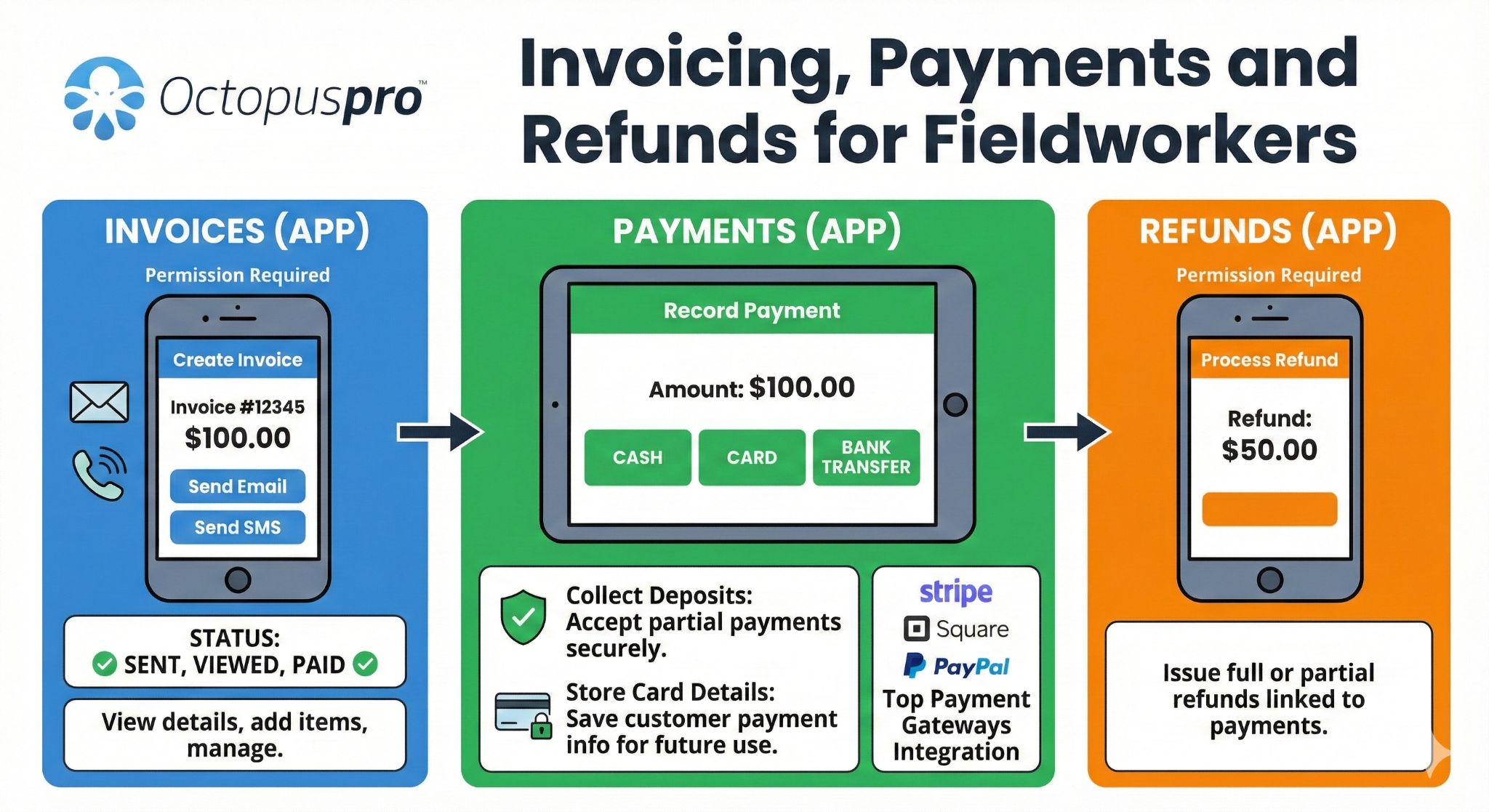
Where permissions allow, fieldworkers can review invoice totals, balances, line items, tips, surcharges, payment status, and refund options from the booking billing tab while on site.
Customer Pay Invoice link
Customers can open a secure payment link from email, SMS, or portal, review the invoice summary, taxes, discounts, and balance, then pay by the enabled gateway, wallet, bank transfer, or offline method.
Instant receipts and updated balances
Successful payments can update the invoice balance, show success confirmation, send receipt emails, and provide downloadable receipt/PDF proof so customers and bookkeepers have evidence immediately.
Portal checkout payment visibility
Payment methods can be enabled at the financial-settings level, then selected for Customer Portal checkout so customers only see the payment options your business wants to offer online.
Offline payment instructions
Bank transfer, cheque, cash, gift voucher, debit, or pay-later methods can display clear instructions and notes, while unapproved offline payments remain reviewable before they affect finance records.
Fieldworker invoice, payment, and refund tools
Give authorised fieldworkers the tools to view invoice balances, collect on-site payments, record payment details, and support refund-related workflows from the field when permissions allow.
Automate invoicing, reminders, and follow-ups without losing control
Once a job is scheduled, in progress, or completed, your team can generate an invoice from the booking and send it with branding, payment instructions, attachments, and a clear due date.
- Automatic overdue reminders sent when an invoice passes its due date.
- Scheduled invoice notifications and activity logging so your team knows what was sent and when.
- Pause or resume reminders per invoice during disputes, purchase order delays, contract changes, or special arrangements.
- Payment confirmations and receipts to acknowledge customer payments and keep the record updated.
Result: faster invoicing, fewer missed follow-ups, and a more professional payment experience without tone-deaf reminders during sensitive situations.
Related user guides: invoice email template settings SMS template settings pause or resume automated communications send invoices to customers

Pause and resume invoice reminders when life happens
Automations are helpful until you are handling a dispute, contract variation, purchase order delay, or customer holiday request. OctopusPro lets you pause invoice reminders for a specific invoice or customer, then resume when ready.

- Pause reminders without deleting templates.
- Resume follow-ups once the issue is resolved.
- Avoid sending overdue notices while a dispute or variation is being handled.
- Keep collection history visible to the team.
Example: A vet clinic can pause reminders while a charge is being discussed, then resume follow-up once the invoice is approved.
Related user guides: pause or resume automated communications handle issues for bookings, quotes and invoices invoice history log
Capture the extra charges that affect service revenue
Field service billing often includes more than labour and materials. OctopusPro can help apply and track the charges that commonly get missed when invoices are rebuilt manually.
Travel fees
Add distance-based or location-related travel fees as invoice line items so mobile service costs are recovered clearly.
Call-out and no-show fees
Charge for failed appointments, attendance, call-outs, or no-show events when your business rules allow it.
Cancellation fees
Add cancellation charges as separate invoice lines and override them case-by-case when managers approve an exception.
Tips, packages, and bundles
Track gratuities separately where enabled, and support package or bundle invoicing rules for prepaid, recurring, or multi-visit services.
Related user guides: distance-based travel fee setup GPS mileage billing call-out and no-show fees booking cancellation fees tips and gratuities service packages and bundles
Protect booked revenue when customers cancel late, no-show, or block billable time
Cancellation billing is not only about adding a fee. OctopusPro can connect portal cancellation permissions, minimum notice windows, customer cancellation notes, booking status changes, fieldworker notifications, and fee line items so your policy is easier to enforce and explain.
Portal and email cancellation paths
Allow eligible customers to cancel through the Customer Portal or cancellation links in booking emails, while keeping the action attached to the booking record instead of buried in separate messages.
Minimum cancellation notice windows
Set a cancellation cut-off window before the booking start time, block customer cancellation/reschedule actions after that window, and show a custom message that explains your policy.
Customer cancellation notes and audit context
Capture the customer’s cancellation reason or note, update the booking status, and keep staff and assigned fieldworkers informed so the invoice or fee decision has context.
Cancellation fee vs call-out/no-show fee
Use cancellation fees for late cancellations before attendance, and call-out or no-show fees for failed jobs where a fieldworker attended or the job could not proceed, with each charge shown clearly as an invoice line item where applicable.
Related user guides: Customer Portal booking cancellation minimum cancellation notice time booking cancellation fee setup call-out and no-show fee setup
Reduce billing surprises with pricing, product, tax, voucher, and inventory-aware controls
Invoices are easier to approve when the customer understands the amount before they pay. OctopusPro can keep service options, products, materials, taxes, discounts, vouchers, and location-based charges connected to the booking and invoice instead of leaving staff to rebuild totals manually.
Real-time service pricing
Let selected service options, add-ons, custom fields, quantities, rooms, units, sessions, upgrades, extras, package options, and quantity-based rules update the expected booking total before checkout.
Minimum prices and total previews
Show starting prices, enforce service minimums, and preview subtotal, discount, tax, surcharge, and total amounts so customers know what they are committing to.
Products, materials, and inventory billing
Add parts, products, consumables, materials, unit labels, SKU/item codes, supplier costs, markup, sale prices, stock usage, and product tax rates to quotes, bookings, and invoices so billable items are not missed.
Geo-pricing and mileage recovery
Use travel fees, distance-based mileage, GPS mileage billing, service areas, suburbs, postcodes, regions, geo-pricing zones, and option-level location pricing to recover location-based costs more transparently.
Discounts, vouchers, and promo codes
Support discount rules, voucher codes, amount/percentage/unit discounts, coupon-style promotions, referral offers, seasonal campaigns, redemption limits, and credits while keeping the final invoice amount explainable.
Gift vouchers and prepaid packages
Sell gift vouchers, redeem prepaid value, create service packages or bundles, control package expiry and remaining credits, and track future bookings against prepaid value for repeat revenue workflows.
Related user guides: Customer Portal real-time service pricing display custom field pricing manage tax rates field service product list management dynamic geo-pricing zones discount voucher code management
Turn service catalogue rules into cleaner invoices
A strong billing workflow starts before the invoice is created. OctopusPro can help your team apply the right service, price, discount, product, package, stock, mileage, and non-billable rules before the final invoice reaches the customer.
Free and non-billable services
Schedule warranty visits, complimentary follow-ups, internal jobs, training runs, inspections, or charity work as operational bookings that still capture notes, photos, files, time logs, and audit history without generating an invoice or payment request.
Quantity discounts and tiered pricing
Use quantity-based discounts or tiered unit pricing so high-volume jobs, square-metre pricing, unit-based services, and package-style offers can show the right discount line or tier rate on customer-facing invoices.
Package invoice release rules
Support prepaid packages, multi-visit passes, add-on packages, expiry rules, and invoicing choices such as generating all invoices upfront, sending the first invoice now, or releasing later invoices as future visits are scheduled.
Inventory and stock issue logic
Track products from warehouses, branches, or field vehicles with SKU/barcode item codes, supplier records, purchase orders, goods received notes, low-stock thresholds, serial numbers, expiry dates, and FIFO/FEFO/LIFO stock handling where configured.
Product sync and item-code discipline
Keep product names, item codes, unit labels, sale prices, tax rates, and stock-item naming consistent so invoices, PDFs, and Xero/QuickBooks syncs are easier to review and less likely to create duplicate items.
Tips and gratuity treatment
Let customers or staff add optional tips where enabled, keep gratuities separate from service revenue, apply tax where required, and include tip visibility in payment, refund, payroll, and payout review workflows.
Related user guides: create free and non-billable services quantity-based bulk discount pricing service packages and bundles stock management and inventory control manage field service product lists tips and gratuities
Connect discounts, gift vouchers, referrals, and lead sources to the revenue workflow
Billing does not always start at the invoice. OctopusPro can support the revenue steps that happen before payment is collected: promo codes, referral rewards, gift voucher checkout, prepaid service value, customer portal campaigns, and lead-source reporting that helps you understand which channels produce paid work.
Discount voucher and promo-code rules
Create voucher, coupon, or promo codes for booking checkout, control fixed or percentage discounts, set validity windows, manage redemption limits, restrict eligibility, and keep the discount visible on the final booking and invoice amount.
First-booking and referral offers
Use first-time customer discounts or referral-style voucher rewards to reduce booking friction, encourage repeat work, and keep promotional credit tied to checkout rather than handled manually by staff.
Customer portal promotion banners
Promote seasonal campaigns, slow-period offers, premium add-ons, referral codes, or booking incentives through your customer portal so customers see the offer before they book and pay.
Gift voucher checkout and redemption
Sell gift vouchers online where enabled, collect full payment at checkout, capture buyer and recipient details, issue a redeem link, and let the recipient book the prepaid service later.
Prepaid value and future bookings
Keep voucher, gift card, package, and prepaid service value connected to future appointments so redeemed work, remaining credits, expiry, and invoice/payment history remain easier to track.
Lead source and campaign revenue context
Capture lead sources on bookings, quotes, and inquiries so management can compare paid work, invoice value, repeat bookings, and conversion quality by channel such as website, referral, Google Ads, social media, or phone calls.
Related user guides: discount voucher code management Customer Portal promotions sell gift vouchers online track lead sources
Consolidated invoicing, statements, billing cycles, and third-party bill payers
For customers who prefer one account-level billing process, OctopusPro supports consolidated billing across multiple jobs, invoices, properties, bill payers, or service visits.
Consolidate multiple invoices
Merge multiple invoices into a single consolidated invoice for commercial, strata, facilities, property maintenance, insurance, real estate, and repeat service accounts.
- Daily, weekly, fortnightly, bi-weekly, monthly, quarterly, semi-annual, annual, or custom billing cycles.
- Define cycle start dates, end dates, and recurring counts so billing follows the customer agreement.
- Merge eligible invoices for the same customer into one group invoice.
- Lock consolidated invoices after the billing period closes.
- Unlock only when authorised users need to adjust, then relock.
- Protect closed billing periods from accidental edits.
Send clearer account statements
Generate Statements of Account that summarise invoices, payments, credits, due dates, and the total balance owing for a selected customer and period.
- Show open invoices and recently settled invoices where required.
- Print, download, or email statements directly as professional customer account summaries.
- Use statement email wording, branding, and placeholders so account follow-up stays consistent.
- Automate statement sending weekly, monthly, or on specific dates.
- Help account customers understand what is outstanding without chasing separate invoices.
- Support third-party bill payer workflows when the payer is not the person receiving the service.
Give account customers a clear summary of invoices, payments, credits, and balance owing
Statements of Account help customers and account payers understand what has been paid, what remains outstanding, and what needs attention across invoices, payments, credits, and balances.


Keep invoicing, bookkeeping, payments, refunds, and financial reporting aligned
OctopusPro manages the service-to-payment workflow, then helps push cleaner billing records into your accounting process so finance teams are not rebuilding context at month-end.
Xero Sync
Connect OctopusPro with Xero to keep invoices, payments, deposits, refunds, customer balances, and account records aligned while reducing double entry.

QuickBooks Sync
Sync invoicing and payment data with QuickBooks so bookkeeping stays up to date and end-of-month accounting is easier.
Financial reporting
Track invoices, payments, refunds, outstanding balances, revenue performance, overdue amounts, payment activity, timesheets, and customer balances.

Batch invoicing and bulk actions
Generate and send multiple invoices, apply labels, and streamline repetitive billing tasks for high-volume teams.
Items, tax codes, and account mapping
Keep service items, invoice line items, taxes/GST/VAT, discounts, income account codes, and customer/contact records aligned with your accounting workflow where sync rules support it.
Credit notes, adjustments, and sync readiness
Support cleaner correction workflows with refunds, adjustments, credit-note context, payment reconciliation, and accounting-sync awareness. MYOB support can be positioned as coming soon where relevant.
Related user guides: payment import and reconciliation manage tax rates refund management third-party API integrations

Need account billing, statements, or accounting sync?
OctopusPro can help you keep customer balances, consolidated invoices, payment records, refunds, and accounting updates connected across the full billing lifecycle.
Spend less time matching payments manually
When payments arrive outside the normal invoice flow, OctopusPro helps your team review, match, assign, reassign, split, or unlink them correctly instead of leaving money sitting in unknown or unapplied records.

- Import bank transactions from CSV and review possible invoice matches.
- Use confidence scoring to support faster reconciliation decisions.
- Detect previously imported payments to reduce duplicate payment records.
- Use ignored keywords to skip irrelevant bank lines such as fees, withdrawals, or internal transfers.
- Filter unknown payments by amount, date, reference, customer link, or “No Customer Linked” style exceptions.
- Manage unknown or unapplied payments until they are assigned correctly.
- Reassign or unlink payments when they were attached to the wrong invoice.
- Split one deposit across multiple invoices where needed.
- Keep partial payments, receipts, refunds, refund approvals, and balances connected to the right invoice.
- Pull payment updates from accounting systems where your Xero or QuickBooks integration supports it.
Related user guides: payment import and reconciliation unknown payments reconciliation keep payments pending until reconciled
See what is due, paid, pending, exported, and ready for finance review
OctopusPro billing records can support daily AR follow-up, payment approval review, ageing visibility, exportable reports, and cleaner accountant handover.
Invoice ageing and overdue visibility
Track due, overdue, open, closed, void, pending payment, and high-risk invoices so teams can prioritise collection before balances become stale.
Payments received reports
Review payment records by date range, customer, method, status, reference, fieldworker, or invoice context to understand cash flow and investigate anomalies.
Payment approval queue
Review approved, rejected, and not-yet-approved payment records before unverified payments affect invoice balances, customer statements, or reports.
Exportable finance records
Export invoice and payment records for spreadsheet review, accountant handover, audit checks, reconciliation, or management reporting.
Recent invoice activity
Monitor newly created, edited, overdue, voided, high-value, or recently paid invoices so billing changes that affect cash flow are easier to spot.
Bank-ready payout context
Keep fieldworker earnings, tips, commissions, timesheets, bank details, payout exports, and split payout context connected where your workflow requires it.
Related user guides: invoice management and invoice views view invoice payments payment import and reconciliation live reports and analytics
Handle the billing exceptions that create finance headaches
The strongest billing systems do not only work when everything goes perfectly. OctopusPro helps your team manage the messy cases that usually slow collections, confuse account customers, or break month-end reporting.
Payment approvals
Keep fieldworker-recorded or offline payments pending until approved by authorised staff so finance can verify money received before closing the invoice.
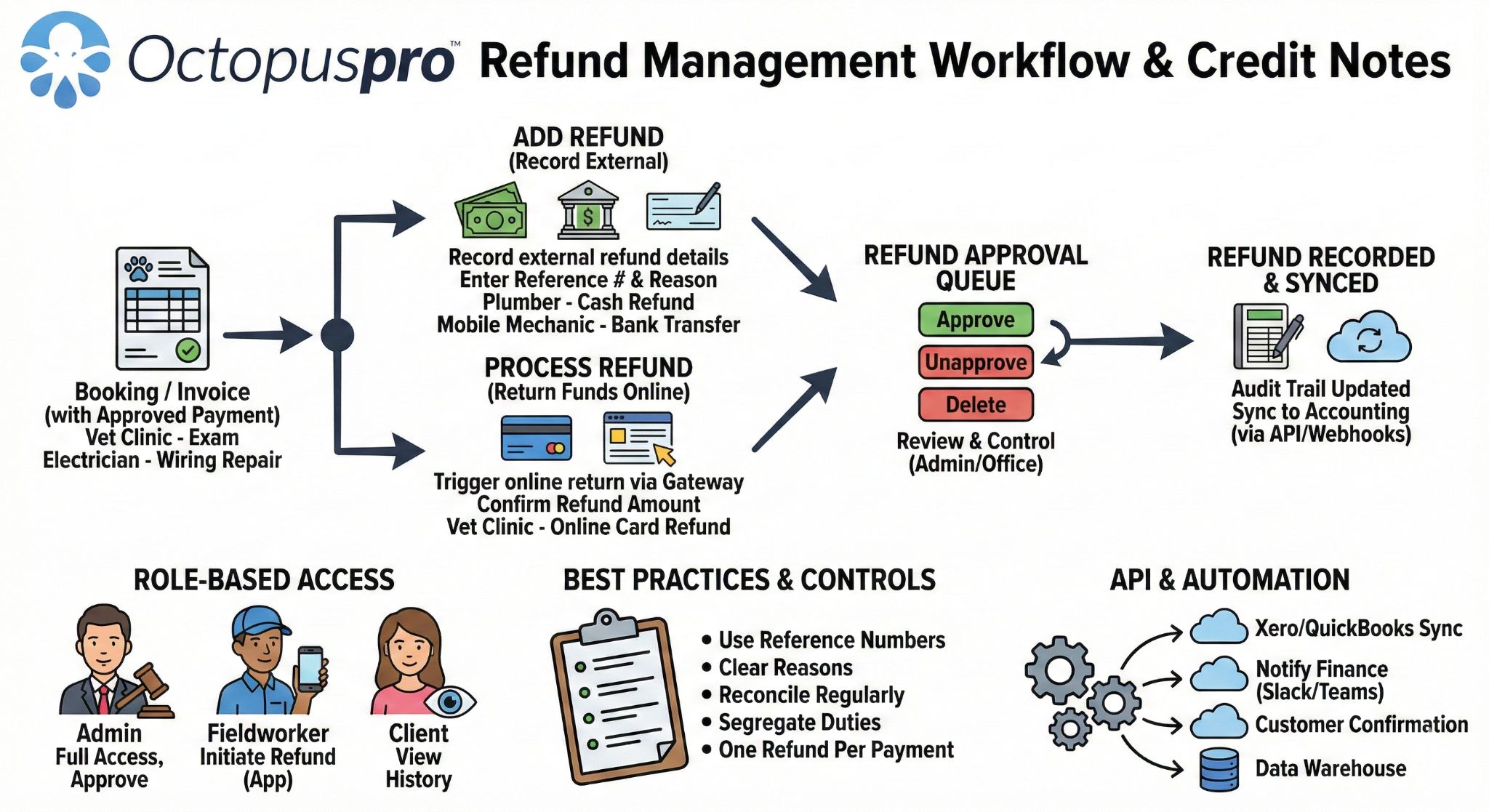
Refund approvals
Track refunds against the original payment and use approval workflows where required before refunds affect customer balances and reporting.
Add vs process refunds
Record external refunds such as cash, cheque, bank transfer, or external processor refunds for audit history, or process eligible gateway/card refunds directly where your payment setup supports it.
Refund references and customer notices
Capture refund amount, method, reference, reason, description, assigned fieldworker, and customer notification options so refund records are easier to explain later.
Issues and payment holds
Keep complaints, disputes, and issue records connected to invoices so unresolved problems do not get lost between operations, accounts, and customer service.
Sync-aware corrections
Manage draft conversion, voiding, credit notes, adjustments, invoice number edits, and invoice changes with awareness that accounting-sync timing and status rules may apply.
Fieldworker billing permissions
Control whether fieldworkers can see billing amounts, create invoices, upload their own subcontractor/tax invoices, add custom services, request refunds, or record payments from the app.
Audit-ready history
Keep invoice status changes, ownership, payments, refunds, reminders, communication history, notes, attachments, approvals, unapprovals, deletion rules, user/timestamp records, and IP/device context where available in one audit-ready record.
Error recovery before finance close
Edit or delete unapproved payment/refund records where permitted, then use refunds, credit notes, or corrections when the transaction has already settled.
Refund and credit-note workflow
Manage refund handling, credit-note context, approval steps, and correction records so finance teams can resolve invoice adjustments without losing the audit trail.
Find invoice records quickly and keep billing tied to the right customer, job, property, or asset
The more jobs, sites, customers, assets, and payments you manage, the more important it becomes to search, filter, and understand billing records without opening every invoice manually.
Invoice list views
Work through all invoices, unpaid invoices, pending payment records, payments received, new payments, new refunds, unknown payments, and duplicate invoice-number checks from structured billing views.
Universal search and advanced filters
Find invoices, quotes, bookings, customers, issues, and records by names, phone numbers, emails, addresses, suburbs, postcodes, record numbers, invoice IDs, prefixes, date ranges, statuses, services, totals, and regions.
Payment-reference matching
Use invoice numbers, payment references, PO numbers, work-order numbers, cost codes, bank-transfer notes, or customer identifiers to connect received money back to the right invoice or account.
Customer property and asset context
Link bookings and billing history to the correct child, pet, vehicle, equipment item, AC unit, appliance, room, pool, property, service site, or asset so repeat work is not mixed together under one customer record.
Property-level service history
For real estate, strata, facilities, pet care, automotive, equipment servicing, healthcare-style appointments, and multi-site accounts, billing becomes clearer when invoices are tied to the exact site or asset serviced.
Cleaner documentation
Keep customer, fieldworker, location, asset, issue, file, communication, and payment context together so invoice PDFs, statements, reports, and follow-up conversations are easier to explain.
Related user guides: universal search and advanced filters customer properties and assets select customer property for a booking invoice labels and tagging
Find the right invoice and understand what happened
Use labels, advanced search, invoice history, communication records, and payment context to understand every billing record without opening unrelated jobs.

- Tags and labels: organise invoices by job type, after-hours work, warranty, insurance, NDIS, weekend care, VIP customers, or recurring weekly work.
- Advanced search: filter by customer, status, date, invoice number, fieldworker, label, booking, job, owner, payment state, and other billing details.
- Invoice history log: review recently created or changed invoices, monitor invoice activity, and support accounts/admin reviews.
- Communication history: know what invoice emails, SMS, reminders, and internal notes were sent and when.
- Customer claims: confirm whether invoice messages or reminders were sent when customers say they did not receive them.
Related user guides: view invoice details invoice history log view invoice payments
Keep ownership, notes, issues, and collaboration attached to the invoice
When more than one person touches a customer account, your invoice record needs clear responsibility, discussion history, and exception context.
- Invoice ownership: assign or transfer owner, sales rep, account owner, or account manager for reporting and accountability.
- Commission and follow-up: keep reporting accurate when jobs or accounts move between staff.
- Discussion board: leave internal notes for office teams, dispatch, fieldworkers, or accounts.
- Issue handling: keep invoice-related complaints, disputes, and payment-hold context linked to the billing record.
- Resolved issue control: close, approve, or reopen invoice-related issues where your workflow requires review before payments, refunds, reminders, or sync actions continue.
- Decision history: record notes such as approved discount, customer requested split payment, waiting on PO, or reminders paused until dispute resolution.
Related user guides: transfer invoice or record ownership field service discussion board discussions history log handle issues for bookings, quotes and invoices


Connect invoice, payment, template, API, and webhook workflows without creating another admin silo
OctopusPro can support the billing workflow beyond the invoice screen: customer messages, reusable templates, external dashboards, accounting systems, CRMs, ERPs, BI tools, and real-time event notifications can all be part of the wider billing operating system.
Open API for billing data
Use API access for custom integrations that need to read, create, or update customers, invoices, payments, quotes, inquiries, users, and related records in external systems.
Invoice and payment webhooks
Subscribe to invoice created, invoice updated, invoice deleted, payment created, payment approved, payment refunded, and payment rejected events so external systems can respond without manual checking.
Accounting, ERP, CRM, and BI workflows
Use API/webhook-enabled workflows to keep invoice totals, tax, line items, payment approvals, refunds, customer updates, BI dashboards, and finance tools aligned in real time.
Email and SMS template controls
Use editable templates for invoice emails, payment links, reminders, confirmations, receipts, follow-ups, and service messages so customer communication stays branded and consistent.
Canned responses and placeholders
Reuse approved wording for common billing questions and use placeholders to automatically insert customer, booking, quote, invoice, payment, and service details into messages.
Payment FAQs and customer education
Add service or payment FAQs to reduce “how do I pay?”, deposit, cancellation, proof, warranty, and invoice approval questions before they slow collections.
Related user guides: third-party API and webhook integrations invoice template placeholders email template settings canned responses and templates service FAQs in the Customer Portal
Connect customer billing with fieldworker earnings, commissions, and payout records
For service businesses using subcontractors, crews, commissions, product sales, or split-pay models, invoicing is only one side of the financial workflow. OctopusPro can help keep worker earnings and payout context connected to the job and invoice records.
Commission and pay-rate rules
Calculate fieldworker earnings using hourly, commission, hybrid, service-level, fieldworker-level, or one-off booking overrides, with a clear hierarchy for how pay rules apply.
Product and add-on commissions
Track product, part, retail, add-on, and material sales where workers earn product commissions, markup share, or fixed item payments.
Subcontractor invoice handling
Let fieldworkers invoice your business by allowing subcontractors to upload or assign their own tax invoices against jobs where required, then retain the reference and file for payroll, audit, and accounting review.
Bulk payout files and bank details
Use fieldworker bank details and payout reports to support batch payment exports such as ABA, NACHA, BACS, SEPA, CSV, Excel, or other region-specific formats where configured.
Stripe Connect and split payouts
For marketplace-style workflows, Stripe Connect or similar setups can help pass split-payment instructions so contractor shares are paid automatically when customers pay online.
Payroll holds and dispute control
Keep complaint, issue, payment-status, and approval context visible before releasing fieldworker payments, helping avoid paying the wrong amount for disputed or unpaid work.
Related user guides: fieldworker payroll management fieldworker commission and pay rates fieldworker bank details fieldworker earnings dashboard invoice, payment and refund workflows in the app
Make invoicing easier for every role involved in the job
Conversion improves when each decision maker can see the value for their own workflow.
Less manual billing work
Convert jobs to invoices, send templates, use filters, manage follow-ups, and handle customer questions from one system.
Faster on-site closeout
Generate and send invoices from the field, add approved extra services, attach job evidence, collect sign-off, and record payments where permitted.
Cleaner payment records
Track balances, partial payments, receipts, pending approvals, refunds, unknown payments, reassignment, reconciliation, and customer statements.
Better financial visibility
Monitor overdue invoices, billing cycles, owner accountability, fee recovery, approval controls, and revenue performance.
Easier approval and payment
Receive clear invoices, proof, payment links, statements, portal access, receipts, and reminders through the right channel.
Smoother month-end
Sync cleaner records into Xero or QuickBooks instead of rebuilding context around payments, refunds, tax, and invoice corrections later.
Related user guides: allow fieldworkers to create invoices fieldworker start and finish job workflow view invoice payments live reports and analytics
Collect faster with fewer customer questions.
Give customers a clear place to review invoices, confirm payment details, pay online, and access the proof they need before approving the bill.
Answer billing concerns before prospects leave the page
Can we still invoice simple jobs quickly?
Yes. OctopusPro supports fast job invoicing without forcing every invoice through a complex account process.
Can account customers receive fewer documents?
Yes. You can consolidate multiple invoices into billing cycles, lock finalised billing periods, and send Statements of Account when customers need an account-level view.
Can we bill someone other than the service recipient?
Yes. OctopusPro supports third-party bill payer workflows, which is useful for real estate, insurance, corporate, family, NDIS-style, or agency-paid service work.
Can we collect deposits or pre-authorise cards?
Yes. Service payment terms can support deposits, full upfront payment, card-on-file, pre-authorisation, and pay-later workflows depending on your setup.
Can we stop reminders during disputes?
Yes. Invoice reminders can be paused and resumed so automation does not create poor customer experiences during disputes, issue handling, holidays, or PO delays.
Can proof travel with the invoice?
Yes. Attachments, photos, certificates, receipts, timesheets, signatures, notes, discussion, issues, and communication history can stay connected to the invoice record.
Can payments and refunds be controlled?
Yes. Track payments, pending approvals, refunds, refund approvals, partial payments, receipts, balances, unknown payments, and reconciliation activity against invoice records.
Can we recover extra charges?
Yes. OctopusPro can support travel fees, call-out fees, no-show fees, cancellation fees, tips, package billing, and other service-related invoice line items.
Can we connect with accounting software?
Yes. OctopusPro supports Xero and QuickBooks sync to reduce double entry and keep finance records cleaner, while still respecting lifecycle and sync rules.
Can we show clearer payment options?
Yes. Depending on your gateway and configuration, OctopusPro can support card payments, payment links, digital wallet options, offline payment instructions, bank transfer references, and hosted checkout workflows.
Can prices update before checkout?
Yes. Service options, custom-field add-ons, quantities, minimum prices, tax, discounts, vouchers, travel fees, and geo-pricing can help customers understand the total before they commit.
Can we bill products and materials?
Yes. Products, parts, materials, consumables, inventory usage, supplier costs, markups, and tax treatment can be reflected in quote, booking, and invoice workflows where configured.
Can we approve offline payments before they affect books?
Yes. Cash, cheque, EFT, bank transfer, voucher, and other offline payment records can be held for admin approval so finance can verify the payment before finalising the invoice record.
Can subcontractors invoice us for completed work?
Yes. Where permissions and workflows allow it, fieldworkers or subcontractors can upload tax invoices, assign invoice references, and keep payout documentation tied to the job record.
Can we manage fieldworker commissions and payouts?
Yes. OctopusPro can support hourly, commission, hybrid, service-based, product-based, and override pay rules, plus payout reports, bank export files, and split-payout context where configured.
Can we record credit notes or financial adjustments?
Yes. Refunds, adjustments, credit-note context, invoice corrections, payment reassignments, and accounting-sync rules can help keep corrected records auditable.
What about MYOB?
Xero and QuickBooks are the main accounting integrations positioned for sync today, and MYOB can be referenced as coming soon where appropriate.
Can payment terms vary by service?
Yes. Use company-wide defaults for consistency and service-level overrides for services that need deposits, full payment, card-on-file, pre-authorisation, charge-on-acceptance, or pay-later rules.
Can invoices show the right bank details?
Yes. Bank transfer instructions can show company bank details, and marketplace-style workflows can use fieldworker bank or entity details where your invoice entity display settings require it.
Can we use custom tax rules?
Yes. Tax settings can support tax-inclusive or tax-exclusive pricing, multiple tax rates, service/product tax rules, tax overrides, and zero-rated or exempt items where required.
Can we keep warranty or internal jobs out of invoicing?
Yes. Free or non-billable services can still be scheduled, dispatched, tracked, and audited without generating invoices or payment requests.
Can invoices reflect volume discounts or tiered rates?
Yes. Quantity-based discounts and tiered unit pricing can help larger jobs show either a clear discount row or the correct tiered unit price on the final invoice.
Can packages control when invoices are generated?
Yes. Package workflows can support upfront billing, first-invoice-now billing, future invoice release rules, remaining booking credits, and expiry controls depending on your setup.
Can stock rules support invoice accuracy?
Yes. Inventory locations, SKU/item codes, supplier costs, stock usage, serial or expiry tracking, and product tax rules can help invoices reflect what was actually used on the job.
Can surcharge rules vary by gateway or card type?
Yes. Where configured, surcharge settings can differ by payment gateway or card type and appear in payment views, invoice records, and customer-facing invoice PDFs.
Can invoices be generated automatically from booking status changes?
Yes. Invoices can be created from completed jobs, in-progress jobs, failed/no-show jobs with call-out fees, cancellations with cancellation fees, deposit-required bookings, and portal/widget booking confirmations where your settings and policies allow.
Can customers get instant payment confirmation?
Yes. Online payments can update the invoice balance, show payment success, send receipt emails, and provide receipt/PDF proof while keeping payment records available for finance review and reconciliation.
Can invoices be tied to assets, properties, pets, vehicles, or sites?
Yes. Customer properties and related records can help connect bookings and billing history to the right child, pet, vehicle, property, equipment item, unit, room, service site, or asset under the customer account.
Can we keep our existing invoice numbering after switching?
Yes. Starting numbers, reference IDs, duplicate checks, and controlled number changes can help you keep billing continuity when migrating from another system.
Can customers pay through a branded portal experience?
Yes. Where configured, your customer portal can support branded invoice review, booking checkout, payment methods, saved payment details, statements, and account self-service.
Can forms and checklists support invoice approval?
Yes. Job forms, checklists, custom-field answers, photo tags, signatures, and files can help prove what was completed before a customer or account payer approves payment.
Can full payment be delayed until a booking is accepted?
Yes. Depending on your service payment terms and customer portal setup, payment can be required on booking creation, on booking acceptance, after a configured grace period, or later by invoice/payment link.
Can bank import avoid duplicate or irrelevant transactions?
Yes. Payment import and reconciliation can use duplicate detection, confidence matching, ignored keywords, and manual review so finance does not accidentally apply bank fees, transfers, or previously imported payments to customer invoices.
Can statements be printed as well as emailed?
Yes. Customer account statements can be shared by email or printed/downloaded as PDF summaries when customers, property managers, insurers, or accounts teams need a formal account record.
Can we control what appears on invoice PDFs?
Yes. You can manage itemised cost breakdowns, scheduled appointment visibility, branding, logo placement, colours, headers, footers, payment advice, terms, and trading-name/entity display where configured.
Can customers pay from an email or SMS link?
Yes. Customers can use Pay Invoice links to open hosted checkout, review the invoice, pay by enabled methods, and receive receipt confirmation or PDF proof after successful payment.
Can OctopusPro trigger external systems when invoices or payments change?
Yes. API and webhook workflows can notify external systems when invoices are created, updated, or deleted, and when payments are created, approved, refunded, or rejected.
Can invoice emails, payment reminders, and receipt messages be customised?
Yes. Email and SMS templates, reusable canned responses, dynamic placeholders, attachments, and automation settings can help keep billing communication consistent while still allowing manual review where needed.
Can we stop customers cancelling too late through the portal?
Yes. Portal settings can enforce a minimum cancellation notice window, block cancellation or reschedule actions after the cut-off, and show your custom message so customers understand the policy.
Can cancellation and no-show fees be handled differently?
Yes. Cancellation fees can apply when a customer cancels too close to the appointment, while call-out or no-show fees are better suited to failed jobs where a fieldworker attended or the work could not proceed.
Can portal checkout show only selected payment options?
Yes. Payment methods can be enabled system-wide and then separately displayed or hidden in Customer Portal checkout settings, with instructions for offline methods like bank transfer, cash, cheque, or gift card.
Can FAQs reduce billing and payment support questions?
Yes. Service and payment FAQs can explain deposits, bank transfer instructions, payment links, cancellation fees, proof requirements, warranty visits, and other invoice-related questions before customers contact the office.
Related user guides: invoice management guide field service invoice payments customer billing cycle management refund management service payment terms customise invoice templates
Billing also includes the offers and sources that create paid bookings
Can promo codes and vouchers reduce the invoice total?
Yes. Voucher and promo-code rules can support fixed or percentage discounts, eligibility limits, expiry windows, redemption controls, and customer-facing checkout visibility so the final amount is easier to explain.
Can customers buy gift vouchers online?
Yes. Where enabled, customers can buy a gift voucher through the Customer Portal, pay in full, enter buyer and recipient details, and send the recipient a redeem link to book the service later.
Can we see which marketing sources create paid work?
Yes. Lead-source tracking can connect inquiries, quotes, and bookings to channels such as website, referral, phone, Google Ads, Facebook, or Instagram, helping management compare conversion and revenue quality.
Can branch or storefront teams take deposits and balances?
Yes. Branch-based and POS-style service teams can take a deposit online or in person, then record the remaining balance later against the same invoice so payment history, receipts, and outstanding balances stay clear.
Can group sessions charge per person or per session?
Yes. Group and class-based services can support per-person pricing, flat session pricing, multi-seat checkout, one organiser paying the total, or split payment across attendees depending on the booking model.
Can remote services collect payment before the appointment?
Yes. Remote and virtual services can use online checkout, deposits, pay-in-full rules, card-on-file settings, payment links, and automatic invoicing for portal bookings to reduce no-shows and improve cash flow.
Can approved quotes become invoice-ready bookings without retyping?
Yes. Approved quotes can carry customer details, service address, line items, quantities, prices, discounts, taxes, notes, discussions, and attachments into bookings, then into the invoicing workflow when the job is ready to bill.
Related user guides: discount voucher code management sell gift vouchers online Customer Portal promotions track lead sources multi-location POS service billing group booking and class scheduling remote service management quote acceptance and decline workflow
Choose OctopusPro when billing needs to stay connected from work to finance.
Use it when you need more than a simple invoice template: you need job context, approval proof, online payment, account billing, reconciliation, and reporting in one connected workflow.
Related user guides: invoice management in OctopusPro field service invoice payments Customer Portal payment methods payment import and reconciliation
Resolve the practical concerns that delay billing software decisions
Get clear answers to the questions service businesses often ask before choosing an invoicing and billing workflow.
Can we use our own payment gateway?
Yes. OctopusPro facilitates supported payment integrations and does not add extra processing fees on top of what your payment gateway charges.
Can fieldworkers invoice on site?
Where permissions allow, fieldworkers can create or send invoices, add approved extras, attach proof, and help collect payment while the job is fresh.
Can customers pay online?
Customers can use payment links, Customer Portal checkout, saved payment methods where configured, and supported gateway options for invoices and deposits.
Can multiple jobs be billed together?
Account customers can use billing cycles, consolidated invoices, statements, due dates, and balance tracking across repeat work or multiple sites.
Can we sync with accounting software?
Billing and payment workflows can connect with Xero and QuickBooks where configured, helping finance keep records cleaner and reduce double entry.
Can customers see invoice history?
Customers can review invoices, payments, statements, and account details through portal self-service where enabled, reducing repetitive office follow-up.
Related user guides: online invoice payments consolidated billing cycles customer statements
Ready to turn service work into approved, paid, finance-ready invoices?
Start a free trial, compare pricing, or book a demo so your invoicing workflow is configured correctly from the beginning.