
Field Service Management Software for Plumbing, Electrical & Trade Businesses
Manage plumbing, electrical, HVAC, drain cleaning, installation and contractor workflows from enquiry and quoting through scheduling, dispatch, site documentation, invoicing and payment.
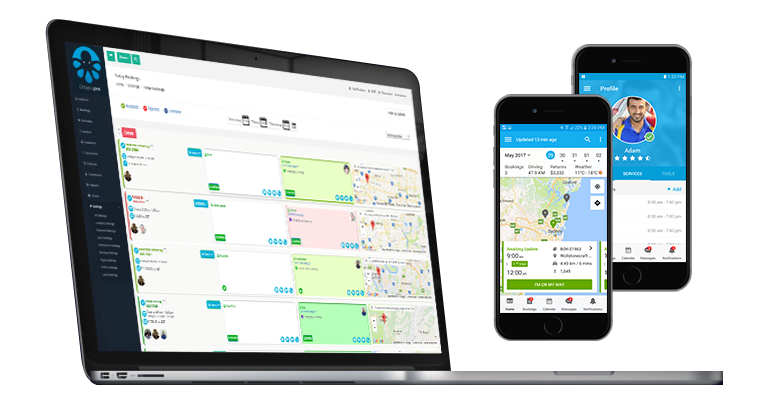
Capture emergency call-outs, quote requests and planned work, assign the right plumber, electrician, technician or crew, manage service areas and travel, track site progress, collect compliance records, add parts and materials, invoice customers and monitor performance without disconnected systems.
Choose software tailored to your trade business
Explore industry-specific workflows for urgent call-outs, planned maintenance, inspections, installations, project work, field documentation, invoicing and payments.
Plumbing Software
Manage emergency call-outs, installations, recurring maintenance, plumber schedules, service areas, parts, photos, invoices and payments.
Electrician Software
Coordinate electrical service calls, testing, installations, estimates, electrician availability, compliance forms, materials and invoicing.
HVAC Service Software
Schedule heating, cooling and refrigeration jobs, dispatch technicians, manage equipment records, maintenance plans, parts, forms and recurring service.
Drain Cleaning Software
Manage blocked-drain call-outs, inspections, jetting, CCTV work, drainage technicians, photos, reports, estimates and payments.
Handyman & Carpentry Software
Coordinate repairs, carpentry and handyman jobs, site visits, multi-skill assignment, estimates, materials, photos and approvals.
Painting Contractor Software
Run site inspections, estimates, painter and crew schedules, colour notes, progress photos, variations, invoices and repeat work.
Roofing Contractor Software
Coordinate roof inspections, estimates, crews, safety forms, materials, staged work, progress invoices and follow-up visits.
Flooring Contractor Software
Schedule measurements, installations and repairs, manage flooring crews, surfaces, materials, estimates, checklists, photos and payments.
Tiling Contractor Software
Manage measurements, tiling and grout repair jobs, crews, materials, photos, quote variations, progress and customer sign-off.
Solar Installation Software
Coordinate solar assessments, installations, crews, equipment, site details, forms, photos, approvals, milestones and payments.
Waterproofing Contractor Software
Manage inspections, leak investigations, multi-visit waterproofing jobs, photos, forms, materials, warranties and staged billing.
Door Installation Software
Coordinate measurements, door installations and repairs, technicians, product choices, site records, approvals, invoices and follow-up.
Lighting Installation Software
Schedule lighting installation, replacement, repair and inspection jobs with electrician availability, estimates, site notes and customer updates.
Welding & Boilermaker Software
Manage workshop, site and mobile welding work, fabrication estimates, crews, materials, photos, checklists and staged billing.
Excavation Contractor Software
Schedule site assessments, excavation work, operators, equipment, locations, safety forms, photos, estimates and invoicing.
Asbestos Removal Software
Manage enquiries, inspections, authorised crews, service areas, compliance forms, evidence, signatures, invoices and audit-ready records.
Run call-outs, installations and projects from first enquiry to final payment
OctopusPro connects lead capture, estimates, work orders, scheduling, dispatch, technician and crew coordination, site documentation, parts and materials, invoicing, payments and reporting for plumbing, electrical, HVAC and construction trade businesses.
Capture urgent and planned work
Receive emergency call-outs, service requests, inspection bookings, installation enquiries, maintenance work and referrals without losing job details.
Estimate and approve work faster
Create detailed estimates and quotes with labour, call-out fees, parts, materials, taxes, discounts, attachments, expiry dates and follow-up reminders.
Coordinate technicians, crews and subcontractors
Match each job to suitable plumbers, electricians, HVAC technicians, installers, subcontractors or specialist crews using services, availability, working hours and coverage.
Track site and field progress
Use job statuses, on-the-way updates, check-in and check-out, GPS-supported workflows and live communication for call-outs, inspections, installations and projects.
Capture proof, compliance and completion records
Keep site notes, safety forms, inspections, checklists, certificates, photos, documents, signatures and material usage attached to the job.
Protect cash flow and job visibility
Manage call-out charges, deposits, progress invoices, final balances, refunds, accounting integration, reports and audit history.
Turn every call-out, inspection and project enquiry into a clear next step
Capture the fault, scope, location, urgency, access details, photos, plans and preferred timing your team needs. Allow standard services to book directly, while keeping inspections, installations and complex projects quote-first until pricing and approvals are confirmed.

Capture call-outs, inspection requests, project enquiries, photos, plans and service details before work is scheduled.
- Embed branded lead capture and booking forms on your website
- Collect trade, job type, property or site location, access, urgency, measurements, photos, plans and files
- Choose direct booking, office approval, site inspection or quote-first workflows by service
- Create detailed estimates with labour, call-out fees, parts, materials, taxes, discounts and notes
- Set quote expiry dates, follow-up reminders and approval requirements
- Convert accepted estimates into scheduled work orders without re-entering information
- Request a deposit, pre-authorisation or payment before confirming suitable work
- Keep enquiry, quote, booking, invoice and communication history connected

Coordinate office teams, plumbers, electricians, HVAC technicians, installers, crews, subcontractors and sub-workers from one live schedule.
Send the right plumber, electrician, technician or crew to every job
Manage calendars, working hours, leave, job requests, service eligibility, service areas and multiple-worker jobs while giving field teams the mobile tools they need to accept work and update progress.
- Daily, weekly, monthly, list and map-based scheduling views
- Fieldworker working hours, leave, breaks and unavailable periods
- Skills and service-based assignment for specialist trade work
- Map-based service areas, travel radius and regional coverage control
- Manual assignment, automated broadcast and accept-or-decline requests
- Multiple tradies, subcontractors and sub-workers on the same job
- Google and Outlook calendar integration
- Commission, hourly, fixed and mixed pay workflows
Build service and project workflows around the way your trade business prices and delivers work
Create structured services for inspections, call-outs, installations, repairs, maintenance, project stages and follow-up visits. Use custom questions and pricing logic to capture the right information before dispatch.
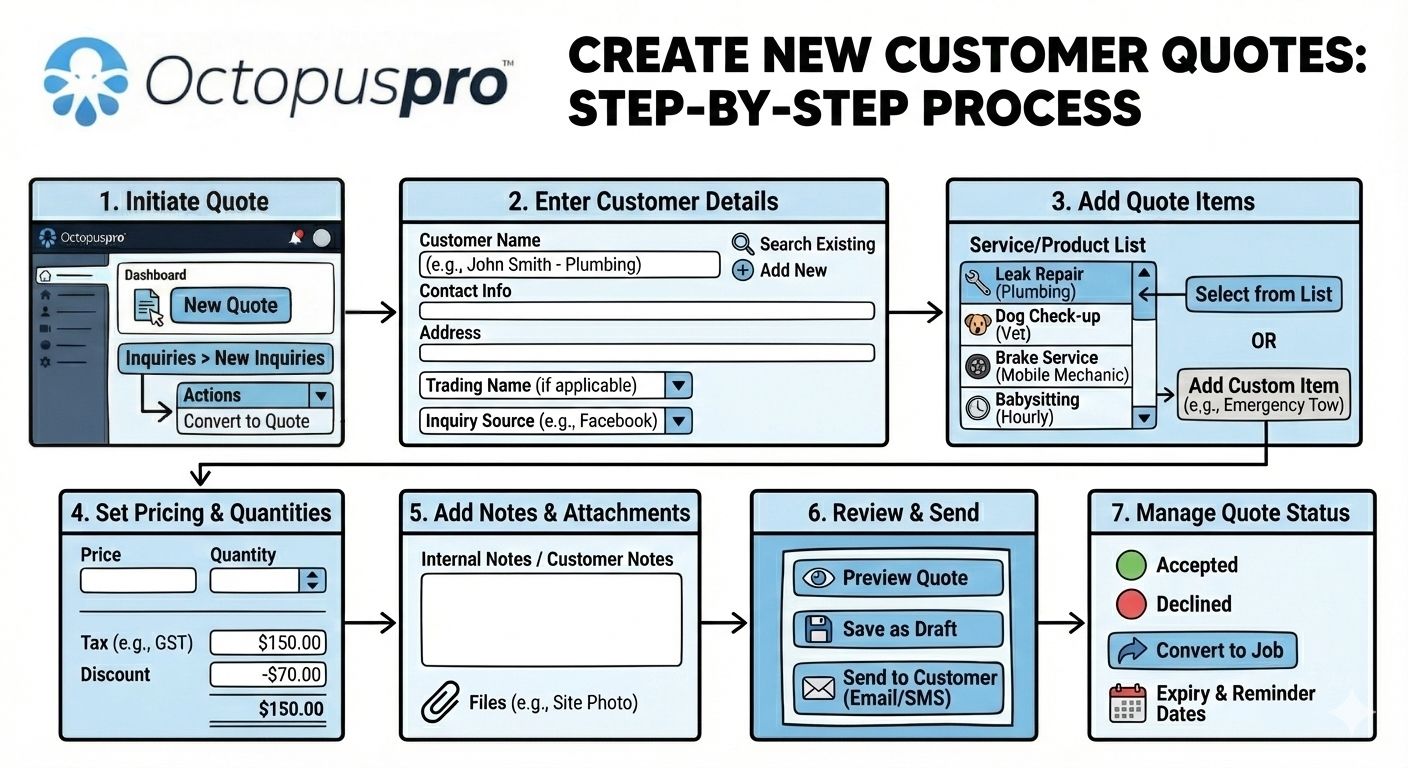
Structure services, quote items, pricing, products, discounts and approval rules.
- Service categories, descriptions, durations and booking rules
- Call-outs, inspections, installations, repairs and multi-visit jobs
- Custom fields for site type, dimensions, faults, access and equipment
- Dependent questions that appear only after a relevant selection
- Fixed, hourly, unit, range and quote-based pricing workflows
- Products, parts, materials and consumables on quotes and invoices
- Discounts, taxes, voucher codes and customer-specific pricing
- Distance-based travel charges, free radius and mileage rules

Standardise inspections, job sheets, safety checks, photos, signatures and proof of completion.
Give field teams complete job details and keep site, system and compliance records connected
Store customer, property, site, asset and equipment details with the relevant work order. Capture structured forms, notes, photos, documents and signatures before, during and after the job.
Customer, site and asset profiles
Keep addresses, properties, equipment, service history, warranty notes and recurring operational details connected.
Digital job sheets and checklists
Run inspections, pre-starts, safety checks, completion reports and quality-control workflows online or offline.
Photos, documents and signatures
Attach before-and-after images, plans, specifications, certificates, customer approvals and proof of work.
Job status and audit history
Track on-the-way, arrival, start, finish, notes, communication and changes across the full work-order lifecycle.
Create trade forms, checklists and job records
Protect cash flow from call-out fee or deposit through to final invoice and maintenance follow-up
Use payment rules that fit call-outs, fixed-price work, projects, maintenance contracts and multi-stage jobs. Automate the communication that keeps approvals, attendance and payment collection moving.

Configure deposits, payment terms, invoices, balances, refunds and accounting workflows.
- Deposits, full payment, card-on-file and pre-authorisation
- Progress, milestone, partial and final invoice workflows
- Payment terms, due dates, balances and automated reminders
- On-site invoicing and payment collection from the field
- Refund tracking and linked payment history
- Recurring maintenance, repeat jobs and service reminders
- Grouped and consolidated billing for multi-site customers
- Xero and QuickBooks accounting integration
Staged and milestone billing
Collect deposits and progressive payments for longer jobs while keeping every payment linked to the correct work.
Recurring and contracted services
Schedule repeat maintenance, inspections and service reminders while maintaining site and asset history.
See call-outs, estimates, projects, revenue and field activity in real time
Use live reports and audit trails to understand lead conversion, booked versus completed work, payment status, fieldworker workload, timesheets, service demand, communication and operational trends.
Job and revenue visibility
Review enquiries, quote conversion, active jobs, completed work, payments, outstanding balances and revenue trends.
Crew workload and field activity
Monitor schedules, assigned work, timesheets, travel, job progress, productivity and earnings-related records.
Communication and audit proof
Trace email, SMS, call, automation, discussion and booking activity when resolving questions or complaints.

How trade job management works in OctopusPro
Keep each call-out, inspection, installation or project moving through one structured process instead of re-entering information across separate estimating, scheduling, field, payment and reporting tools.
Capture the request
Receive an emergency call-out, online request, phone enquiry, inspection booking, referral, maintenance request or office-created job.
Collect job details
Add the trade service, customer, site, system or asset, access notes, urgency, scope, photos, plans and required documents.
Quote and approve
Create the estimate, add labour, call-out fees, parts and materials, send it for approval and collect a deposit where required.
Schedule and dispatch
Assign suitable technicians, tradespeople or crews using service eligibility, skills, availability, working hours, location and service-area rules.
Complete and document
Track travel, arrival, site progress, safety forms, inspections, photos, materials, notes, signatures and completion.
Invoice and follow up
Issue call-out, progress or final invoices, collect payment, resolve issues and schedule maintenance or follow-up work.
Why plumbing, electrical and trade businesses need more than a basic calendar
Compare a calendar-only tool with a connected field service management platform.
Basic scheduling calendar
- Reserves time on one or more calendars
- Usually handles simple appointments only
- May send basic confirmation messages
- Leaves leads, quotes, forms, files, products, payments and reporting in separate tools
- Limited support for service areas, crews, subcontractors and job-status workflows
- Becomes fragmented as jobs, staff, locations and documentation needs grow
OctopusPro field service management software
- Connects enquiries, quotes, work orders, crews and customer records
- Supports call-outs, projects, recurring work and multi-visit jobs
- Uses skills, services, availability, locations and coverage for assignment
- Links forms, photos, signatures, products, reminders, invoices and payments
- Supports travel charges, staged billing, assets and multi-site customers
- Provides live reports, audit trails and operational visibility
Trade management software for service calls, installations and projects
Use the same connected platform whether your team handles urgent repairs, recurring maintenance, scheduled installations, specialist projects or multiple branches.
Emergency service and repair teams
Prioritise urgent plumbing, electrical, HVAC and drainage call-outs, assign the nearest suitable technician and keep customers informed.
Planned maintenance contractors
Schedule recurring inspections and service visits, retain site and equipment history, automate reminders and group billing for repeat customers.
Installation and project crews
Coordinate site assessments, estimates, crews, materials, milestones, variations, compliance records and progress invoices for multi-stage work.
Multi-service and multi-branch businesses
Control services, skills, service areas, branches, subcontractors, customer sites, billing and reports from one connected account.
See your office, technicians, crews and customers working together
See how enquiries, estimates, scheduling, dispatch, site updates, compliance records, invoices and payments stay connected from the first request to completed work.


Plumbing, electrical and trade management software FAQs
Common questions from plumbing companies, electrical contractors, HVAC teams, drain specialists, installers and construction trade businesses.
What is field service management software for plumbing, electrical and trade businesses?
It connects enquiries, estimates, work orders, scheduling, dispatch, technician activity, site and compliance records, parts, materials, invoicing, payments and reporting in one system.
Can customers request quotes or book trade services online?
Yes. Use lead capture and quote-request workflows for complex jobs, inspections and installations, while allowing suitable standard services and maintenance visits to be booked online.
Can OctopusPro manage plumbers, electricians, HVAC technicians and specialist crews?
Yes. Configure fieldworkers, subcontractors and sub-workers by trade, service, skill, working hours and service area, then assign one technician or multiple workers to each job.
Can urgent call-outs and planned projects use the same system?
Yes. You can manage emergency repairs, recurring maintenance, site inspections, installations and multi-stage projects with different statuses, durations, assignment rules, forms and billing workflows.
How does scheduling and dispatch work?
Use calendar, list and map views to review availability, assign work manually, broadcast requests to eligible fieldworkers and monitor travel, arrival and job-status updates from the field.
Can technicians accept, decline or suggest another time for work?
Yes. When enabled, fieldworkers can review requests, accept or decline them, provide reasons and suggest alternative times so the office can reassign or reschedule efficiently.
Can we collect safety forms, inspections, photos and signatures?
Yes. Forms and checklists can capture risk assessments, inspections, test results, certificates, photos, documents, notes and customer signatures before, during or after work.
Can OctopusPro store customer sites, systems, assets and equipment?
Yes. Customer Properties can store multiple sites, service addresses, systems, assets and equipment, then connect them to bookings, forms, service history and recurring maintenance.
Does OctopusPro support service areas, travel charges and mobile teams?
Yes. Define technician service areas with radius or polygon coverage, apply distance-based travel charges and use location data to support scheduling and dispatch decisions.
Can we manage call-out fees, deposits and staged payments?
Yes. Configure call-out charges, deposits, payment terms, partial payments, progress or milestone invoices, final balances, refunds and on-site payment collection.
Can parts and materials be added to estimates, jobs and invoices?
Yes. Store parts, fittings, equipment, materials and consumables in product lists, then add them to estimates, bookings and invoices for clearer pricing and job records.
Is OctopusPro suitable for multi-branch and multi-service contractors?
Yes. Manage branches, service areas, technician groups, permissions, customer sites, billing and reporting from one account while keeping job and communication history connected.
Set up OctopusPro for your plumbing, electrical or trade business
Follow practical guides for enquiries, estimating, dispatch, technicians, site and compliance records, payments, recurring maintenance and reporting.
Leads, quotes & bookings
Fieldworkers, crews & dispatch
Site records, forms & products
Payments, automation & reporting
Ready to run your plumbing, electrical or trade business from one connected platform?
Bring call-outs, estimating, scheduling, technician and crew coordination, site and compliance records, parts, materials, field updates, invoices, payments and reporting together. Start a free trial or book a personalised demo to see how OctopusPro fits your workflow.