
Cleaning, Pest Control & Restoration Management Software
OctopusPro helps cleaning companies, pest control businesses and restoration specialists manage enquiries, inspections, quotes, bookings, routes, technicians, job records, invoices, payments and recurring service from one connected platform.
Built for residential and commercial cleaning, carpet and window cleaning, pest and termite control, gutter cleaning, water damage restoration, tile and grout restoration, natural stone polishing, sealing and repair, emergency call-outs, multi-site accounts and specialist mobile teams.
- Accept bookings or quote requests
- Schedule routes, technicians & crews
- Manage recurring visits & treatments
- Capture forms, photos & signatures
- Invoice, collect payment & follow up
Choose software designed for the services your business provides.
Choose the OctopusPro solution that matches your services. Each option includes the booking, quoting, scheduling, routing, field documentation, billing and customer-management tools needed for that type of work.
Helpful setup guides: organise service categoriescreate servicesservice packages and bundles
Run a more efficient, organised and profitable cleaning, pest control or restoration business.
OctopusPro connects the daily outcomes cleaning, pest control and restoration business owners care about most: faster quoting, fuller schedules, fewer missed details, better fieldworker utilisation, clearer proof of work and more repeat bookings.
Quote and booking paths that fit the job size
Offer instant booking for straightforward cleans, use quote approval for complex work, and keep commercial opportunities moving with structured follow-up.
Assign work with fieldworker availability and job requirements
Use service types, locations, working hours, territories, job notes and scheduling context to make fieldworker allocation easier.
Capture scope, photos, checklists and signatures
Document what was requested, what was completed and what evidence was collected, especially for end-of-lease, commercial and specialist service work.
Make repeat cleaning easier for returning customers
Use saved details, reminders, repeat bookings, customer portal history, invoice access and rebooking prompts to bring customers back.
Choose the workflow that matches your service business priorities.
Every service business has different priorities. You may need more online bookings, faster quote approvals, better fieldworker scheduling or stronger control over recurring commercial work. Choose the workflow that solves the most important operational problem first.
Related user guide: field service management guide
“I need one place for jobs, fieldworkers and customers.”
Bring enquiries, customer records, cleaning bookings, fieldworker allocation, invoices and service history into one connected system.
“I want customers to book or request quotes online.”
Offer instant booking, quote-request forms, service options, add-ons, repeat booking choices and secure payment options through the customer portal.
“I’m losing time dispatching staff manually.”
See fieldworker availability, service areas and job requirements before assigning work, then keep cleaners, technicians and crews updated through the fieldworker app.
“I need to manage regular homes, offices and sites.”
Manage repeat bookings, customer properties, site instructions, recurring schedules, reminders, consolidated billing and account-level reporting.
Stop losing time between the first enquiry and completed service.
Cleaning, pest control and restoration businesses often outgrow spreadsheets, shared calendars, messaging threads and paper job sheets once they need inspections, recurring schedules, routes, urgent dispatch, site records, field evidence, invoices and customer history to stay connected.
Leads get missed
Website enquiries, calls, emails, quote requests, and returning customers need one organised pipeline so your team can respond faster.
Schedules change daily
Staff leave, urgent call-outs, recurring visits, treatment windows, travel time and customer rescheduling can quickly make manual calendars unreliable.
Billing gets messy
Deposits, progress invoices, one-off payments, commercial accounts, recurring billing and consolidated invoices need better visibility than disconnected accounting notes.
Quality is hard to prove
Inspection records, treatment details, photos, checklists, customer sign-off, issue notes and service history help protect your business and keep delivery standards consistent.
Turn scattered administration into a connected service workflow.
See the difference between managing service work across basic calendars, spreadsheets, generic CRMs and accounting tools, and running the complete operation from one connected platform.
| Operational area | Manual or disconnected setup | Connected OctopusPro workflow |
|---|---|---|
| Enquiries and quotes | Leads arrive through forms, phone calls and emails with no consistent follow-up process. | Capture enquiries, store customer details, send quotes, follow up and convert accepted work into bookings. |
| Fieldworker scheduling | Office staff manually check calendars, message fieldworkers and re-enter updates in multiple places. | Use bookings, availability, service areas, working hours, job requests and dispatch workflows to allocate work more efficiently. |
| Job delivery | Fieldworkers rely on text messages, screenshots or paper job sheets and office staff chase status updates. | Send job details to the fieldworker app, capture status changes, notes, photos, forms and completion evidence. |
| Billing and repeat work | Invoices, payments, customer history and reminders are managed after the job in separate tools. | Connect completed bookings to invoices, payments, billing cycles, service reminders, recurring bookings and reporting. |
One platform for cleaning, pest control and restoration businesses.
Use one account for booked services, inspection-led work, recurring treatments, route-based jobs, emergency response, multi-stage restoration and commercial accounts. Configure each service with its own questions, pricing, duration, staff requirements and follow-up process.
Cleaning companies
Manage residential, commercial, carpet, window and gutter cleaning with online bookings, quotes, cleaner schedules, recurring visits, checklists, invoices and rebooking.
Pest control businesses
Capture pest types and property details, schedule inspections and treatments, manage technician territories, products, forms, recurring visits and reminders.
Restoration specialists
Coordinate emergency response, assessments, equipment, site evidence, staged work, approvals, technician updates, estimates, invoices and follow-up visits.
Property and facility accounts
Keep locations, access instructions, site contacts, service history, recurring schedules, billing cycles and consolidated invoices connected to each customer.
Required features across cleaning, pest control and restoration.
Compare the intake, scheduling, field-record and billing capabilities needed for each service type, and see how OctopusPro supports them.
Related user guides: service category setup field service management custom fields
| Industry | Enquiry, inspection & pricing | Scheduling, delivery & job records | Billing, follow-up & reporting |
|---|---|---|---|
| Cleaning businesses | Service type, property size, rooms, add-ons, access, frequency, photos, book-now or quote-first options. | Cleaner availability, recurring visits, property notes, checklists, photos, signatures, job status and customer updates. | Deposits, invoices, card payments, recurring billing, reminders, reviews, rebooking and service profitability. |
| Carpet cleaning | Room or area counts, fibre and stain details, upholstery or rug add-ons, access, photos and minimum charges. | Technician schedules, travel, treatment notes, products, before-and-after photos and completion records. | Quotes, add-on approval, invoices, payments, service reminders and repeat-customer history. |
| Pest control | Pest type, property type, affected areas, inspection request, urgency, occupants, pets, photos and treatment estimate. | Technician territories, inspection forms, treatment records, chemicals and products, signatures, recurring visits and follow-ups. | Inspection and treatment invoices, payment collection, reminder programmes, service history and technician reports. |
| Window cleaning | Window counts, building levels, access, height or equipment requirements, frequency, photos and quote rules. | Route scheduling, team assignment, safety and access notes, repeat visits, photos and completion confirmation. | Invoices, commercial account billing, payment reminders, recurring schedules and route or service reporting. |
| Water damage restoration | Urgent incident details, affected areas, source, property contacts, photos, insurer or claim references and assessment scope. | Emergency dispatch, equipment, moisture and progress records, staged work, forms, photos, notes and customer updates. | Estimates, deposits, progress and final invoices, payment tracking, job-cost visibility and complete restoration history. |
| Tile & stone restoration | Surface type, area, condition, staining or damage, desired finish, photos, inspection notes and treatment options. | Specialist assignment, cleaning, repair, polishing and sealing stages, products, test areas, photos and approvals. | Quotes, deposits, staged invoices, maintenance reminders, customer history and service profitability. |
| Stone restoration | Stone type, finish, damage, area measurements, sample or inspection requirements, photos and proposed process. | Technician skills, honing, polishing, sealing and repair stages, products, equipment, notes and evidence. | Estimate approval, progress billing, final payment, care instructions, maintenance reminders and project reporting. |
| Gutter cleaning | Property type, levels, gutter length, access, blockage, roof or safety details, photos and recurring frequency. | Route and seasonal scheduling, crew assignment, access and safety notes, before-and-after photos and completion updates. | Quotes, invoices, payments, seasonal reminders, recurring maintenance and customer service history. |
Support every service model without forcing every job into the same process.
Configure separate services and workflows while keeping customers, properties, fieldworkers, invoices, payments and reports in one platform.
| Operational model | Common requirements | How OctopusPro supports it |
|---|---|---|
| Book-now and recurring services | Online availability, recurring frequency, preferred staff, property notes, reminders, rescheduling and repeat booking. | Customer Portal, real-time availability, recurring bookings, customer properties, automated notifications and fieldworker scheduling. |
| Inspection-led and quote-first work | Enquiry capture, inspection booking, photos, custom questions, estimates, approval, deposits and conversion to a job. | Lead capture, inquiries, custom fields, attachments, quotes, online acceptance, payment terms and booking conversion. |
| Route and territory work | Service areas, technician availability, travel, route context, recurring rounds, mobile job details and status visibility. | Fieldworker service areas, availability finder, calendar dispatch, mobile app, job statuses, GPS workflows and route-ready records. |
| Urgent and multi-stage restoration | Priority intake, rapid assignment, equipment and progress records, staged tasks, photos, forms, approvals and billing. | Inquiry prioritisation, dispatch, multiple fieldworkers, forms, checklists, attachments, discussions, job history and staged financial workflows. |
| Commercial and multi-site accounts | Multiple locations, site contacts, recurring schedules, purchase references, supervisor checks, billing cycles and consolidated invoices. | Customer properties, saved service locations, recurring bookings, role permissions, forms, billing cycles and consolidated invoicing. |
| Quality, compliance and proof | Inspection records, treatment or product details, risk checks, signatures, before-and-after photos, issues and audit history. | Custom forms, checklists, products, attachments, signatures, issue management, booking activity and communication logs. |
All the tools needed to run cleaning, pest control and restoration operations.
OctopusPro brings the essential workflows service businesses usually need into one connected system, so owners, office teams, supervisors, fieldworkers and customers can work from the same live information.
Website enquiries & bookings
Online booking, quote requests, lead capture forms, photo uploads, customer portal, service categories, booking paths, quote approvals and self-service rescheduling.
Quoting, pricing & scope
Packages, add-ons, room counts, square metres, site size, custom fields, service options, deposits, discounts, purchase order details and quote-to-booking conversion.
Scheduling & dispatch
Calendar views, recurring jobs, availability, service areas, skills, preferred fieldworkers, multiple fieldworkers, crews, supervisor assignment, route-friendly planning and unassigned jobs.
Mobile fieldworker execution
Fieldworker app, job details, customer/property notes, access instructions, status updates, discussions, photos, signatures, checklists, forms and proof-of-work records.
Products, supplies & equipment
Cleaning products, chemicals, consumables, billable materials, equipment notes, treatment records, stock visibility, surface-specific supplies and technician instructions.
Customers, sites & properties
CRM records, customer properties, multiple locations, site contacts, service history, household preferences, commercial account details, access notes and communication history.
Invoicing, payments & billing cycles
Invoices, deposits, online payments, manual payments, payment tracking, refunds, recurring customer billing, consolidated invoices, payment terms and account billing cycles.
Reports, QA & control
Dashboards, live reports, fieldworker utilisation, job profitability, issue tracking, customer feedback, reviews, permissions, role controls, audit history and performance visibility.
Manage the full workflow from first enquiry to repeat service.
Connect lead capture, quoting, scheduling, dispatch, fieldworker app workflows, forms, products, CRM, billing, reporting, automation and customer self-service in one system.
Lead capture & quote requests
Website enquiries, service-specific intake questions, photo uploads, quote-first workflows, follow-up reminders and conversion from enquiry to quote or booking.
Quotes, packages & add-ons
Cleaning packages, room counts, square metres, extras, discounts, deposits, quote approvals, terms, optional services and price-building information.
Bookings & recurring schedules
One-off bookings, repeat visits, recurring housekeeping, commercial rosters, seasonal exterior cleaning, urgent jobs, rescheduling rules and booking reminders.
Fieldworker dispatch & availability
Fieldworker working hours, service areas, skills, preferred fieldworkers, teams, supervisors, subcontractors, unassigned jobs, calendar views and schedule control.
Mobile fieldworker app
Job details, status updates, access notes, customer contact rules, photos, signatures, notes, checklists and proof-of-work capture from the field.
Forms, checklists & QA
Room checklists, site inspections, supervisor checks, compliance records, before-and-after photos, customer sign-off, issue reporting and job completion notes.
CRM, sites & properties
Customer records, property addresses, site contacts, access instructions, gate codes, alarm notes, service history, multi-site accounts and customer communication history.
Products, supplies & equipment
Cleaning products, chemicals, consumables, add-on materials, equipment notes, billable items, service-linked products and job-level product usage.
Invoices, payments & billing cycles
Deposits, online payments, manual payments, invoices, refunds, payment reminders, commercial account billing, consolidated invoices and customer payment history.
Customer communication
Booking confirmations, reminder emails, SMS updates, quote follow-ups, fieldworker arrival updates, rescheduling links, post-service messages and review requests.
Reports & profitability
Booking volume, lead sources, staff utilisation, revenue by service, outstanding invoices, completed jobs, repeat work, product usage and operational performance.
Permissions & control
Role-based access, fieldworker visibility, customer privacy controls, approval workflows, supervisor oversight, admin permissions and consistent operating rules.
Everything needed to quote, schedule, deliver, document, invoice and follow up service work.
Manage cleaning visits, pest inspections and treatments, restoration projects, route-based work, recurring service, mobile field activity, invoices, payments and reporting from one platform.
Online booking forms
Offer online booking for straightforward services, inspection or quote requests for complex work, emergency enquiry forms, recurring plans and service-specific booking options.
Lead & enquiry tracking
Keep phone calls, website enquiries, quote requests, incomplete bookings, follow-up dates, and sales notes organised.
Quotes & estimates
Quote complex service jobs with service packages, add-ons, property details, photos, expiry dates, reminders, and approvals.
Recurring appointments
Schedule weekly, fortnightly, monthly, seasonal, and contract service work without repeatedly recreating the same bookings.
Customer properties
Store multiple homes, units, offices and sites with access notes, occupants, contacts, service risks and complete job history under the right customer.
Fieldworker mobile app
Give fieldworkers job details, route context, notes, statuses, forms, photos, signatures, and updates while they are onsite.
Forms & checklists
Create pre-clean checks, room-by-room lists, post-clean QA, supervisor audits, customer sign-off, issue forms, and feedback surveys.
Invoices & payments
Send invoices, collect deposits or balances, track outstanding payments, manage refunds, and support commercial billing workflows.
Reports & dashboards
Monitor bookings, revenue, quote conversion, fieldworker utilisation, cancelled jobs, payment status, and customer activity.
Configure OctopusPro around how each job is assessed, sold and delivered.
Different services need different booking paths, questions, staff and completion evidence. OctopusPro can support each model from the same platform.
Booked and recurring cleaning
Offer book-now services or quote-first cleaning, capture property and access details, assign cleaners, use checklists and photos, invoice customers and schedule repeat visits.
Pest inspections and treatments
Record pest concerns, property type and affected areas, assign qualified technicians, document products and treatments, collect signatures and schedule follow-up service.
Emergency water damage restoration
Capture urgent enquiries, dispatch available specialists, record affected areas and equipment, upload progress photos, manage staged work and keep billing connected.
Tile and stone restoration projects
Manage inspections, surface type, damage, proposed treatments, samples, polishing or sealing stages, technician notes, approvals, products, photos and final invoices.
Give owners, office staff and supervisors one live view of the service day.
Instead of managing service work from a calendar, spreadsheet, accounting app, inbox and phone messages, OctopusPro connects the operational record from lead capture through to dispatch, field updates, invoicing, payment and repeat customer follow-up.
Connect every stage from enquiry or inspection to payment and follow-up.
A better service management system should not only store appointments. It should connect demand capture, quoting, scheduling, field delivery, proof of work, payment, follow-up, and retention.
Capture
Receive website enquiries, phone bookings, portal requests, quote requests, and returning customer actions.
Quote
Price deep cleans, end-of-lease jobs, commercial sites, add-ons, travel, packages, and recurring plans.
Schedule
Find available fieldworkers, protect travel time, match service areas, and manage one-off or recurring visits.
Dispatch
Send job details to fieldworkers with customer notes, access instructions, checklists, and mobile updates.
Invoice
Create invoices, collect deposits or balances, manage payments, and keep financial records connected.
Rebook
Send reminders, request feedback, trigger follow-ups, and make repeat booking easier for loyal customers.
See how every part of your field service operation stays connected.
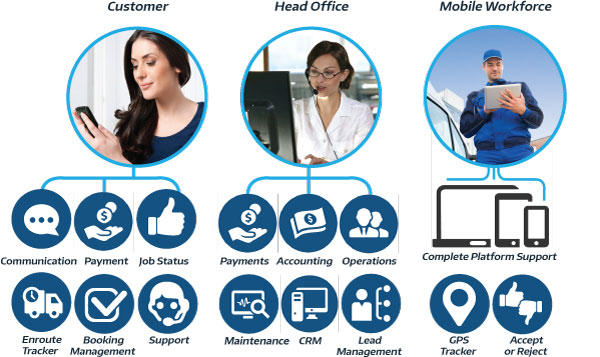
See how OctopusPro connects customer booking, office scheduling, fieldworker updates, invoicing, payments, reporting and repeat-service workflows in one system.
Related user guide: field service management guide
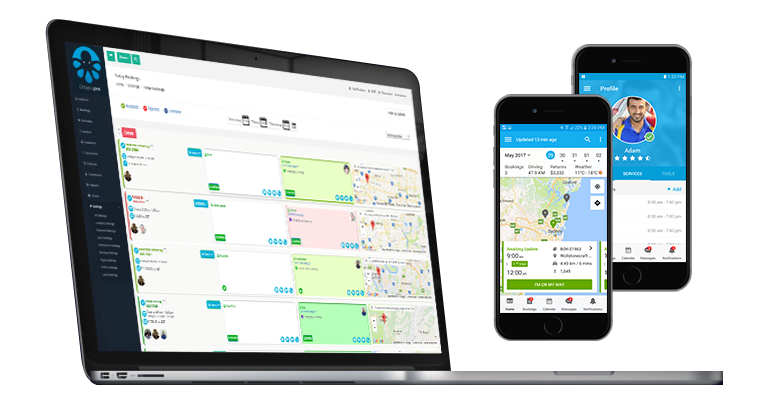
Booking and operations workflow
Connect bookings, recurring agreements, scheduling, customer CRM, workforce dispatch and financial workflows.
Related user guide: field service management guide
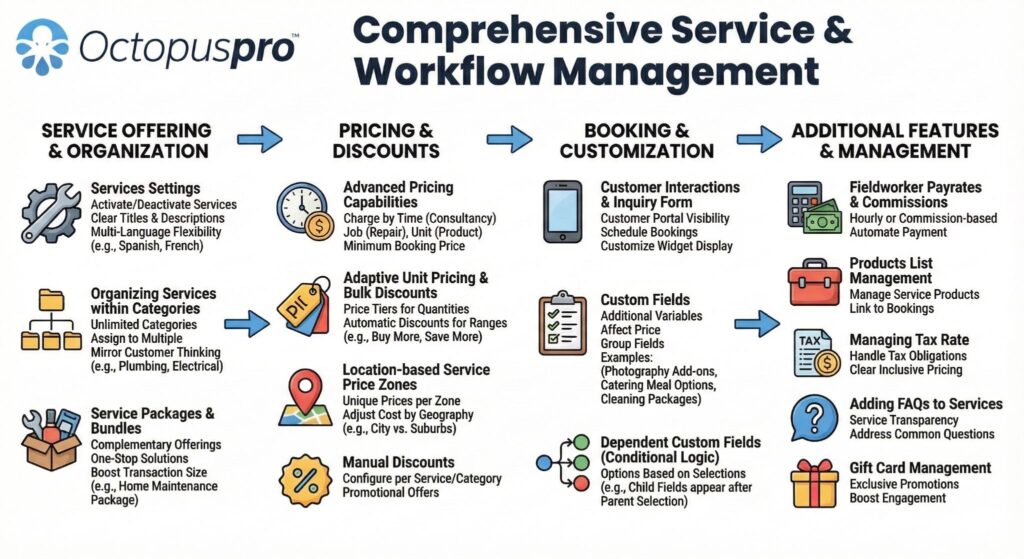
End-to-end job lifecycle
Follow each job from enquiry and quote approval through dispatch, completion, payment, feedback and follow-up.
Related user guide: field service management guide
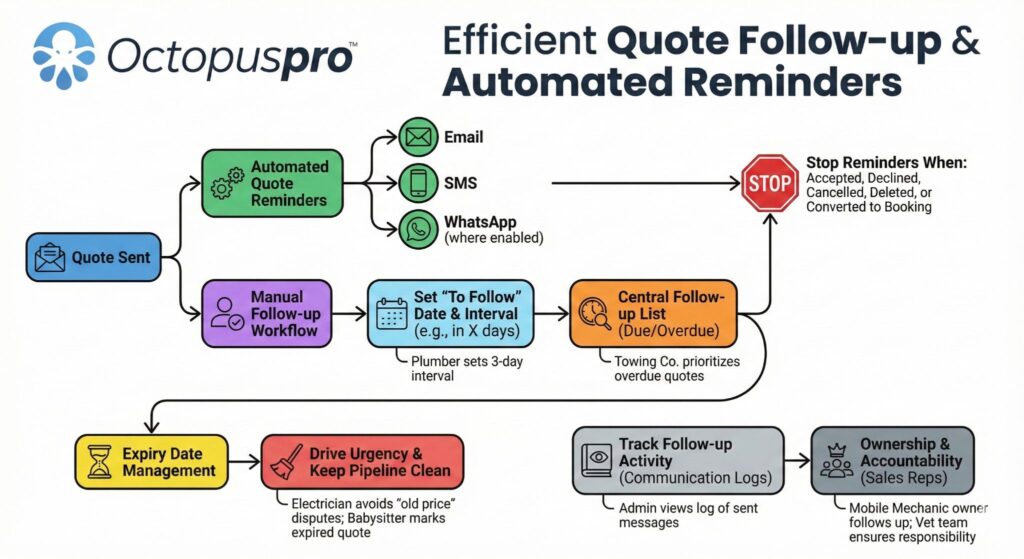
One connected ecosystem
Use OctopusPro as the connection point between admin staff, fieldworkers, customers, automations, payments, integrations and reports.
Related user guide: field service management guide
Support the way customers book, request inspections and approve services.
Customers may need an instant booking, an inspection, a detailed quote, emergency help, recurring service or management of several locations. OctopusPro supports each path from one connected workflow.
Choose the right service path
Present clear options for cleaning, pest control, restoration, specialist surface work and recurring maintenance.
Capture the details that affect the job
Ask about property type, affected areas, access, urgency, photos, pest or surface type, frequency and requested outcomes.
Route the request correctly
Send simple work to online booking, inspection-led jobs to assessment, urgent work to dispatch and approved quotes to scheduling.
Keep the customer informed
Use confirmations, reminders, quote updates, invoices, receipts, service history, follow-up and repeat-booking options.
Give every customer a clear way to book, request an inspection or quote, and manage their service.
Use different customer paths for straightforward booked services, inspection-led work, urgent response, recurring visits and commercial accounts.
Instant booking
For clearly defined cleaning, maintenance or repeat services where customers can select a service, location, date, time and payment option.
Inspection or quote request
For pest concerns, restoration assessments, large cleaning jobs, specialist surfaces and work that needs photos or onsite evaluation before pricing.
Urgent service request
For water damage and other time-sensitive work where the office needs incident details, location, priority and immediate assignment options.
Recurring and account service
For regular cleaning, pest treatments, maintenance programmes, property managers, facilities and customers with multiple locations.
Turn your website into a booking, inspection request, quote approval, payment and repeat-service channel.
Let customers browse services, request a quote, choose available times, upload photos, approve quotes, pay deposits or invoices, manage bookings, update profiles, and book again from a branded online portal.
- Store customer properties, site contacts, access instructions, and service history.
- Connect quote approvals, deposits, invoice payments, saved details, and repeat booking paths.
- Reduce routine calls while your business stays in control of booking rules and permissions.
Collect the right service, property and risk details before the team arrives.
Use services, custom fields, customer properties, forms, attachments and checklists to capture the information that affects pricing, assignment, safety, treatment and completion standards.
Property, access and contacts
Store the location, property type, access instructions, parking, keys, alarms, occupants, pets, site contacts and repeat service history.
- Homes, offices and multi-site properties
- Access windows and site contacts
- Saved locations and service history
Scope, condition and service requirements
Ask the questions that change labour, products, equipment and timing, such as affected areas, room or window counts, pest type, surface type, damage, urgency and frequency.
- Cleaning and area details
- Pest, treatment or inspection details
- Restoration condition and desired finish
Photos, documents and evidence
Collect photos, floor plans, claim or purchase references, access documents and pre-service condition notes, then attach progress and completion evidence to the same record.
- Before, progress and after photos
- Documents and customer notes
- Audit-ready job history
Forms, checklists and sign-off
Standardise inspections, treatment records, risk checks, room or area completion, equipment readings, supervisor review and customer acceptance.
- Inspection and treatment forms
- Quality and safety checklists
- Signatures and completion records
Build services and treatment packages that are easier to quote, schedule and invoice.
Organise your service catalogue around how customers buy cleaning: room-based packages, whole-home cleans, hourly housekeeping, move-out cleaning, office cleaning, carpeted areas, sanitising, oven cleaning, window cleaning, supplies, access needs, and follow-up visits.
- Use custom fields for bedrooms, bathrooms, property size, carpeted rooms, access notes, parking, pets, and alarm details.
- Add optional extras, minimum charges, deposits, travel fees, discounts, service-specific terms, and recurring frequencies.
- Link products, supplies, consumables, and equipment to jobs so quotes and invoices reflect the work delivered.
Turn services, treatments, add-ons and job scope into a consistent sales workflow.
Different jobs require different intake and pricing. OctopusPro helps structure services, custom fields, inspection and quote workflows, deposits, add-ons, products, recurring schedules and account billing so the office can quote consistently and schedule work with fewer surprises.
Related user guides: quote and estimate management service packages and bundles custom fields
Match each job to the right cleaner, pest technician, restoration specialist or crew.
OctopusPro helps coordinate cleaners, pest technicians, restoration specialists, crews, supervisors and subcontractors while keeping the office calendar, field app and customer communication aligned.
- Set working hours, unavailable times, service areas, qualifications, skills, permissions and services performed.
- Assign one fieldworker or several workers to large cleaning jobs, pest programmes, urgent restoration work, multi-stage projects and commercial sites.
- Use job status updates, reminders, location workflows and complete booking history to improve accountability.
| Assignment factor | How it helps field service teams |
|---|---|
| Availability | Avoid double-booking and protect recurring visits, treatment windows and urgent response capacity. |
| Service type | Match cleaning, pest inspection, treatment, restoration, surface and exterior work to appropriately skilled fieldworkers. |
| Location & service area | Reduce travel gaps and keep mobile fieldworkers inside practical service areas or territories. |
| Customer preference | Keep repeat customers with preferred fieldworkers where appropriate and enabled. |
| Capacity | Assign crews or multiple fieldworkers for large sites, multi-location accounts, urgent call-outs and time-sensitive projects. |
Give field teams the job details they need and capture evidence before the invoice is questioned.
Mobile workflows help field staff see job details, update statuses, capture inspection or treatment notes, upload photos, complete forms and checklists, request signatures and keep the office updated without constant calls.
- Before, progress and after photos for cleaning, pest inspections, treatments, water damage restoration, surface restoration and commercial audits.
- Room, area, treatment, equipment or site checklists for consistent service quality and evidence.
- Customer sign-off, product and equipment records, internal notes, issues and follow-up tasks connected to the booking.
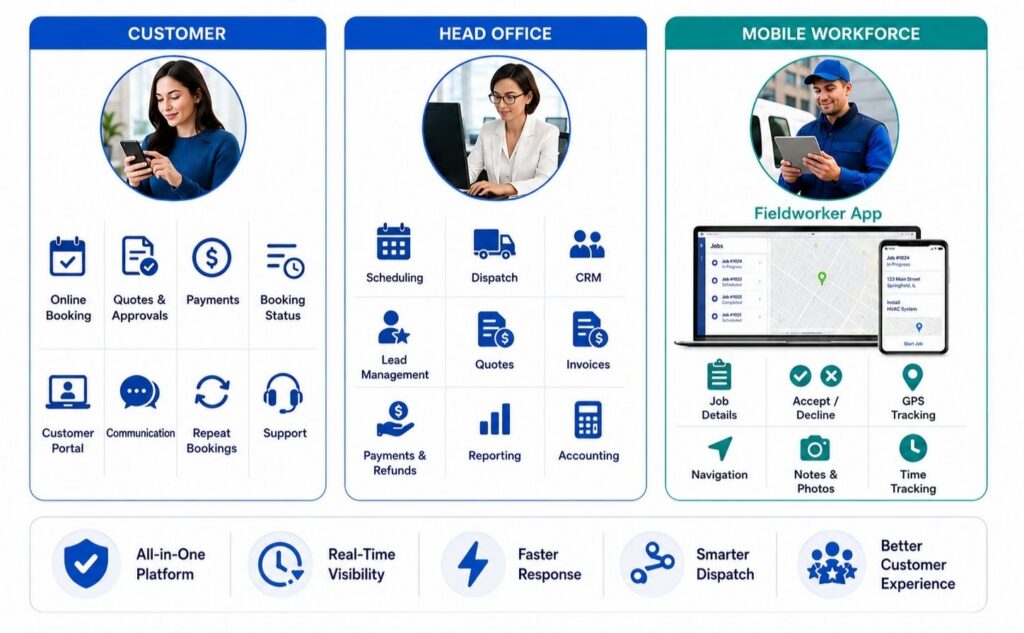
Run the full field service workflow, not just the calendar.
Use OctopusPro to connect cleaning enquiries, quotes, online bookings, fieldworker scheduling, mobile job updates, proof of work, invoices, payments, customer history, reports and repeat bookings in one place.
Choose your next step
- Start a free trial to set up your workflows.
- Book a demo for larger teams, crews, sites or contracts.
- View pricing and choose the right plan for your business.
- Review booking, mobile workforce, customer portal, invoicing and reporting features.
Handle repeat visits, multiple properties and account billing with more control.
Cleaning contractors, pest control providers and restoration specialists may manage recurring schedules, property portfolios, commercial sites, facility contacts, staged work and consolidated billing. OctopusPro keeps the operational and financial history connected.
Property and site records
Keep addresses, site contacts, access instructions, property details, service risks, recurring preferences and complete job history organised.
Recurring schedules and treatment plans
Schedule daily, weekly, fortnightly, monthly, seasonal or custom service frequencies with fieldworker assignment and reminders.
Supervisor, compliance and completion checks
Use forms, checklists, photos, signatures, issues and follow-up tasks to document quality, treatments, restoration progress and completion.
Account and consolidated billing
Manage deposits, staged invoices, billing cycles and consolidated invoices for commercial customers and repeat work where suitable.
Keep office staff, field teams, supervisors and customers working from the same live job record.
Every job can carry the customer profile, service location, property record, access instructions, scope, inspection details, assigned fieldworkers, status, products or equipment, photos, form responses, checklist results, invoice balance and communication history.
Sales & booking
Lead captureQuote requestsOnline bookingDeposits
Turn website and phone enquiries into structured service requests with required questions, attachments, inspection or booking rules, approvals and payment options.
Fieldworker operations
CalendarDispatchField appJob status
Assign the right cleaner, pest technician, restoration specialist or crew using availability, skills, service areas, job requirements and live field updates.
Finance & retention
InvoicesPaymentsReportsRebooking
Invoice faster, collect payments, consolidate repeat work, send reminders, request feedback, and encourage customers to book again.
Make daily work easier for every part of the business.
A stronger system should help the owner, office team, fieldworkers, supervisors, and customers, not just add another calendar.
Owners
See workload, revenue, conversion, cash flow, team activity, and repeat customer trends from one system.
Related user guide: field service management guide
Office team
Create quotes, schedule bookings, answer customer questions, send reminders, and manage invoices faster.
Field teams
Receive job details, update status, see access notes, complete forms, upload photos, and reduce phone calls.
Customers
Book online, approve quotes, pay invoices, manage bookings, view history, and book again with less effort.
Know which jobs, technicians, services and customers are driving results.
Use reports and dashboards to review bookings, enquiries, quote conversion, fieldworker workloads, revenue, outstanding payments, customer activity, and service performance. This helps owners and managers make scheduling, staffing and pricing decisions using live operational data.
Support the customer before, during and after every service visit.
A connected customer journey confirms the work, prepares the field team, documents delivery, closes the financial record and creates the next maintenance, treatment or repeat-service opportunity.
Before the visit
Confirm the appointment or inspection, collect deposits where needed and share the instructions that help the fieldworker arrive prepared.
- Confirmations and reminders
- Deposits and payment instructions
- Property, access and scope details
During the service
Give fieldworkers live job details, forms and mobile updates so the office can see progress without repeated calls.
- Status and checklist updates
- Inspection, treatment and progress records
- Photos, notes and issue capture
After completion
Close the job with invoices, receipts, care or treatment notes, follow-up communication and proof of work attached to the same record.
- Invoices, payment links and receipts
- Completion records and customer sign-off
- Feedback, reviews and follow-up
For recurring and account customers
Keep regular cleaning, pest treatment, maintenance and multi-site customers organised with saved properties, schedules, billing and service history.
- Recurring bookings and reminders
- Billing cycles and account control
- Service history and rebooking prompts
Cleaning, pest control and restoration businesses need connected operations, not isolated appointments.
A basic calendar can store a time slot, but field service businesses also need enquiries, inspections, estimates, staff assignment, site records, mobile evidence, invoices, payments, recurring work and reporting to stay connected.
| Workflow area | Spreadsheets and separate tools | Basic booking app | OctopusPro |
|---|---|---|---|
| Lead and inspection handling | Calls, forms, emails, photos and notes are split across people. | May capture an appointment but not a full enquiry, inspection and quote pipeline. | Lead capture, inquiries, inspections, quotes, bookings, follow-ups and conversion history stay connected. |
| Scheduling and dispatch | Hard to manage availability, territories, recurring work, urgent jobs, travel and crews. | Usually focuses on appointment selection. | Availability, service areas, multiple fieldworkers, recurring work, urgent assignment and booking rules support field operations. |
| Job delivery and evidence | Field teams rely on calls, paper notes, chat messages and memory. | Often provides only basic job instructions. | Mobile job details, forms, checklists, products, equipment, photos, signatures, status updates and issues stay on the job record. |
| Payments, follow-up and reporting | Invoices, payments and future-service reminders are delayed or disconnected. | Payments may exist without complete service or customer history. | Deposits, invoices, payments, refunds, billing cycles, reminders, reports and customer history are tied to the work. |
Answer the questions cleaning, pest control and restoration teams ask before switching.
OctopusPro connects enquiries, inspections, quotes, bookings, technician schedules, field evidence, invoices, payments and repeat service without forcing every service type into the same process.
Related user guide: field service management guide
“Can we manage different service types in one account?”
Yes. Configure cleaning, pest control, restoration and specialist services with their own booking questions, prices, durations, staff skills, forms, products and follow-up rules.
“Can we keep inspection-first and quote-first workflows?”
Yes. Simple services can be booked immediately, while pest inspections, restoration assessments and complex cleaning jobs can move from enquiry to inspection, quote approval and booking.
“Will field teams receive the details they need?”
Fieldworkers can access customer notes, location and access details, scope, pest or surface information, forms, checklists, photos, signatures, products and job status updates.
“Can it manage repeat visits and emergency work?”
Use recurring bookings and reminders for regular cleaning, pest treatments and maintenance, while urgent enquiries can be prioritised and dispatched to available specialists.
Start with the workflow that saves the most time, then expand.
Begin with the workflow that creates the most revenue or removes the most admin. Add more automation after your services, staff and customers are comfortable with the system.
1. Set services
Create cleaning, pest control and restoration services with descriptions, prices, add-ons, images, payment rules, required questions and customer visibility.
2. Add staff
Set cleaner profiles, roles, permissions, working hours, service areas, skills, and assignment rules.
3. Connect customers
Add booking buttons, inspection and quote request forms, customer portal links, service-specific calls to action and invoice payment paths.
4. Automate follow-up
Turn on confirmations, service reminders, quote follow-ups, payment reminders, feedback requests and recurring-service prompts.
Choose the capabilities that remove the most day-to-day friction.
Focus on the capability that will make the biggest difference to your daily work, whether that is scheduling, quoting, field documentation, customer self-service or billing.
Field service scheduling and dispatch
Coordinate availability, service areas, routes, recurring work, urgent call-outs, crews and technician calendars without relying on separate spreadsheets.
Inspection, quoting and booking workflows
Collect job scope, photos and service-specific details, create estimates, obtain customer approval, request deposits and convert accepted work into scheduled bookings.
Mobile forms, photos and proof of work
Give field teams job instructions and capture inspections, treatment records, checklists, products, equipment, signatures, before-and-after photos and completion evidence.
Invoices, payments and recurring service
Invoice completed work, collect deposits and balances, manage account billing, send payment reminders and organise future cleaning, treatment or maintenance visits.
Bring booking, fieldwork, customer service, billing and reporting together.
Connect booking, mobile workforce, customer portal, invoicing, forms and reporting tools without duplicating customer, job or financial records.
Service Booking Management Software
Connect enquiries, inspections, quotes, bookings, recurring visits, rescheduling and customer communication.
Mobile Workforce Management Software
Dispatch fieldworkers, share job details, collect status updates, forms, photos, notes, signatures and completion evidence.
Customer Portal & Online Booking Software
Let customers request quotes, book services, approve work, pay invoices, manage appointments and access service history.
Service Invoicing & Payment Software
Manage deposits, invoices, online and offline payments, refunds, reminders, billing cycles and reporting.
Forms, Checklists & Job Evidence
Standardise inspections, treatment records, risk checks, site documentation, completion standards and proof of work.
Reports & Business Performance
Review leads, quote conversion, bookings, technician workload, completed jobs, payments, recurring service and customer activity.
Questions cleaning, pest control and restoration business owners ask before switching.
Get clear answers about bookings, inspections, recurring work, emergency dispatch, technician scheduling, field documentation, invoicing and multi-service operations.
Related user guides: field service management guide choose a plan
What is cleaning, pest control and restoration management software?
It is field service software that connects enquiries, inspections, quotes, bookings, routes, field staff, customer and property records, forms, photos, invoices, payments, recurring service and reporting in one system.
Can OctopusPro manage cleaning, pest control and restoration services in one account?
Yes. Each service can have its own description, price, duration, booking questions, required skills, forms, products, payment terms and follow-up workflow while sharing the same CRM, calendar and reporting platform.
Can customers book online or request an inspection and quote?
Yes. Offer instant booking for straightforward services and use enquiry or quote-request paths for pest inspections, restoration assessments, large properties or complex scopes.
Can I manage recurring cleaning visits and pest treatments?
Yes. Use recurring bookings, reminders, customer properties, saved instructions and service history for weekly cleaning, scheduled pest treatments, maintenance programmes and other repeat work.
Can OctopusPro support urgent water damage restoration call-outs?
Yes. Urgent enquiries can be captured with property and incident details, then assigned to available fieldworkers with job notes, photos, forms, equipment requirements and status updates.
Can fieldworkers use OctopusPro on mobile?
Yes. Cleaners, pest technicians and restoration specialists can view schedules and job details, update statuses, complete forms and checklists, add notes and photos, and collect signatures where enabled.
Can we record treatments, chemicals, products and equipment?
Yes. Services, custom fields, products, forms, checklists, notes and attachments can be configured to record treatment details, consumables, equipment and other job-specific information.
Does OctopusPro support before-and-after photos and proof of work?
Yes. Field teams can attach photos, documents, notes, form responses, checklist results and signatures to the relevant inquiry, quote or booking record.
Can OctopusPro create quotes, invoices and accept payments?
Yes. Manage estimates, approvals, deposits, invoices, online and offline payments, refunds, payment reminders, billing cycles and financial reports according to your setup.
Can it manage commercial and multi-site customers?
Yes. Store multiple service locations, site contacts, access instructions, recurring schedules, service history and account billing details for property managers, facilities and commercial customers.
Can jobs be assigned by availability, skill and service area?
Yes. Use working hours, availability, services performed, service areas, existing bookings and assignment workflows to help allocate the right fieldworker or crew.
Can one-off, quote-first and recurring services run together?
Yes. A single account can support book-now services, inspection-led quotes, emergency work, recurring visits, multi-stage restoration and commercial contracts.
Is OctopusPro suitable for growing service teams?
Yes. It supports solo operators, office and field teams, subcontractors, supervisors, multiple service areas, role permissions, customer self-service, automation and live reporting.
How can these businesses improve quote accuracy?
Collect the details that affect labour, products, equipment and risk before pricing, including property type, affected areas, access, photos, pest or surface type, urgency, service frequency and requested outcomes.
Use this checklist when comparing cleaning, pest control and restoration software.
When choosing cleaning management software, look for a platform that can handle booked cleaning, inspection-led pest control, urgent restoration, recurring treatments, multi-site accounts, mobile teams and quote-first services.
- Clear fitConfirm the software supports your services, booking paths, team structure, customer types and growth goals.
- Connected workflowMake sure office workflow, customer portal, fieldworker app, recurring jobs and invoicing work as one system.
- Flexible booking pathsSupport instant bookings, inspection-led quotes, urgent work, recurring services and commercial enquiries without forcing one process.
- Operational depthLook for fieldworker scheduling, service areas, mobile updates, forms, checklists, photos, products, equipment, billing cycles, customer properties and reporting.
- Industry coverageSupport cleaning, carpet and window services, pest control, water damage restoration, tile and stone restoration, gutter cleaning and multi-site accounts.
- Easy next stepsCompare industry solutions, booking, customer portal, mobile workforce, pricing and support options before choosing the right setup.
Make cleaning, pest control and restoration work easier to manage.
Bring enquiries, inspections, quotes, online bookings, route and team scheduling, job documentation, customer properties, invoices, payments and recurring follow-up into one connected workflow.
- Capture enquiries and inspection requests
- Schedule cleaners, technicians and crews
- Document treatments, restoration work and proof
- Invoice faster and organise repeat service
Choose your next step
Start a free trial, review pricing or speak with the OctopusPro team about the setup that fits your services and workflow.