
Excavation Scheduling Software
Run a more organised mobile excavation business with smarter operator scheduling, equipment allocation, faster customer communication, less admin, and stronger cash flow from first enquiry to final payment.
OctopusPro helps excavation companies, earthmoving and site preparation teams, mobile excavator operators, urgent excavation crews, and excavation businesses manage the complete excavation workflow in one connected system. Schedule residential excavation jobs, commercial earthmoving projects, trenching work, site preparation, land clearing, soil removal, machine and operator bookings, online excavation enquiries, photo-based excavation quote requests, urgent excavation requests, and last-minute site work without relying on spreadsheets or disconnected calendars.
Manage operator availability, customer and property profiles, site addresses, online photo-based excavation quote request details, site access notes, machine requirements, ground condition notes, site intake notes, excavation project history, excavation add-ons, forms, checklists, signatures, proof of completed excavation work, invoices, payments, and site work completion records from enquiry through to final payment. OctopusPro also supports Online Excavation Enquiry and Quote Request Management for online excavation bookings, customer intake calls, site assessment calls, and digital follow-up workflows.
Manage every excavation workflow from one place
- Schedule excavation crews and operators, excavation jobs, operator and equipment routes, mobile excavation and earthmoving jobs, and online excavation bookings.
- Store customer details, property profiles, excavation booking notes, and excavation project history.
- Automate confirmations, reminders, follow-ups, invoices, and payments.
- Track enquiries, quotes, recurring site work schedules, operator attendance, and site work completion records.
Drive Revenue and Profitability with Better Excavation Management

Excavation Operator Scheduling and Rota Management
Keep your excavation crews and operators fully utilised, reduce scheduling chaos, and run excavation bookings, mobile excavation and earthmoving jobs, and customer-site excavation and earthmoving jobs from one organised calendar. Stay organised and improve excavation operational efficiency by managing multiple excavation crews’ schedules and excavation bookings from one calendar. Coordinate excavation jobs, site inspections, and follow-up visits while keeping customers informed and your team fully prepared.

Scheduling and Dispatch Board for Excavation Contractors, Operators, and Excavation Jobs
Use OctopusPro’s scheduling and dispatch board to manage excavation jobs, unassigned work, and operator and equipment workloads from one live calendar. Drag and drop excavation bookings, scan excavation bookings in list view, match work to the right excavation contractor, and keep the day running without juggling spreadsheets, whiteboards, or disconnected calendars. See Calendar – Scheduling & Dispatch, Calendar List View, and Find Availability.
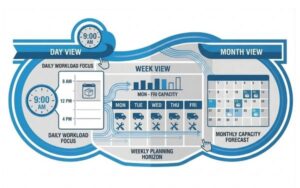
Daily, Weekly, and Monthly Excavation Schedule Views
Get better visibility of workload, capacity, and bottlenecks so you can plan ahead instead of reacting at the last minute. Use flexible calendar views to plan excavation jobs by day, week, or month. This makes it easier to manage workload, monitor excavation contractor and excavation job capacity, avoid scheduling conflicts, and keep your operation running on time.


Flexible Calendar Setup for Your Excavation Workflow
Schedule work more efficiently, improve visibility, and organise excavation bookings around the way your business operates. OctopusPro’s flexible calendar setup adapts to excavation operations, excavation bookings, excavation visits, strata, real estate, and multi-site excavation jobs, and excavation contractor rosters, with calendar filters, live availability, mobile excavation service areas, and assignment rules that help you manage work clearly and effectively.
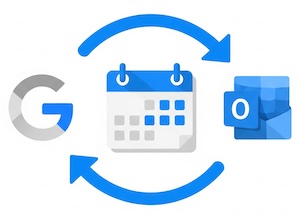
Google and Outlook Calendar Integrations
Reduce double booking, save admin time, and keep your excavation crew aligned with Google Calendar integration and Outlook Calendar integration. OctopusPro keeps excavation jobs, availability, and schedule updates in sync, improving visibility across your team and making day-to-day scheduling easier to manage.
Make Sure Every Excavation Request Is Handled Quickly and Professionally
Reduce delays, improve response times, and route every excavation request to the right excavation contractor more efficiently with structured operator assignment and dispatch workflows. OctopusPro helps your admin team, excavation operations, and excavation crews and operators coordinate work through manual and automatic assignment options, real-time progress tracking, and clearer visibility from request through to completion. This gives your excavation crew better control over dispatch, reduces scheduling conflicts, and helps excavation jobs move more smoothly through the workflow.

Let Excavation Contractors Accept or Decline Excavation Requests
Reduce response delays, give excavation crews and operators more flexibility, and keep excavation bookings progressing without losing control over dispatch. With OctopusPro’s accept and decline excavation request workflows, operator excavation job request management tools, and settings to allow excavation crews and operators to accept or decline excavation requests, excavation crews and operators can review new assignments, accept suitable work, decline excavation jobs that do not fit their availability or excavation service area, provide decline reasons, and suggest alternative times when enabled. Your excavation crew can notify excavation crews and operators by push, SMS, or email and quickly reassign declined work so excavation bookings keep progressing smoothly from dispatch to completion.

Ready to run excavation jobs with less admin?
Start a free trial, compare pricing, or book support to see how OctopusPro can organise excavation contractor schedules, excavation bookings, excavation pre-job inspections, quotes, invoices, and payments from one connected platform.
Start Free TrialBook SupportView Pricing

Modernise your excavation workflow without adding more admin.
Replace disconnected calendars, spreadsheets, message threads, and manual follow-ups with one organised system for excavation jobs, excavation pre-job inspections, excavation bookings, excavation contractor schedules, quotes, invoices, payments, and customer communication.
Need setup guidance?
Tell us about your excavation workflow.
Share how you manage excavation crews and operators, excavation jobs, mobile excavation and earthmoving jobs, excavation service packages, and payments so the OctopusPro team can help you choose the best next step.
Automatically Match the Right Excavation Contractor to Each Excavation Job
Improve first-job fit and service consistency, strengthen service quality, and assign excavation jobs more accurately from the start. OctopusPro helps you match each excavation job to the right excavation contractor using a combination of skills, service types and job types, excavation services offered, and eligibility, together with real-time availability, working hours, leave, time blocks, synced calendars, and map-based mobile excavation service areas to make smarter scheduling and dispatch decisions. This is especially useful when excavation jobs need to be assigned based on both capability and real service coverage, including specialist work such as customer intake calls, excavation enquiries, online excavation enquiries, customer-site excavation and earthmoving jobs, strata, real estate, and multi-site excavation jobs, excavation pre-job inspection and appointment coordination, multi-site excavation jobs, online excavation bookings, multi-site excavation schedules.

Flexible Booking Location Types for Excavation Companies, Mobile Excavation Operators, and Online Excavation Enquiries
- Mobile and On-Site Excavation Services — ideal for customer-site excavation visits, mobile excavation and earthmoving jobs, customer-site excavation services, customer sites, commercial sites, managed properties, recurring site work programmes, and customer-site excavation bookings and other excavation jobs where the operator travels to the customer.
- Customer Properties, Service Addresses, and Mobile Team Coverage — ideal for saved customer sites and properties, site addresses, commercial sites, strata properties, rental properties, and multi-site excavation accounts where operators attend the customer site.
- Online Excavation Enquiries and Photo-Based Excavation Quote Requests — ideal for online excavation enquiries, remote excavation intake calls, photo-based excavation quote requests, follow-up messages, and quote reviews, online excavation enquiries and photo-based excavation quote requests, follow-up visits and excavation pre-job inspections handled through customer-provided details, photos, phone calls, email, or online quote request forms.
Whether your excavation business operates from a customer site or property or site address, visits customers on-site, supports organisations across multiple properties, or manages online quote requests, OctopusPro keeps scheduling, customer communication, reminders, calendar invites, operator access and property profiles organised in one place.

Excavation Contractor-Based Scheduling and Service Matching
Make excavation crew capabilities easier to deploy, improve excavation job accuracy, and define more clearly which excavation crews and operators can perform which types of work. With skills-based operator assignment by excavation services, job types, excavation contractor experience, and eligibility, configure excavation staff profiles around the excavation services they offer and the work they are approved to handle. This helps you assign excavation bookings based on job type, service format, service type, location requirements, excavation contractor capability, and internal requirements, and can be extended with profile data and custom fields to record things like service formats, excavation crew sizes, excavation job resource options, access requirements, or other excavation-specific criteria.

Real-Time Excavation Contractor Availability
Avoid double bookings, schedule with greater confidence, and give your excavation crew a clearer view of who is genuinely available for new excavation jobs. With real-time operator availability, OctopusPro checks each excavation contractor’s working hours and live calendar availability, including unavailable periods and breaks, so excavation job time slots reflect actual operator capacity. When enabled, it only shows customers available time slots where at least one matching excavation contractor is available, helping you make better dispatch decisions, reduce scheduling conflicts, and keep the day running more smoothly.

Map-Based Mobile Excavation Service Areas and Coverage Control
Prevent out-of-area excavation bookings, reduce wasted travel for mobile excavator operators, and assign excavation jobs based on real excavation contractor coverage. With map-based mobile excavation service areas and coverage rules, OctopusPro lets you define precise territories, multiple service regions, and overlapping coverage where needed. This helps you match excavation jobs to the right excavation crews and operators based on actual coverage, apply a default travel radius when required, and avoid excavation bookings outside the areas you support.

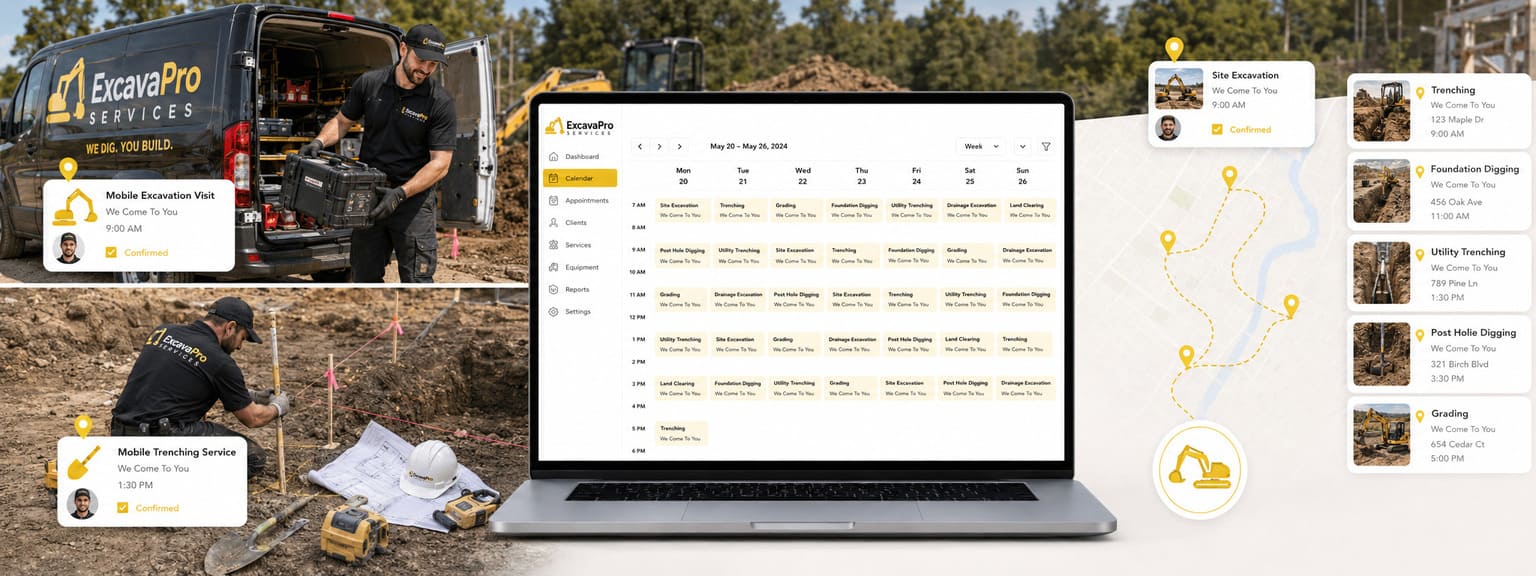
Turn more excavation leads into confirmed excavation bookings.
Capture excavation enquiries, respond faster, send clearer quotes, and move customers from first contact to confirmed excavation job without losing details across inboxes, calendars, and spreadsheets.
Start Free TrialBook SupportView Pricing
Optimise Your Excavation Management Software

Customer and Property Profiles with Structured Excavation Booking Intake
Collect the right excavation booking details upfront so your team can prepare excavation quotes faster, understand customer requirements, property details, and excavation requirements more accurately, and deliver more consistent repeat service. OctopusPro stores structured customer and property profiles with details such as customer name, job type, service type, excavation job preferences, preferred service format, excavation project history, excavation notes, and custom fields, helping your team identify excavation jobs faster and manage excavation records more efficiently. See Customer and Property Profiles, Excavation Service Addresses, and Related Records and Custom Fields.

Excavation History and Customer Record Management
Understand customer needs faster, deliver more consistent service, and build customer trust with a complete record of every excavation job. With excavation project history and record management, OctopusPro keeps previous excavation jobs, notes, attachments, invoices, and communication records in one place, helping your team track past work, support future excavation job recommendations, and provide a more transparent customer service experience.

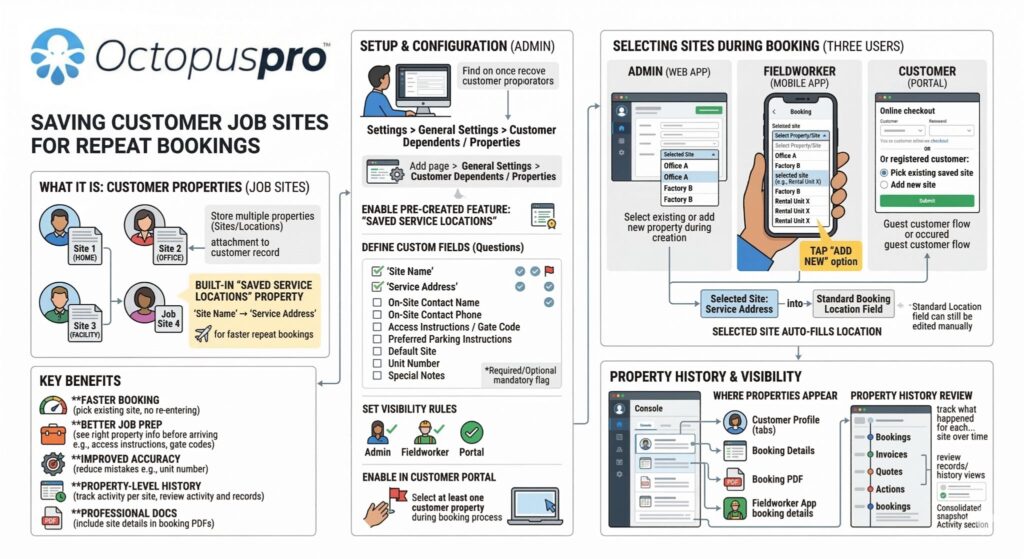
Saved Excavation Locations, Customer Addresses, and Venue Details for Repeat Customers
Speed up repeat excavation bookings and reduce address errors with Saved Online Enquiry and Customer-Site Excavation Service Addresses for multi-property customers and property managers, property managers and real estate partners, facilities managers, offices, hotels, and managed properties, and repeat customer accounts and required customer-property selection during online excavation job. OctopusPro lets you store multiple customer locations, multi-property sites, home addresses, online photo-based excavation quote request details, site access notes, machine requirements, ground condition notes, site addresses and access notes, and other customer-linked records in the customer and property profile, then require the customer to choose the correct location, excavation job, or property before submitting a excavation job. This is ideal for multi-property, corporate, and multi-property and property management customers, commercial excavation service customers, and repeat customers who book work across multiple sites.
Digital Excavation Intake Forms, Checklists, Property Profiles, and Proof of Completed Excavation
Standardise customer intake calls, job reviews, and follow-up excavation pre-job inspections, reduce missed steps, and maintain a more professional, accountable service process with digital excavation forms and checklists. OctopusPro helps excavation companies and earthmoving and site preparation teams manage customer excavation intake forms, excavation notes, excavation summaries, internal checklists, excavation reports, follow-up records, excavation enquiries, excavation contractor handover notes, and site work completion records in one structured workflow. Capture customised checklists, optional photos, excavation notes, customer approvals, signatures, and proof of completed excavation work or excavation job completion in a consistent format that can be completed online or offline. This helps your excavation operations improve accountability, reduce mistakes, keep a clear audit trail, and stay consistent across excavation quality checks, internal process records, excavation approvals, and customer sign-off. See Forms & Checklists Overview, Using Forms & Checklists, and Digital Signatures.

Unified Excavation Management
Reduce admin, improve team coordination, and keep excavation bookings progressing more efficiently with one connected excavation management system. OctopusPro brings together excavation enquiries, quotes, excavation bookings, excavation contractor schedules, invoices, and payments in one place, so your team can manage each excavation job more smoothly from intake to completion.

Custom Booking Statuses for Your Excavation Workflow
Give your team clearer workflow control, better visibility, and stronger automation across every excavation job. With custom excavation statuses for excavation workflows, OctopusPro lets you create stages such as Awaiting Approval, Awaiting Excavation Contractor Confirmation, Customer Intake Complete, Ready for Excavation Job, On Hold, or Follow-Up Required, so each excavation job can be tracked and managed in a way that fits your process.

Excavation Materials and Equipment, Equipment, Packages, and Stock Control
Reduce delays, improve pricing accuracy, and keep profitable excavation bookings progressing with tighter control over excavation materials, ground condition removers, deodorisers, protectants, hoses, wands, machines, PPE, excavation consumables, and stock. OctopusPro helps you track stock levels, organise excavation materials, ground condition removers, deodorisers, protectants, hoses, wands, machines, PPE, excavation consumables, and equipment, and add materials and equipment directly to quotes, excavation bookings, and invoices, so excavation jobs are priced more accurately and less likely to be delayed by missing or mismanaged items. See the Materials and Equipment & Equipment and Materials Inventory guide.


Excavation Packages, Supplies, and Add-On Service Management
Create clear excavation service packages and recurring maintenance plans for room-based packages, whole-house packages, land clearing add-ons, soil removal add-ons, trenching and site preparation, deodorising, fabric protection, travel fees, extra operator support, job reviews, follow-up visits, and common excavation options, then link the right materials and equipment, pricing rules, and excavation options to each excavation job. OctopusPro helps you organise excavation service lines and excavation materials, equipment, and supplies in a structured way so your team can prepare excavation quotes faster, upsell more accurately, and keep excavation workflows consistent. See Create a New Service and Materials and Equipment & Equipment and Materials Inventory.
Match every excavation request to the right excavation contractor.
Use operator availability, mobile excavation service areas, excavation service types, operator capacity, and excavation booking notes to coordinate residential excavation jobs, mobile excavation and earthmoving jobs, excavation bookings, customer-site job check-ins, and excavation requests with confidence.
Start Free TrialBook SupportView Pricing

Excavation Quote-to-Booking and Excavation Package Workflow
Create professional excavation job estimates faster, improve quote accuracy for excavation service packages, and convert approved quotes into booked work without duplicate data entry. OctopusPro keeps pricing, notes, attachments, custom fields, approvals, and follow-up activity connected in one workflow from quoting through to scheduling, invoicing, and payment. See Excavation Quote & Estimate Management, View & Manage Quotes, Accept or Decline Quotes, and Custom Fields.


Follow-Ups & Reminder Automation
Improve excavation quote conversion, reduce missed opportunities, and keep your pipeline active with more consistent follow-up. OctopusPro helps you manage manual follow-up tasks and automate reminder messages, so your team can stay on top of open quotes more efficiently.
Set a follow-up date for each excavation quote, view due and overdue follow-ups in one place, and automate reminders by email, SMS, and WhatsApp where enabled. Expiry dates can help create urgency, while reminders stop automatically when a excavation quote is accepted, declined, cancelled, deleted, or converted into a excavation job. Communication logs also give your team clear visibility into what has been sent and what still needs action. See the Excavation Quote Follow-Up Reminder Automation guide.

Modern excavation workflows without the admin overload.
Keep excavation bookings, recurring site work schedules, property profiles, customer communication, invoices, payments, and follow-ups moving smoothly as your excavation business grows.
Start Free TrialBook SupportView Pricing


Improve Excavation Enquiry Conversion and Booking Rates
Turn more excavation enquiries into paying work, respond faster, and convert more leads into confirmed excavation bookings with a more organised sales workflow. With excavation enquiry management, lead tracking, and excavation enquiry-to-excavation job conversion, OctopusPro helps your team review new opportunities sooner, send quotes promptly, and move every lead efficiently from first contact to confirmed excavation job.

Website Enquiry Widget and Customer Portal Contact Us Lead Funnel
Capture more quote requests, reduce missed opportunities, and give your team a faster path from enquiry to excavation quote or excavation job. With the embedded lead capture form for your website and the Customer Portal Contact Us excavation enquiry form, OctopusPro lets prospects submit service details, addresses, photos, and timing questions when they are not ready to book yet. Each submission automatically creates a excavation enquiry your team can qualify, follow up, and convert into a excavation quote or excavation job without re-entering details. This is especially valuable for customer intake calls, excavation enquiries, complex excavation programmes, commercial excavation jobs and enquiries, and other “excavation quote-first” excavation jobs.

Automated Lead Recovery and Booking Follow-Up
Recover lost revenue, reduce manual chasing, and stop leads from going cold with more consistent follow-up. OctopusPro helps you re-engage incomplete excavation bookings and missed opportunities using automated excavation enquiry contact-attempt notifications and abandoned cart follow-up messages, along with lead follow-up reminders. This helps your team stay on top of open opportunities, respond more consistently, and convert more leads into booked work.


New Enquiry Notifications and Full Excavation Enquiry Review Workflow
Help your excavation crew respond sooner, qualify leads faster, and make sure promising excavation jobs do not sit unanswered. With web and mobile excavation enquiry notifications in OctopusPro’s notifications centre and a full excavation enquiry details view for lead qualification, follow-up, and conversion, your team can review service details, addresses, photos, communication history, follow-up reminders, lead source data, and conversion options from one screen as soon as a new excavation enquiry is submitted. This helps you respond faster, stay organised, and convert more excavation enquiries into quotes and confirmed excavation jobs.

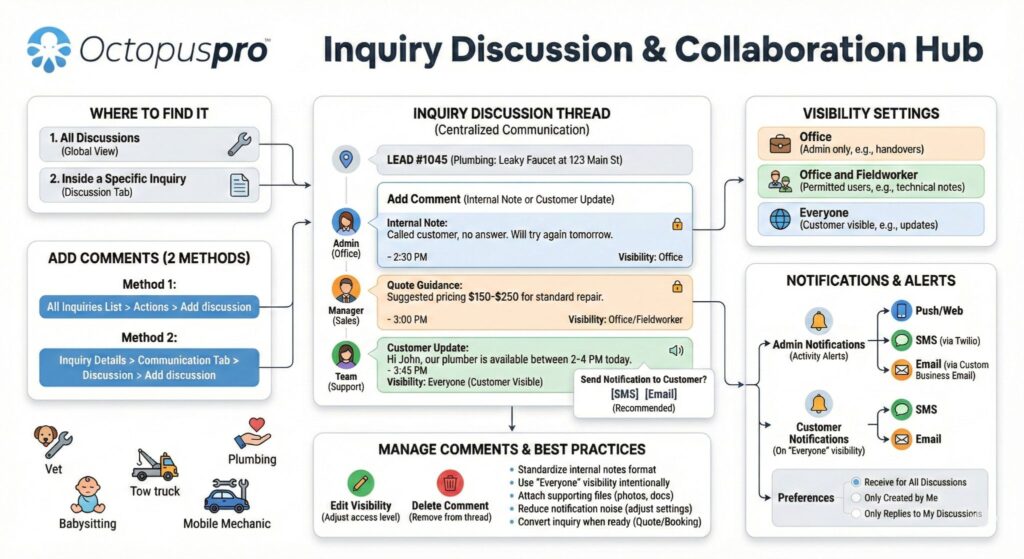
Enquiry Discussions, Internal Notes, and Customer Updates
Keep every pre-excavation job conversation in context, help your team collaborate more effectively, and follow up with greater confidence. With threaded excavation enquiry discussions, internal notes, and visibility controls and email, SMS, and calling directly from excavation enquiries, OctopusPro lets your team collaborate internally, attach files, share customer-visible updates when needed, and maintain a complete communication trail linked to the excavation enquiry instead of scattered across inboxes, text messages, and personal notes.
Make scheduling, quoting, and payments easier to manage.
Give your team a excavation contractor way to handle excavation service packages, urgent excavation requests, recurring excavation bookings, reminders, approvals, invoicing, and payment collection from one system.
Start Free TrialBook SupportView Pricing
Website booking channel
Integrate your website and start accepting excavation bookings online
Turn your website into a 24/7 booking channel that generates more excavation enquiries, excavation requests, excavation pre-job inspections, and quote requests without adding extra admin
OctopusPro helps excavation companies and earthmoving and site preparation teams prevent urgent excavation requests, give customers clearer booking options, and make sure your team has enough time to prepare, assign staff, and travel to the job.
- Let customers request quotes and submit excavation, customer-site visit, and quote request submissions for your excavation jobs and excavation services online.
- Let customers choose exact excavation booking start times or preferred time windows in the customer portal, depending on how your scheduling workflow is set up.
- Apply minimum advance notice rules for new online excavation bookings so your team has enough time to prepare, dispatch, and travel before the excavation job starts.
- Customise your customer portal website with your brand colours, fonts, and styling without needing design or coding skills.
- Add your business logo, images, and favicon to create a professional branded experience.
- Display your excavation services and excavation options clearly in an organised service catalogue.
- Use the portal as a standalone excavation booking website if you do not already have a site, or embed it into your existing website.
- Add a “Book Now” button to encourage faster excavation conversions.
- Add customer login and signup access so customers can manage their excavation bookings, approvals, and payments.
- Use your own website domain or portal URL for a more seamless online experience.
- Link your social media pages and listings to improve reach and trust.
- Offer multiple languages to support a broader customer base.


Self-Service Online Booking for Excavation Jobs
Make excavation booking easier for customers, reduce admin, and manage scheduling, dispatch, and excavation job progress from one connected system. With online excavation quotes, bookings, and job management, OctopusPro helps your team manage work from anywhere while customers can request quotes and book excavation services through your website. Customise the excavation booking experience to match your brand, present your excavation services clearly, and use it as part of your website or as a standalone excavation booking site.

Customer Self-Service Booking Rescheduling
Reduce admin, improve convenience, and give customers more flexibility with customer self-service excavation booking rescheduling. OctopusPro lets customers reschedule excavation bookings through the customer portal or directly from excavation booking confirmation and reminder emails, while your business keeps control with minimum notice rules for excavation booking changes. This helps your team cut back on calls and back-and-forth messages, reduce scheduling conflicts, and make it easier for customers to update their excavation job without leaving your system.

Controls for Exact Times, Time Windows, and Advance Notice
Offer clearer excavation job choices to customers while keeping tighter control over availability and scheduling. With exact excavation booking start times and customer time-window settings and minimum notice time rules for new online excavation pre-job inspections, OctopusPro lets you choose whether customers book a precise time or an available time window, while controlling how much notice is required. This helps create a smoother online excavation booking experience and reduce last-minute scheduling pressure.
Compatible with all website builders, regardless of the platform
Add online booking and lead capture to your existing site without rebuilding your website or changing platforms

Automated Excavation Job Reminder Notifications
Bring customers back at the right time, improve retention, and generate more repeat revenue with automated excavation reminders. OctopusPro helps you send recurring and follow-up reminders for excavation services such as post-excavation follow-ups, repeat excavation schedule renewals, follow-up visits, excavation job reminders, and recurring site work programmes, repeat excavation services, strata, real estate, and multi-site excavation jobs, and recurring excavation work, and planned follow-up visits and recurring excavation programmes, making repeat excavation booking easier and helping you stay top of mind. See Automate Recurring Service Reminders for Excavation Customers.

Recurring and Repeat Excavation Jobs
Lock in future work, reduce rebooking admin, and create more predictable recurring revenue with repeat and recurring excavation scheduling. OctopusPro lets you create repeat and recurring excavation bookings for excavation services such as follow-up visits, strata, real estate, and multi-site excavation jobs, recurring excavation pre-job inspections, customer intake calls, planned reviews, and repeat excavation services, while also letting you offer recurring online excavation bookings for customers.

Voucher Codes, Promotions, and Excavation Campaigns
Create more demand, win new customers, and bring existing customers back with targeted offers and seasonal excavation campaigns. OctopusPro helps you drive more excavation bookings using discount voucher code management and customer portal promotions and homepage banners, making it easy to launch first-service discounts, time-sensitive offers, and seasonal excavation campaigns that attract new business and encourage repeat excavation bookings.
Give excavation contractors clearer schedules and better job details.
Help excavation crews and operators arrive prepared with customer details, property profiles, job notes, site addresses, forms, and excavation booking updates available from the admin dashboard or mobile app.
Start Free TrialBook SupportView Pricing

Mobile, Customer-Site, and Multi-Site Excavation Jobs
Reduce confusion, price travel more accurately, and handle complex customer-site excavation scheduling, multi-property routes, strata work, commercial sites, and urgent excavation call-outs with greater control. OctopusPro supports multi-address excavation bookings for home, customer-site excavation site address, mobile service area, multi-property, and multi-site excavation jobs, making it easier to manage urgent excavation requests, customer-site excavation and earthmoving jobs, property-based excavation jobs, customer-site excavation service visits, online photo-based excavation quote request details, site access notes, machine requirements, ground condition notes, and other multi-site excavation workflows. You can also use distance-based travel fees to calculate travel between customer sites and properties, site addresses, commercial sites, rental properties, and managed sites where needed, helping you recover operator travel time more fairly while keeping pricing clearer for customers.

Exact Mobile Excavation Locations, Shared Pin Links, and Google Maps URLs
Improve location accuracy, speed up dispatch, reduce location errors, and help excavation crews and operators reach the exact site address faster for customer-site, property-based, and mobile excavation pre-job inspections, and hard-to-access excavation jobs. With Google Maps URL and shared pin capture during excavation job and mobile excavation location tools for precise customer-site, property-based, and mobile site addresses, your team can paste a customer’s dropped pin or Google Maps share link into the site address prompt, confirm the exact site address on the map, and use precise GPS pin locations for last-minute customer-site and mobile excavation requests and hard-to-find site addresses.
Assign Excavation Contractors Faster with Real-Time Mobile Excavation Operator and Operator Tracking
Improve response times, reduce unnecessary travel, and make faster dispatch decisions with real-time operator tracking. OctopusPro helps your team view active excavation crews and operators on a live map, identify the closest available mobile excavator operator for urgent excavation bookings, and schedule work more efficiently based on real-time location. See how it works in our real-time operator location tracking software guide.


ETA Updates and Geofenced Mobile Excavation Job Progress
Improve punctuality, reduce “where is my excavation contractor?” calls, and give dispatchers clearer excavation job progress visibility with real-time tracking and automated updates. OctopusPro combines real-time GPS tracking and live excavation job status updates with live ETA updates, GPS excavation booking tracking, and running-late alerts, plus geofenced arrival and automatic operator check-out. This helps your team monitor operator travel, arrival, and departure more accurately and keep scheduled excavation jobs running on time.

Live Excavation Contractor Tracking for Customers
Set clearer arrival expectations, improve customer confidence, and reduce unnecessary calls to your admin team with live excavation contractor tracking for customers. OctopusPro lets customers follow their assigned excavation contractor while they are on the way, helping create a more transparent service experience and making arrival times easier to understand.

Address Privacy Until the Excavation Contractor Is On the Way
Protect customer privacy, control when sensitive address details are revealed, and keep visibility aligned with your dispatch workflow. With address masking until the excavation contractor taps On the Way and operator permissions that control what mobile excavation staff can view in the app, OctopusPro helps prevent premature access to sensitive locations and supports stronger privacy controls based on operator travel status.


Nearby Excavation Jobs and Proximity-Based Excavation Contractor Assignment
Reduce travel time, improve response times, and fit more profitable work into each day with Nearby Excavation Jobs and proximity-based scheduling for excavator operators. OctopusPro helps dispatchers and excavation crews and operators view excavation jobs by geographic proximity, identify the closest qualified excavation contractor, and cluster work more efficiently across online excavation enquiries and photo-based excavation quote requests, customer-site excavation visits, property-based excavation jobs, and urgent excavation requests. This supports smarter route planning and helps your team complete more excavation jobs without sacrificing service quality. In simple terms, Nearby Excavation Jobs proximity-based scheduling helps you plan around a excavation job by showing nearby excavation jobs, travel distance, and available time slots so you can cluster excavation jobs and optimise routes. In contrast, Real-Time Operator Location Tracking software shows the live location of active excavation crews and operators, helping dispatchers identify who is closest right now for faster operator assignment and real-time dispatch decisions.

Create a smoother booking journey for excavation customers.
Let customers request excavation bookings online, receive confirmations and reminders, update excavation jobs where allowed, and stay informed before and after each excavation job.
Start Free TrialBook SupportView Pricing

Customer, Property Profile, and Relationship Management
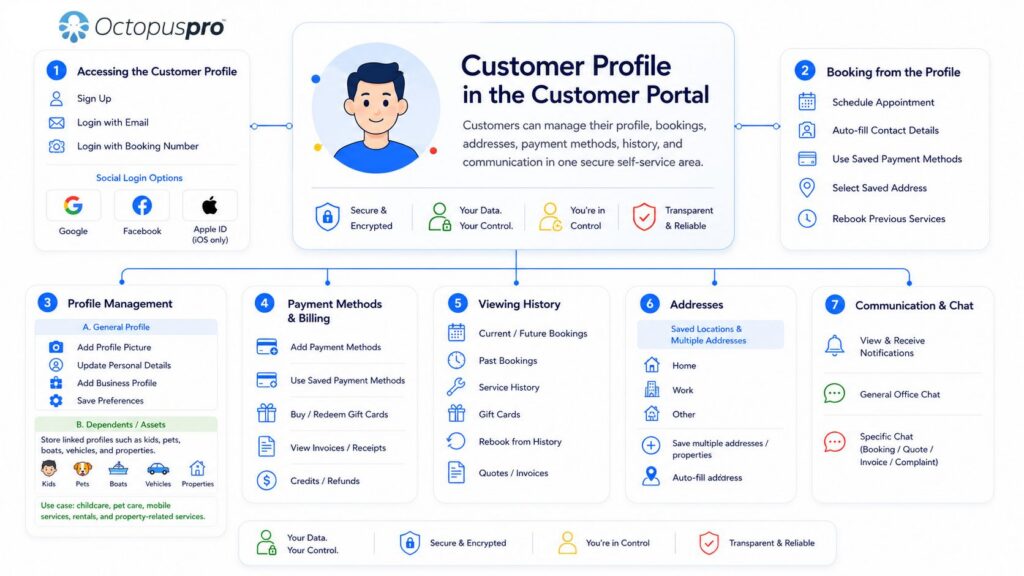
OctopusPro’s built-in CRM tools bring together customer details, site addresses, property profiles, quotes, excavation bookings, invoices, complaints, and a complete communication history in one organised system. You can also manage customer and property profile custom fields, labels, internal notes, properties or properties or assets linked to the customer, account statements, and billing details from one profile, while giving customers a secure self-service space through customer portal profile management to keep their details up to date. This helps your team respond faster, personalise service more easily, and maintain a clearer customer record across the full relationship lifecycle.


Automated Excavation Job Reminders and Confirmations
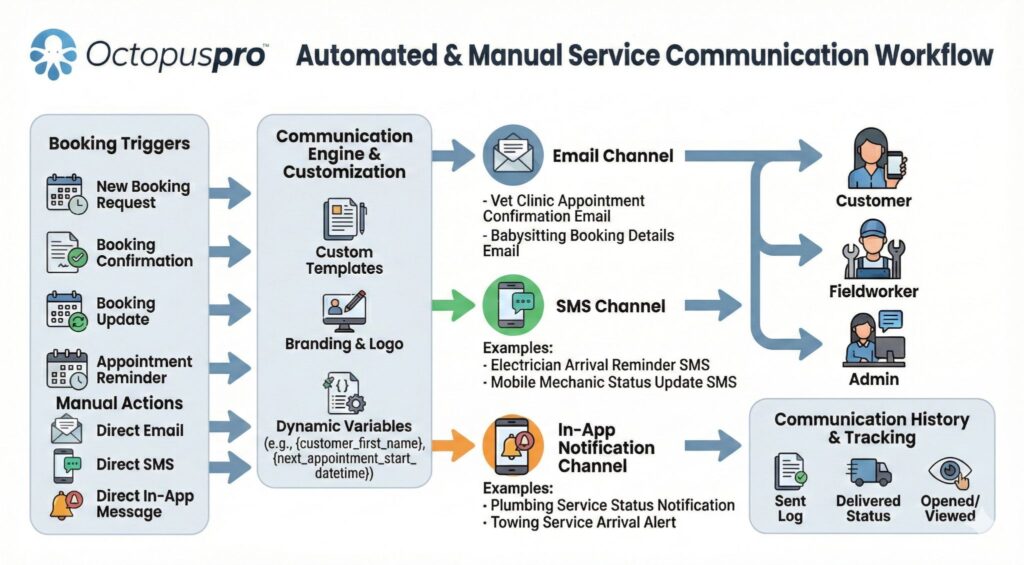
Reduce no-shows, protect excavation contractor time, reduce cancellations, and keep customers and excavation crews and operators better informed without extra manual follow-up. With automated email, SMS, and app reminders and confirmations, OctopusPro can send reminders before scheduled excavation jobs and confirmations with the necessary excavation booking information for upcoming, booked, rescheduled, changed, or cancelled excavation jobs. You can also customise your reminder and confirmation messages to match your workflow and branding, helping keep every excavation job on track and everyone informed every step of the way.

Automate Customer and Staff Communication
Save hours of admin, reply faster, keep your admin staff, excavation contractors, and operators aligned, and present a more professional and consistent image at every stage of the excavation job. With email and SMS automations for customer updates, reminders, and internal staff communication, plus canned responses and reusable message templates, you can send status updates, on-the-way notifications, rescheduling alerts, quotes, invoices, payment reminders, follow-ups, internal prompts to staff, and consistent replies to common excavation enquiries, excavation questions, updates, approvals, and follow-ups without rewriting the same messages every time.

Two-Way Customer and Excavation Contractor Communication
Keep everyone aligned, make communication easier to track, and reduce delays caused by scattered messages. With two-way excavation job communication and direct messaging with excavation crews and operators through OctopusPro, your team can contact customers, contact excavation crews and operators, send updates, request approvals, answer questions, and keep chat, SMS, calls, and communication history linked to the relevant excavation record instead of scattered across personal devices.
WhatsApp Integration
Reach customers and excavation crews and operators faster, reduce communication delays, and manage WhatsApp messaging from one central system with WhatsApp Business integration through Meta. OctopusPro lets you use approved Meta templates for confirmations, reminders, status updates, follow-ups, first-contact auto-responses, and targeted bulk WhatsApp campaigns to mailing lists. It also helps you track template status, message site address, read rates, failures, and overall account activity, giving your team better visibility and control over day-to-day service communication and outreach.

Digital phone system, missed-call workflows, and call logging
Deliver a more professional calling experience, keep every call linked to the right customer record, and manage phone communication more efficiently from one system. OctopusPro lets your team handle business calls, SMS, voicemails, call routing, and call logs in one connected workflow, with in-app calling, team-based number routing, missed-call workflows, and communication history tied to the right records. This helps your team stay organised and responsive without relying on personal mobiles. See the Digital Phone System guide.


Unified Notifications Hub Across Web and Mobile
Help your team respond faster, stay organised, and keep time-critical communication from being missed with one central notifications hub across web and mobile. OctopusPro brings calls, voicemails, SMS, discussions, leads, and operational updates into a notifications centre for web and excavation crews and operators, supported by a live dashboard with excavation enquiries, SMS, and discussion widgets. This gives reception, admin staff, and dispatchers a clear view of what needs attention next, helping them react faster to new leads, missed calls, internal updates, and time-sensitive service communication.
Share Excavation Notes, Photos, Forms, and Attachments with Excavation Contractors
Give excavation crews and operators the context they need before they start, reduce back-and-forth, and help excavation jobs get completed more accurately with better field collaboration and documentation. With excavation job attachments, OctopusPro lets your team attach estimates, photos, site excavation pre-job inspection images, instructions, invoices, and other excavation job-related files, while also allowing excavation crews and operators to upload before-and-after photos and other field images as the work progresses. This keeps admin staff, excavation contractors, and operators aligned, improves communication, and creates clearer proof of completed excavation work and completion throughout the excavation job.


Secure Cloud Storage for Documents, Forms, and Excavation Records
Keep critical excavation booking information secure, accessible, and easy to find throughout the full service lifecycle. OctopusPro securely stores your business data in the cloud, giving your team reliable long-term access to the records, attachments, and documentation connected to each excavation job. Whether your staff are in the admin dashboard, on-site at customer sites and properties, or working remotely on admin tasks, they can quickly find the information they need to quote, schedule, deliver excavation jobs, invoice, and follow up with confidence. This helps maintain continuity across every stage of the service process without relying on paper files or scattered files or systems.
Get Paid Faster and Keep Cash Flow Under Control
Shorten the time between completing work and collecting payment while keeping invoicing and payment records easier to manage. OctopusPro helps excavation companies manage invoicing, payments, deposits, and refunds more efficiently. Generate invoices quickly, collect payments through supported gateways, track balances, automate reminders, and maintain clear financial records for every excavation job. This reduces admin work and creates a smoother payment experience for both customers and staff.


Saved Cards, Card on File, and Flexible Deposit Terms
Reduce payment friction, make it easier for customers to approve work, and support more flexible excavation job and payment workflows. With service payment terms for deposits, card-on-file, and pay-later excavation bookings and saved payment methods in the customer portal, OctopusPro lets you collect deposits, securely store cards for later charging, and help returning customers pay faster without re-entering their details. This is especially useful for customer intake calls, excavation enquiries, approval-based excavation jobs, urgent mobile excavation call-outs, recurring maintenance, and balance-after-service workflows.

Mobile, card-present, and online payments in one workflow
Get paid faster, reduce admin, and give customers more ways to pay with one connected payment workflow. OctopusPro supports online deposits and secure payment methods, mobile payment collection, card-present payments at the customer site or during a mobile excavation job, and secure payment links sent with quotes and invoices. It integrates with multiple payment gateways, including Stripe, PayPal, Authorize.Net, Square, Checkout.com, eWAY, WePay, and Tap, so you can collect deposits, balances, and on-site payments more efficiently while keeping quoting, invoicing, and payment collection connected in one system.
Ad-Hoc Excavation Services and On-Site Charge Adjustments
Capture extra labour, excavation materials, equipment, supplies, and one-off charges immediately so changing excavation job scope does not lead to missed revenue. With custom excavation services and non-catalogue line items added from the operator app, excavation crews and operators can record unexpected labour, extra labour time, extra excavation materials, equipment, supplies, and other additional excavation job items directly in quotes, excavation bookings, and invoices from the field.

Integrate with industry-leading payment gateways

In-App Invoicing and Payment Collection for Mobile Excavation Jobs
Close out excavation jobs faster, invoice sooner, get paid closer to excavation job completion, and make payment collection easier while the excavation contractor is still on-site or completing the visit. With instant invoicing and in-app invoicing and payment collection, OctopusPro lets excavation crews and operators create invoices and take payment as soon as the excavation job is completed, helping reduce delays, improve transparency, shorten the gap between finishing the excavation job and collecting payment, and keep cash flow improving.

Invoice Labels, Tracking, and Audit Trail
Stay organised, resolve disputes faster, and give your team clearer visibility over invoice progress with invoice labels and tags plus a detailed invoice history log and audit trail. Categorise invoices by workflow stage, track key actions such as sent, edited, paid, or voided, and quickly review what changed, when it changed, and who made the update. This makes it easier to manage finance workflows, investigate billing questions, and keep invoice records clearer and more accountable as your operation grows.
Digital Signature Capture
Approve work faster, reduce paperwork, and create a more reliable sign-off process with digital signature capture. Collect customer approval and sign-off for quotes, excavation bookings, and invoices electronically, whether the customer signs through any browser on their own phone or device using a secure link, or signs on-site through the operator app when the excavation contractor is with them. This helps you confirm approvals faster, capture proof of service more professionally, and maintain a clearer digital record without paper forms.

Automated Payment Reminders
Improve collections, protect cash flow, reduce overdue invoices, and save your team time with automated payment reminders. Automatically send unpaid and overdue invoice follow-ups by email, SMS, and WhatsApp. It also works well with customer billing cycles for consolidated invoicing and custom invoice due dates and billing terms, making it easier to align reminders with agreed payment schedules, recurring billing arrangements, and customer-specific billing dates so you can get paid faster and manage accounts more consistently.


Branded Invoice PDFs and Payment Advice
Look more professional, reduce confusion, and help customers pay faster with clear branded invoice documents. With custom invoice PDF templates, branding, and payment advice, you can add your logo, choose logo alignment, customise the layout, and style your invoices with your preferred font family, font size, font color, and border color to better match your brand. You can also add custom header and footer content, include clear payment instructions, terms, excavation notes, or legal disclaimers, and apply different branding for different trading names, helping make invoices easier to understand, more consistent, and more professional to send.

Payment Tracking, Due Dates, and Terms
Improve cash flow control, set clearer payment expectations, and make balances, deposits, refunds, and due dates easier to manage. OctopusPro gives staff and customers clear visibility of payments, receipts, deposits, and refunds, including paid amounts, outstanding balances, and payment history, while allowing you to apply invoice due dates and payment terms such as pay on completion, excavation job start, Net terms, or fixed billing dates at invoice, customer, service, or company level. This makes it easier to support trade accounts, part-payments, and deposit-based excavation jobs, track overdue invoices more accurately, and align reminders and collections with agreed payment schedules.
Coordinate mobile excavation crews without the guesswork.
Use mobile excavation service areas, travel details, saved locations, map links, and operator availability to manage customer-site excavation, multi-site excavation jobs, venue excavation bookings, and urgent excavation requests more efficiently.
Start Free TrialBook SupportView Pricing
Efficiently Manage Multi-Location Excavation Contracts and Repeat Excavation Work
Handle higher excavation job volume more efficiently, deliver more consistent service, and keep multi-site excavation jobs, strata, real estate, and multi-site excavation jobs, or excavation service and contract work organised from one connected system. OctopusPro helps businesses serving commercial excavation service portfolios, trade accounts, logistics operators, government excavation jobs, and corporate customers manage multiple excavation jobs, repeated excavation jobs, and long-term service contracts in one place. With excavation project history tracking, automated communication, and centralized scheduling, it becomes easier to coordinate ongoing work, maintain service quality, and manage contract customers more effectively as your business grows.


Group and Merge Invoices
Reduce billing admin, improve invoice clarity, and present customers and property managers, property managers and real estate partners, facilities managers, offices, hotels, and managed properties, and repeat customer accounts with a more professional view of charges using grouped and merged invoices. This is especially useful for trade accounts, recurring maintenance programs, and businesses managing multiple excavation jobs for the same customer, helping you keep billing accurate and easier to manage as your operation grows.
Optimise Billing Cycles for Corporate, Multi-Location, and Repeat Excavation Customers
Reduce billing admin, simplify reconciliation, and manage high-volume commercial excavation service invoicing more efficiently with flexible billing cycle management. OctopusPro helps you group multiple completed excavation jobs into scheduled invoices for trade accounts, multi-site excavation jobs, strata, real estate, and multi-site excavation jobs, or excavation service customers, and other commercial excavation service customers, making recurring billing clearer, more organised, and easier to control.

Sell and manage excavation service packages more professionally.
Create clearer excavation quotes, package options, excavation add-ons, follow-up reminders, and recurring excavation workflows so your team can manage sales and delivery in one place.
Start Free TrialBook SupportView Pricing

Configured for Your Excavation Workflow
Run your business more efficiently with a system that fits your workflow instead of forcing you into a generic setup. OctopusPro supports mobile, excavation operations, and hybrid service site address workflows, so you can manage the way you work today and adapt more easily as your business grows.

Multi-site excavation company and service area management
Keep growing without losing control by managing multiple service areas, mobile service zones, and hybrid operations in one system. OctopusPro helps you assign excavation services and excavation crews and operators by location, control which service area handles each excavation job, filter schedules by area, and keep reporting, payments, and operations organised as your business expands. See Multi-Location POS, Booking Location Types, and Operator Excavation Service Areas.

Distance-Based Travel Fees and Geo-Pricing Zones
Protect margin on mobile work and charge more accurately for travel, distance, and excavation service area pricing. With distance-based travel fees for mobile excavation call-outs and geo-pricing zones for field mobile excavation service areas, OctopusPro can automatically apply free travel thresholds, per-kilometre or per-mile charges, and different pricing by suburb, postcode, or service zone, so the right travel fee is added without manual calculation.



Team Excavation Jobs with Lead Excavation Contractors, Assistants, and Support Staff
Complete larger excavation jobs more efficiently, define team roles more clearly, and keep accountability and payroll organised when multiple excavation crews and operators are needed on-site. OctopusPro lets you assign multiple excavation crews and operators to one excavation job and manage support team accounts for lead excavation crews and operators and assistants for bigger excavation jobs, online enquiry and customer-site excavation job scheduling work, multi-site excavation jobs, strata, real estate, and multi-site excavation jobs, or excavation service, and specialist support.

Real-Time Excavation Contractor Activity Log
Improve accountability, resolve disputes faster, and give managers clearer visibility with a real-time activity log and audit trail. OctopusPro records excavation contractor actions, status changes, and excavation job updates as they happen, making performance easier to monitor and issues easier to investigate.
Excavation Contractor Time Tracking, Attendance, and Timesheets
Track labour more accurately, improve payroll confidence, and get clearer visibility into excavation contractor material or equipmentivity. OctopusPro records operator attendance, check-in and check-out activity, travel, excavation job progress, and working hours in real time, helping you reduce reliance on manual timesheets and improve accountability, payroll accuracy, and reporting. See Operator Check-In / Check-Out Tracking and Excavation Contractors and Operators, Sub-excavation crews and operators & Payroll.

Built for solo excavation contractors, growing salons, mobile teams, and excavation businesses.
Whether you manage one excavation contractor or a multi-excavation contractor operation, OctopusPro helps keep scheduling, dispatch, records, communication, billing, and reporting organised as demand increases.
Start Free TrialBook SupportView Pricing
Excavation Contractor Payroll and Commission Management
Improve payroll accuracy, reduce admin, and manage excavation contractor commissions and mixed pay models with more confidence. OctopusPro helps you calculate earnings, commissions, and payouts more reliably for employee excavation crews and operators, subcontractors, and mixed pay structures, helping reduce manual work and payroll disputes. See Operator Payroll Management & Reconciliation.

Stop excavation bookings, follow-ups, and payments slipping through the cracks.
Use reminders, statuses, notifications, customer records, quote follow-ups, and payment workflows to keep every excavation job moving from enquiry to completion.
Start Free TrialBook SupportView Pricing
Reduce Complaints and Deliver a Better Excavation Customer Experience
Resolve issues faster, protect your reputation, improve customer satisfaction, and give customers more confidence with a clearer, more reliable complaint handling process. OctopusPro helps you manage complaints and service issues, handle payment issues and service questions, keep customers updated, track progress, and maintain complete customer communication records with a full history of actions taken. With issue and complaint management for service businesses, your team gets clearer workflows, better visibility, and stronger accountability so problems are handled properly, resolved faster, and nothing slips through the cracks.


Customer Feedback and Review Management
Build a stronger reputation, improve service quality, gain clearer customer insights, and add more trusted social proof with customer feedback, ratings, and reviews for service businesses. OctopusPro helps you collect internal feedback, monitor customer sentiment, and improve service site address. You can also use Google Excavation Reviews integration and automated review requests to display public Google Excavation Reviews, send customers to your Google review page, and automate review requests by email and SMS.

Automated review requests and customer reactivation marketing
Save time, re-engage past customers, and promote future excavation services more effectively with automated follow-up and targeted outreach. OctopusPro helps you request feedback after completed excavation jobs using Customer Feedback, Ratings & Excavation Reviews, automate follow-up workflows through Workflow Automations, and use Mailing Lists plus Mailchimp Integration to re-engage customers, market seasonal or recurring excavation services such as excavation intake calls, follow-up excavation pre-job inspections, customer check-ins, strata, real estate, and multi-site excavation jobs, and recurring excavation work, and keep your business in front of the right audience with less manual effort.

Mailing Lists and Customer Marketing
Grow repeat business, improve campaign targeting, and keep your marketing organised with built-in mailing list management software for service businesses. Create customer and staff mailing lists using filters like location, excavation project history, labels, and excavation job status, then use them for promotions, reminders, updates, and reactivation campaigns. You can also integrate OctopusPro mailing lists with Mailchimp for email marketing, automation, and reporting, and learn how to manage campaigns more effectively in the mailing lists marketing guide.


A better system for excavation businesses ready to grow.
Excavation Review plans, start a trial, or book support to plan how OctopusPro can fit your services, excavation crews and operators, locations, excavation service packages, customer portal, and reporting workflows.
Start Free TrialBook SupportView Pricing
Accounting Integration with Xero and QuickBooks
Save admin time, reduce double entry, improve accuracy, and make reconciliation easier by connecting OctopusPro with Xero and QuickBooks accounting integration. OctopusPro helps excavation companies and earthmoving and site preparation teams sync customers, invoices, payments, and service items between their operational and financial systems, so excavation operations, mobile excavation and earthmoving jobs, multi-site excavation jobs, strata, real estate, and multi-site excavation jobs, and excavation service billing records stay aligned. This makes it easier to automate invoice creation from quotes, excavation bookings, and completed excavation jobs, track deposits and part-payments, keep overdue balances visible, issue receipts and payment confirmations, and give your bookkeeper or accountant excavation contractor, more up-to-date records for reporting, reconciliation, and tax time.

Open API, Webhooks & Third-Party Integrations
Reduce manual work, connect your systems more effectively, and keep data flowing smoothly across your business with API access, webhooks, and third-party integrations. OctopusPro can connect with Mailchimp, Google Maps API, Google Excavation Reviews, Facebook Page & Messenger, and external CRM, ERP, accounting, and reporting platforms. With the Open API and webhooks, you can sync customers, excavation enquiries, quotes, excavation bookings, invoices, and payments, build custom portals or apps, create dashboards in Power BI, Looker, and Tableau, and trigger real-time actions such as Slack or Teams alerts when quotes change, payments are approved, or missed calls need follow-up.
Secure, Searchable Reporting for Your Entire Operation
Make better decisions faster, track performance more accurately, and keep a reliable record of your business activity with secure, searchable reporting. With real-time reporting across excavation bookings, excavation crews and operators, customers, invoices, payments, sales, and operational activity, you can quickly find the data you need, monitor trends, export reports when required, and maintain clear visibility across your entire operation.

Keep Working Online or Offline
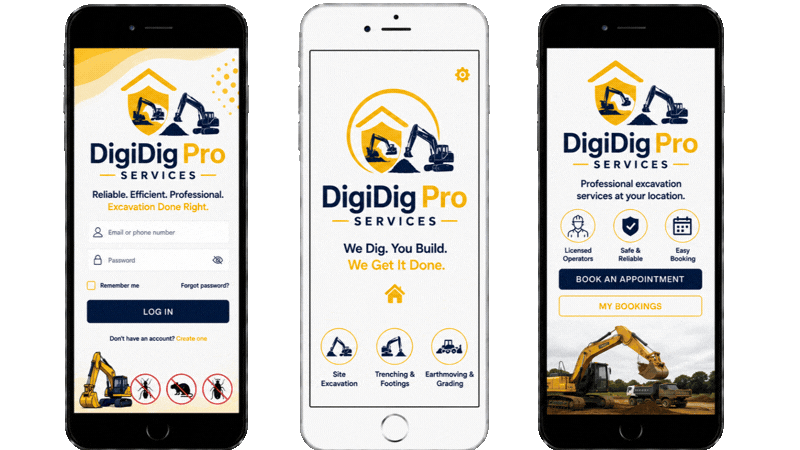
Offer a Branded App Experience for Your Excavation Business
Strengthen your brand, make your business look more professional and established to excavation crews and operators, and give repeat customers an easier way to remember, access, and stay connected with your business. With your own branded service industry app, you can publish the OctopusPro app under your company name and business identity, helping your business appear more professional and consistent. For customers, this is especially valuable if you offer repeat or recurring excavation services, as they can access your business more easily and receive push notifications through your branded app, helping build stronger familiarity, trust, and long-term loyalty.

Available Wherever Your Team Works
Keep admin staff, excavation contractors, and operators material or equipmentive from the excavation company, the road, or the customer site with one connected system available on iOS, Android, and the web. With operator app access and mobile excavation management, your team can stay connected and manage work from anywhere.

Reliable Cloud-Based Data Security
Protect sensitive business data while maintaining stronger access control, accountability, and operational control across your team. OctopusPro supports role-based user permissions and secure staff access control, helping reduce risk while ensuring the right team members can securely access the records and information they need from anywhere.

Excavation Videos and User Guides
Help your team get up to speed faster and make better use of the platform with the OctopusPro User Guide, webinars, onboarding supplies, and excavation videos and material or equipment walkthroughs. Find step-by-step setup guides, tutorials, and real workflow examples to support onboarding, daily operations, and ongoing improvement across your admin team and field teams.
Launch your excavation workflow with expert support.
Get help planning your setup, organising excavation crews and operators, services, excavation booking forms, customer portal options, pricing, reminders, and reporting workflows so your excavation business can move from enquiry to paid excavation booking with less friction.
Start Free TrialBook SupportView Pricing