
Control complex field operations from one connected enterprise FSM platform
Coordinate high-volume work orders, multi-region scheduling and dispatch, employees and contractor networks, mobile execution, customer sites and assets, billing, reporting, and integrations without splitting the service lifecycle across disconnected systems.
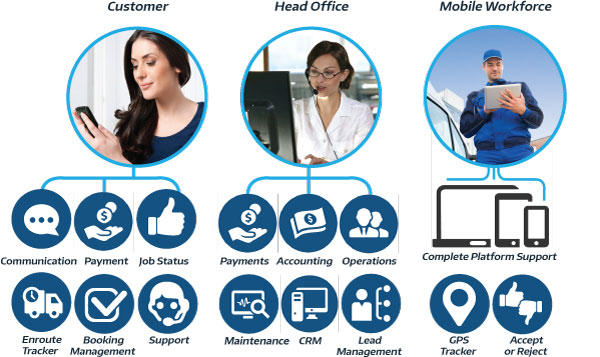
Replace disconnected field service processes with one operating platform
Enterprise service organizations do not only need another calendar. They need a field service management platform that connects customer demand, work orders, workforce capacity, mobile execution, financial control, and management visibility across the business.
Fragmented customer and job data
Office, field and finance teams work from different records, creating repeated entry and unreliable handovers.
Manual dispatch coordination
Schedulers rely on calls, messages and spreadsheets to check availability and redistribute work.
Inconsistent field documentation
Forms, photos, signatures and service evidence are collected differently across teams and regions.
Delayed operational reporting
Managers wait for spreadsheets instead of seeing bookings, workforce activity, revenue and unresolved issues as work changes.

One connected service lifecycle from request and booking through field execution, billing and reporting.
Run the full service lifecycle across teams, regions and customer accounts
Enterprise field service management software coordinates the people, processes, customer information and financial workflows required to deliver work outside the office at scale.
Centralize service operations
Manage inquiries, quotes, bookings, work orders, appointments, invoices, payments, issues and history without splitting the lifecycle across unrelated systems.
Coordinate distributed resources
Schedule fieldworkers, technicians, contractors, crews and sub-workers using working hours, availability, service eligibility and service areas.
Standardize field execution
Use custom fields, forms, checklists, statuses, notes, photos, files and signatures to create repeatable service delivery workflows.
Connect office, field and customer
Keep dispatchers, managers, mobile teams and customers informed through connected records, notifications, discussions and self-service.
Strengthen commercial control
Connect quotes, deposits, payments, refunds, billing cycles, consolidated invoicing, payroll-related records and accounting workflows.
Scale with live visibility
Use dashboards, reports, logs and exports to monitor service demand, workforce activity, revenue, communication and unresolved actions.
What enterprise service organizations should evaluate in an FSM platform
A scalable field service management system should support the complete operating model—not only technician scheduling. Use these requirements when comparing platforms or preparing an FSM software RFP.
| Enterprise requirement | How OctopusPro supports it | Operational value |
|---|---|---|
| Multi-location field service management | Regions, working hours, service areas, customer locations, fieldworker structures and multiple trading names. | Maintain central oversight while configuring how different operating units deliver work. |
| Work order and appointment control | One-off, recurring, multi-visit, multi-service and multi-appointment booking structures. | Support different service models without creating disconnected records. |
| Enterprise workforce scheduling | Availability, service eligibility, working hours, job requests, crews, contractors and sub-workers. | Give dispatchers better information when assigning work and managing exceptions. |
| Role-based access and governance | User roles, fieldworker permissions, approval workflows, activity history and controlled customer access. | Limit access and actions according to operational responsibility. |
| Customer, site and asset history | CRM profiles, communication history, saved locations, properties, assets and repeat-service records. | Give teams the context needed to deliver consistent service across long-term accounts. |
| Field data and quality control | Custom fields, forms, checklists, photos, files, signatures, notes, issue and complaint workflows. | Create more consistent records for completion, review, billing and customer follow-up. |
| Enterprise billing and reporting | Deposits, invoices, payments, refunds, billing cycles, consolidated invoices, dashboards and exports. | Connect completed work with commercial oversight and management reporting. |
| Integration readiness | Available integrations, Xero and QuickBooks connections, open API and webhooks. | Fit field operations into a broader business systems environment. |
Turn your requirements list into a connected operating workflow
Review your branches, service lines, workforce model, customer data, billing and integration priorities with the OctopusPro team.
Work order management, workforce scheduling and dispatch
Manage the service lifecycle from initial inquiry or request through quote, booking, assignment, field completion, invoice and reporting. OctopusPro keeps related appointments, customer records, files, communication and financial activity connected to the same operational history.
- Create one-off, recurring, multi-visit and multi-appointment service workflows.
- Assign work manually or distribute job requests to eligible fieldworkers.
- Use working hours, availability, services and service areas when coordinating resources.
- Manage rescheduling, cancellation, alternative-time suggestions and unassigned work.
- Keep job statuses, notes, discussions, attachments and customer communication attached to the booking.

Mobile workforce management for employees, contractors and crews
Give fieldworkers the job information and mobile actions they need while giving dispatchers and managers stronger visibility over acceptance, travel, attendance, status updates, proof of work and completion.

- Manage fieldworkers, subcontractors, lead workers, assistants, crews and sub-workers.
- Configure services, working hours, service areas, permissions and job-request rules.
- Support On the Way, Arrived, Start, Pause, Finish and related attendance workflows.
- Capture location visibility, navigation, check-in/out records, timesheets and job activity.
- Collect forms, checklists, photos, files, notes and customer signatures from the field.
- Connect time, job revenue, commissions and payout-related information to reports.
Field service CRM, customer self-service and repeat-service history
Enterprise service delivery depends on more than a contact name and address. OctopusPro keeps customer records, communication, quotes, bookings, invoices, issues, saved locations and related properties or assets together so teams can understand the complete service relationship.
- Centralize customer profiles, communication logs, quotes, bookings, invoices and complaints.
- Represent sites, service locations, vehicles, equipment, properties or other repeat-service entities using Customer Properties.
- Attach the correct customer property, location or asset context to each booking.
- Give customers controlled online access to bookings, profiles, quotes, invoices, payments and stored service information.
- Support multiple trading names or sub-brands while retaining centralized operational oversight.
- Use recurring bookings, saved cards, saved locations and self-service tools for long-term customer accounts.
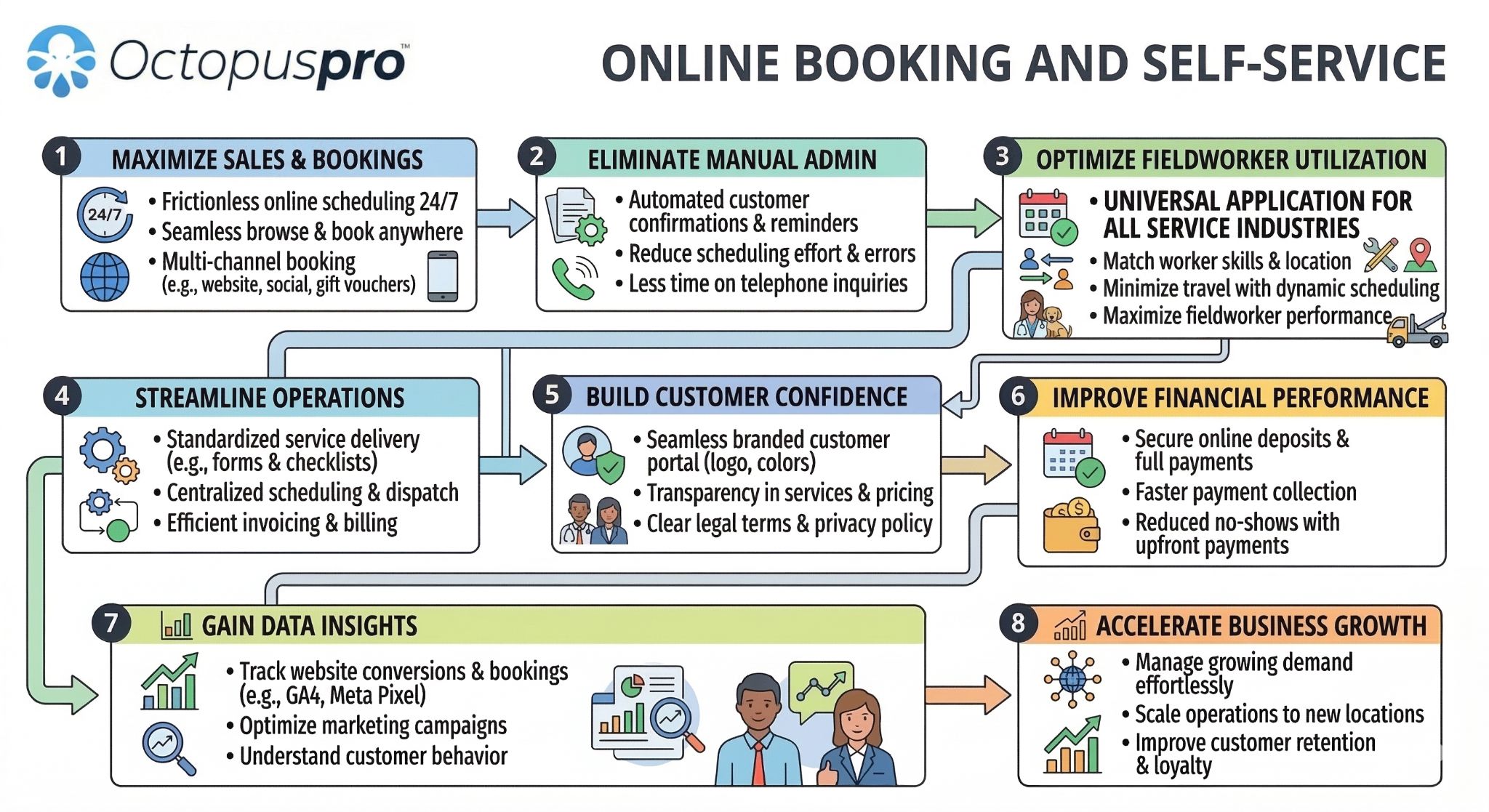
Quote-to-cash workflows, consolidated billing and field service analytics
Connect operational completion with finance workflows so customer balances, invoices, deposits, payments, refunds, billing cycles, contractor earnings and management reports are based on the same service records.

- Create, send, track and convert quotes and estimates.
- Manage invoices, deposits, part payments, full payments, refunds and customer balances.
- Use customer billing cycles and consolidated invoicing for commercial or repeat-service accounts.
- Review booking, sales, payment, timesheet, fieldworker, communication and issue reports.
- Trace actions through booking activity, automation, email, SMS, call and discussion logs.
- Connect eligible accounting workflows with Xero or QuickBooks and use exports where required.
Role-based access, standardized data and enterprise integrations
Configure access and workflow responsibility around the way your business operates. Combine user roles, fieldworker permissions, forms, checklists, approval processes, logs, API connections and webhooks to create stronger control without separating office and field activity.
- Assign granular user access based on operational responsibility.
- Control fieldworker actions, customer visibility and change requests.
- Standardize service data using custom fields, forms and checklists.
- Manage issues and complaints with assigned ownership, status tracking and activity history.
- Connect external systems through available integrations, the open API and webhooks.
- Use templates, automations and communication workflows to reduce repeated administration.

See how OctopusPro can support your teams, workflows and customer contracts
Explore the platform using your real scheduling, dispatch, mobile workforce, asset, billing and reporting requirements.
Configure the platform around different service lines and operating models
OctopusPro supports mobile, fixed-location and virtual service workflows, as well as different customer, workforce, billing and approval requirements within the same broader service operation.
Multi-branch and multi-brand operations
Support distributed service teams, service regions, customer locations and multiple trading names from one account.
Custom fields and structured data
Capture service-specific, customer-specific and internal information through configurable booking and CRM fields.
Forms, checklists and proof of work
Standardize inspections, safety steps, approvals, photos, files, signatures and completion evidence.
Real-time availability and self-booking
Only expose suitable appointment options where eligible fieldworkers are available under the configured rules.
Issue and complaint management
Log, assign, track and resolve service issues with a connected customer and booking history.
Enterprise onboarding support
Map services, teams, data, permissions, finance and integrations into a staged implementation plan.
Give every department the context and controls it needs
Enterprise FSM decisions affect dispatch, customer service, finance, IT, leadership and the mobile workforce. OctopusPro keeps those teams connected to the same current service records.
One live service record
Shared across every team and customer touchpoint
Operations and dispatch
See demand, fieldworker availability, assignments, status changes, service areas, unresolved work and operational exceptions.
Field service teams
Access job details, customer context, forms, checklists, photos, files, signatures, discussions and mobile status actions.
Finance and commercial
Connect quotes, deposits, invoices, payments, refunds, billing cycles, consolidated accounts and accounting workflows.
Leadership and management
Review live dashboards, reports, workload, revenue, communication logs, issue trends and operating activity.
Customer service
Use one customer history for inquiries, bookings, communication, complaints, payments and follow-up.
IT and systems
Connect field operations with external applications through integrations, API access, webhooks and exports.
Regional managers
Monitor local teams, service areas, availability and activity while maintaining organization-wide standards.
Enterprise customers
Use self-service tools for profile details, bookings, quotes, invoices, payments and approved service actions.
Move work from request to revenue without losing operational context
Create a repeatable field service workflow while retaining the flexibility to configure services, permissions, workforce rules, customer data and field requirements around different teams and business units.
Capture demand
Receive an inquiry, quote request, online booking, service request or manually created work order.
Structure the work
Add the customer, service, site, asset, pricing, fields, forms, files and required instructions.
Plan capacity
Review working hours, availability, service eligibility, service areas, crews and existing commitments.
Schedule and dispatch
Assign the right fieldworker or send a job request under the configured assignment workflow.
Execute in the field
Use mobile status updates, navigation, check-in/out, notes, photos, forms, signatures and discussions.
Keep customers informed
Send confirmations, reminders, on-the-way updates, portal access and approved self-service options.
Invoice and reconcile
Generate invoices, collect payments, manage billing cycles, review earnings and synchronize accounting data.
Measure and improve
Use dashboards, reports, logs, ratings, issues and customer history to improve service delivery.

End-to-end enterprise FSM workflow connecting demand, planning, field execution, quality control, payments and reporting.
Enterprise field service management use cases
Use one platform to coordinate complex service delivery while preserving the local rules, customer context and workforce structures required by each operating model.
National or multi-region service provider
Coordinate bookings, dispatch, customer records, mobile activity, reporting and billing across distributed operating areas.
Franchise or multi-brand organization
Maintain shared workflows and central visibility while managing local teams, regions, working hours and trading names.
Commercial maintenance contractor
Standardize recurring work, site records, field documentation, customer updates, consolidated billing and issue resolution.
Asset- or property-based services
Keep service history linked to customer sites, vehicles, equipment, properties or other repeat-service records.
Large subcontractor network
Manage employees, contractors, lead workers, assistants and crews with service eligibility, permissions, job requests and earnings records.
Mixed mobile, fixed-site and virtual services
Coordinate field visits, provider locations and remote appointments under one customer, scheduling and billing platform.
High-volume customer service operation
Connect inquiry handling, online booking, reminders, rescheduling, dispatch, payments and complaints to one customer history.
Enterprise account and contract delivery
Support repeat customers, multiple service locations, recurring schedules, purchase-order notes and consolidated account billing.
Connected systems environment
Use OctopusPro as the service operations layer while connecting accounting, calendars, communication tools and custom applications.
Move beyond a calendar when field operations become complex
Basic appointment software can be useful for simple scheduling. Enterprise FSM software is designed to manage the broader service operation across customers, work orders, mobile teams, data, finance and connected systems.
Basic scheduling software
- Primarily manages appointment times on a shared calendar.
- Customer, field and finance data often live in separate systems.
- Limited support for crews, contractors, sites, assets and permissions.
- Field updates may rely on calls, messages or paper forms.
- Reporting often requires manual spreadsheet consolidation.
- Completed work still needs to be re-entered for billing or analysis.
Connected enterprise FSM with OctopusPro
- Connects inquiries, quotes, work orders, scheduling, field execution, invoicing and reporting.
- Maintains a shared customer, site, asset and service history.
- Supports roles, permissions, employees, contractors, crews and service areas.
- Captures statuses, GPS workflows, timesheets, forms, photos and signatures from the field.
- Provides dashboards, reports, logs and exports using current operational records.
- Connects completion data to invoices, payments, billing cycles and accounting workflows.
Start building a more connected enterprise field service operation
Test the workflow in OctopusPro or speak with the support team about implementation, migration and configuration priorities.
Plan the rollout around your real operating model
A successful enterprise FSM implementation starts with the work your teams actually perform. Configure the highest-value workflows first, validate them with representative users, then expand into deeper automation, reporting and integrations.

Reduce rollout risk with a staged configuration plan
Start with the workflows that affect service delivery most, test them with representative office and field users, then expand once the operating model is proven.
- Prioritize high-volume and high-risk workflows
- Validate roles, permissions and exception paths
- Pilot billing, integrations and customer communication
- Review adoption using reports, logs and feedback
Frequently asked questions
What is enterprise field service management software?
Enterprise field service management software connects work order management, workforce scheduling, dispatch, mobile field execution, customer and asset records, billing, reporting, permissions and integrations across larger or more complex service organizations.
What is the difference between enterprise FSM and basic scheduling software?
Basic scheduling software mainly places appointments on a calendar. Enterprise FSM manages the wider service lifecycle, including demand capture, work orders, dispatch, workforce rules, field records, customer history, invoices, payments, reports and connected systems.
Can OctopusPro support multiple branches, regions or trading names?
OctopusPro can support distributed operations through service areas, working hours, fieldworker structures, shared records, centralized reporting and multiple trading names. The configuration should reflect how your organization separates brands, teams, customer ownership and operational responsibility.
Can OctopusPro manage employees, subcontractors and crews?
Yes. You can manage fieldworkers, subcontractors, sub-workers, lead workers and team-based appointments, including services, availability, working hours, service areas, permissions, timesheets and payroll-related information.
Can enterprise customers, service sites and assets be tracked over time?
Yes. The CRM stores customer and service history, while Customer Properties can represent sites, locations, vehicles, equipment, dependents or other repeat-service entities and link them to the correct bookings.
How does OctopusPro standardize work order and field workflows?
Configure services, booking structures, recurring work, custom fields, forms, checklists, statuses, templates, notifications, permissions and approvals so teams follow a repeatable process while retaining service-specific requirements.
Does OctopusPro support consolidated invoicing for contract customers?
Yes. Customer billing cycle management can group eligible work into consolidated invoices based on the configured period and rules. OctopusPro also supports invoices, deposits, payments, refunds and customer balances.
Can OctopusPro connect with accounting or other enterprise systems?
OctopusPro provides available integrations, Xero and QuickBooks accounting connections, an open API and webhooks. Integration design depends on the external system, required data flow and the workflows you want to automate.
What reporting is available for enterprise field service operations?
OctopusPro includes dashboards, live reports, exports and operational logs across bookings, field activity, customers, communications, payments, timesheets, issues and business performance. Reporting usefulness depends on the data and workflows configured by the organization.
Does OctopusPro support mobile, fixed-location and virtual services?
Yes. Businesses can configure services delivered at customer locations, provider locations or remotely, with the relevant scheduling, availability, customer communication and booking information for each model.
How should an enterprise prepare for implementation?
Document service lines, work order structures, workforce models, regions, customer and asset data, required field documentation, user roles, billing, integrations and reporting goals. Pilot representative workflows before expanding across every team or branch.
Who should be involved in selecting enterprise FSM software?
The evaluation should include operations, dispatch, field team representatives, customer service, finance, IT, management and any regional or branch stakeholders whose processes, data or reporting will be affected.
Explore related enterprise field service guides
Review the underlying capabilities in more detail as you assess requirements, prepare an RFP, map workflows and plan your OctopusPro configuration.
Work orders and workforce
Governance and customer experience
Data, assets and finance
See how OctopusPro can fit your enterprise field service workflow
Bring work orders, scheduling, dispatch, mobile workforce management, customer and asset history, field documentation, billing, reporting, and integrations together in one configurable platform.
Start with your real operating requirements
Review your services, regions, workforce model, customer data, billing and integration priorities with the OctopusPro team.