
Salon Scheduling Software for Beauty Industries
Allow your customers to book beauty appointments easily on your website or even in your own branded app.
With OctopusPro, you are able to manage beauty inquiries, appointments, and schedules on any device, at any time.
Beauty Industries
OctopusPro offers a field service management software and an app suitable for any industry and supports you in growing your business, regardless of the size of your team.
Take the challenge and transform your business with a FREE Trial!
Salon & Beauty Appointment Scheduling Software
OctopusPro helps salons, beauty studios, mobile beauty professionals, and multi-location beauty businesses manage appointments, staff schedules, customer records, payments, and day-to-day operations from one central platform.
Whether you run a hair salon, nail salon, beauty salon, waxing business, makeup service, eyelash extension studio, tanning salon, or a hybrid business that offers both in-salon and mobile appointments, OctopusPro gives you the tools to accept bookings online, manage staff availability, capture service details, automate reminders, take deposits, sell gift vouchers, and track performance in real time.
Instead of relying on paper appointment books, spreadsheets, back-and-forth messages, and disconnected tools, OctopusPro brings your booking workflow, client management, team coordination, invoicing, and reporting into one secure cloud-based system.

On this page
- What is salon and beauty scheduling software?
- Who is this for?
- Why beauty businesses use OctopusPro
- Key features for salons and beauty businesses
- How it works
- Example beauty industry use cases
- Benefits of using OctopusPro
- Related user guide pages
What is salon and beauty scheduling software?
Salon and beauty scheduling software helps appointment-based beauty businesses manage the full client journey, from the first inquiry through to booking, confirmation, service delivery, payment, rebooking, and follow-up.
For salons and beauty professionals, this usually includes managing service menus, appointment slots, staff rosters, client records, treatment notes, add-ons, deposits, gift vouchers, repeat bookings, cancellations, no-show fees, and business reporting.
OctopusPro is especially useful for beauty businesses that need to manage both scheduling and operations in one place, including fixed-site salons, mobile beauty services, multi-provider teams, and businesses with multiple branches.
Who is this for?
OctopusPro can support a wide range of salon and beauty businesses, including:
- Hair salons and hairdressers
- Nail salons and nail technicians
- Beauty salons and day spas
- Waxing businesses and mobile waxing professionals
- Makeup artists and bridal beauty teams
- Eyelash extension studios and lash technicians
- Tanning salons
- Multi-location salon groups and hybrid salon/mobile businesses
It works well for solo providers, growing teams, and larger beauty businesses that need stronger control over appointment scheduling, customer experience, staff management, payments, and reporting.
Why beauty businesses use OctopusPro
Beauty businesses often need more than a simple calendar. You may need to manage short appointment slots, staff-specific availability, service variations, treatment add-ons, customer preferences, patch-test notes, before-and-after photos, prepaid packages, gift vouchers, deposits, and repeat bookings.
OctopusPro helps bring these workflows together in one system so your front desk, salon managers, therapists, stylists, mobile staff, and customers can all work from the same live information.
With OctopusPro, your business can:
- Accept online bookings through your website
- Run fixed-site, mobile, or hybrid beauty services
- Set time slot intervals and booking rules that suit short appointments
- Manage staff rosters, availability, and provider assignment
- Capture service-specific data such as treatment choices, add-ons, contraindications, or customer preferences
- Sell gift vouchers and prepaid service packages
- Take deposits, collect payments, and manage refunds
- Track appointments, staff activity, revenue, and operational performance in real time

Key features for salons and beauty businesses
Online appointment booking through your website
OctopusPro lets customers book appointments online through your website using the Customer Portal. Customers can browse your services, choose a staff member if enabled, select a date and time, add service options, and complete checkout based on your business rules.
You can also allow guest checkout, self-service rescheduling, and self-service cancellations, depending on your portal settings.
Related guides: Accept Online Bookings Through Your Website and Customer Portal Flags & Permissions
Storefront, mobile, and hybrid beauty service delivery
Not every beauty business operates the same way. Some businesses work from a salon or studio, some provide mobile beauty services, and some do both. OctopusPro supports fixed-site storefront bookings, mobile/on-site bookings, and hybrid service models in one account.
This is ideal for salon chains, mobile makeup artists, home-visit beauty therapists, lash artists, bridal teams, and beauty businesses expanding from one service model into another.
For businesses with multiple branches, OctopusPro also supports multi-location operations so customers can book the correct site while your team keeps scheduling, payments, and reporting centralized.

Related guides: Service Delivery Types: Storefront, Mobile & Remote and Multi-Location POS Software for Physical Storefronts and Branches
Time slot intervals and booking rules for short appointments
Beauty businesses often need more precise appointment spacing than longer field-service jobs. OctopusPro lets you configure time slot intervals and minimum notice periods so your booking flow suits fast, appointment-based services such as waxing, nails, lashes, tanning, hair touch-ups, and other short treatments.
This helps you control how closely bookings can be scheduled, reduce last-minute requests when needed, and present a cleaner booking experience online.

Related guides: Time Slot Intervals for Online Bookings and Customer Portal Flags & Permissions
Service menus, add-ons, pricing logic, and treatment questions
OctopusPro helps you build a structured service catalogue for your business and collect the right information during booking. You can use Custom Fields to ask service-specific questions, offer add-ons, apply extra time, or change pricing based on customer selections.
This is useful for options such as hair length, nail art, lash infills, skin type, tanning levels, bridal add-ons, treatment upgrades, or other beauty-service variables.
You can also use dependent custom fields so follow-up questions only appear when relevant, keeping the booking flow clear while still collecting the information you need.

Related guides: Custom Fields for Bookings, Lead Capture & CRM and Dependent Custom Fields (Conditional Logic)
Appointment lifecycle management
OctopusPro helps you manage the full appointment lifecycle, from inquiry or quote through to booking, confirmation, completion, invoicing, and follow-up. This is useful for everyday salon appointments as well as more complex bookings such as bridal makeup, group styling, event beauty services, or premium treatment packages.
For businesses that need to send pricing before confirming the appointment, OctopusPro also supports quotes and estimates with services, products, discounts, voucher codes, notes, and follow-up reminders.

Related guides: Service Booking Management, Create a New Booking, and Create a New Quote
Repeat appointments, prepaid packages, and gift vouchers
Beauty businesses often depend on repeat work. OctopusPro supports repeat and recurring bookings so customers can lock in future appointments such as lash refills, waxing cycles, blow-dries, tanning sessions, nail maintenance, and ongoing treatment plans.
You can also sell service packages and bundles for multi-visit offers, prepaid treatment plans, or promotional series. This is ideal for businesses that want to improve retention and secure repeat revenue in advance.
Gift vouchers are also supported, making it easier to sell beauty gift cards online for birthdays, holidays, or promotional campaigns.

Related guides: Set Up Recurring & Repeat Bookings, Allow Customers to Make Repeat / Recurring Bookings, Service Packages & Bundles, Sell Gift Vouchers Online, and Add “Book Online” & Gift Voucher Buttons to Your Website
Staff rosters, provider availability, and commission-friendly workflows
OctopusPro helps you manage staff schedules, working hours, availability, and appointment assignment from one platform. This is useful for salons with multiple stylists or therapists, as well as mobile beauty providers who need stronger visibility while working across different locations.
You can configure provider availability, reduce double-bookings, and make it easier for customers to see valid appointment slots. If your business uses commission-based pay, fixed pay, hourly pay, or blended staff payment models, OctopusPro also supports payroll-related workflows for fieldworkers and service providers.
For group or event bookings, such as bridal jobs or specialist appointments requiring more than one provider, OctopusPro also supports assigning multiple fieldworkers to one booking structure.

Related guides: Fieldworker Management Guide, Manage Fieldworker Working Hours & Availability, and Assign Multiple Fieldworkers to a Booking

Client CRM, profile management, and long-term preferences
OctopusPro includes a built-in CRM so you can keep customer details, booking history, communications, invoices, saved payment methods, and related records in one place. This gives your team a stronger view of each client and helps deliver a more personalized service.
You can also use Customer Profile Custom Fields to store long-term client information such as allergies, skin sensitivities, patch-test notes, preferred provider, preferred contact method, loyalty or membership IDs, colour notes, or other profile-level details that should stay with the client across future visits.
Related guides: Customer Management & CRM, Customer Portal & Profile Management, and Customer Profile Custom Fields

Consultation forms, treatment checklists, before-and-after photos, and attachments
Beauty businesses often need more than standard booking notes. OctopusPro supports digital Forms & Checklists so you can collect consultation data, consent forms, treatment notes, skin or hair assessments, patch-test confirmations, aftercare acknowledgements, signatures, and quality-control checks in a structured way.
You can also upload before-and-after images, inspiration photos, consultation files, signed PDFs, and other attachments to bookings, quotes, and inquiries. This helps create a clearer record, support better service delivery, and reduce disputes.

Related guides: Forms & Checklists Overview, Attach Photos & Files to Bookings, Quotes & Inquiries, and Forms & Checklists Use Cases
Automated confirmations, reminders, deposits, refunds, and no-show fees
Clear communication and tighter payment control are essential in appointment-based beauty businesses. OctopusPro helps you send booking confirmations and reminders automatically, take deposits where required, record payments, manage refunds, and apply no-show or cancellation fees when appropriate.
This can help reduce no-shows, improve cash flow, and make appointment policies easier to enforce consistently.

Related guides: Automated Reminders & Confirmations, Invoice, Billing, Payment, and Refund Management, and Automate Call-Out & No-Show Fees for Failed Bookings

Live reports and operational visibility
OctopusPro includes live reports and analytics so you can monitor appointments, revenue, payments, staff activity, service mix, and operational performance in real time. This helps beauty businesses understand what is booked, what has been completed, how staff are performing, and where the business is growing.
This is especially useful for salon managers, owners, and multi-location operators who need better visibility across the business.
Related guide: Live Reports & Analytics

How it works
A typical salon or beauty workflow in OctopusPro looks like this:
- Accept a booking online, receive an inquiry, or create an appointment manually.
- Add the client, service, provider, location, and appointment details.
- Capture any relevant service options, add-ons, consultation questions, or customer preferences.
- Assign the correct staff member based on availability, branch, or service requirements.
- Send confirmations, reminders, and payment requests automatically or manually.
- Complete the service while recording any forms, notes, photos, or attachments if needed.
- Generate the invoice, collect any remaining balance, and encourage repeat booking, package purchase, or voucher sales for future business.
This creates one connected workflow across bookings, customer experience, staff operations, and billing.
Example beauty industry use cases
- Hair salons: Manage stylist rosters, colour consultation details, add-on services, deposits, and repeat appointments.
- Nail salons: Schedule short appointments efficiently, capture nail art upgrades, manage gift vouchers, and encourage regular rebooking.
- Beauty salons: Combine facials, waxing, lashes, brows, tanning, and other services in one structured booking flow.
- Waxing businesses: Collect treatment-specific questions, handle repeat schedules, and send reminders automatically.
- Makeup artists and bridal teams: Send quotes for event work, assign multiple providers where needed, and manage client communication clearly.
- Eyelash extension businesses: Run infill cycles, recurring bookings, treatment notes, and before-and-after documentation more efficiently.
- Tanning salons: Manage high-frequency appointments, quick turnarounds, and self-service online booking with stronger slot control.
- Mobile beauty professionals: Run home visits, manage availability, and coordinate mobile service delivery from the same platform.
You can also explore OctopusPro’s related beauty-industry pages for:
Waxing,
Makeup Artists,
Nail Salons,
Hairdressers,
Eyelash Extensions,
Beauty Salons, and
Tanning Salons.
Benefits of using OctopusPro
- More bookings online: Let customers book and rebook without calling your team.
- Better calendar control: Use time slots, notice periods, and provider availability to reduce scheduling issues.
- Higher retention: Support repeat appointments, prepaid packages, and gift vouchers more effectively.
- Better client experience: Keep customer records, preferences, and communication organized in one place.
- Stronger payment control: Manage deposits, refunds, and no-show policies more consistently.
- Better team visibility: Track staff schedules, workloads, and performance in real time.
- More professional operations: Standardize consultation forms, attachments, and service documentation.
- Scalable growth: Support more staff, more branches, and more bookings without relying on disconnected tools.
Related user guide pages
- Accept Online Bookings Through Your Website
- Customer Portal Flags & Permissions
- Time Slot Intervals for Online Bookings
- Service Delivery Types: Storefront, Mobile & Remote
- Multi-Location POS Software for Physical Storefronts and Branches
- Service Booking Management
- Create a New Booking
- Create a New Quote
- Custom Fields for Bookings, Lead Capture & CRM
- Dependent Custom Fields (Conditional Logic)
- Set Up Recurring & Repeat Bookings
- Allow Customers to Make Repeat / Recurring Bookings
- Service Packages & Bundles
- Sell Gift Vouchers Online
- Add “Book Online” & Gift Voucher Buttons to Your Website
- Fieldworker Management Guide
- Manage Fieldworker Working Hours & Availability
- Assign Multiple Fieldworkers to a Booking
- Customer Management & CRM
- Customer Portal & Profile Management
- Customer Profile Custom Fields
- Forms & Checklists Overview
- Attach Photos & Files to Bookings, Quotes & Inquiries
- Invoice, Billing, Payment, and Refund Management
- Automate Call-Out & No-Show Fees for Failed Bookings
- Live Reports & Analytics
OctopusPro gives salons and beauty businesses a practical, scalable way to manage appointments, staff, customer experience, payments, and reporting from one platform. Whether you run a single salon, a mobile beauty business, or a growing multi-location operation, OctopusPro can help you streamline operations and deliver a more professional booking experience.
Take the challenge and transform your business with a FREE Trial!
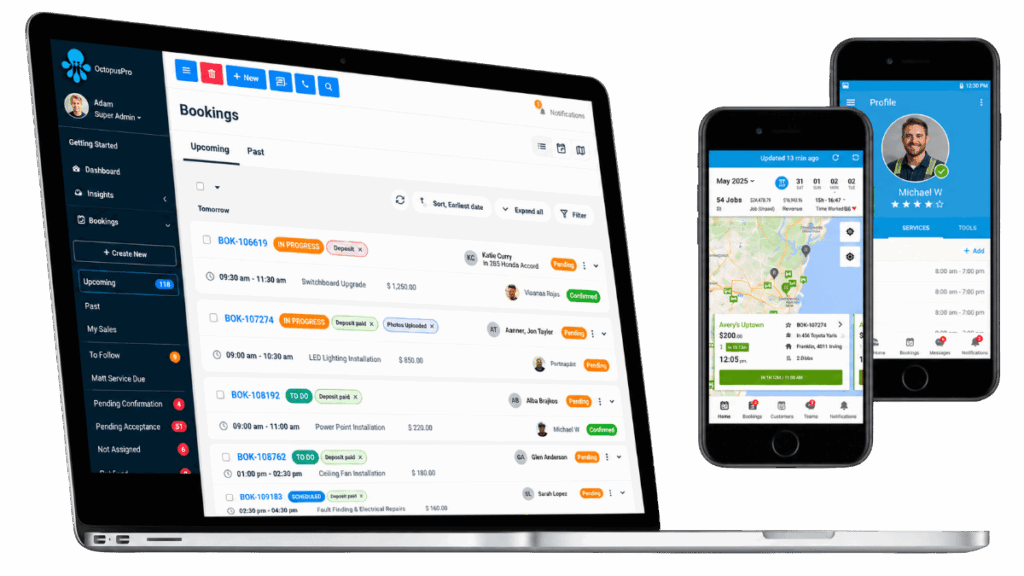
Field Service Management for Beauty Professionals
Easily manage inquiries, quotes, bookings, invoices, payments, and your customers and staff all under one software, safe and secure in the cloud!
